
Our readers keep the lights on and my morning glass full of iced black tea. As an Amazon Associate, I earn from qualifying purchases.
Specs are compiled from manufacturer listings and verified buyer reviews and can change over time — please confirm the key details on the product page before buying.
Your laptop is only as useful as the gear around it. A wobbly stand, a tired wrist, a dead battery mid-flight, or a screw you can’t grip can turn a powerful machine into a frustrating brick. This guide cuts through the noise to the accessories that genuinely change how you work, travel, and play with your computer.
I’m Min — the founder and writer behind Gadgets Feed. This guide is built by comparing the manufacturers’ published specifications and the patterns across verified customer reviews, so you get each pick’s real strengths and trade-offs instead of marketing spin.
From precision screwdrivers to a 165W power bank, these are the laptop accessories that fix daily frustrations and make your setup feel complete.
Our Picks at a Glance
How To Choose The Best Laptop Accessories
The right accessory solves a specific physical problem: a hot lap, a tired wrist, a lost screw, or a dead battery. Before you buy, identify the friction point in your daily routine—that is the accessory worth paying for.
Match the tool to your actual laptop
Check your machine’s size and port setup first. A 15.6-inch laptop needs a compatible lap desk or cooling pad; a thinner ultrabook might prefer a USB-C hub over a full dock. Knowing your ports (USB-A vs. USB-C) and power needs (watts) prevents wasted money.
Prioritize materials that last
Look for real materials over marketing words. Chrome-vanadium steel bits resist stripping, a solid PU base on a mouse pad prevents slipping, and high-retention battery cells (mAh) in a power bank determine how many recharges you get. Durable construction means the accessory doesn’t become e-waste in a year.
Quick Comparison
| Model | Best For | Core Feature | Capacity/Size | Power/Output | Amazon |
|---|---|---|---|---|---|
| STREBITO 142-Piece★ Best Overall | DIY Repairs | 120 Precision Bits | 142-Piece Kit | Magnetic | Amazon |
| HAOCOO Desk Mat SetDesk Upgrade | Desk Ergonomics | Memory Foam Wrist Rest | 35.4″ x 15.7″ | — | Amazon |
| havit HV-F2056 | Thermal Management | 3 Ultra-Quiet Fans | 15.6″-17″ Laptops | USB Powered | Amazon |
| HUANUO Lap Desk | Lap/Recliner Use | Cushioned Foam Base | Fits up to 15.6″ | Passive | Amazon |
| Bagstellar Tote | Commuting & Work | 15.6″ Laptop Compartment | Spacious Tote | — | Amazon |
| Anker Power Bank | Travel Charging | Built-in Retractable Cables | 25,000mAh | 165W Total Output | Amazon |
| Dell Pro Dock WD25 | Multi-Monitor Setup | USB-C Docking Station | 10 Ports | 100W to Laptop | Amazon |
In‑Depth Reviews
1. STREBITO Electronics Precision Screwdriver Sets 142-Piece
Our pick — over 4.5★ from 21,000+ verified ratings; the strongest balance of quality and price.
The fix-it-first kit that pays for itself the moment you open a device.
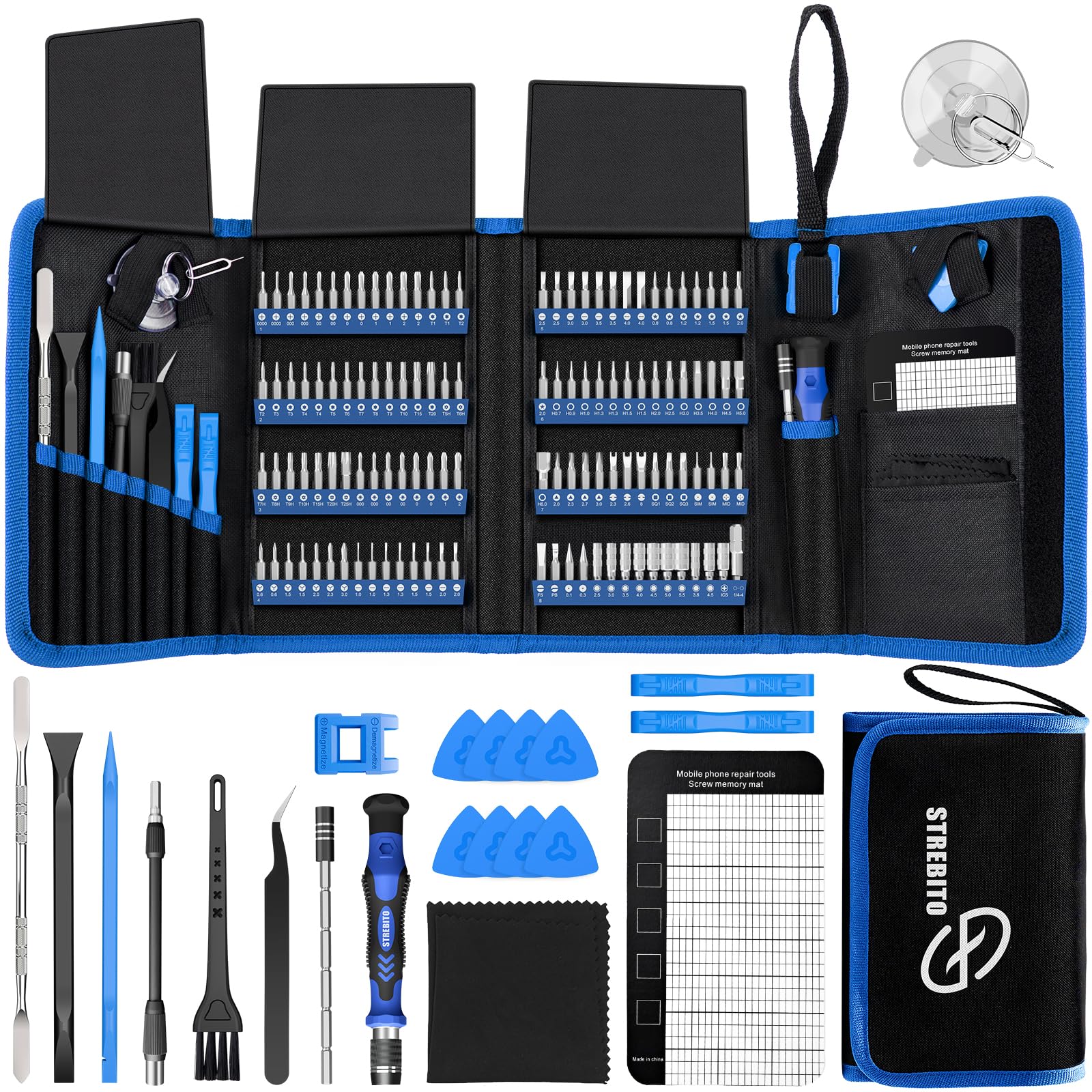
This is the accessory you buy once and use for years on every gadget you own. The set includes 120 precision bits and 22 practical accessories, so you can open a phone, a laptop, an SSD, a game console, or even a sewing machine without hunting for the right tool. The bits are made from 60HRC Chromium-vanadium steel, which resists abrasion and corrosion, meaning the tips hold their shape instead of stripping the screws they touch.
What makes it feel professional is the human design: a particle grip with a rubberized, ergonomic handle and swivel top that spins smoothly in your fingers. A magnetic bit holder transmits magnetism through the bit to grab tiny screws, and a flexible extension shaft reaches screws in tight spots. The 5.7 x 3.3-inch magnetic project mat keeps screws organized, while the included magnetizer/demagnetizer tool lets you strengthen or weaken the magnetism to avoid damaging sensitive electronics.
The 142-piece kit is the kind of purchase buyers describe as a “must-have for DIY”—the magnetic tips prevent screw loss and the sturdy bits resist stripping, even on a stubborn Pentalobe. Buyers report using it on iPhones, glasses, PS4, and laptops, noting “all bits fit, Pentalobe didn’t strip.” The teardown is straightforward: reach for this kit instead of paying a repair shop.
What wins people over
- Build quality is the standout—1,300 owners single out the solid feel of the handle and bits.
- Value for money is the second-biggest praise, with 568 owners calling it a bargain for the range.
- Organized storage: a rubber bit holder marked with type and size, packed in a tear-resistant oxford bag.
The honest trade-off
- Not pro-grade for daily heavy shop use—this is a brilliant consumer kit, not an industrial tool.
- Some owners end up with excess bits they never touch, which adds a bit of bulk to the bag.
Reach for it when: you’d rather open a device yourself than pay a repair shop, and you want one toolkit that covers every screw head you’ll meet.
Look elsewhere if: you need a single rugged driver for constant construction work, not a precision electronics set.
2. HAOCOO Mouse Pad with Wrist Rest, Large Desk Mat Set
The desk mat that turns a flat workspace into a cushioned, pretty corner.
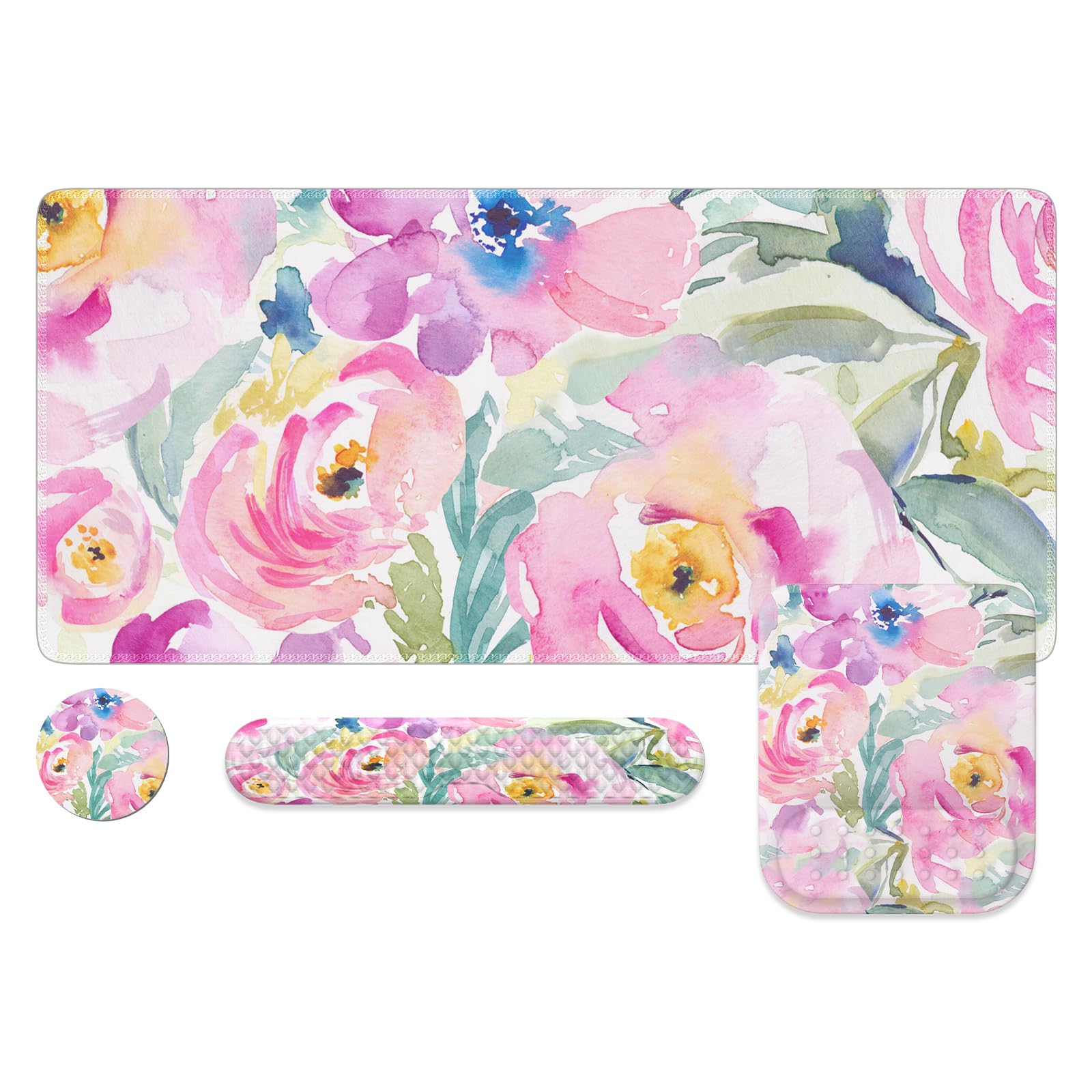
This 4-in-1 set does more than protect your desk—it makes long typing sessions easier on your wrists. The large floral desk mat measures 35.4 x 15.7 inches, giving your computer, keyboard, mouse, and a cup plenty of room while guarding the desktop from scratches. The memory foam filling in the wrist rests bounces back after you press it, and unlike gel pads, it won’t leak over time.
The design thinking extends to the bumpy massage bead pattern on the keyboard and mouse pads, which improves air circulation between your arm and the pad so it doesn’t feel stuffy during long use. The base is natural rubber with a PU finish, so it stays put even on soft surfaces like a bed or sofa, and it unrolls flat right out of the package. The Lycra surface gets treated in a high-pressure chamber at 230°F to ensure mouse accuracy and consistency.
What wins people over is the design—66 owners call the look a highlight, and the color follows with 23 mentions. The mat is waterproof, so a spilled drink wipes right off. The honest caveat: the keyboard wrist rest has a durability question mark. Owners mention “the keyboard wrist rest ripped within a month had to get a replacement but the mousepad and coaster are holding up fine”—so treat the slim rest gently, while the main mat keeps looking fresh.
The bright side
- Machine washable and spill-repellent, so a coffee accident doesn’t end the mat’s life.
- The massage bumps keep your wrist from feeling stuffy and stuck to a flat surface.
- A 4-piece set: desk mat, keyboard rest, mouse wrist support, and a 3.9-inch coaster.
Handle with care
- The keyboard wrist rest is the weak link—customers note it can tear within a month of regular use.
- The mouse pad offers less support than a dedicated ergonomic mouse rest, so heavy users may want a separate one.
Pick this if: you want an affordable, pretty desk overhaul with genuine wrist comfort and don’t mind replacing the slim keyboard rest occasionally.
skip it if: you need a heavy-duty industrial desk mat built to survive years of abuse without any wear.
3. havit HV-F2056 Laptop Cooler Cooling Pad

The slim cooling pad that keeps your laptop whisper-quiet and ice-cool under load.
If your laptop runs hot during long gaming or work sessions, this cooling pad is a low-cost fix that actually works. It fits 15.6″ to 17″ laptops and uses three ultra-quiet fans to push air through a sturdy metal mesh surface. The mesh does double duty as a stable carrying surface, so your laptop won’t wobble while you type. Reviewers point out keeping temperatures below 72°F, with one owner noting their laptop stays cool after five hours of heavy use and the system fan never kicking in.
The pad is slim, portable, and lightweight, so it’s easy to toss in a bag when you travel. It doubles as an ergonomic stand with two adjustable height settings, giving you a better typing angle and lifting the keyboard toward eye level. An extra USB port and a power switch let you keep other devices plugged in and turn the fans off when you don’t need them. Note that the included cable is USB to USB, so Type-C devices need an adapter.
The number one thing that wins people over is the build quality—5,400 owners praise the solid feel—and the noise level is the second-biggest highlight with 3,500 mentions, because the fans are genuinely quiet. The blue LED light provides a nice indicator that the fans are spinning. The honest trade-off is the slick surface: a few owners recommend adding bumpers to keep the laptop from sliding, and the cable ends benefit from a little reinforcement tape for extra longevity.
Why it earns its spot
- Effectively cools laptops, even keeping a hot HDMI plug near room temperature.
- Noise level is a standout—the fans produce low white noise without a high-pitched whine.
- Lightweight metal deck with sturdy feet gives a comfortable typing angle.
Fair warnings
- No fan speed control—you get one speed, which is fine for most but not adjustable.
- Some units have a shorter lifespan; a few shoppers say failure within two months.
Best for: anyone whose laptop runs hot and loud, and who wants an affordable, quiet, portable fix that also improves typing angle.
Not for: overclocking enthusiasts who need variable fan speed control for extreme thermal loads.
4. HUANUO Laptop Lap Desk with Cushion
The lap tray that makes working from the sofa or recliner feel like a desk job.
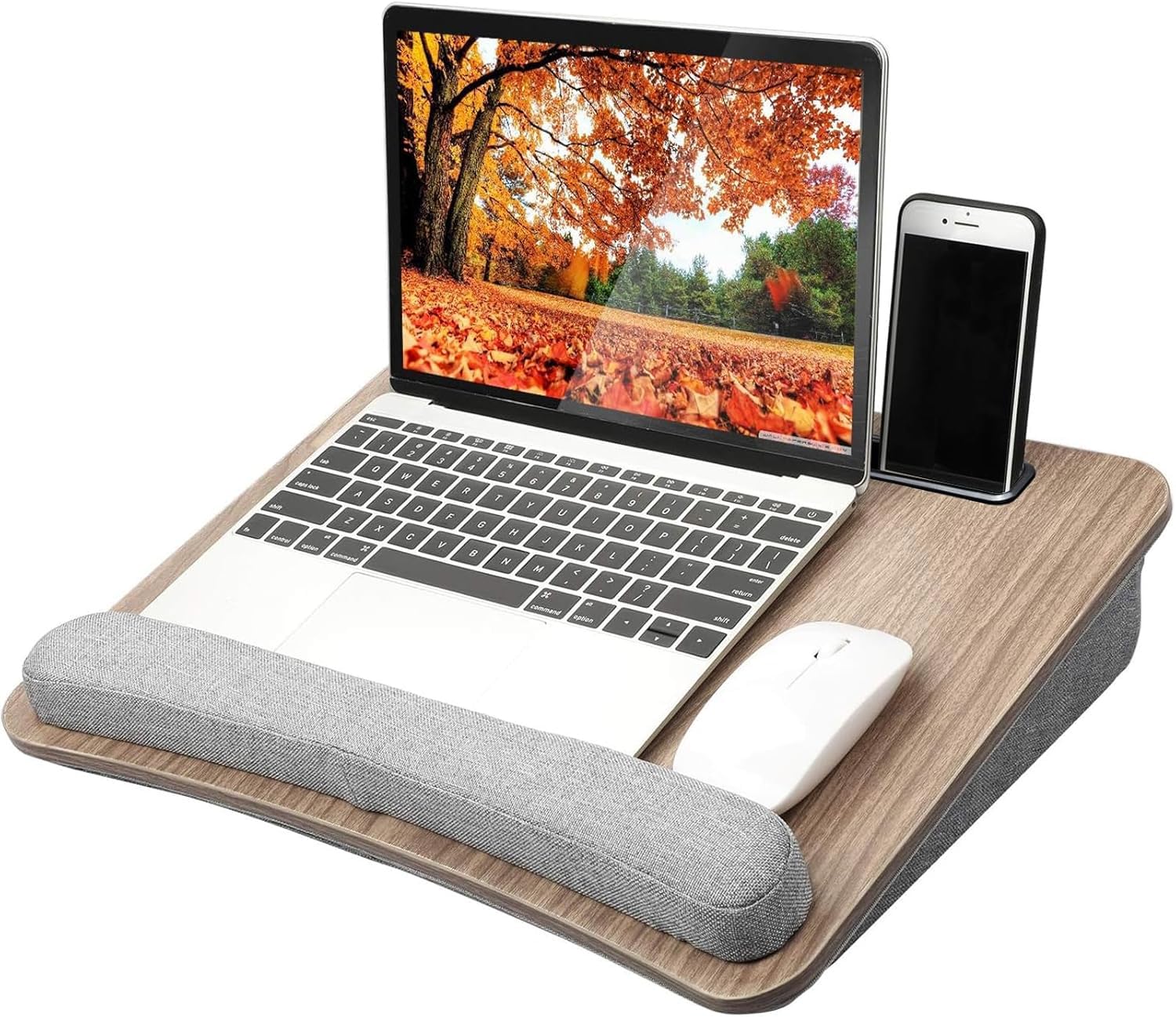
This lap desk solves the problem of hot thighs and wobbly laptops when you work away from a desk. It fits laptops up to 15.6 inches, with a sturdy woodgrain platform and a gray fabric-covered foam pad that molds to your lap for comfort and stability. The cushioned pillow keeps hot laptop bottoms off your legs, and the ergonomic wrist pad reduces hand fatigue while you type, solving the sharp-edge problem some laptops have.
The thoughtful extras make it genuinely convenient. An anti-slip wrist pad, a storage pocket that doubles as a carrying handle, and a tablet holder keep everything in reach. The brown wood grain platform with gray foam gives it a modern look, and owners say the weight is manageable for moving around the home. It works well in a chair, on the couch, or even in the car, making it a favorite for dorm students and home office workers.
What wins people over is the appearance—954 owners praise the look—and comfort comes second with 456 mentions. The foam pillow is firm enough for stability while still being comfortable, and the curved design raises the laptop screen to a better angle. The honest sizing caveat: sufficient mouse space only exists with laptops 14 inches or smaller. A larger laptop leaves little room for an external mouse, and some owners find it “a little small if you want to use your laptop with any kind of mouse.”
Solid all-rounder: a lightweight, comfortable lap desk that solves heat and wrist strain, with a storage pocket and tablet holder as freebies. The size is the deciding factor—pick it if your laptop is 14 inches or smaller and you use a trackpad, not a mouse.
Reach for it if: you’re a couch or recliner worker with a 13-14 inch laptop who wants a stable, cushioned surface with a wrist pad.
Pass it by if: your laptop is 15.6 inches and you need dedicated mouse space, since the surface gets crowded.
5. Bagstellar Teacher Tote Bag for Women, 15.6″ Laptop Work Tote

The roomy tote that carries a whole workday without looking like a suitcase.
This tote is built for people who carry everything—a laptop, a planner, a 40 oz tumbler—and still want to look put-together. It fits a 15.6″ laptop in a padded compartment, and the many zipper pockets make it easy to find items quickly without digging to the bottom. Owners note it fits under a plane seat, making it a strong personal item for air travel, with secure pockets for a passport and money.
The design is where this bag shines. It’s quilted and professional, with comfortable straps that hold up under daily use. The interior includes an insulated cup holder, expandable side pockets, and a zip top to keep everything secure. One owner sums up the space: “This has so many well thought out pockets and holds tons, but still looks so cute.” It’s machine washable, so keeping it fresh is simple.
What wins people over is the appearance—252 owners praise the look—and the size follows with 156 mentions. The bag stands alone, so it doesn’t flop over, and it’s wipeable for easy cleaning. The honest trade-off is the color choice: one owner notes the interior is brown while the exterior is green, which is a minor mismatch for those who prefer a matching interior. But for durability, strong straps, and professional style, this tote is a daily workhorse.
What commuters love
- Roomy enough for a 40 oz tumbler, laptop, and planner, plus a padded shoulder strap.
- Many zipper pockets keep passport, money, and cables secure and easy to find.
- Machine washable and durable enough for daily teacher or nurse use.
The small print
- Interior liner color may not match the exterior for some colorways.
- Not waterproof—it’s wipeable and machine washable, but heavy rain needs a cover.
Best for: teachers, nurses, and commuters who need one bag for a laptop, a big water bottle, and daily essentials, with professional styling.
Think twice if: you need a fully waterproof commuter bag for heavy weather, since the fabric is wipeable but not sealed.
6. Anker Laptop Power Bank, 25,000mAh, 165W Output
The travel power bank that charges your laptop as fast as a wall outlet.
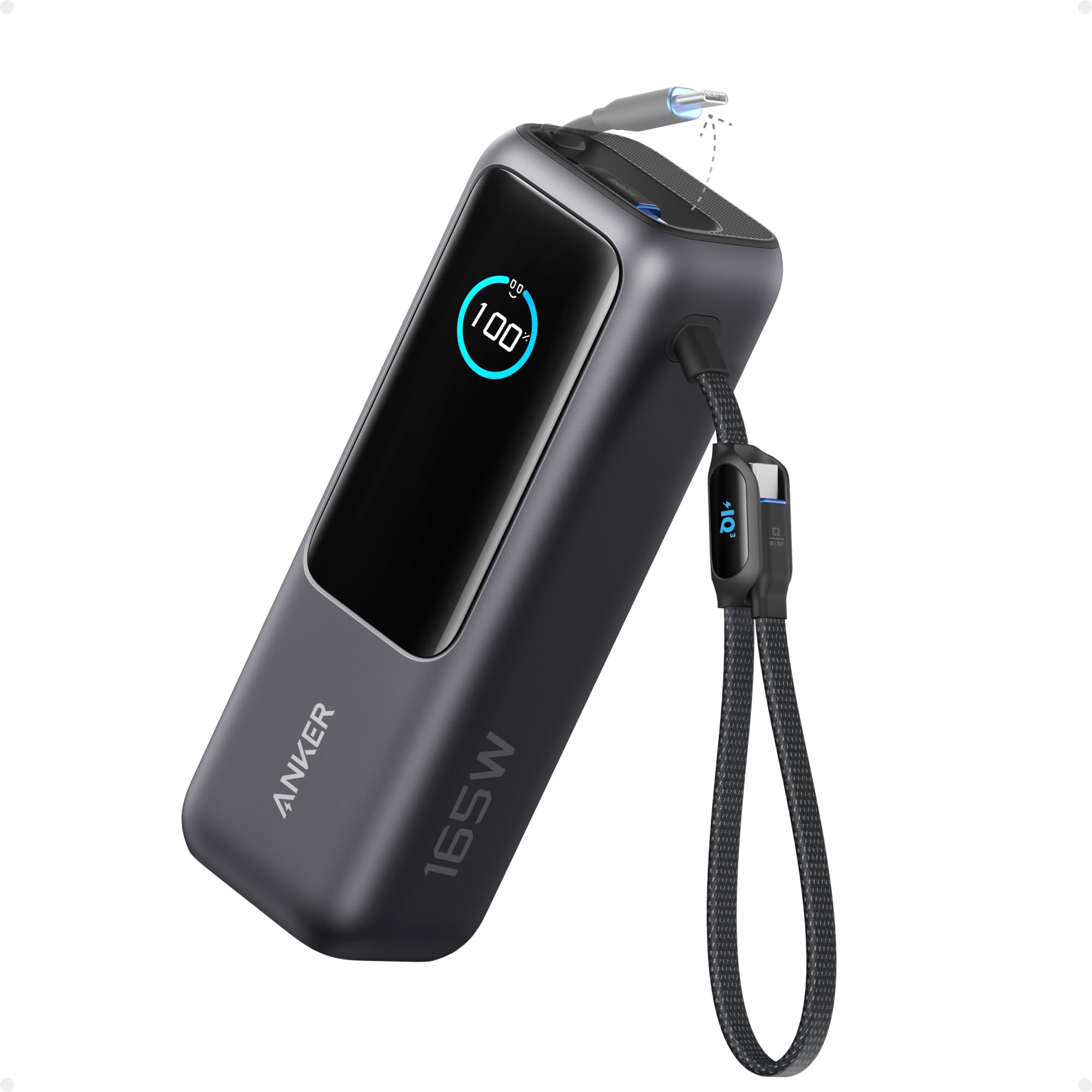
This is the accessory for anyone who has watched a laptop battery die mid-flight or mid-cafe. The Anker Power Bank packs 25,000mAh of capacity with 165W total output, which is enough to charge a 17″ MacBook Pro, a phone, and a tablet simultaneously without throttling. Buyers report taking a MacBook from 0 to 70% in roughly an hour, and it self-recharges in under two hours with a 100W or higher charger.
The design is made for travel. It has two built-in USB-C cables: one extends up to 2.3 ft and is rated for 20,000 retractions, and a second 0.98 ft cable doubles as a durable carrying strap that endures more than 20,000 bends. A USB-A port and a USB-C port let you charge four devices at once. It complies with 100Wh airline restrictions, so it’s carry-on friendly for flights.
Charging speed is the thing everyone raves about—702 owners single it out—and portability is the second-biggest praise with 331 mentions. The clear display shows wattage, battery life, and temperature, so you always know the charge status. The honest trade-off is the weight: at 250 negative mentions, it’s hefty, and a few owners find it larger than expected. But for long-haul power in a solid, reliable Anker build, this is the premium pick.
Premium power: the retractable cables and digital display turn this into a travel essential rather than a brick. It’s heavier than a phone charger, but the 165W output means a full laptop charge away from any wall plug.
Reach for it if: you travel with a laptop and want one device that charges everything, with airline-safe capacity and built-in cables.
Look elsewhere if: you need a featherweight power bank for a phone only—this is built for laptops, and it carries that weight.
7. Dell Pro Laptop Docking Station WD25, USB-C, 100W
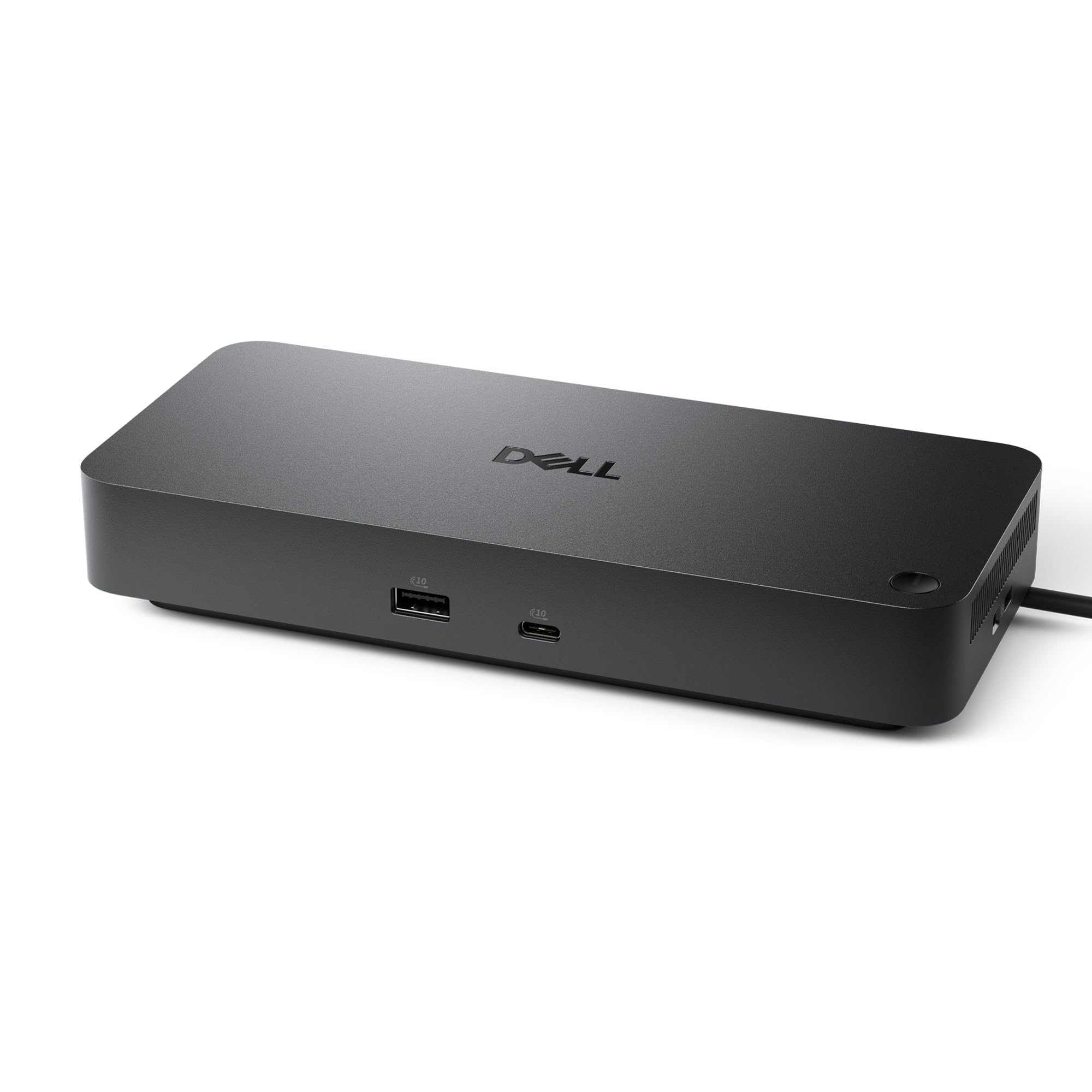
The one-plug dock that turns a single USB-C into a full multi-monitor desk setup.
This docking station is the cleanest way to turn your laptop into a desktop workstation. Plug one USB-C cable in, and you get up to 100W of power to your laptop plus access to 10 ports, including DisplayPort, Ethernet, HDMI, and USB. It supports native output to up to four high-res displays, which is why one owner reports driving three monitors at 4K—two Dell displays via DisplayPort and a Samsung via HDMI—all through a single cable.
You can route the USB-C cable left or right, so it fits neatly on either side of your desk. The USB-C connector (the oval-shaped plug that carries power and data) is reinforced to withstand daily plugging and unplugging. This dock belongs to Dell’s commercial family, meaning IT can manage it remotely to avoid downtime. It works with Dell AI PCs and non-Dell PCs, and it’s made with at least 65% postconsumer recycled materials, so you’re choosing a more sustainable option.
Owners mention that 57 owners praise its plug-and-play performance, with no setup problems. It fixes the HDMI and DisplayPort monitor connection glitches that other docks often cause. The trade-off: while many say it has all the ports they need, some note it can’t drive dual monitors in certain setups, and a few units have failed after months of use. If you have a compatible Dell laptop, this is a smooth upgrade—but check your monitor configuration first.
The workstation upgrade
- Drives up to four high-res displays with native DisplayPort and HDMI support.
- 100W power delivery charges your laptop while it’s connected.
- Ambidextrous USB-C cable routes left or right for a tidy desk.
Compatibility check
- Not all setups can drive dual monitors—check your laptop’s display output.
- A few customers note units failing after several months of use.
Best for: Dell laptop owners who want a single-cable multi-monitor setup with power delivery and a clean, professional dock.
Not for: budget setups or users with older laptops that lack full USB-C power delivery support.
Understanding the Specs
Power Delivery (Watts)
This tells you how fast a charger or dock can power your laptop. A 100W dock can run and charge a typical ultrabook, while a 165W power bank can handle a larger workstation. Match the wattage to your laptop’s needs—a low-watt charger on a powerful laptop means slow charging or drain under load.
Battery Capacity (mAh)
Milliamp-hours (mAh) tell you how much energy a power bank stores. A 25,000mAh unit can recharge your phone several times and top up your laptop once, making it the balance for travel. But higher capacity usually means more weight, so weigh your power needs against how much you want to carry in your bag.
FAQ
Will a 25,000mAh power bank charge my 15-inch laptop?
Can a docking station drive two monitors on any laptop?
How long does a precision screwdriver bit last?
Is a cooling pad actually necessary for a laptop?
What size lap desk do I need for a 15.6-inch laptop?
Can a laptop tote bag fit under an airplane seat?
Are memory foam wrist rests better than gel ones?
What is the difference between a USB-C hub and a docking station?
Final Thoughts: The Verdict
For the majority of shoppers, the laptop accessories winner is the STREBITO Precision Screwdriver Set because it’s the crowd favorite—4.8 stars across 21,000+ owners—and it fixes the most common laptop problem: not being able to open one. If you want to stop a hot laptop from throttling, grab the havit Cooling Pad. And for travel power that charges a full laptop, the Anker Power Bank is the one to reach for.
How We Picked
We do not accept paid placement. Every pick is matched to a real buyer and a real use-case; we do not hands-on test units.
Sources & Methodology
Specifications: manufacturer listings and product documentation. Review insights: verified customer reviews, as of August 2026. Pricing: not shown on this page (it changes often); check the current price via the retailer link.
As an Amazon Associate, Gadgets Feed earns from qualifying purchases. This does not affect which products we feature.