
Our readers keep the lights on and my morning glass full of iced black tea. As an Amazon Associate, I earn from qualifying purchases.
Specs are compiled from manufacturer listings and verified buyer reviews and can change over time — please confirm the key details on the product page before buying.
The biggest trade-off in a mini PC is usually between raw speed and everyday practicality. The best pick proves you do not have to choose — it pairs a modern processor with enough memory for heavy multitasking, all in a chassis that hides behind your monitor. This guide breaks down which models genuinely deliver on their specs and which ones cut corners that will cost you later.
I’m Min — the founder and writer behind Gadgets Feed. This guide is built by comparing the manufacturers’ published specifications and the patterns across verified customer reviews, so you get each pick’s real strengths and trade-offs instead of marketing spin.
If you are tired of bulky towers eating your desk, the affordable mini pc market has a size and speed tier for almost every workflow you can name.
Our Picks at a Glance


How To Choose The Best Affordable Mini PC
The space savings are the main draw, but the processor, RAM, and storage together determine real-world speed. Prioritize a balanced combo of a modern quad-core CPU, 16GB RAM, and an NVMe SSD for smooth multitasking.
The Processor: Your Multitasking Engine
The processor dictates how smoothly your browser tabs and apps run under load. A modern quad-core chip with eight threads, like the AMD Ryzen series, lets you run spreadsheets, video calls, and streaming simultaneously without choking. Older business-class Intel chips (i5-6500T) are still capable for basic tasks, but they show their age under heavy loads compared to newer architectures.
RAM and Storage: The Responsiveness Duo
8GB RAM suits basic tasks, while 16GB provides comfortable headroom for heavy multitasking. For storage, an NVMe SSD (a very fast type of solid-state drive) makes boot-up and app loading feel instant, while slower eMMC storage can make a budget machine feel laggy from day one. Check if the model offers an extra M.2 slot so you can expand later.
Connectivity and Ports: Your Daily Flexibility
Check for dual HDMI or DisplayPort outputs, Wi-Fi, Bluetooth, and multiple USB 3.2 ports. Dual HDMI or DisplayPort outputs let you run two 4K monitors, which is a huge productivity win. Built-in Wi-Fi and Bluetooth save you from dongle clutter, and multiple USB 3.2 ports ensure your keyboard, mouse, and external drives all plug in without a hub.
Quick Comparison
| Model | Best For | Processor | RAM / Storage | Display Outputs | Amazon |
|---|---|---|---|---|---|
| KAMRUI Pinova P1★ Best Overall | Best Overall | AMD Ryzen R2544 (3.4 GHz) | 16GB / 256GB SSD | Triple 4K | Amazon |
| Dell OptiPlex 7050Value Heavyweight | High-Spec Value | Intel i5-6500T (3.1 GHz) | 16GB / 256GB SSD | Dual 4K | Amazon |
| HP EliteDesk 800 G2Office Essential | Office Budget Pick | Intel i5-6500T (3.1 GHz) | 8GB / 240GB SSD | VGA + DP | Amazon |
| Bmax Mini PC B1 Plus | Compact Starter | Intel Celeron J3355 (2.5 GHz) | 6GB / 128GB eMMC | Dual 4K | Amazon |
| HP EliteDesk 800 G2 (16GB) | Refurbished Power | Intel i5-6500T (3.1 GHz) | 16GB / 240GB SSD | VGA + DP | Amazon |
| Dell OptiPlex 7040 | Fast NVMe Storage | Intel i5-6500T (3.1 GHz) | 16GB / 256GB NVMe | Dual 4K | Amazon |
| HP EliteDesk 800 G4 | Newer Intel Core | Intel i5-8500T (3.5 GHz) | 16GB / 256GB NVMe | Dual Monitor | Amazon |
| BOSGAME E5 | Networking Enthusiast | AMD Ryzen 3 5300U (3.8 GHz) | 8GB / 256GB NVMe | Triple 4K | Amazon |
| GMKtec G5S | Travel Companion | Intel Celeron N5095 | 8GB / 128GB SSD | Dual 4K | Amazon |
| GMKtec G3S | Modern Efficiency | Intel N95 (3.4 GHz) | 8GB / 256GB M.2 SSD | Dual 4K | Amazon |
| BOSGAME E4 Air | Casual Gaming | AMD Ryzen 5 3500U (3.7 GHz) | 8GB / 256GB SATA SSD | Triple 4K | Amazon |
In-Depth Reviews
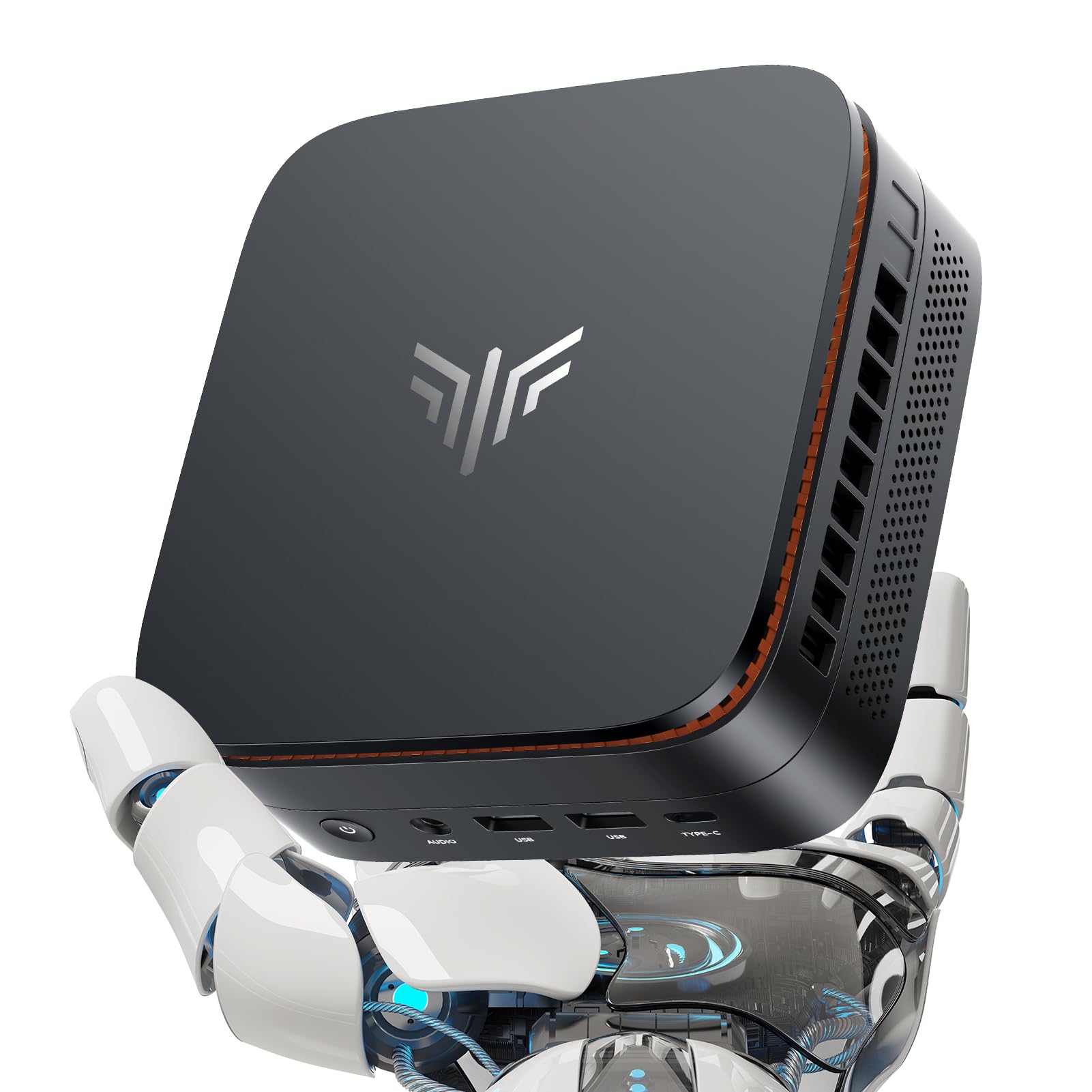
1. KAMRUI Pinova P1 Mini PC
Our pick — over 4★ from 900+ verified ratings; the strongest balance of quality and price.
A compact desktop that drives three 4K monitors simultaneously.
This is the pick that ends the tower-vs-tiny debate. The AMD Ryzen R2544 processor, running up to 3.4 GHz, delivers the multitasking muscle for heavy concurrent workloads — think multi-window office work and long 4K video sessions with no stuttering. The 16GB of DDR4 RAM and 256GB M.2 SSD give you instant boot-ups and smooth app switching, and there’s an extra M.2 slot if you ever need to push storage up to 4TB.
Your workspace transforms with the Triple 4K support, letting you run one screen on HDMI, one on DisplayPort, and one on Type-C simultaneously. This triple-display capability is a major productivity boost for multi-monitor workflows. It’s a palm-sized box at 5.05 x 5.05 x 2 inches, and buyers report it’s “quiet, fast, and responsive” — many note it replaced an older tower completely. The consensus is clear: for this price and spec combo, it is a crowd favorite with over 900 owners backing it.
What Wins People Over
- 16GB RAM handles dozens of tabs and heavy multitasking without lag
- Triple 4K display output for a serious multi-monitor workstation
- Quiet operation that makes you forget it’s running
Who Should Look Elsewhere
- Light gamers should temper expectations — it handles light gaming but isn’t built for AAA titles
- The 256GB base storage fills fast if you hoard large media files
Reach for this if: you need a silent, powerful hub for a triple-monitor office setup that costs a fraction of a new tower.
Consider the catch: for serious gaming or heavy graphic design, you’ll want a dedicated GPU that this compact chassis simply doesn’t include.
2. Dell OptiPlex 7050 Micro Computer
A certified refurbished business workhorse that brings 16GB of RAM to the budget fight.
This is the value play for anyone who wants maximum memory for the money. It’s a Certified Refurbished unit, meaning it’s tested to look and work like new, and it arrives with a minimum 90-day warranty. The real story is the 16GB of DDR4 RAM — double what the similar HP EliteDesk 800 G2 offers — which makes this a proper multitasking machine for home offices.
You get a dependable upgrade from an aging Windows 7 PC with the Intel Quad Core i5-6500T, which runs up to 3.1 GHz. Buyers call it a “very satisfactory replacement for an older Windows 7 machine.” It supports dual 4K displays, so you can run two monitors at 3840×2160 to expand your workspace. Reviews consistently praise the performance and value, though boot reliability gets mixed feedback, with some units needing a tech-support fix early on. Performance is the top positive by a wide margin (139 mentions), and the compact size is a big plus.
Why It’s a Steal
- 16GB RAM at a budget price point is rare and powerful
- Dual 4K display support for a dual-monitor workflow
- Refurbished means you get business-grade build quality cheap
What to Expect
- Refurbished units can have quirks — boot issues are the most common complaint
- Some report storage is limited to the 256GB drive, with no easy expansion mentioned
Buy it for: the sheer value of 16GB RAM and a quad-core i5 for basic office work, streaming, and web browsing.
Think twice if: you want a plug-and-play experience with zero troubleshooting — refurbished machines sometimes demand a little patience.
3. HP EliteDesk 800 G2 Mini Business Desktop PC
A quiet, quick-booting office PC that gets you set up in under ten minutes flat.
If your day is web browsing, email, and documents, this HP is the focused tool for the job. It boots quickly and sets up in under 10 minutes, which is exactly what you want from a no-fuss office machine. The Intel Core i5-6500T Quad Core runs up to 3.1 GHz, paired with 8GB of DDR4 RAM and a 240GB SSD — plenty for everyday computing and light web work.
The performance is the standout feature here, just ahead of the value for money in owner feedback. It’s silent in operation and runs cool enough for daily use. One owner even noted it helps save about on electricity bills versus a traditional tower. The obvious trade-off versus the Dell above is the RAM — at 8GB it’s half the memory, which shows if you open dozens of tabs. The VGA + DisplayPort outputs mean dual monitors are possible, though you’ll need the right cables.
Quiet Performer: This is the silent office worker that handles basics with aplomb, just don’t expect it to multitask like the 16GB models.
The 8GB Catch: You’ll feel the memory ceiling during heavy multitasking — it’s best suited to single-focus workflows.
4. Bmax Mini PC B1 Plus
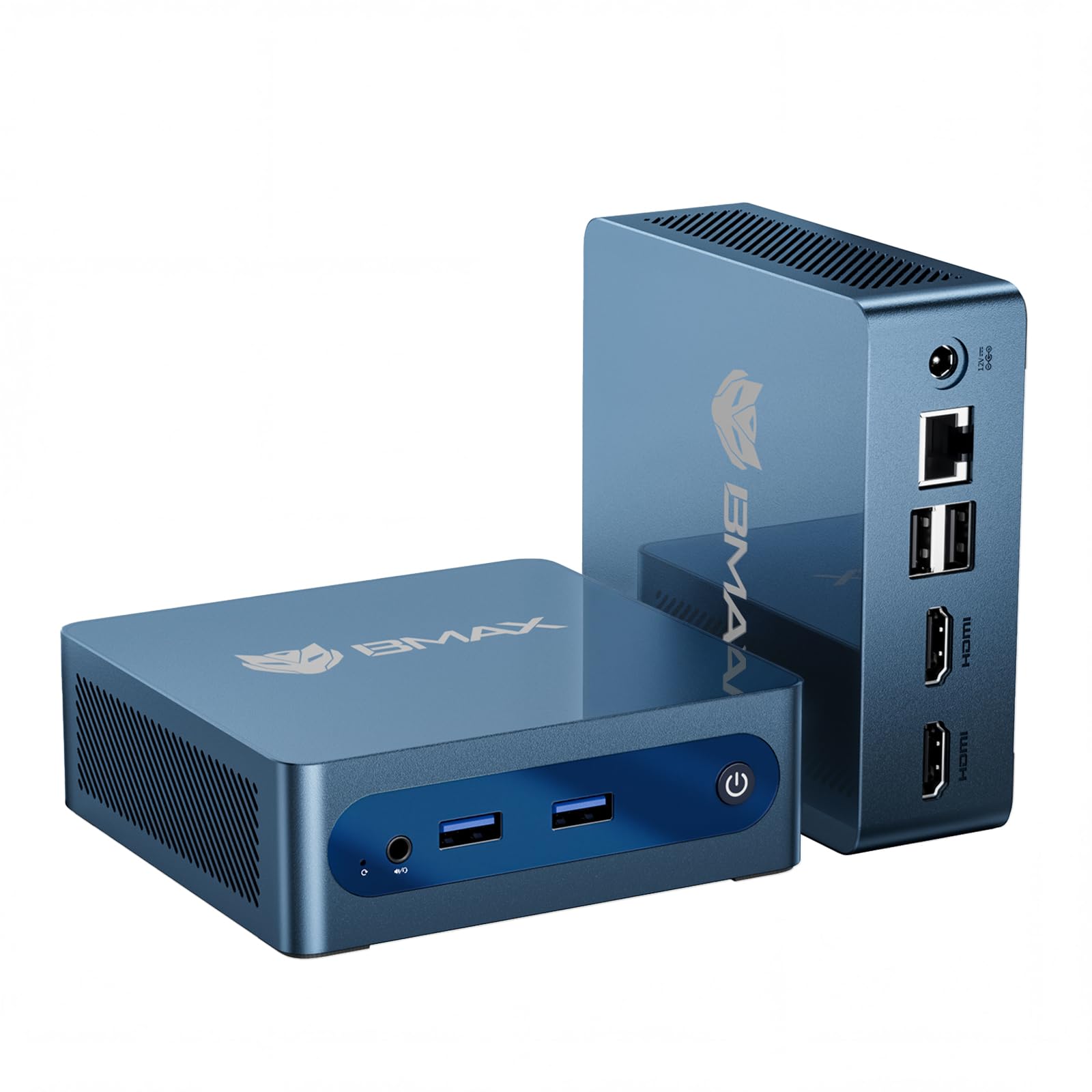
The tiniest footprint in the lineup at 0.49 lbs, designed to vanish behind your monitor.
Its 4.2 x 4.1 x 1.4-inch frame and 0.49 lbs weight make it the most space-saving option. The Bmax B1 Plus measures just 4.2 x 4.1 x 1.4 inches and weighs a featherweight 0.49 lbs, so it fits on a shelf, in a drawer, or behind a VESA mount with zero clutter. It’s powered by the Intel Celeron J3355 running up to 2.5 GHz, with 6GB of LPDDR3 RAM and 128GB of onboard storage for fast boot-ups.
The clever bit is the dual M.2 SSD slot design — one SATA and one NVMe — letting you expand storage up to 2TB without removing the original drive. Buyers find it works well for media purposes like Discord, web surfing, and music apps, running quiet and cool all day. The reality check is that the Celeron chip is entry-level; apps take a minute to get going and it’s not for heavy multitasking. For the price, it’s a great starter computer with a smart silent fan and a one-click restore via the F9 key.
Starter-Friendly: Ideal for a first desktop, a dedicated media box, or a home office secondary screen — just keep expectations in the light-task lane.
The Speed Limit: The Celeron processor is the slowest in this roundup; heavy multitaskers will find it frustrating.
5. HP EliteDesk 800 G2 Desktop Mini (16GB)
A certified refurbished business PC that pairs 16GB RAM with serious future-proofing.
This HP takes the EliteDesk formula and adds memory headroom. It’s a Certified Refurbished unit with a minimum 90-day warranty, powered by the Intel Quad-core i5-6500T up to 3.1 GHz. The 16GB of DDR4 RAM comes in two slots that support up to 32GB, so you can double the memory later for even heavier workloads — a rare upgrade path at this price.
The port selection is generous: 2 front USB 3.0, a front USB Type-C, plus 4 rear USB 3.0, VGA, DP, and RJ-45. Buyers called it “way faster than specs would tell you,” and it’s a favorite for homelab tinkerers running Linux as a server or a TV-mounted security display. Performance leads the positive feedback, and the compact size is praised. The reliability is more of a mixed bag in the data, with some units needing a BIOS tweak to fix a boot loop, so it’s best for someone comfortable with a little configuration.
Best suited to: homelab enthusiasts and productivity users who want 16GB of RAM and the option to grow to 32GB later.
Not for: pure plug-and-play buyers who want zero BIOS tinkering or who need HDMI — this model uses VGA and DP.
6. Dell OptiPlex 7040 Micro Form Factor Desktop

The reliable refurbished runner that uses NVMe storage to feel brand new.
This Dell leans on its blazing-fast NVMe SSD to deliver a snappy experience. The 256GB NVMe drive provides 5x faster speeds than a traditional hard drive, which means quick boot-ups and instant app launches. It’s a Certified Refurbished unit with a 90-day warranty, running the Intel Core i5-6500T up to 3.1 GHz with 16GB of DDR4 RAM.
You get a cable-free workspace with the Micro Form Factor, which ships with Wi-Fi and Bluetooth enabled. It measures just 7.1 x 7.1 x 1.4 inches, so it tucks easily behind a monitor. It supports dual displays at up to 4K via HDMI and DisplayPort. Size is the top positive in the data, with buyers calling it “the best refurbished item I’ve ever bought” and noting it’s “very fast and a great compact size.” The noise level is mixed — some find it noiseless, others say it’s still loud — and the Wi-Fi comes via a USB dongle rather than internal antennas, which is worth knowing.
Reliable Daily Driver: The NVMe storage makes this feel faster than its specs suggest for everyday tasks like web servers or home office work.
Minor Quirks: The USB Wi-Fi dongle is a bit clunky, and the fan noise is a lottery — some units hum louder than others.
7. HP EliteDesk 800 G4 Mini Tiny Business PC

A newer hexa-core chip gives this refurbished HP a genuine edge over older i5s.
This is the pick of the refurbished litter if you want a newer processor. The Intel Core i5-8500T is a Hexa-Core chip running up to 3.5 GHz, which is a meaningful step up from the older i5-6500T found in its siblings. You get 16GB of DDR4 RAM and a 256GB NVMe SSD for quick startup and smooth multitasking.
It runs Windows 11 Pro and supports dual monitors via HDMI and DisplayPort, with Wi-Fi and Bluetooth built in. Performance is the top positive in the data, and buyers are impressed with how clean the interior is — one noted it was “very clean inside and out” and works “just great” for their needs. The honest caveats are that it lacks built-in Wi-Fi and Bluetooth (despite the listing title), and the included accessories can be hit-or-miss, with one HDMI converter arriving dead. A unit or two arrived DOA, so check it immediately on arrival.
The Spec Edge: Six cores at 3.5 GHz make this the fastest Intel processor in the refurbished group — perfect for snappier multitasking.
Setup Snags: Be ready to test it right away; some owners mention DOA units and missing or faulty accessories.
8. BOSGAME E5 11 Pro Mini PC
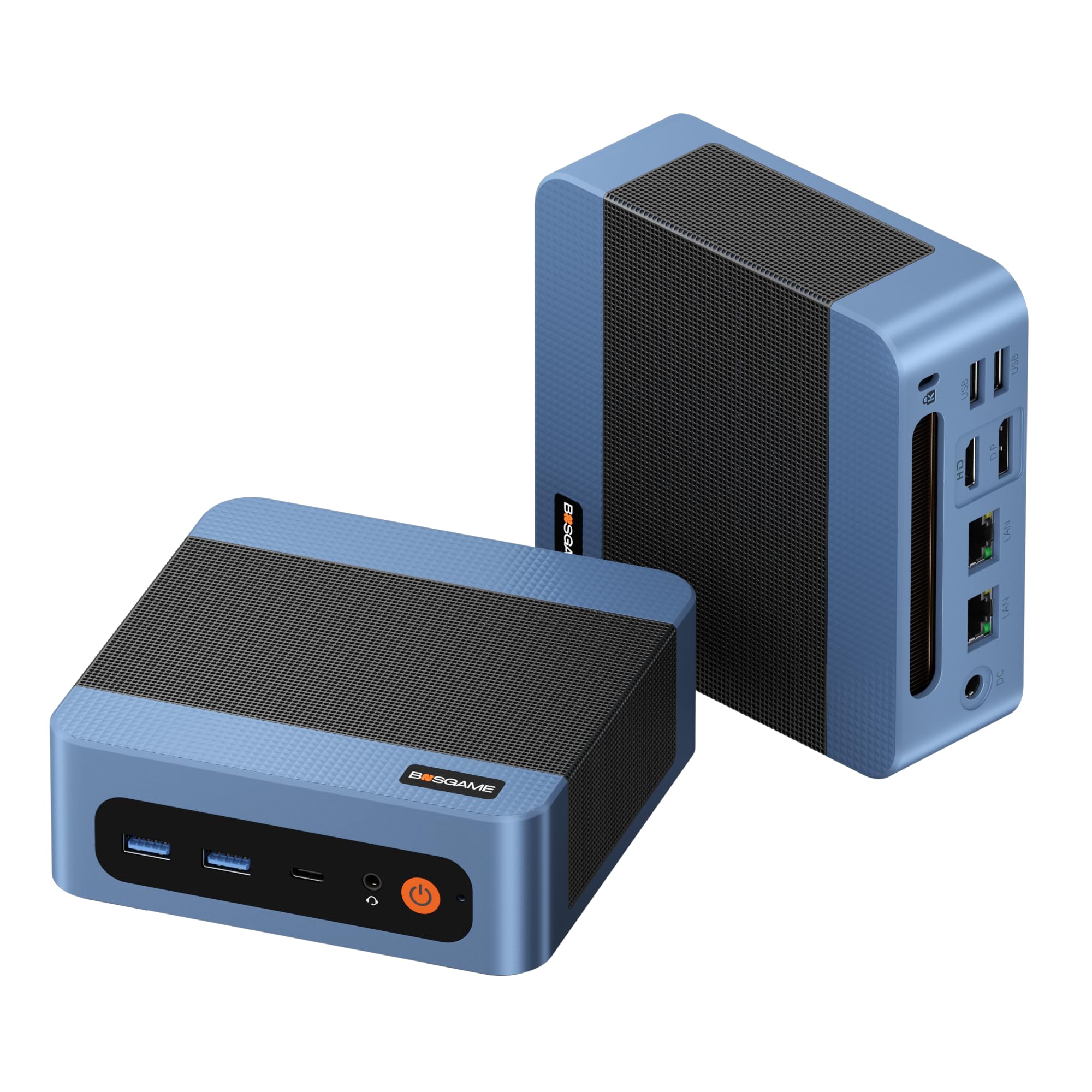
A premium Ryzen brain wrapped around dual 2.5GbE ports for the serious network tinkerer.
The BOSGAME E5 is the quiet overachiever that pulls double duty as a workstation and a networking hub. Its AMD Ryzen 3 5300U chip (4 cores, 8 threads, up to 3.8 GHz) delivers over 30% faster multi-core speed than low-end Intel N150 chips, so you can run 30+ browser tabs and large Excel sheets alongside a Zoom call without lag. It comes with 8GB of DDR4 RAM and a 256GB M.2 NVMe SSD, and the dual SODIMM slots let you expand memory up to 64GB.
What separates this from the pack is the dual 2.5 Gigabit Ethernet ports — perfect for building a software router, a hardware firewall, or a home NAS server. It also outputs true 4K at 60Hz to three monitors via HDMI, DisplayPort, and a Full-Function Type-C port. Buyers love the quiet operation (under 25dB) and note it runs cooler than a comparable Beelink, staying at 40-42°C idle. The performance is the top praise, and the compact VESA-mountable design keeps your desk clean. The main caveat in the data is reliability, with some units stopping within three months — a risk to weigh.
Grab this for: a powerful desktop that doubles as a homelab server, firewall, or NAS with blazing dual 2.5GbE connectivity.
Hesitate if: you need maximum long-term reliability — the data shows some units fail within three months of use.
9. GMKtec G5S Mini PC
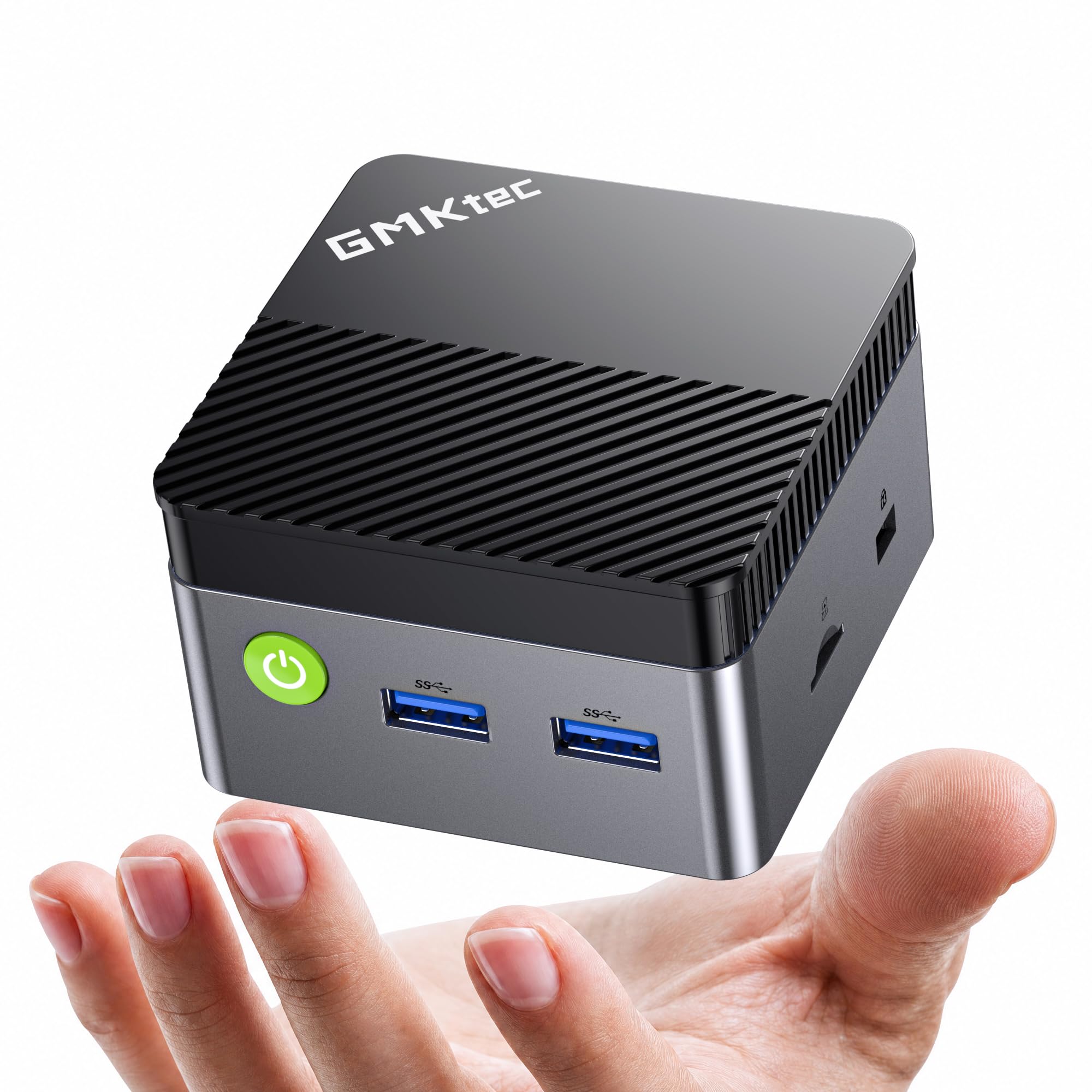
A pocket-sized PC that runs off a power bank, making it the digital nomad’s best friend.
This is the one that breaks the desktop mold entirely. The GMKtec G5S measures just 2.8 x 2.8 x 1.75 inches and weighs a mere 7.3 ounces — smaller than a paperback. Its a neat extra is the USB-C 12V/3A (36W) power input, which means it runs off compatible power banks and universal laptop chargers. For digital nomads, field workers, or students, this turns any café table or hotel desk into a full workstation without hunting for a wall outlet.
Inside, you get 8GB of LPDDR4 RAM and a 128GB M.2 SSD (expandable), powering the Intel Celeron N5095. It outputs dual 4K UHD at 60Hz through two HDMI ports, so you can run two monitors for multitasking. The connectivity is rich — 3x USB 3.2, Gigabit Ethernet, a 3.5mm audio jack, and a Micro SD slot. Wi-Fi 6 and Bluetooth 5.2 keep the wireless experience fast. Buyers call it a “tiny workhorse” that runs dual TVs smoothly and stays cool, though it’s not for gaming. It ships with a 1-year limited warranty.
Ultra-Portable: The USB-C power input is genuinely unique — you can run this from a power bank anywhere.
Entry-Level Power: The N5095 chip is best for browsing, streaming, and documents; leave the heavy lifting to pricier models.
10. GMKtec G3S Mini PC

A modern 12th-gen Intel chip that sips power while keeping your workflow smooth.
The G3S is the efficiency pick, built around the 12th Gen Intel N95 processor with 4 cores, a 6MB cache, and a burst frequency up to 3.4 GHz. Compared with older N100/N5095 chips, the N95 delivers up to 36% overall performance improvement, which you’ll feel in quicker startups and smoother multitasking. It’s pre-installed with 8GB of DDR4 RAM and a fast 256GB M.2 2242 SSD.
You get smooth video playback on two displays with dual HDMI 2.0 ports supporting 4K at 60Hz, powered by Intel UHD Graphics with AV1 decoding. It has a 3.5mm audio jack, USB 3.2 at 10Gbps, Wi-Fi 6, and Bluetooth 5.0. Buyers are impressed by how quiet and efficient it is — it’s used successfully as a Home Lab server running NextCloud and Frigate, and it “boots after power failure without issue.” It’s a perfect little server or everyday desktop, with the only mild gripe being the proprietary power connector instead of USB-C.
Efficient Worker: The N95 chip is the modern balance for office work and home entertainment, running cool and silent all day.
Minor Limitation: The proprietary power adapter means you can’t run this from a USB-C power bank like the G5S.
11. BOSGAME E4 Air Mini PC

The Ryzen 5 with Vega 8 graphics that handles light gaming and triple 4K displays.
The BOSGAME E4 Air is the one that steps up to casual gaming. Its AMD Ryzen 5 3500U (4 cores, 8 threads, up to 3.7 GHz) is paired with Radeon Vega 8 Graphics, which is enough to run games like Houseflipper and Inscryption lag-free — even No Man’s Sky and Borderlands 3 are playable on lower settings. It comes with 8GB of DDR4 RAM and a 256GB SATA SSD for quick app launches.
The triple 4K display support via HDMI, DisplayPort, and USB-C makes it a flexible multi-monitor hub for spreadsheets or home theater. Dual Gigabit Ethernet ports and Wi-Fi 5 keep connections stable. It’s FCC, ROHS, and CE certified, with a 1-year warranty on the machine and 3 years on parts. Customers note it handles heavy browsing with 10+ tabs easily and runs a silent fan. The reliability is the watch-point, with some units failing to recognize the hard drive after about 6 months, and there are mixed feelings about the preinstalled Windows performance.
Pick this up for: a first desktop that can dabble in casual gaming and drive three 4K screens at once for productivity.
Be aware: the preinstalled Windows can feel laggy — some owners switch to a clean Linux install to open up its true speed.
Understanding the Specs
Processor Cores and Threads
The core count multiplies with thread count to determine how many tasks your PC handles at once. A 4-core, 8-thread chip like the Ryzen R2544 or Ryzen 5 3500U can juggle multiple heavy apps, browser tabs, and video calls simultaneously. Older dual-core chips will still do basic work, but they’ll stutter when you push them with multitasking — match the processor to how many things you typically do at once.
RAM: The Multitasking Buffer
Think of RAM as your short-term memory for open apps. 8GB is the comfortable minimum for browsing and documents, while 16GB is the balance for heavy multitaskers who keep dozens of tabs and multiple office apps open. If you plan to run virtual machines or do photo editing, look for models with upgradeable slots, like the BOSGAME E5 that expands to 64GB.
Storage Types: eMMC vs SSD vs NVMe
Storage speed controls how fast your PC boots and loads programs. eMMC is the slowest, often found in the cheapest mini PCs, and can feel sluggish. SATA SSDs are a solid step up, while NVMe SSDs are the fastest — delivering 5x the speed of a traditional hard drive for instant app launches. The KAMRUI and Dell OptiPlex 7040 prioritize this speed for a snappy daily experience.
Display Outputs and Connectivity
Count the monitor ports to match your screen setup. Dual HDMI or a combination of HDMI and DisplayPort lets you run two 4K displays for a wider workspace, while models with an added Type-C port offer a third display or easy docking. Built-in Wi-Fi and Bluetooth save you dongle hassle, and multiple USB 3.2 ports mean your keyboard, mouse, and drives plug in without a hub.
FAQ
How much RAM do I really need in a mini PC?
Can a mini PC handle dual 4K monitors?
Is a refurbished business mini PC a good idea?
What is the difference between eMMC and an M.2 SSD?
Can I use a mini PC for light gaming?
Will a mini PC work for a home server or NAS?
Is Wi-Fi built into all mini PCs?
Can I power a mini PC from a portable power bank?
Final Thoughts: The Verdict
For the majority of shoppers, the affordable mini pc winner is the KAMRUI Pinova P1 because it balances 16GB RAM, a capable Ryzen processor, and triple 4K output in a tiny chassis. If you want a homelab networking hub with dual 2.5GbE ports, grab the BOSGAME E5. And for an ultra-portable desktop that runs off a power bank, the GMKtec G5S is the one to reach for.
How We Picked
We do not accept paid placement. Every pick is matched to a real buyer and a real use-case; we do not hands-on test units.
Sources & Methodology
Specifications: manufacturer listings and product documentation. Review insights: verified customer reviews, as of August 2026. Pricing: not shown on this page (it changes often); check the current price via the retailer link.
As an Amazon Associate, Gadgets Feed earns from qualifying purchases. This does not affect which products we feature.