
Our readers keep the lights on and my morning glass full of iced black tea. As an Amazon Associate, I earn from qualifying purchases.
Specs are compiled from manufacturer listings and verified buyer reviews and can change over time — please confirm the key details on the product page before buying.
Podcasting on video lives or dies by two things: a clean microphone signal and a clean HDMI output. You are not shopping for a camera that takes pretty photos; you are shopping for a studio tool that records your voice clearly and sends a stable video feed to your computer or switcher. Every camera here has a microphone input and clean HDMI output, but they serve very different setups, budgets, and skill levels.
I’m Min — the founder and writer behind Gadgets Feed. This guide is built by comparing the manufacturers’ published specifications and the patterns across verified customer reviews, so you get each pick’s real strengths and trade-offs instead of marketing spin.
Whether you produce a weekly interview show or stream solo, the right camera for podcasting pairs easy audio capture with the video quality your audience expects from a modern production.
Our Picks at a Glance


How To Choose The Best Camera For Podcasting
Your phone or laptop webcam can start a podcast, but they cap your audio routing and video quality. Before you buy, decide how you record: live streaming, saving to an SD card, or both. That choice tells you if you need UVC streaming support (a standard that lets a camera act as a webcam over USB), local recording, or a camera that handles both.
Mic Inputs and Phantom Power
Your microphone is half the equation, so count the inputs. XLR inputs with phantom power let you plug pro-grade mics directly into the camera and skip an external recorder. A standard 3.5mm input is simpler and works with most lavalier and shotgun mics, but you usually power those mics separately.
Sensor Size and Low-Light Performance
A larger sensor gathers more light, which matters when your studio is dim. Full-frame sensors are the biggest and brightest, while 1-inch sensors offer a strong balance for smaller budgets. In a typical interview setup with soft lighting, a full-frame or 1-inch sensor keeps your face clean and noise-free.
Video Output and Streaming
Clean HDMI output sends a video feed without menus or overlays on top, which is essential for a multi-camera production. If you want to stream directly, look for UVC support, which lets the camera act as a webcam over USB. Some cameras record locally while they stream, giving you a backup file without extra gear.
Quick Comparison
| Model | Best For | Sensor | Video Resolution | Mic Input | Amazon |
|---|---|---|---|---|---|
| Canon EOS R5★ Best Overall | Ultimate hybrid quality | Full-Frame 45MP | 8K RAW / 4K 120p | External (via adapter) | Amazon |
| Zoom Q8n-4KAudio-First Pick | All-in-one audio + video | Wide-Angle | 4K 30p | 2x XLR w/ phantom | Amazon |
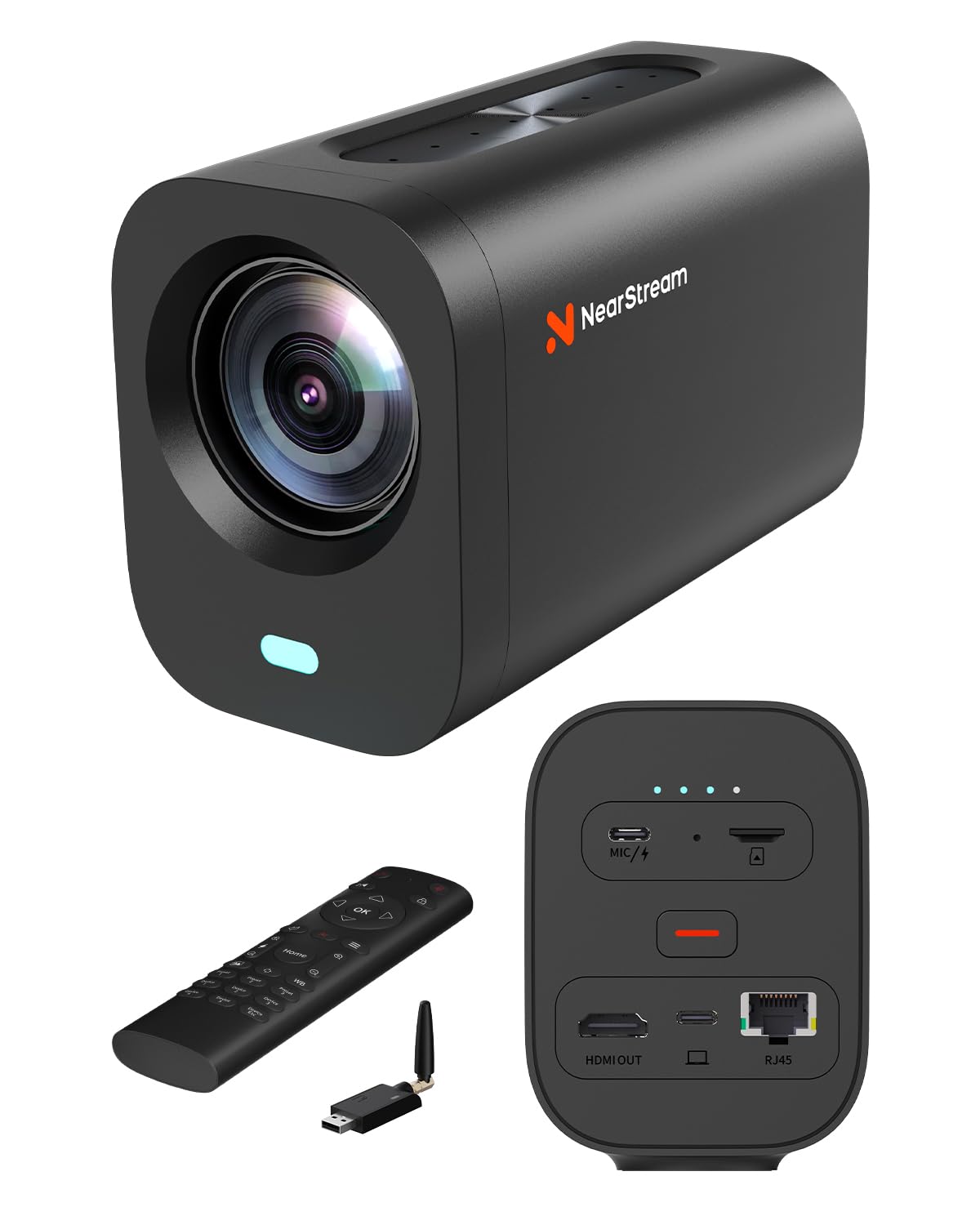
| NearStream VM20 ProCable-Free Studio | Cable-free studio streaming | 1/2″ CMOS | 4K via USB-C | 8-mic array + ext. | Amazon |
| Sony ZV-1 | Compact vlogging | 1″ Exmor RS 20.1MP | 4K HDR | 3.5mm jack | Amazon |
| Panasonic LUMIX S9 | Compact full-frame travel | Full-Frame | 4K60 | 3.5mm jack | Amazon |
| Canon EOS R8 | Lightweight full-frame | Full-Frame 24.2MP | 4K 60p | External (via adapter) | Amazon |
| Sony Alpha a7 III | Reliable all-rounder | Full-Frame 24.2MP | 4K | External (via adapter) | Amazon |
| Sony Alpha 7 IV | Pro hybrid with 4K 60p | Full-Frame 33MP | 4K 60p 10-bit | External (via adapter) | Amazon |
| Nikon RED ZR | Cinema-grade audio | Full-Frame 6K | 6K up to 60fps | 32-bit float ext. | Amazon |
| Blackmagic Pocket 6K | RAW cinema color | Super 35 | 6K up to 50fps | External (via adapter) | Amazon |
| Canon XA70 | Pro camcorder with XLR | 1″ CMOS | 4K UHD 160Mbps | 2x XLR | Amazon |
In-Depth Reviews
1. Canon EOS R5 Mirrorless Camera
Our pick — over 4.5★ from 750+ verified ratings; the strongest balance of quality and price.
The full-frame hybrid that records your podcast in cinematic 8K with autofocus that locks onto eyes.
The R5 sets the benchmark for podcast video quality with its 8K RAW and 4K 120p recording. Its 45-megapixel full-frame CMOS sensor with a DIGIC X processor delivers 8K RAW and 4K up to 120fps internal recording, so your interview footage carries detail that survives any edit. The 4K HQ mode, which downsamples from 8K, looks cinematic and crisp to owners who grade their footage.
Autofocus is the standout feature here. The phase-detection system (a fast focusing method) with eye detection locks onto your guest’s face even as they lean forward. The mechanical shutter shoots up to 12 frames per second (fps), and the electronic silent shutter hits 20 fps — useful if you also grab stills for social media. Buyers report the in-body stabilization (IBIS) keeps shots steady, so you can shoot handheld at low ISO (a low light sensitivity setting) without blur.
Battery life is the biggest catch, delivering around 650 shots per charge in real use. The R5 is a serious investment, and a few owners mention units becoming unusable within weeks — a rare but real reliability concern for a camera at this tier. For a professional studio that records long-form video, this is the reference standard.
The Highlights
- 8K RAW and 4K 120fps internal recording for future-proof footage
- 45MP sensor gives incredible detail for photo and video
- Eye-detect autofocus keeps your subject locked and sharp
- Dual card slots for reliable long recordings
The Trade-offs
- Battery life around 650 shots — plan spare batteries for long shoots
- Premium price puts it out of reach for hobbyist setups
- Rare reliability complaints reported within weeks of use
Reach for this if: you run a professional studio that already has a lighting rig and wants the highest ceiling for video quality.
Who should skip it: anyone starting out — the body costs more than a full beginner podcast kit, and the menu depth demands time you may not have.
2. Zoom Q8n-4K Video Recorder
A portable studio that puts broadcast-grade audio ahead of its video, with dual XLR inputs built in.
The Q8n-4K is the rare device that treats your sound as the star. Two XLR inputs with phantom power let you plug professional microphones directly in, and the 4-channel audio recording captures up to four simultaneous tracks — perfect for a two-host podcast with separate mics. Owners describe the audio as fantastic, with stage mics plugging in directly and eliminating audience noise.
Video comes second here, and buyers understand that going in. The F2.8 150-degree wide-angle lens offers five field-of-view presets for indoor, outdoor, nighttime, and concert lighting, but the 4K image turns grainy in low light. The honest fit note: this camera shines on a professionally lit set, where a media producer confirms it hits broadcast quality — but in dim studio corners, you will see the noise.
The recurring production gripe is overheating. Customers note the unit shutting down after about 40 minutes of handheld use in an 81°F studio, which makes it risky for long, hot rooms. It also streams live over USB while recording locally to an SD card up to 512GB, a workflow that fits solo creators who want a backup file.
The real verdict: the Q8n-4K is a Swiss Army knife for podcasters who want a single device that records great sound and decent video, not a cinema camera. Keep it on a tripod in a cool room and it performs.
Who it beats: virtually any webcam-plus-recorder combo, since you skip the separate audio interface entirely.
Grab it for: a mobile podcast rig or live band recording where XLR audio quality is non-negotiable.
Pass if: your studio runs warm, you plan long unbroken episodes, or you need clean 4K in low light — this camera will frustrate you there.
3. NearStream VM20 Pro 4K Streaming Camera
A plug-and-play streaming camera that ditches USB cables with a wireless transceiver in the box.
The VM20 Pro is built for creators upgrading from basic webcams, and its 1/2-inch CMOS sensor delivers 4K resolution with autofocus, HDR, and 3D noise reduction. The standout is the 10x true optical zoom, which combined with 4x digital zoom reaches a 40x hybrid zoom — so a two-person couch interview can punch in tight on each speaker without moving the camera.
What makes it unique in this lineup is the included NA20 transceiver. It sends video and audio to your computer over a dedicated 2.4GHz/5GHz wireless protocol — not standard Wi-Fi — which keeps your podcast table clean with no long USB or HDMI cables. The 8-microphone array with AI noise reduction and beamforming picks up voices up to 16 feet away, and the USB-C port accepts an external mic via the included 2-in-1 cable.
Owners call it sharp, compact, and lightweight, with reliable autofocus and crisp low-light video that beats typical webcams. The NearSync software handles FOV adjustments from 45 to 120 degrees plus AI auto-framing, though reviewers point out the instructions are poor. It records 4K MP4 to a MicroSD card up to 1TB, making it a capable backup recorder during your stream.
What Stands Out
- Wireless AV transceiver removes cable clutter from the desk
- 10x optical zoom punches in on guests without moving the camera
- 8-mic array with AI noise reduction for clean room audio
- Plays nice with OBS, Zoom, and Teams from the start
What To Watch
- Image quality is very good, not exceptional, compared to a full-frame body
- Random auto-zoom can trigger in video calls
- Documentation is thin — plan a learning curve with NearSync
Ideal for: a multi-camera studio or classroom that wants a clean cable-free desk and good autofocus without learning a cinema camera.
Not for: anyone needing interchangeable lenses or shallow depth-of-field bokeh — this is a fixed-lens streaming tool, not a hybrid.
4. Sony ZV-1 Digital Camera

A pocket-sized vlogging camera with a flip screen and autofocus fast enough to chase a conversation.
The ZV-1 packs a 20.1MP stacked 1-inch Exmor RS CMOS sensor with a large-aperture 24-70mm F1.8-2.8 ZEISS lens into a body that slips into a bag. For a solo podcaster, the side flip-out 3.0-inch LCD screen that also tilts up and down makes framing yourself easy, and the forward-directional on-board mic with a detachable windscreen gives decent sound in one take.
The autofocus is the thing everyone raves about. Fast Hybrid AF with Real-Time Eye Autofocus keeps your face locked, and the Product Showcase Setting transitions focus from your face to an object — useful for a show where you demo gear. The automatic exposure tracks faces and keeps them well-lit, and a quick switch between two defocused background bokeh modes gives that premium blurred-background look instantly.
The built-in mic is passable, but a 3.5mm external mic is essential for clean audio, and battery life tops out at about 25 minutes of continuous filming. Owners recommend a dummy battery for studio streaming. The 4K HDR video over USB makes it a strong webcam, though one recurring complaint is the tripod hole blocking access to the battery and SD card while mounted.
Why It Wins Fans
- Flip-out touchscreen makes solo framing a breeze
- Real-time Eye AF holds focus during lively conversation
- 1-inch sensor outperforms any webcam in low light
- Product Showcase mode nails desk-demo shots
The Fine Print
- Battery life is short — a dummy battery is almost mandatory for studio use
- Built-in mic is decent, but an external mic via 3.5mm jack is far better
- Tripod mount blocks the battery door when attached
Pick it if: you vlog solo, travel with your podcast gear, and want a flip-screen camera that doubles as a video call webcam.
skip it if: you need XLR inputs or run multi-hour panel shows — the battery and single-mic input will bottleneck you.
5. Panasonic LUMIX S9

A full-frame body that fits in a coat pocket, with Open Gate video for every social format at once.
The S9 squeezes a full-frame sensor into a body that owners describe as a point-and-shoot masterpiece. The kit pairs it with the compact S 18-40mm F4.5-6.3 lens with a variable aperture that adapts to changing light, and the Depth From Defocus autofocus keeps up with interview subjects. In a dim studio, the full-frame sensor gives you clean, professional-looking footage without a lighting overhaul.
Its a neat extra for podcasters is Open Gate video. The camera captures all aspect ratios from one shot with multiple frame markers, so you can deliver a vertical clip for Instagram and a widescreen cut for YouTube from the same recording. The LUMIX Lab app pairs over an ultra-fast Wi-Fi connection to push clips straight to your phone, which speeds up your social posting workflow considerably.
Shoppers say no overheating in 4K30 beyond an hour after a firmware update, which is rare for a compact full-frame. The trade-off: it has a cold shoe only, so you cannot mount a flash, and there is no hotshoe, EVF, or headphone jack. One buyer warns it is not ideal for portraits of people, while another calls it one of the best full-frame cameras for the price — so match it to your use case.
The real trade-off: this is a full-frame sensor in a travel body, and it shows. You get gorgeous low-light video and phone integration, but you give up the hotshoe and EVF that studio shooters expect.
Who it beats: the compact full-frame crowd — buyers report it outperforms the ZV-E1 on overheating and edge out the A7c II on weight.
Best suited for: a roving podcaster who records on the move and posts to multiple social platforms from one take.
Think twice if: your show needs a flash, a viewfinder, or pro-audio monitoring — the missing hotshoe and headphone jack are real gaps.
6. Canon EOS R8 Mirrorless Camera

Canon’s lightest full-frame RF camera, delivering 4K 60p and autofocus that tracks faces, animals, and trains.
The R8 steps up to full-frame without the weight, pairing a 24.2MP CMOS sensor with the DIGIC X processor. The uncropped 4K movie mode records up to 60fps, oversampled from 6K for extra sharpness, and Full HD high-frame-rate recording reaches 180fps for slow-motion B-roll. Dual Pixel CMOS AF II covers the full frame area with 1,053 AF zones and deep-learning subject detection for people, animals, and vehicles — even trains and horses.
Owners compare it directly to the pricier R6 II, saying it shares the same sensor, autofocus, and video quality at a lower price. The low-light performance earns heavy praise, with buyers calling it magic in your hands and noting minimal noise at high ISO. Its UVC/UAC support means you can plug it into a computer and stream over USB with clean video, which makes it a flexible studio camera.
Canon cut key hardware to hit this price: one SD slot, a smaller battery, and no in-body stabilization. You get one SD card slot, a smaller battery, and no in-body image stabilization (IBIS). A few owners mention overheating when recording in direct sun, so keep it in a temperature-controlled studio. If you want full-frame quality without the R5’s cost, this is your balance.
The Strengths
- 4K 60p oversampled from 6K for crisp interview footage
- Extensive AF subject detection including aircraft and trains
- UVC streaming straight to your computer over USB
- Impressive low-light performance with minimal noise
The Compromises
- Single SD card slot with no backup recording
- No in-body image stabilization — use a tripod for podcasts
- Smaller battery than the R6 II; pack spares
Choose it for: a full-frame studio camera that streams over USB and shoots gorgeous 4K without breaking your budget.
Avoid if: you need dual card slots or in-body stabilization for handheld b-roll — this body prioritizes weight and value.
7. Sony Alpha a7 III

The workhorse full-frame that owners call the best camera for the money, with a battery that outlasts a full shoot.
The a7 III earns its studio staple status with reliable 4K video and a 15-stop dynamic range. Its 24.2MP back-illuminated full-frame sensor with 1.8X readout speed delivers clean 4K video and a 15-stop dynamic range, so your highlights and shadows stay intact under uneven studio lights. The 693 phase-detection autofocus points cover 93% of the frame, and owners praise its fast, accurate tracking.
Battery life separates it in daily use. A single NP-FZ100 battery (a Sony rechargeable pack) shoots roughly 710 photos in real-world testing, and buyers call the battery life incredible, noting a spare is not essential. The kit lens — a 28-70mm f/3.5-5.6 zoom — frames a talking head reliably, and the 4K output looks stunning, though owners note you will want a UHS-II card (a fast memory card standard) for smooth recording.
The recurring complaint is the menu system, which buyers call complex, and the weather sealing is limited compared to newer bodies. For podcasting, neither is a dealbreaker — you set the camera once on a tripod. One owner describes the transition from Fujifilm as smooth, with simpler controls and superior low-light performance, which says a lot about how accessible it feels.
What Makes It A Workhorse
- 15-stop dynamic range keeps interview lighting forgiving
- 693 AF points track moving subjects with ease
- Battery shoots around 710 photos per charge
- Kit lens is dependable for a talking-head setup
Where It Shows Its Age
- Menu system is complex and dated
- Weather sealing is limited for outdoor shoots
- 4K recording needs a fast UHS-II card
Reach for it: if you want a proven full-frame body that just works for long recording sessions without battery anxiety.
Look elsewhere if: you need the latest autofocus subject tracking or a touch-friendly menu — newer Sony bodies do that better.
8. Sony Alpha 7 IV

A 33MP full-frame body with 4K 60p 10-bit color and the menu system owners actually enjoy using.
The a7 IV refines everything the a7 III started. Its 33MP full-frame Exmor R back-illuminated CMOS sensor pairs with the next-generation BIONZ XR processor for up to 4K 60p 10-bit 4:2:2 recording with full pixel readout in all formats. The 7K oversampled 4K 30p mode captures incredibly detailed interview footage, and the S-Cinetone color profile delivers a beautiful, filmic look straight out of the camera.
Owners consistently praise the improved menu system, calling the camera intuitive and well worth the money. The dual card slots — supporting CFexpress Type A and SDXC — give you reliable backup recording for long episodes, and autofocus with 693 points tracks your guest’s eyes with remarkable accuracy. The flip screen and high ISO noise reduction make it a confident choice in challenging light.
The balanced view: some customers note a learning curve because the camera offers so many settings, and a few report overheating during extended 4K use. The 60-120p modes crop into the sensor, which matters if you film interviews at that frame rate. For a serious podcast studio wanting room to grow into cinematography, the a7 IV is a top-tier hybrid that owners rate as a 10/10 investment.
Why It Impresses
- 4K 60p 10-bit 4:2:2 with full pixel readout
- S-Cinetone color profile for cinematic looks with zero grading
- Dual card slots for reliable long-form recording
- Renowned for an accurate, easy-to-navigate menu
Keep In Mind
- Steep learning curve from the sheer number of settings
- 60-120p modes crop the sensor
- Spare battery recommended for long shoots
Grab it for: a professional podcast setup that wants S-Cinetone color and 10-bit flexibility without stepping up to a cinema body.
Pass it by if: you want a simple point-and-shoot experience — this rewards owners willing to learn its power.
9. Nikon RED ZR Cinema Camera

A 6K cinema camera with 32-bit float audio that captures RED color science in a 1.18 lb body.
The ZR fuses RED’s legendary color science with Nikon engineering and a 6K full-frame sensor with 15+ stops of dynamic range and Dual Base ISO. For audio, it leads the entire category with industry-leading 32-bit float recording — a format that captures your voice with such a wide range you effectively cannot clip the audio, a real safety net for live interviews. Support for external microphones makes it a serious podcast tool.
Owners who upgraded from other RED cameras call it a revelation: faster boot times, no need for black shading, a built-in 4-inch DCI-P3 touchscreen that swivels, and 6K recording at 60fps. The REDCODE RAW (R3D NE) footage open up the same color space and Log curve as bigger RED cameras, and buyers confirm all codecs produce great results. It weighs just 1.18 lbs, so it rigs easily onto a podcast desk arm.
The catch is file size: 6K R3D footage demands fast CFexpress Type B storage. The 6K R3D footage (a high-resolution RAW video format) is enormous and demands fast CFexpress Type B storage (a high-speed memory card), which owners flag as the main hurdle. The 273 autofocus points with hybrid technology handle interviews well, but this is essentially a cinema camera in a small body — the Z8 remains the better pick for hybrid stills and video, while the ZR suits video-focused creators and short films.
The standout: 32-bit float audio is a genuine podcast superpower — you can record a soft-spoken guest and a loud laugher in one take without ever worrying about distortion.
The honest hurdle: 6K file sizes will eat your storage, so budget for fast CFexpress cards and a big editing drive.
Pick it if: you are a video-first creator shooting cinematic podcasts and want RED color in a compact, audio-forward body.
pass on it if: you also shoot stills or want a hybrid — the Z8 fits that dual role better, and file storage costs add up fast.
10. Blackmagic Design Pocket Cinema Camera 6K
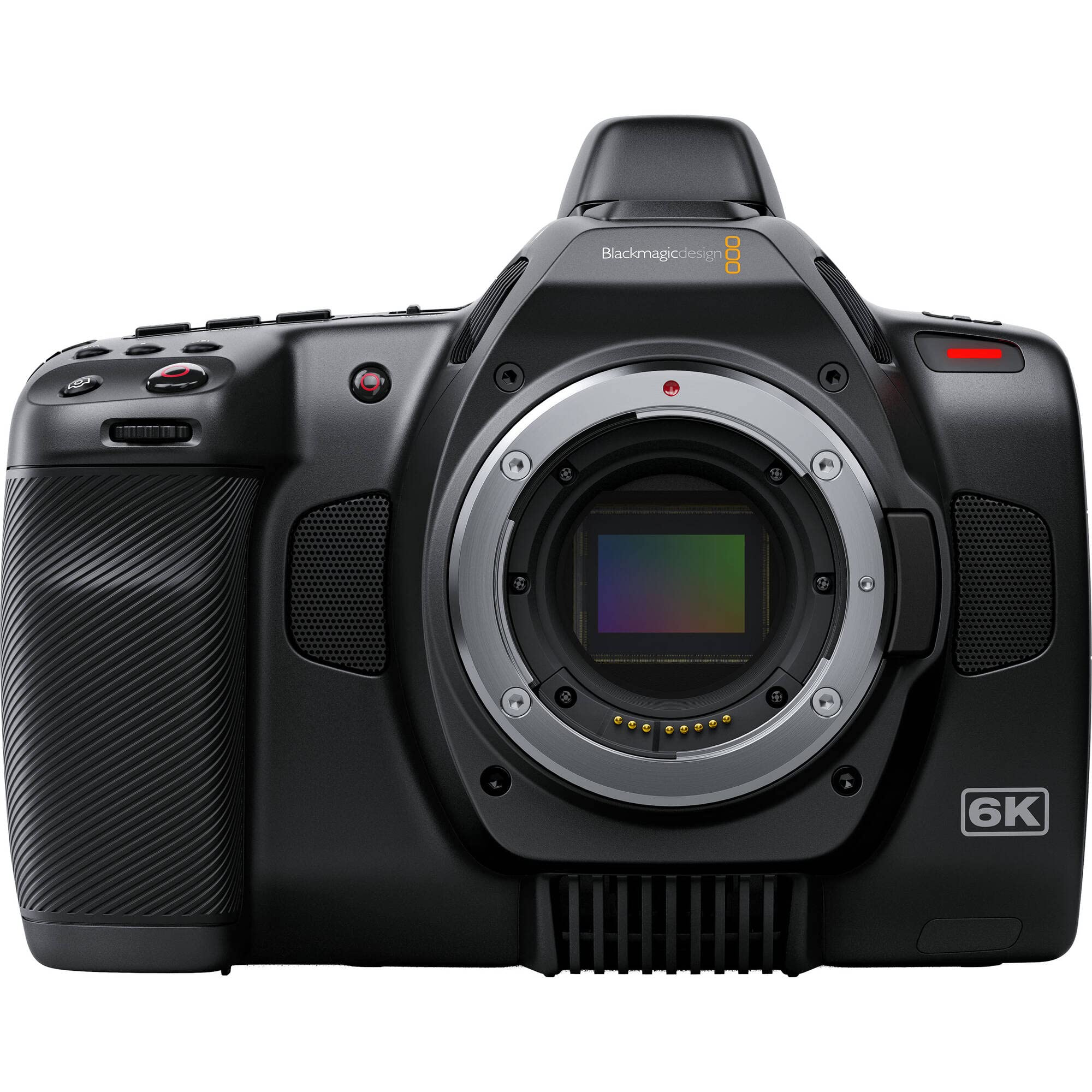
A Super 35 cinema camera that shoots 6K RAW and comes with the editing software built in.
The Pocket 6K delivers the most cinematic image in this lineup for its price. Its Super 35 sensor shoots 6144 x 3456 at up to 50fps and 2.8K 17:9 at up to 120fps, giving you RAW recording flexibility that editors love. The Canon EF lens mount means you can adapt a wide range of affordable glass, and owners describe the picture quality as sensational, rivaling much more expensive cinema cameras.
For podcasting, the value pitch is strong: it includes editing software with the camera, and owners praise the well-organized menus and how easy manual focus is to learn. A buyer moving from a Sony a73 calls it the best camera they have purchased, and another notes it rivals RED and ARRI for a fraction of the cost. The 6K resolution gives you room to crop into a two-person frame after recording.
The trade-offs are real: a misleading LCD and slow contrast-detection autofocus. The LCD is misleading, so buyers recommend an external monitor, and contrast-detection autofocus is not the fastest — you will likely pull focus manually. Reliability is mostly solid, but one buyer’s 6K unit overheated and shut off until Blackmagic confirmed it was defective. Size gets mixed feedback: powerful and compact, but this is a cinema brick, not a travel camera.
The Cinema Wins
- 6K RAW recording with stunning color depth
- Comes with professional editing software included
- EF lens mount adapts to a huge range of lenses
- 120fps slow-motion in 2.8K for dramatic b-roll
The Production Reality
- Autofocus is contrast-based and slow — plan to pull focus
- LCD is misleading; budget for an external monitor
- Bulkier than a mirrorless body; not for travel
Choose it for: a studio that prioritizes RAW color and post-production flexibility over autofocus convenience.
Pass if: you want set-and-forget autofocus or a compact body — this camera demands a more hands-on operator.
11. Canon XA70 Pro Camcorder

A pro camcorder with dual XLR inputs and a 15x optical zoom that captures every angle of the room.
The XA70 is the dedicated camcorder answer for podcasters who need a purpose-built video tool. Its 1-inch CMOS sensor with the DIGIC DV6 processor records 4K UHD at 160Mbps in 30P/24P or Full HD at 45Mbps, and the 15x optical zoom lens lets you frame a tight two-shot from across the room. The detachable handle carries 2 XLR terminals with 4-channel linear PCM audio, giving you pro-level sound capture right in the body.
The camcorder form factor is its superpower for live production. Dual SD card slots enable relay and simultaneous recording, so you never miss a moment, and the USB Type-C output with UVC support streams HD video straight to a PC or Mac. The tiltable OLED EVF and 3.5-inch touchscreen give you solid monitoring, and infrared plus optical image stabilization keeps handheld footage steady — a rare bonus for a run-and-gun podcast.
Owners who replaced overheating mirrorless cameras — including one switching from a Nikon Z30 that shut down in 4K even in a freezing rink — report the XA70 runs reliably for long recordings. This camcorder rewards manual operation, so auto-mode users may find it frustrating. One owner flatly says it is great if you use manual settings and understand it, and the monitor resolution and ND filter options drew a return from one buyer who found them lacking.
The Pro Perks
- 2 XLR terminals with phantom power on the detachable handle
- 15x optical zoom frames distant speakers without moving
- Dual SD slots with relay and simultaneous recording
- USB Type-C UVC streaming to your computer
The Operator Demands
- Rewards manual settings — auto mode buyers are better served elsewhere
- Monitor resolution and ND filter options drew criticism
- Built-in audio is strong, but XLR mics are the real path
The right fit: a professional operator or event podcaster who wants a reliable camcorder with XLR audio and long zoom that never overheats.
Not the fit: a beginner who wants auto-everything — the manual learning curve and pro price tag make that a mismatch.
Understanding the Specs
Sensor Size and Image Quality
The sensor is the light-catcher behind your lens. Full-frame sensors are the largest and best in dim rooms, 1-inch sensors balance cost and quality for webcam-style setups, and Super 35 sensors sit between them with a cinematic look. In a typical podcast studio, a larger sensor means less noise on your face and a smoother, more professional image without buying extra lighting.
XLR Inputs and Phantom Power
XLR is the professional microphone connection standard. When a camera has XLR inputs with phantom power, you can plug pro studio mics directly in and power them without a separate audio interface. Some cameras skip XLR and offer a 3.5mm jack instead, which works with most consumer mics but usually requires the mic to have its own power source.
Clean HDMI Output and UVC Streaming
Clean HDMI means the camera sendspure video with no menus or overlays — essential when you route the feed into a switcher or capture card. UVC support, meanwhile, lets the camera act as a webcam over a single USB cable, which is the easiest path to streaming on Zoom or OBS. If you record locally while streaming, you get a backup file without any extra gear.
Autofocus and Face Tracking
A podcast is a conversation, and people move. Autofocus with eye or face detection keeps your guest sharp even when they lean in or turn their head. Phase-detection systems are the fast, modern standard, while contrast-detection systems — common on cinema cameras — are slower and often require manual focus. For a solo host on a fixed tripod, a reliable face-tracking AF is worth more than raw resolution.
FAQ
Do I need a camera with XLR inputs for podcasting?
What does phantom power do for my podcast microphone?
Can I use a mirrorless camera as a webcam for live podcasting?
Will these cameras overheat during a long podcast recording?
Is a full-frame sensor worth the extra cost for a podcast?
What is clean HDMI output and why do streamers need it?
Should I record 4K if I only publish to YouTube?
What is the difference between optical zoom and digital zoom for a podcast camera?
Are cinema cameras like the Blackmagic Pocket 6K practical for podcasts?
How many card slots do I need for a reliable podcast recording?
Final Thoughts: The Verdict
The highest-rated pick here is the camera for podcasting champion, the Canon EOS R5, because it pairs 8K RAW video with a 45MP sensor and the most trusted autofocus in the lineup — the crowd favorite at 4.7 stars across hundreds of owners. If you want a hands-off streaming setup with wireless freedom, grab the NearStream VM20 Pro. And for a pro camcorder that records pristine XLR audio (a professional audio connection) without overheating, the Canon XA70 is the one to reach for.
How We Picked
We do not accept paid placement. Every pick is matched to a real buyer and a real use-case; we do not hands-on test units.
Sources & Methodology
Specifications: manufacturer listings and product documentation. Review insights: verified customer reviews, as of August 2026. Pricing: not shown on this page (it changes often); check the current price via the retailer link.
As an Amazon Associate, Gadgets Feed earns from qualifying purchases. This does not affect which products we feature.