
Our readers keep the lights on and my morning glass full of iced black tea. As an Amazon Associate, I earn from qualifying purchases.
Specs are compiled from manufacturer listings and verified buyer reviews and can change over time — please confirm the key details on the product page before buying.
You want a budget mechanical keyboard for gaming without giving up the satisfying feel or the competitive edge. Today’s budget tier now includes hot-swappable switches, gasket mounts, and hall-effect magnetic tech at a fraction of their old cost. Here are nine boards that deliver on feel, speed, and value for your setup.
I’m Min — the founder and writer behind Gadgets Feed. This guide is built by comparing the manufacturers’ published specifications and the patterns across verified customer reviews, so you get each pick’s real strengths and trade-offs instead of marketing spin.
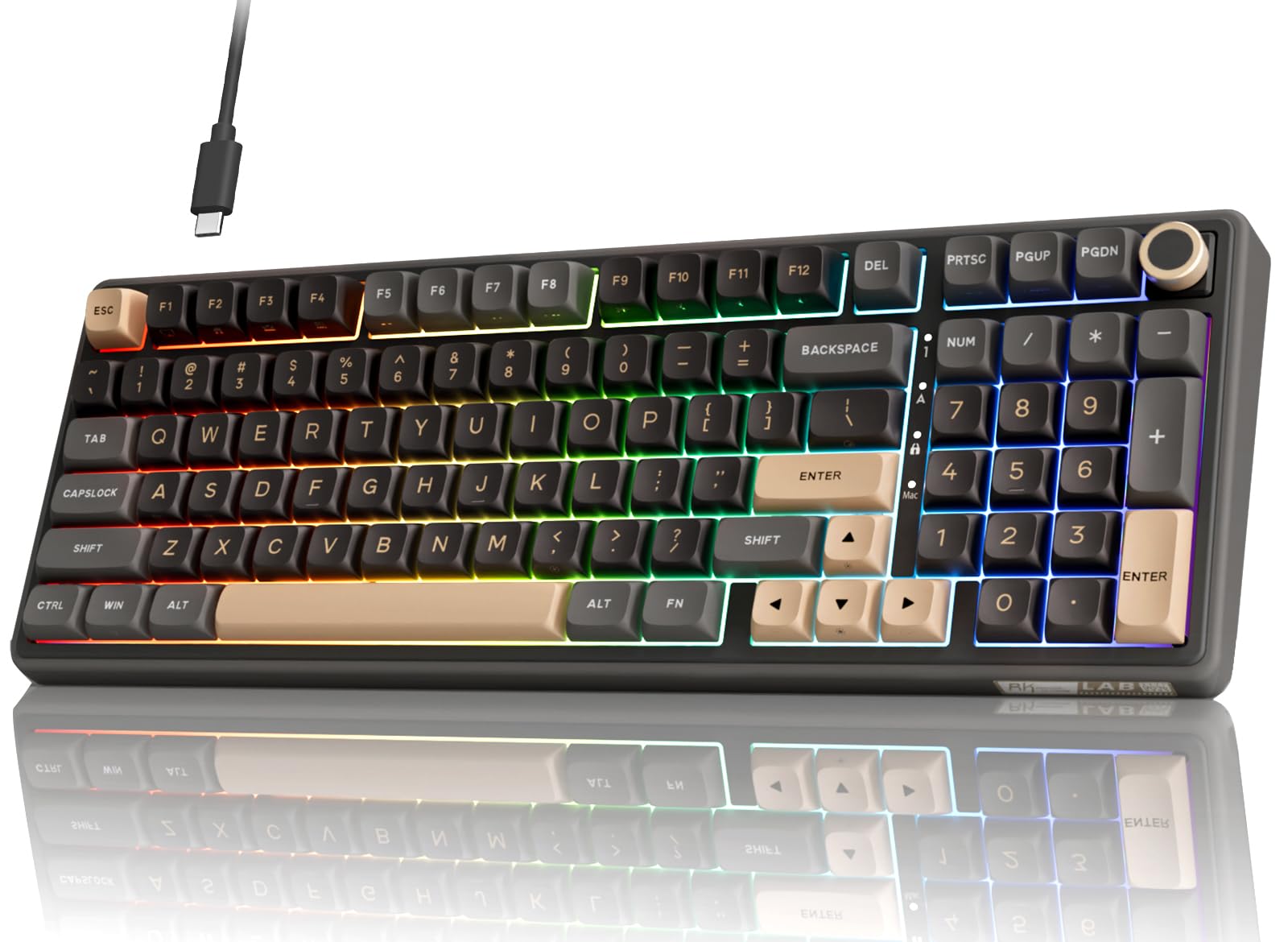
The crowd favorite — 4.6 stars across 700+ owners — is the RK ROYAL KLUDGE R98 Pro, pairing a creamy gasket mount with a full number pad. If you want the best value in a budget mechanical keyboard for gaming, this is the safest all-rounder to start with.
Our Picks at a Glance

How To Choose The Best Budget Mechanical Keyboard For Gaming
Before you buy, decide three things: the physical size you want on your desk, the switch feel you prefer, and if you need wired-only reliability or wireless freedom. Once you settle those, the rest of the spec sheet is mostly bonus features.
Pick Your Layout First
Your layout decides how much desk space you lose and which keys you have to reach for. A 60% board drops the arrow keys and function row entirely for maximum mouse room, while a 75% or TKL keeps the F-keys and arrows in a compact frame. If you play MMOs or use keyboard shortcuts for work, the full-size 96% and 100% layouts keep the number pad so you never feel cramped.
Switch Type Sets the Feel
You have three switch families: linear (straight down, no bump), tactile (a small feedback bump mid-press), and clicky (an audible click on top of that bump). For gaming, linear switches are the usual pick because the smooth, uninterrupted travel makes rapid double-taps and strafing feel easy.
Look for Hot-Swappable Sockets
A hot-swappable keyboard is one where you can pull out the switches with a small tool and plug in different ones without soldering. This lets you swap in heavier or quieter switches later, extending the board’s life without a full replacement.
Quick Comparison
| Model | Best For | Layout | Switch Type | Connection | Amazon |
|---|---|---|---|---|---|
| RK ROYAL KLUDGE R98 Pro★ Best Overall | All-round value with a number pad | 96% (98 keys) | Pre-lubed Cream Linear | Wired USB-C | Amazon |
| AJAZZ AK820Compact Value | Compact desks needing F-keys | 75% (82 keys) | Pre-lubed Linear Red | Wired USB-C | Amazon |
| Aula WIN60 HEFPS Fiend | Competitive FPS speed | 60% (—) | Hall Effect Magnetic | Wired USB-C | Amazon |
| AULA WIN68 HE | Compact boards keeping arrow keys | 60% (68 keys) | Hall Effect Magnetic | Wired USB-C | Amazon |
| Redragon K745 PRO | Wireless freedom with full size | 100% (108 keys) | Gasket Linear | USB-C, BT, 2.4GHz | Amazon |
| Razer BlackWidow V4 X | Macro keys and Chroma RGB | 100% (104 keys) | Yellow Linear | Wired | Amazon |
| ASUS ROG Strix Scope II X | Premium feel straight from a known brand | 100% (—) | ROG NX Snow V2 Linear | Wired USB 2.0 | Amazon |
| EPOMAKER TH108 PRO | The full-size wireless showpiece | 100% (104 keys) | Creamy Jade Linear | USB-C, BT, 2.4GHz | Amazon |
| CORSAIR K70 CORE | Established brand with a palm rest | 100% (—) | MLX Red Linear | Wired USB-A | Amazon |
In‑Depth Reviews
1. RK ROYAL KLUDGE R98 Pro
Our pick — over 4.5★ from 700+ verified ratings; the strongest balance of quality and price.
The thocky, creamy all-rounder that proves a budget board can keep the number pad.
The R98 Pro keeps the numpad for work and MMO gaming without sacrificing mechanical feel. It keeps a 96% layout with 98 keys, so you get the numpad, arrow keys, and most functions in a frame that takes up noticeably less desktop than a full-size board. The star of the show is the pre-lubed cream linear switch on a gasket mount with five layers of sound-absorbing foam — owners describe the result as a quiet, buttery smooth “thunk” that feels premium.
The build quality for the price is what wins owners over. The aluminum CNC knob feels genuinely high-end, the MDA-profile PBT keycaps have a soft matte finish that resists fading, and the whole thing has a solid heft at 0.8 kg. Buyers report that the keys are zippy and responsive with zero perceived lag, and the RGB offers more than 20 modes to play with. It is hot-swappable for 3/5-pin switches too, so you can swap in your own switches later without soldering.
The honest trade-off is the layout’s space efficiency. A few owners find the arrow, shift, and enter keys feel a bit cramped, and the knob sits close to the PgDn key which makes it slightly hard to grip. The online driver software is also a weak point — one reviewer noted the software site was blocked at work. For the price, owners mention it feels premium and replaces much pricier boards.
Why it wins the round
- Full 98-key layout keeps the numpad without the bulk
- Pre-lubed cream switches deliver quiet, buttery-smooth typing
- Hot-swappable sockets and PBT keycaps extend its life
Where it stumbles
- Arrow and shift cluster feels a little cramped to some hands
- Online driver software is less intuitive and can be blocked
Reach for it if: you want one board that handles spreadsheets by day and frags by night without sacrificing the number pad.
Look elsewhere if: your desk is tiny and you would rather have a compact frame than keep the numpad.
2. AJAZZ AK820
A 75% board that keeps every F-key, so you never lose the shortcuts you rely on.
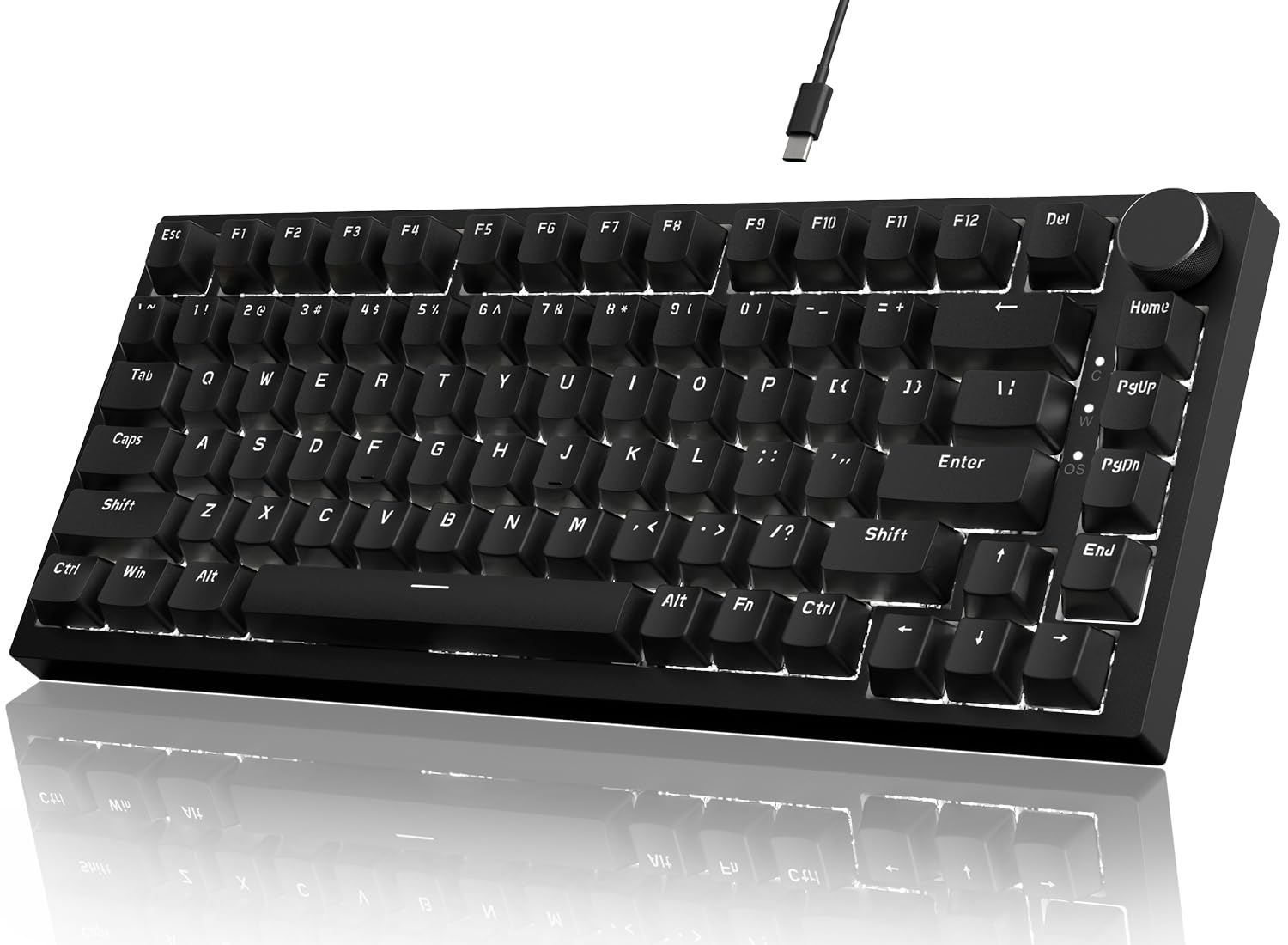
The AK820 is the cure for anyone who tried a 60% board and immediately missed the function row. It uses a 75% layout with 82 keys, which keeps the F-keys and arrow keys while trimming the size for a smaller footprint. As one buyer puts it, the board is “amazing for doing anything because it has all the F keys on it” — the review pages sum it up: it is simply better than a 60% for daily use.
The typing feel is genuinely good for an entry-level price. It uses pre-lubed linear red switches on a gasket mount with five layers of sound-absorbing foam (EVA cotton, IXPE foam, PET sound pad, bottom filler, and silicone pad) that eliminates hollow noise. The 1.2mm slotted PCB and PC positioning plate give the board a soft, bouncy sound that owners describe as comfortable and quiet. It is fully hot-swappable, accepting both 3-pin and 5-pin switches, and the CNC machined aluminum media knob offers smooth volume control.
The catch is that this is a wired-only board with a single-color white LED backlight, not RGB. For buyers who want to customize their lighting or go wireless, this is not the one. But for a pure value play — 82 keys, hot-swap, gasket mount, and a satisfying sound — it is remarkably well-rounded. Durability gets a strong nod too, with ownership calling it very durable and ideal for beginner gamers and typists.
Built for the essentials: If you want the F-key convenience with a compact footprint and do not care about RGB or wireless, this is the board that punches above its weight.
Know before you buy: The white LED backlight and wired-only connection are the two places it keeps costs down.
3. Aula WIN60 HE
Hall-effect magnetic switches deliver 8000 Hz polling for near-instant counter-strafes.
The WIN60 HE is the budget board that brings genuinely premium hall-effect technology to the entry tier. Instead of physical metal contacts, it uses magnetic switches that never wear out, and it offers an adjustable actuation point with a Rapid Trigger step distance of just 0.02mm. What that means for you: the keyboard registers a press the instant you start pushing, and resets the instant you release, which is a real edge for fast-peeking and quick-stop shooting in Valorant and CS2.
Owners describe the feel as smooth and satisfying without being noisy, with a thocky sound (a deep, muffled thud) and a heavy build that feels far more expensive than it is. The polling rate of up to 8000Hz (how often the board reports its state to your PC) is eight times faster than a standard 1000Hz board, so you get virtually instant response in fast games. The web-based driver is a standout convenience, letting you remap keys and adjust actuation from any browser without installing software.
The main flaw is the stock keycaps, which some owners say feel cheap and uncomfortable and worsen the sound — swapping them is a common DIY fix. The 8k polling has also been reported to cause USB issues on some AMD systems, and the unpolished online software draws mixed feelings. As the review pages put it: “For the price? Hell yeah.” It is a top budget pick for serious gamers who want speed over everything.
Built for speed: If competitive FPS is your priority and you want rapid-trigger tech without the premium price, this is the board to beat.
Know before you buy: Budget for a keycap swap, and be ready for a less polished software experience than big-name brands.
4. AULA WIN68 HE

A 60% board that keeps the arrow keys and adds hall-effect speed under the hood.
The WIN68 HE is the smarter compact choice for gamers who refuse to lose their arrow keys. Its 68-key layout trims the function row and number pad to save up to 40% of your desktop space, but it keeps the arrows and basic function keys tucked in via FN combinations. Like its sibling, it runs on hall-effect magnetic switches with an adjustable actuation point from 0.02mm to 3.44mm, adjustable in 0.1mm steps per key — so you can set a feather-light trigger for shooters and a deeper press for typing.
The responsiveness is the headline: an 8000Hz polling rate with 0.3ms latency, which customers note as incredibly quick for FPS games. The web driver lets you customize RT/SOCD/DKS/MT/TGL functions, remap keys, and edit macros without downloading software, though it is Windows-only. Owners describe the switches as quiet linear and note the PBT keycaps have a pleasing sandy feel, while the build is plastic but heavy and durable.
The trade-offs are real but fair for the price. Some owners call the keys a bit mushy and louder than expected, and the RGB is dimmer than the competition. A few report the quick trigger is excellent while others mention occasional input delays, so the responsiveness is best described as very good rather than perfect. One buyer notes their son has a keyboard and actually prefers this one — that is the kind of endorsement that matters.
Made for the desk-saver: If you want hall-effect speed but refuse to give up arrow keys, this is the compact board to grab.
Know before you buy: The dimmer RGB and slightly louder keypresses are the compromises to accept.
5. Redragon K745 PRO
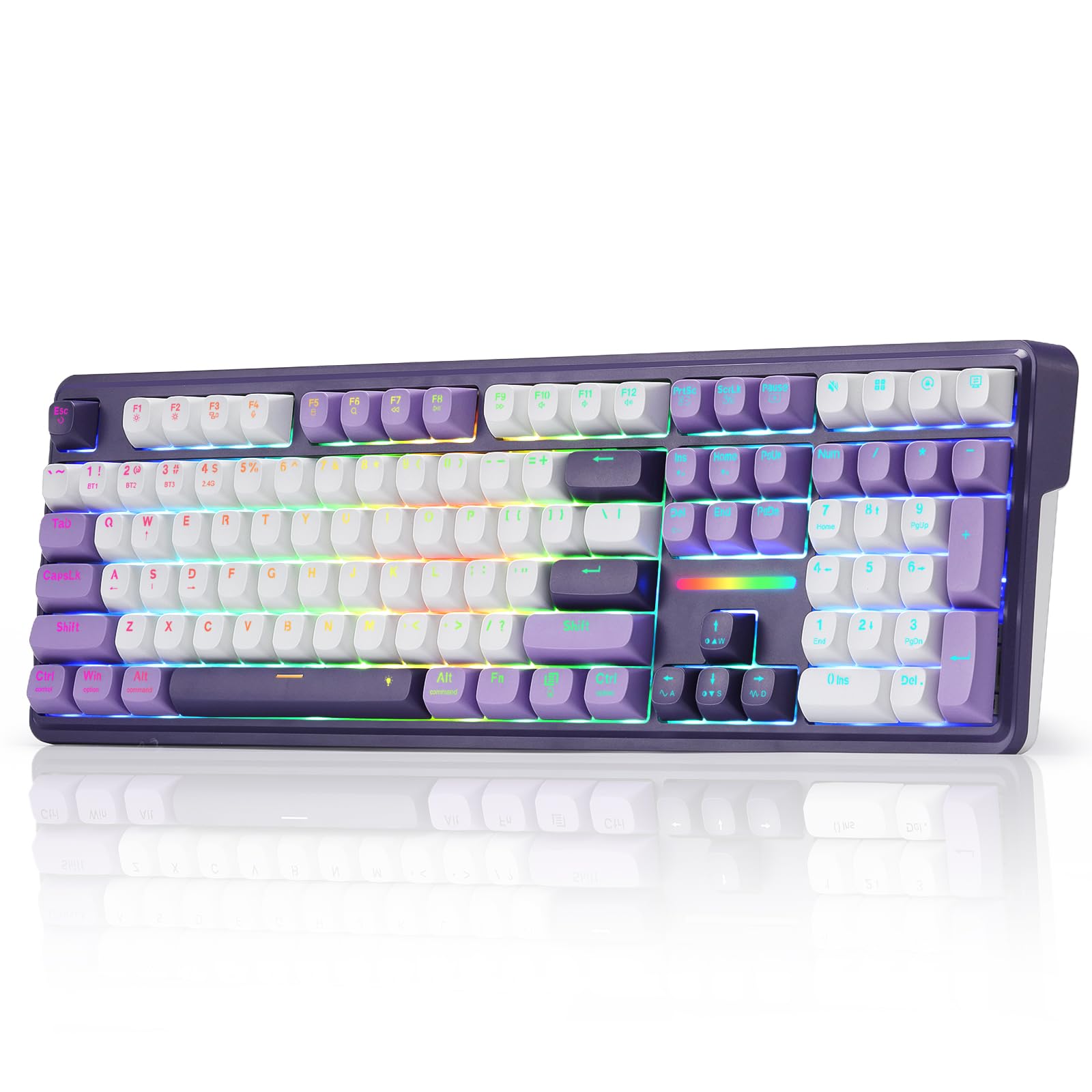
A full-size 108-key board that cuts the cable without cutting the creamy feel.
The K745 PRO answers the wireless question with real flexibility: it is a 108-key full-size board with tri-mode connectivity that jumps between USB-C, Bluetooth, and 2.4GHz wireless. That means you can move from your PC to a laptop to a tablet without re-pairing, and reviewers point out the wireless works flawlessly with zero perceived lag. It also packs four extra dedicated hotkeys defaulting to mute, calculator, screen lock, and desktop — handy shortcuts you can reassign through software.
The feel is the other headline. The gasket-mounted construction with five-layer noise dampening produces what owners call a “creamy cushioned” typing experience with a soft, silky bounce. The Mint Mambo switches are smooth and satisfying, and the board is lighter than a Corsair Strafe while remaining comfortable for small hands. The translucent round PBT keycaps let the RGB shine through cleanly while resisting the greasy shine that ABS caps develop over time.
The visual is a big part of the appeal — the Charming Purple palette with per-key RGB lighting looks great at night, and one buyer mentioned the keys sound “loudy but not too much” compared to Cherry blues. The one honest caveat: a small number of shoppers say keys that stop working, and the board lacks key backlighting despite the RGB underglow. For the price, though, the combination of wireless freedom, full-size layout, and creamy feel is a strong value.
What owners rave about
- Tri-mode wireless works without lag across devices
- Creamy gasket feel with four handy hotkeys
- Purple PBT keycaps and RGB look premium
What to watch for
- No key backlighting on the caps themselves
- A few units stop responding on some keys
Grab it if: you want one full-size board that swaps between your PC, laptop, and tablet without ever touching a cable.
Think twice if: you need per-key backlighting on the keycaps rather than just an RGB glow beneath them.
6. Razer BlackWidow V4 X

Six dedicated macro keys meet quiet yellow linear switches in a full-size frame.
The BlackWidow V4 X is the board for players who want quick access to complex command strings. It ships with six dedicated macro keys on the left edge that you can program to your preferred playstyle, plus a multi-function roller and secondary media keys for volume, brightness, play, and pause. The yellow mechanical linear switches are the quiet option: with zero distance between actuation and reset at 1.2mm and only 45g of force required, you get instant, rapid-fire inputs without the clatter.
The Chroma RGB is a genuine highlight, with per-key lighting from over 16.8 million colors and effects that sync dynamically with hundreds of Chroma-integrated games. Doubleshot ABS keycaps use an extra-thick molding process so the labeling never wears off, and a layer of foam under the circuit board plus lubricated stabilizers keeps the acoustics satisfying rather than hollow. Owners praise the quality, feel, and vibrant lighting — one buyer even reports the board survived two coffee spills after an alcohol rinse and compressed air.
The honest caveat is the left-side macro keys themselves. Several owners note they disrupt hand orientation, especially in games with a WASD-left-hand posture, and you will need to retrain yourself not to hit them by accident. The yellow switches are also very sensitive, so resting fingers on keys can trigger stray keystrokes. Durability draws mixed feedback, with some reporting keys that stop working after a few months, so it is worth weighing that against the polish of the Chroma ecosystem.
Why it stands out
- Six macro keys plus media roller for deep command control
- Quiet yellow linear switches with instant 1.2mm actuation
- Per-key Chroma RGB with game integration
Where it trips up
- Left macro keys interfere with standard hand placement
- Sensitive switches cause accidental keystrokes at rest
Best for: the player who lives inside Razer’s Chroma ecosystem and wants macro keys for MMOs or productivity.
Not ideal if: you rest your hand on the left edge of the board, where the macro keys will keep surprising you.
7. ASUS ROG Strix Scope II X
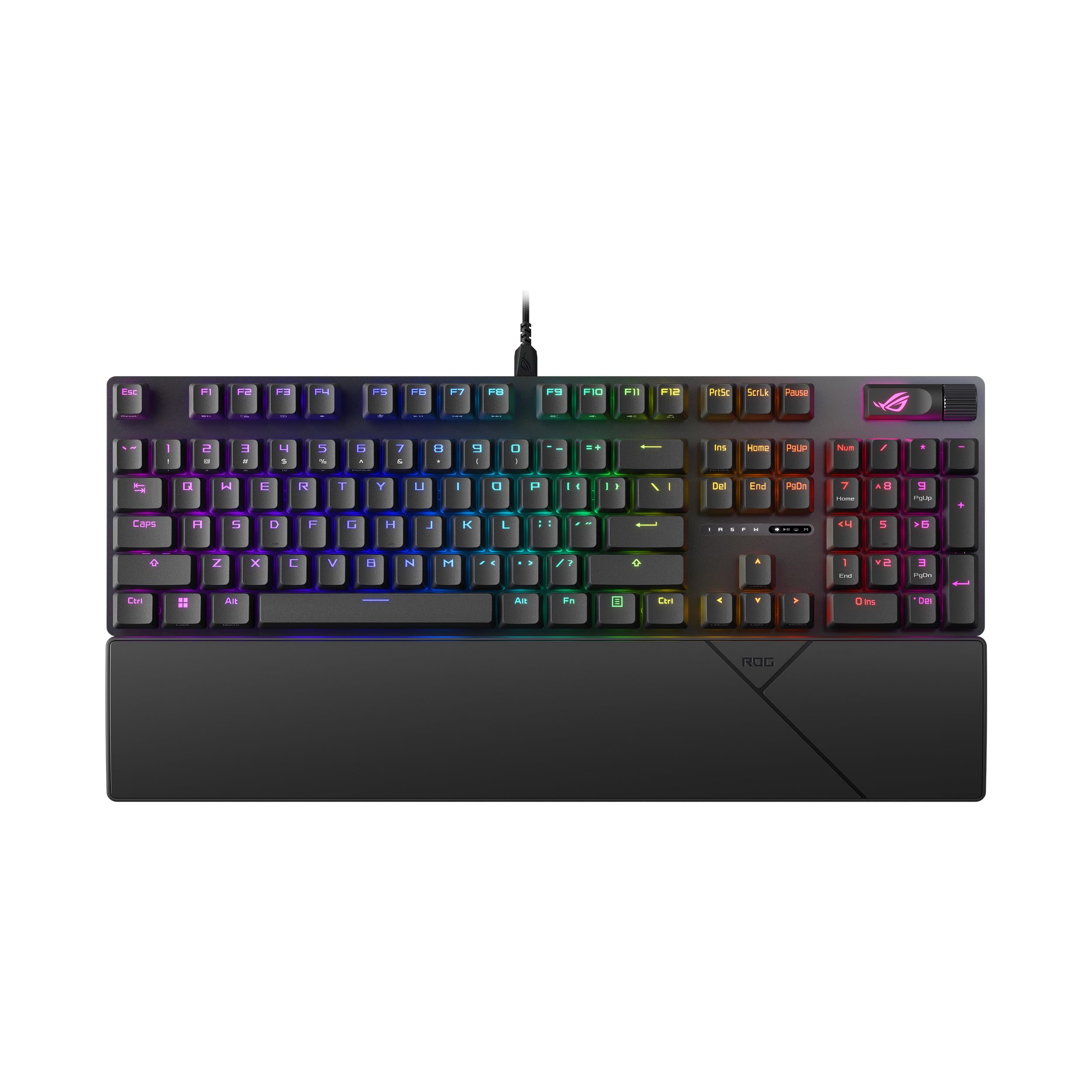
A full-size board from a trusted name that feels quieter and heavier than its price suggests.
The ROG Strix Scope II X is the pick for buyers who want the reassurance of a major brand with a genuinely premium feel. It is a 100% full-size keyboard with a number pad and wired USB-C connectivity, wrapped in an aluminum top plate with PBT doubleshot keycaps. Owners describe it as having a heavy, no-flex build that feels far more expensive than the price point suggests.
The sound and feel are the standout features. The pre-lubed ROG NX Snow V2 linear switches deliver smooth, thocky keystrokes, while integrated sound-dampening foam and switch-dampening pads absorb pinging and echoes. Buyers report it is noticeably quieter than brown switches and offers a soft, pleasant click. It is also hot-swappable, so you can swap in ROG NX Storm clicky switches if you prefer a crisp, tactile feel. The board is fully macro-programmable, with pre-programmed hotkeys for Xbox Game Bar and a multi-function wheel for media and lighting.
For comfort, you get three angle adjustments and a detachable wrist rest that positions your hands well for long sessions. The honest negatives are minor: some owners mention a sticky spacebar or left shift from the start (spares are included), and the keyboard is lighter than some competitors with a cord that feels a bit flimsy. One owner notes the function button is unique and takes time to get used to. Overall, the consistent praise for quality, quiet operation, and responsive keys makes it an easy recommendation.
A confident all-rounder: If you want a quiet, premium-feeling full-size board from a brand you can trust, the Strix Scope II X delivers on every front.
The one adjustment: Be prepared for a short learning curve on the unique function button layout.
8. EPOMAKER TH108 PRO
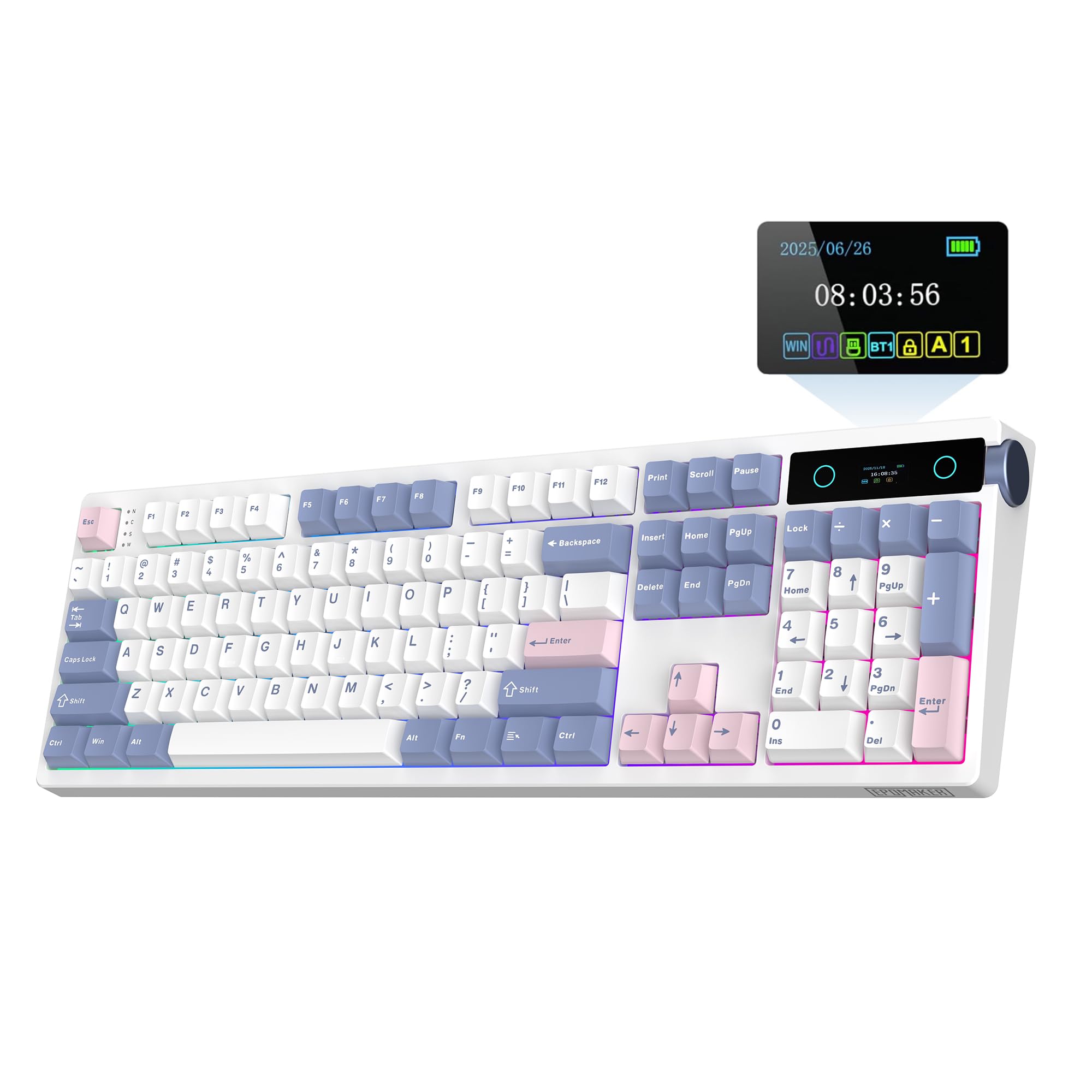
A 100% wireless board with a smart screen and a 200-hour battery that ditches the charging cable.
The TH108 PRO is the full-size showpiece of this list, and its defining feature is the smart screen built into the top-right corner. This display shows the time, monitors keyboard power, and lets you toggle RGB backlighting with the volume knob, all without losing focus on your game. You can even upload your own GIFs or pictures using the Chrome-based software, so that screen can show your team logo or a perfectly timed meme while you play.
Under the hood, it is just as impressive. The 100% layout has 104 double-shot PBT keycaps with unfading colors, and the thick ABS plastic body weighs over 1.1kg so it never slides around during intense play. The massive 10,000mAh battery delivers up to 200 hours of wire-free life, and the tri-mode connection works across USB-C, 2.4GHz wireless, and Bluetooth with up to 5 paired devices. Buyers describe the Creamy Jade switches as smooth with a satisfying marbly, thocky sound straight from the start.
The standout engineering is the 5-layer padded gasket mount — sandwich foam, IXPE switch pad, Sound-Enhancement PET, EPDM switch socket foam, and bottom silicone — which owners say feels like bubble wrap popping with each stroke. The board is hot-swappable for 5-pin switches and fully customizable through a web-based driver. The honest caveats: the side-positioned knob is not to everyone’s taste, and a few owners mention the board can be unresponsive on PC boot in USB mode until you toggle the connection switch.
What makes it special
- Smart screen shows time, power, or custom GIFs
- 10,000mAh battery with up to 200-hour wireless life
- Creamy gasket feel with satisfying acoustics
What to know
- Side knob position is a matter of taste
- Occasional USB boot-up connection quirk
Reach for it if: you want a full-size wireless board that doubles as a desk centerpiece with a customizable screen.
Skip if: you prefer a subtle, screen-free board and do not want to fiddle with a connection switch at boot.
9. CORSAIR K70 CORE
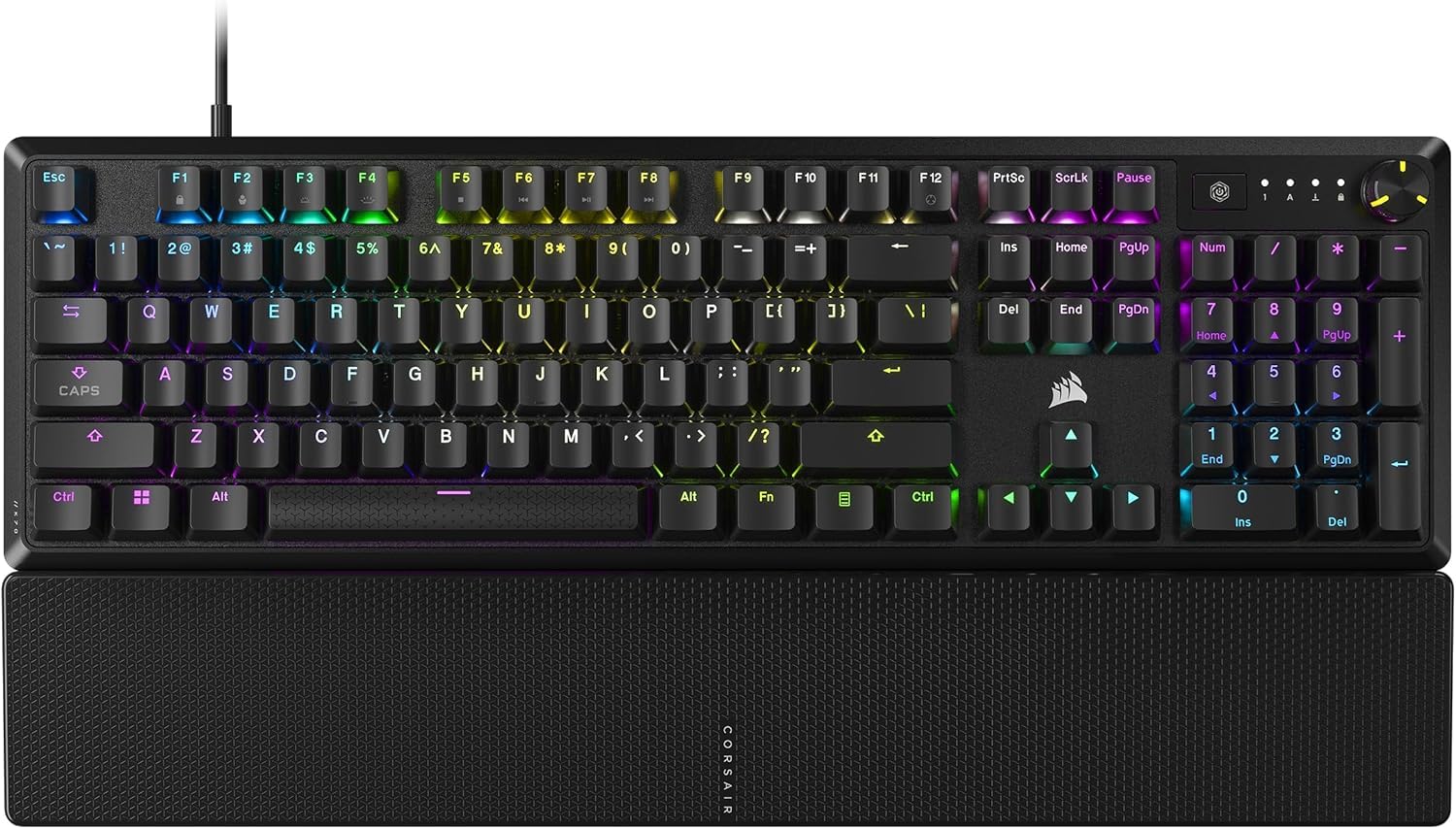
A trusted Corsair full-size with a magnetic palm rest that feels great from the start.
The K70 CORE brings the famous Corsair name to the budget tier, and what stands out immediately is the magnetic detachable soft-touch palm rest. It snaps on and off easily, giving you a comfortable place to rest your hands without any awkward clips, and it is one of the reasons buyers call the overall feel premium. The pre-lubricated MLX Red linear switches deliver smooth, responsive keystrokes, enhanced by two layers of sound dampening for a satisfying but quiet typing experience.
The build quality is solid: a sturdy aluminum top plate adds stability and style, while sturdy doubleshot ABS keycaps (molded in two layers so the letters never wear off) resist cracking under pressure. The multi-function rotary dial and programmable media button handle volume and more, fully customizable through Corsair’s iCUE software. Buyers praise the textured feel, vibrant RGB lighting, and the fact that once you set your lighting scheme, it saves to the board itself — so your settings follow the keyboard even to another PC.
This is the one pick where the honesty check matters most. The overall quality sentiment is mixed among owners, and the recurring pattern is reliability: a meaningful number report double-typing keystrokes and function keys failing after a few months of use, including one who saw repeated keystrokes after three months. A few also mention the RGB freezing and the dial stopping until you unplug and replug. The typing feel and RGB are genuinely loved, but this board is best bought with a warranty in mind, not as a set-and-forget purchase.
What it does well
- Magnetic palm rest is genuinely comfortable
- Aluminum top plate with a solid, stable build
- Lighting settings save directly to the board
Where it disappoints
- Reliability issues with double-typing and key failures
- RGB freezing requires unplug/replug to fix
Choose this if: you value the Corsair brand, the magnetic palm rest, and on-board lighting saves more than long-term durability.
Hold off if: you need a board that will survive heavy daily use without the risk of key failures.
Understanding the Specs
Polling Rate
This is how often your keyboard reports its state to your PC, measured in Hertz. A standard board is 1000Hz, which is once per millisecond. Boards like the Aula WIN60 HE and WIN68 HE hit 8000Hz, meaning they report eight times as often — that extra speed shows up as a more immediate response in fast-twitch shooters.
Hall Effect Magnetic Switches
Instead of physical metal contacts that wear out, hall-effect switches use magnets to detect the keypress. This lets you set a custom actuation point — the exact depth where the press registers — from as shallow as 0.02mm to deeper presses. That adjustability is a genuine competitive edge, and since there is no contact, the switches never wear out.
FAQ
What is the difference between a 60% and a 75% keyboard?
What does hot-swappable mean and why does it matter?
Are linear or tactile switches better for gaming?
Will a hall-effect keyboard make me a better FPS player?
How important is the polling rate for gaming?
Is a wireless gaming keyboard just as fast as a wired one?
What is a gasket mount and why does it change the feel?
Do I need the number pad for gaming?
What are PBT keycaps and are they worth it?
Final Thoughts: The Verdict
For most buyers, the best budget mechanical keyboard for gaming is the RK ROYAL KLUDGE R98 Pro because it pairs a creamy, quiet gasket-mount feel with the practicality of a full number pad at a price that beats expectations. If you prioritize competitive FPS speed above all else, grab the Aula WIN60 HE for its hall-effect rapid trigger and 8000Hz polling. And for those who want wireless freedom in a full-size frame, the EPOMAKER TH108 PRO is the one to reach for. The R98 Pro’s crowd-pleasing balance of 98 keys, hot-swap sockets, and that satisfying thock is what makes it the safest first buy in this entire tier.
How We Picked
We do not accept paid placement. Every pick is matched to a real buyer and a real use-case; we do not hands-on test units.
Sources & Methodology
Specifications: manufacturer listings and product documentation. Review insights: verified customer reviews, as of August 2026. Pricing: not shown on this page (it changes often); check the current price via the retailer link.
As an Amazon Associate, Gadgets Feed earns from qualifying purchases. This does not affect which products we feature.