
Our readers keep the lights on and my morning glass full of iced black tea. As an Amazon Associate, I earn from qualifying purchases.
Specs are compiled from manufacturer listings and verified buyer reviews and can change over time — please confirm the key details on the product page before buying.
When you shop for a child’s robot, the first fork in the road is simple: do you want a ready-to-play toy that entertains instantly, or a build-and-code kit that teaches problem-solving along the way? The best humanoid robots on Amazon fall into those two camps, so matching one to your kid’s age, patience, and interests is the real buying decision.
I’m Min — the founder and writer behind Gadgets Feed. This guide is built by comparing the manufacturers’ published specifications and the patterns across verified customer reviews, so you get each pick’s real strengths and trade-offs instead of marketing spin.
From 15-inch dancing companions that respond to voice commands to 600-piece coding kits, here is the focused shortlist of the best humanoid robot on amazon for the kids in your life.
Our Picks at a Glance


How To Choose The Best Humanoid Robot On Amazon
The first fork in the road is simple: does your child want a robot that performs on command right now, or one they have to build and program first? Both are rewarding, but they serve completely different play styles and age groups.
Match the control method to the child’s age
A younger child (ages 3-6) will get the most joy out of a robot they can steer with a simple remote, or one that responds to a touch on the head or a voice command. Older kids (ages 8+) are better matched with robots that use an app, where they can drag-and-drop coding blocks to make the robot move, dance, or react.
Decide between play value and learning value
Ready-to-play robots deliver instant fun — they sing, dance, tell jokes, and follow commands. Build-and-code kits ask for patience, but they teach electronics, mechanics, and programming logic. Ask yourself if you want a toy that entertains, or a project that educates over many sessions.
Check the battery and charging setup
Look at whether the robot charges via USB or needs disposable batteries. A built-in rechargeable battery saves money over time, but a robot that needs 4 AA batteries (plus a separate CR2025 for the remote) means you’ll be buying replacements regularly unless you have rechargeable AAs at home.
Quick Comparison
| Model | Best For | Control Method | Play Time | Assembly | Amazon |
|---|---|---|---|---|---|
| Makeblock mBot★ Best Overall | Ages 8-12 learning to code | App + Remote | 4 AA batteries | 15 minutes | Amazon |
| VATOS 15.4″ RC RobotBiggest Showman | Ages 3-8 ready-to-play fun | Remote + Voice + Gesture | 60 min per charge | None | Amazon |
| HBUDS Coin Bank RobotSmart Saver | Ages 6+ saving & dancing | Remote + Touch + Voice | 1-2 hours per charge | None | Amazon |
| HPROMOT RC Robot | Ages 6+ gesture control | Remote + Gesture + Voice | 3.7V 350 mAh battery | None | Amazon |
| Holyton 5088 Robot | Ages 6-12 action play | Remote + App + Gravity | Rechargeable | None | Amazon |
| okk Robot Toy | Ages 5-8 music & saving | Remote + Touch + Voice | Rechargeable | None | Amazon |
| Apitor Robot X | Ages 8+ building & coding | App + Remote | 3 AA batteries | 12 models, 600+ blocks | Amazon |
| Makeblock Codey Rocky | Ages 6-12 coding progression | App | Rechargeable | None | Amazon |
| ENERGIZE LAB Eilik | All ages desk companion | Touch + Inter-Robot | USB-C | None | Amazon |
In-Depth Reviews
1. Makeblock mBot STEM Coding Robot Kit
Our pick — over 4.5★ from 2,500+ verified ratings; the strongest balance of quality and price.
The build-it-yourself robot that turns playtime into a genuine first coding lesson.
The mBot wins the top spot because it delivers the full package: assembly, coding, and play. Its metal and plastic frame assembles in roughly 15 minutes with clear instructions, so a child gets the satisfaction of building their own machine before they ever program it. Owners call it easy and fun to put together, with good instructions guiding the way.
Kids start with Scratch-style block coding and can progress toward Arduino, using 3 free Makeblock apps and mBlock software to control the robot, play coding games, and program line-following or obstacle-avoidance behaviors. The open-source system connects to 100+ electronic modules and 500+ parts, and it’s compatible with LEGO parts, so the kit grows with your child’s skills.
The main trade-off is connectivity. While some owners say it works from the start, others report Bluetooth pairing issues, and a few note the robot stops responding to programming. Plan for a parent to help with the first app connection. Also note it needs 4 AA batteries for the robot and a CR2025 for the remote — none are included.
Build & Learning Value
- Assembles in about 15 minutes with clear instructions
- Progresses from Scratch to Arduino coding
- Compatible with 100+ modules and LEGO parts
Setup Friction
- Bluetooth connectivity can be finicky to establish
- Requires 4 AA batteries plus a CR2025, not included
Reach for this if: you want a robot that teaches real coding skills, not just remote-control driving, for a kid aged 8-12.
Look elsewhere if: your child wants instant play with zero assembly — this one asks for building patience first.
2. VATOS Remote Control Robot Extra Large 15.4″
A 15.4-inch performer that sings, dances, and follows voice commands for big-kid play.
This is the robot for the child who wants a show, not a project. Standing 15.4 inches tall, the VATOS robot commands attention with bright LED eyes that change expressions while it sings, dances, or tells stories. It responds to a 2.4GHz remote, gesture commands, and a new voice control mode that lets kids simply talk to the robot and hear it obey.
Beyond the spectacle, there’s a real programming hook. Kids can program the robot to repeat up to 30 commands, choosing from 22 kinds of functional remote instructions like sliding, walking, reciting poetry, and adjusting volume. Buyers report it’s well made and fun for all ages — one gave it to an 8-year-old for his birthday, and another’s 3-year-old great grandson loves it. It was even praised as a great way to get kids off their devices.
The battery is built-in and rechargeable via USB, giving about 60 minutes of play from a 2-hour charge. The one honest caveat is surface sensitivity: it works best on hard floors, not very well on carpet. Parents also noted the controller buttons aren’t numbered to match the manual’s command list, which means some manual-checking during first use.
Entertainment Value: The cuteness factor is the biggest draw — owners single it out more than any other feature, and the age range it delights spans toddlers to 8-year-olds.
Practical Note: Skip if your home is mostly carpeted, since the robot’s movement struggles there.
3. HBUDS Rechargeable RC Robot with Coin Bank
A dancing, talking robot that doubles as a piggy bank to teach saving habits.
The HBUDS robot stands out for its dual purpose. Beyond remote-controlled movement, dancing, and music, it has a built-in coin bank in its head — kids drop coins through a slot on top and retrieve them through a latching drawer inside.
Interaction is varied. A touch on the head triggers specific actions, and it responds to voice commands and hand claps. Kids can also record their own voices and hear the robot repeat them in 3 different voice styles, which owners say is a favorite feature. It charges via USB, providing 1-2 hours of working time per full charge, and the rechargeable battery is a point owners consistently appreciate.
The trade-offs are real but manageable. The remote control instructions come in another language, which can slow initial setup. A few owners mention the robot only works for about ten minutes before needing a pause, and the piggy bank drawer is disappointingly tiny. The playability is what wins people over, though — it’s engaging enough that some families buy two or three so the robots can play together.
Dual-Purpose Fun: Playability is the thing everyone raves about, and the savings lesson adds a layer most robots lack.
Caveat: Expect some head-scratching with the non-English manual, and keep expectations modest on the coin drawer size.
4. HPROMOT RC Robot with Voice & Gesture Control

A video-game-styled robot that answers to hand gestures, voice, and remote alike.
The HPROMOT robot gives kids three ways to drive it — remote, gesture sensing, and voice control — all running on a 2.4GHz wireless system. That variety means a child can switch from steering with the remote to waving a hand to make it turn, or just talk to it directly. Owners found it moves easily on wood or carpeted surfaces, which is a practical edge over robots that struggle on soft flooring.
It’s built for companionship as much as control. The robot supports dialogue, walking, music-playing, dancing, and storytelling, with a cartoon-inspired look borrowed from video-game styling. Constructed from premium ABS material, it’s described as 100% non-toxic and eco-friendly, tested for safety and durability. Inside runs a built-in 3.7V 350 mAh battery that charges via computers, power banks, or wall adapters — though the remote needs 2 AA batteries not included.
Quality is the most-praised aspect, and the playability follows closely. The main caveat is functionality, which gets mixed feedback — some units work great while others have issues. A parent noted his son wanted more from it, like having the robot call his name, so it’s best framed as a feature-packed toy rather than an AI companion. It’s particularly well suited to younger children who will enjoy the simpler controls.
Three-Way Control: The gesture and voice options keep play fresh, and construction quality earns consistent praise.
Keep Expectations Real: It’s a fun interactive toy, not a conversational partner — don’t expect the robot to hold a back-and-forth chat.
5. Holyton 5088 Smart Robot with Gripping Arm
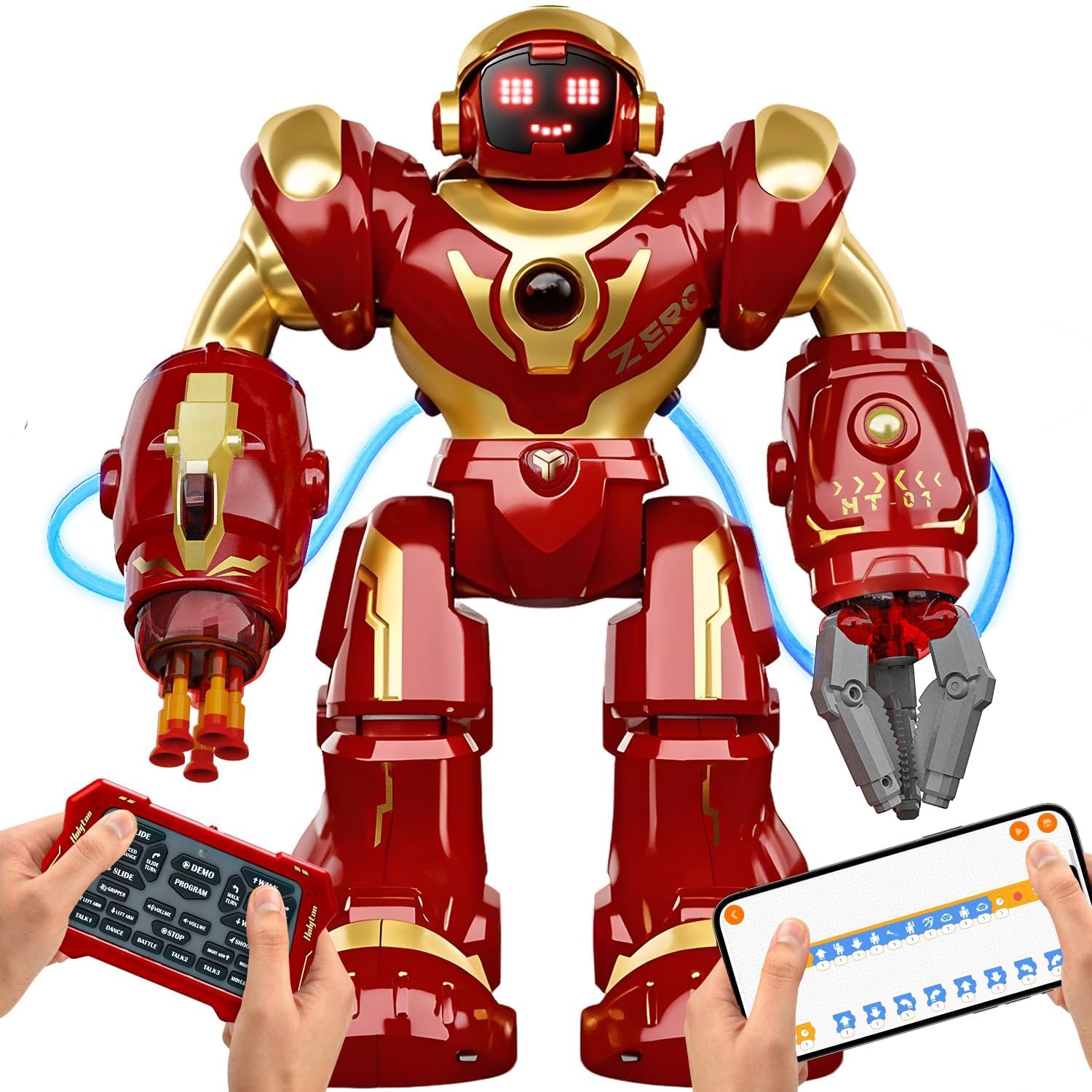
A 15.7-inch robot with a functional gripper and dart launcher for action-packed play.
The Holyton 5088 is the pick for kids who want their robot to do things, not just move. Standing 15.7 inches tall, it features a functional gripping arm that picks up lightweight objects and a safe foam dart launcher built into the arms. Owners note kids especially love the dart-shooting action, which keeps them entertained for long stretches.
Under the action is genuine STEM capability. It boasts 200+ programmable actions, app programming, and intelligent movement control, letting kids develop logic, sequencing, and problem-solving skills. You can drive it three ways — a 2.4GHz remote, a Bluetooth app, or gravity-sensing mode where tilting the controller steers the robot. Voice commands add another layer of interaction.
The build quality and functionality get mixed reviews, with some owners reporting leg issues or units that barely function. That said, the customer service is a standout — one owner who received a unit with a broken missile port praised the seller’s response as absolutely stellar, and support resolved the issue. It comes with a 30-day return policy and 90-day product warranty. Quality is the most-discussed positive, with fun close behind.
Action-Packed STEM: The gripper and dart launcher make it the most physically engaging robot here, with real coding depth behind the play.
Inspect on Arrival: Given mixed build reports, check the legs and launcher as soon as it arrives, and lean on the strong customer service if anything’s off.
6. okk Robot Toy with Touch & Sound Control

A cute, music-playing companion with touch and clap controls that keeps younger kids engaged.
The okk robot is the value play for families who want a friendly, engaging robot without a big budget. It responds to touches on the head, voice commands, and hand claps, and it can record voices for the robot to speak back. The cuteness is the defining trait — it’s the most-praised feature by a wide margin, and owners describe little ones being completely captivated, with one child not wanting to open any other gifts.
It sings and dances with pre-programmed music tracks, and a small attachable tray lets it deliver snacks and drinks like a tiny personal assistant. There’s also a coin bank in the head, adding a savings lesson similar to the HBUDS model. Owners like that it plays music and dances, and one noted it helps with hand-eye coordination as kids guide its movements.
The honest downsides: it runs on wheels, so it moves smoothly on hardwood but can be shaky on carpet, and the remote and charging both get mixed feedback. A grandparent noted the grandkids lost interest in about a week, so this is best for younger kids who enjoy simple, repetitive interactive play rather than older children seeking complex features.
Instant Charm: The coin bank, music, and touch controls make it a well-rounded first robot for ages 5-8.
Not for Big Kids: With limited depth, older children may outgrow it quickly — it’s squarely a younger-kid toy.
7. Apitor Robot X 12-in-1 Building Kit
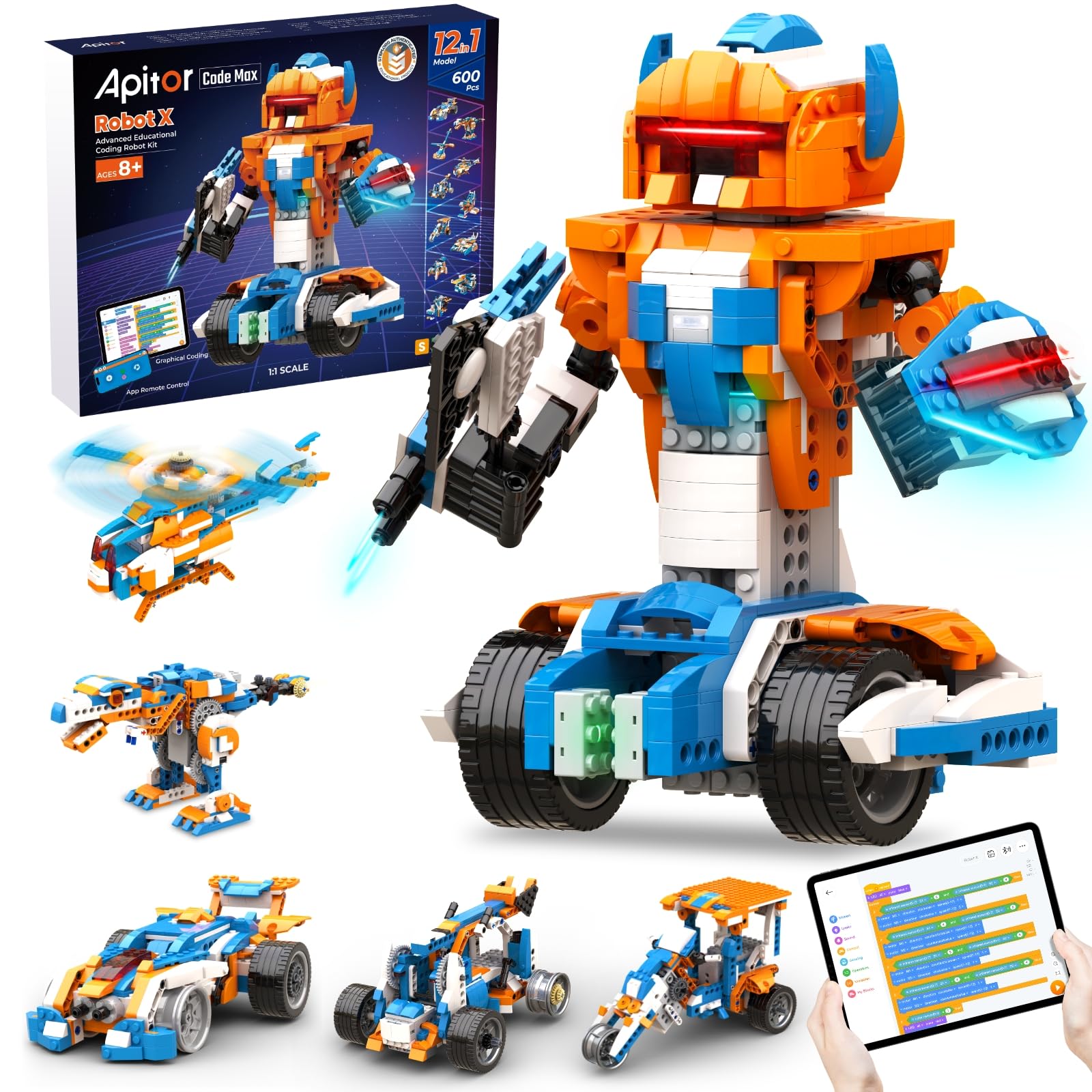
A 600-block robotics kit that rebuilds into 12 different motorized robots.
The Apitor Robot X is the deepest build experience on this list. With 600+ blocks, a control unit featuring 7 multicolor LED lights, 2 infrared sensors, 1 color sensor, and 3 motors, kids can construct and reconstruct 12 unique robots. It’s compatible with major building block brands, so kids can mash it together with existing collections to create custom motorized machines.
Programming happens through the free Apitor Kit app, which offers a drag-and-drop graphical coding interface. Kids can program their robots to follow lines, avoid obstacles, detect distance, and control the LED lights, learning real STEM logic as they go. The app also enables remote control with 360-degree rotating stunts. A 9-year-old assembled it with dad’s help over several hours, finding it challenging but rewarding, and an 8-year-old built a car mostly alone.
This is a project, not a toy straight from the box. Only one printed plan is included; the rest of the instructions live in the app, so a phone or tablet is required. It runs on 3 AA batteries that aren’t included. The reviews are enthusiastic about the hours of concentration it provides, and one family bought a second unit because the first was so loved. It’s slower and more methodical than a play robot, but the educational payoff is substantial.
Maximum STEM Depth: The 12-in-1 rebuildability and sensor-equipped control unit make this the most comprehensive learning kit here.
Heavy Parental Role: Expect to help with assembly early on — it’s challenging enough that a child rarely builds alone at first.
8. Makeblock Codey Rocky Interactive Robot
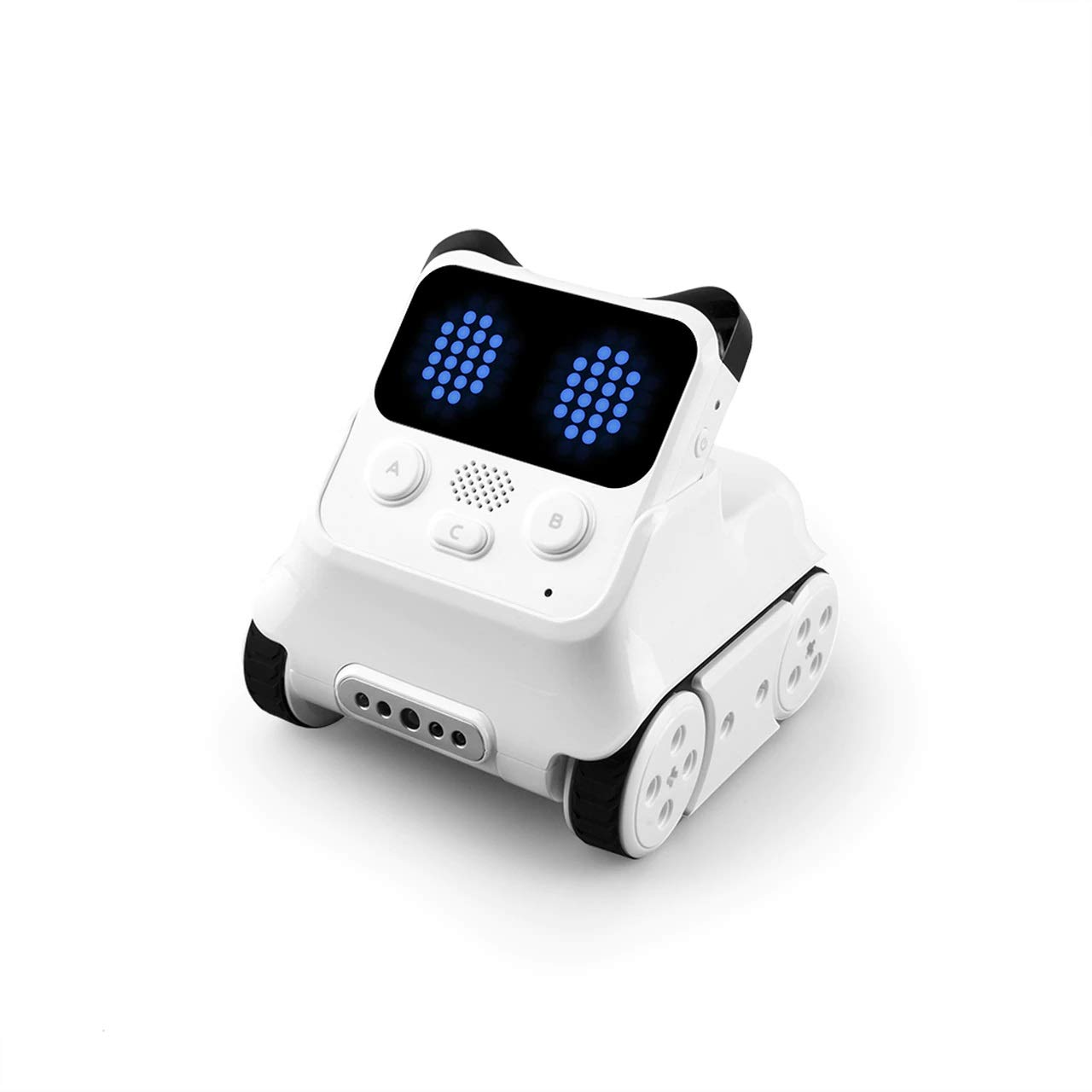
An expressive panda-shaped robot that grows from beginner blocks to advanced Python coding.
Codey Rocky is the most emotionally expressive robot here. In an adorable panda shape, it uses rich sound effects and facial expressions like smiling or anger to nurture emotional development, responding to touch and interaction like a living pet. It’s ready to play straight from the start, so younger kids can enjoy remote control and the draw-the-face feature before they ever write a line of code.
The real differentiator is the coding curriculum. Kids start with Scratch block-based programming and can progress to advanced Python, working through gamified tasks and CSTA-aligned lessons. One 9-year-old loves it and quickly made it move using Python, while another 8-year-old uses it daily. The app splits into Drive mode (joystick and face patterns), Draw & Run mode (draw a path and add effects), and Code mode, making progression intuitive.
The catch is setup friction. The firmware needs an update via PC from the website before everything works smoothly, and Bluetooth connectivity gets mixed reviews. Without engaging with the coding, one owner noted it’s essentially just a remote-control vehicle with emotions and tricks. It’s built with impact-resistant materials for classroom durability and carries a 1-year warranty against manufacturer defects. The enjoyment factor is the most-praised aspect.
Smartest Learning Curve: The Scratch-to-Python progression with expressive feedback makes it ideal for a child genuinely interested in coding.
Plan for Setup Time: Budget an evening for the firmware update and app pairing before the fun fully open up.
9. ENERGIZE LAB Eilik Touch Robot Pets (Blue + Pink)

An expressive desk pet whose personality shines brightest when two Eiliks meet.
The Eilik is a different kind of robot — it’s a companion first and a toy second. At just 8 ounces, it sits on a desk and reacts to touch on its head, belly, or back, each triggering different emotions. It has idle animations and mini-games, and it’s designed for everyone from kids to adults who want a little life on their workspace. Owners describe it bringing smiles to their workday.
The magic multiplies with a second Eilik. When two connect, they chat, play, and even quarrel, and a group of them will throw a party. That’s why the blue + pink combination makes sense as a bundle. With frequent firmware updates adding new emotions, functions, and games, it keeps evolving. It charges via USB-C and requires no app or programming — power on and play.
Buyers consistently praise the build quality and entertainment value, but value for money is a real concern — a few owners call it an expensive purchase, and one reviewer received two blue units instead of the blue and pink they ordered. Place it on a desk or shelf where it can be touched and observed, not as a rough-and-tumble floor toy. It suits someone who enjoys quirky, interactive tech, but skip it if you want a durable toy for heavy play.
Unique Personality: The emotion-driven interactions and robot-to-robot play make it the most novel robot here, and it works instantly with no setup.
Think About Budget: It’s the premium pick of the list — buy it for the desk-companion magic, not for action-packed play.
Understanding the Specs
Control Methods
The way a robot responds to commands is the single biggest factor for age fit. A simple 2.4GHz remote is easiest for young kids — just push a button and the robot moves. Gesture control lets a child wave a hand to steer, which feels magical but takes slightly more coordination. Voice control lets kids talk to the robot, which is intuitive but can be inconsistent. App-based control is the most powerful, open up coding and programming, but it requires a phone or tablet and a bit more patience to set up.
Programmability & STEM Value
Not all robots teach equally. A basic robot just moves and plays music. A programmable robot lets a child record a sequence of commands that it repeats, building logic and sequencing skills. Advanced coding robots use drag-and-drop block programming (like Scratch) and can even progress to text-based languages like Python. If education is your goal, look for a robot that offers app coding with step-by-step projects rather than one that only responds to a remote.
FAQ
What is the difference between a ready-to-play robot and a build-it-yourself robot kit?
Which robot is best for a 4-year-old?
Do these robots need batteries, or do they charge?
How long does the battery last on these robots?
Can my child really learn coding from these robots?
Do these robots work on carpet?
Which robot is best for a 10- or 11-year-old who loves building?
Are these robots safe for toddlers?
Final Thoughts: The Verdict
For most families, the humanoid robot on amazon winner is the Makeblock mBot because it blends a 15-minute build with real coding education that grows with your child. If you want a ready-to-play entertainer for younger kids, grab the VATOS for its voice control and 30-command programming. And for the child who loves action and building, the Holyton 5088 with its gripping arm and dart launcher, or the 12-in-1 Apitor Robot X, are the ones to reach for.
How We Picked
We do not accept paid placement. Every pick is matched to a real buyer and a real use-case; we do not hands-on test units.
Sources & Methodology
Specifications: manufacturer listings and product documentation. Review insights: verified customer reviews, as of August 2026. Pricing: not shown on this page (it changes often); check the current price via the retailer link.
As an Amazon Associate, Gadgets Feed earns from qualifying purchases. This does not affect which products we feature.