
Our readers keep the lights on and my morning glass full of iced black tea. As an Amazon Associate, I earn from qualifying purchases.
Specs are compiled from manufacturer listings and verified buyer reviews and can change over time — please confirm the key details on the product page before buying.
You want to see your speed, engine temperature, or RPM without glancing down at the dash. An aftermarket automotive HUD (head-up display, a small screen that projects data into your line of sight) plugs into your car’s diagnostic port (the OBD2 socket under the dash) and shows that info right on your windshield. Your choice hinges on your car’s OBD2 compatibility and if you need engine vitals or just GPS speed.
I’m Min — the founder and writer behind Gadgets Feed. This guide is built by comparing the manufacturers’ published specifications and the patterns across verified customer reviews, so you get each pick’s real strengths and trade-offs instead of marketing spin.
Each pick below fills a specific dashboard gap, from missing coolant gauges to laggy speed readouts. This guide breaks down the aftermarket automotive hud options that actually deliver on their promises.
Quick Picks
- MAIMEIMI OBD2 Speedometer — Best Overall
- KONNWEI KW206 — Diagnostic Powerhouse
- wiiyii P8 Gauge — Compact Data Hub
- CAMECHO F16 HUD — Bright Smart Gauge
- Arestech 5.5″ A8 HUD — Large Display
- wiiyii A8 HUD — High-Res Option
- X AUTOHAUX Mini HUD — Budget Champion
How To Choose The Best Aftermarket Automotive HUD
Before you pick, you need to know what your car can support. A HUD (Head-Up Display) is a small screen that projects or shows driving data by plugging into your car’s OBD2 port, the same plug mechanics use for diagnostics. Most cars made after 1996 have this port, but the data it shares varies wildly between models.
Check Your Car’s OBD2 Compatibility First
Not every HUD works with every car. While many units say “plug and play,” a lot of specific brands are simply incompatible. For example, several popular HUDs on the market outright refuse to work with Dodge, Jeep, Chrysler, French, or Italian models. Some also fail on Suzuki, Mazda6, hybrids, diesel engines, trucks, and RVs. Always cross-check your vehicle’s make and model against the HUD’s listed exclusions before buying.
Decide Between OBD2 and GPS Mode
If your car is from 2008 or newer, OBD2 mode is the way to go because it reads richer data like water temperature, RPM, and fault codes. For older cars or those with quirky computers, GPS mode is a lifesaver—it calculates speed from satellites, so it works with any vehicle. The trade-off is that GPS mode only shows speed, distance, and time, not engine vitals. A unit with both systems gives you the most flexibility.
Evaluate Screen Size and Brightness
Screen size dictates how much data you can see at a glance. Small 2.2-inch displays are compact and easy to mount, but larger 5.5-inch screens give you more space for multiple readouts. Look for automatic brightness adjustment, which is critical for keeping the display readable in bright sunlight without blinding you at night.
Quick Comparison
| Model | Best For | Display Size | Navigation Mode | Weight | Amazon |
|---|---|---|---|---|---|
| MAIMEIMI OBD2 Speedometer | Dual-system flexibility | Compact | OBD2 + GPS | 5.6 oz | Amazon |
| wiiyii P8 Gauge | Boost & temp monitoring | 2.4″ | OBD2 + GPS | 125 g | Amazon |
| X AUTOHAUX Mini HUD | Value compact install | 2.2″ | OBD2 | — | Amazon |
| Arestech 5.5″ A8 HUD | Large windshield projection | 5.5″ | OBD2 | 259.99 g | Amazon |
| wiiyii A8 HUD | High-res 5.5″ display | 5.5″ | OBD2 | 0.2 kg | Amazon |
| CAMECHO F16 HUD | Smart gauge with GPS | 3.5″ | OBD2 + GPS | 0.26 kg | Amazon |
| KONNWEI KW206 | Diagnostics & live data | 3.5″ | OBD2 | 275 g | Amazon |
In‑Depth Reviews
1. MAIMEIMI OBD2 Speedometer

The dual-system unit that keeps your engine guessing game over.
The headline feature here is the pairing of OBD2 and GPS in one unit. That means you can pull rich engine data like water temperature, oil temperature, and voltage from the port, or switch to GPS mode, which uses satellites and works with absolutely any vehicle. It also gives you altitude and travel direction readouts.
With 10 different data display modes, you can organize the screen to show exactly what you care about, from RPM to fuel consumption. The stand base lets the 5.6-ounce unit rotate in all directions, so you can angle it flat on the dashboard or stick it to the windshield.
Its live temperature and fault-code alerts give you an early warning before breakdowns. As buyers report, it has “saved me from overheating twice” by showing live temperature, and it can also scan for fault codes to give you a heads-up on trouble before it strands you.
What Owners Love
- Live water temp and voltage monitoring for confidence
- GPS mode works with any car, even pre-2008 models
- 10 switchable display interfaces for custom layouts
Consider This
- Noticeable lag when processing GPS data
- Not compatible with Dodge, Jeep, Chrysler, French, Italian, or Suzuki models
Reach for this if: you want the safety net of both OBD2 engine data and universal GPS speed in one compact 5.6-ounce package.
Look elsewhere if: you drive one of the incompatible brands like Dodge or Jeep.
2. KONNWEI KW206

A 3.5-inch gauge that doubles as a code reader for DIYers.
It’s the pick for DIYers who want real-time engine data at a glance. The KW206 3.5-inch color screen displays hundreds of real-time engine parameters, and owners praise the customization, noting the four corners can display 38 different PIDs. You can have coolant temp in one corner, voltage in another, and set alarms for each.
Its built-in scanner reads and clears fault codes, saving you a mechanic trip. You can read engine fault codes and even clear the check engine light, potentially saving you a trip to the mechanic. It also includes a 0-100 speed-up test for some fun.
Compatibility is broad — it works on all 2003 or newer OBDII certified gas and diesel cars, including J1850 and CAN protocol vehicles. While the instruction manual gets slammed for being confusing, the on-screen setup guides you through. The quality is solid, with one owner noting it reads codes on a 2011 Crown Vic Interceptor flawlessly.
The Big Win
- Reads and clears engine fault codes
- 4 customizable corners with 38 PID options
- Auto sleep mode prevents battery drain
The Small Gripes
- Confusing instruction manual
- Some owners mention finicky sleep mode
For the tinkerer: this is the only pick that reads and clears codes, making it a true two-in-one tool.
Thinks twice if: you want a set-and-forget display, as the learning curve is steeper here.
3. wiiyii P8 Gauge

The tiny screen that finds your boost, temps, and more.
If you want more than just speed, this 2.4-inch LED display pulls raw OBD (on-board diagnostics, the car’s self-monitoring system) data to show oil temperature, coolant temperature, voltage, intake pressure, and in some cases, boost. Tuned AMG owners use it to watch turbo pressure without installing a physical gauge pod.
It offers 8 switchable display interfaces and a dual OBD+GPS system. The 125-gram weight makes mounting on the A-pillar or dashboard easy. Owners highlight the speed accuracy, noting it can be adjusted to within ±1 mph after a quick calibration.
There is a catch though: reliability gets the most mentions, and some units last only 3 months before the display goes dark, with the manufacturer refusing to help. It is a feature-rich unit, but treat the warranty as a gamble, not a guarantee.
Fan favorite for: showing boost and intake pressure that most HUDs ignore, though the plastic build feels basic.
Heads up: reliability is the recurring gripe, with a few units failing around the 3-month mark.
Pick this for: boost monitoring and raw OBD data on a tuned or modified car.
skip it if: you need guaranteed long-term reliability or solid warranty support.
4. CAMECHO F16 HUD
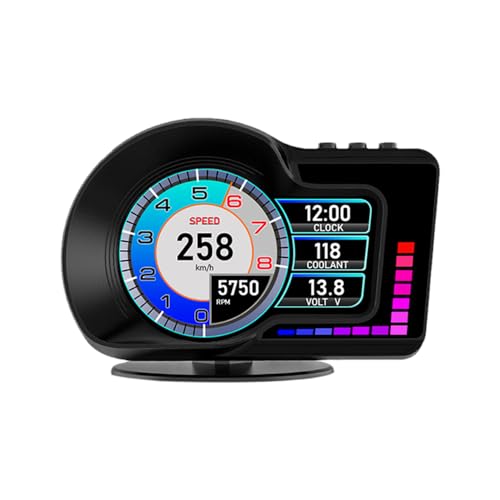
A 3.5-inch IPS (in-plane switching, a screen type with wide viewing angles) display that stays readable in bright sunlight.
Its auto-brightness on a 3.5-inch IPS panel keeps readouts clear in any light. Customers note good visibility in any light, which is a common failure point for other HUDs. The dual OBD2 and GPS system means you get engine vitals when your car supports it, with a full GPS fallback for cars that don’t.
Beyond standard speed and temp, it shows altitude, latitude, and longitude via GPS, plus acceleration and brake tests. It also supports speed alarms, high water temperature alarms, and fatigue driving reminders. The rotating bracket lets you position it perfectly on the dash or windshield.
The trade-off is the 0.26 kg weight feels a bit dense, and compatibility is strictly for vehicles after 2008 in OBD2 mode. One owner successfully uses it on a 2014 Lexus for water temp, while another had one shut down after 20 seconds, so quality control is a real factor to weigh.
Glare killer: the auto-brightness IPS panel delivers clear visibility whether it’s high noon or midnight, a rarity at this level.
Fit check: requires a 2008+ car for OBD2 data; a few units arrive with power issues.
Best for: drivers who want a crisp, bright screen that handles sun glare well.
Not for: anyone with a pre-2008 car expecting full OBD2 functionality.
5. Arestech 5.5″ A8 HUD

A big 5.5-inch projector that floats your data on the windshield.
This unit takes the classic HUD approach, projecting a colorful 5.5-inch readout directly onto your windshield. That means speed, RPM, water temperature, and voltage appear to hover a few feet ahead of you, keeping your eyes on the road. The included anti-ghosting reflective film minimizes the double-image effect that plagues projector-style HUDs.
It reads pre-calibrated in MPH and owners call the setup genuinely simple. The auto power-on/off linked to your ignition helps protect the battery. While it is compatible with OBD II / EUOBD gasoline vehicles from 2004+, the same old exclusions apply: Dodge, Jeep, Mazda, Suzuki, and French/Italian vehicles are a no-go.
The honest downside is that accuracy takes work. Reviewers point out it reads 5 mph fast at 70 mph until you calibrate it manually. Heat is also a known enemy — a few units died within two weeks in the sun, so mounting placement matters more here than on other picks.
Projection Perks
- Large 5.5-inch projected display is easy to read
- Auto power on/off protects your battery
- Pre-calibrated in MPH for quick setup
Watch For
- Manual calibration required for speed accuracy
- Heat sensitivity leads to early failure for some
Choose for: a full-windshield projection that puts your data right in your line of sight, so you never look away from the road.
Be cautious if: you park in direct sun daily — heat is the leading cause of early unit failure.
6. wiiyii A8 HUD
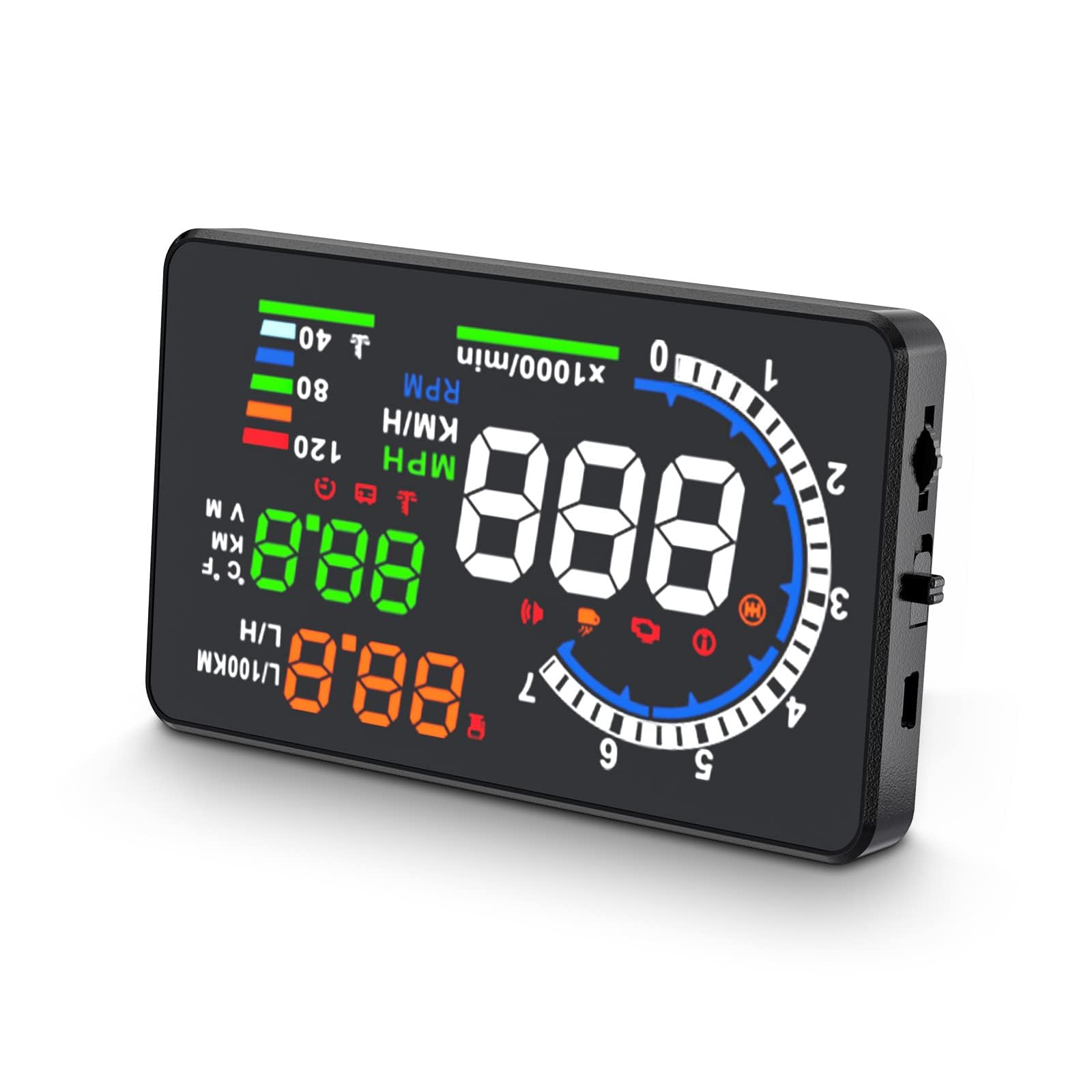
A high-resolution 5.5-inch screen with built-in fault detection.
It’s the P8’s larger sibling, trading GPS for a sharper 800×480 5.5-inch screen. The higher resolution makes text and numbers crisper than on the standard 320×240 screens, which helps when you’re scanning for details at a glance. It is powered directly by the OBD-II/EOBD port and shows speed, water temperature, voltage, and distance.
It reads and clears fault codes, plus triggers failure alarms for early warnings. That gives you a taste of diagnostics without buying a separate scanner. It is only for OBDII and EOBD vehicles, so no GPS mode for older cars.
Owners are split on it. Setup is consistently called easy, and daytime visibility is praised. However, the speed indicator is the most-discussed negative, with some reporting it doesn’t show speed at all. One owner found it worked perfectly in a 2017 Nissan Frontier but would not power on in a new 2026 Crown Signia, showing sensitivity to vehicle power behavior.
Screen Quality
- Crisp 800×480 native resolution for sharp text
- Reads and clears engine fault codes
- Simple plug-and-play setup
Speed Issues
- Speed indicator has the most negative mentions
- Brightness varies, sometimes too strong at night
Worth it for: the sharpest text of any display here, thanks to the 800×480 panel.
Test carefully: it may not power on correctly with every vehicle’s ignition system.
7. X AUTOHAUX Mini HUD

A tiny 2.2-inch TFT that fills an analog gauge gap cheaply.
If your car’s dashboard is missing a crucial gauge, like the coolant temperature readout, this mini HUD is the most affordable fix. It uses a 2.2-inch TFT LCD screen that doesn’t require any reflective film on your windshield. Owners with a 2014 Jetta TDI bought it specifically because the car lacked a coolant gauge, and it delivered exactly that.
The screen color can be adjusted, and it has a built-in light sensor for automatic brightness. It reads data from the ECU, showing voltage, water temperature, speed, and fuel consumption, plus alarms for over-speed, engine temperature, and battery voltage. It also reads fault codes.
As for negatives, one owner’s unit kept rebooting itself, pointing to a quality-control variance. Another mentioned the digital speed numbers shift from white to yellow to orange past 60 mph and 70 mph, which is distracting and can’t be turned off. For the price, the value is undeniable, but it demands a bit of luck on the QC front.
Value score: the cheapest way to get a live coolant temp readout, especially for European models like VW and Jetta.
Quirks to know: speed digits change color at 60 mph and 70 mph with no way to disable it.
Great for: budget buyers who just need one critical missing gauge, like coolant temp.
Accept the risk: occasional units arrive defective or reboot constantly.
Understanding the Specs
OBD2 vs GPS Mode
OBD2 mode plugs into your car’s diagnostic port and reads data straight from the engine computer, giving you rich info like water temperature, RPM, and voltage. The catch is that compatibility varies by brand, and some cars simply won’t share the data. GPS mode relies on satellite signals to calculate speed, so it works in any vehicle, but it only shows speed, distance, and time — no engine vitals.
Display Resolution
This is how sharp the numbers on the screen appear. You will see lower resolutions like 320×240 on compact budget units, which look fine for simple speed readouts. Higher-end units like the 800×480 screen offer noticeably sharper text, which makes scanning multiple small data points like voltage and temperature easier on the eyes.
FAQ
Will a HUD work with my 2008 or older car?
Why does my HUD show a speed that is 5 mph fast?
Is it safe to leave a HUD plugged in overnight?
Why does my HUD not work with Dodge, Jeep, or Chrysler?
Can a HUD read and clear check engine codes?
What does GPS mode show that OBD2 mode does not?
How long does it take for a HUD to lock onto a GPS signal?
Why is the display unreadable in direct sunlight?
Final Thoughts: The Verdict
The aftermarket automotive hud winner is the MAIMEIMI OBD2 Speedometer, because its OBD2 and GPS dual system works with the widest range of cars while still showing critical engine vitals. If you want built-in diagnostics to read and clear fault codes, the KONNWEI KW206 is the tool for you. And for the sharpest, most rich display, the wiiyii A8 gets your data off the dash and into your line of sight.
How We Picked
We do not accept paid placement. Every pick is matched to a real buyer and a real use-case; we do not hands-on test units.
Sources & Methodology
Specifications: manufacturer listings and product documentation. Review insights: verified customer reviews, as of August 2026. Pricing: not shown on this page (it changes often); check the current price via the retailer link.
As an Amazon Associate, Gadgets Feed earns from qualifying purchases. This does not affect which products we feature.