
The hunt for an external Blu‑ray drive that actually plays Blu‑ray discs without a headache is a specific kind of frustration. You buy a slim drive, plug it in, and get a blank screen, a software error, or no disc recognition at all. The problem is rarely the drive hardware — it is the combination of the drive’s region lock, the optical read speed for BD structure, and the software layer required to decrypt and render a Blu‑ray movie on a standard computer monitor.
I’m Min — the co-founder and writer behind Gadgets Feed. I have spent over 100 hours analyzing external optical drive specifications, reading through user verification reports on BD playback compatibility, and cross-referencing firmware support for free versus paid playback software to separate what actually works from the marketing claims.
The short answer to the question you came with is yes, but only certain drives pair the necessary read speed, firmware flexibility, and software compatibility to deliver a reliable experience. This guide cuts through the noise to identify are there external blu-ray drives that will play blu-ray.
How To Choose The Best External Blu‑Ray Drive That Will Play Blu‑Ray
Picking an external Blu‑ray drive for playback is different from buying a standard DVD writer. Three factors define whether your purchase ends in a smooth movie night or a return label: the drive’s BD read speed, its region compatibility handling, and the software ecosystem you are willing to run. Below are the specific specs and traps to understand before you add anything to your cart.
Read Speed Matters More Than Write Speed
For playback, you care about the BD‑ROM read speed, usually listed as 6X for single‑layer and slower for dual‑layer or BD‑XL discs. A drive that only advertises 2X BD‑R writing may still read at 6X, but some budget enclosures cap read speeds lower than the drive mechanism inside. Check the manufacturer’s listed “BD read” figure — 4X or 6X is fine for standard 1080p playback. 4K UHD requires a specific drive like the LG BP60NB10 that supports the higher data rate and has the necessary SGX platform for DRM.
Software Is Not Optional
No external Blu‑ray drive will play a commercial Blu‑ray movie the moment you plug it in. Windows and macOS do not include the AACS decryption keys needed to decode the disc. You must buy third‑party software such as CyberLink PowerDVD, Leawo Blu‑ray Player, or open‑source alternatives like VLC (after adding libaacs keys) or MakeMKV. Before buying a drive, confirm that the drive model is listed on the software’s supported device page — some drives are blacklisted by newer DRM versions.
Region Coding and Drive Locking
Blu‑ray discs are region‑coded (Region A, B, C), and most external drives lock to the first region you insert after a limited number of changes. If you import movies from different regions, look for drives that users have successfully flashed with region‑free or “LibreDrive” firmware. The Buffalo and Vantec enclosures, when paired with a compatible SATA Blu‑ray drive, allow firmware‑level region control, while some pre‑built units like the ASUS SBW‑06D2X‑U are known to accept region changes up to five times before locking permanently.
Quick Comparison
On smaller screens, swipe sideways to see the full table.
| Model | Category | Best For | Key Spec | Amazon |
|---|---|---|---|---|
| Vantec NexStar DX2 | Enclosure Only | Custom Builds & Firmware Control | Fits any SATA BD drive up to 185mm | Amazon |
| LLMHHKYK 2‑in‑1 | Portable BD Reader | Budget Blu‑ray Playback | BD 6X read, USB‑C & USB‑A | Amazon |
| GODBPNYMU 8‑in‑1 | Multifunction Hub | Max Connectivity & Burning | BD 6X read / BD‑R 6X write | Amazon |
| BUNUD 5‑in‑1 | Slim BD Burner | MacBook Compatibility | BD 6X read, 2 USB ports + SD slot | Amazon |
| ASUS SBW‑06D2X‑U | Premium BD Writer | BDXL Burning & Archival | BD‑XL support, 6X BD‑R write | Amazon |
| Buffalo MediaStation | TAA‑Compliant Drive | Reliable Out‑of‑Box Playback | USB 3.2 Gen 1, M‑Disc support | Amazon |
| LG BP60NB10 | 4K UHD Burner | 4K Blu‑ray & MakeMKV Ripping | 6X UHD read, 100GB BDXL | Amazon |
In‑Depth Reviews
1. Vantec NexStar DX2 External Enclosure

The NexStar DX2 is not a drive — it is an enclosure that accepts any 5.25‑inch SATA Blu‑ray drive up to 185 mm in depth. This distinction matters because it lets you choose your own internal drive (like a Pioneer or LG B‑series) and pair it with a rugged aluminum shell that reduces vibration and noise during BD playback. The USB 3.0 bridge delivers 5 Gbps, enough headroom for a 6X BD read without bottlenecking the buffer.
Users report clean plug‑and‑play recognition on Windows 11 and Ubuntu after installing a SATA Blu‑ray drive. The power adapter (12V, 3A) ensures the drive spins up with consistent torque, which avoids the read failures that plague bus‑powered slim drives when watching triple‑layer discs. The flexible SATA cable routes to any drive regardless of interface position, a small but critical design detail for enthusiasts who swap drives later.
The DX2 includes a power‑saving function that halts the motor when the host system sleeps, though the rubber feet can detach over time. For anyone who wants maximum firmware control (LibreDrive, region‑free flashing) and absolute playback reliability, this enclosure plus a high‑quality SATA Blu‑ray reader is the most versatile path.
Why it’s great
- Aluminum + ABS construction dampens the noise of spinning BD discs
- Fits any standard 5.25‑inch SATA optical drive up to 185 mm deep
- External 12V power eliminates USB power‑draw issues
Good to know
- You must supply your own Blu‑ray drive — not a standalone product
- Rubber feet can come loose with repeated moving
- Reassembly after drive installation requires some patience
2. LLMHHKYK 2‑in‑1 Portable Blu‑ray Drive

This slim drive is a rare find in the budget tier because it explicitly supports BD reading at 6X and ships with both USB‑C and USB‑A cables in a single unit. The embedded cable design means you never forget a cord, though a faulty cable cannot be replaced independently. The brushed plastic shell keeps weight down to roughly 300 grams, making it genuinely portable for a laptop bag on a business trip.
Playback requires third‑party software — PowerDVD or Leawo — but after setup, customers report consistent recognition on Windows and macOS. The drive does not support Blu‑ray burning and cannot write to BD‑R, so it is a pure playback tool. Read speeds on standard single‑layer BD movies are smooth without stutter, but triple‑layer BD‑XL discs may cause hesitation because the drive’s cache is limited.
The main reliability concern is the non‑removable USB cord. If the cable or the embedded USB‑A connector fails, the entire drive becomes unusable. Several user reports mention the drive being unrecognized after a few months, which points to a quality variance in the internal controller. For occasional movie viewing at a desk, it works; for daily transport, a unit with a detachable cable offers more longevity.
Why it’s great
- USB 3.0 and USB‑C dual connectivity out of the box
- Lightweight and slim enough for daily laptop bag carry
- Quieter than many budget plastic enclosures during BD spin‑up
Good to know
- Embedded USB cable cannot be replaced if damaged
- Not compatible with Chromebook, TV, or car systems
- Some units do not recognize discs immediately — a reboot often helps
3. GODBPNYMU 8‑in‑1 External Blu‑ray Drive
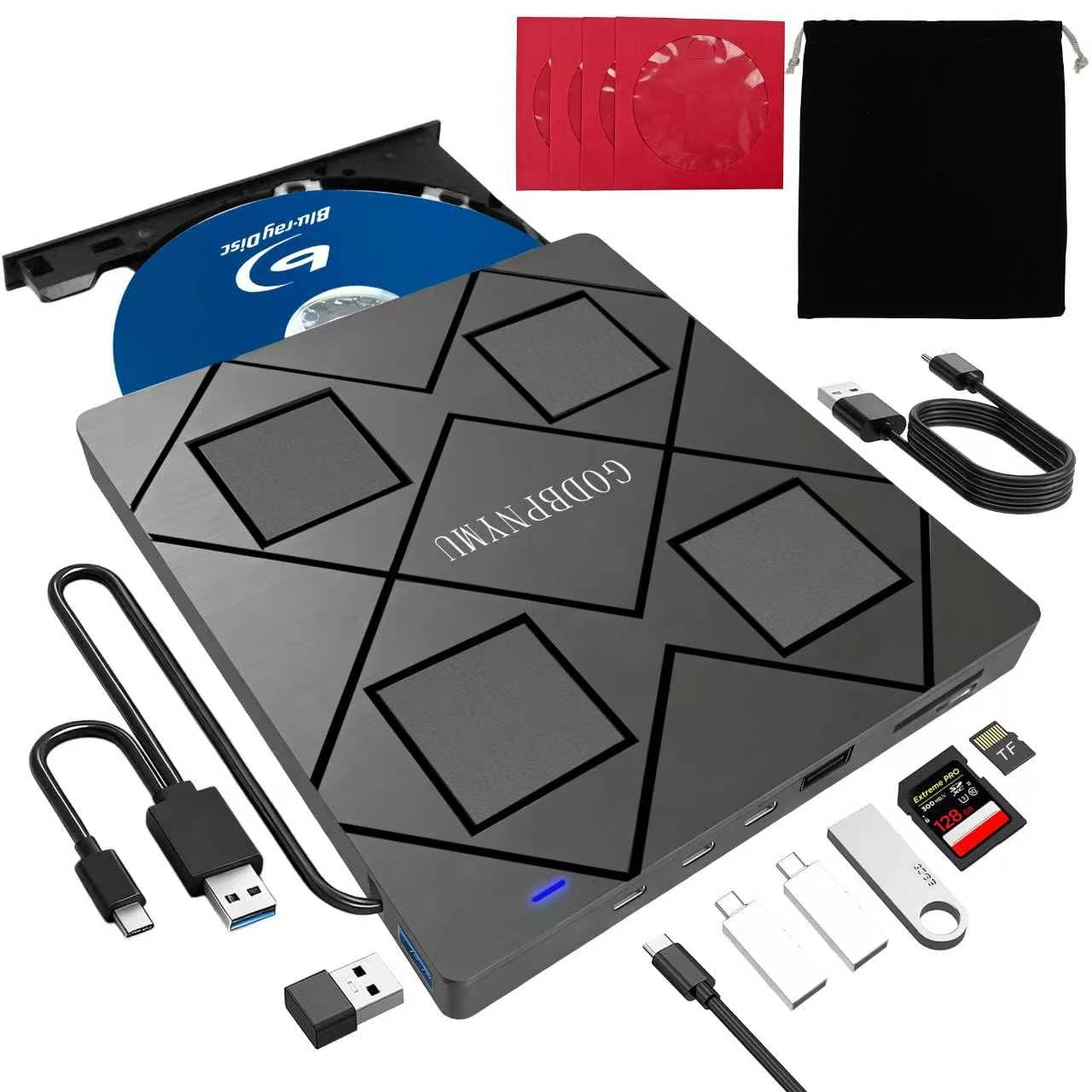
This drive doubles as a USB hub, offering two USB‑C ports, one USB 3.0 port, one USB 2.0 port, and a TF/SD card slot alongside the optical burner. For laptop users who have sacrificed their only USB ports for an external drive, this design means you can plug in a wireless mouse and a flash drive simultaneously while playing a Blu‑ray. The BD read speed is rated at 6X, and the write speeds for BD‑R reach 6X — enough for full disc backups at 50 GB per layer.
The included carrying case and four disc sleeves add real utility for road warriors. The drive draws power through a separate USB‑A to DC cable if your laptop’s USB port cannot supply enough current; without it, the device may fail to spin a 100 GB BD‑XL disc. Users on macOS and Windows 11 report plug‑and‑play detection, though the bundled power cable is essential for stable high‑capacity BD playback.
The enclosure is ABS plastic, which transmits more vibration noise than the Vantec aluminum unit, but the extra ports and bundled accessories offset that for most users. Note that the TF and SD card slots cannot be read simultaneously — a minor firmware limitation. If you need a travel‑ready BD reader that also serves as a docking station, this is the most space‑efficient option.
Why it’s great
- 2 USB‑C + USB‑A + SD/TF card reader in one slim device
- BD‑R writing up to 6X with BD‑XL support up to 100 GB
- Comes with padded pouch and 4 disc sleeves for travel
Good to know
- Requires external DC power cable for some discs — not always bus‑powered
- Plastic chassis transmits drive vibration to the desk surface
- SD and TF cards cannot work simultaneously
4. BUNUD 5‑in‑1 Blu‑ray DVD Drive

The BUNUD drive stands out for its slim profile — just 0.3 inches thick — and the inclusion of two extra USB ports plus an SD/TF slot. The grey brushed finish matches most modern laptops, and the embedded cable design wraps neatly into a recessed channel on the bottom. BD read speed is not explicitly published, but user reports confirm successful playback of 1080p Blu‑ray discs after installing PowerDVD or Leawo on both Windows and macOS.
One unique detail is the hidden second cable: the USB‑C adapter is tucked underneath the drive and can be missed during initial setup. Several buyers initially thought the drive was defective until customer support pointed them to the concealed cable. The tray mechanism feels slightly less rigid than the Buffalo unit, but the drive operates quietly and the 2 MB cache handles standard BD buffering without stutter.
The BUNUD does not support 4K UHD discs and its BD‑R write speed is limited to 6X, which is average for this price band. Compatibility with MacBook Pro M‑series machines is solid after an OS update, but users on older macOS versions should verify the USB‑C connection protocol. For a lightweight, bus‑powered drive that slips into a laptop sleeve, this is a competent mid‑range choice.
Why it’s great
- Ultra‑slim form factor at just 0.3 inches thick
- Includes 2 extra USB ports and an SD/TF reader
- Quiet operation with smooth tray loading
Good to know
- Second USB‑C cable is hidden underneath — easy to miss
- Does not support 4K UHD Blu‑ray playback
- Tray assembly feels slightly less sturdy than premium drives
5. ASUS SBW‑06D2X‑U External Blu‑Ray Writer
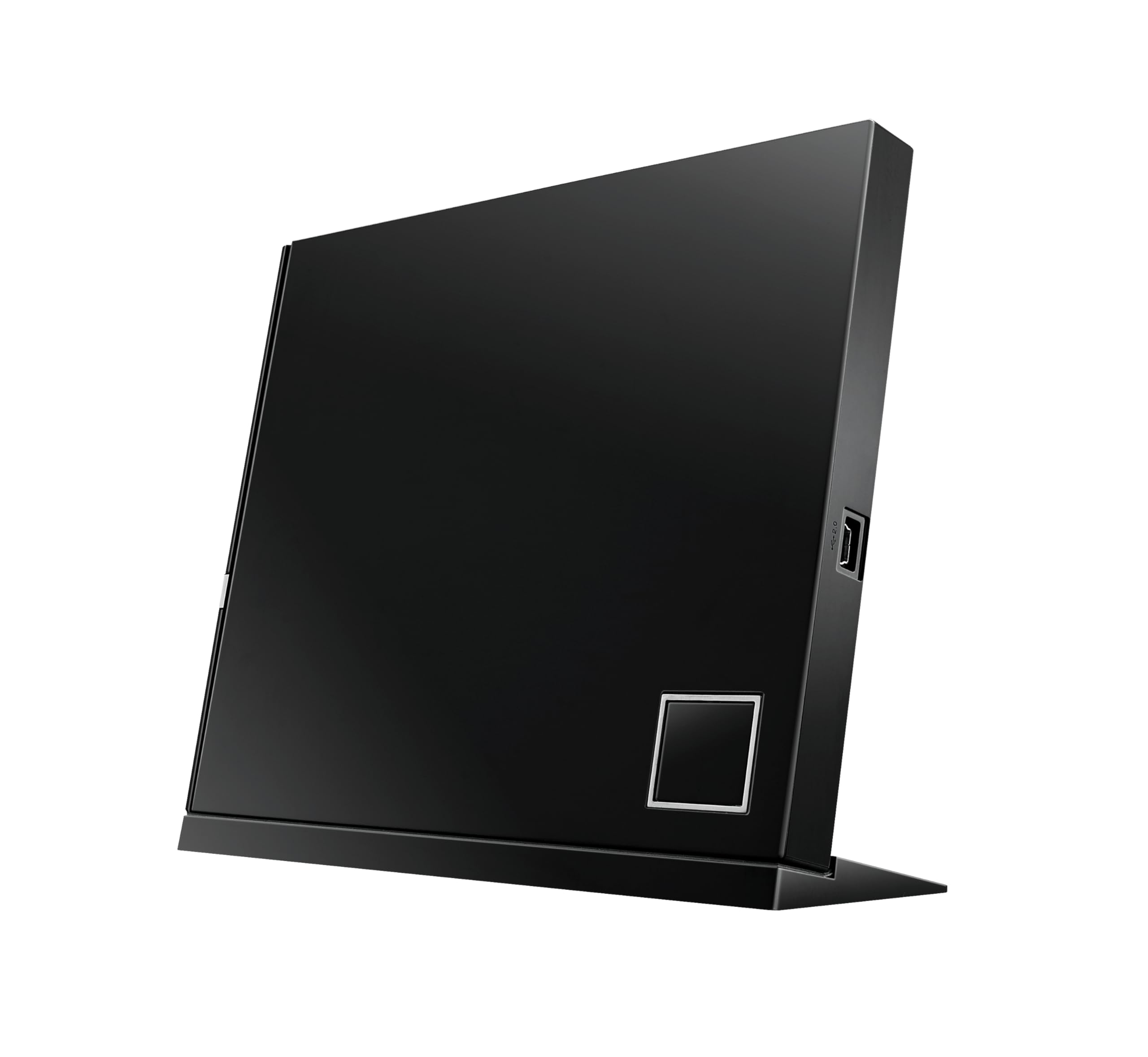
ASUS built this drive around archiving rather than pure playback: it writes BD‑R at 6X, supports BD‑XL triple‑layer discs (128 GB), and includes Disc Encryption II for password‑protected burns. The architecture‑inspired design stands vertically with a included stand, saving desk space. Read performance for Blu‑ray movies is strong — the 6X BD‑ROM read sustains the data stream without the buffer underruns that cheap readers exhibit on multi‑angle discs.
Setup can be fussy on older Windows systems. The bundled software requires a USB installation from a CD, and some users on Windows 8.1 found the writing options grayed out due to OS compatibility gaps. On macOS, the drive is recognized immediately and works with Toast 11 for burning, but Windows users should check that their USB controller supports UASP to extract full 5 Gbps throughput. The included dual‑USB power cable draws from two ports, eliminating the need for a wall adapter.
The plastic enclosure lacks the premium feel of the Buffalo or LG offerings, but the trade‑off is a lower price point for a full BDXL burner. Playback of region‑locked discs is possible up to five region changes before the mechanism locks permanently. For anyone burning BD‑XL projects and occasionally watching movies, this ASUS delivers dual purpose without the premium of a 4K UHD drive.
Why it’s great
- Writes to BD‑XL triple‑layer for 128 GB archival discs
- Vertical stand saves desk space with a clean aesthetic
- Disc Encryption II provides password protection for sensitive data
Good to know
- Setup can require manual driver patching on Windows 8.1 and 11
- Uses dual USB cables for power — not a single USB‑C solution
- Region change is limited to five switches before permanent lock
6. Buffalo MediaStation 6X Portable Blu‑ray Drive

Buffalo’s MediaStation is the most reliable out‑of‑box experience for Blu‑ray playback in this roundup. It is TAA‑compliant and made in Japan, with a full 2‑year manufacturer warranty — double the standard period. The drive reads and writes BD at 6X, DVD at 8X, and supports M‑Disc for archival data that supposedly lasts 1,000 years. The CyberLink Media Suite software included on the setup DVD gives you PowerDVD and Power2Go for Windows, eliminating the biggest friction point: finding compatible playback software.
The USB 3.2 Gen 1 interface comes with a Type‑C adapter, covering both modern and legacy ports. Bus‑powered operation is stable for single‑layer BD, but dual‑layer discs may require plugging into a high‑power USB port. Weighing just 0.5 lbs and measuring 0.6 inches thick, it is genuinely pocketable — users report throwing it into a laptop bag without a case. The build quality is noticeably denser than the plastic budget drives, with a matte finish that resists fingerprints.
Mac users should note that the bundled CyberLink software is Windows‑only; macOS users must supply their own player (VLC with libaacs or Leawo). Occasional read incompatibility with specific pressed discs has been reported — one user noted a first disc failed while a second worked fine. Overall, this drive is the safest recommendation for buyers who want plug‑and‑play functionality and a warranty that backs the product for years.
Why it’s great
- Two‑year manufacturer warranty with US‑based support
- Includes CyberLink PowerDVD for Windows — no extra software purchase needed
- M‑Disc support for humidity‑ and light‑resistant archival burning
Good to know
- Bundled software is Windows‑only; macOS requires a third‑party player
- A small percentage of discs may fail to read on first attempt
- USB bus power may be insufficient for some dual‑layer BD discs
7. LG BP60NB10 Portable 6X Ultra HD 4K Blu‑ray Burner

The LG BP60NB10 is the only drive on this list capable of reading 4K Ultra HD Blu‑ray discs out of the box. It ships bundled with a 100 GB M‑Disc BDXL and the CyberLink Media Suite, which includes PowerDVD 22 for UHD playback. The 6X read speed applies to standard BD, while UHD discs can be read at the correct data rate for 4K streaming. Silent Play technology automatically slows the motor during quiet scenes, and Jamless Play skips damaged disc sectors to maintain playback continuity.
Users must be aware of a critical hardware restriction: UHD playback requires Intel SGX (Software Guard Extensions) support on both the CPU and motherboard. Newer Intel processors (11th gen and later) and most AMD platforms lack SGX, meaning the drive may not play 4K discs on modern hardware without flashing LibreDrive firmware via MakeMKV. Once flashed, the drive bypasses the SGX requirement and works with PowerDVD or other players on a wider range of systems.
The slim form factor and included carrying case make it portable, but the plastic chassis feels less premium than the aluminum Vantec enclosure. One user reported the drive failed after three months of light use, returning a “device not recognized” error across multiple computers. For 1080p Blu‑ray playback the drive is excellent and quiet; for 4K, prospective buyers must verify their system’s SGX status or be prepared to flash LibreDrive firmware. This is the ultimate choice for those committed to 4K physical media.
Why it’s great
- Only portable drive that reads 4K Ultra HD Blu‑ray discs natively
- Bundle includes 100GB BDXL M‑Disc and CyberLink software suite
- Jamless Play skips damaged disc sectors for smooth viewing
Good to know
- UHD playback requires Intel SGX — many modern PCs lack this
- LibreDrive firmware flash is often needed for full 4K compatibility
- Reports of units failing completely after a few months of use
FAQ
Do I need special software to watch a Blu‑ray movie on my laptop with an external drive?
Can any external Blu‑ray drive play 4K Ultra HD Blu‑ray discs?
What does BD‑XL support mean for Blu‑ray playback?
Why does my external Blu‑ray drive sometimes not read a disc on the first try?
Final Thoughts: The Verdict
For most users, the are there external blu-ray drives that will play blu-ray winner is the Buffalo MediaStation because it ships with CyberLink PowerDVD, includes a 2‑year warranty, and provides reliable out‑of‑box BD playback without firmware hacking. If you want maximum firmware control and the ability to choose your own high‑quality internal drive, grab the Vantec NexStar DX2 enclosure. And for 4K UHD physical media capability, nothing beats the LG BP60NB10 with a LibreDrive flash — provided your system supports the SGX requirement.