
You do not buy 1 TB of RAM because you are curious. You buy it because you have already hit every wall your current system has—virtual machines consuming 64GB each, datasets that refuse to fit in any reasonable allocation, or a multi-threaded render that crashes the instant it touches swap. This is not a consumer purchase. It is a professional infrastructure decision that separates hobbyists from operators who bill by the minute.
I’m Min — the co-founder and writer behind Gadgets Feed. I have spent hundreds of hours dissecting server-grade memory specs, matching registered DIMMs to specific workstation chipsets, and identifying which 128GB, 256GB, and full 1 TB kits actually boot without errors on the platforms that matter most.
Whether you are building a home lab, a deep-learning rig, or a Mac Pro that never touches swap, this guide isolates the only configurations worth your money with 1 tb ram at their core.
How To Choose The Best 1 TB RAM System
Choosing a platform that supports 1 TB RAM is fundamentally different from buying a standard desktop. The motherboard’s memory topology, the CPU’s memory controller, and the type of DIMM (registered vs. unbuffered) all lock together — one mismatch and the system simply refuses to post.
Platform Lock-In: Intel W-Series vs. AMD Threadripper vs. Xeon
Mainstream chipsets like Intel Z790 or AMD B650 max out at 192GB or 256GB. To reach a full terabyte, you need a workstation platform: Intel W790 (supporting Xeon W-2400/W-3400), AMD TRX50/WRX80 (Threadripper), or a dual-socket Xeon or EPYC server. Each platform dictates RAM type — W790 demands RDIMMs, while Threadripper PRO can use RDIMMs or 3DS RDIMMs. Choosing the wrong CPU/motherboard combination is the single most expensive mistake in this category.
Registered ECC Memory Is Non-Negotiable
At densities of 128GB per stick, you are almost certainly running registered ECC (RDIMM) or load-reduced (LRDIMM) memory. Consumer unbuffered DIMMs simply do not ship in 128GB single-module capacities at DDR5 speeds. RDIMM buffers the address and command lines to reduce electrical load, allowing more modules per channel — critical when populating eight slots to reach 1 TB. Non-ECC or unregistered memory will not work on Xeon or Threadripper PRO platforms.
Channel Configuration and Speed Trade-Offs
Filling all memory channels (eight sticks in an 8-channel platform, or four sticks in a quad-channel platform) maximizes bandwidth but often forces lower memory speeds — 4800 MT/s on a fully loaded Xeon W9-3495X versus 5600 MT/s with fewer modules. For memory-bandwidth-bound workloads like CFD, genomic assembly, or large-scale ML training, channel count matters more than peak speed. A system running 4,800 MT/s across eight channels still outperforms a two-channel setup at 6,000 MT/s.
Quick Comparison
On smaller screens, swipe sideways to see the full table.
| Model | Category | Best For | Key Spec | Amazon |
|---|---|---|---|---|
| CyberPowerPC Gamer Xtreme | Premium Gaming Desktop | High-FPS Gaming + Streaming | 32GB DDR5 + 12GB RTX 5070 | Amazon |
| Acer Nitro V 16S AI | AI Gaming Laptop | On-the-Go AI & Gaming | 32GB DDR5 + 572 AI TOPS | Amazon |
| Skytech Gaming Crystal | Mid-Range Gaming Desktop | 1080p Ultra Settings Gaming | 32GB DDR4 + RTX 5060 | Amazon |
| Dell Pro Tower Plus QBT1250 | Business Workstation | Enterprise Productivity | 32GB DDR5 + Intel Ultra 5 | Amazon |
| Dell Tower ECT1250 | Home Office Desktop | Multi-Monitor Trading/Finance | 32GB DDR5 + Intel Core Ultra 7 | Amazon |
| NIMO 17.3″ Gaming Laptop | Value Gaming Laptop | 4K Video Editing + Light Gaming | 32GB DDR5 + Ryzen 7 | Amazon |
| GMKtec K11 Gaming PC | Compact Gaming Mini PC | eGPU Gaming + Content Creation | 32GB DDR5 + OCuLink Port | Amazon |
| HP Desktop i5-12500 | Student/Home Office PC | Reliable Everyday Computing | 16GB DDR5 + 1TB PCIe SSD | Amazon |
| HP ProDesk 600 | Budget Business Desktop | Office Productivity + 4K Display | 16GB DDR4 + GT 610 Dedicated | Amazon |
| GMKtec K10 Workstation | Mini Workstation | Industrial/COM Port Applications | 32GB DDR5 + i9-13900HK | Amazon |
| Lenovo ThinkCentre neo 50q | Compact Business Mini PC | Space-Constrained Office | 16GB DDR5 + 1TB SSD | Amazon |
| PowerEdge Dell R630 | Enterprise Server (Renewed) | Home Lab / Hyper-V Host | 128GB DDR4 + 2x Xeon 28 Cores | Amazon |
| OWC 128GB DDR4 ECC Kit | Mac Pro Memory Upgrade | 2019 Mac Pro 7,1 Expansion | 128GB (4x32GB) RDIMM 2933MHz | Amazon |
In‑Depth Reviews
1. CyberPowerPC Gamer Xtreme Gaming PC, AMD Ryzen 9 9900X

The CyberPowerPC Gamer Xtreme delivers a Ryzen 9 9900X 12-core CPU paired with an RTX 5070 12GB on a B850 chipset, backed by 32GB of DDR5 memory and a 1TB PCIe 4.0 NVMe SSD. The liquid-cooled CPU with a tempered glass side panel and customizable RGB lighting makes this a premium-ready machine for 1440p and entry-level 4K gaming without any case-swap hassle out of the box.
Reviewers note that this configuration handles ultra settings in titles like Assassin’s Creed Shadows at around 90 FPS, with the seven-fan setup remaining relatively quiet under load. The free lifetime tech support adds significant long-term value for buyers who want a warranty-backed system rather than a self-built rig, especially given the parts-labor warranty covering the first year.
If you need a system that can step beyond gaming into video editing or other creative workflows, the 12-core Zen 5 CPU and 32GB of DDR5 handle Premiere Pro timelines and multi-track audio without stutter. The single 12GB RTX 5070 memory buffer, however, may limit very large 3D scene renders compared to pro-grade cards like the RTX 6000 Ada.
Why it’s great
- Liquid-cooled Ryzen 9 9900X keeps thermals in check under sustained all-core loads
- RTX 5070 with GDDR7 memory delivers excellent 1440p ray tracing performance
- Pre-installed Windows 11 and included keyboard/mouse make it ready to use immediately
Good to know
- 32GB memory cap may limit extreme multi-VM workflows compared to workstation platforms
- Some units reported GPU instability requiring RMA under warranty
2. Acer Nitro V 16S AI Gaming Laptop

The Acer Nitro V 16S AI brings a Ryzen 7 260 processor and RTX 5060 laptop GPU delivering 572 AI TOPS, making it one of the first laptops to leverage full DLSS 4 Multi Frame Generation. The 16-inch WUXGA 1920×1200 IPS panel covers 100% sRGB at a 180Hz refresh rate, giving competitive gamers the fluidity they need without stepping up to 4K panel costs.
Real-world testing shows the system running Cyberpunk 2077 at 2K resolution with ray tracing at 65 FPS, and over 100 FPS without RT. The dual DDR5 slots come populated with 32GB (2x16GB) at 5600 MT/s, and the two PCIe Gen 4 M.2 slots leave one open for expansion — reviewers have added 4TB SSDs without issue. The CPU peaks at 79°C under heavy gaming loads, which is respectable for a 16-inch chassis with this power envelope.
Battery life is a known trade-off: the 135W power adapter cannot keep the system fully charged in performance mode during intense gaming, causing gradual battery drain. Buyers intending to game on battery for extended sessions should budget for a higher-wattage adapter or keep the system plugged into a high-output USB-C PD source.
Why it’s great
- 180Hz 100% sRGB display with 16:10 aspect ratio provides excellent color accuracy for creative work
- 572 AI TOPS from RTX 5060 enables next-gen DLSS 4 features and AI-enhanced workflows
- Dual M.2 slots and socketed DDR5 allow easy user upgrades beyond the stock 32GB
Good to know
- Stock 135W power supply may drain battery under sustained gaming loads
- Display brightness is modest for outdoor use; FHD resolution limits desktop real estate
3. Skytech Gaming Crystal Gaming PC, AMD Ryzen 7 5700, RTX 5060

The Skytech Gaming Crystal pairs an AMD Ryzen 7 5700 with the new RTX 5060 8GB GDDR7 GPU in a triple-tempered-glass chassis, offering a clean entry point into modern gaming without the DIY assembly. The 32GB of DDR4-3200 memory and 1TB NVMe SSD provide ample storage and multitasking headroom for titles like Call of Duty, Fortnite, and Baldur’s Gate 3 at 1080p Ultra settings above 60 FPS.
Reviewers consistently note that the system runs 200+ FPS in competitive shooters like Valorant and Overwatch 2, with the high-performance air cooler and ARGB fans keeping noise in check. The 650W Gold-rated PSU leaves moderate headroom for future GPU upgrades, though the motherboard’s PCIe Gen 3 bandwidth may slightly bottleneck a hypothetical high-end card down the line. Skytech assembles these units in the USA with a 1-year parts and labor warranty plus free lifetime tech support.
One caveat: the product images may not match the exact GPU brand shipped — reviewers report receiving cards from various AIB partners, though performance matches the advertised RTX 5060 spec. The included keyboard and mouse are basic but functional for immediate setup.
Why it’s great
- RTX 5060 with GDDR7 memory delivers significant generational uplift over RTX 4060
- 32GB DDR4 at 3200 MHz is well-matched to the Ryzen 7 5700’s Infinity Fabric
- Clean, bloatware-free Windows 11 install with no unnecessary trial software
Good to know
- DDR4 platform limits future memory upgrade path compared to DDR5-based systems
- GPU brand may vary from product images; performance remains as specified
4. Dell Pro Tower Plus QBT1250
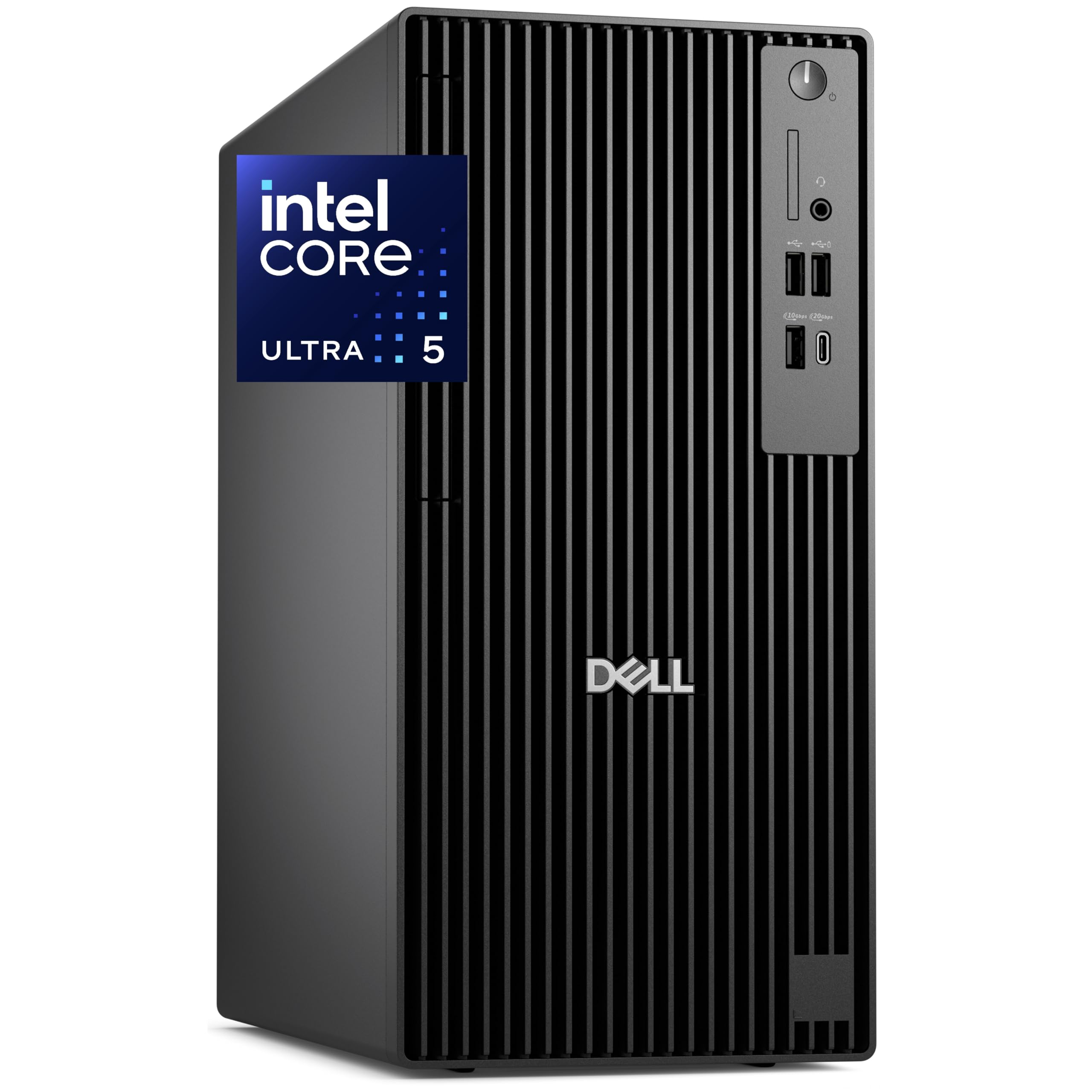
The Dell Pro Tower Plus QBT1250 is built around the Intel Core Ultra 5 235 processor with a dedicated NPU for AI acceleration, 32GB of DDR5 RAM, and a 1TB PCIe NVMe SSD. The integrated Intel Graphics drives up to three independent 4K displays via native DisplayPorts without needing a discrete GPU, making this tower ideal for financial analysts or programmers who need massive screen real estate for live data feeds and code editors.
The chassis includes a built-in DVDRW drive for legacy media — a rare inclusion in 2025 towers — plus front USB 3.2 Gen 2×2 Type-C at 20Gbps for fast external backups. IT departments will appreciate the TPM 2.0 security chip, Windows 11 Pro for domain integration, and the tool-less side panel that simplifies RAM or storage upgrades. Dell includes a 1-year onsite service warranty, which covers on-location repairs if remote troubleshooting fails.
Buyers should note that the system ships with a USB Wi-Fi adapter instead of a built-in wireless card — a minor oversight for a business-class tower at this tier. Adding an internal Intel Wi-Fi 6E card and antenna kit costs roughly and restores the expected integrated wireless experience.
Why it’s great
- Native triple 4K display output via DisplayPort without a discrete graphics card
- 32GB DDR5 with 1TB NVMe SSD delivers sub-10-second boot times for enterprise workloads
- Tool-less chassis with TPM 2.0 and Windows 11 Pro meets corporate IT compliance standards
Good to know
- Wi-Fi requires an external USB adapter out of the box; no built-in wireless card included
- Integrated Intel Graphics is sufficient for productivity but not for gaming or 3D rendering
5. Dell Tower Desktop ECT1250, Intel Core Ultra 7

The Dell Tower ECT1250 features Intel’s Arrow Lake Core Ultra 7-265 processor with 20 cores (including efficiency cores), 32GB of DDR5 memory, and a 1TB M.2 NVMe SSD. The Intel UHD Graphics supports up to four FHD monitors via DisplayPort daisy chaining or two 4K displays through the HDMI 2.1 and DisplayPort outputs, making this a robust workstation for multi-monitor trading setups or video surveillance systems.
Reviewers consistently highlight the sub-30-second boot time and snappy responsiveness for day-to-day tasks like stock trading with charts, scans, and large software suites running simultaneously. The tool-less side panel allows quick access to the single 32GB DDR5 stick, and the 180W bronze PSU is adequate for the integrated graphics configuration. Dell includes a 1-year onsite service warranty, dispatching a technician to your location for hardware issues that cannot be resolved remotely.
Upgrade limitations exist: the single-channel 32GB RAM configuration leaves one of the two DIMM slots empty, but the OEM short NVMe drive occupies the only M.2 slot, with no additional slot provided for expansion. The 180W PSU limits discrete GPU upgrades to cards under 75W unless the user replaces the power supply with an aftermarket unit.
Why it’s great
- 20-core Arrow Lake CPU with built-in AI NPU accelerates productivity tasks and background blur in video calls
- Four-monitor support via DisplayPort daisy chain provides immense screen real estate for trading or research
- Dell 1-year onsite service includes technician visits for covered hardware issues
Good to know
- Single-channel 32GB RAM stick leaves performance on the table compared to dual-channel configuration
- No additional M.2 slot for storage expansion; only one SATA port available for 2.5-inch drives
6. NIMO 17.3″ IPS Gaming Laptop, AMD Ryzen 7 8745HS

The NIMO N177 packs an AMD Ryzen 7 8745HS with integrated Radeon 780M graphics, 32GB of DDR5 RAM, and a 1TB PCIe SSD into a 17.3-inch chassis that weighs under 2.1 kg and measures just 18.8 mm thick. The 180-degree hinge allows the display to lie flat for collaborative presentations, and the 100W USB-C PD charging keeps the cable count to one for both power and data.
Reviewers with backgrounds in network engineering and music production report that the laptop handles 4K video editing and heavy VST plugin workloads without stutter. The dual DDR5 slots support up to 64GB, and the two M.2 PCIe 4.0 x4 slots allow massive storage expansion. The 58Wh battery with Windows Modern Standby provides instant-on responsiveness, though the 100W PD adapter is essential to keep the system charged during intensive tasks.
The fingerprint reader embedded in the touchpad provides biometric Windows Hello login, and the backlit US-layout keyboard helps typing accuracy in low-light environments. NIMO backs this unit with a 2-year manufacturer warranty and 90-day return period, which is above-average for this laptop price tier. The integrated Radeon 780M graphics handle light gaming at 1080p, but buyers expecting RTX-class performance for AAA titles should look at dedicated GPU laptops.
Why it’s great
- Sub-2.1 kg weight for a 17.3-inch laptop makes it genuinely portable for mobile professionals
- 100W USB-C PD charging eliminates proprietary power brick bulk during travel
- 2-year manufacturer warranty with 90-day return window provides excellent purchase protection
Good to know
- Integrated Radeon 780M graphics cannot match dedicated GPUs for AAA gaming at high settings
- 58Wh battery may require mid-day charging under heavy creative workloads
7. GMKtec Gaming PC, K11 AMD Ryzen 9 8945HS

The GMKtec K11 is a mini PC built around the AMD Ryzen 9 8945HS (8 cores, 16 threads, up to 5.2 GHz) with 32GB of dual-channel DDR5 5600 MT/s RAM and a 1TB PCIe 4.0 NVMe SSD. The defining feature is the OCuLink port — a direct PCIe x4 connection for external GPU enclosures that bypasses the bandwidth limitations of Thunderbolt, delivering better frame rates and lower latency when paired with an eGPU dock.
The system includes dual Intel i226V 2.5GbE LAN ports for soft routing, firewall, or file server applications, plus HDMI 2.1, DisplayPort 2.1, and dual USB4 ports (up to 40 Gbps) supporting simultaneous quad 4K display output. The upgraded Hyper Ice Chamber 2.0 cooling uses larger top and bottom fans to maintain 360-degree airflow while keeping noise down to 35 dB in quiet mode. Three BIOS-selectable performance modes (35W quiet, 54W balance, 65W performance) let users trade off between thermals and compute density.
Reviewers note that the factory thermal paste application can lead to peak CPU temperatures of 91°C under sustained all-core loads, and the plastic top cover can be difficult to remove for internal access. The lack of SATA power or data ports is also a limitation for users needing to attach 2.5-inch drives. GMKtec includes a 1-year limited warranty.
Why it’s great
- OCuLink port enables high-bandwidth eGPU connection without Thunderbolt bottleneck or licensing fees
- Dual 2.5GbE LAN ports support advanced networking use cases like pfSense or OPNsense firewalls
- Four simultaneous 4K display outputs via HDMI 2.1, DP 2.1, and dual USB4 provide immense desktop real estate
Good to know
- Factory thermal paste may need replacement to achieve optimal thermal performance under sustained load
- No SATA ports for legacy 2.5-inch or 3.5-inch storage drives; expansion limited to M.2 SSDs
8. HP Desktop Computer Tower PC, Intel i5-12500
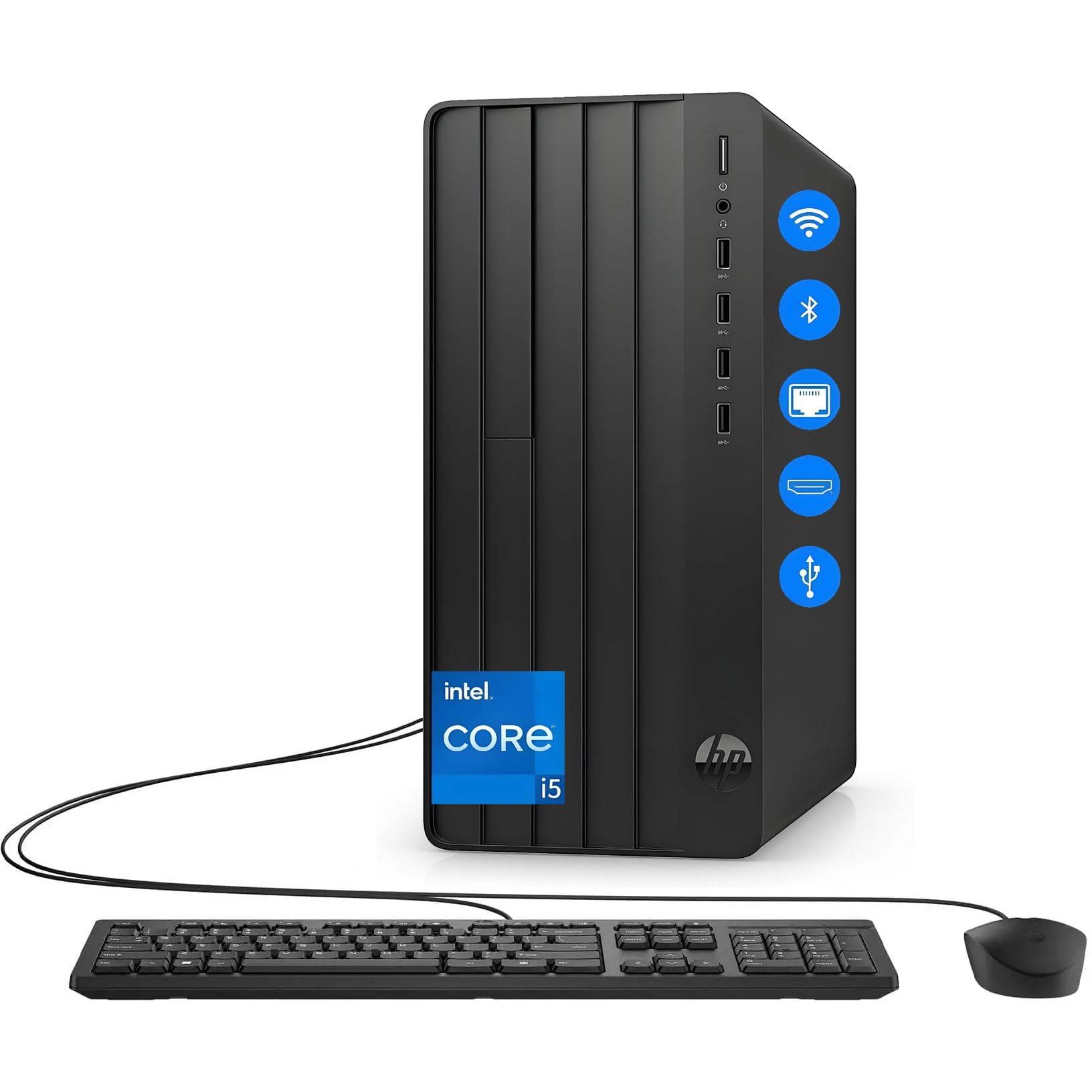
This HP desktop tower runs an Intel 6-core i5-12500 (Alder Lake) with 16GB of DDR5 RAM and a 1TB PCIe NVMe SSD, plus integrated Intel UHD Graphics 770. The complete bundle includes a wired keyboard and mouse, making it a truly out-of-the-box solution for home office professionals, students, and small business operators who need a reliable daily driver without hunting for peripherals.
Built-in Wi-Fi and Bluetooth 5.2 eliminate cable clutter, and the 1TB SSD provides fast boot times and ample storage for documents, spreadsheets, and video conferencing applications. Reviewers report the system has been running 8 hours a day for 7 months without slowdowns or crashes, calling it dead quiet and dependable. The microtower form factor (roughly 12 x 6 x 13 inches) fits under desks or on small workstations without dominating the space.
The 16GB of DDR5 RAM is adequate for Microsoft Office, Zoom, and dozens of browser tabs, but power users running virtual machines or large code compilations may find the ceiling lower than the 32GB configurations offered by competing systems. The integrated UHD 770 graphics handle dual 4K displays for productivity but will not support gaming beyond esports titles at low settings.
Why it’s great
- Complete out-of-box experience with keyboard, mouse, and Windows 11 pre-installed
- DDR5 memory and PCIe 4.0 SSD deliver fast boot and application loading
- Compact microtower footprint fits easily in small home office or dorm room setups
Good to know
- 16GB RAM ceiling may be restrictive for heavy multitasking or VM workloads
- Integrated graphics cap gaming performance to esports titles at low settings
9. HP ProDesk 600 Desktop Computer, Intel i5-10400F
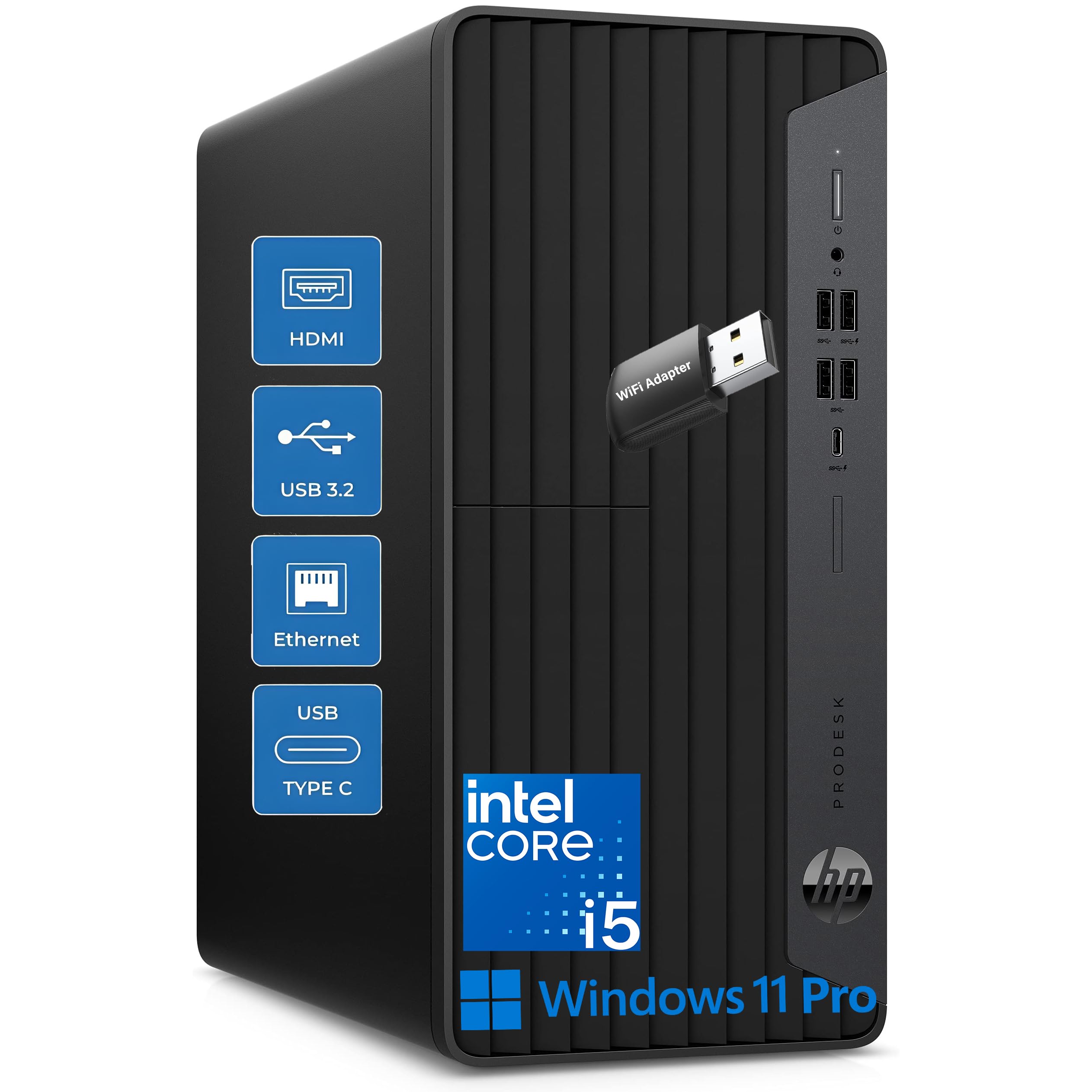
The HP ProDesk 600 features a 10th-gen Intel Core i5-10400F (6 cores, 12 threads, up to 4.3 GHz) with 16GB of DDR4 RAM, a 1TB NVMe SSD, and a dedicated NVIDIA GeForce GT 610 2GB graphics card. The inclusion of a dedicated GPU — even an entry-level one — allows this tower to drive 4K displays without relying on integrated graphics, making it suitable for offices that need high-resolution presentation output or video playback.
The microtower design (11.93 x 13.27 x 5.98 inches) offers a sensible balance between expansion room and footprint, with five front USB ports including a USB-C 10Gbps port plus four rear USB ports. The included HP wired keyboard and mouse round out a complete business package. Reviewers note that the system is fast, quiet, and reliable for general office use after 9 months of daily operation.
Potential constraints include the limited 160W PSU, which makes upgrading to a more powerful GPU challenging without also replacing the power supply. The GT 610’s 2GB DDR3 VRAM is also a bottleneck for any modern gaming or 3D modeling — this is strictly a productivity and office tower. Some users have reported that the included WiFi adapter can drop from 300 Mbps to 15 Mbps unpredictably, though Empowered PC provided responsive customer support for affected units.
Why it’s great
- Dedicated GT 610 GPU enables 4K display support without burdening system RAM
- Front USB-C 10Gbps port provides fast connectivity for modern peripherals and external SSDs
- Six total USB ports plus USB-C offer extensive connectivity for office peripherals
Good to know
- 160W PSU limits graphics card upgrade options without also replacing the power supply
- WiFi adapter performance may be inconsistent; some users experience speed drops requiring support
10. GMKtec Mini PC Workstation, Intel Core i9 13900HK

The GMKtec K10 packs a 13th-gen Intel Core i9-13900HK (14 cores, 20 threads, up to 5.4 GHz) with 32GB of DDR5 RAM and a 1TB PCIe NVMe SSD into a compact chassis. The standout feature is the built-in COM port, enabling direct serial communication with PLCs, POS terminals, barcode scanners, and industrial automation equipment that business-class mini PCs typically omit.
The system supports quad-screen output with two HDMI 2.0 (4K at 60 Hz), one DisplayPort 1.4 (8K at 60 Hz), and one Type-C with DP Alt Mode at 10 Gbps. The Realtek 2.5G Ethernet port and Wi-Fi 6 with Bluetooth 5.2 ensure modern wireless connectivity. Three M.2 2280 PCIe slots accept up to 12 TB of total NVMe storage, giving this mini PC workstation capabilities that rival full-sized desktops for data-heavy industrial or research applications.
Reviewers running 4K video transcoding on Plex/Emby report that the i9-13900HK handles three simultaneous 4K transcoding streams without stutter. The system runs warm under sustained load — some users added supplemental cooling — but remains quiet in normal operation. GMKtec includes a 1-year warranty, and the compact footprint (similar to an Intel NUC) makes it easy to mount behind a monitor or under a desk.
Why it’s great
- Integrated COM port supports industrial automation, POS systems, and PLC communication natively
- DisplayPort 1.4 outputs 8K at 60 Hz for ultra-high-resolution visualization or signage
- Three M.2 PCIe 4.0 slots support up to 12 TB of NVMe storage in a mini chassis
Good to know
- Runs warm under sustained load; additional active cooling may be needed for 24/7 transcoding
- No SATA ports or 2.5-inch drive bays restrict legacy storage expansion options
11. Lenovo ThinkCentre neo 50q Gen 5 Mini Desktop

The Lenovo ThinkCentre neo 50q Gen 5 measures just 7.05 x 7.20 x 1.42 inches — roughly the size of a large book — yet houses a 13th-gen Intel Core i5-13420H (8 cores, 12 threads, turbo up to 4.6 GHz) with 16GB of DDR5 RAM and a 1TB PCIe NVMe SSD. The VESA-mountable chassis can be attached behind any monitor for a completely cable-free desk setup, making this one of the most space-efficient business desktops available.
Connectivity is robust: WiFi 6E on the 6 GHz band, Bluetooth 5.3, Gigabit Ethernet, dual display via HDMI 2.1 and DisplayPort 1.4, and eight USB ports including USB-C. The system ships with Windows 11 Pro, enabling BitLocker encryption, Remote Desktop, Hyper-V for virtual machines, and domain join for corporate network integration. Reviewers running this unit 10 hours daily in a busy salon report zero overheating issues and reliable performance over years of use.
Some buyers have reported receiving units sourced from the UAE with invalid Windows licenses and warranty coverage that does not transfer — a buyer-beware scenario that affects a minority of units on Amazon marketplace listings. Sticking to Amazon-fulfilled inventory or verified Lenovo-authorized sellers mitigates this risk. The 16GB of DDR5 RAM is sufficient for business applications but cannot be upgraded beyond the soldered maximum in this ultra-compact form factor.
Why it’s great
- Ultra-compact 1.42-inch thick chassis with VESA mount for clutter-free monitor-back installation
- WiFi 6E and Bluetooth 5.3 provide the latest wireless connectivity standards for business environments
- Dual 4K display output via HDMI 2.1 and DisplayPort 1.4 without requiring a discrete GPU
Good to know
- 16GB RAM is soldered and cannot be upgraded; choose carefully for future-proofing
- Some units reported with invalid Windows licenses and non-transferable UAE warranties
12. PowerEdge Dell R630 Server, 2X E5-2690 v4, 128GB RAM

The Dell PowerEdge R630 is a 1U rack-mount server with dual Xeon E5-2690 v4 processors (14 cores each, 28 cores total, 2.6 GHz base, 3.5 GHz turbo), 128GB of DDR4 ECC memory, and two 1TB SATA SSDs. This renewed enterprise server includes the PERC 730-mini RAID controller, iDRAC 8 Enterprise for remote management, and an 8-bay 2.5-inch SFF drive backplane, making it a powerful home lab foundation for hypervisors like Windows Server 2022 with Hyper-V or VMware ESXi.
The unit ships with updated BIOS and clean internal components, and the iDRAC Enterprise license enables full remote KVM, virtual media, and power control without needing a monitor or keyboard physically connected. The single 128GB DDR4 configuration is a strong starting point for virtualization, though the platform supports up to 768GB (24 slots) for users needing to expand toward a full terabyte.
The VGA ports on some units may require patience to get a display output — the front VGA port tends to work more reliably than the rear ports. As a renewed/refurbished unit, the server shows cosmetic age, and obtaining up-to-date drivers from Dell for the 13th-generation platform may require some hunting. The power draw of dual 14-core Xeons at idle (~120-150W) should be factored into operational costs for 24/7 home lab use.
Why it’s great
- 28 physical cores with hyper-threading provide massive parallel compute capacity for VM density
- iDRAC 8 Enterprise with dedicated management port enables full remote administration over IP
- PERC 730-mini RAID controller with battery-backed cache protects against data loss during power events
Good to know
- 128GB base configuration requires additional DIMM purchases to reach the 768GB maximum supported
- Renewed unit may show cosmetic wear; VGA port reliability can be inconsistent across units
13. OWC 128GB DDR4 ECC Registered Memory Kit
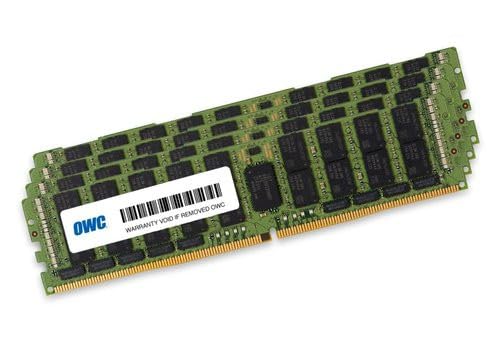
The OWC 128GB DDR4 ECC Registered memory kit consists of four 32GB 2933 MHz PC4-23400 CL21 RDIMM modules, specifically qualified for the 2019 Mac Pro 7,1 (tower and rack variants). OWC is Apple’s original memory manufacturer for these modules, and the kit includes the Mac-qualified thermal sensor EEPROM that ensures temperature monitoring works correctly within macOS
For Mac Pro users, this kit provides a straightforward 128GB upgrade path without compatibility concerns — the modules are compliant with JEDEC standards and include OWC’s limited lifetime warranty with free tech support. The registered ECC design corrects single-bit memory errors automatically, which is critical for long-running render nodes, video transcoding servers, or any workflow where data integrity directly impacts project deadlines.
Some buyers have reported receiving Samsung-manufactured modules instead of OWC-branded sticks — while Samsung RDIMMs are functionally identical and often used by OWC as source components, the branding mismatch can be surprising for buyers expecting OWC-labeled parts. A small number of units have arrived with DOA or early-failure DIMMs, though OWC’s advanced replacement program provides cross-shipped replacements. This kit is strictly for the 2019 Mac Pro — it will not physically fit or electrically work in Intel Mac Pro towers from the 2013 or earlier generations, which use different memory form factors.
Why it’s great
- Factory-qualified for 2019 Mac Pro 7,1 with thermal sensor EEPROM for accurate macOS temperature monitoring
- Registered ECC DIMMs provide error correction for data-intensive professional workflows and long render sessions
- Lifetime warranty with advanced replacement program minimizes downtime if a module fails
Good to know
- Compatible only with 2019 Mac Pro 7,1 model (MacPro7,1 / A1991); will not fit earlier Mac Pro towers
- Some units ship with Samsung-manufactured RDIMMs rather than OWC-branded modules despite the listing
FAQ
Can any consumer motherboard handle 1 TB of RAM?
What speed should I expect when running 1 TB of RAM?
Is ECC memory mandatory for a 1 TB RAM setup?
Can I mix different-capacity RDIMMs to reach 1 TB?
Final Thoughts: The Verdict
For most users, the 1 tb ram journey starts with the PowerEdge Dell R630 because its dual Xeon E5-2690 v4 platform provides 28 cores and a proven enterprise chassis that scales from 128GB to 768GB as your budget allows. If you need native macOS compatibility and error-correcting memory for a render farm, grab the OWC 128GB DDR4 ECC Kit and populate a 2019 Mac Pro 7,1 with four sticks to hit the 128GB mark. And for a compact mini PC with industrial connectivity that still delivers workstation-class compute density, nothing beats the GMKtec K10 Workstation with its i9-13900HK, COM port, and three M.2 slots.