
Our readers keep the lights on and my morning glass full of iced black tea. As an Amazon Associate, I earn from qualifying purchases.
Specs are compiled from manufacturer listings and verified buyer reviews and can change over time — please confirm the key details on the product page before buying.
Start by asking what you’ll do daily: browse, edit video, or game. This guide covers all-in-ones, mini PCs, and gaming towers, detailing their real-world strengths and trade-offs. You’ll get plain-English spec explanations to match a machine to your budget and workflow.
I’m Min — the founder and writer behind Gadgets Feed. This guide is built by comparing the manufacturers’ published specifications and the patterns across verified customer reviews, so you get each pick’s real strengths and trade-offs instead of marketing spin.
From an all-in-one with a color-rich display to a compact mini PC that replaces a bulky tower, here are the 10 computers worth your attention in 2025.
Our Picks at a Glance



How To Choose The Best 10 Computers
Choosing a desktop balances your tasks, desk space, and budget. Email-only users don’t need a 4K gaming rig, and gamers will outgrow a basic office PC. Know these categories before you shop.
All-in-One vs. Tower vs. Mini PC
An all-in-one (AIO) like the iMac or Lenovo merges the screen and computer into one unit, saving desk space and reducing cable clutter. A traditional tower (like the Dell or HP) is a separate box that connects to your own monitor — it is often easier to upgrade. A mini PC (like the GEEKOM) is a tiny, powerful box that can be hidden behind a monitor, using a VESA mount, and is ideal for minimalist setups.
Processor (CPU) and Memory (RAM) Basics
The CPU executes all instructions and calculations. More cores (like 8 or 24) and higher turbo speeds (like 4.9GHz or 5.3GHz) mean the machine can handle more tasks at once. RAM (measured in GB) is the short-term memory; 16GB is comfortable for everyday work and multitasking, while 32GB is better for heavy video editing, 3D rendering, or running many large programs simultaneously.
Storage and Graphics: The Real-World Impact
A Solid-State Drive (SSD) is the modern standard — it makes your computer boot in seconds and loads programs instantly, unlike older hard drives. Look for 512GB or 1TB for most users. For gaming or creative work, the Graphics Card (GPU) is most important. A dedicated GPU with its own memory (like 12GB or 16GB of VRAM) is essential to run modern games on high settings, while an “integrated” GPU is fine for office work and streaming.
Quick Comparison
| Model | Best For | Processor | Memory | Graphics | Amazon |
|---|---|---|---|---|---|
| Apple iMac (M4)★ Best Overall | Everyday users wanting an elegant AIO | Apple M4 (8-core) | 16GB Unified | 8-core GPU | Amazon |
| GEEKOM Mini PC IT12 MAXCompact Powerhouse | Multi-monitor productivity setups | Intel Core Ultra 5 125U | 16GB LPDDR5 | Intel Xe (Integrated) | Amazon |
| Dell Slim DesktopSlim Office Star | Compact office/home productivity | Intel Core Ultra 5-225 | 16GB (up to 4.9GHz) | Integrated (Intel) | Amazon |
| Lenovo AIO 24″ | Everyone wanting a quick, simple AIO | Intel Core i3-N305 | 16GB DDR4 | Intel UHD (Integrated) | Amazon |
| HP Pro Tower 290 G9 | Home offices and small businesses | Intel Core i5-12500 | 16GB DDR4 | Intel UHD 770 (Integrated) | Amazon |
| Dell Tower (Ultra 7) | Power users needing a fast base | Intel Core Ultra 7-265 | 32GB | Integrated (Intel) | Amazon |
| CyberPowerPC Gamer Xtreme | Serious gamers on a budget | Intel Core i9-14900KF | 32GB DDR5 | RTX 5070 (12GB) | Amazon |
| Alienware Aurora | Gamers wanting a sleek, branded tower | Intel Core Ultra 7 265F | — | RTX 5070 | Amazon |
| MSI Codex Z2 | High-FPS 1440p gaming | AMD Ryzen 7 8700F | 32GB DDR5 | RTX 5070 | Amazon |
| Skytech King 95 | Elite 4K gaming performance | AMD Ryzen 7 9800X3D | 32GB DDR5 | RTX 5070 Ti (16GB) | Amazon |
| Skytech O11 Vision | The ultimate enthusiast gaming rig | AMD Ryzen 7 9850X3D | 32GB DDR5 | RTX 5070 Ti (16GB) | Amazon |
In-Depth Reviews
1. Apple 2024 iMac All-in-One (M4)
Our pick — over 4.5★ from 650+ verified ratings; the strongest balance of quality and price.
The all-in-one that turns your desk into a clean, colorful, and surprisingly fast workspace.
If you want the simplest setup and a screen that looks stunning, the iMac delivers both in one thin, vibrant package. The 24-inch 4.5K Retina display is the standout feature, offering 500 nits of brightness and supporting up to 1 billion colors, so photos and movies look rich and true-to-life. You get the whole computer built into the monitor, which means you’re not juggling a separate tower or a mess of cables.
Performance is a huge part of the appeal, powered by the Apple M4 chip with an 8-core CPU and 8-core GPU. Buyers consistently describe it as fast, with one summing up the general feeling: “Computer looks and functions as new, and boy is it fast.” It handles photo editing, presentations, and even gaming without breaking a sweat. Setup is famously easy, especially for those new to computers or upgrading from a very old model, and it comes with a 12MP Center Stage camera and six speakers with Spatial Audio for crisp video calls.
This model comes with 16GB of unified memory and a 256GB SSD. While 256GB is on the smaller side for storing large video projects, it is perfectly adequate for daily apps and documents, especially if you use cloud storage. Some buyers report the included accessories are basic — the mouse charges from the bottom and the keyboard is compact — so factor in a potential accessory upgrade if you prefer a full-size layout.
What wins people over
- The 24-inch 4.5K Retina display is sharp, bright, and color-accurate
- Fast M4 chip makes everyday tasks and creative work feel instant
- Zero-clutter all-in-one design that is easy to set up
Keep in mind
- 256GB SSD is limited if you store lots of media locally
- Bundled keyboard and mouse have design quirks
Reach for this if: you want a gorgeous, space-saving all-in-one with excellent performance for everyday and creative tasks.
Look elsewhere if: you need vast internal storage for large media libraries without relying on external drives.
2. GEEKOM Mini PC IT12 MAX
A tiny box that replaces a full tower, drives four monitors, and runs nearly silent.
The GEEKOM IT12 MAX proves you do not need a giant case to get serious work done. This mini PC is powered by the Intel Core Ultra 5 125U processor, which boosts up to 4.7GHz, and it ships with 16GB of LPDDR5 memory and a 500GB PCIe 4.0 NVMe SSD. The performance is genuinely impressive, with many buyers using it to replace their old Dell desktops entirely. One owner even noted a 12.8-second boot time from power-on to desktop, which makes everyday starts feel instantaneous.
Its defining feature is the connectivity. With dual USB4 and dual HDMI 2.0 ports, it can drive four 4K displays simultaneously, making it a fantastic choice for stock traders, programmers, or anyone who thrives on lots of screen space. It also includes dual 2.5G LAN ports for fast, reliable networking. Despite the power, the upgraded 3-copper-tube fan cooling system keeps it quiet, operating at a near-silent 38dB. Buyers praise it as an excellent daily driver for light gaming and video editing, with one stating it “outperforms house computers.”
The trade-off is that, like most mini PCs, it is not built for the latest AAA gaming titles, although it can handle light gaming and 4K/8K decoding thanks to its Xe graphics (Intel’s integrated graphics unit). The storage is upgradeable, and the company backs it with a 3-year quality support, so you can rely on it for years. If desk space is at a premium and you value a clean, powerful setup, this is an outstanding pick.
Top pick for multi-display users: The dual USB4 and dual HDMI 2.0 ports supporting quad 4K output are a rare find at this size and price. It is the smartest way to build a powerful, clutter-free workstation.
3. Dell Slim Desktop (Ultra 5)
A dependable, slim tower with plenty of ports that keeps your desk tidy and your workflow fast.
This Dell Slim Desktop is built for people who want a straightforward, no-nonsense Windows PC that fits into small workspaces. It runs on the Intel Core Ultra 5-225 processor with a max turbo speed of 4.9GHz, which buyers find more than capable for daily tasks, web browsing, and office applications. The 16GB of RAM and 512GB SSD provide a responsive experience, with one happy owner noting it’s “small in size but big in performance.”
One of its best features is the easy upgrade potential. The tool-less entry and removable side panel let you get inside the case quickly without any special tools, making upgrades convenient for the future. It also supports multiple monitors, allowing you to connect up to four FHD displays using DisplayPort 1.4a and Daisy Chaining, which is excellent for boosting productivity. Buyers appreciate how quiet and compact it is, making it a great fit for a home office or a reception desk.
The main limitations are the lack of a rear speaker jack and a VGA port, relying instead on front headphone and HDMI connections. This is not a gaming machine, so if you plan to play modern titles, a dedicated graphics card is needed. But for a fast, reliable, and space-conscious workhorse, this Dell is a solid choice that represents a great value.
Your best bet if: you want a quiet, compact, and easily upgradeable Windows desktop for productivity without the gamer aesthetic.
Think twice if: you prefer connecting to older VGA monitors or need rear audio output for a speaker setup.
4. Lenovo 2026 24″ FHD All-in-One
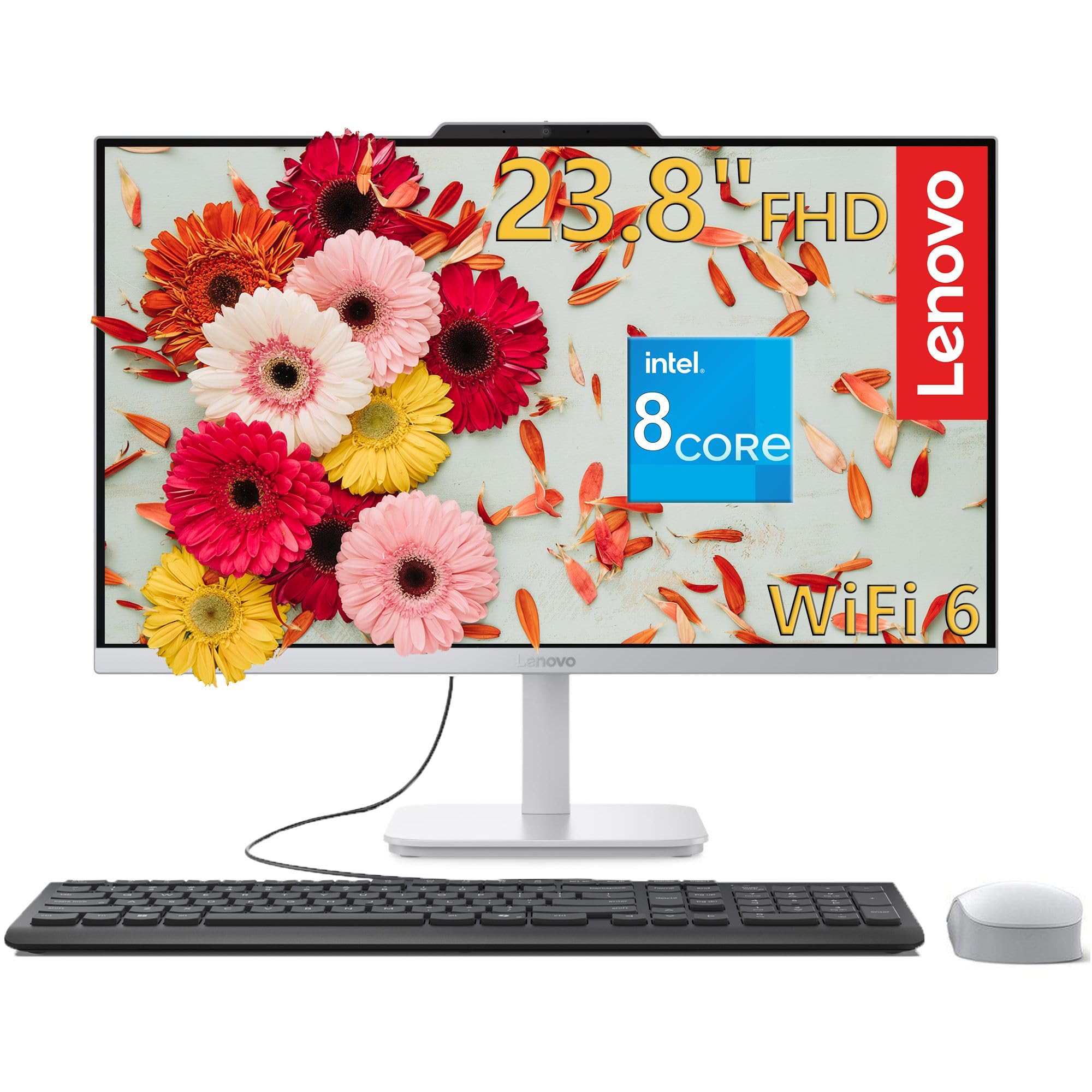
A bright, ready-to-go all-in-one with tons of storage for the whole family.
The Lenovo 24″ AIO is designed for simplicity and immediate usability, combining the computer and monitor into one clean unit. It features a 23.8-inch Full HD (1920×1080) IPS anti-glare display with 250 nits of brightness and 99% sRGB color accuracy, which makes colors look vibrant and true-to-life from wide viewing angles. This is perfect for streaming, homework, and light photo editing, and the anti-glare coating helps reduce eye strain during long sessions.
Under the hood, it is powered by an Intel Core i3-N305 processor with 8 cores and turbo speeds up to 3.8GHz, so it handles everyday tasks like web browsing and document editing without lag. Paired with 16GB of DDR4 RAM and a generous 1TB M.2 PCIe NVMe SSD (a fast storage drive that plugs directly into the motherboard), it boots quickly and offers ample space for family photos, documents, and games. Buyers are consistently impressed with how fast and easy it is to set up, with several noting it was “up and running in about thirty minutes.” It also comes with a full-size wired keyboard and a wireless mouse in the box, so you have everything you need to start working right away.
Connectivity is modern with Wi-Fi 6 and Bluetooth 5.2 for fast, low-latency wireless. The main thing to be aware of is its size; while it saves clutter, it is a large desktop that requires a decent amount of desk space. It also has an integrated HD camera and stereo speakers (2W x 2) for video conferencing. If you want a simple, attractive, and powerful machine for the family, this Lenovo is a fantastic value.
Great for families and home offices: The 1TB SSD and 8-core processor provide a smooth, responsive experience that can handle multiple users and tasks without slowdown, all in a stylish, clutter-free design.
5. HP Pro Tower 290 G9

A secure, powerful tower that handles demanding business apps without breaking a sweat.
The HP Pro Tower 290 G9 is built with business-grade reliability in mind, making it ideal for home offices and small enterprises. It is powered by the Intel Core i5-12500 processor, which has 6 cores and a turbo speed of up to 4.6GHz, providing exceptional multitasking power. With 16GB of DDR4 RAM and a 512GB PCIe NVMe SSD, it offers fast boot times and instant file access, whether you are crunching numbers in a spreadsheet or editing documents.
The complete connectivity suite is a highlight. It includes WiFi and Bluetooth, plus front USB 3.0 ports (5Gbps), rear USB 2.0 ports, HDMI, and VGA, giving you the flexibility to connect multiple peripherals and displays. The Intel UHD Graphics 770 supports dual displays, and the TPM 2.0 security chip helps keep your data safe. Buyers describe it as a “breeze to set up” with “no noise,” and it is praised for its compact footprint and lightweight design, making it easy to place on or under a desk.
While it is not designed for gaming, it handles basic tasks efficiently, with one user noting it works “great for gaming” at lower settings. It comes with an 80 Plus Gold efficient 180W power supply and includes an HP wired keyboard and mouse. This is a reliable workhorse that focuses on delivering solid performance and security for professional environments, a dependable choice for anyone needing a straightforward, durable PC.
Choose this for: a secure, quiet, and powerful tower for demanding business applications and professional work.
skip it if: you want to play the latest AAA games on high settings, as this relies on integrated graphics.
6. Dell Tower Desktop (Ultra 7)

A future-proof tower with high-core-count power and plenty of memory for heavy multitasking.
This Dell Tower is for the power user who needs serious processing muscle. It is equipped with the Intel Core Ultra 7-265 processor, which runs up to 5.3GHz, making it one of the fastest CPUs here in raw clock speed. Combined with a generous 32GB of RAM, this machine is built to handle demanding workloads like video editing, 3D rendering, and running multiple virtual machines without breaking a sweat.
Buyers who use it for everyday tasks are consistently impressed with its speed and reliability, describing it as “very fast, reliable and I have had no issues with it.” It features a sleek, modern design crafted from recycled materials, and the tool-less entry allows for easy upgrades. You can connect up to four FHD monitors (1920×1080 resolution) using DisplayPort and Daisy Chaining (linking monitors together), or two 4K displays using the HDMI 2.1 port, making it perfect for a high-productivity multi-screen setup.
The key trade-off is the power supply. Some owners mention the 180W non-ATX PSU limits potential upgrades to a dedicated graphics card, so it is not the best starting point for a high-end gaming rig. Also, some found only 4 USB-A ports on the rear. However, for a business, data analysis, or content creation workstation that is fast and quiet, this is an excellent choice that offers significant long-term value.
Built for the busy professional: The combination of a 5.3GHz processor with 32GB of RAM makes short work of heavy multitasking, and the tool-less design means easy internal upgrades down the line.
7. CyberPowerPC Gamer Xtreme VR
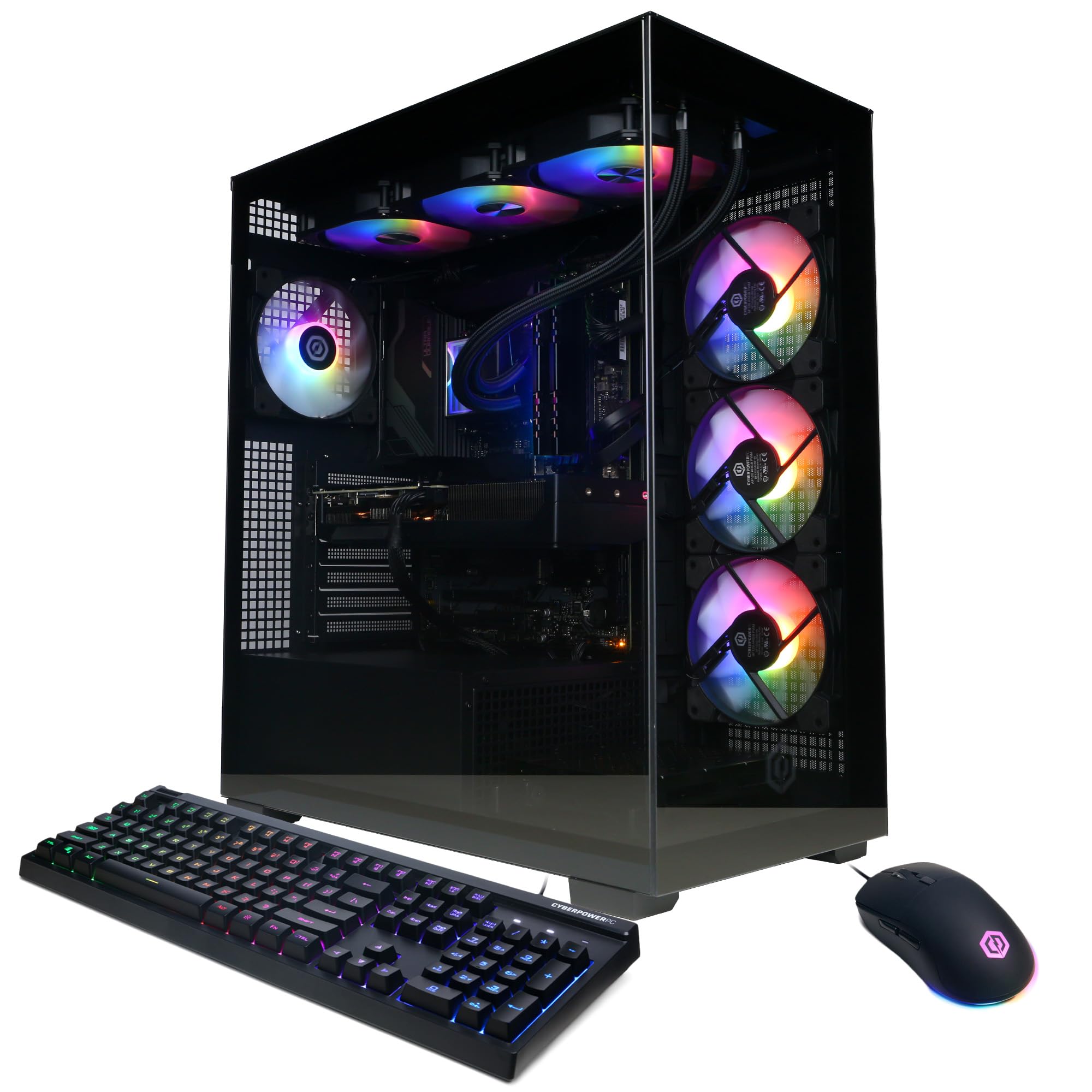
A high-end gaming rig that handles any modern title on max settings while looking sharp.
For gamers ready to step up to high-refresh-rate, high-detail play, the CyberPowerPC Gamer Xtreme is a formidable choice. At its core is the Intel Core i9-14900KF processor with 24 cores, a significant boost in multitasking power for gaming and streaming simultaneously. This is paired with the NVIDIA GeForce RTX 5070 graphics card with 12GB of dedicated GDDR7 memory, a serious piece of hardware that handles current game releases at max settings with ease. Customers note it runs “all current generation games at max settings” without issue.
It comes with 32GB of fast DDR5 RAM and a 2TB PCIe 4.0 NVMe SSD, providing lightning-fast load times and ample space for a large game library. The liquid-cooled CPU and tempered side panel with custom RGB lighting give it a premium look that gamers love. Setup is straightforward, and the included keyboard and mouse let you get started immediately. One owner upgraded from an older system and praised the “clean interior” and “quality brand components.”
Noise is the most-discussed aspect, with opinions split — some find it “super quiet,” while others report noticeable fan noise under heavy load, which is common for powerful gaming PCs. The connectivity includes 2x USB-C, 4x USB-A 3.2, and Wi-Fi 5 with Bluetooth 4.2. This is a great value for anyone wanting a powerful, ready-to-play gaming machine without the hassle of building one.
What gamers love
- RTX 5070 with 12GB GDDR7 runs modern AAA games on max settings
- 24-core i9-14900KF processor handles gaming and streaming together
- 2TB PCIe 4.0 SSD provides huge storage and quick load times
The honest trade-off
- Fan noise is noticeable under heavy gaming load
- Strictly needs a wired ethernet connection for best online performance
Who it’s for: Gamers who want a powerful, ready-to-run PC that delivers top-tier performance on current games and looks great doing it.
Who should pass: Those seeking absolute silence under load or who prefer the more premium chassis of an Alienware or Skytech.
8. Alienware Aurora (RTX 5070)

An iconic chassis with customizable lighting and the raw power to dominate any game.
The Alienware Aurora is a statement piece, combining a famous matte basalt black chassis with customizable AlienFX lighting zones for a look that’s truly distinctive. Underneath that striking exterior is serious gaming hardware: the NVIDIA GeForce RTX 5070, built on the Blackwell architecture, and the Intel Core Ultra 7 265F processor with a 5.3GHz turbo speed. This combination delivers smooth, high-fidelity gaming, with buyers reporting they can run games on “Max settings no problem on AAA.”
Cooling and quiet operation are consistent strengths here. Owners frequently note the cooling system is “good” and the machine is “quieter than expected,” allowing you to focus on the game rather than the hum of fans. The case is designed for easy upgrades, with one buyer specifically noting it is “easy to add SSD/HDD” and has “better upgradeability than HP Omen.” The Alienware Command Center software gives you total control over RGB lighting and performance profiles across your game library.
The downside for some has been the product description, which some buyers found inaccurate, specifically regarding port availability (one noted having only one HDMI port). It’s worth checking the exact port configuration for your needs. However, for a gamer who values both performance and a unique, high-quality aesthetic, the Aurora is a compelling package.
The stylish gamer’s companion: Excellent cooling and quiet operation pair with a top-tier RTX 5070 GPU, in a chassis that looks like nothing else on your desk. The main hurdle is confirming the exact port layout before you buy.
9. MSI Codex Z2 (Ryzen 7)

A streamer-friendly tower delivering high FPS and cool, quiet operation for a fair price.
The MSI Codex Z2 is a powerhouse designed for gamers who also stream or multitask heavily. It is driven by the AMD Ryzen 7 8700F processor, an 8-core, 16-thread CPU that boosts up to 5.0 GHz, providing smooth and responsive gameplay even when running background tasks like streaming software. This is paired with the NVIDIA GeForce RTX 5070, which delivers a massive generational leap in both rasterization and ray tracing performance, letting you play AAA titles the way they were meant to be seen.
Buyers are impressed with the value, noting it runs games “flawlessly, no frame drops, quiet.” With 32GB of DDR5 RAM and a 2TB SSD, there’s plenty of headroom for multitasking and a large game library. The cooling system is a clear focus, featuring four system fans (three front, one rear) alongside an ARGB fan air cooler to keep temperatures low during intense gaming sessions. The built-in RGB lighting can be cycled with a button or customized via MSI Center software for a personal touch.
While a few isolated incidents of hardware issues have been reported, the overwhelming consensus is that this is a “great beginner PC” and an excellent value for the performance offered, especially for console switchers. It’s a strong contender for anyone prioritizing high frame rates in 1440p gaming.
Best for: Gamers and streamers who want high-FPS 1440p performance with an AMD CPU and great cooling at a reasonable price.
Consider another if: you prefer the Intel platform or want the absolute highest-end chassis for the enthusiast look.
10. Skytech Gaming King 95

A show-stopping white case with the elite GPU and CPU combo for flawless 4K gaming.
The Skytech King 95 is aimed squarely at the enthusiast who demands the best performance for 4K gaming and heavy creative work. At its heart is the AMD Ryzen 7 9800X3D processor, a legendary gaming CPU known for its incredible performance, and it’s paired with the NVIDIA GeForce RTX 5070 Ti with 16GB of GDDR7 VRAM. This combination is capable of running every modern game at ultra settings, detailed 1440p, or smooth 60+ FPS in 4K, making it a future-proof investment.
The build quality is a major talking point, with owners praising the “solid build quality,” the gorgeous King 95 White case, and quality components throughout. Setup is as simple as it gets, with one buyer noting it was “ready to go right from the start,” almost like a game console. It comes with a 360mm AIO liquid CPU cooler with ARGB fans, ensuring the powerful hardware stays cool for extended gaming sessions. The included gaming keyboard and mouse are solid performers, adding to the value.
The most significant caveat reported is noise. While some owners find it very quiet, others describe the fans as “the loudest fans you ever heard” at default settings, though a BIOS adjustment can often tame them. It’s also a very large case, so ensure you have the desk space. For someone who wants top-tier performance and a stunning centerpiece, this is a top choice.
The 4K gaming specialist: The pairing of the 9800X3D CPU and RTX 5070 Ti (16GB) delivers extraordinary frame rates. It’s a large, premium machine, and you may need to tweak the fan curve for quieter operation.
11. Skytech Gaming O11 Vision

The pinnacle of performance with the fastest gaming CPU and a stunning white panoramic case.
At the top of the lineup sits the Skytech O11 Vision, a machine for the gamer and creator who wants the absolute best without compromise. It is powered by the AMD Ryzen 7 9850X3D, which boosts up to an incredible 5.6GHz, widely considered the best gaming processor you can buy. It’s paired with the NVIDIA GeForce RTX 5070 Ti with 16GB of GDDR7 memory, ensuring this system handles any game, whether it’s the latest AAA title or a demanding simulation, at ultra settings and high resolution with ease.
This is a premium package in every sense. It features the stunning Lian Li PC-O11 Vision case in white, a panoramic design that showcases the high-spec 360mm AIO liquid cooler and RGB lighting beautifully. It comes with a massive 2TB Gen4 NVMe SSD and 32GB of DDR5 RAM, so load times are virtually non-existent and you’ll never run out of space for your library. It is assembled in the USA and comes with a 1-year warranty on parts and labor.
Buyers describe it as “an excellent entry-level system” for its price point, with one noting it “handles all their favorite games with little difficulty.” The common theme is incredible speed and value, offering performance that would be difficult to build yourself for the same cost. While reviews note reliability can be a mixed bag, the vast majority of owners are thrilled, making this the ultimate choice for a no-holds-barred gaming PC.
The dream setup
- Blazing-fast Ryzen 7 9850X3D with a 5.6GHz boost is class-leading for gaming
- RTX 5070 Ti (16GB GDDR7) handles 4K gaming at max settings
- Panoramic white case and 360mm AIO cooler look spectacular
Considerations
- Premier-tier pricing, making it the largest investment on this list
- As with any high-performance rig, fan noise under heavy load can be noticeable
For the uncompromising enthusiast: This is the most powerful and visually stunning PC here, built for flawless 4K/1440p gaming and heavy creative workloads.
Are you ready to pay for the best? If budget is a primary concern, the Skytech King 95 offers nearly identical gaming performance at a lower price.
Understanding the Specs
Processor (CPU) & Memory (RAM)
The CPU (central processing unit) is the brain of your computer, executing instructions and calculations. You’ll see specs like “8-core” and “turbo speed up to 4.9GHz.” More cores mean better multitasking, while a higher turbo speed means faster single-task processing. RAM (random access memory) is the short-term memory; 16GB lets you run many programs at once, but 32GB is the balance for heavy video editing or if you never want to close a browser tab. For everyday use, a modern 6-core processor with 16GB of RAM is a comfortable minimum.
Graphics Card (GPU) & Storage (SSD)
The GPU renders images for your monitor. Integrated graphics are built into the CPU and are fine for office work and streaming. Dedicated graphics (like the RTX 5070) have their own memory (VRAM, measured in GB) and are essential for modern gaming and 3D rendering. For storage, always choose an SSD (Solid-State Drive). An SSD uses flash memory to load your OS and programs in seconds, while an older HDD (hard disk drive) is much slower. A 512GB SSD is a good starting point; 1TB or 2TB is better if you store many games or large files.
FAQ
How much RAM do I really need in a desktop computer?
Is an all-in-one computer better than a tower desktop?
Can a mini PC really replace a full-size desktop tower?
What is the difference between an SSD and an HDD for storage?
Do I need a dedicated graphics card?
How many monitors can I connect to a desktop computer?
<
Is a desktop computer better than a laptop for home use?
What is the ideal processor speed and core count for a beginner?
What does VRAM mean and how much do I need for gaming?
How important is the CPU’s cache size?
Final Thoughts: The Verdict
Your ideal desktop depends entirely on your daily tasks. If you want a gorgeous, space-saving machine for everyday creative work, the 10 computers winner is the Apple iMac (M4) because its 4.5K Retina display and fast M4 chip deliver a premium experience with zero cable clutter. If you need to drive multiple monitors without a bulky tower, grab the GEEKOM Mini PC IT12 MAX, which handles quad 4K output with ease. And for gamers, the CyberPowerPC Gamer Xtreme is the one to reach for if you want elite RTX 5070 performance without paying top-tier prices.
How We Picked
We do not accept paid placement. Every pick is matched to a real buyer and a real use-case; we do not hands-on test units.
Sources & Methodology
Specifications: manufacturer listings and product documentation. Review insights: verified customer reviews, as of August 2026. Pricing: not shown on this page (it changes often); check the current price via the retailer link.
As an Amazon Associate, Gadgets Feed earns from qualifying purchases. This does not affect which products we feature.