
Every laptop sold today sacrifices the dedicated number column for a more compact chassis, forcing accountants, data analysts, and inventory specialists to either hunt-and-peck the top row or buy a separate peripheral. A standalone 10 key pad recovers the muscle-memory speed you lost when you switched to a tenkeyless notebook.
I’m Min — the co-founder and writer behind Gadgets Feed. I’ve spent dozens of hours cross-referencing battery capacities, key-switch types, wireless protocols, and OS compatibility matrices across the current market to separate the responsive number pads from the laggy, battery-draining disappointments.
Whether you need Bluetooth multipoint, a wired zero-lag connection, or an integrated wrist rest for marathon spreadsheet sessions, this guide will help you choose the right 10 key pad for your exact workflow.
How To Choose The Best 10 Key Pad
Buying a numeric keypad looks straightforward until you realize the differences in battery capacity, key-switch type, wireless reliability, and OS shortcut support. Focus on these three factors to avoid a frustrating purchase.
Wireless vs. Wired vs. Dual-Mode
Bluetooth freedom comes at the cost of a wake-up delay on most units — the keypad enters deep sleep after a few idle minutes to preserve battery. Wired USB-C models wake instantly and never drop a keystroke, but they tether you to one device. Dual-mode pads (Bluetooth plus 2.4G dongle) offer the best of both worlds: you can leave one receiver plugged into your desktop and toggle to Bluetooth for tablet use.
Key Switch Feel and Lifetime
Scissor-switch keys, borrowed from laptop keyboards, provide a short, stable travel with a crisp tactile bottom-out. Membrane dome keys are quieter but mushier, leading to slower data entry and more finger fatigue over long sessions. If you type numbers for more than two hours daily, scissor-switch is the non-negotiable choice. Key lifetime ratings above 5 million presses separate durable pads from ones that develop dead spots within a year.
Battery Capacity and Standby Time
A 280mAh to 300mAh battery paired with an auto-sleep circuit delivers roughly two to four weeks of daily use on a single charge. Smaller 110mAh cells need weekly top-ups. The standby current draw — not just cell size — determines real-world endurance. Look for units that advertise a standby time of 90 days or more; that number reflects an efficient power controller that won’t leave you searching for a USB-C cable mid-workday.
Quick Comparison
On smaller screens, swipe sideways to see the full table.
| Model | Category | Best For | Key Spec | Amazon |
|---|---|---|---|---|
| Nulea Wireless Number Pad | Bluetooth | Daily data entry | 280mAh battery, 96-day standby | Amazon |
| ProtoArc EK04 N | Ergonomic | Long sessions with wrist support | Hard palm rest, 250h standby | Amazon |
| iClever Aluminum 34-Key | Premium Build | Travel and desk use | Stainless steel base, 100h use | Amazon |
| JOYEKY Bluetooth Pad | Ultra-Slim | Portability above all | 112g weight, 220h runtime | Amazon |
| iClever 35-Key Bluetooth | Multi-Device | Three-device switching | 35 keys, pair up to 3 devices | Amazon |
| Kisnt KN300BT | Budget Pick | Mac compatibility | 300mAh battery, dual Bluetooth | Amazon |
| Macally USB-C Wired Pad | Wired | Zero-lag, instant wake | 5ft USB-C cable, aluminum body | Amazon |
In‑Depth Reviews
1. Nulea Wireless Number Pad
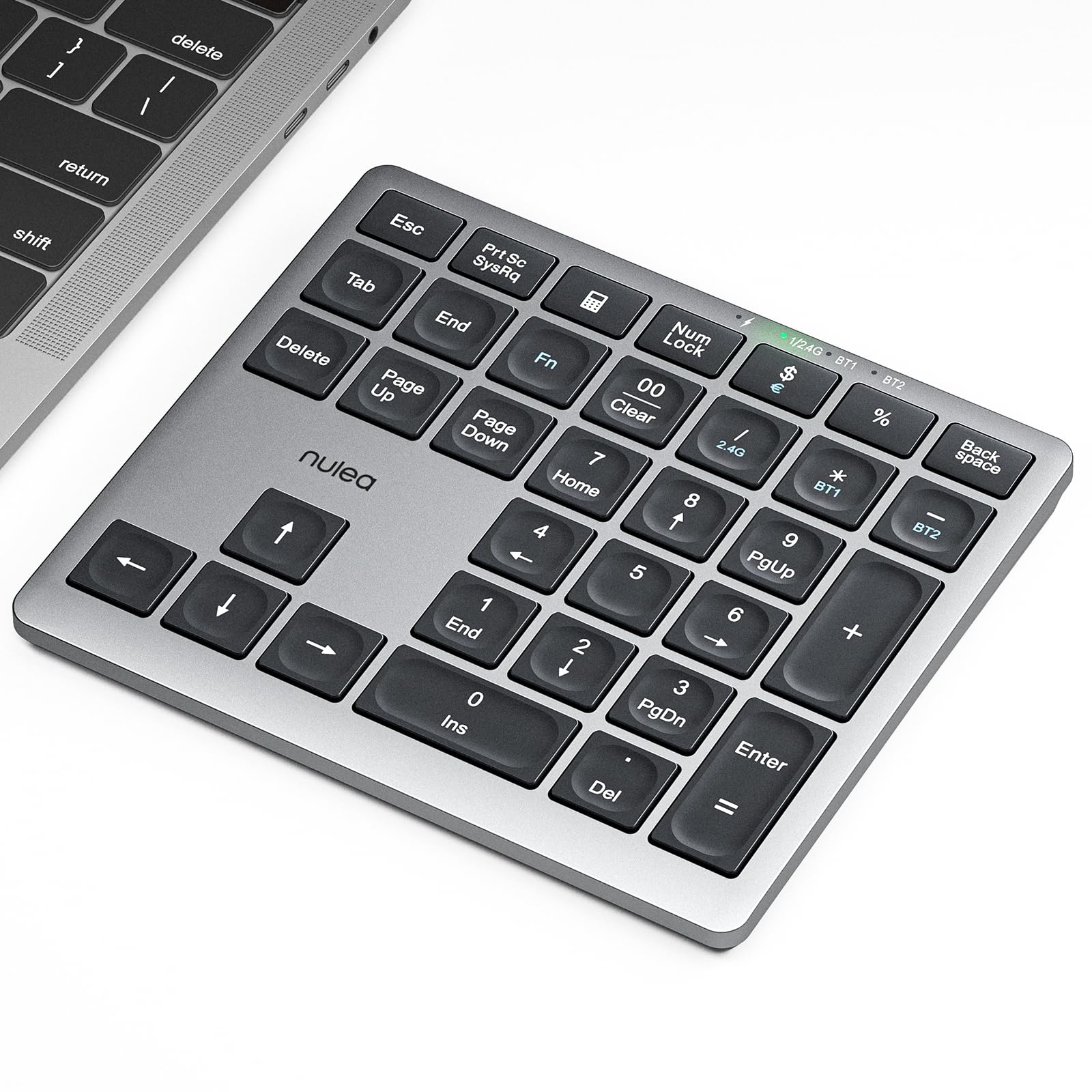
The Nulea combines Bluetooth 5.0 and 2.4G wireless in a single unit, letting you leave the dongle in your desktop and toggle to a tablet without re-pairing. The 280mAh rechargeable battery delivers a claimed 96-day standby, and the silent scissor-switch keys produce a satisfyingly soft bottom-out that won’t disturb coworkers in an open plan office.
It ships with a silver aluminum faceplate that blends well with Mac laptops, and the 7.5-degree tilt angle positions your hand naturally for long data-entry sessions. The anti-slip base kept the pad planted during rapid number entry on a glass desk.
Several verified users report flawless pairing with both Windows and macOS, and the auto-sleep-wake cycle works without a noticeable first-keypress delay. The only limitation is that it cannot be reprogrammed, but the standard numeric layout covers every key an accountant or inventory specialist needs.
Why it’s great
- Dual Bluetooth + 2.4G connectivity for maximum flexibility
- Silent scissor-switch keys with 7.5-degree ergonomic tilt
- 280mAh battery provides weeks of real-world use
Good to know
- Not compatible with USB-A ports — requires USB-C
- No programmable keys or backlight
2. ProtoArc Wireless Number Pad (EK04 N)

The ProtoArc EK04 N is the only entry with an integrated hard palm rest — a leather-topped platform that elevates your wrist to a neutral angle. That feature alone makes it the go-to choice for anyone who spends four or more hours per day entering data. The low-profile scissor-switch keys require minimal actuation force and rebound quickly, reducing cumulative finger strain.
It connects via Bluetooth 5.1 or a 2.4G USB-A dongle, and you can pair two devices simultaneously with a hotkey toggle. The 250-hour standby time after a two-hour USB-C charge means you can leave it in your bag for weeks without worrying about a dead battery. The 34-key set includes essential navigation keys: PgUp, PgDn, Delete, Insert, and a dedicated calculator button.
Bear in mind that the wrist rest is non-removable and hard — not a cushioned gel pad — so if you prefer a soft surface under your palm, you may need an additional gel rest. The unit’s width is 7.5 inches, which occupies more desk space than a compact pad but feels stable for rapid number entry.
Why it’s great
- Integrated hard palm rest reduces wrist strain during long sessions
- Dual Bluetooth + 2.4G with easy switching between two devices
- Reliable scissor-switch keys with quiet, crisp feedback
Good to know
- Non-removable wrist rest adds to desk footprint
- Calculator function works only in Windows, not macOS
3. iClever Aluminum 34-Key Bluetooth Number Pad

The iClever KP10 stands apart with a stainless steel base plate that gives it a premium heft and rigidity — the pad barely flexes even under aggressive thumb presses. The scissor-switch keys are rated for over 5 million keystrokes, and the slim profile (0.51 inches thick) slides easily into a laptop sleeve alongside your MacBook.
Bluetooth pairing is effortless across Windows, macOS, iOS, and Android, and you can connect two devices simultaneously with a single press to toggle. The USB-C fast charge replenishes the battery in about one hour, providing up to 100 hours of continuous typing — roughly a month of normal use. The NumLk indicator deactivates after six seconds to conserve power, but the NumLk state persists, so you never lose track of your input mode.
Some users note that the aggressive auto-sleep timer causes a brief first-keypress delay when the pad wakes, and the power switch feels a bit rigid and sharp-edged. The aluminum body also runs cold in winter, but the build quality justifies the mid-range price for professionals who want a desk-worthy accessory that also travels well.
Why it’s great
- Stainless steel base delivers exceptional rigidity and premium feel
- 5-million-keystroke rated scissor-switch keys
- One-hour fast charge powers 100 hours of use
Good to know
- Agressive auto-sleep causes a short delay on wake-up
- Power switch is rigid and can feel sharp to the touch
4. JOYEKY Bluetooth Number Pad
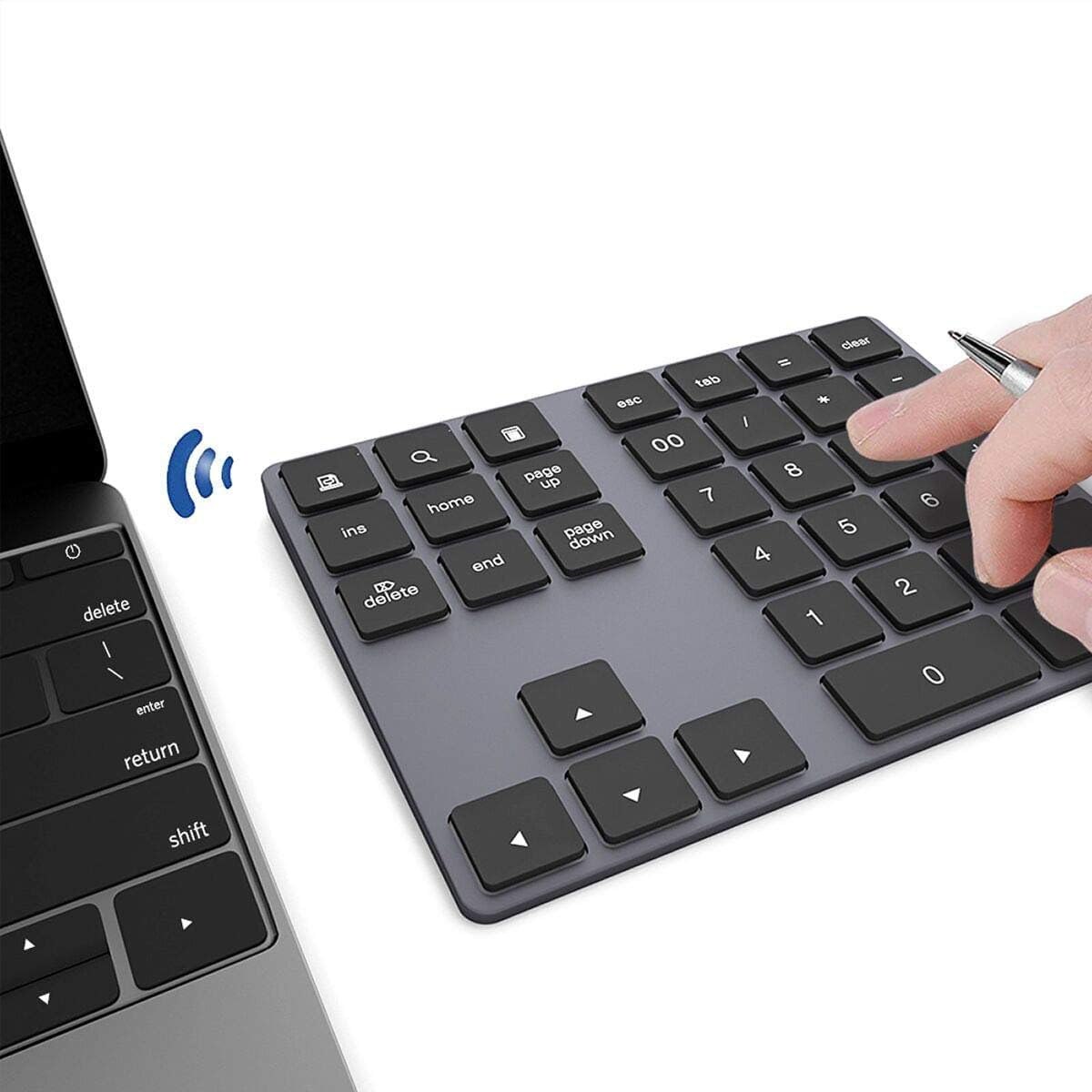
Weighing only 112 grams and measuring 0.42 inches thick, the JOYEKY is the most portable option in this lineup — it disappears into a backpack pocket or even a large coat pocket. The 34-key layout includes calculator, End, PgUp, and PgDn shortcuts, though the page up/down, search, screenshot, and Insert keys do not function under macOS. All number keys and the core numeric block work fine on Mac, but Windows users get the full feature set.
The built-in 110mAh battery is smaller than the competition’s, but the unit’s efficient power management still delivers up to 220 hours of runtime — roughly two weeks of regular use. A full charge takes about one hour via USB-C. Pairing is one-button and reliable for most users, though some found initial pairing required a second attempt after flipping the switch on the back.
The membrane-type keys produce a quiet but slightly mushy feel compared to the scissor-switch units above. For fast data entry, the lack of tactile feedback can slow you down, but for light spreadsheet work or occasional number entry, the ultra-slim profile and low weight make it a compelling travel companion.
Why it’s great
- Extremely light (112g) and thin (0.42 in) for true portability
- One-hour USB-C charge lasts 220 hours
- Reliable one-button Bluetooth pairing
Good to know
- Several shortcut keys do not work in macOS
- Membrane keys feel mushier than scissor-switch alternatives
5. iClever 35-Key Bluetooth Number Pad

The 35-key iClever stands out because it can pair with up to three devices simultaneously and swap between them with a single key press. This is a genuine productivity booster for anyone who works across a desktop PC, a laptop, and a tablet. The round scissor-switch keys have a pleasant tactile feel that mimics a modern ultrabook keyboard, and the slim stainless-steel frame adds durability without bulk.
The built-in battery is rated for up to 90 days of continuous use, though real-world results vary based on Bluetooth traffic and sleep interval. The included USB-C charging cable is short but adequate for desk-side use. Compatibility spans Windows, macOS, Android, and even Clip Studio, making it a surprisingly strong option for digital artists who need quick numeric input for brush sizes or layer opacity.
Like many Bluetooth keypads, the iClever enters a deep sleep to preserve battery, and there is a noticeable half-second wake-up delay when you start typing after a pause. Users who require instantaneous response may prefer the ProtoArc or the wired Macally, but for multi-device flexibility at a low cost, this pad delivers excellent value.
Why it’s great
- Pairs with up to three devices with instant switching
- Round scissor-switch keys with satisfying tactile response
- Included 90-day battery life with USB-C recharge
Good to know
- Auto-sleep creates a brief wake-up delay
- Short included charging cable may limit placement
6. Kisnt KN300BT Bluetooth Number Pad
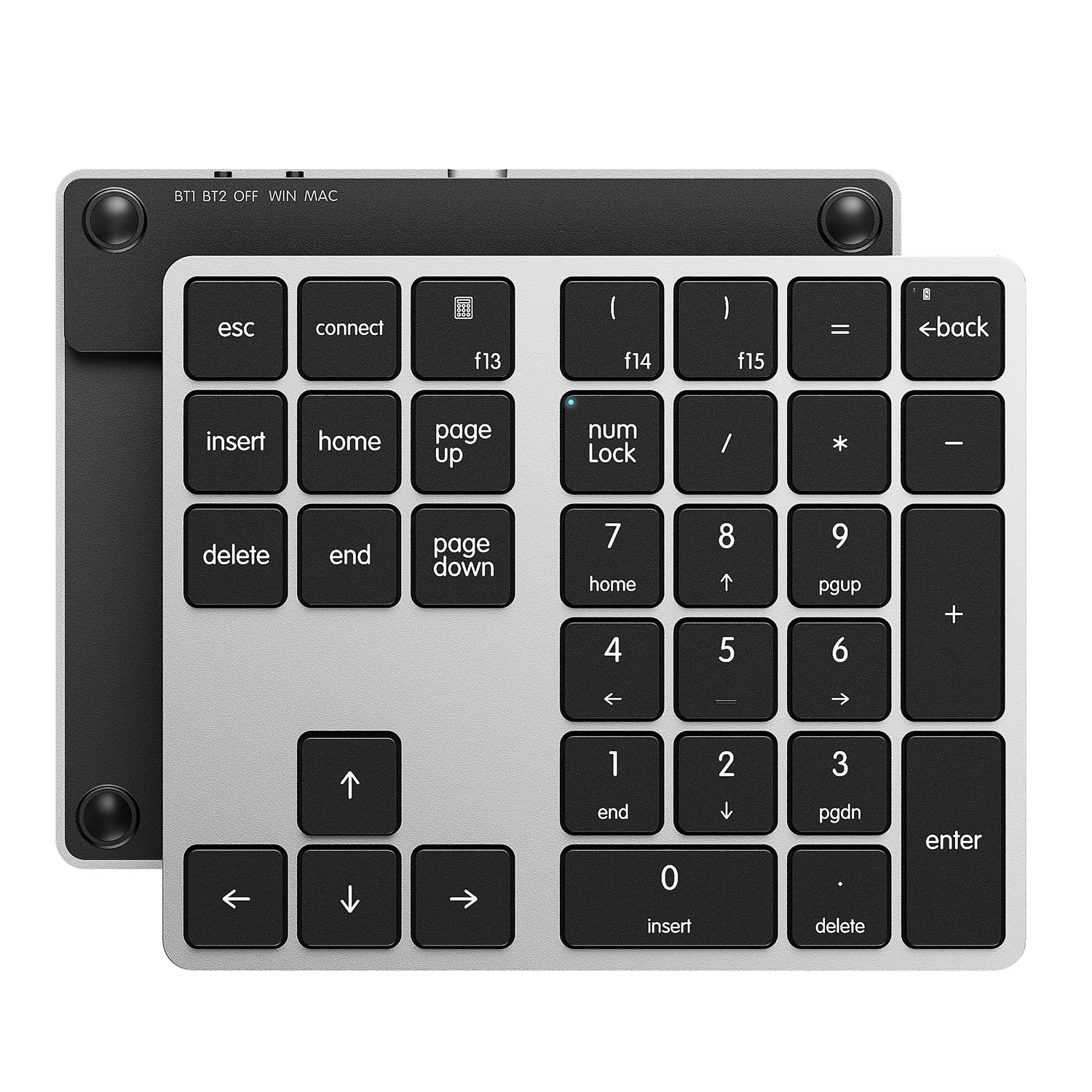
The Kisnt KN300BT packs a 300mAh rechargeable battery — the largest capacity in this roundup — which translates to one to two months of daily use between charges. It supports dual Bluetooth pairing; you can toggle between two paired devices by pressing BT1 or BT2 without re-pairing. The 34-key full-size layout includes Esc, Tab, Backspace, Delete, Home, PgUp, PgDn, and four arrow keys, making it a near-complete extension of a tenkeyless keyboard.
Setup with macOS devices is straightforward, and multiple verified buyers confirm it works seamlessly with both MacBook Air M4 and older Intel-based Macs. The scissor-switch keys are quiet and responsive, closely matching the typing feel of a MacBook keyboard. The OS switch on the top adapts the key map for Windows or macOS automatically.
Some users note that the auto-sleep timer kicks in after one hour of inactivity, and pressing any key wakes it instantly. The unit lacks a backlight, which is standard at this price tier, and cannot be programmed for custom macros. For pure data entry on a Mac, however, the KN300BT is a reliable, long-running performer that requires minimal maintenance.
Why it’s great
- 300mAh battery offers the longest charge interval in this guide
- Dual Bluetooth with one-touch device switching
- Scissor-switch keys mimic the feel of a MacBook keyboard
Good to know
- No backlight for low-light use
- Not programmable for custom macros
7. Macally USB-C Wired Number Pad

The Macally is the only wired option in this list, and it earns its spot by offering instant, zero-lag input with no battery to charge and no Bluetooth pairing hassle. Just plug the 5-foot USB-C cable into your Mac or PC, and the pad is immediately recognized as a standard HID device — no drivers required. The 22 full-size keys are quiet and responsive, with a built-in tilt angle that reduces wrist strain.
The aluminum enclosure gives the pad a solid 170-gram feel and a silver finish that matches Apple’s aesthetic perfectly. The non-slip rubber feet keep it planted even during aggressive number entry sessions. Because it’s wired, you never experience a wake-up delay: every keystroke registers exactly when you press it, which matters for real-time data entry in financial systems or inventory scanning.
A small number of users report occasional disconnection that requires unplugging and re-plugging the cable, though this seems to be limited to certain USB-C hubs. The 22-key layout is more compact than the 34-key competitors, missing navigation keys like PgUp, PgDn, and arrow keys. If you need those, a Bluetooth pad with a fuller layout is a better fit. But for raw numeric entry speed with zero latency, the Macally is unbeatable.
Why it’s great
- Plug-and-play wired connection with zero input lag
- Aluminum body matches Mac aesthetics and feels premium
- No batteries to charge or Bluetooth to pair
Good to know
- 22-key layout lacks navigation keys like PgUp and arrow keys
- Occasional disconnection reported with certain USB-C hubs
FAQ
Will a Bluetooth number pad work with my MacBook M4?
Why does my wireless number pad have a delay when I start typing?
Can I use a number pad for left-handed data entry?
Final Thoughts: The Verdict
For most users, the 10 key pad winner is the Nulea Wireless Number Pad because it balances Bluetooth 5.0 and 2.4G connectivity, silent scissor-switch keys, and a 280mAh battery that lasts weeks on a single charge. If you need integrated wrist support for all-day data entry, grab the ProtoArc EK04 N. And for zero-lag, instant-wake performance in a premium shell, nothing beats the Macally USB-C Wired Pad.