
Scrolling through listings for server memory or workstation RAM, you’ll notice a strange gap: almost nothing is sold as a single 100 GB kit. The reason is technical — standard DIMM densities jump from 8GB to 16GB to 32GB, never landing on a neat 100. What buyers actually mean when they search for “100 GB RAM” is a configuration delivering roughly triple-digit capacity through matched modules — 128GB kits, 96GB combos, or 80GB sets banked across multiple slots. The real question is which generation, form factor, and ECC standard fits your machine.
I’m Min — the co-founder and writer behind Gadgets Feed. This guide is the product of dozens of hours cross-referencing motherboard QVL lists, parsing JEDEC timing tables, and mapping compatibility across Dell, HP, Apple, and Supermicro platforms to find the configurations that actually post on first boot.
Whether you’re reviving a 2010 Mac Pro or populating a dual-Xeon homelab, finding a reliable configuration of 100 gb ram means navigating DDR3 versus DDR4, registered versus unbuffered, and pin counts that vary by generation.
How To Choose The Best 100 GB RAM
Because no module ships at exactly 100GB, your buying decision is really about finding the right kit capacity, memory generation, and ECC type that your motherboard supports. Three factors will determine whether your upgrade works immediately or throws POST errors.
DDR3 vs DDR4: Pin Count Changes Everything
DDR3 modules use 240 pins and operate at 1.35V or 1.5V. DDR4 jumps to 288 pins and drops to 1.2V. They are not interchangeable — a DDR4 stick will not fit a DDR3 slot, and forcing it damages the board. For older Mac Pros (2009–2012) and iMacs (2011–2015), DDR3 is the only path. For Dell Precision T3610 or HP Z2 workstations, DDR4 is required. Check your system’s max memory speed before buying; a 3200MHz kit is wasted on a 1333MHz bus.
ECC Registered vs Unbuffered: Know Your Platform
Servers and high-end workstations demand ECC Registered (RDIMM) memory for error correction on large-capacity loads. Standard desktop motherboards — even those with Ryzen or Core i9 chips — often require ECC Unbuffered (UDIMM) or plain Non-ECC. Installing RDIMM in a consumer board can prevent boot entirely. The product listings clearly state “RDIMM” or “UDIMM”; match this to your motherboard’s QVL before clicking buy.
Kit Size and Slot Configuration
A 128GB kit typically comes as 4x32GB or 8x16GB. If your board has only four slots, the 4x32GB layout is mandatory. Eight-slot boards like dual-CPU Xeon platforms can accept 8x16GB or 8x32GB, but populating all slots at full speed may require adjusting memory frequency in BIOS. Always verify maximum capacity per slot — some older platforms cap individual DIMMs at 8GB or 16GB.
Quick Comparison
On smaller screens, swipe sideways to see the full table.
| Model | Category | Best For | Key Spec | Amazon |
|---|---|---|---|---|
| Dell OptiPlex 7020 | Renewed Desktop | Entry workstation | i7-4790 / 16GB DDR3 | Amazon |
| Timetec 80GB KIT | DDR3L SODIMM | Apple iMac upgrade | 10x8GB / 1600MHz | Amazon |
| NEMIX RAM 128GB | DDR3 RDIMM | Mac Pro 2009–2012 | 8x16GB / 1333MHz ECC | Amazon |
| OWC 128GB DDR3 | DDR3 RDIMM | Workstations / Servers | 4x32GB / 1600MHz ECC | Amazon |
| Dell Optiplex 7040 | Renewed Desktop | Multi-tasking office | 64GB DDR4 / 1TB NVMe | Amazon |
| A-Tech 128GB DDR4 | DDR4 RDIMM | 2019 Mac Pro / Servers | 4x32GB / 2666MHz ECC | Amazon |
| HP Z2 Tower G4 | Renewed Workstation | 3D / Video editing | i9-9900K / 64GB DDR4 | Amazon |
| OWC 128GB DDR4 UDIMM | DDR4 UDIMM | Desktop / Workstation | 8x16GB / 3200MHz ECC | Amazon |
| PowerEdge R630 | Renewed Server | Enterprise homelab | 2x E5-2690 v4 / 128GB | Amazon |
In‑Depth Reviews
1. OWC 128GB (4x32GB) DDR3 1600 PC3-12800 CL11 4Rx4 240-pin 1.5V ECC Registered RDIMM
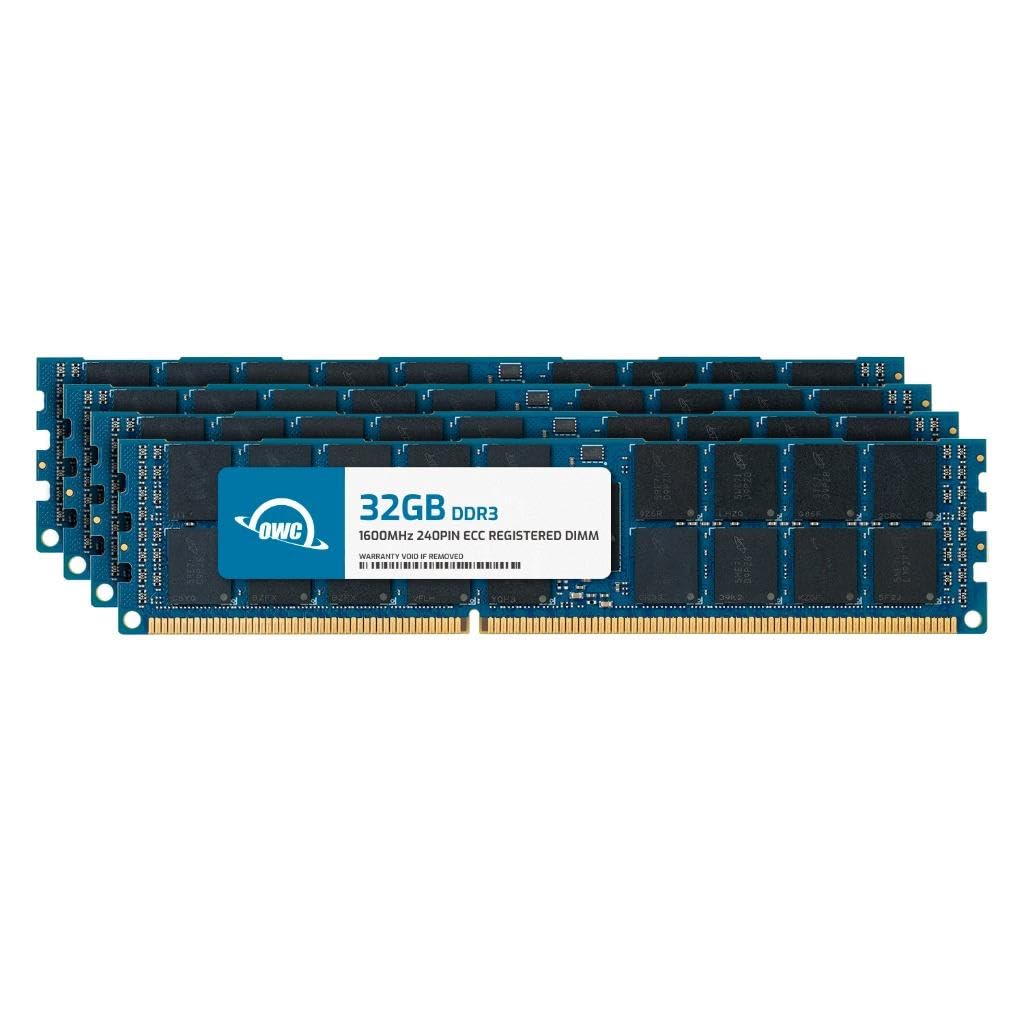
OWC’s 128GB kit delivers four 32GB DDR3-1600 registered DIMMs built for select workstations and servers. The 4Rx4 quad-rank configuration and 1.5V operating voltage are specifically designed for platforms like the Dell Precision T3610 and Supermicro X9-series boards. Users report successful POST on first boot with full capacity recognized at rated speed — a strong indicator of tight timing compliance.
Each module carries CL11 latency and ECC registered topology, meaning the memory controller offloads address decoding to the register on the DIMM itself. This reduces electrical load on the CPU’s memory controller, which is critical when populating multiple ranks across four slots. The 240-pin form factor follows JEDEC ROHS standards, and OWC backs the kit with a limited lifetime warranty and advanced replacement program.
One reviewer logged 256GB across two kits in a Supermicro X9DRI-LN4F+ with dual Xeon E5-2650 v2s, confirming the memory ran at 1600MHz without manual BIOS adjustment. Another used it to max out a Dell T3610 for a Windows 11 upgrade, noting the error-correcting capability as a benefit for long-running compute tasks. For those with compatible LGA2011 platforms, this kit is the most reliable path to triple-digit capacity on DDR3.
Why it’s great
- True 4x32GB layout hits 128GB in four slots — ideal for workstations without eight DIMM sockets
- ECC registered design stabilizes memory on multi-rank configurations
- OWC lifetime warranty with advanced replacement reduces downtime
Good to know
- Incompatible with standard desktop motherboards and unbuffered memory slots
- One user reported a failed stick, though OWC replaced under warranty
2. NEMIX RAM 128GB (8X16GB) DDR3 1333MHz PC3-10600 2Rx4 1.5V 240-PIN ECC RDIMM

NEMIX designed this 128GB kit specifically for the Mac Pro 2009 (MacPro4,1), 2010 (MacPro5,1), and 2012 models. The eight 16GB DDR3-1333 RDIMMs operate at 1.5V with CL9 latency and dual-rank x4 organization. Users upgrading a 2010 Mac Pro for 4K video work reported immediate performance gains, with the system recognizing all 128GB without additional configuration.
The 1333MHz speed matches the native memory bus of the Xeon Westmere and Nehalem processors in these Mac Pros. Running faster 1600MHz memory would downclock to 1333MHz anyway, so this kit avoids wasted bandwidth. The ECC registered topology is mandatory for Mac Pro 5,1 — unbuffered memory will not work. NEMIX includes a lifetime replacement warranty and holds to JEDEC PC3-10600 standards, which means compatibility with any system that accepts DDR3-1333 RDIMMs.
One reviewer noted flawless operation over a month handling 4K video timelines. A separate user appreciated the cost advantage over other options for the same 128GB capacity on the Mac Pro platform. The primary trade-off is slot count — eight sticks require all DIMM slots occupied, leaving zero room for future expansion without replacing the entire kit.
Why it’s great
- Perfect native speed match for Mac Pro 4,1/5,1 — no downclocking required
- 128GB in eight sticks provides maximum theoretical capacity for the platform
- CL9 latency is tighter than typical 1333MHz server memory
Good to know
- Uses all eight DIMM slots with no room for incremental upgrades
- Return policy includes restocking fee if compatibility is an issue
3. Timetec 80GB KIT(10x8GB) Compatible for Apple DDR3L 1600MHz PC3L-12800 CL11 SODIMM

This Timetec kit targets a very specific niche: older Apple iMacs from mid-2011 through mid-2015 with 10 SODIMM slots. The ten 8GB DDR3L modules run at 1600MHz at 1.35V (PC3L-12800), which is the low-voltage standard that reduces heat in the iMac’s cramped chassis. CL11 latency is standard for DDR3L at this speed grade. The 204-pin SODIMM form factor is smaller than desktop DIMMs and is exclusive to laptop and all-in-one designs.
Buyers should note this is 80GB total, not 100GB or 128GB, but it is one of the few kits available that fills every slot on compatible iMac models like A1311, A1312, and A1419. Users with mid-2012 MacBook Pros have also successfully used it, though those laptops have only two SODIMM slots, making a 10-module kit excessive unless repurposed across multiple systems. The guaranteed lifetime warranty from Timetec covers the purchase date forward.
Multiple verified reviews confirm compatibility with iMac12,2 and iMac13,2 running Logic Pro and general productivity. One user described the performance improvement as “immediate” when upgrading from 4GB to 16GB on a 2012 iMac, though that upgrade used only two sticks. The key differentiator here is that this kit comes pre-configured with ten modules, eliminating the guesswork of sourcing matched 8GB sticks individually for full-population builds.
Why it’s great
- Low 1.35V operation reduces thermal load in all-in-one chassis
- Ten matched 8GB SODIMMs fill every slot on compatible 2011–2015 iMacs
- Lifetime warranty with US-based technical support
Good to know
- 80GB total — not 128GB — and requires all slots populated to reach that figure
- Only compatible with Apple iMacs and select older MacBooks; not for generic PCs
4. Dell OptiPlex 7020 Desktop Computer, 16GB Ram 256GB SSD, Intel Quad Core i7 4790 up to 4.0GHz, AC8260 Built-in WiFi 5

The Dell OptiPlex 7020 is a renewed small-form-factor desktop with a 4th-gen Core i7-4790 (up to 4.0GHz), 16GB DDR3 RAM, and a 256GB SSD running Windows 11 Pro. Built-in WiFi 5 via the AC8260 card eliminates the need for a wired Ethernet drop. The system supports three monitors at 4K through its HDMI and DisplayPort outputs, making it a practical choice for multi-display office setups or light server management.
While the included 16GB is far below triple-digit capacity, the OptiPlex 7020 uses standard DDR3 DIMMs in four slots. Upgrading to 32GB or 64GB is straightforward — the i7-4770/4790 memory controller officially supports up to 32GB, though some users report 64GB functioning with 16GB modules. The 256GB SSD provides snappy boot times, and the DVD-RW drive is a rare inclusion on modern refurbished units.
Customer feedback highlights its speed for office tasks and light gaming. One reviewer praised it as “fast, reliable, quiet” for daily business use, while another noted the 32GB RAM upgrade made it “responsive and great for older games.” The main caveat is the integrated graphics — no dedicated GPU means modern 3D workloads will struggle. The small form-factor case limits GPU upgrade options to low-profile cards with no external power connectors.
Why it’s great
- Quad-core i7-4790 reaches 4.0GHz — still capable for office/light server tasks
- Integrated WiFi 5 and 4K triple-monitor support out of the box
- Four DDR3 DIMM slots allow easy capacity upgrades to 32GB or higher
Good to know
- Integrated Intel HD Graphics 4600 cannot handle modern gaming or 3D modeling
- Some units ship with wrong cables; verify monitor adapter requirements before buying
5. A-Tech 128GB Kit (4x32GB) DDR4 2666MHz PC4-21300 ECC RDIMM 2Rx4 Dual Rank

A-Tech’s Enterprise Series delivers 128GB across four 32GB DDR4-2666 RDIMMs. The PC4-21300 speed grade provides 21.3 GB/s per module, and the dual-rank x4 organization (2Rx4) allows the memory controller to interleave between ranks for lower latency under load. At 1.2V, these modules run cooler than DDR3 alternatives, which matters in densely packed server chassis.
Compatibility is restricted to DDR4 servers and workstations — the product listing explicitly states it will not work with desktop or laptop computers. Verified users have deployed it in Dell Precision 5820 workstations, 2019 Mac Pros, TrueNAS Mini X+ systems, and dual-CPU X99 motherboards like the Machinist X99. One reviewer used four kits (512GB total) in a Dell 5820 with reported stability over months of operation.
The CL19 latency is expected for DDR4-2666 ECC RDIMMs and does not impact real-world throughput in memory-bound workloads like virtualization or database caching. A-Tech covers the modules with a limited lifetime warranty and has a responsive support team. The primary compatibility trap is mixing with ECC Unbuffered or Load-Reduced DIMMs — this kit is strictly RDIMM and fails if combined with other types.
Why it’s great
- 128GB in only four slots — leaves room for additional expansion on eight-slot boards
- Dual-rank x4 design maximizes memory bandwidth on compatible platforms
- Proven on 2019 Mac Pro and Dell Precision 5820 without configuration issues
Good to know
- Incompatible with all non-ECC and ECC Unbuffered memory slots
- 2666MHz is the rated speed; some platforms may downclock to 2400MHz
6. Dell Optiplex 7040 Small Form Desktop, Intel Quad Core i7 6700 3.4Ghz, 64GB DDR4, 1TB NVMe PCIe M.2 SSD

The Dell Optiplex 7040 SFF packs a 6th-gen Core i7-6700 (3.4GHz base, 4.0GHz turbo), 64GB of DDR4 RAM, and a 1TB NVMe PCIe M.2 SSD into a compact chassis that sits easily on a desk. Windows 11 Pro is pre-installed and activated. The system includes one HDMI and two DisplayPort outputs supporting up to 3840×2160 resolution, plus front-panel USB ports for convenient peripheral access.
The 64GB DDR4 configuration is double the capacity of typical refurbished office desktops at this price tier, making it suitable for memory-heavy workflows like running multiple virtual machines or hosting a Minecraft server with hundreds of mods. One customer reported lag-free modded Minecraft with up to 75 mods, attributing the smooth operation to the 64GB buffer. The 1TB NVMe SSD ensures fast application loading and reduced boot times compared to SATA-based alternatives.
The trade-off is the small form factor’s limited expansion. The integrated Intel HD Graphics 530 handles 4K display output but is not designed for gaming or GPU-accelerated rendering. GPU upgrades are restricted to low-profile, low-power cards because the small power supply lacks GPU power connectors. A reviewer noted the lack of built-in Bluetooth and WiFi, though a adapter card adds both.
Why it’s great
- 64GB DDR4 pre-installed — ready for heavy multitasking or server workloads out of the box
- 1TB NVMe SSD provides significantly faster storage than SATA alternatives
- Compact SFF design fits constrained desk spaces without sacrificing performance
Good to know
- No built-in WiFi or Bluetooth; requires add-on card for wireless connectivity
- Upgrading GPU is difficult due to low-profile bracket and PSU limitations
7. HP Z2 Tower G4 Workstation, Intel Eight Core i9 9900K 3.6Ghz, 64GB DDR4 RAM, 2TB NVMe PCIe M.2 SSD

The HP Z2 Tower G4 is a professional workstation powered by an 8-core i9-9900K reaching 5.0GHz turbo. It ships with 64GB of DDR4 RAM and a 2TB NVMe PCIe M.2 SSD, running Windows 11 Pro on a clean installation. The tower design supports full-height PCIe cards, allowing users to install a dedicated GPU for 3D modeling, video editing, or AI workloads that the integrated UHD Graphics 630 cannot handle alone.
The advanced cooling system uses a front intake and rear exhaust with a dedicated CPU fan duct, keeping the i9-9900K under control during sustained all-core loads. This is a meaningful advantage over small-form-factor desktops that throttle under prolonged stress. The Z2’s motherboard includes four DIMM slots supporting up to 128GB DDR4-2666, providing a clear upgrade path to triple-digit capacity. The 2TB NVMe SSD offers generous local storage for project files and OS partitions.
Buyers should note that this renewed unit does not include keyboard, mouse, or WiFi adapter — those must be purchased separately. One reviewer praised the “spotless” condition and easy setup, while another experienced a hard drive failure within days and noted the machine’s fans run audibly at all times. Despite mixed reliability experiences, the i9-9900K and 64GB RAM provide workstation-class compute for demanding applications.
Why it’s great
- 8-core i9-9900K with 5.0GHz turbo handles rendering and compilation tasks
- Full-height PCIe slot allows GPU upgrades — not locked to low-profile cards
- 2TB NVMe SSD and 64GB DDR4 provide ample storage and memory headroom
Good to know
- No built-in WiFi, keyboard, or mouse included — factor in – for peripherals
- Fans are audible under load; not suitable for silent environments
8. OWC 128GB (8x16GB) DDR4 3200MHz PC4-25600 CL22 1RX8 ECC Unbuffered UDIMM
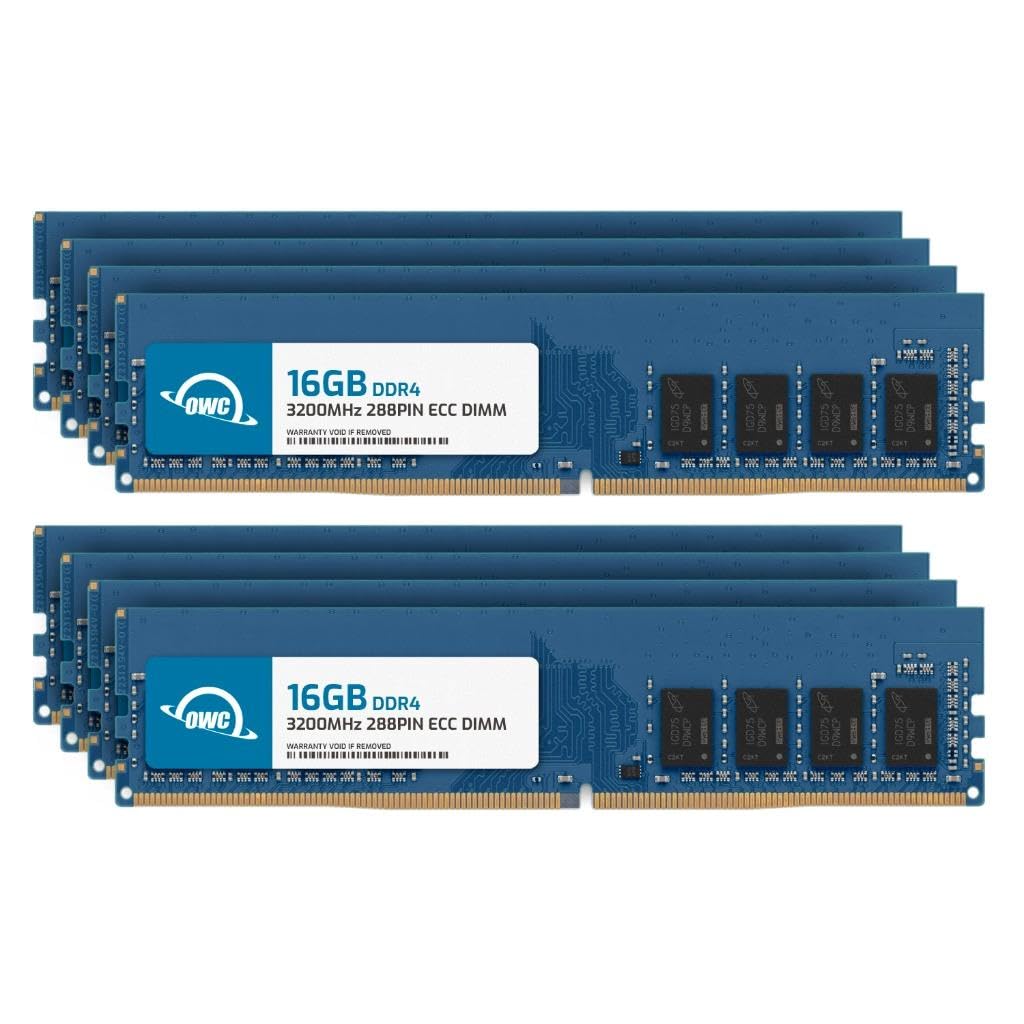
OWC’s 128GB DDR4-3200 UDIMM kit uses eight 16GB single-rank x8 modules operating at 3200MHz with CL22 latency and 1.2V. The key distinction from the earlier OWC DDR3 kit is this is ECC Unbuffered (UDIMM), not Registered. ECC UDIMMs are compatible with desktop-class platforms that support ECC, such as AMD Ryzen systems on B550/X570 chipsets or Intel W-series workstations. The 288-pin form factor matches all DDR4 slots.
Multiple users confirmed flawless operation with AMD Ryzen 9 5950X CPUs on Gigabyte X570 and ASUS B550 motherboards running Proxmox and MemTest86. One reviewer ran a 48-hour memory test that validated ECC error correction was functioning, reporting zero uncorrectable errors. Another noted the RAM worked at its rated 3200MHz speed instantly without manual BIOS overclocking. The kit is also compatible with Dell PowerEdge, HP ProLiant, and Lenovo ThinkStation systems.
The 8x16GB configuration requires eight DIMM slots, which limits this kit to dual-CPU server boards or high-end consumer platforms like the ASUS ROG Zenith or Gigabyte Aorus Xtreme. Some users reported ECC errors that resolved after swapping module positions, suggesting the motherboard’s memory training can be sensitive to slot placement. OWC includes an advanced replacement program and limited lifetime warranty.
Why it’s great
- DDR4-3200 at CL22 provides strong bandwidth for Ryzen and Intel workstation builds
- ECC Unbuffered works with consumer platforms that support ECC — not just servers
- Validated error correction in MemTest86 ensures data integrity for sensitive workloads
Good to know
- Requires eight DIMM slots; incompatible with four-slot boards unless you use only four sticks
- Some users encountered ECC errors that required swapping module positions in the slots
9. PowerEdge Dell R630 Server | 2X E5-2690 v4 = 28 Cores | 128GB RAM | 2X 1TB SSD

The Dell PowerEdge R630 is a 1U rackmount server with dual Xeon E5-2690 v4 processors totaling 28 cores (14 per socket) at 2.6GHz base and 3.5GHz turbo. It ships with 128GB of DDR4 PC4-2133 memory across its 24 DIMM slots — meaning it can be expanded to 768GB with 32GB modules. Two 1TB SATA SSDs provide storage, and the PERC 730-mini RAID controller manages drive redundancy. The iDRAC 8 Enterprise card enables out-of-band management for remote monitoring and OS deployment.
This is a genuine enterprise server for homelab use, not a repurposed desktop. The 1U chassis fits standard racks, but the noise level is higher than tower workstations; it is not suitable for quiet home office environments.
Buyers should be prepared for the learning curve of enterprise hardware — BIOS iDRAC configuration, RAID setup, and driver installation differ significantly from consumer PC builds. One user noted difficulty obtaining up-to-date drivers, while another praised the “excellent packaging” and immediate functionality. The renewed unit includes a 90-day warranty, and the 128GB DDR4 configuration provides a strong foundation for virtualization, containerization, or as a NAS host.
Why it’s great
- 28 cores and 128GB RAM deliver exceptional VM density for a homelab server
- iDRAC 8 Enterprise enables full remote management without physical access
- 24 DIMM slots allow future expansion to 768GB without replacing existing memory
Good to know
- Loud 1U fans make it unsuitable for quiet residential use without a dedicated room
- Enterprise setup and driver management require technical familiarity beyond consumer PCs
FAQ
Can I mix 16GB and 32GB modules in the same system for a 100GB configuration?
Why do DDR3 servers at 1333MHz still cost over for 128GB?
Will a DDR4-3200 RDIMM kit run at 3200MHz on a dual-CPU Xeon v3 motherboard?
What happens if I install ECC RDIMM into a non-ECC desktop motherboard?
Final Thoughts: The Verdict
For most users, the 100 gb ram winner is the OWC 128GB DDR3 RDIMM Kit because it delivers true 128GB capacity in a compact 4x32GB layout for workstations that need error correction without requiring eight slots. If you want DDR4 performance on a Ryzen or Intel workstation with ECC support, grab the OWC 128GB DDR4 UDIMM Kit. And for enterprise homelab virtualization, nothing beats the PowerEdge R630 Server with its 28 cores and 128GB pre-installed.