
If you rely on a dedicated number pad, navigation cluster, and full function row for your workflow or gaming muscle memory, anything smaller than a 100% layout introduces trade-offs you do not need to make. Every millimeter of desk space a compact keyboard saves comes at the cost of a layered key you have to memorize or a macro you have to program. The 100% Keyboard Kit market has matured past plastic office boards into a genuine category of premium, customizable full-size workstations — but only if you know which specs separate a rattling, hollow frame from a dense, thocky foundation. I’m Min — the co-founder and writer behind Gadgets Feed. My analysis of this category focuses on isolating the physical build, switch ecosystem, and software flexibility that define whether a full-size kit delivers lasting satisfaction or just another set of regrets. After poring over the technical specifications, user reviews, and hardware architectures of the leading 100% kits on the market, I’ve separated the boards worth your time from the ones that simply take up space. This guide exists to help you find the absolute best 100% keyboard kit that matches your typing style and desk space.
How To Choose The Best 100% Keyboard Kit
Choosing a 100% kit means trading portability for uncompromised functionality. The decision matrix changes compared to smaller form factors because the frame itself is larger and more expensive to manufacture. Three factors dominate the choice: the switch interface, the case construction, and the programming layer.
Hot-Swap vs. Soldered: Non-Negotiable for Full-Size
A 100% kit has over 100 switch positions. If the PCB is soldered, changing a single broken or disliked switch requires desoldering it from a multi-layer board — a job that becomes expensive and tedious. A hot-swap PCB with 5-pin support lets you test linear, tactile, and clicky switches in the same board over the weekend. Every kit in this guide supports hot-swap because a full-size board should evolve with your preference, not lock you into a single feeling.
Case Material and Internal Architecture
A full-size aluminum frame adds roughly 1.5 to 2.5 pounds of weight compared to a plastic case. That weight translates directly into stability — the board does not slide when you type aggressively or game. Look for a gasket mount design (where the plate floats on silicone or rubber gaskets) rather than a tray mount (where screws press the plate directly against the case). Gasket mount creates a softer, more uniform typing feel and reduces the hollow ping that plagues cheaper full-size boards.
Firmware and Programmability
The best 100% kits run QMK or VIA firmware, allowing you to remap every key, create multi-layer macros, and adjust the rotary encoder functions without proprietary software. Proprietary software (like iCUE from Corsair or the Glorious Core) is functional but ties you to a specific ecosystem across OS updates. QMK/VIA support ensures your keyboard is truly yours, independent of ongoing software support.
Quick Comparison
On smaller screens, swipe sideways to see the full table.
| Model | Category | Best For | Key Spec | Amazon |
|---|---|---|---|---|
| Keychron V6 Max | Mid-Range | Customizable Wireless Workhorse | 108-key, QMK/VIA, 2.4 GHz/Bluetooth | Amazon |
| ASUS ROG Strix Scope II X | Mid-Range | Quiet Gaming Typist | Aluminum top plate, sound-dampening foam | Amazon |
| Keychron K10 HE | Mid-Range | Hall-Effect Switch Enthusiast | Magnetic switches, 0.1mm actuation, wood frame | Amazon |
| Corsair K100 RGB | Premium | Top-Tier Gaming Responsiveness | 4,000 Hz polling, Cherry MX Speed Silver | Amazon |
| Glorious GMMK 3 PRO (Silver) | Premium | Modular Barebones Custom Build | Full aluminum, 9-point modularity | Amazon |
| Glorious GMMK 3 PRO (Black) | Premium | Premium Pre-Built with Fox Switches | Pre-installed Fox linear switches, gasket system | Amazon |
| HHKB Studio | Premium | Productivity Minimalist | 60-key compact, trackpoint, gesture pads | Amazon |
| Corsair Galleon 100 SD | Premium | Stream Deck Integration | Built-in Stream Deck, 8,000 Hz polling | Amazon |
| Kinesis Advantage360 | Premium | Ultimate Ergonomic Full-Size | Split contoured, programmable, PBT keycaps | Amazon |
In‑Depth Reviews
1. Keychron V6 Max Wireless Custom Mechanical Keyboard

The Keychron V6 Max hits the sweet spot of the full-size kit market by combining 108-key full-size layout with tri-mode wireless (2.4 GHz at 1000 Hz polling, Bluetooth 5.1 for three devices) and a gasket-mounted plate with sound-absorbing foam. The double-shot PBT keycaps resist shine far longer than ABS, and the south-facing RGB prevents interference with switch legends. The programming layer is the biggest win: the Keychron Launcher web app lets you remap every key, create macros, and control the rotary encoder without installing any local software — and QMK open-source firmware powers the entire thing.
The Gateron Jupiter Brown switches are pre-lubed from the factory, offering tactile feedback with less scratch than standard Browns. The PCB-mounted screw-in stabilizers reduce wire wobble on the space bar and shift keys, which is a critical upgrade point for full-size boards where the wider keys amplify resonance. Users report weeks-long battery life in normal mixed-use scenarios and reliable 2.4 GHz connectivity without noticeable jitter.
Some owners note that the backlight does not shine through the solid PBT keycaps, requiring a compromise between legend visibility and texture preference. The programming workflow requires a wired connection to use the Launcher, which is a minor friction point if you expect fully wireless configuration. Despite these details, the V6 Max delivers the most complete package of connectivity, customizability, and build quality at its tier.
Why it’s great
- Full QMK/VIA support for deep key customization
- Tri-mode wireless with 2.4 GHz 1000 Hz polling
- Gasket mount and foam reduce hollow echo
Good to know
- Backlight does not shine through keycaps
- Programming requires wired connection to Launcher
- No right-click button on the PCB
2. ASUS ROG Strix Scope II X Wired USB Mechanical Gaming Keyboard

The ROG Strix Scope II X stakes its claim on acoustic refinement and gaming-specific features. The aluminum top plate provides rigidity and weight without requiring a full CNC-machined frame, while integrated sound-dampening foam and switch-dampening pads target the pinging noise that usually escapes plastic full-size boards. The pre-lubed ROG NX Snow V2 linear switches produce a deeper, smoother keystroke with less spring crunch than stock Cherry MX Red variants.
What sets this kit apart for gamers is the built-in multi-function wheel for media and lighting adjustments, plus hotkeys for Xbox Game Bar and recording controls. The hot-swap socket accepts 3-pin and 5-pin MX-style switches, so you can replace the pre-installed linear switches with tactiles or clickies within minutes. The detachable wrist rest uses a firm foam that maintains palm support without collapsing after long sessions.
The keycaps are double-shot PBT, which resist wear well, but several users report a sticky space bar and left shift key out of the box — a quality control variance that matters on a kit. The lighting customization requires ASUS Armoury Crate software rather than onboard-only controls, which adds bloatware overhead. The board is also heavy enough that it stays planted during aggressive gaming, but that weight reduces portability if you switch between multiple machines.
Why it’s great
- Excellent acoustic dampening with foam pads
- Hot-swap with 3-pin and 5-pin compatibility
- Multi-function wheel for media control
Good to know
- Some units have sticky stabilizers out of box
- Lighting requires ASUS software for full control
- Detachable wrist rest is firm, some prefer softer
3. Keychron K10 HE Hall Effect Keyboard

The Keychron K10 HE introduces Hall Effect magnetic switches into the full-size category, offering 0.1mm sensitivity and adjustable actuation from 0.2mm to 3.8mm — capabilities impossible with traditional mechanical contacts. The magnetic detection eliminates physical wear on the switch contacts, theoretically extending switch lifespan beyond the typical 50-100 million keystroke rating of mechanical switches. The tri-mode connectivity mirrors the V6 Max with Bluetooth 5.2, 2.4 GHz, and USB-C wired.
The aesthetic differentiator here is the natural wood side frame combined with an aluminum body, giving the board a desk-centerpiece weight and warmth that plastic kits cannot replicate. The Keychron Launcher web app extends the same QMK-level customization (rapid trigger, snap action macros) to the magnetic switches, making it possible to set two actuation points on a single keypress for driving games or illustration shortcuts. The OSA-profile double-shot PBT keycaps provide a consistent feel across the 100% layout.
Battery life under heavy use (8 hours daily with RGB on) is notably shorter than the V6 Max, with users reporting 2-3 day charge cycles. The keyboard also lacks a volume knob, which is a surprising omission for a premium kit at this price point. The RGB illumination is somewhat subdued even at maximum brightness, so if vibrant per-key lighting is a priority, this board may disappoint. These trade-offs are acceptable if you prioritize switch innovation and build materials over battery endurance and knob convenience.
Why it’s great
- Hall Effect switches with adjustable actuation range
- Aluminum + real wood side frame construction
- Web-based configuration with rapid trigger support
Good to know
- Battery life shorter than standard mechanical kits
- No dedicated volume knob
- RGB brightness is subdued at max setting
4. Corsair K100 RGB Mechanical Gaming Keyboard
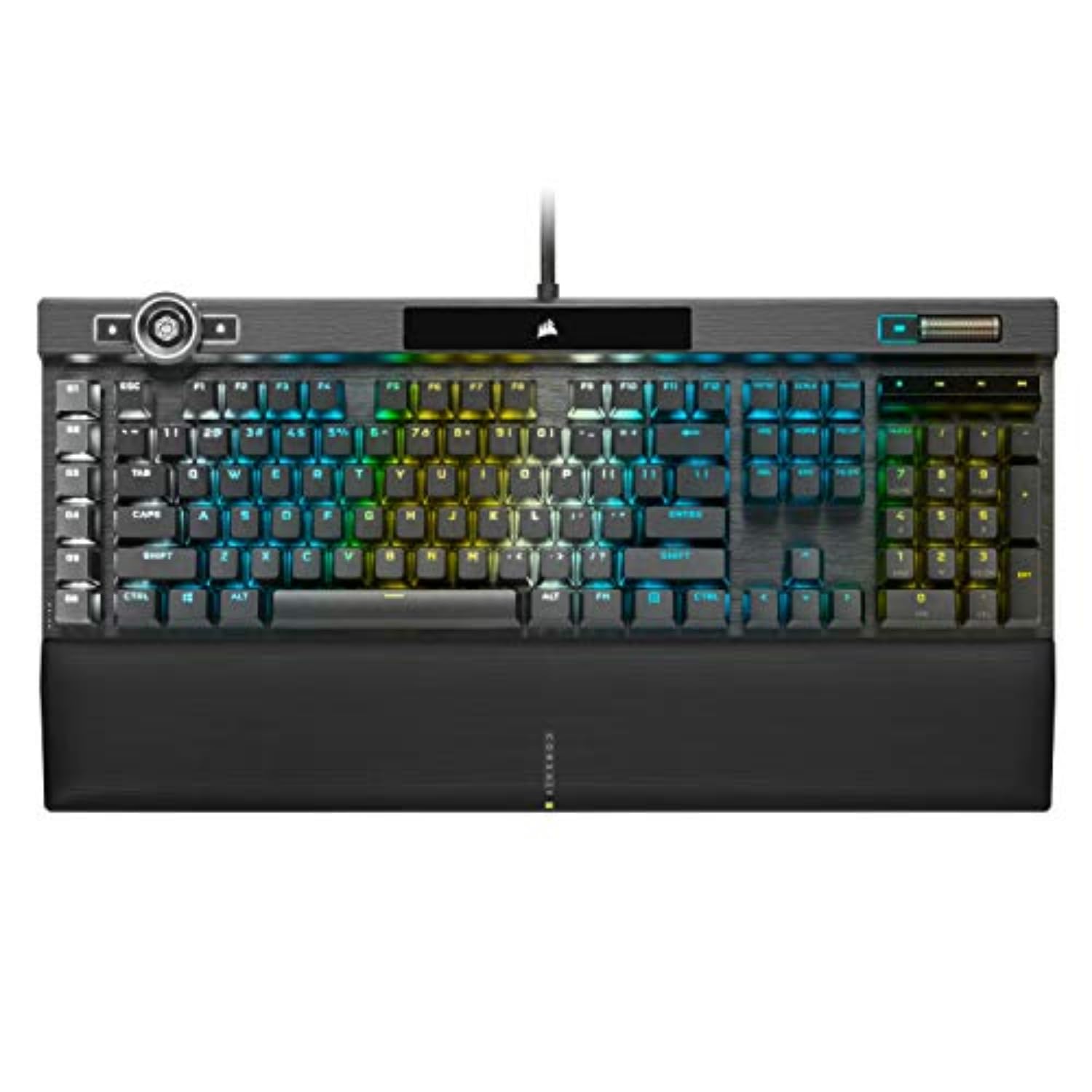
The Corsair K100 RGB represents the wired gaming flagship approach to full-size keyboards. The proprietary AXON hyper-processing technology delivers native 4,000 Hz polling and key scanning — four times the standard 1,000 Hz rate, translating to theoretically lower input latency in competitive shooters and rhythm games. The Cherry MX Speed Silver switches use a shortened 1.2mm actuation point, making accidental key presses more common but also making rapid double-taps easier.
The iCUE control wheel offers media jogging, backlighting control, and app-specific binds through the iCUE software ecosystem. The six dedicated macro keys along the left side provide programmable inputs without sacrificing the full-size layout. The aluminum frame and 44-zone three-sided LightEdge strip give the K100 a distinct RGB presence that rivals Corsair’s own premium lineup. Users report that the magnetic detachable wrist rest with memory foam provides consistent comfort for long sessions.
The dependency on iCUE software for macro assignment and lighting customization is a double-edged sword: powerful, but iCUE is a heavy 1.1 GB install that can cause CPU overhead on lower-specced machines. Some users report the volume wheel becoming unresponsive after the keyboard enters sleep mode, requiring a reconnection. The board is also large and heavy enough to dominate a standard desk, making it awkward for those who prefer to stow their keyboard between sessions.
Why it’s great
- 4,000 Hz native polling for ultra-low latency
- Cherry MX Speed Silver linear switches (1.2mm actuation)
- Six dedicated macro keys and iCUE control wheel
Good to know
- Requires iCUE software for full customization
- Volume wheel can desync after sleep mode
- Heavy and bulky, not for portable use
5. Glorious GMMK 3 PRO Barebones Custom Keyboard Kit w/Knob (Silver)
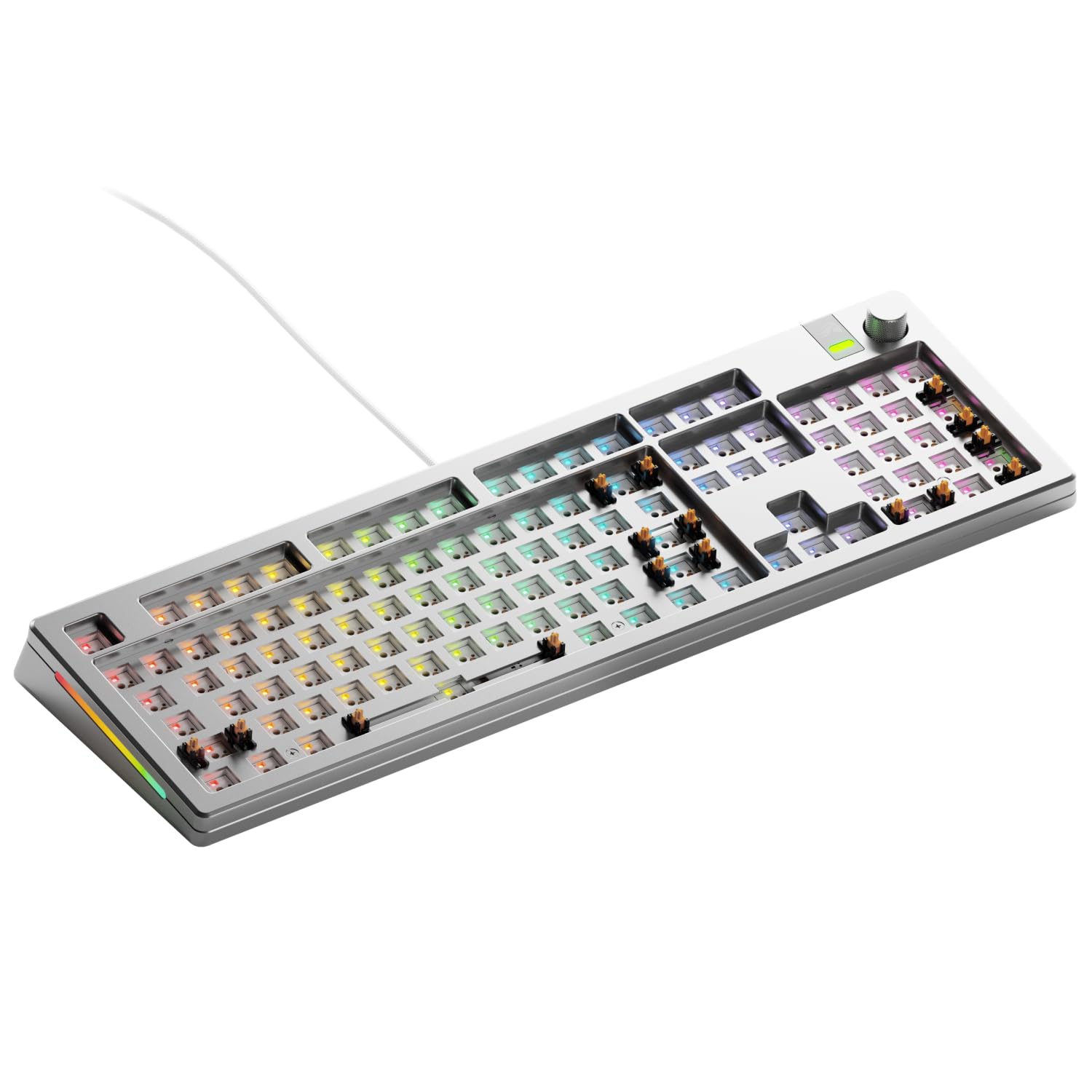
The GMMK 3 PRO in its barebones form offers a high-end full-size foundation for builders who already have switches and keycaps in mind. The CNC-machined aluminum top and bottom case gives the board substantial weight (approximately 5 pounds) with a smooth anodized finish that resists fingerprints better than matte coatings. The 9-point modularity system allows you to swap the switch plate between aluminum, polycarbonate, or brass options to change the board’s flex and sound profile.
The Modular Gasket System (MGS) uses building-block-style gasket spacers that let you adjust the typing feel from firm to bouncy without removing the plate. The two layers of sound-dampening foam reduce the hollow echo common in full-size aluminum cases. The hot-swap sockets accept 5-pin MX switches, so almost any mechanical switch on the market can be installed without soldering. The included rotary encoder adds media volume control without sacrificing key count.
The most common complaint involves the customization software, which is proprietary and lacks QMK/VIA compatibility — meaning you cannot use the full macro and layer capabilities that open-source firmware provides. Some users report that the switch sockets grip switches too tightly, occasionally damaging switch pins during removal. The barebones format means you need to budget separately for switches and keycaps, which can push the total cost beyond the pre-built alternatives listed here.
Why it’s great
- Full CNC aluminum case, durable and weighty
- 9-point modular system for plate and gasket tuning
- Hot-swap 5-pin MX support for any switch
Good to know
- Proprietary software, no QMK/VIA support
- Switch sockets can grip too tightly
- Barebones only — requires separate switch/keycap purchase
6. Glorious GMMK 3 PRO Custom Mechanical Keyboard (Black)

The pre-built version of the GMMK 3 PRO comes with Glorious Fox linear switches pre-installed, eliminating the research and purchase step required by the barebones variant. The Fox switches are factory-lubed linear switches with a 45g actuation force that lands between Cherry MX Red and standard speed switches — light enough for long typing sessions without accidental keystrokes. The CNC-machined aluminum frame and sound-dampening foam layers produce a deep, low-pitched typing sound that reviewers consistently describe as premium.
The same 9-point modularity and Modular Gasket System carry over from the barebones version, meaning you can still swap the switch plate and adjust the gasket tension later if you decide to experiment with different switch types. The board comes with double-shot PBT keycaps in an OEM profile and includes four macOS alternate keycaps and three sample switches so you can test different feel profiles before committing to a full set. The per-key RGB lighting is programmable through Glorious Core software, with separate control for the side LED strips.
Some users note that the keycaps have minor blemishes on the backlighting diffusion, making the legends appear slightly uneven on certain keys. The software remains proprietary and heavier than QMK-based tools, though the Glorious Core app has improved stability in recent updates. At this price point, the pre-built GMMK 3 PRO represents the most straightforward path to a premium full-size aluminum kit without building from scratch.
Why it’s great
- Pre-installed Fox linear switches with factory lube
- CNC aluminum frame with gasket mount
- Includes macOS keycaps and sample switches
Good to know
- Glorious Core software is proprietary
- Keycap backlight diffusion can be uneven
- Heavy at 5.49 pounds, not travel-friendly
7. HHKB Studio Wireless Bluetooth Keyboard

The HHKB Studio takes a radical departure from conventional full-size kits by compressing the layout to 60 keys while adding a pointing stick and four gesture pads — effectively replacing the need for a separate mouse for many productivity workflows. The Kailh Box Pink silent linear switches are quieter than standard Cherry MX Red, and the hot-swap socket means you can replace them with any MX-compatible switch. The absence of a physical full-size number pad means this is not a 100% layout in the traditional sense, but it earns a place here for users who value ergonomic efficiency over dedicated navigation keys.
The gesture pads are touch-sensitive surfaces that can be customized through the HHKB software to trigger window switching, volume control, or complex keystroke sequences. The trackpoint in the center of the keyboard allows cursor control without lifting your hands from the home row — a meaningful advantage for programmers and writers who want to minimize wrist movement. Bluetooth multi-pairing connects to up to four devices, and the keyboard saves up to four keymap profiles onboard so you can switch layouts between computers without reconfiguring.
The plastic enclosure contrasts sharply with the aluminum builds elsewhere in this guide, though the HHKB Studio is lighter and more portable (1.85 pounds). Several long-time HHKB users report that the Studio model lacks the signature Topre electrostatic capacitive switches they prefer, instead using MX-compatible switches that feel different under the fingers. The gesture pads are described by some users as “curious but unrefined” — requiring deliberate configuration to be genuinely useful.
Why it’s great
- Integrated trackpoint reduces wrist movement
- Four customizable gesture pads for shortcuts
- Hot-swap MX switches, silent linear feel
Good to know
- 60-key layout lacks dedicated navigation and numpad
- Plastic case, not aluminum
- Gesture pads require software setup to be useful
8. Corsair Galleon 100 SD RGB Mechanical Wired Gaming Keyboard
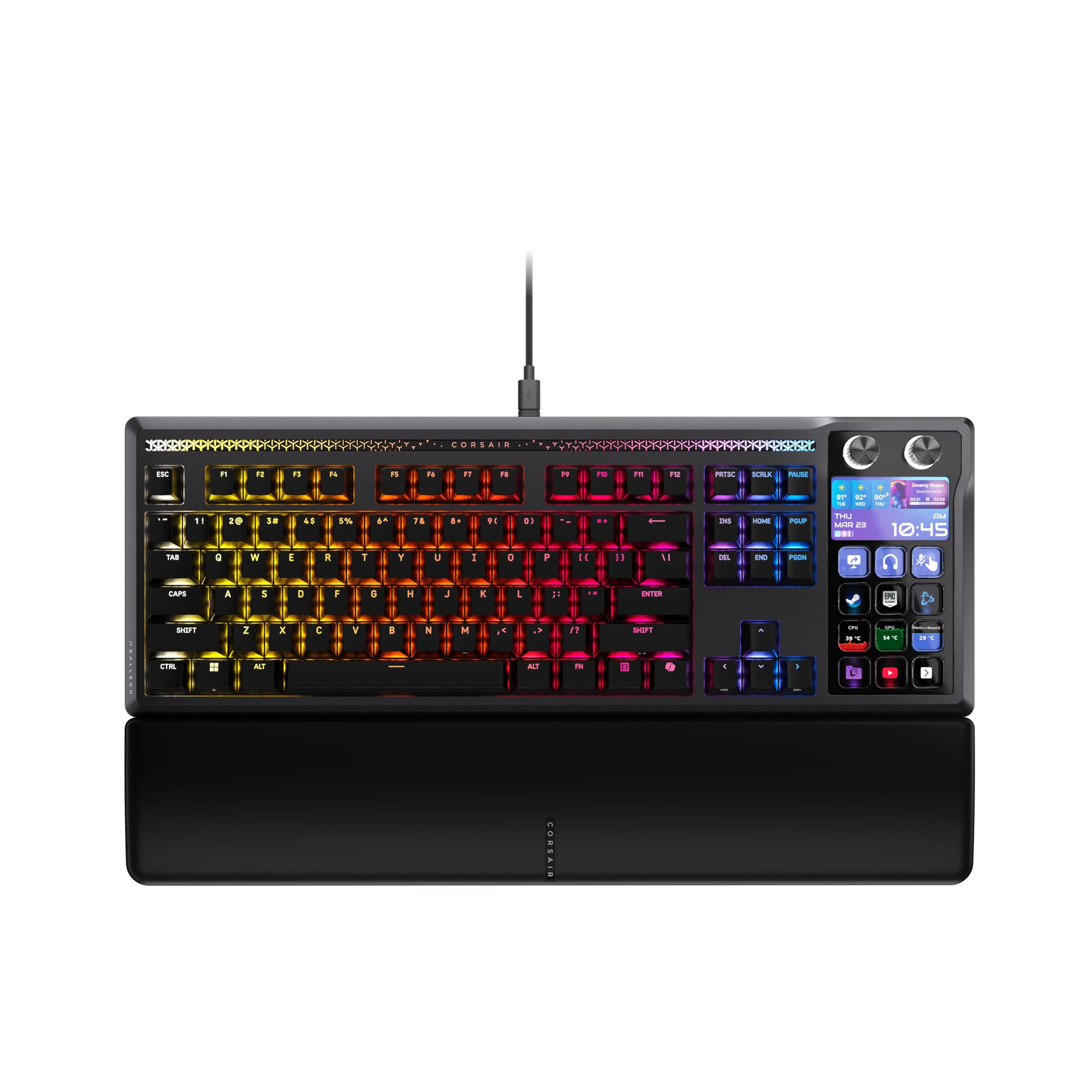
The Corsair Galleon 100 SD is the first full-size keyboard to integrate a configurable Stream Deck row directly into the main deck, eliminating the need for a separate Elgato Stream Deck device on your desk. The customizable 5-inch LCD display sits above the function row and shows real-time hardware monitoring, Twitch chat, or application shortcuts. The pre-lubed MLX Pulse switches produce a thocky sound signature that reviewers compare favorably to enthusiast-grade custom builds, while the 8,000 Hz hyperpolling and FlashTap SOCD support provide competitive-grade input response.
The Stream Deck integration is the defining feature: six LCD keys and a dial give instant control over streaming software (OBS, Streamlabs), communication apps (Discord, Spotify), and in-game actions without alt-tabbing. The keys are hot-swappable with 5-pin MX compatibility, and the double-shot PBT keycaps resist shine. The full-size layout includes a number pad and dedicated media controls, making it equally functional for desktop productivity between streams.
The keyboard requires two USB-C connections to power both the Stream Deck module and the main keyboard matrix, which can clutter a desktop setup. Some early units shipped with hardware defects — unresponsive Stream Deck keys or key mapping issues — suggesting quality control is still being dialed in. The price point places it firmly in the premium tier, which means the target buyer is someone who already uses Stream Deck functionality and wants to consolidate devices.
Why it’s great
- Built-in Stream Deck with 5-inch LCD display
- 8,000 Hz polling and FlashTap SOCD for gaming
- Hot-swappable MLX Pulse switches, PBT keycaps
Good to know
- Requires two USB-C cables for full function
- Early units had quality control issues
- High price, not for non-streamers
9. Kinesis Advantage360 Split Ergonomic Keyboard

The Kinesis Advantage360 uses a contoured, split, and fully tented design to position each hand in a more natural, neutral posture than any flat keyboard can achieve. The Kailh Box Pink stem switches are linear with a low activation force, reducing finger fatigue during all-day typing. The SmartSet programming engine lets you remap any of the 104 keys across 9 profiles and 5 layers without any software — the keyboard appears as a mass storage device, and you edit text files directly on the v-Drive.
The split modules can separate up to 10 inches via the included link cable, accommodating broad-shouldered users who find standard boards too narrow. The three adjustable tenting heights raise the inner edges of the key wells, reducing forearm pronation and wrist extension. The PBT keycaps resist shine better than the standard ABS caps found on earlier Kinesis models, though some users still report they get oily within months. The thumb cluster provides dedicated keys for modifiers and common shortcuts, reducing pinky strain.
The learning curve is steep — expect one to two weeks of reduced typing speed as your fingers adapt to the concave wells and thumb keys. The linear switches are light enough that some users experience accidental key presses, especially when resting fingers on the home row. The Bluetooth connectivity works well with Apple devices but can be intermittent with Windows PCs, leading many users to default to wired USB-A mode for reliability. At this price, the Advantage360 is a targeted purchase for users already dealing with wrist or forearm pain, not a casual upgrade.
Why it’s great
- Contoured split design reduces wrist and forearm strain
- Onboard programming via v-Drive, no software required
- Adjustable tenting for personalized forearm angle
Good to know
- Steep learning curve (1-2 weeks)
- Light linear switches can cause accidental presses
- Bluetooth inconsistent on Windows, best wired
FAQ
What is the difference between a 100% keyboard kit and a pre-built full-size keyboard?
Can a 100% keyboard kit support Hall Effect magnetic switches?
Why do some full-size kits use a split spacebar design?
Does a heavier aluminum case reduce typing vibration in a full-size board?
Final Thoughts: The Verdict
For most users, the best 100% keyboard kit winner is the Keychron V6 Max because it combines QMK/VIA firmware, tri-mode wireless, gasket mount acoustics, and hot-swap switches at a price that represents genuine value. If you want Hall Effect magnetic switches with adjustable actuation, grab the Keychron K10 HE. And for a premium pre-built aluminum kit that bypasses the component selection process, nothing beats the Glorious GMMK 3 PRO.