
Blowing $100 on a used console or a gacha game isn’t the only way to scratch the itch. A dedicated $100 video card can wake up an old Dell SFF, push 4K netflix to a living room monitor, and let you grind a few matches of Valorant without crashing—all on a 200‑watt power supply. The trick is knowing which generation of GPU silicon actually delivers usable performance inside that strict power budget, and which cards are just repackaged decade-old chips.
I’m Min — the co-founder and writer behind Gadgets Feed. I spend hundreds of hours each quarter combing through GPU spec sheets, comparing CUDA core counts, memory bus widths, and real‑world power draw numbers so you don’t have to guess when every dollar counts.
This guide lays out the seven most capable options right now, from the quietest HTPC unit to the fastest low‑profile card for compact cases, all of which qualify as a genuine $100 video card.
How To Choose The Best $100 Video Card
At this price point, every component choice is a trade‑off between memory type, bus width, and cooling solution. Understanding three critical specs will keep you from buying a card that stutters on the desktop.
Memory Type: GDDR5 vs DDR3
GDDR5 bandwidth is roughly 4x that of DDR3 at the same clock speed. A GT 730 with 2 GB of GDDR5 can load textures fast enough for light modern games like Fortnite or Overwatch at low settings, while the same chip with DDR3 will drop frames even on the Windows 11 desktop when driving a 4K display. Always prioritize GDDR5 if you intend to play any 3D title.
Bus Width and the 64‑Bit Trap
Many cards in this segment use a 64‑bit memory bus, which restricts the amount of data that can move between the GPU core and the VRAM per clock. A 2 GB GDDR5 card with a 64‑bit bus can still serve older titles and video streaming fine, but a card with a 128‑bit bus (rare at this price) will have a noticeable advantage in pixel‑pushing scenarios like 4K video or multiple monitor setups. Check the “Memory Interface” spec; if it says 64‑bit, plan for light duty.
Power Draw and Form Factor
Every card covered here draws under 30 W under load, meaning none require a PCIe power cable—the slot itself supplies enough juice. This is a huge advantage for upgrading pre‑built office PCs (Dell Optiplex, HP EliteDesk, Lenovo ThinkCentre) where the power supply is typically 180‑240 W and lacks GPU power connectors. Look for low‑profile / half‑height brackets if your case is a SFF chassis; many cards include the bracket in the box, but some ship with only the full‑height bracket, requiring an extra purchase.
Quick Comparison
On smaller screens, swipe sideways to see the full table.
| Model | Category | Best For | Key Spec | Amazon |
|---|---|---|---|---|
| maxsun GT 1030 2GB | Premium SFF | 1080p e‑sports & 4K HTPC | GP108 Pascal, 48 GB/s bandwidth | Amazon |
| ASUS GT 730 2GB GDDR5 | Silent HTPC | 0dB media center builds | Passive heatsink, 0dB operation | Amazon |
| maxsun GT 730 4GB | High VRAM | Multi‑monitor office work | 4 GB DDR3, 64‑bit bus | Amazon |
| msi GT 710 2GB | Budget LP | Basic dual‑monitor upgrade | 2 GB DDR3, PCIe 2.0 x8 | Amazon |
| PowerColor RX 550 2GB | Value Gaming | Light gaming, modern codecs | 512 stream processors, 64‑bit bus | Amazon |
| Glorto GT 730 2GB GDDR5 | Win11 Ready | Office PC with modern OS | GDDR5, 64‑bit, low profile | Amazon |
| EVGA GT 710 1GB | Entry Level | Dual‑monitor productivity | 1 GB DDR3, 192 CUDA cores | Amazon |
In‑Depth Reviews
1. maxsun GeForce GT 1030 2GB GDDR5

This is the fastest card on the list, and it’s not close. The GT 1030 uses Nvidia’s Pascal architecture (GP108 core) with 384 CUDA cores clocked up to 1468 MHz boost. That gives it roughly 3x the raw compute of a GT 730 DDR5 and about 6x the GT 710. In real terms, you can run Fortnite at 1080p low settings hovering around 60 FPS, and CS2 at medium settings stays playable.
Memory is 2 GB GDDR5 on a 64‑bit bus delivering 48 GB/s bandwidth. That’s enough for 4K Netflix playback (HEVC decode is built in) and light video editing. Power draw maxes out at 30 W, so any 200‑watt power supply in a Dell Optiplex SFF will handle it without a 6‑pin connector. The silver‑plated PCB and solid capacitors help with thermals in cramped cases.
The low‑profile bracket is included in the box — you just swap the full‑height bracket that comes pre‑installed. Some user reports mention the bracket wasn’t inside, so check the package the moment it arrives. For the price, this card also supports G‑Sync, ShadowPlay, and GPU Boost 3.0, which you won’t find on any GT 730 or 710.
Why it’s great
- Pascal architecture delivers 3x GT 730 performance
- 30W power draw fits any SFF / office PC
- Low profile bracket included
Good to know
- Low‑profile bracket may be missing from some units
- 64‑bit bus limits heavy modern titles
2. ASUS GeForce GT 730 2GB GDDR5

The ASUS GT 730 is the only card here with a completely fanless heatsink. Zero moving parts means zero noise — a perfect choice for a bedroom media center or a living room HTPC where fan whine would ruin a quiet movie scene. The heatsink is a single‑slot aluminum block with enough surface area to keep the 902 MHz GK208 core under 65°C in a ventilated case.
Its 2 GB of GDDR5 memory pushes 14.4 GB/s bandwidth, which handles 1080p YouTube and 4K Netflix (HDCP 2.2 supported on the HDMI 1.4a port) without dropped frames. You get one HDMI, one DVI‑D, and one VGA port, covering almost any monitor combination from the last 15 years. The Auto‑Extreme manufacturing process from ASUS adds solid capacitor reliability.
Setup can be tricky: the HDMI port only outputs a signal on certain TV ARC ports, and a high‑speed HDMI cable (18 Gbps+) is required. Several users needed a VGA monitor just to adjust the initial overscan. But once tuned, the card is silent, stable, and draws so little power that even a 180 W power supply is safe.
Why it’s great
- Completely silent passive cooling
- HDCP 2.2 for 4K Netflix / Blu‑ray
- Auto‑Extreme solid capacitors for long life
Good to know
- HDMI may require a specific port / cable
- Initial setup often needs a VGA monitor
3. maxsun GeForce GT 730 4GB

This card prioritizes VRAM capacity over bandwidth. 4 GB of DDR3 on a 64‑bit bus means you can stretch your desktop across three monitors (HDMI, DVI, VGA) at up to 4K@30Hz per output without running out of memory. For a stock trader, data analyst, or IT admin managing multiple terminals, that’s more useful than raw FPS.
The 384 CUDA cores clocked at 902 MHz are the same GK208 silicon found in other GT 730s, so gaming performance is modest. You can run Minecraft with moderate shaders at 1080p and older titles like Warcraft at high settings with slight hesitations during crowded fights. The 8 cm fan and eagle‑radiator cooling keep noise low, but the card is not silent — it’s audible under load.
It uses a full‑height dual‑slot bracket, so low‑profile SFF cases require a different card. The 4 GB buffer helps with texture caching in image‑heavy apps, but the DDR3 speed (1600 MHz effective) becomes a bottleneck if you push higher pixel counts. This is a productivity workhorse, not a gaming card.
Why it’s great
- 4 GB VRAM for multi‑monitor setups
- Triple display via HDMI, DVI, VGA
- Low noise fan under normal load
Good to know
- DDR3 memory is slower than GDDR5
- Only full‑height bracket — not SFF friendly
4. PowerColor AMD Radeon 550 2GB GDDR5

This is an OEM‑spec RX 550, meaning it uses a 64‑bit memory bus instead of the standard 128‑bit retail version. That’s a significant cut: bandwidth is halved to roughly 48 GB/s, which directly impacts high‑resolution textures. Still, the 512 stream processors (GCN 4.0 architecture) boost to 1071 MHz, so for eSports titles like Rocket League or Valorant at 720p to 900p low settings, it’s competitive with the GT 1030.
Memory is 2 GB GDDR5 clocked at 6.0 Gbps, enough for lightweight games. The card supports modern video codecs (HEVC, VP9) for efficient streaming. It’s slightly faster than a 4‑year‑old integrated GPU, and it wakes up an older PC without requiring a new PSU — peak draw is under 50 W, though real load is closer to 30 W.
Installation is straightforward on standard mid‑towers. The dual‑slot cooler is quiet at idle and moderately audible under load. Builders should be aware of the 64‑bit bus limitation — this is not the full 128‑bit RX 550 sold in retail boxes. If your budget could stretch to a used GTX 1050, that’s a better gaming buy; otherwise, this fills the gap for ultra‑tight budgets.
Why it’s great
- 512 stream processors at 1071 MHz boost
- GDDR5 memory with modern codec support
- Quiet and low power draw
Good to know
- 64‑bit bus halves bandwidth vs retail RX 550
- Full‑height bracket only
5. Glorto GeForce GT 730 2GB GDDR5

The Glorto GT 730 is one of the few cards at this price that explicitly confirms Windows 11 compatibility out of the box. It’s powered by the GK208 GPU with 902 MHz core and 2 GB of GDDR5 memory — the same GDDR5 advantage that separates usable desktop smoothness from the stutter of DDR3 variants. The 64‑bit bus pushes about 16 GB/s bandwidth, enough for a snappy 1080p office experience with hardware acceleration in Edge and Chrome.
It supports triple monitors via HDMI (2560×1600 max), DVI (same), and VGA (2048×1536). DirectX 12 and OpenGL 4.6 are supported for compatibility with modern apps, though gaming will be limited to older or lightweight titles. The card draws less than 30 W, so no power connector is needed, and it fits in most small form factor cases thanks to the included low‑profile brackets.
The low‑profile brackets require disassembly of the full‑height bracket and reassembly — this is not a tool‑free swap. Some users reported a “NO SIGNAL” error on first boot, resolved by reseating the card and ensuring the monitor cable is firmly connected before powering on. Once running, it’s stable and produces a clean image.
Why it’s great
- Confirmed Windows 11 compatible
- GDDR5 memory for smooth desktop use
- Includes two low‑profile brackets
Good to know
- Low‑profile bracket swap requires disassembly
- May show “NO SIGNAL” on initial boot
6. EVGA GT 710 1GB DDR3
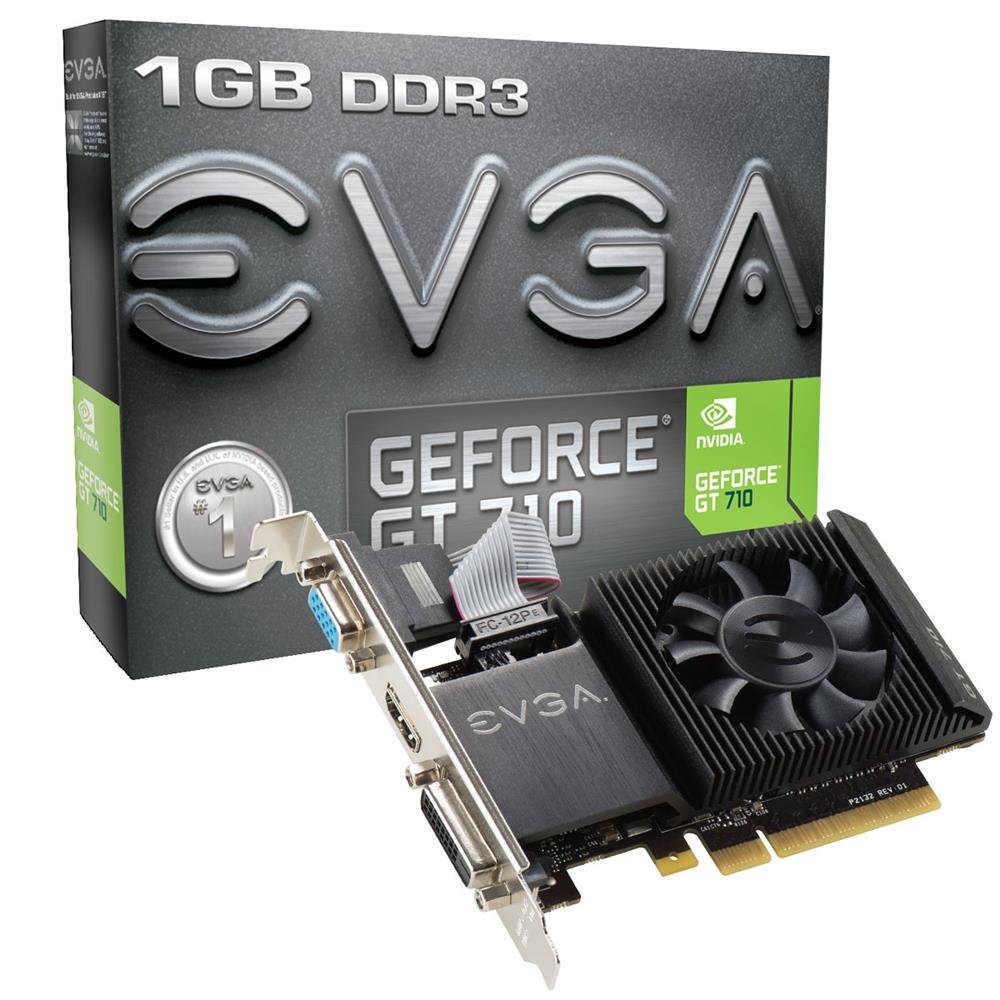
The EVGA GT 710 is the most stripped‑down, no‑frills GPU that still adds a dedicated video output to a motherboard without integrated graphics. With 192 CUDA cores at 954 MHz and 1 GB DDR3 on a 64‑bit bus, it won’t run anything released after 2016 at acceptable frame rates — but it will reliably drive dual monitors at 1080p for programming, spreadsheets, and web browsing without a stutter.
Connectivity is DVI‑D and HDMI (both digital), plus a DVI‑to‑VGA adapter in the box. The card is single‑slot and low‑profile, making it the easiest drop‑in upgrade for a Dell Optiplex 7010 or an HP ProDesk. Power consumption is a mere 19 W load, so even a 180 W PSU is safe. The included low‑profile bracket works without modification.
Gaming is not its purpose, but for light use it can push Minecraft at 100‑150 FPS on low settings and Valorant at 50‑60 FPS. Some users report it solving GSync / non‑GSync monitor conflicts by offloading the secondary display. For anyone who needs the cheapest possible dual‑digital‑output GPU with reliable drivers, this is it.
Why it’s great
- Lowest power draw (19 W) on the list
- DVI‑D and HDMI for dual digital monitors
- Includes low‑profile bracket and VGA adapter
Good to know
- 1 GB DDR3 = no modern gaming
- 192 CUDA cores limit compute tasks
7. msi Gaming GeForce GT 710 2GB DDR3

The msi GeForce GT 710 brings 2 GB of DDR3 memory to the table — double the EVGA’s frame buffer — which helps when running memory‑hungry browser tabs or a higher‑resolution desktop. It uses the same GK208 core as other GT 710s, with 192 CUDA cores at 954 MHz base, but the added VRAM capacity makes it slightly more forgiving for 2K monitor setups.
It’s a low‑profile card with VGA, DVI‑D, and HDMI outputs. The HDMI port supports up to 4096×2160 at 24 Hz, though that’s not usable for gaming — it’s meant for 4K video playback where the HEVC decoder does the heavy lifting. The card draws under 20 W, making it compatible with 240‑watt office PSUs, and the single fan is quiet at idle but audibly whirs under load.
Installation on older PCs (Gateway, Acer SFF, Mac Pro 5.1) is well documented by users. A few had to update the BIOS to enable Intel Multi‑Display mode, and Mac Pro users should note there is no boot screen and no audio through HDMI. For a cheap refresh that brings a dead computer back to life with dual‑monitor support, this card delivers.
Why it’s great
- 2 GB DDR3 buffer for better multi‑tasking
- Sub‑20W power consumption
- Works with 240‑watt office PSUs
Good to know
- Fan is audible under sustained load
- No macOS boot screen or HDMI audio on Mac Pro
FAQ
Can a $100 video card run Fortnite or Valorant at 60 FPS?
Will these cards work in a Dell Optiplex with a 240W power supply?
What is the difference between a full‑height and low‑profile bracket?
Is 4 GB of VRAM useful on a budget card with a slow bus?
Final Thoughts: The Verdict
For most users, the $100 video card winner is the maxsun GT 1030 2GB because its Pascal architecture delivers 3x the performance of the GT 730 generation while drawing only 30 W — the best balance of speed, power efficiency, and SFF compatibility in this budget. If you need absolute silence for a media center, grab the ASUS GT 730 2GB GDDR5 with its fanless passive cooling. And for the cheapest entry into dual‑digital‑monitor productivity, nothing beats the EVGA GT 710 1GB.