
Our readers keep the lights on and my morning glass full of iced black tea. As an Amazon Associate, I earn from qualifying purchases.
Specs are compiled from manufacturer listings and verified buyer reviews and can change over time — please confirm the key details on the product page before buying.
You already know the 1060 graphics card delivers smooth 1080p gaming without costing a fortune. The hard part is choosing between the 3GB and 6GB versions. This guide compares clock speeds, VRAM (video memory) limits, and cooling designs, so you pick the exact card for your build and your games.
I’m Min — the founder and writer behind Gadgets Feed. This guide is built by comparing the manufacturers’ published specifications and the patterns across verified customer reviews, so you get each pick’s real strengths and trade-offs instead of marketing spin.
The right 1060 graphics card is still a fantastic 1080p investment. if you need a low-profile card for a small office PC or a dual-fan powerhouse for VR (virtual reality) gaming, one of these cards fits your build.
Our Picks at a Glance

How To Choose The Best 1060 Graphics Card
A GTX 1060 comes in two main memory sizes — 3GB and 6GB. Your choice depends on the games you play and your budget. Here are the three factors that matter most for this specific card.
VRAM: 3GB vs 6GB
For older e-sports titles like CS:GO or Overwatch, a 3GB card is plenty. These games do not need a lot of video memory. But newer AAA games and some VR experiences can easily exceed that 3GB limit, which causes stuttering. If your budget allows, the extra VRAM on a 6GB model gives you more room for high-resolution textures (the detailed surfaces in games) and mods (user-created content that often adds higher quality graphics).
Physical Size and Cooling Design
The GTX 1060 was built in many shapes — from tiny single-slot low-profile cards for small form factor (SFF) desktops (compact PCs that fit in tight spaces), to long dual-fan cards for standard mid-towers. A blower-style fan (common on SFF cards) is noisier under load but pushes hot air out the back of your case, which is better for cramped cases. Dual-fan designs are quieter but dump warm air inside your case, so your case needs decent airflow.
Clock Speed and Power Requirements
Most 1060s come with a “boost clock” that pushes the processor speed above the base speed under load, giving you faster frame rendering when gaming. A higher boost clock (like 1809 MHz) translates to better frames per second (FPS) — the number of images your screen updates each second. Most 1060s recommend a 400W power supply, but you should also check for an additional 6-pin power connector, because not all cards draw power solely from the PCIe slot (the slot on your motherboard).
Quick Comparison
| Model | Best For | VRAM | Boost Clock | Size (Length) | Amazon |
|---|---|---|---|---|---|
| GIGABYTE Windforce 3GB★ Best Overall | Budget 1080p Gaming | 3 GB | 1797 MHz | 8.8″ | Amazon |
| ASUS 6GB Dual-FanAlso Great | VR-Ready Gaming | 6 GB | 1809 MHz | — | Amazon |
| GPVHOSO 6GB | Entry-Level Gaming | 6 GB | 1531 MHz | — | Amazon |
| SRhonyra Low Profile 6GB | SFF & Office PCs | 6 GB | 1506 MHz | 6.61″ | Amazon |
| ASUS 3GB Dual-Fan | Multi-Monitor Setups | 3 GB | — | — | Amazon |
| EVGA 3GB | Refurbished Value | 3 GB | — | ~17.5 cm | Amazon |
| NVIDIA Founder’s Edition 6GB | Original Reference Build | 6 GB | — | — | Amazon |
In‑Depth Reviews
1. GIGABYTE GeForce GTX 1060 Windforce OC 3GB
Our pick — 4.5★ from 650+ verified ratings; the strongest balance of quality and price.
A 3GB Windforce built for budget-conscious 1080p gamers who want dual-fan cooling and a rare 8K display option.
This card’s defining feature is its 7680×4320 resolution support — double the ASUS 6GB’s maximum — so it handles 8K displays right from the start, which is rare for a budget-tier card. The Windforce 2x blade fan design keeps temperatures under 60°C during gaming, according to buyer reports. One buyer mentioned it is a “great budget GPU for 1080p gaming; runs Dark Souls III max settings without frame drops,” which directly speaks to its intended use case.
At 8.8 inches long, this card is a full 33% longer than the low-profile SRhonyra card on our list, so measure your case clearance first. The 3GB VRAM is fine for titles like GTA V, Skyrim, and Warframe at Ultra 1080p at 60FPS, but buyers report it “will struggle at 4K” and some units exhibit coil whine (a buzzing electrical sound) at high FPS, which headphones can mask. This is a great pick for older e-sports titles at 1080p if you want the option to connect an 8K monitor. If you play modern AAA games that need more than 3GB of VRAM, pick the ASUS 6GB instead.
Why It Wins on Value
- Supports 8K display at 60Hz, outpacing many pricier 6GB cards.
- Dual fans keep temps under 60°C during intensive gaming.
- Great 1080p performer for classic titles on a tight budget.
Where It Cuts Corners
- 3GB VRAM causes stuttering in new AAA titles with high-res textures.
- 8.8″ length may not fit in compact or small form factor cases.
- Some units have audible coil whine at frame rates above 100 FPS.
Reach for this if: you play older e-sports titles at 1080p and want the option to connect an 8K monitor.
Choose another if: you play modern AAA games that need more than 3GB of VRAM.
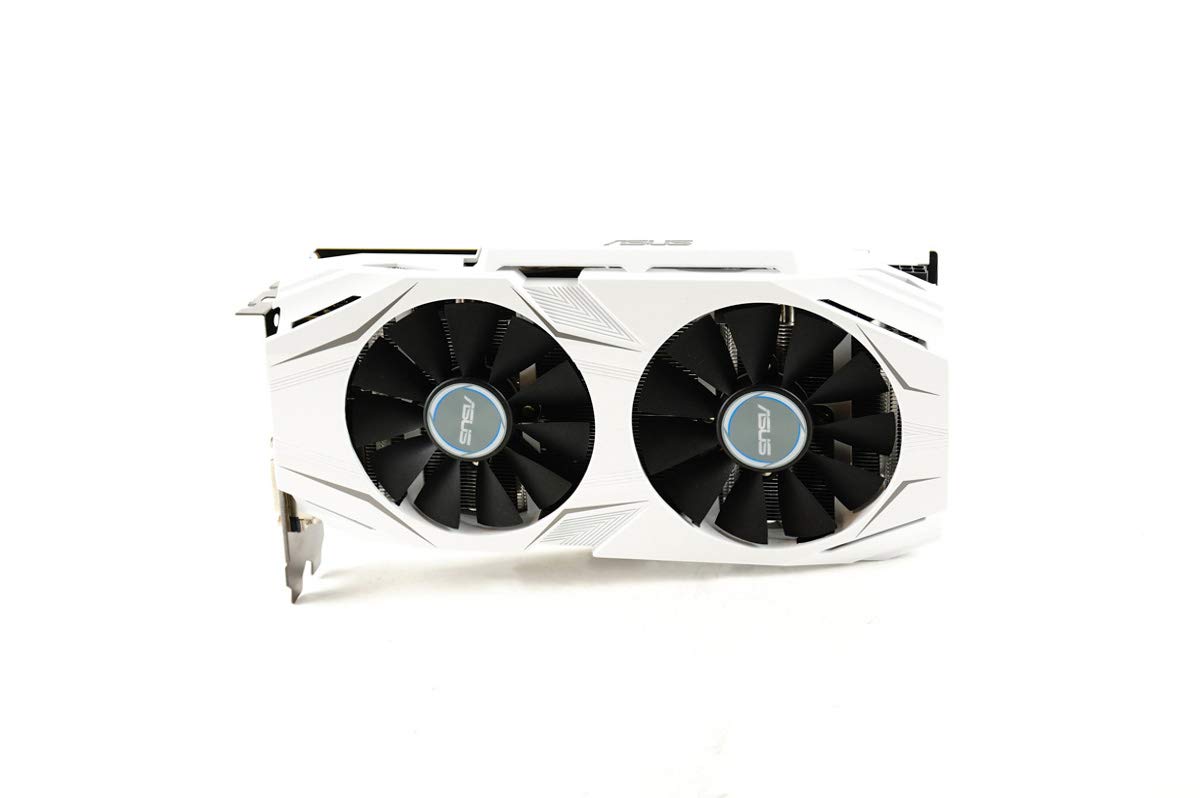
2. ASUS GeForce GTX 1060 6GB Dual-Fan OC Edition (Renewed)
The 6GB ASUS delivers VR-readiness and the highest boost clock on this list — 1809 MHz — for smoother frames in demanding games.
You get the full 6GB of GDDR5 memory here, which is the balance for running modern games with high-resolution texture packs (detailed surface files) without stuttering. The boost clock hits 1809 MHz in OC (overclocked) mode — that is 12 MHz higher than the GIGABYTE Windforce 3GB we compare it to, which means slightly snappier frame rates in demanding scenes. The dual HDMI 2.0 ports (a video connector standard) let you plug in a VR headset and a monitor at the same time without swapping cables. One reviewer noted it “replaced broken GPU in ASUS G11CD; works perfectly,” noting the two-fan design is a slight variation from the stock card but fit fine.
This card is ideal for dropping into an older pre-built PC. But the 3840×2160 maximum resolution (the number of pixels on screen) is lower than the 7680×4320 on the GIGABYTE 3GB, so if native 8K output is your goal, that other pick leads. The renewed condition saves you cash, but minor cosmetic wear is possible. At this price, you get the fastest-clocked 6GB 1060 for VR and 1080p gaming. Buyers who need native 8K output or a brand-new sealed card should look at the GIGABYTE Windforce 3GB instead.
The Real Strengths
- Highest boost clock on test at 1809 MHz for smoother frames.
- 6GB VRAM handles modern AAA titles without hitting memory limits.
- Dual HDMI 2.0 ports let you plug in a VR headset and your main monitor.
The Trade-Offs
- Maximum resolution tops out at 3840×2160, not 8K.
- Renewed condition means minor cosmetic wear is possible.
- Some buyers noted a different mounting bracket vs. stock OEM cards.
Grab this if: you want the fastest-clocked 6GB 1060 for VR and 1080p gaming at a renewed price.
Look elsewhere if: you need native 8K output or a brand-new sealed card.
3. GPVHOSO GTX 1060 6GB Computer Graphics Card

The 6GB underdog that sneaks 8K support and a core clock of 1531 MHz into the entry-level bracket.
With a core clock of 1531 MHz (the base speed of the graphics processor), this card beats the low-profile SRhonyra by a 2% margin on paper, which translates to a few extra frames per second in practice. It also comes with 6GB of GDDR5 memory and a dual-fan cooling system, so it punches well above its budget price for 1080p gaming. Owners mention it is “backward compatible with PCIe 2.0” (a standard slot version on older motherboards) and delivers “max graphics at consistent FPS in older games like World of Tanks.”
The catch is a hidden requirement: you need a 6-pin power cable, which is not included and not heavily advertised. One reviewer warned the cable requirement is “not disclosed.” Also, the brand is less mainstream than ASUS or EVGA, so driver support and long-term reliability rely on standard NVIDIA drivers rather than proprietary software. It still runs cool and quiet, with one buyer saying “the noise level is very low.” This is best for builders on a strict budget who want 6GB VRAM and can source a 6-pin cable. If you want a known-brand card with bundled software and no extra cable hunt, choose the ASUS 6GB.
Why It Impresses
- 6GB VRAM at a budget price, giving you headroom for modern games.
- Higher core clock at 1531 MHz than many entry-level cards.
- Backward compatible with older PCIe 2.0 motherboards.
What to Watch For
- Requires a 6-pin power cable, which is not included in the box.
- Less established brand means less customer support history.
- No proprietary tuning software included.
Best for: builders on a strict budget who want 6GB VRAM and cannot miss the 6-pin cable requirement.
skip it if: you want a known-brand card with bundled software and no extra power cable hunt.
4. SRhonyra GTX 1060 6GB Low Profile Graphics Card

The tiny 6.61-inch single-slot card that squeezes 6GB of power into a small form factor (SFF) case.
At just 6.61 inches long and 0.71 inches wide, this is the most compact 6GB 1060 on our list — 33% shorter than the GIGABYTE Windforce 3GB. It is tailor-made for Dell OptiPlex, HP SFF, and other small form factor desktops where every millimeter counts. Buyers confirm it “fits a Dell OptiPlex 7070 SSF” and “brings life to an old HP SFF desktop.”
The trade-off is the blower-style fan, which one reviewer described as “like hair dryer at 100%” under full load. Running a custom fan curve at 80% keeps noise manageable. While its core clock of 1506 MHz is the lowest on our list, customers note it “outperforms 1050 Ti by ~35% in Firestrike” (a 3DMark benchmark test), so it still delivers solid 1080p performance for older titles and light gaming. This is the card if you need a 6GB card that physically fits inside an SFF office PC. If you game with the case on your desk and cannot tolerate fan noise under load, choose the ASUS 6GB dual-fan card.
The Compact Advantage
- Smallest card at 6.61″ long — fits the tightest SFF cases.
- Single-slot design leaves room for other PCIe cards.
- 6GB VRAM means you are not sacrificing memory for size.
The Noise Penalty
- Blower fan is loud under full gaming load.
- Lowest core clock on test at 1506 MHz.
- Runs hotter than dual-fan cards in standard cases.
Reach for this if: you need a 6GB card that physically fits inside a small form factor office PC.
Look elsewhere if: you game with the case on your desk and can’t tolerate fan noise under load.
5. ASUS GeForce GTX 1060 3GB Dual-Fan OC Edition

The ASUS dual-fan 3GB card that drives three monitors without breaking a sweat.
This card’s dual HDMI 2.0 ports make it a standout for multi-monitor productivity. One owner reported they used it to drive a 50-inch 4K monitor, a 27-inch 1080p monitor, and an extra DVI monitor all at once, with “no issues.” The dual-fan cooling system delivers “3x quieter gameplay” compared to single-fan designs, according to ASUS, and reviewers confirm it “stays cool and quiet” under typical use. For Overwatch, one buyer saw FPS jump from ~30 on integrated graphics to 120 on Ultra settings.
The limitation is the 3GB VRAM. While it handles e-sports and older titles easily, one customer observed stuttering in Prey when using medium textures due to the memory cap. Overclocking potential is near a stock 1070 (Passmark score of 10,186), but the VRAM ceiling remains. This is a solid pick for anyone who prioritizes silent, multi-display office work over maxed-out textures in the latest games. If you regularly play VR or modern AAA titles that demand more VRAM, choose the 6GB version instead.
Multi-Tasking Strengths
- Dual HDMI 2.0 plus DVI for triple-monitor setups.
- Dual-fan design stays quiet even under load.
- Great 1080p gaming performance for competitive titles.
Where It Falls Short
- 3GB VRAM causes stuttering in texture-heavy modern games.
- Software CD just links to the ASUS website, not a full install suite.
- Not ideal for 4K gaming beyond desktop productivity.
Grab this if: you run a multi-monitor workstation and want a silent, reliable 1080p gaming card on the side.
Choose the 6GB version if: you regularly play VR or modern AAA titles that demand more VRAM.
6. EVGA GeForce GTX 1060 3GB GDDR5 Graphics Card (Refurbished)
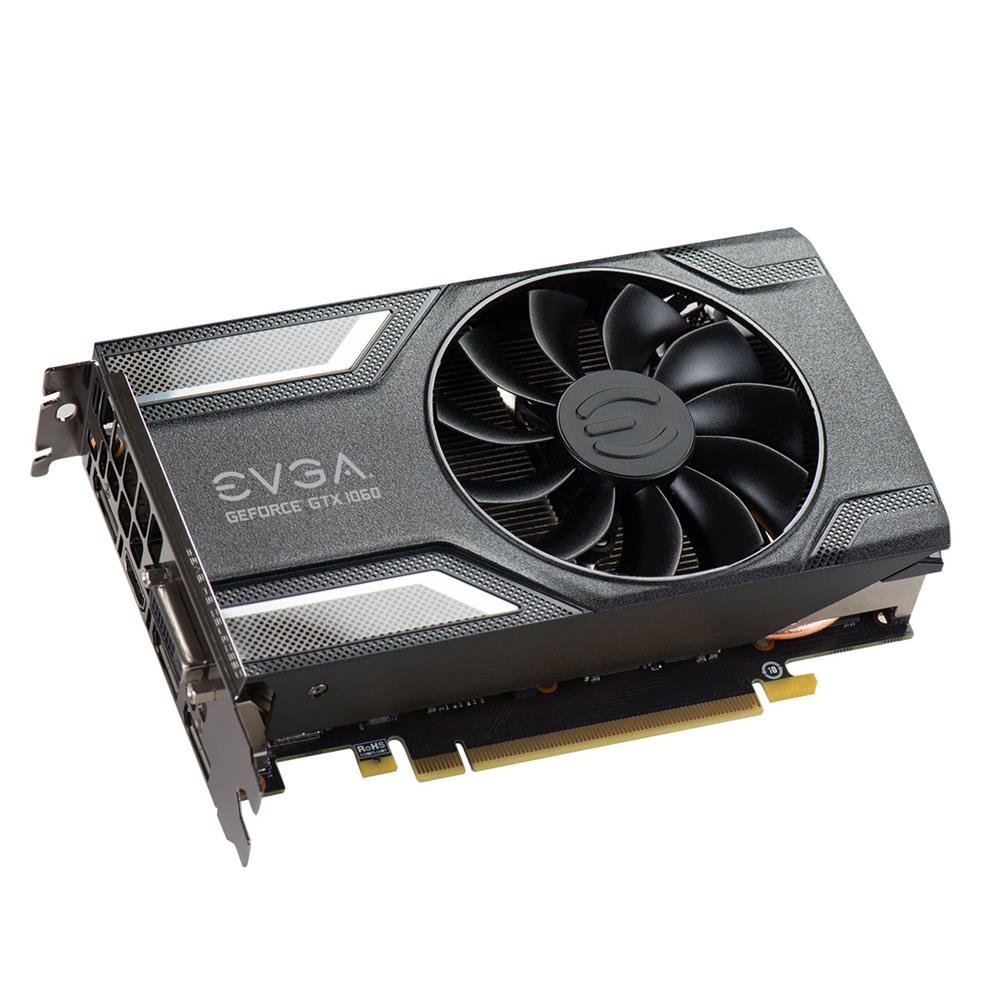
EVGA’s legendary build quality meets a 3GB 1060 at an entry-level price — but only if you accept the risks of refurbished hardware.
EVGA is known for excellent customer support, and this card carries a refurbished certification that means it was tested and repackaged. The single-fan design includes a “zero-fan mode” that keeps the fan off under light loads, so it is silent for office work and browsing. One user highlighted the aluminum frame and compact ~17.5 cm length, making it a good fit for smaller mid-towers. Overclocked, it reportedly hits about 23 MH/s for crypto mining, showing its stability under extended loads.
The catch is that refurbished cards carry some risk. One buyer received a dusty unit that failed after a month, warning to “avoid seller ‘Trinity Technology USA’.” The 3GB VRAM is the same limitation as other 3GB cards: fine for e-sports but tight for modern AAA titles. For a budget builder willing to gamble on condition, this is a solid foundation. If you want a warranty guarantee and no risk of receiving a worn-out unit, consider a new card instead.
The EVGA Advantage
- High-quality build with aluminum frame and zero-fan silent mode.
- Compact length (~17.5 cm) fits most mid-tower cases.
- Refurbished pricing makes it among the most accessible entries.
Refurbished Risks
- Condition varies — some units arrive dusty or fail within a month.
- 3GB VRAM limits modern AAA game potential.
- Single-fan design may run warmer under sustained loads.
Best for: budget buyers who trust EVGA’s brand reputation and are comfortable with refurbished electronics.
Consider a new card instead if: you want a warranty guarantee and no risk of receiving a worn-out unit.
7. NVIDIA GeForce GTX 1060 Founder’s Edition 6GB

The original NVIDIA reference card, packing 1280 CUDA cores (processing units) in a classic blower design.
This is the original GTX 1060 design from NVIDIA, featuring 6GB of GDDR5 memory and 1280 CUDA cores based on the Pascal architecture (the chip design generation). The single-blower fan design “only boosts when it needs to,” keeping noise down during light tasks and ramping up only under gaming load. One buyer’s wife uses it in an Alienware X51 and it “worked perfectly,” though they noted the need for a more powerful AC adapter. This is the card to buy if you want the exact reference design that reviewers benchmarked back in 2016.
The price reflects its collector status and scarcity rather than raw value. At a premium-tier price, you are paying for the brand authenticity and original design. Some buyers received units with dirty fan blades, suggesting quality control on used stock is inconsistent. For pure price-to-performance today, the ASUS 6GB Dual-Fan offers a higher boost clock at a lower cost. But if you want the card that started it all, this is the one. Anyone seeking the best bang for their buck should skip this for the dual-fan 6GB ASUS.
The Fan Appeal
- Original NVIDIA reference design with 1280 CUDA cores.
- 6GB VRAM with standard Pascal architecture.
- Boosts only under load for quieter everyday use.
Reality Check
- Highest price on the list for no performance gain over rivals.
- Used condition means potential dust and wear on arrival.
- Blower fan runs louder under sustained gaming than dual-fan cards.
Reach for this if: you are a collector or want the exact reference card for a period-correct build.
Skip it for: anyone seeking the best bang for their buck — a dual-fan 6GB card offers more for less.
Understanding the Specs
Boost Clock (MHz)
This is the maximum speed the graphics card’s processor can reach while under load, essentially telling you how fast it can render frames. A higher boost clock, like the ASUS’s 1809 MHz, translates directly to higher frame rates in games, giving you a smoother visual experience.
VRAM (Video RAM)
GDDR5 memory is the working space for your graphics card to store textures, models, and frame data. 6GB is the balance for modern AAA games, allowing for high-resolution textures and mods without stuttering. 3GB is sufficient for older and e-sports titles but can bottleneck newer games at higher settings.
FAQ
Is a 1060 Graphics Card still good for gaming in today’s market?
What is the difference between a 3GB and a 6GB GTX 1060?
How much power does a GTX 1060 need?
Will a GTX 1060 fit in my small form factor (SFF) PC?
Can a GTX 1060 run VR games?
Is it safe to buy a refurbished or used GTX 1060?
What does “boost clock” mean for a graphics card?
Can a GTX 1060 run a 4K monitor?
Final Thoughts: The Verdict
Across the board, the 1060 graphics card winner is the ASUS 6GB Dual-Fan because it combines the highest boost clock, reliable renewed quality, and enough VRAM for modern gaming. If you want the absolute best value for 1080p gaming and don’t need 6GB, grab the GIGABYTE Windforce 3GB. And for squeezing into a small form factor PC, the standout is the SRhonyra Low Profile 6GB.
How We Picked
We do not accept paid placement. Every pick is matched to a real buyer and a real use-case; we do not hands-on test units.
Sources & Methodology
Specifications: manufacturer listings and product documentation. Review insights: verified customer reviews, as of July 2026. Pricing: not shown on this page (it changes often); check the current price via the retailer link.
As an Amazon Associate, Gadgets Feed earns from qualifying purchases. This does not affect which products we feature.