
The GeForce GTX 1080 Ti remains one of the most debated pieces of silicon in PC gaming history. A card launched in 2017 that still trades hands for hundreds of dollars, it occupies a strange space—too old for retail, too powerful to ignore. Buyers today face a minefield of mining cards, questionable renewals, and inflated pricing where the wrong choice means artifacts within a week or a stable 1440p beast that lasts another five years.
I’m Min — the co-founder and writer behind Gadgets Feed. I’ve spent countless hours analyzing 1080 Ti listings, parsing real customer feedback, and cross-referencing specs across dozens of SKUs to separate functional bargains from ticking time bombs. This guide is built from actual buyer experiences, not press releases.
The market for a used 1080 ti gpu is crowded with Founders Editions, EVGA SC2 models, ASUS ROG Strix variants, and even newer RTX cards that compete on price — knowing which ones deliver reliable performance and which are rebadged mining rigs makes the difference between a smart buy and a costly mistake.
How To Choose The Best 1080 Ti GPU
Choosing a 1080 Ti today is fundamentally different from buying one in 2017. The card is no longer manufactured, so every unit is either used, refurbished, or renewed. That means the condition, cooling solution, and seller reputation matter far more than the GPU die itself. Here’s what separates a smart purchase from a paperweight.
Cooling Design: Blower vs. Open-Air
Founders Edition cards use a radial blower fan that exhausts heat out the back of the case — great for small cases with limited airflow, but louder and hotter under load. Open-air designs with two or three axial fans, like the EVGA SC2 or ASUS ROG Strix, run cooler and quieter but dump heat inside your case. If you have a well-ventilated mid-tower, open-air is nearly always better for sustained gaming sessions.
PCB Quality and Power Phases
The 1080 Ti draws up to 250W at stock, and overclocking pushes it higher. Cards with higher phase counts (like the GIGABYTE AORUS with 12+2 phases) deliver cleaner power and run cooler VRMs. Cheaper reference PCBs with fewer phases are more prone to voltage ripple and instability, especially in hot cases. Check the power connector — most 1080 Tis require one 8-pin and one 6-pin, but premium models need dual 8-pin.
Seller Provenance and Return Policy
Mining cards flooded the market after the 2021 crypto boom. Cards that ran 24/7 at high memory temperatures have degraded solder joints and fan bearings. Look for sellers who explicitly state the card was used for gaming, not mining. Renewed cards from Amazon-qualified vendors with a 90-day return policy offer more safety than random third-party listing. Always check reviews for phrases like “artifacts,” “crashes under load,” or “mining card.”
VRAM Capacity vs. Newer Alternatives
The 1080 Ti’s 11GB of GDDR5X memory is still competitive at 1440p — many modern games at high textures use 8–10GB. However, cards like the RTX 3070 Ti (8GB GDDR6X) or RTX 3080 Ti (12GB GDDR6X) offer faster memory bandwidth and ray tracing support. If your budget stretches to the mid-range, a newer card may deliver better longevity without the risk of used hardware.
Quick Comparison
On smaller screens, swipe sideways to see the full table.
| Model | Category | Best For | Key Spec | Amazon |
|---|---|---|---|---|
| EVGA GTX 1080 Ti SC2 Gaming | Mid-Range | Best Overall 1080 Ti | 11GB GDDR5X, 1670 MHz Boost | Amazon |
| GIGABYTE AORUS GTX 1080 Ti | Mid-Range | Extreme Overclocking | 12+2 Power Phases, 1708 MHz OC | Amazon |
| ASUS ROG Strix GTX 1080 Ti | Premium | Best Cooling & VR | Wing-Blade 0dB Fans, 1632 MHz Boost | Amazon |
| NVIDIA GTX 1080 Ti FE (Renewed) | Budget | Entry-Level 1080 Ti | 11GB GDDR5X, Blower Cooler | Amazon |
| NVIDIA GTX 1080 FE | Budget | Value 1440p Gaming | 8GB GDDR5X, 10 GHz Memory | Amazon |
| ASUS TUF RTX 3070 Ti OC (Renewed) | Mid-Range | Ray Tracing Alternative | 8GB GDDR6X, 3072 CUDA Cores | Amazon |
| NVIDIA RTX 3080 Ti (Renewed) | Premium | High-End VR Gaming | 12GB GDDR6X, 912 GB/s Bandwidth | Amazon |
| ZOTAC RTX 3070 Ti Trinity OC | Premium | Quiet 1440p Gaming | 8GB GDDR6X, 1800 MHz Boost | Amazon |
| MSI RTX 2080 Ti Gaming X Trio | Premium | 4K & VR Performance | 11GB GDDR6, 1710 MHz Core | Amazon |
| GIGABYTE RTX 3080 Ti Gaming OC | Premium | High FPS 2K/4K Gaming | 12GB GDDR6X, 19000 MHz Memory | Amazon |
| MSI RTX 4070 Ti Super 16G Expert | Premium | Future-Proof 1440p | 16GB GDDR6X, 2685 MHz Boost | Amazon |
In‑Depth Reviews
1. EVGA GeForce GTX 1080 Ti SC2 Gaming

The EVGA SC2 represents the sweet spot of the 1080 Ti generation — a factory-overclocked card with a dual-slot open-air cooler that runs quietly and stays well under 75°C under load. The 1556 MHz base clock with 1670 MHz boost provides solid out-of-box performance, and iCX technology adds nine thermal sensors across the memory and VRM for granular temperature monitoring.
Buyers consistently report 1440p gaming at 100–150 FPS in competitive titles and stable 50–60 FPS at 4K max settings. The 11GB GDDR5X buffer handles modern texture-heavy games without VRAM bottlenecks. Multiple reviewers note the card lasted over five years without degradation, and even demanding titles like Cyberpunk 2077 ran well at 2K high settings.
The main drawback is limited overclocking headroom — most units top out around +50 MHz core and +100 MHz memory before stability issues appear. A small number of users report coil whine above 50% fan speed, which may be audible in quiet cases. Still, for a 1080 Ti at a reasonable price, this EVGA variant consistently delivers the best reliability track record.
Why it’s great
- Excellent thermal performance with iCX sensors
- Quiet operation even under sustained gaming load
- Proven longevity — many units last 5+ years
Good to know
- Limited overclocking headroom above factory settings
- Some units exhibit coil whine at high fan speeds
2. GIGABYTE AORUS GeForce GTX 1080 Ti

GIGABYTE’s AORUS flagship pushes the 1080 Ti architecture to its practical limits with a factory boost of 1708 MHz in OC mode — the highest among aftermarket 1080 Tis. The three 100mm WINDFORCE Stack fans, combined with an advanced copper backplate, keep the GDDR5X memory and VRMs significantly cooler than reference designs, enabling sustained boost clocks during long sessions.
The 12+2 power phase design is overbuilt for the GP102 die, providing exceptionally clean power delivery that reduces voltage ripple and improves stability during aggressive overclocking. Users report 4K gaming at 60 FPS on titles like Project CARS and consistent triple-digit FPS at 1440p max settings. The RGB Fusion lighting offers 16.8 million colors and can be controlled or disabled via software if you prefer a clean look.
This card is physically large — triple-slot and over 11 inches long, so measure your case clearance carefully. A minority of users found the driver setup time-consuming, and the card generates noticeable heat at high loads despite the strong cooling. At a mid-range price, this AORUS variant offers the most overbuilt PCB of any 1080 Ti on the market.
Why it’s great
- Highest factory boost clock among 1080 Tis
- Robust 12+2 phase VRM for stable overclocking
- Advanced copper backplate improves memory cooling
Good to know
- Triple-slot design requires ample case space
- Runs warm under sustained heavy loads
3. ASUS ROG Strix GTX 1080 Ti

ASUS built the ROG Strix GTX 1080 Ti with an emphasis on silence and build quality. The three wing-blade fans spin at 0 RPM under low load — the card is completely inaudible during desktop use and light gaming. When the fans do engage, the MaxContact heatsink delivers 2X more GPU-to-heatsink contact area than standard coolers, keeping temperatures in the mid-60s during gaming while remaining whisper-quiet.
With 1632 MHz boost clock in OC mode, 11GB of GDDR5X on a 352-bit bus, and 3584 CUDA cores, this card chews through VR titles with heavy supersampling settings without judder. The FanConnect II feature includes two 4-pin chassis fan headers that respond to GPU temperature, helping manage overall case thermals. Aura Sync RGB covers the card and includes an additional 4-pin RGB header for compatible peripherals.
The premium price positions this near the top of the 1080 Ti range, and you pay for the cooling engineering and ROG ecosystem. The card requires two 8-pin PCIe power connectors, though only one adapter is included in the box. Several users note it runs exceptionally cool even in SLI configurations, with zero coil whine reported — unusual for the 1080 Ti platform.
Why it’s great
- Fanless operation under low load for silent use
- MaxContact heatsink delivers excellent thermal transfer
- FanConnect II links case fans to GPU temps
Good to know
- Premium pricing for a last-gen flagship card
- Only one 8-pin adapter included; needs two
4. NVIDIA RTX 3080 Ti (Renewed)

The RTX 3080 Ti in renewed condition directly competes with high-end 1080 Tis on price while offering substantially more performance. Built on the Ampere architecture, it packs 12GB of GDDR6X memory on a 384-bit bus delivering 912 GB/s bandwidth — nearly double the 1080 Ti’s 484 GB/s. This memory throughput makes a noticeable difference in 4K texture streaming and heavy VR titles like Half-Life: Alyx with wireless Quest 3 streaming.
Renewed units from Amazon-qualified vendors receive professional inspection and cleaning, which reduces the risk of picking up a mining-worn card. Users report excellent condition upon arrival, with all accessories included. The Founders Edition blower design runs hotter than open-air coolers — expect 75–80°C under sustained load — but the raw rasterization performance leap over the 1080 Ti is significant, especially in modern titles that benefit from DLSS.
The primary risk with any renewed high-end GPU is longevity — one verified buyer reported burn out within a year despite adequate power and cooling. Case compatibility is also a concern; the 3080 Ti FE is a two-slot card but over 11 inches long. If your budget allows, this offers a meaningful upgrade path without stepping into premium pricing.
Why it’s great
- Massive memory bandwidth for 4K and VR gaming
- Refurbished inspection reduces mining card risk
- DLSS support improves modern game performance
Good to know
- Blower cooler runs hot under sustained load
- Renewed units have variable long-term reliability
5. ZOTAC Gaming RTX 3070 Ti Trinity OC

The ZOTAC Trinity OC provides a modern alternative to the aging 1080 Ti architecture. With 8GB of GDDR6X memory clocked at 19 Gbps on a 256-bit bus, and the Ampere architecture’s 2nd-gen ray tracing cores, this card delivers competitive raw performance while adding features the 1080 Ti lacks — DLSS, HDMI 2.1, and PCIe 4.0 support. The 1800 MHz boost clock out of the box is aggressive for an RTX 3070 Ti.
IceStorm 2.0 cooling with three 90mm fans keeps temperatures well under 70°C in well-ventilated cases, and the FREEZE fan-stop mode means the fans remain stationary below light loads for silent operation. Users upgrading from RTX 2060 Super-class cards report significant FPS jumps at 1440p 165Hz. The Spectra 2.0 RGB lighting adds visual flair, though it doesn’t sync with ASUS Aura software.
The 8GB VRAM buffer is the limiting factor — at 4K with ultra textures and ray tracing, some modern titles push past 8GB allocation, causing stuttering. The card is also noticeably long at 12.5 inches. Fan noise can become audible during intense gaming sessions, though many users find it acceptable with noise-canceling headphones. At a mid-range price, this is a solid entry into the Ampere ecosystem.
Why it’s great
- Aggressive factory boost clock for its class
- Triple-fan cooling runs cool and quiet
- Ray tracing and DLSS support for modern titles
Good to know
- 8GB VRAM can bottleneck at 4K with ray tracing
- Fans audible under sustained heavy gaming loads
6. MSI RTX 2080 Ti Gaming X Trio

The MSI Gaming X Trio RTX 2080 Ti offers 11GB of GDDR6 memory with a 352-bit bus and 1710 MHz core clock — closely matching the 1080 Ti’s VRAM capacity while adding Turing architecture features like mesh shading and variable rate shading. The triple-fan TRI FROZR thermal design with TORX 3.0 fans keeps idle temperatures at 32°C with fans completely off, and load temps rarely exceed 58°C at 78% fan speed.
This card is massive — 12.79 inches long and 2.5 slots thick — requiring careful case selection. Users report excellent 4K gaming performance, with 55–70 FPS at max quality paired with Ryzen 9 3950X-class CPUs. VR performance shines with heavy supersampling in titles like Fallout 4 VR, maintaining smooth frame rates where the 1080 Ti would stutter. The included anti-sag bracket is essential for this weight class.
The standout feature is near-silent operation — multiple long-term owners report the card remains whisper-quiet even years after purchase. The premium price reflects the high-end positioning, and buyers should verify the fan curve is enabled in MSI Afterburner as the default zero-RPM mode can cause passive overheating in poorly ventilated cases. Still, for 4K gaming without jumping to RTX 40-series pricing, this is a compelling option.
Why it’s great
- Exceptional thermal performance; stays below 60°C under load
- Near-silent operation even under sustained gaming
- Excellent 4K and VR performance with large VRAM buffer
Good to know
- Extremely large; may not fit in standard mid-tower cases
- Requires manual fan curve configuration to avoid passive heat issues
7. GIGABYTE RTX 3080 Ti Gaming OC

The GIGABYTE RTX 3080 Ti Gaming OC leverages the full power of the Ampere architecture with 12GB of GDDR6X memory humming at 19 GHz and a 384-bit bus that delivers 912 GB/s memory bandwidth — nearly double the 1080 Ti’s throughput. This memory performance matters most at 2K and 4K resolutions where texture streaming bandwidth directly impacts frame times and 1% lows.
The triple WINDFORCE fan cooling with alternate-spinning fans reduces turbulence and keeps the card running at reasonable temperatures even with the 350W TDP. Multiple users report excellent thermals and consider it a great value compared to scalper pricing during the GPU shortage. The card easily runs demanding titles like Cyberpunk 2077 and Death Stranding at 2K ultra settings with high and consistent FPS. Undervolting is a popular modification — users show that setting 0.875mV at 1905 MHz maintains stock performance while reducing power draw and temperatures noticeably.
The card is over 12 inches long and requires a 750W power supply minimum, with dual 8-pin power connectors. The main complaint is quality control — some units arrive with no video signal output, and customer service experiences vary significantly. Check the yellow GIGABYTE seal to verify the card is new, and register for the 4-year warranty immediately upon arrival. For buyers who want maximum performance without jumping to RTX 40-series pricing, this card delivers.
Why it’s great
- Exceptional memory bandwidth for 4K gaming
- Undervolting potential reduces power and heat significantly
- Competitive pricing for an RTX 3080 Ti
Good to know
- Inconsistent quality control; some units arrive DOA
- Requires large case and minimum 750W PSU
8. MSI RTX 4070 Ti Super 16G Expert

The MSI RTX 4070 Ti Super Expert represents the current generation solution for buyers who need modern features but want to avoid the mining GPU lottery entirely. With 16GB of GDDR6X memory running at 21 Gbps on a 256-bit bus, the Ada Lovelace architecture delivers DLSS 3 frame generation, AV1 encoding, and full ray tracing support that no 1080 Ti can match. The 2685 MHz boost clock is among the highest for this chipset.
The Expert series features a unique dual-slot vapor chamber cooling design with a metal casing that acts as a heat spreader — idle temperatures hover around 30°C with fans completely stationary, and full load peaks at 71–72°C. Installation is straightforward despite the 3-slot thickness, though the length is significant at 12.5 inches. Users upgrading from older CPUs note the card can be CPU bottlenecked in VR scenarios, with the Ryzen 7 7800X3D being a popular pairing for maximum VR racing performance.
Some units exhibit coil whine under load, though it tends to fade after the first week of use. The no-RGB, all-metal aesthetic appeals to builders who prefer a clean, industrial look. The premium price positions this at the top of the list, but you get a current-generation card with warranty support, full driver optimization, and years of expected longevity — arguably the best value per dollar if you plan to keep the card for 4–5 years.
Why it’s great
- 16GB VRAM buffer is future-proof for texture-heavy titles
- DLSS 3 frame generation boosts FPS in supported games
- Excellent thermal performance with zero-RPM idle
Good to know
- Premium pricing — the most expensive option on this list
- Some units have coil whine that may or may not fade
9. ASUS TUF Gaming RTX 3070 Ti OC (Renewed)
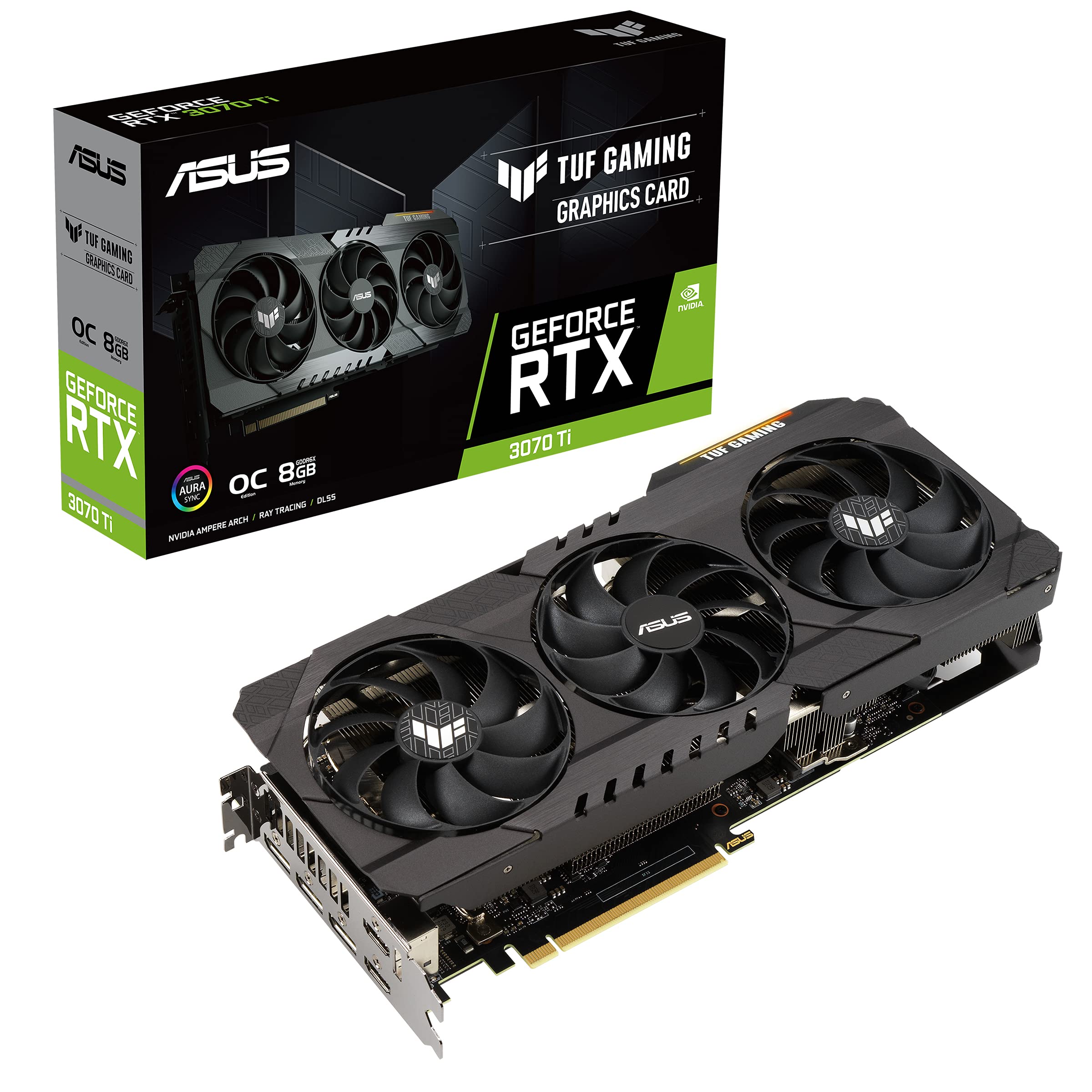
The ASUS TUF Gaming RTX 3070 Ti OC in renewed condition offers the most accessible entry point into the Ampere architecture. With 8GB of GDDR6X memory and 3072 CUDA cores on a PCIe 4.0 interface, this card delivers solid 1440p performance while including hardware ray tracing and DLSS — features the 1080 Ti completely lacks. The dual ball fan bearings and military-grade certification suggest better long-term reliability than budget renewed cards.
Renewed units from Amazon-qualified vendors arrive in near-excellent condition, well-packaged with ESD protection. Users report the card runs hot under load — around 80°C in demanding titles like RE4 Remake at high settings — so good case airflow is essential. The TUF chassis is durable with a metal backplate, and the card supports GPU Tweak II for fine-tuning fan curves and clock speeds.
The main limitation is the 8GB VRAM buffer — at 1440p with high texture quality, some modern titles push past 8GB, causing occasional stuttering. The card also runs noticeably warmer than open-air 1080 Tis, which may be a concern for silent PC builders. Despite these trade-offs, at this price point, it’s the most cost-effective way to get ray tracing and DLSS without buying used mining hardware.
Why it’s great
- Affordable entry to ray tracing and DLSS features
- Durable TUF construction with ball bearing fans
- Strong 1440p performance in competitive titles
Good to know
- 8GB VRAM can bottleneck modern high-texture titles
- Runs hot; requires good case airflow
10. NVIDIA GTX 1080 Ti FE (Renewed)

The NVIDIA GeForce GTX 1080 Ti Founders Edition in renewed condition is the most budget-friendly way to get 11GB of GDDR5X memory and the full GP102 die with 3584 CUDA cores. The 2 GHz GPU clock speed and 11 GHz memory clock deliver stock performance that still competes with entry-level modern cards at 1440p. The blower-style cooler exhausts heat directly out of the case, making it suitable for small form factor builds.
Buyers report mixed experiences — many receive cards in pristine condition with proper packaging and functional accessories, while others receive mining-worn units that crash with artifacts during video playback. The blower fan runs noticeably louder than open-air designs and keeps temperatures higher, typically 75–85°C under gaming load. The 11GB buffer is genuinely useful for texture-heavy games like Red Dead Redemption 2 and Microsoft Flight Simulator.
The primary risk is the refurbishing quality — one user reported receiving a card that was clearly used for cryptocurrency mining with degraded thermal performance. The renewed process does not verify original accessories, and some units arrive missing cables. If you’re willing to gamble and have a return-ready mindset, this is the cheapest path to 1080 Ti performance, but it carries the highest failure risk of any option on this list.
Why it’s great
- Most affordable way to get full 1080 Ti performance
- Blower cooler works well in small cases
- 11GB VRAM remains useful for modern texture-heavy games
Good to know
- High risk of receiving mining-degraded units
- Blower fan is loud and runs hot under load
11. NVIDIA GTX 1080 Founders Edition

The standard GTX 1080 Founders Edition is not a 1080 Ti — it uses a cut-down GP104 die with 8GB of GDDR5X memory on a 256-bit bus, delivering noticeably lower performance than the 1080 Ti’s GP102 die. However, it remains a capable 1440p card and is often listed alongside 1080 Tis on the secondhand market. The 10 GHz memory clock and blower cooler are identical in design to the 1080 Ti FE.
Customer experiences are mixed — some buyers receive cards that work perfectly for general gaming, while others report bait-and-switch scenarios where a different, lower-spec card is shipped instead. The refurbished condition varies significantly; some units arrive with scratches and replaced thermal paste, others in near-new condition. The 8GB VRAM buffer is limiting for modern AAA titles at high textures, and the blower fan noise is noticeable under load.
This card lacks the 11GB buffer and wider memory bus that make the 1080 Ti special. For casual 1440p gaming at high settings, it’s adequate, but demanding modern titles will push against its limits. At this budget-friendly price point, it represents a lower-risk entry into the GTX 10-series ecosystem, but serious gamers should stretch to a 1080 Ti or better for meaningful longevity.
Why it’s great
- Lowest cost option for 1440p gaming
- Familiar Founders Edition blower design
- GDDR5X memory offers decent bandwidth
Good to know
- Not a 1080 Ti — significantly less CUDA core count
- 8GB VRAM is tight for modern AAA games
- Bait-and-switch seller risk with refurbished units
FAQ
Is the GTX 1080 Ti still good for gaming in 2025?
How do I tell if a used 1080 Ti was used for mining?
What power supply do I need for a 1080 Ti?
Should I buy a 1080 Ti or save for a newer card?
Final Thoughts: The Verdict
For most users, the best 1080 ti gpu winner is the EVGA GeForce GTX 1080 Ti SC2 Gaming because it combines reliable iCX thermal monitoring, quiet open-air cooling, and a proven track record of longevity at a mid-range price. If you want the highest factory boost clocks and the most robust VRM for overclocking, grab the GIGABYTE AORUS GeForce GTX 1080 Ti. And for silent 1440p gaming with the best cooling engineering, nothing beats the ASUS ROG Strix GTX 1080 Ti.