
Our readers keep the lights on and my morning glass full of iced black tea. As an Amazon Associate, I earn from qualifying purchases.
Specs are compiled from manufacturer listings and verified buyer reviews and can change over time — please confirm the key details on the product page before buying.
You just want a picture that stays on the screen when you plug a Blu-ray player, game console, or streaming box into your 1080p TV. The wrong HDMI cable can give you flickers, black screens, or a signal that cuts out entirely. You need a cable that delivers a clean, stable picture every time without paying extra for features your setup does not use.
I am Min, founder and writer of Gadgets Feed. This guide compares each manufacturer’s published specs and patterns across verified customer reviews. That way you get the real strengths and trade-offs of each pick, not marketing spin.
The most reliable 1080p hdmi cable for most people is the Highwings 15 FT because its 48Gbps bandwidth gives you a rock-solid signal today and handles a future 4K or 8K upgrade without needing a new cable. If you are a PC gamer who needs 144Hz refresh, the Ubluker 10 FT is a better fit. And for a very long run across a room or through a wall, the KIMTABO Fiber Optic 100 FT keeps the signal clean over 100 feet.
Quick Picks
- Highwings Long HDMI Cable 15 FT — Top Performer
- Ubluker 10K 8K 4K HDMI Cable 48Gbps 10 FT — Best Value
- Highwings High-Speed 25 FT HDMI Cable — Long-Run Favorite
- BlueRigger 4K HDMI Cable 50 FT — In-Wall Pro
- 4K HDMI Cable 100 ft, Fiber Optic — Budget Champion
How To Choose The Best 1080P HDMI Cable
At 1080p, almost any modern HDMI cable can technically work, but the real difference is in the distance you need and the build quality. A poorly shielded 50-foot cable will drop the signal entirely, while a thick copper cable might be impossible to bend around a tight corner. Here is what to look for.
Length and Signal Stability
Standard copper HDMI cables start to lose signal strength beyond about 25 to 30 feet. To keep the picture clean on runs longer than that, you need either a thicker gauge copper cable (lower number means thicker wire) or an active fiber optic cable that does not lose signal over distance.
Cable Rating and Build Materials
If you run the cable inside a wall, you need a CL3-rated cable (a fire-safety standard that resists high heat) that meets local building codes. Outside walls you can use any cable, but gold-plated connectors resist corrosion, and braided jackets resist wear from foot traffic or pets.
Bandwidth and Future-Proofing
Even if you only need 1080p today, a cable rated for 18Gbps (gigabits per second, a measure of data capacity) or higher will handle the occasional 4K source you might plug in later. Cables that barely meet the 1080p spec at 4.95Gbps tend to fail sooner with random signal dropouts.
Quick Comparison
| Model | Best For | Length | Data Transfer Rate | Refresh Rate | Amazon |
|---|---|---|---|---|---|
| Highwings 15 FT HDMI 2.1 | Gaming & Future-Proofing | 15 Feet | 48 Gbps | 60 Hz | Amazon |
| Ubluker 10K 8K 4K 10 FT | High-Refresh PC Gaming | 10 Feet | 48 Gbps | 144 Hz | Amazon |
| Highwings High-Speed 25 FT | Long Home Theater Run | 25 Feet | 18 Gbps | 60 Hz | Amazon |
| BlueRigger 4K 50 FT | In-Wall Installations | 50 Feet | 18 Gbps | 30 Hz | Amazon |
| KIMTABO Fiber Optic 100 FT | Extreme Distance Runs | 100 Feet | 18 Gbps | 60 Hz | Amazon |
In‑Depth Reviews
1. Highwings Long HDMI Cable 15 FT

This 15-foot cable delivers a clean 1080p signal now and handles a future 4K or 8K upgrade because its bandwidth is 48Gbps (gigabits per second), while a standard cable is 18Gbps.
You get a rock-solid 1080p picture with plenty of headroom because the Highwings uses HDMI 2.1 specs (the latest standard for high-bandwidth video and audio). Its data transfer rate of 48 gigabits per second means you can plug it into a 4K or 8K source down the road without worrying if the cable can keep up. It has 48Gbps bandwidth compared to the Highwings High-Speed 25 FT’s 18Gbps, so it is far more future-proof.
Buyers report using this for long runs through walls. One reviewer noted they “ran a 50′ cable from the basement to the living room so one input is a multi-cam view of the house.” The cable has directional labels (markings that say “display” and “source” on each end), so you avoid the frustration of plugging it in backwards. It also has a CL3 in-wall rating (a fire-safety standard), which makes it a solid choice for permanent installations in walls or ceilings.
For an extra layer of reliability, the advanced audio return channel (eARC, which sends high-bitrate audio from your TV back to a soundbar or receiver) means you get uncompressed sound from your TV to your audio gear — handy if you game or watch movies through a single source.
Why It Stands Out
- 48Gbps bandwidth leaves room for future 4K/8K upgrades so you keep the same cable
- CL3-rated for safe in-wall installation, meeting fire safety codes
- eARC support for high-quality audio pass-through like Dolby Atmos
- Directional labels prevent setup mistakes
One Thing to Note
- Thin cable is flexible but may feel less armored than braided options
Reach for this if: you want a cable that handles today’s 1080p setup and is ready for a future monitor upgrade without being replaced.
A different crowd: gamers who need higher refresh rates — the spec lists 60Hz (frames per second), which is fine for movies and standard gaming but not 144Hz PC play.
2. Ubluker 10K 8K 4K HDMI Cable 48Gbps 10 FT
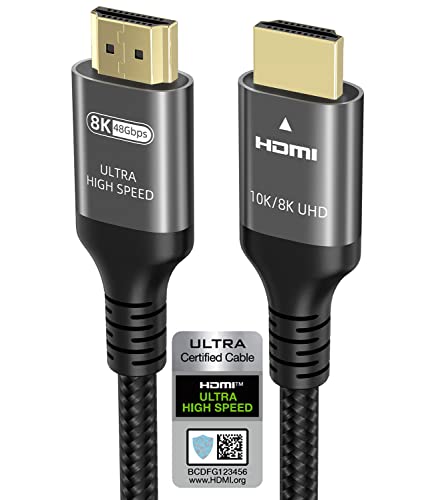
A short 10-foot cable with a 144Hz refresh rate (frames per second) that makes a big difference for PC gamers — at 144Hz versus the BlueRigger 50-foot cable’s 30Hz.
This Ubluker cable is certified by HDMI Forum (an official testing body), meaning it has passed formal tests for reliable performance. The standout spec is the refresh rate of 144 Hz — compared to 30Hz on the BlueRigger 50-foot cable, so if you game on a PC monitor that can hit 144 frames per second, this cable will actually show those frames on screen. You get 48Gbps bandwidth just like the Highwings 15 FT, but in a shorter 10-foot package that is ideal for connecting a console to a nearby TV or a gaming PC to a monitor.
One buyer mentioned, “I bought this cable to replace a failing ARC cable on my soundbar. It fixed the problem and sound quality has returned to normal.” The nylon braided jacket is less stiff than rubber cables, according to reviewers, which makes it easier to bend behind a tight entertainment center without kinking the wire. It also supports HDR10+ (a color and contrast standard), eARC, and HDCP 2.3 (a content protection standard for streaming services), so it is fully compatible with modern consoles and streaming services.
Keep in mind the 10-foot length is short — it is not ideal if you need to run it across a room or through a wall. It is designed for close connections where every millisecond of latency matters.
Gamer’s Choice: The Ubluker hits 144Hz at 1080p with a certified handshake — one of the best values if you sit close to your gear.
Who should pick this: PC and console gamers who want a fast, certified cable for short runs without spending premium money.
Who should look elsewhere: anyone needing a long in-wall cable — 10 feet is simply too short for across-the-room installations.
3. Highwings High-Speed 25 FT HDMI Cable

A 25-foot braided cable that keeps your 1080p signal reliable over a longer distance without a heavy price tag — it’s 25 feet versus 15 feet for the Highwings HDMI 2.1 cable.
This cable runs 25 feet at 18Gbps (gigabits per second), compared to 15 feet for the Highwings HDMI 2.1 cable above, but it still keeps a strong 1080p signal without dropouts. The braided nylon jacket makes it tough enough to survive foot traffic and furniture being moved around — one owner reported the cable showed “zero signal issues” over a long run. It supports 4K HDR at 60Hz when you plug in a higher-resolution source, though at 1080p it handles everything with no flickers.
There is an honest caveat from buyers. One person noted that when they “connected to my TV from my gaming PC and it would only do 1080p without cutting out and losing the signal” at higher resolutions. That suggests this cable is best for standard 1080p and entry-level 4K use, not for pushing the limits of high-bandwidth HDR content. Other reviewers praised the ARC (Audio Return Channel) passthrough, which sends sound from your TV back to a soundbar, and the gold-plated connectors for a snug fit that does not wiggle loose.
At this length, it is a great choice for connecting a projector or TV across a living room without needing an active booster or a fiber optic setup.
Best Bits
- Braided jacket resists damage from pets and foot traffic
- Costs a fraction of longer fiber optic cables
- Plug-and-play with no configuration needed
A Limitation
- May struggle with very high-bandwidth 4K signals over 18Gbps
Reach for this if: you need a reliable 25-foot cable for a standard home theater or office setup and want something durable.
skip it if: you plan to push 4K HDR at 60Hz constantly — consider a higher-bandwidth 48Gbps option like the Highwings 15 FT for that.
4. BlueRigger 4K HDMI Cable 50 FT

A 50-foot heavy-duty cable built for permanent in-wall installations, with a lifetime warranty to back it up — it meets CL3 fire safety standards so you do not need a separate conduit.
This cable is CL3-rated (a fire safety standard) for in-wall use, which means it meets the fire codes for running through ceilings and walls — fewer trips to the hardware store for a separate conduit. Its data transfer rate is 18Gbps (gigabits per second), and it supports 4K at 30Hz (frames per second), so for 1080p content it is completely overkill in a good way. One customer observed having it installed for five years and still working perfectly.
Compared to the 25-foot Highwings, this BlueRigger cable is 25 feet longer but still keeps a stable 1080p signal thanks to solid copper conductors and gold-plated 24K connectors. Some reviewers mentioned the cable is thick and heavy, which is what you want for durability but makes it harder to thread through tight spaces. The lifetime warranty from BlueRigger adds confidence for a permanent install.
One note: the spec lists 30Hz (frames per second), not 60Hz, so this is best for movie and TV watching where you do not need high frame rates. It works with eARC for soundbars and supports HDCP 2.2 (content protection for copy-protected material).
Built to Last: With over 25,000 bends lifespan rating and a lifetime warranty, this is the kind of cable you install once and forget.
Who it fits: homeowners running cable through walls for a clean, hidden setup who want a manufacturer-backed guarantee.
Who it does not fit: gamers needing 60Hz or 120Hz support — the 30Hz cap makes this a poor fit for PC or console gaming.
5. 4K HDMI Cable 100 ft, Fiber Optic
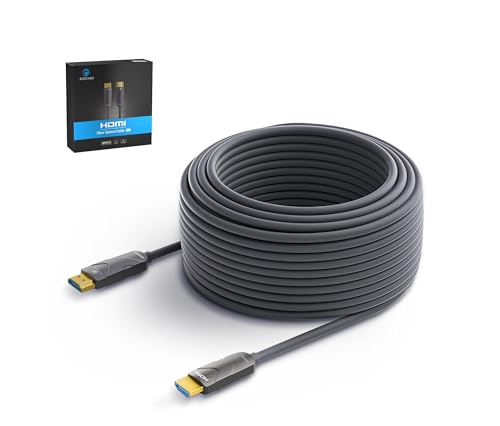
A fiber optic 100-foot cable that stays thin enough (4.8mm diameter) to fish through walls without any signal loss — it pushes 18Gbps the full distance, unlike copper which would need an expensive repeater.
Running a copper HDMI cable 100 feet usually kills the signal or requires an expensive active repeater (a booster box). This KIMTABO cable uses a fiber core and a German chipset to push 18Gbps (gigabits per second) up to 100 feet with no attenuation (signal weakening) or interference — the same 18Gbps bandwidth as the BlueRigger 50-foot copper cable, albeit over a 100-foot span versus 50 feet. The cable’s diameter is only 4.8mm, which buyers said made it easy to “route inside of the walls” and “maneuvered through wall joists fishing downstairs from the attic.”
One user highlighted it ran across their whole living room without any issues, calling it “kickass” and “thick” despite the slim profile. It supports 4K at 60Hz (frames per second) and 1080p with no lag, plus HDR10 and ARC. The catch is that fiber optic cables are unidirectional — you must plug the correct end into the source (the device sending the signal) and the other into the display. If you reverse them, it simply will not work.
At this price point it competes directly with the BlueRigger but gives you twice the length for the same cost.
Why It Wins at Distance
- 100-foot run with zero signal loss thanks to fiber core
- Thin 4.8mm diameter for easy wall fishing
- Same 18Gbps bandwidth as shorter copper cables like the BlueRigger 50 FT
What to Watch
- Unidirectional design means you cannot swap ends if you plug it in wrong
Grab this for: a very long run from a basement server closet or attic to a TV on the opposite side of the house at a budget-friendly cost.
A better option exists if: you need high refresh rates beyond 60Hz — stick with a shorter 48Gbps cable like the Ubluker instead.
Understanding the Specs
Data Transfer Rate (Gbps)
This is the amount of data the cable can push every second. For stable 1080p you only need about 4.95Gbps (gigabits per second), but cables rated for 18Gbps have room to handle 4K HDR without dropouts. A 48Gbps cable adds support for 8K and very high refresh rates.
Cable Length and Gauge
Copper cables over 25 feet often need a thicker gauge (a lower number means a physically thicker wire) to keep the signal strong. Beyond 50 feet, fiber optic cables are usually the practical choice because they do not lose signal over distance. A CL3 rating (a fire-safety standard) means the outer jacket meets safety codes for in-wall runs.
FAQ
Will a 48Gbps HDMI cable work with a 1080p TV?
How long can a 1080p HDMI cable be before the signal degrades?
What does CL3 rating mean on an HDMI cable?
Is there a difference between a cheap and expensive HDMI cable for 1080p?
Can I use an 18Gbps cable for 1080p 144Hz gaming?
What is a directional HDMI cable and why does it matter?
Do I need eARC for a soundbar?
Can a bad HDMI cable cause lag in games?
What is the difference between HDMI 2.0 and HDMI 2.1 for 1080p?
How do I know if my HDMI cable is certified?
Final Thoughts: The Verdict
The 1080p hdmi cable winner for most setups is the Highwings 15 FT because it gives you modern 48Gbps bandwidth in a flexible CL3-rated cable that works for today’s setup and tomorrow’s upgrade. If you want high-refresh PC gaming at 144Hz, grab the Ubluker 10 FT. And for a long in-wall run that spans rooms, the KIMTABO Fiber Optic 100 FT keeps the signal clean over extreme distances while staying affordable.
How We Picked
We do not accept paid placement. Every pick is matched to a real buyer and a real use-case; we do not hands-on test units.
Sources & Methodology
Specifications: manufacturer listings and product documentation. Review insights: verified customer reviews, as of July 2026. Pricing: not shown on this page (it changes often); check the current price via the retailer link.
As an Amazon Associate, Gadgets Feed earns from qualifying purchases. This does not affect which products we feature.