
Our readers keep the lights on and my morning glass full of iced black tea. As an Amazon Associate, I earn from qualifying purchases.
Specs are compiled from manufacturer listings and verified buyer reviews and can change over time — please confirm the key details on the product page before buying.
You can add 10-gig speeds to your network without pulling a single strand of fiber by plugging a 10G SFP+ transceiver (a small plug-in module that converts signals) into an existing switch or router port and connecting it with a regular Ethernet cable. The catch is that these copper modules, especially the affordable ones, can run hot enough to make you nervous — and some models simply stop working after a few months. This guide breaks down which 10G SFP modules deliver reliable multi-gig performance, which ones play nice with Ubiquiti, Cisco, and MikroTik gear, and which ones to avoid if stability is your priority.
I’m Min — the founder and writer behind Gadgets Feed. This guide is built by comparing the manufacturers’ published specifications and the patterns across verified customer reviews, so you get each pick’s real strengths and trade-offs instead of marketing spin.
Whether you are bridging a fiber ONT (optical network terminal, the box your ISP provides) to a UniFi UDM Pro, adding a 10G uplink between switches, or connecting a high-speed server, the right 10g sfp module makes the difference between a bottleneck and a smooth copper multi-gig network.
Quick Picks
- MikroTik S+RJ10 — Top Performer
- TP-Link Omada SM5310-T — Best Value
- QSFPTEK 10G SFP+ RJ45 Module — UniFi tune
- 10Gb SFP+ to RJ45 Modules (Wiitek Technology) — Compact & Light
- ipolex SFP+ to RJ45 10Gb Module — Versatile Choice
- 1.25/2.5/5/10G-T SFP+ to RJ45 Transceiver — Budget Champ
- 10GBASE-T SFP+ to RJ45 Transceiver (XZSNET) — Budget Alternative
How To Choose The Best 10G SFP Module
Not every copper SFP+ module is built the same. Some are tune for a specific brand like Ubiquiti, while others claim wide compatibility but fail in mixed-speed networks. Here are the three things that matter most.
Multi-Rate Support and Auto-Negotiation
Look for modules that explicitly support 1G, 2.5G, 5G, and 10G speeds. This “multi-rate” capability lets one module handle everything from a 1Gbps internet plan to a full 10Gbps LAN without swapping hardware. Without it, your device may fall back to slower speeds or fail to link entirely. Some modules struggle with 2.5G in mixed-speed networks — buyers report that a switch may see the module as 10G while the modem expects 2.5G, causing dropped packets.
Heat Management and Operating Temperature
Copper 10GBASE-T modules generate significantly more heat than fiber SFP+ modules. A module rated for 0-70°C ambient may still reach surface temperatures over 120°F under load. If your switch or router has passive cooling (no fan), you will want a module known for lower power draw, like the MikroTik S+RJ10. A small fan or heatsink placed on the module can prevent throttling and extend lifespan.
Brand Compatibility
Many modules claim broad compatibility, but real-world results vary. Ubiquiti UniFi gear, for example, can be picky after firmware updates — some third-party modules stop being recognized or require a reboot. Cisco Nexus and Meraki switches often reject non-Cisco modules outright. Always check recent reviews for your exact switch model. A module that works in a UniFi UDM Pro may overheat and cause instability in a Netgate XG-7100, for instance.
Quick Comparison
| Model | Best For | Wattage / Power | Max Cable Distance | Multi-Rate | Amazon |
|---|---|---|---|---|---|
| MikroTik S+RJ10 | Troublesome 2.5G/5G WAN Links | — | Up to 200m | 10M / 100M / 1G / 2.5G / 5G / 10G | Amazon |
| TP-Link Omada SM5310-T | Reliable Multi-Vendor Compatibility | — | 30m (10G) / 100m (2.5G/1G) | 100M / 1G / 2.5G / 10G | Amazon |
| QSFPTEK 10G SFP+ RJ45 | Ubiquiti UniFi Ecosystems | 2.5W | Up to 30m | 2.5G / 5G / 10G | Amazon |
| 10Gb SFP+ to RJ45 (Wiitek) | Lightweight Budget Builds | <2.0W | Up to 30m | 1.25G / 2.5G / 5G / 10G | Amazon |
| ipolex SFP+ to RJ45 10Gb | Multi-Brand Switching (Avoid Netgate) | <2.5W | Up to 30m | 1.25G / 2.5G / 5G / 10G | Amazon |
| 1.25/2.5/5/10G-T SFP+ to RJ45 (QINIYEK) | Entry-Level Budget Pick | — | Up to 30m | 1.25G / 2.5G / 5G / 10G | Amazon |
| 10GBASE-T SFP+ to RJ45 (XZSNET) | Lowest-Cost 10G Capability | — | Up to 30m | 1G / 2.5G / 5G / 10G | Amazon |
In‑Depth Reviews
1. MikroTik S+RJ10
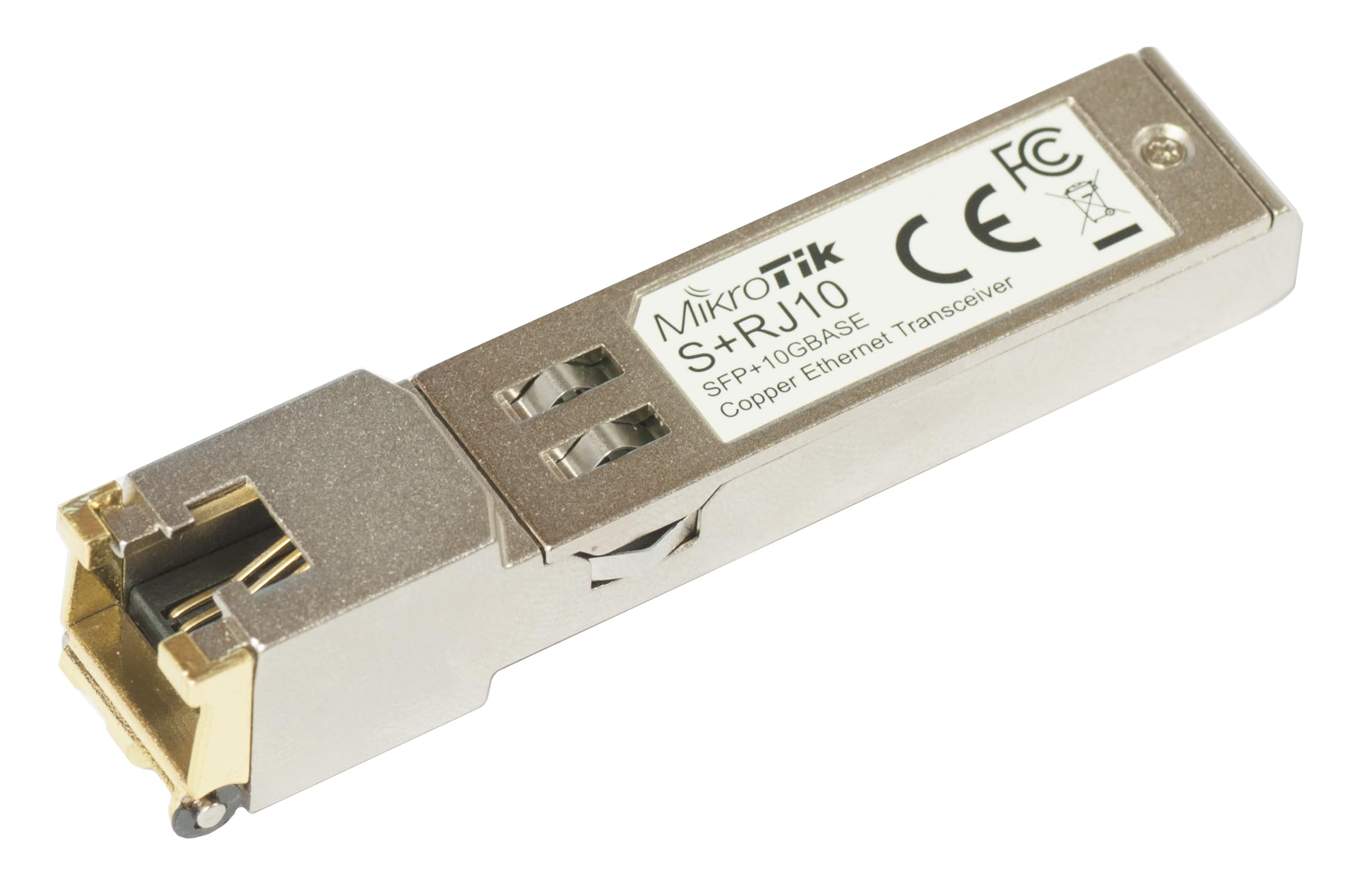
The one module that solves tricky 2.5G WAN lockups that others cannot handle.
This module open up 10 Gbps speeds over regular twisted-pair cables on any device with an SFP+ port, even on older networks. It supports an unusually wide range of data rates — 10 Mbps, 100 Mbps, 1 Gbps, 2.5 Gbps, 5 Gbps, and 10 Gbps — so it handles everything from legacy gear to the latest fiber ONTs. The maximum cable reach is up to 200 meters, versus the 30-meter limit of most competitors. Owners mention it is the only module that solved 2.5GbE lockup issues with cable modems on a UniFi UDM Pro after a firmware update, maintaining a stable link where others failed.
The trade-off is heat. Customers note it runs very hot, measuring between 95-105°C under load, which requires adequate spacing or active cooling in the switch. It is also the priciest pick here. However, for troublesome mixed-speed WAN links and long in-wall Cat5e runs, it delivers reliability that cheaper modules simply cannot match. Compared to the Wiitek 10Gb module, which weighs 0.704 ounces, the MikroTik is noticeably heavier and feels more sturdy.
Why it stands out
- Supports every speed from 10 Mbps to 10 Gbps, including 2.5G and 5G
- Cable distance up to 200 meters, far beyond the usual 30m limit
- Resolves compatibility issues with UniFi gear after major updates
What to watch for
- Runs extremely hot (95-105°C reported); needs active cooling in passive devices
- Premium price compared to budget alternatives
Reach for this if: you need a module that reliably links at 2.5Gbps with a cable modem or ONT, often the only one that works where others fail.
Look elsewhere if: your switch is passively cooled with no ventilation — the heat output requires airflow or a fan.
2. TP-Link Omada SM5310-T

The reliable all-rounder that works across TP-Link, Ubiquiti, and Fortinet without drama.
TP-Link’s SM5310-T uses a durable metal casing to handle heat better than many plastic-bodied modules, and it transmits data up to 30 meters at 10Gbps over Cat6a cable, or up to 100 meters at 2.5G/1G speeds over Cat5e. It operates at 3.3 Volts and is hot-pluggable, meaning you can slot it in or pull it out without powering down your network. One reviewer noted it was the third module they tried for a Ubiquiti UDR7 — the only one that actually worked without issues.
The metal casing keeps it running cooler than many alternatives. Reviewers point out it is “barely warm” in a QNAP switch, unlike the “almost too hot to touch” reports on other modules. One catch: on a Fortinet S648 switch, the SFP+ port’s default auto-speed setting caused frequent 15-second drops, but changing the setting to a fixed 10G mode solved it completely.
The durable build
- Metal casing dissipates heat better and feels sturdier than plastic alternatives
- Longer reach at lower speeds — 100m on Cat5e at 2.5G
- Plays well with multiple brands: Ubiquiti, Fortinet, QNAP, TP-Link Omada
The known quirk
- Needs a fixed-speed setting on Fortinet switches to avoid packet drops
- Gets hot to the touch, though less so than many rivals
Best for mixed-brand racks: if you are connecting a TP-Link switch to a Ubiquiti router or a Fortinet firewall, this module is the most likely to work from the start.
Not ideal for strict Cisco-only environments: if you need absolute Cisco-certified compatibility, stick to a first-party Cisco module.
3. QSFPTEK 10G SFP+ RJ45 Module

A pro-grade module tailor-made for Ubiquiti UniFi switches, with a strong warranty backing.
QSFPTEK claims power consumption of 2.5W, which is on the efficient side for a 10GBASE-T copper module. It supports 10G, 5G, and 2.5G multi-rate auto-negotiation and connects via Cat6a or Cat7 cable up to 30 meters. It is specifically tune for Ubiquiti UF-RJ45-10G and Netgear AXM765 switches, but also lists compatibility with Cisco SFP-10G-T-S, MikroTik S+RJ10, TP-Link TL-SM5310-T, Supermicro, and others. It operates at 3.6 Volts and measures 3.94 x 1.77 x 0.71 inches at 1.41 ounces.
One buyer running a stable 10 Gbps uplink for six months noted the module runs at 127°F, which is very hot but stable. Another reviewer mentioned a slight learning curve with the Ubiquiti Dream Machine Special Edition: the port was not recognized unless the system was fully rebooted after installing the module. The three-year warranty and lifetime technical support give confidence that budget brands often lack.
Pro-grade build
- Low 2.5W power draw for a copper 10G module
- Solid 3-year warranty plus lifetime tech support
- Consistently positive reviews in Ubiquiti UniFi setups
Heat and install quirks
- Runs very hot (127°F reported); may need a small fan or heatsink
- Initial recognition on Ubiquiti gear may require a full system reboot
Grab this if: your network is built around UniFi switches or routers and you want a module with actual after-sales support.
skip it if: you have a passively cooled switch with no fan in an enclosed space — the heat requires some ventilation.
4. 10Gb SFP+ to RJ45 Modules (Wiitek Technology)

The featherweight module that draws under 2 watts and fits into the smallest network spaces.
At just 0.704 ounces and measuring 2.75 x 1 x 0.75 inches, the Wiitek is the lightest module here — weighing 0.704 ounces compared to the ipolex module at 3.2 ounces. It features a built-in Marvell chip and claims less than 2.0W power consumption at 30 meters. It supports multi-rate speeds of 1.25G, 2.5G, 5G, and 10G and is compatible with Cisco SFP-10G-T-X, Ubiquiti, Netgear AXM766, and MikroTik S+RJ10. One buyer running a CAT6A line from their fiber ONT to a UniFi UDM Pro said it was a “great price for CAT6A from fiber ONT to Unifi UDM Pro” and that it delivered symmetrical 998/999 Mbps speeds.
The main limitation is at 2.5GBASE-T speeds in a mixed 10G network. One buyer mentioned that when the switch sees the module as 10G but the modem only links at 2.5G, packet loss occurs and performance drops under 1Gbps. Adding egress limits on a MikroTik CRS305 helped reach 1.4Gbps.
Lightweight efficiency
- Weighs just 0.704 oz, easy to fit in tight switch enclosures
- Sub-2.0W power draw at 30m, one of the lowest in its class
- Proven compatibility with UniFi UDM Pro and MikroTik CRS305
Mixed-speed caution
- Problematic at 2.5GBASE-T in mixed 10G networks — can cause packet loss
- Runs hot enough to need good ventilation (62°C reported)
Reach for this if: your network runs at a consistent 10G speed and you want a lightweight, low-power module that fits any switch.
Think twice if: your WAN modem or device operates at 2.5G while the rest of your network is 10G — the mixed-speed negotiation can be unreliable.
5. ipolex SFP+ to RJ45 10Gb Module
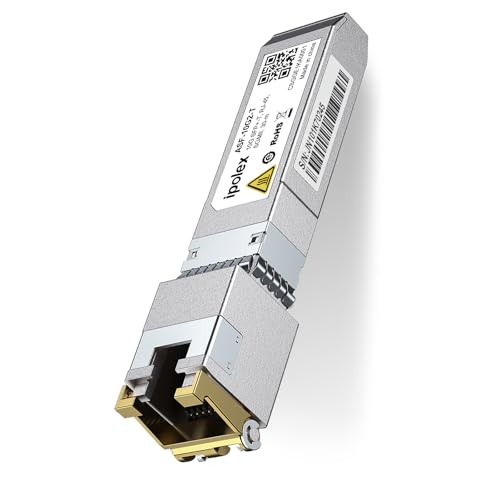
A well-tested module with broad compatibility, except for one specific Netgate model.
The ipolex module supports 1.25G, 2.5G, 5G, and 10G auto-negotiation and delivers up to 30 meters over Cat6a or Cat7 cable. It draws less than 2.5W and is compliant with IEEE 802.3an, IEEE 802.3az, SFF-8431, and SFF-8432 standards. At 3.2 ounces and 6.69 x 2.17 x 0.59 inches, it is physically larger than many rivals — a package measuring 6.69 inches in length, compared to the Wiitek module at 2.75 inches. It is compatible with Cisco 2960, UniFi US-16-XG, USW-PRO24-POE, UniFi UDM SE, MikroTik CRS305, Netgear, D-Link, Qnap, TP-Link ER707-M2, Supermicro, and Broadcom gear.
Shoppers say it works well with Unifi USG Pro and USW Aggregation switches, successfully negotiating 2.5G with a modem and reporting 10G to UniFi. The big warning: it is NOT compatible with the Netgate XG-7100. One owner reported it “caused overheating and instability,” so if you run a Netgate firewall, skip this one. The module runs hot-to-the-touch — one user was concerned about long-term reliability — but no actual failures were reported during their two-week test.
Strong compatibility list
- Works with Cisco 2960, UniFi US-16-XG, MikroTik CRS305, and many more
- Low power draw under 2.5W
- Successfully negotiates 2.5G with modems while reporting 10G to switch
Devices to avoid
- Incompatible with Netgate XG-7100 — causes overheating and instability
- Runs hot-to-the-touch; potential long-term heat concern
- Larger physical size than competitors (6.69 inches long)
Solid pick if: you need a module that works across UniFi, MikroTik, Qnap, and TP-Link gear — the compatibility list is among the broadest here.
Do not buy if: you own a Netgate XG-7100 or any passively cooled firewall appliance where heat buildup is a concern.
6. 1.25/2.5/5/10G-T SFP+ to RJ45 Transceiver (QINIYEK)

The entry-level module that reliably pushes 10 Gig for over a year — if you manage the heat.
This QINIYEK module weighs 1.44 ounces and measures 3.94 x 1.77 x 0.71 inches. It supports multi-rate speeds of 10G, 5G, 2.5G, and 1.25G and reaches up to 30 meters using Cat6a or Cat7 cable. It is compatible with Cisco SFP-10G-T-S (excluding Nexus and Meraki series), Ubiquiti UF-RJ45-10G, Netgear AXM765, D-Link DEM-440XT, Supermicro, MikroTik, Fortinet, and other open 10G switches.
The biggest risk is early failure. One reviewer had a module fail after exactly 9 months in a climate-controlled residential interior — “lasted as long as a full-term pregnancy,” they wrote. However, the seller reached out after the review and offered strong support, which the buyer appreciated. Another buyer reported that after adding router fans for thermal control, their four switches and transceivers work great, with one pulling 2.3GB up/down consistently on a 2GB fiber line. The three-year warranty and lifetime technical support help offset the durability concern.
Budget-friendly value
- Reliable 10G performance for over a year in some setups
- Good warranty: 30-day returns, 3-year warranty, lifetime support
- Works with Ubiquiti, MikroTik, Fortinet, and Trendnet switches
Durability gamble
- Some units fail around the 9-month mark; heat management is critical
- Runs warm even in climate-controlled environments
- Not compatible with Cisco Nexus or Meraki series
Go for it if: your switch has active cooling and you want a low-cost entry into 10G copper networking with solid warranty support.
Avoid it if: your switch is in a hot or unventilated closet and you need a module you can set and forget for years.
7. 10GBASE-T SFP+ to RJ45 Transceiver (XZSNET)

A cheap 10G copper module that works great — until it suddenly does not.
This XZSNET module weighs 0.1 pounds and is built with an aluminum casing. It supports 1G, 2.5G, 5G, and 10G auto-negotiation over Cat6a or Cat7 cable up to 30 meters. It is compatible with Cisco SFP-10G-T-S, Ubiquiti UniFi UF-RJ45-10G, Meraki MA-SFP-10GB-T, MikroTik S+RJ10, Netgear AXM765, Supermicro, Broadcom, and TP-Link/D-Link switches — but it explicitly states it is NOT compatible with HP/HPE switches. One customer observed it worked perfectly over existing Cat5e cable at 10G with no heat issues, eliminating the need for a costly cable upgrade.
The durability record is mixed. While some setups run fine for months, one reviewer saw three out of five modules die within four months — the LEDs stayed green but speeds dropped to zero, and unplugging did not fix them. Another reported a single unit failed at just three days, though the seller provided generous support and a replacement. For a lowest-cost option, the failure rate is higher than pricier modules, so factor in the risk of needing replacements.
Lowest-cost entry
- Worked over existing Cat5e at 10G in some setups, saving cable upgrade cost
- Aluminum build may help with heat dissipation vs all-plastic modules
- Seller provides responsive support and replacements for early failures
Reliability gamble
- Some units die within days or months — not for mission-critical links
- Not compatible with HP/HPE switches at all
- One buyer had 3 out of 5 modules fail within 4 months
Fine for a lab or test bench: where a sudden failure is an inconvenience, not a crisis, and you want the lowest possible upfront cost.
Do not rely on it for production: if this module connects your core router or a WAN link, spend more on a proven option like the MikroTik or TP-Link SM5310-T.
Understanding the Specs
Multi-Rate Auto-Negotiation
A 10G SFP module that supports “multi-rate” can automatically match the speed of whatever device it connects to — 1G, 2.5G, 5G, or 10G — without you changing settings. This matters most when your modem or ONT runs at 2.5G while your switch sees 10G. Some cheaper modules handle this poorly and cause dropped packets. Look for explicit support for 2.5G and 5G in the specs.
Power Consumption and Heat
Copper 10GBASE-T modules generate significantly more heat than fiber SFP+ modules because they convert electrical signals over copper, not light pulses. Lower power draw (under 2.5W) is better, but any copper 10G module running under continuous load will get hot enough to be uncomfortable to touch. A module that draws 2.0W or less, like the Wiitek, is a safer bet for passively cooled switches.
FAQ
Will a 10G SFP+ module work in a 1G SFP slot?
How hot is too hot for a 10GBASE-T module?
Can I use a 10G SFP module to connect my cable modem to a UniFi router?
Do I need Cat6a cable for a 10G SFP+ module?
Why does my 10G SFP+ module get so hot?
Can I use a 10G SFP+ module with a Cat5e cable at 10G?
Will a third-party 10G SFP module work in a Cisco switch?
What does hot-swappable mean for SFP+ modules?
How long do 10G copper SFP+ modules typically last?
Can I use a 10G SFP module to connect two switches over a long distance?
Final Thoughts: The Verdict
For most people, the best 10g sfp module winner is the MikroTik S+RJ10 because it is the only module that reliably handles tricky 2.5G WAN links and supports cable distances up to 200 meters, making it the most versatile option for mixed-speed networks. If you want a cooler-running, more affordable module for a UniFi-centered network, grab the TP-Link Omada SM5310-T with its durable metal casing. And for the absolute lowest entry cost into 10G copper networking — with good warranty support — the QINIYEK 1.25/2.5/5/10G-T SFP+ fits the bill as long as you keep it cool.
How We Picked
We do not accept paid placement. Every pick is matched to a real buyer and a real use-case; we do not hands-on test units.
Sources & Methodology
Specifications: manufacturer listings and product documentation. Review insights: verified customer reviews, as of July 2026. Pricing: not shown on this page (it changes often); check the current price via the retailer link.
As an Amazon Associate, Gadgets Feed earns from qualifying purchases. This does not affect which products we feature.