
Our readers keep the lights on and my morning glass full of iced black tea. As an Amazon Associate, I earn from qualifying purchases.
Specs are compiled from manufacturer listings and verified buyer reviews and can change over time — please confirm the key details on the product page before buying.
If your workflow involves large video files, NAS transfers, or multi-gig networking, the bottleneck is often the tiny port on your laptop. A good adapter open up the full speed of your local network, but picking the wrong one can mean dropped connections or a device that runs too hot to trust. This guide focuses on the three best adapters that work with Thunderbolt 3/4/5 and USB4 ports, pairing real-world throughput numbers with honest trade-offs.
I’m Min — the founder and writer behind Gadgets Feed. This guide is built by comparing the manufacturers’ published specifications and the patterns across verified customer reviews, so you get each pick’s real strengths and trade-offs instead of marketing spin.
Whether you are editing 8K footage from a NAS or managing a server rack, the right 10gb ethernet to thunderbolt adapter changes your whole workflow by delivering wired speeds that local storage used to reserve for desktops.
Quick Picks
- StarTech 10GbE USB4 Ethernet Adapter — Top Performer
- OWC Thunderbolt 4 10G Ethernet Adapter — Desktop Anchor
- SABRENT Thunderbolt / USB4 — Budget Champion
How To Choose The Best 10Gb Ethernet To Thunderbolt Adapter
Not all 10GbE adapters are created equal, and the main difference you will face is compatibility. A standard USB-C port will not work here—you need a Thunderbolt 3/4/5 or USB4 port that supports PCIe tunneling. Once you confirm your port, focus on three things: real-world speed, thermal design, and driver support for your operating system.
Port Compatibility Is Non-Negotiable
Every adapter on this list requires a Thunderbolt or USB4 port. Regular USB 3.2 or USB-C ports do not have the PCIe lanes needed to hit 10 Gbps. Check your laptop or desktop specs before you buy; if you see only a standard USB-C port, these adapters simply will not connect.
Heat Management Defines Reliability
A 10GbE adapter pulls enough power to generate noticeable heat. The best designs use an aluminum heatsink housing that acts as a passive cooler. A plastic enclosure may look sleeker but can lead to throttling under sustained load, which drops your transfer speeds and can cause disconnects.
Driver Support Varies by OS
macOS tends to be plug-and-play with these adapters, while Windows 11 often requires a manual driver download (usually the Marvell AQC113 chipset driver). Linux users may need to install open-source drivers. If you switch between operating systems, check the adapter’s support list for your specific version.
Quick Comparison
| Model | Best For | Weight | Dimensions | Real‑World Speed | Amazon |
|---|---|---|---|---|---|
| StarTech 10GbE USB4 | Portability & Mac Performance | 186 g | 4.3″ x 3″ x 1.1″ | ~900 MB/s | Amazon |
| OWC Thunderbolt 4 10G | Heavy Desktop Use | 453 g | 5″ x 3.1″ x 1.5″ | ~900 MB/s | Amazon |
| SABRENT NT-P10G | Budget‑Minded Pros | 4.59 oz | 3.44″ x 2.52″ x 0.94″ | ~1080 MB/s | Amazon |
In‑Depth Reviews
1. StarTech 10GbE USB4 Ethernet Adapter
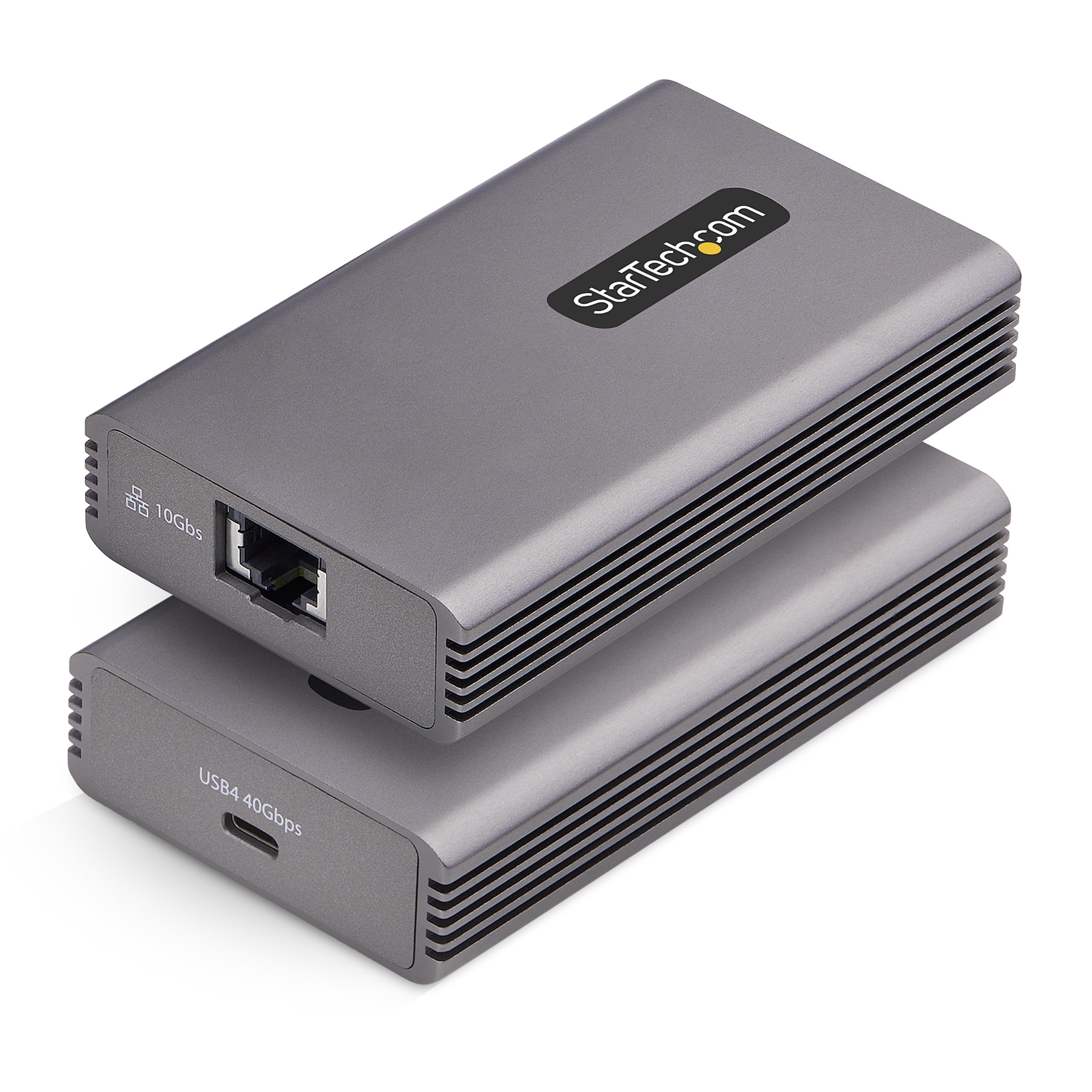
A compact, travel-friendly 10GbE adapter that delivers full-speed transfers without a fan.
If you want a 10GbE link that fits in a laptop bag and keeps working under load, the StarTech is your pick. It weighs just 186 grams, compared to the OWC’s 453 grams — and its all-aluminum housing doubles as a passive heatsink, so there is no fan noise to distract you during video edits. Buyers report a flawless 10GbE connection to a NAS at roughly 900 MB/s transfers, which is exactly the kind of real-world speed that makes large file moves feel instant. The detachable 19.6-inch USB4 cable also gives you flexibility on a cluttered desk.
On macOS, it is completely plug-and-play; on Windows 11, you will need to download the driver manually first. One reviewer noted that it failed on three Windows 11 machines before working on a Linux system, so if you are a Windows-only user, check that your BIOS and chipset support the Aquantia AQC113 controller. The adapter also runs hot — reviewers confirm the metal chassis gets very warm — but that is normal passive cooling doing its job, not a defect.
It is TAA compliant, which matters for IT deployments in government or corporate environments that require that certification. If you bounce between macOS and Linux editing bays, this is the smoothest path to reliable 10 Gbps.
Why it wins
- Lightest at 186 g, ideal for travel.
- ~900 MB/s real-world transfers to NAS.
- Detachable USB4 cable for flexible desk setup.
The friction points
- Not plug-and-play on Windows 11; driver needed.
- Aluminum body gets very hot under sustained load.
- One buyer mentioned failed connection on three Windows 11 machines.
Reach for this if: you edit on a MacBook or Linux workstation and need a portable, fan-free adapter with proven NAS performance.
Look elsewhere if: your workflow is strictly Windows 11 and you want zero driver setup — the OWC offers a simpler driver experience for PC.
2. OWC Thunderbolt 4 10G Ethernet Adapter
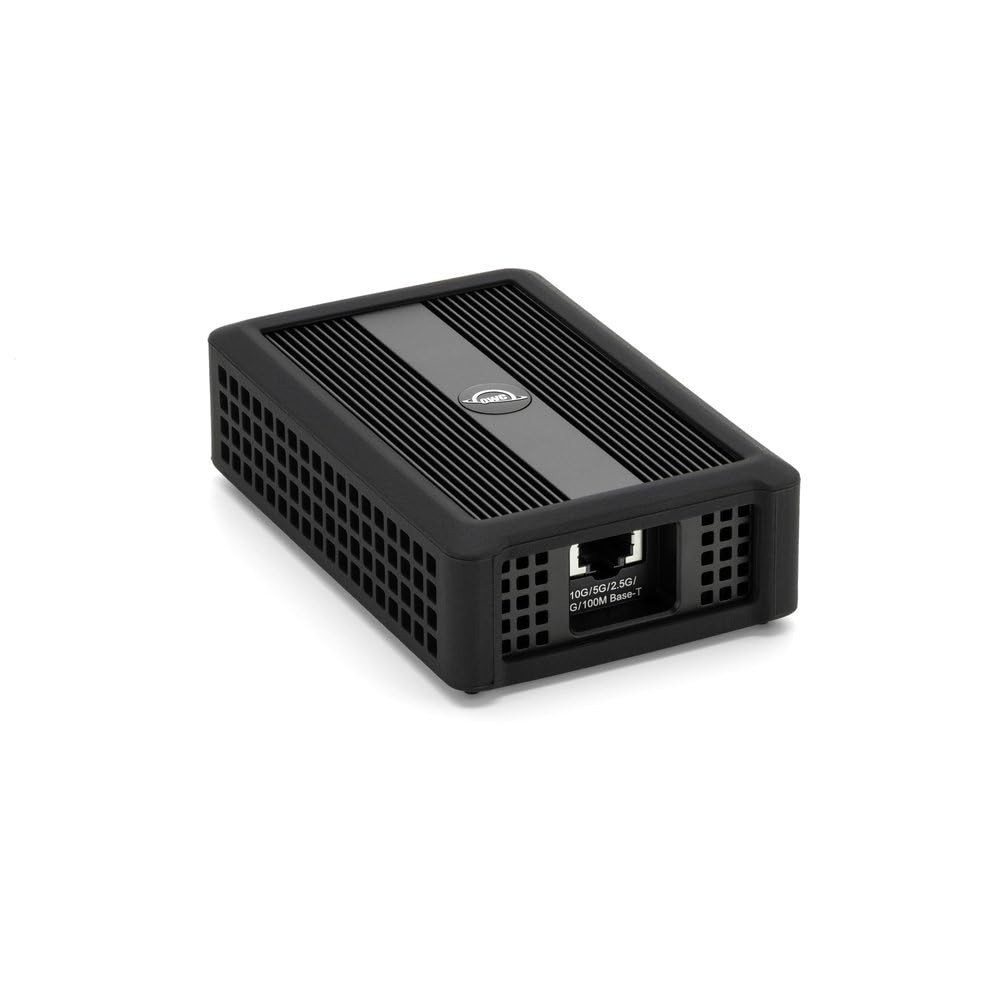
A heavier, sturdier option built for sustained gigabit workflows without overheating.
The OWC adapter takes a different approach from the slim StarTech: it is larger and heavier at 453 grams (5 x 3.1 x 1.5 inches), while the Sabrent is 3.44 x 2.52 x 0.94 inches, which gives it more thermal mass for passive cooling. Buyers confirm it runs cool and does not overheat, even during long file transfers. One owner reported achieving a ~900 MB/s download speed, which is strong evidence the adapter can saturate a multi-gig fiber line. It supports Wake-on-LAN and AVB, the latter being critical for pro audio setups where data stream synchronization matters.
Setup is straightforward on both Mac and Windows, though one customer observed needing a driver download from OWC’s site, which was region-locked and required a workaround. The adapter worked well with a 7-gig fiber connection plugged into a MacBook Pro, and another user called it “user-friendly” and said everything worked as expected. That said, the same buyer returned the unit after it failed a few days later — a reminder that any electronic can have a dud, and the 1-year warranty covers that scenario.
If you leave your adapter plugged into a desk dock or a permanent workstation and want something that stays cool under heavy NAS loads, this is the sensible choice. It just is not the one you will throw into a backpack every day.
Solid performer for the desk: The OWC runs cooler than the Sabrent and delivers real ~900 MB/s download speeds, but its size and region-locked driver download are real friction points for mobile users.
Keep it on your desk if: you need a stable 10GbE link for a workstation and prioritize thermal longevity over portability.
Skip it for travel if: you switch desks often — the 453 g body and large footprint make the StarTech a better road companion.
3. SABRENT Thunderbolt / USB4 to 10 Gigabit Ethernet Adapter
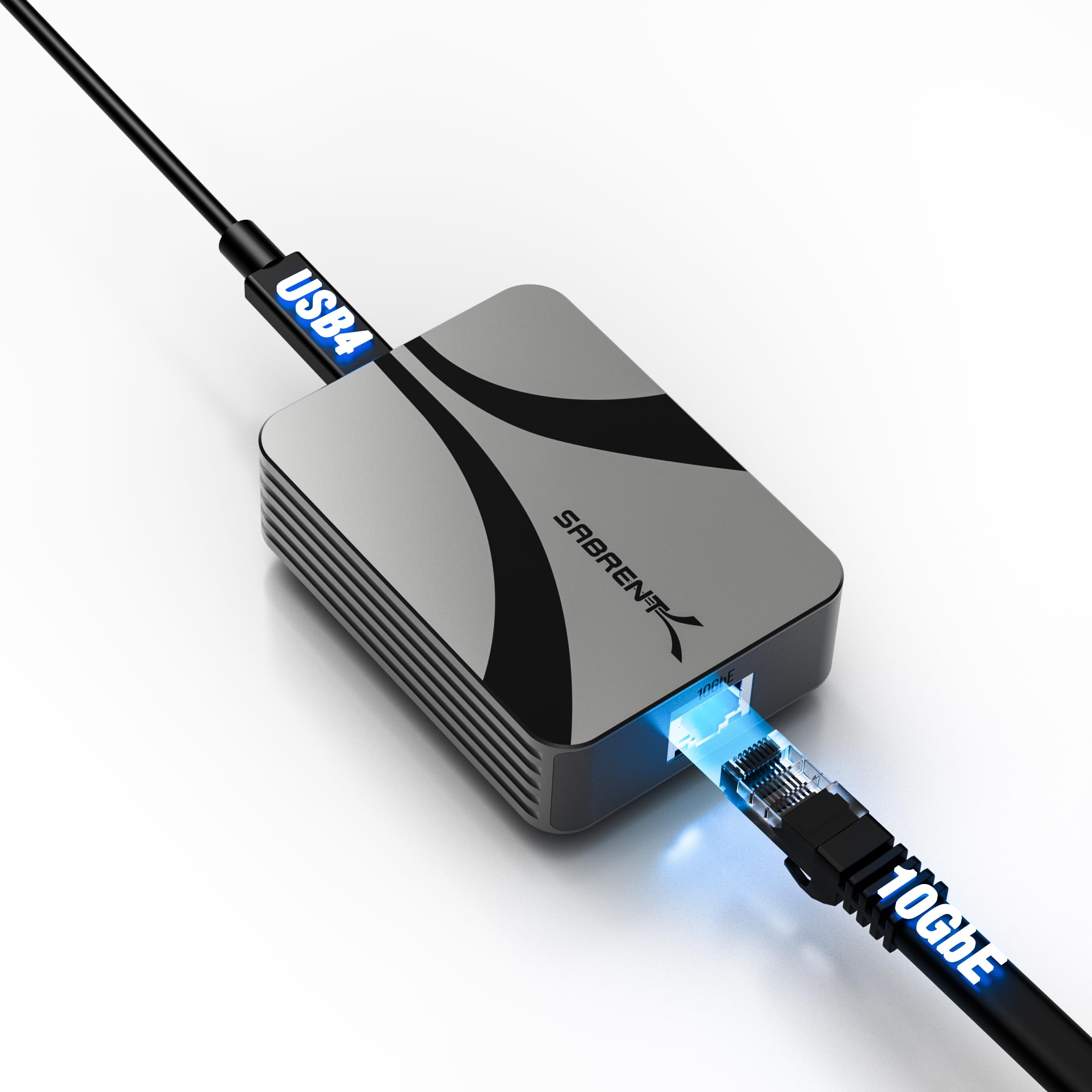
The smallest and lightest 10GbE adapter that hits ~1080 MB/s, but heat is the catch.
The Sabrent NT-P10G is the entry-level price leader in this category, yet it delivers some of the highest real-world transfer numbers. Owners mention achieving roughly 1080 MB/s transfers with no reboot issues, which beats the StarTech’s ~900 MB/s and edges past many pricier adapters. It uses the same Marvell AQC113 chipset found in the StarTech, so the raw throughput potential is similar, but the smaller body (3.44 x 2.52 x 0.94 inches) means there is less aluminum mass to soak up heat. One user highlighted that under sustained heavy load, the unit glitched and throttled, becoming stable only with an external fan — a serious limitation if you plan long multi-hour transfers.
On macOS, it is plug-and-play; Windows 11 and Linux may need the free Marvell driver from Sabrent’s site. The space gray aluminum body looks sleek next to a MacBook, and features like Wake-on-LAN and PXE boot make it viable for IT environments. However, the thermal issue is real: another buyer returned the unit specifically due to extreme heat. If you are running short bursts of big file moves (say, offloading a day’s footage), you will likely never hit the thermal wall.
Compared to the OWC above, the Sabrent is lighter and cheaper, but the OWC runs cooler and stays reliable for longer sessions. If your budget is tight and your workloads are bursty, this is the most value you can get per dollar.
Where it shines
- ~1080 MB/s real-world transfers in testing.
- Smallest footprint at 3.44″ x 2.52″.
- Plug-and-play on macOS; WOL and PXE support.
Where it struggles
- Gets very hot under sustained 10G load; may throttle.
- One shopper added return due to thermal instability.
- Not plug-and-play on Windows 11 without driver download.
Best for bursty workloads: short, high-speed transfers of large files on a Mac are where this adapter wins on price and speed.
Skip it for all-day use: if you transfer data for hours straight, the OWC or StarTech’s better thermal mass is worth the extra cost.
Understanding the Specs
Real-World Throughput vs Theoretical Speed
Every adapter on this list supports a theoretical data transfer rate of 10 Gigabits Per Second. But real-world conditions — cable quality (you need CAT6a or better), switch/router capability, and your computer’s PCIe lane speed — typically drop that to 800-1000 MB/s. Look at MB/s numbers in reviews; they tell you what you will actually get when copying a file to your NAS.
Thermal Design (Heatsink vs Fan)
10GbE adapters generate heat because of the power draw needed to push data at those speeds. A passive heatsink (the aluminum body) is silent and has no moving parts to fail, but it needs enough surface area to dissipate heat. A plastic body with a tiny heatsink inside may throttle under sustained load, dropping your transfer speed. The StarTech and OWC use generous aluminum housings; the Sabrent’s smaller mass means it gets hotter faster.
Wake-on-LAN and PXE Boot
Wake-on-LAN lets you turn on a computer remotely over the network, which is useful for IT admins or accessing a home server while traveling. PXE boot allows a computer to start up from a network image rather than its local drive — essential for enterprise environments that manage many machines. Both features are included on the Sabrent and OWC, while the StarTech also includes WOL.
Driver Requirements by OS
macOS (Big Sur and later) generally recognizes these adapters automatically using built-in drivers. Windows 11 often requires a manual download of the Marvell AQC113 or Aquantia driver from the manufacturer’s site — the StarTech and Sabrent both need this step. Linux (Ubuntu 20.04+) may work with open-source drivers but sometimes needs a separate installation. Always check the support page for your exact OS version before buying.
FAQ
Will a 10GbE Thunderbolt adapter work on a standard USB-C port?
Do I need a special cable to get 10 Gbps speeds?
Why does the adapter get so hot during use?
Can I use one of these adapters with a gaming console?
What is the difference between Thunderbolt 3, 4, and 5 compatibility?
How long does a 10GbE adapter typically last?
Is there any latency difference between a 10GbE adapter and a direct Thunderbolt connection?
Can I daisy-chain a 10GbE adapter through a Thunderbolt dock?
Final Thoughts: The Verdict
Across the board, the 10gb ethernet to thunderbolt adapter winner is the StarTech 10GbE USB4 because it combines a lightweight 186g body with verified ~900 MB/s real-world transfers and passive cooling that stays reliable under load. If you want the coolest-running unit for a permanent desk setup, grab the OWC Thunderbolt 4 10G. And for the best price-to-speed ratio on a tight budget, the SABRENT NT-P10G delivers the highest burst speeds (~1080 MB/s) if you can manage the heat.
How We Picked
We do not accept paid placement. Every pick is matched to a real buyer and a real use-case; we do not hands-on test units.
Sources & Methodology
Specifications: manufacturer listings and product documentation. Review insights: verified customer reviews, as of July 2026. Pricing: not shown on this page (it changes often); check the current price via the retailer link.
As an Amazon Associate, Gadgets Feed earns from qualifying purchases. This does not affect which products we feature.