
Our readers keep the lights on and my morning glass full of iced black tea. As an Amazon Associate, I earn from qualifying purchases.
Specs are compiled from manufacturer listings and verified buyer reviews and can change over time — please confirm the key details on the product page before buying.
You have a NAS full of 4K footage, a server that needs to talk to your workstation, or a home-lab that is starting to feel like a bottleneck. Every second you wait for a file transfer is time you are not spending on the actual work. The solution is a 10Gb LAN adapter — a single PCIe card or USB-C dongle that turns your ordinary desktop or laptop into a machine that moves data at 10 Gbps versus the typical 1 Gbps built-in Ethernet port. This guide breaks down the eight best adapters on the market, why one chipset is worth hunting for, and the one compatibility trap that catches most buyers.
I’m Min — the founder and writer behind Gadgets Feed. This guide is built by comparing the manufacturers’ published specifications and the patterns across verified customer reviews, so you get each pick’s real strengths and trade-offs instead of marketing spin.
After digging through thousands of owner experiences, we have landed on the eight best adapters that actually deliver on the promise — the definitive 10gb lan adapter lineup for anyone upgrading from gigabit.
Our Picks at a Glance

How To Choose The Best 10Gb LAN Adapter
Buying a 10Gb Ethernet card is not like buying a USB hub — there are real hardware incompatibilities that can leave you with a card that simply will not work in your machine. Here is what matters most.
PCIe Lane & Slot Fit
A 10Gb card needs a PCIe slot with enough lanes. Cards with the older Intel X540 chipset use PCIe 2.0 and need a full x8 slot (physical or electrical) to sustain 10 Gbps in both directions. Cards based on the newer Marvell AQC113 can run on a single PCIe 4.0 x1 lane and still hit full speed — which makes them far easier to install in a crowded motherboard. Always check your motherboard’s manual for available slot types before buying.
Copper (RJ45) vs Fiber (SFP+)
Most home users pick 10GBASE-T copper adapters because they can use standard CAT6a or CAT7 Ethernet cables you already have. SFP+ adapters use optical modules or direct-attach copper cables, which tend to run cooler and use less power, but you need a switch that also supports SFP+. For a straightforward home or office upgrade, stick with 10GBASE-T RJ45.
Driver & OS Support
The single biggest source of buyer frustration is driver compatibility. Cards with genuine Intel chipsets (X540, X550, 82599) have mature drivers for Windows, Linux, and VMware, but they often require a manual download. Marvell AQC113-based cards are almost always plug-and-play on Windows 11 and newer Linux kernels. If you run a specific OS like Proxmox or TrueNAS, check the buyer reviews for that exact use case first.
Single Port vs Dual Port
A single-port card is enough to connect your PC to a 10Gb switch. Dual-port cards let you bond two connections for redundancy or connect two different networks — useful for virtualization hosts and high-availability servers. For most home users, a single Marvell AQC113 card is the smarter, less expensive choice.
Quick Comparison
| Model | Best For | Ports | Chipset | Interface | Amazon |
|---|---|---|---|---|---|
| YuanLey AQC113-X1★ Best Overall | Best Overall | 1 x RJ45 | Marvell AQC113 | PCIe 4.0 x1 | Amazon |
| LinksTek X540T2Dual-Port Value | Dual-Port Value | 2 x RJ45 | Intel X540 | PCIe 2.0 x8 | Amazon |
| NICGIGA X540-T2Reliable Dual-Port | Dual-Port Reliability | 2 x RJ45 | Intel X540 | PCIe x8 | Amazon |
| TP-Link TX401 | Known Brand | 1 x RJ45 | Marvell AQC107 | PCIe x4 | Amazon |
| VIMIN X540-T2 | Dual-Port for Linux | 2 x RJ45 | Intel X540 | PCIe 2.0 x8 | Amazon |
| 10Gtek X520-DA1 (2-Pack) | Fiber / SFP+ Lab | 1 x SFP+ (each) | Intel 82599EN | PCIe x8 | Amazon |
| ASUS XG-C100C | Desktop Upgrade | 1 x RJ45 | Marvell AQC107 | PCIe x4 | Amazon |
| Sabrent NT-P10G | Laptop / Thunderbolt | 1 x RJ45 | Marvell AQC113 | Thunderbolt 4 / USB4 | Amazon |
In‑Depth Reviews
1. YuanLey 10G AQC113-X1
Our pick — over 4.5★ from 550+ verified ratings; the strongest balance of quality and price.
The single-port marvel that slides into a cramped motherboard and just works.
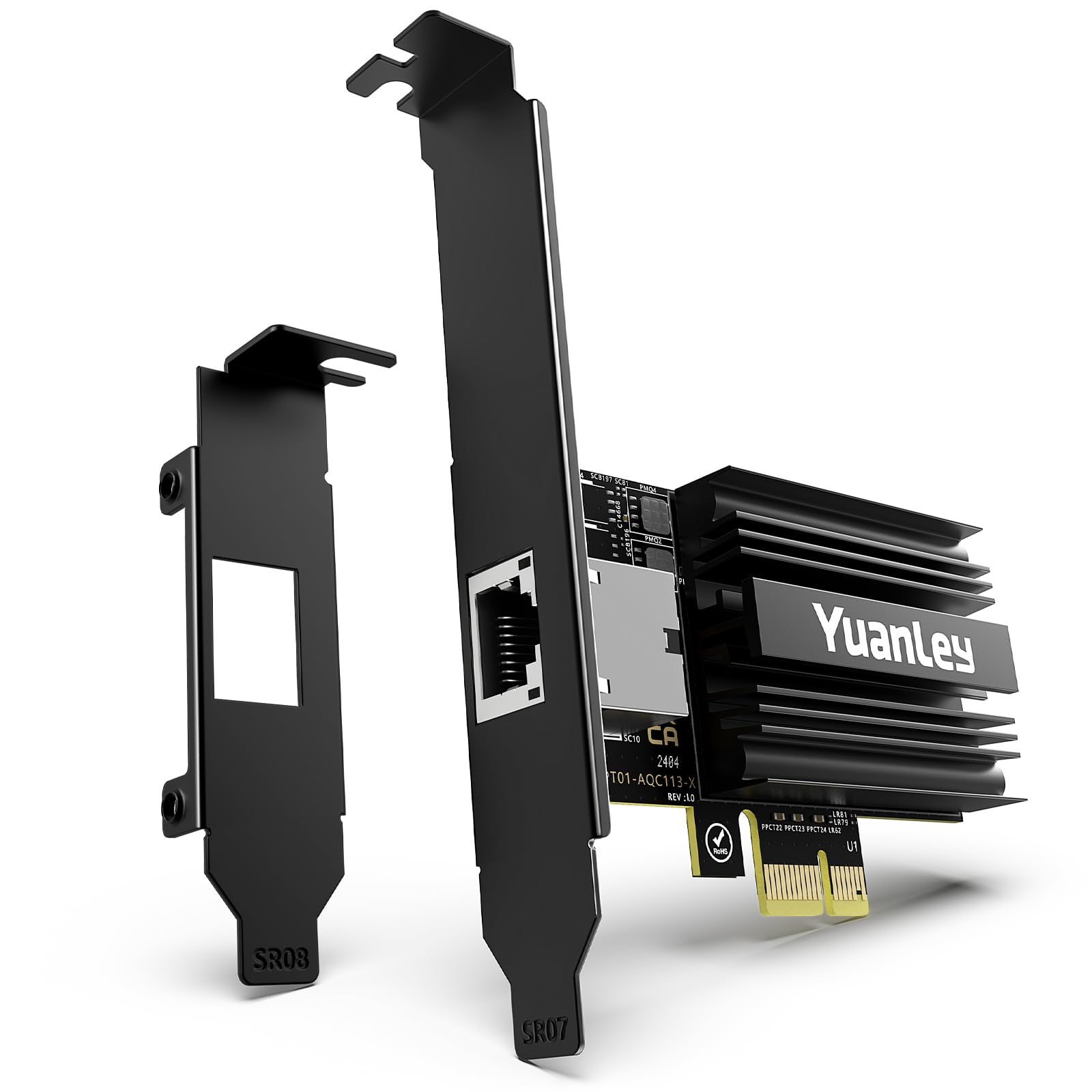
This is the crowd favorite — nearly a thousand owners have given it a 4.6-star average, and the praise is centered on one thing: it works from the start. The Marvell AQC113 chipset and PCIe 4.0 x1 interface mean it is plug-and-play on Windows 11 and Linux with zero driver hunting. Buyers report that Windows instantly identifies the card, and on Debian GNU/Linux it is also fully recognized with no tinkering. It is also remarkably tiny, at only 0.15 kg — the lightest card here by a wide margin.
The big trade-off versus a dual-port card like the NICGIGA X540-T2 is that you get only one port. For a single workstation or NAS client, that is all you need. But if you are running a virtualization host, the dual-port models give you more flexibility. The YuanLey also avoids the EEPROM firmware issues that have tripped up some Intel X540-based cards. As the review pages sum it up: “popped right in and Windows Server 2025 recognized it immediately.”
What wins people over is the sheer ease of installation. Functionality is the most-discussed draw, and the top positive note is how simple the card is to get running. A minority of owners caution that on a PCIe Gen 3 x1 slot, the card may lack bandwidth for full 10Gb — so pair it with a Gen 4 slot for best results.
What makes it the top pick
- Genuine Marvell AQC113 chipset — native Windows 11 / Linux support, no driver fumbling
- PCIe 4.0 x1 slot compatibility fits nearly any motherboard, even crowded ones
- Includes both full-height and low-profile brackets for ATX and SFF builds
The honest trade-offs
- Single RJ45 port limits it to one connection — not for dual-network setups
- On older PCIe Gen 3 x1 slots, bandwidth may cap below full 10 Gbps
Best suited for: Anyone upgrading a single desktop or workstation to 10Gb who values instant plug-and-play over dual-port flexibility.
Look elsewhere if: You need two independent 10Gb connections for server bonding or a virtualization host.
2. LinksTek X540T2
Two 10Gb ports for the price of one, but with a serious software caveat.
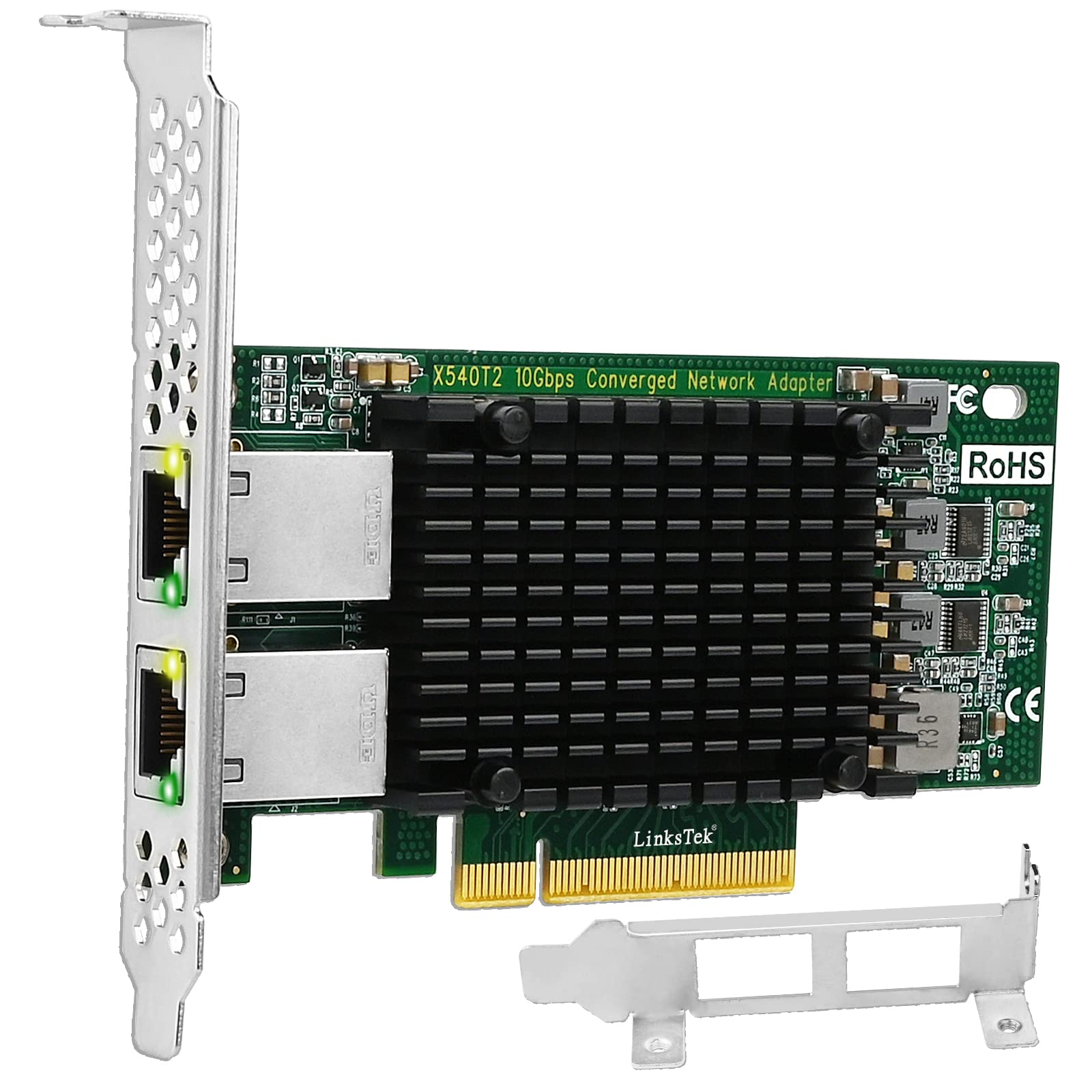
The LinksTek X540T2 gives you two independent 10GBASE-T RJ45 ports on a PCIe 2.1 x8 interface, which is a lot of connectivity for the price. It is based on the Intel X540-AT2 controller, a well-known chipset with broad driver support for Windows Server, Linux, and VMware. Several owners mention that it works flawlessly on Windows Server 2019 and Synology NAS units without any extra setup. At just 156 grams, it is also lighter than the NICGIGA X540-T2.
The catch here is genuine. Multiple owners have reported the card being detected as an Intel X540-AT2 with the ixgbe driver failing on Proxmox and Linux due to an “EEPROM Checksum Is Not Valid” error. This appears to be a firmware issue on some units. While others have had a great experience, this is a card that demands a knowledgeable user willing to troubleshoot. It also does not support 2.5GbE or 5GbE modes — only 10Gb and 1Gb, so it will drop to 1 Gbps if your switch is multi-gig.
The thing everyone raves about is the value. Getting two genuine 10Gb ports at this price is rare. The low-profile bracket is included, and its compatibility with data-center features like SR-IOV and DDIO is a bonus for advanced setups.
Who it fits: IT pros and home-lab owners who need dual ports for a server or virtualization host and are comfortable with manual driver installation.
The known risk: An occasional unit arrives with corrupted EEPROM firmware, requiring a return — make sure you buy from a seller with a good return policy.
3. NICGIGA X540-T2
A steady dual-port performer that runs hot but delivers the promised 10Gb.
Building on the same Intel X540 chipset as the LinksTek, the NICGIGA X540-T2 is a dual-port card that enjoys a far wider owner consensus — 700+ buyers have rated it 4.3 stars. The overwhelming sentiment is that it works as advertised, with many owners noting that Windows 11 recognized the card immediately with no driver installation. It is heavier than the YuanLey at 0.25 kg, but it also has a larger heatsink to manage the heat generated by the X540 chipset.
On the other hand, this card runs very warm during sustained transfers, especially during something like a large Veeam backup. Customers note it gets “very warm” but continues to work without issues. Unlike the YuanLey, which uses a modern low-power chipset, the NICGIGA draws more power and pumps more heat into your case — something you should factor in if your PC case has poor airflow. It also does not support 2.5GbE or 5GbE speeds, only 10Gb and 1Gb.
The praise from owners consistently points to its plug-and-play nature and stable dual-port performance. Some buyers have used it for direct NAS connections and report no issues. It is a solid, no-frills dual-port card for a homelab or office server.
Why it works
- Dual 10GBASE-T RJ45 ports give you two independent high-speed connections
- Includes both standard and low-profile brackets for desktop and server chassis
- Strong owner consensus — thousands of ratings with a 4.3-star average
The heat factor
- Runs noticeably hot under sustained load; needs good case airflow
- No support for 2.5Gb/5Gb multi-gig modes — drops to 1Gb only
Reach for this if: You need dual 10Gb ports in a standard desktop or server and want the most owner-verified, reliable Intel X540 card available.
Think twice if: Your PC case has limited airflow, or you need a modern multi-gig card that supports 2.5Gb and 5Gb as well.
4. TP-Link TX401

A name you trust, with a 10Gb card that includes a CAT6a cable — but reliability is a roll of the dice.
TP-Link is a household name in networking, and the TX401 is their ticket to the 10Gb party. It uses the Marvell AQC107 chipset, which is a generation older than the AQC113 found in the YuanLey, but still supports the same 10/5/2.5/1 Gbps speeds over a single RJ45 port. TP-Link sweetens the deal by including a 1.5-meter CAT6a cable in the box, saving you a trip to the store. Build quality is the single most praised aspect, with 47 owners calling it out positively.
The honest reality, however, is a mixed one. Functionality is the most-discussed aspect with a MIXED verdict from Amazon, and reliability has a NEGATIVE verdict — the highest count. Some IT pros report it works great on Windows and Linux with easy driver installation. Others report that the card shut off minutes after installing it on Windows 11, even with a 1050W power supply. A common fix cited by owners is disabling “power efficient networking” in the device manager to fix gaming disconnects.
This card is a gamble. If you get a good unit, it performs well. But the failure rate is higher than the other Marvell-based options here. For the same money, the YuanLey AQC113-based card offers a more modern chipset and significantly better owner satisfaction.
Go with it if: You are a TP-Link loyalist, have an easy return policy, and want the included CAT6a cable for a quick setup.
Be prepared for: A non-trivial chance of driver or hardware issues on Windows 11 — have a backup plan.
5. VIMIN X540-T2

Another Intel X540 dual-port card, but this one has the best Linux acceptance in the category.
The VIMIN X540-T2 is essentially the same Intel X540-based dual-port card as the NICGIGA and LinksTek models, but with a few key differences that make it stand out for certain users. It uses the same PCIe 2.0 x8 interface and weighs the same 0.25 kg. what separates it is the owner consensus: it works very well with Proxmox, BSD, and Linux systems, where the genuine Intel X540 chip and its native support for SR-IOV are fully leveraged. One owner reported 5400 Mbps performance on a Dell R710 running VMware 6.0.
The trade-off? Driver compatibility on Windows 11 is a mixed bag. Some reviewers point out needing to manually download the Intel driver before the card works. The card also has a known limitation: it does not support 2.5Gb or 5Gb speeds, so it drops to 1 Gbps if your network equipment is not 10Gb native. A knowledgeable owner noted that the MAC address is a locally-administered one (not a pre-assigned public MAC), which is a non-issue for most but a detail for IT folks.
Functionality is the top positive aspect, with 41 owners praising how well it works in Proxmox and VMware environments. Installation is also highly rated. This is the card to reach for if your primary OS is Linux, BSD, or a hypervisor.
Best for server OS
- Native support for Proxmox, BSD, and Linux with SR-IOV and clean passthrough
- Good heatsink design keeps it stable under heavy load
- Includes both standard and slim brackets for flexible installation
The Windows note
- Windows 11 driver compatibility is mixed — manual download often required
- No 2.5Gb/5Gb support; drops to 1 Gbps on multi-gig switches
Reach for this if: You are running a Linux-based server, Proxmox, or VMware host and need a reliable dual-port 10Gb card.
Look elsewhere if: You are a pure Windows 11 desktop user who wants driverless installation.
6. 10Gtek X520-DA1 (2-Pack)

Two enterprise-grade SFP+ adapters for the price of one consumer card — if you are ready for fiber.
The 10Gtek X520-DA1 is a completely different beast. Instead of a copper RJ45 port, it uses a single SFP+ cage that accepts SFP+ modules, DAC cables, or fiber optics. This makes it the choice for users who run fiber-optic networking in their home lab or small office. It is based on the Intel 82599EN controller, a chipset famous for its stability and low power draw in data-center environments. Reliability is the most-praised aspect, with 110 owners calling it out as rock-solid. Speed is the second most-discussed positive.
There is a significant catch for Windows 11 users. The card is not natively supported — you must manually install older Intel x510 series drivers. Owners who use Linux (Pop OS 22.04) or TrueNAS Scale report it is plug-and-play. The card uses a PCIe x8 interface, which requires a PCIe x8 or x16 slot. It also does not support 1G/2.5G/5G — only 10Gb.
The value is undeniable for the right buyer. You get two genuine Intel 82599EN-based cards in the box, complete with low-profile brackets. Owners use them for Synology NAS-to-PC connections, reporting a jump from 113 MB/s to around 300 MB/s (limited by their hard drives, not the card). If you are building an SFP+ network, this is the most cost-effective way to get multiple machines connected.
Reach for this if: You already have or plan to build an SFP+ network with fiber or DAC cables and want enterprise-grade reliability.
Think twice if: You need a simple copper RJ45 connection, are on Windows 11, or do not have a free PCIe x8 slot.
7. ASUS XG-C100C
A well-known brand with built-in QoS, but reliability reports are the most common topic — and they are mixed.
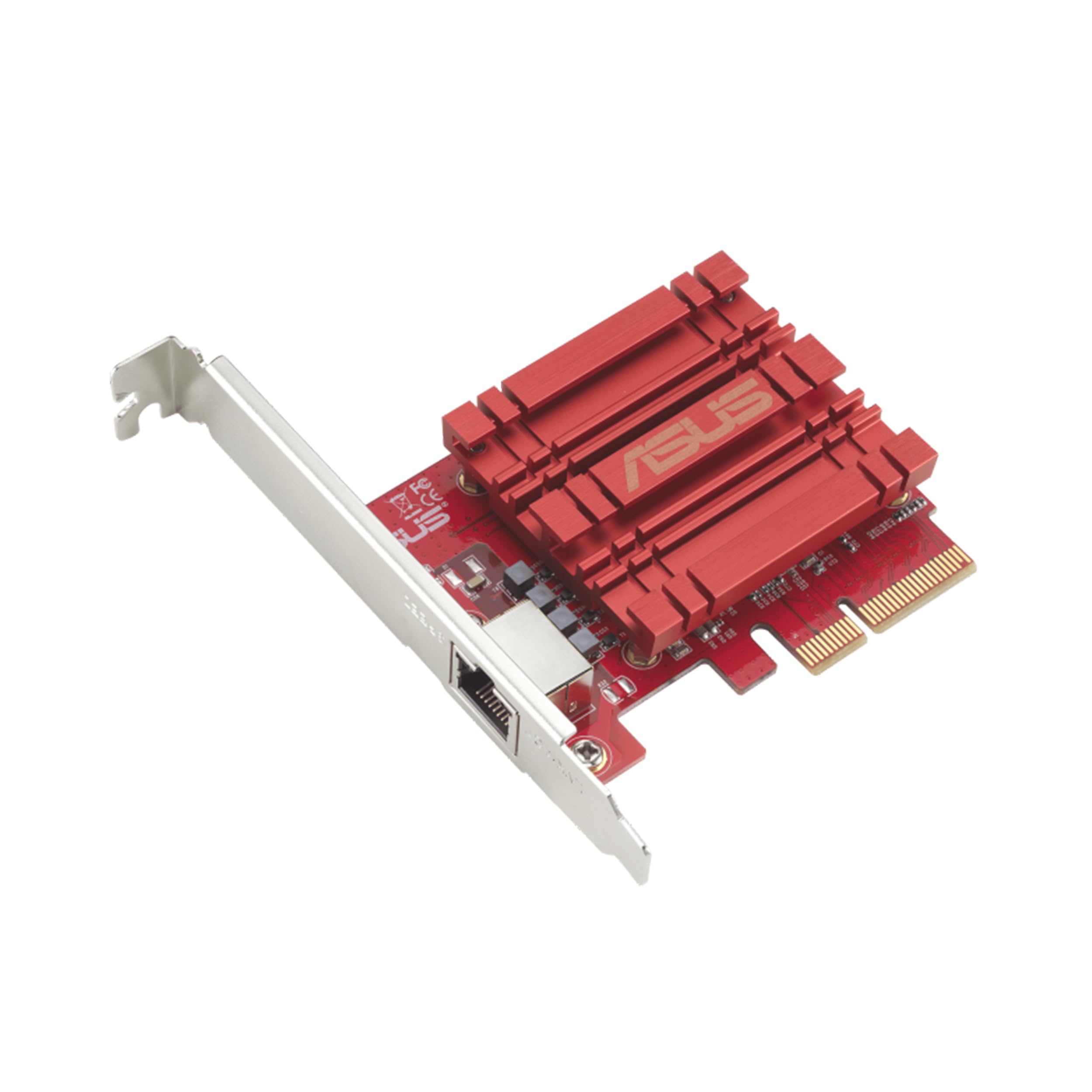
The ASUS XG-C100C is among the most recognizable names in this space, thanks to ASUS’s strong reputation in gaming and networking hardware. It is a single-port 10GBASE-T card using the Marvell AQC107 chipset with a PCIe x4 interface. It supports full backward compatibility with 5Gb, 2.5Gb, 1Gb, and 100Mbps, so it plays nicely with any existing router or switch. The card also features built-in Quality of Service (QoS) to prioritize gaming traffic — a feature unique to this card in the roundup.
Speed is the top positive aspect, with 45 owners praising its ability to open up multi-gig internet speeds. One owner reported steady 1.4 Gbps internet speeds after installation. Quality is the second most-discussed positive. However, the most-discussed aspect overall is reliability, with a MIXED verdict from Amazon. Some shoppers say the card works flawlessly on Windows and unRAID for months, while others report random disconnections and failed iPerf3 tests that were only resolved by swapping to an Intel X550-based card. A common recommendation from owners is to disable power saving features in Windows to stabilize the connection.
This is a solid card for a Windows workstation if you are willing to tweak power settings. The built-in QoS is a genuine bonus for gamers who want to ensure their traffic is prioritized. But the reliability variance makes it a harder sell than the YuanLey or the Intel-based options.
What stands out
- Built-in QoS for gaming — unique feature not found on other cards here
- Backward compatible with 5Gb/2.5Gb/1Gb for easy integration
- Windows plug-and-play for many owners
The reliability concern
- Reliability is the most-discussed aspect, and the verdict is mixed — some units disconnect
- No Wake-on-LAN header, making remote wake-up impossible
Pick it if: You are a gamer who wants QoS prioritization and is comfortable adjusting power settings in Windows.
skip it if: You cannot afford any network drops, or you need a rock-solid card for a production server.
8. Sabrent NT-P10G

The only way to get 10Gb on a modern laptop — as long as you have a Thunderbolt 4 or USB4 port.
The Sabrent NT-P10G is the only external 10Gb adapter in this roundup, designed for laptops and small-form-factor PCs that lack a PCIe slot. It connects via a USB4 or Thunderbolt 4/5 Type-C port and adds a single 10GBASE-T RJ45 port. The Marvell AQC113 chipset ensures full plug-and-play driver support on macOS and most Thunderbolt 4 systems. Buyers report it is driver-free on a MacBook Pro M4 Pro and achieves full 10 Gbps in iPerf tests. Speed is the top positive aspect, with the build quality of the aluminum heatsink housing also getting consistent praise.
The critical catch is all in the name: Thunderbolt & USB4. This adapter will not work on standard USB-C or USB 3.2/3.1/3.0 ports at all. Confirming your laptop has a Thunderbolt 4 or USB4 port is mandatory before ordering. Furthermore, the card runs very hot. The aluminum housing acts as a heatsink, and under sustained 10Gb transfers, it gets “very hot.” Some owners mention thermal throttling and stalling during large file copies, requiring active cooling. The heat level was the most-discussed negative aspect, with 23 owners noting it gets worryingly warm.
There is also a driver gap for newer ARM64-based Windows computers. The adapter is unrecognized on Snapdragon-powered PCs. For Intel-based Windows and Mac users, it is a fast and mobile solution, but it demands attention to ventilation and port type.
Perfect if: You have a Thunderbolt 4 laptop and need a portable 10Gb solution for a Mac or Intel Windows machine — and you keep it in a ventilated spot.
Not for you if: You have a standard USB-C laptop, an ARM64 Windows PC, or plan to do large sustained file transfers without airflow.
Understanding the Specs
PCIe Generation & Lane Count
A 10Gb card needs enough bandwidth on the PCIe bus. A PCIe 3.0 x1 lane provides about 1 GB/s of bandwidth. A PCIe 2.0 x8 slot, used by Intel X540 cards, provides 4 GB/s — plenty for full-duplex 10Gb. A PCIe 4.0 x1 slot, used by Marvell AQC113 cards, provides 2 GB/s, enough for full-duplex 10Gb. Always check your motherboard’s PCIe generation and lane configuration.
SFP+ vs 10GBASE-T (RJ45)
10GBASE-T is the copper standard that uses standard RJ45 connectors and CAT6a/CAT7 cables you probably already have. It is the easiest to set up in a home environment. SFP+ uses a small pluggable module that can handle fiber optics or direct-attach copper (DAC) cables. SFP+ generally runs cooler and uses less power, but you need matching SFP+ modules and a switch with SFP+ ports. For most home users, 10GBASE-T is the simpler choice.
FAQ
Will a 10Gb LAN adapter work in any PCIe slot?
Do I need special cables for 10Gb Ethernet?
Will a 10Gb adapter work with my existing router or switch?
Does a 10Gb card need drivers on Windows 11?
What is the difference between a single-port and dual-port card?
Can I use a 10Gb adapter in a PCIe x4 slot?
Will a 10Gb card work on Linux without drivers?
Do 10Gb adapters run hot?
What is the difference between a 10Gb “LAN” adapter and a “server” adapter?
Can I use a 10Gb Thunderbolt adapter on a regular USB-C port?
Final Thoughts: The Verdict
For most people, the 10gb lan adapter winner is the YuanLey AQC113-X1 because it is the only card in the roundup that combines a modern Marvell chipset, easy plug-and-play on both Windows and Linux, and the narrowest PCIe footprint for easy installation. If you need two 10Gb ports for a server or virtualization host, grab the NICGIGA X540-T2. And for an SFP+ fiber network that demands enterprise-grade reliability, the 10Gtek X520-DA1 2-pack is the one to reach for.
How We Picked
We do not accept paid placement. Every pick is matched to a real buyer and a real use-case; we do not hands-on test units.
Sources & Methodology
Specifications: manufacturer listings and product documentation. Review insights: verified customer reviews, as of July 2026. Pricing: not shown on this page (it changes often); check the current price via the retailer link.
As an Amazon Associate, Gadgets Feed earns from qualifying purchases. This does not affect which products we feature.