
Upgrading a home lab or small office network to 10 Gigabit Ethernet is supposed to unlock blistering file transfers to your NAS and eliminate latency bottlenecks for your workstation. But the wrong switch can introduce heat, noise, and configuration headaches that turn a speed upgrade into a frustrating project. Choosing the right hardware for your specific environment and skill level is critical.
I’m Min — the co-founder and writer behind Gadgets Feed. I’ve spent hundreds of hours analyzing the technical specifications, real-world performance benchmarks, and user experiences across dozens of multi-gigabit and 10Gb switch models to separate the capable performers from the problematic units.
This guide breaks down the top-tier managed and unmanaged options so you can confidently choose the best 10gb network switch for your home lab, media production workflow, or growing small business network.
How To Choose The Best 10Gb Network Switch
Selecting a 10Gb switch involves more than just counting ports. You must balance your specific use case—home lab experimentation, high-speed NAS access, or a managed office network—against the switch’s management capabilities, thermal design, and port flexibility. A switch that works perfectly in a climate-controlled server room may fail in a hot attic or a quiet home office.
Managed vs. Unmanaged: Control vs. Simplicity
An unmanaged 10Gb switch is truly plug-and-play, ideal for users who simply need to connect a few 10Gb devices like a NAS and a workstation without any configuration. A managed switch, on the other hand, offers VLAN segmentation, link aggregation (LACP), QoS, and advanced security features like 802.1X authentication. For a home lab or small business where network segmentation is critical, a managed switch is the right choice despite the steeper learning curve.
Thermal Management and Noise Levels
10Gb switch chips generate significant heat. Fanless models rely on passive cooling through a metal chassis, making them completely silent but often requiring adequate airflow in the deployment location. Switches with small, high-speed fans can be deployed in warmer environments but introduce noise that is disruptive in a home office. Always check if a switch uses an internal PSU or an external power brick, as this affects both heat dissipation and rack-mounting convenience.
Port Configuration and Auto-Negotiation
Not all 10Gb switches handle multi-Gig speeds (2.5Gb/5Gb) gracefully. Some managed switches lock SFP+ ports into a single speed setting, which can cause compatibility issues when mixing 1Gb and 10Gb devices. Ensure the switch supports auto-negotiation across the full range of speeds you intend to use. A switch with dedicated RJ45 10GBase-T ports is often simpler for copper cabling, while SFP+ cages offer flexibility with fiber, DAC, or transceiver modules.
Quick Comparison
On smaller screens, swipe sideways to see the full table.
| Model | Category | Best For | Key Spec | Amazon |
|---|---|---|---|---|
| MokerLink 8-Port 10G Managed (B0FSCKJMVG) | Managed L3 | High-performance core network | 160 Gbps switching capacity | Amazon |
| TP-Link Omada SG3452X | Managed L2+ | Cloud-managed enterprise networks | 48 x Gigabit + 4 x 10G SFP+ | Amazon |
| YuanLey 5-Port 10G PoE Switch | Unmanaged PoE | 10Gb PoE for APs and cameras | 65W PoE budget, 110W total | Amazon |
| MikroTik CRS304-4XG-IN | Managed L2 | Compact, fanless 10Gb core | 40 Gbps switching capacity | Amazon |
| MokerLink 8-Port 10G Managed (B0CWP6NK4N) | Managed L3 | Rackmount home lab SOHO | 8 x 10G RJ45 ports | Amazon |
| Davuaz 8-Port 10G Unmanaged | Unmanaged | Simple plug-and-play 10Gb links | 160 Gbps switching capacity | Amazon |
| MokerLink 4×2.5G / 2x10G Managed | Managed | Budget-friendly 10Gb upgrade path | 60 Gbps switching capacity | Amazon |
In‑Depth Reviews
1. MokerLink 8 Port 10G Managed Switch (4x10G RJ45 + 4x10G SFP+)
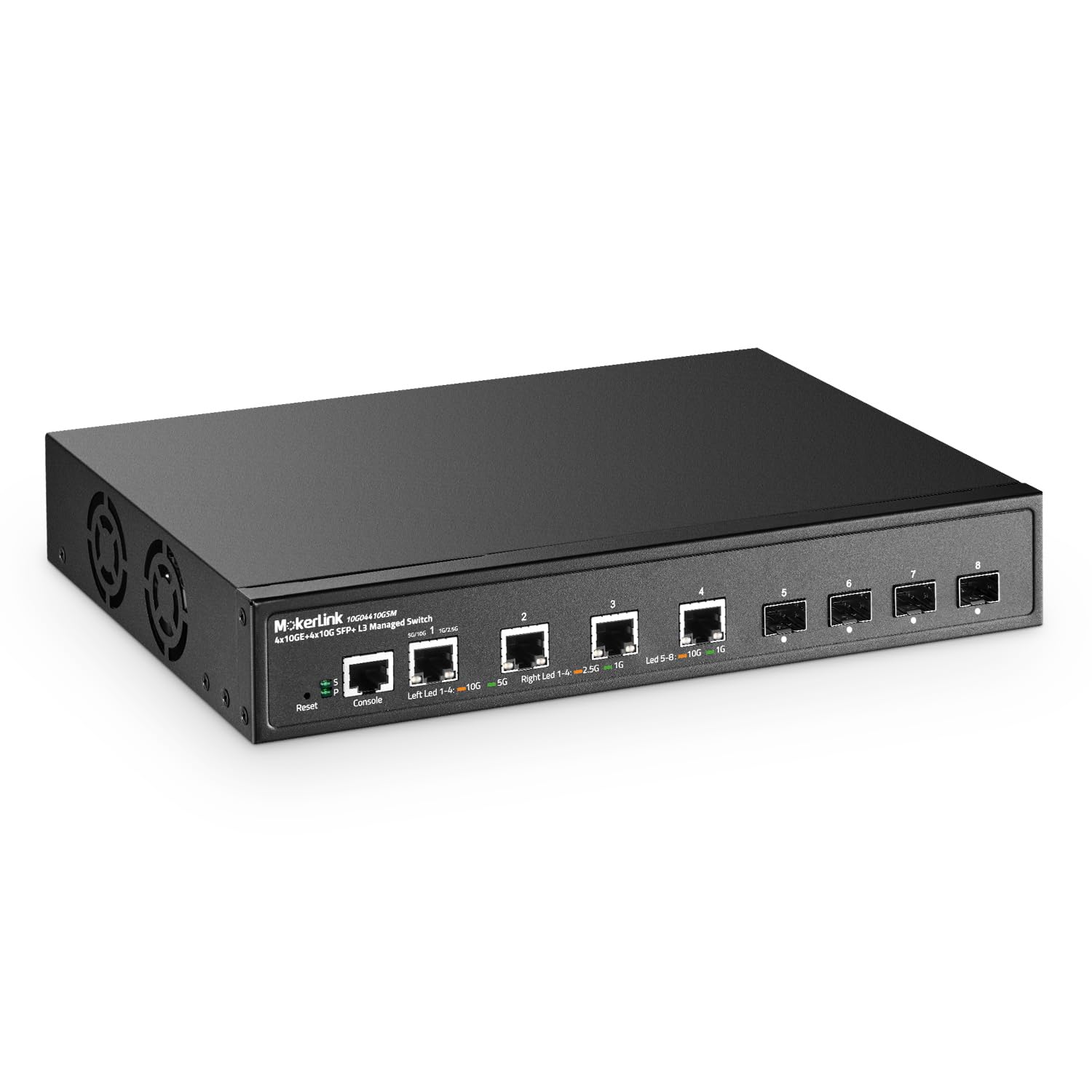
This MokerLink switch delivers the ideal mix of port variety and management depth for a high-performance home lab or small business core. With four 10GBase-T RJ45 ports and four dedicated SFP+ cages, it bridges existing copper cabling with fiber uplinks without needing media converters. The 160 Gbps switching capacity ensures non-blocking line-rate forwarding across all eight ports.
The L3 management suite includes VLAN, ACL, QoS, and static routing, plus security features like DHCP Snooping and dynamic ARP inspection. Users report excellent iperf3 throughput hitting 9.86 Gbps and reliable compatibility with generic SFP+ modules. The single point of contention is the fan noise, which some describe as a varying-pitch whine unsuitable for a dead-quiet office.
For users who need advanced network segmentation and high-speed bridging between copper and fiber, this switch offers a rich feature set at a competitive price point. The learning curve is mild for anyone familiar with web-managed switches, but the fan noise is a real consideration for noise-sensitive environments.
Why it’s great
- Combines 4x RJ45 10GbE and 4x SFP+ for maximum connectivity flexibility.
- Full L3 Layer 3 management including static routing and robust security protocols.
- Non-blocking 160 Gbps backplane handles 10G line-rate on all ports simultaneously.
Good to know
- Fan noise can be distracting in a quiet room due to a varying-pitch whine.
- Included instruction sheet may reference a different product model.
2. TP-Link Omada SG3452X

The TP-Link Omada SG3452X is a different beast entirely from the port-count-focused switches above. It provides 48 Gigabit RJ45 ports alongside four 10Gb SFP+ uplink slots, purpose-built for environments requiring high-density client connectivity with a fast core uplink. This is a managed L2+ switch, supporting static routing, VLANs, and IGMP snooping.
Its standout feature is full integration with the Omada Software Defined Networking (SDN) platform. This allows centralized cloud management of switches, access points, and gateways from a single interface. The switch is fanless and quiet, making it a strong candidate for office deployments where noise matters. Users note the web GUI and CLI have a Cisco-like feel, and the Omada mobile app simplifies initial adoption.
This switch is ideal for businesses already invested in the Omada ecosystem or those planning a centrally managed network. It is not a pure 10Gb switch for connecting multiple 10Gb devices, but rather a high-density Gigabit edge switch with fast uplinks. The VLAN configuration process can be complex, and the boot time is noted as slow.
Why it’s great
- Omada SDN integration provides centralized cloud management for multi-site networks.
- Fanless design makes it completely silent for open-plan office environments.
- Four 10G SFP+ uplinks prevent bottlenecking the 48 Gigabit ports.
Good to know
- Primarily a Gigabit switch with 10Gb uplinks, not a full 10Gb multi-port switch.
- VLAN and PVID configuration requires careful attention in the management interface.
3. YuanLey 5-Port 10G PoE Switch

The YuanLey 5-Port 10G PoE switch fills a very specific niche: it delivers 10Gb speeds to powered devices like Wi-Fi 6/7 access points and high-resolution IP cameras without needing a separate PoE injector. It offers four 10GBase-T PoE ports and one 10Gb uplink port, with a total switching capacity of 160 Gbps. The PoE budget is 65W, with a maximum of 30W per port.
As an unmanaged switch, it is truly plug-and-play. Users report it reliably powers cameras and APs on long cable runs, delivering full 2.5Gb and 5Gb speeds without packet loss. The metal chassis includes 4kV lightning protection and a 24dB cooling fan, which is quieter than an industrial fan but still audible. It can be rack-mounted or wall-mounted.
The trade-off is the lack of any management features—no VLAN, no QoS. If you need to segregate network traffic or perform link aggregation, this switch is not for you. It is a purpose-built tool for extending 10Gb connectivity to PoE-powered devices where simplicity is paramount.
Why it’s great
- Provides 10Gb PoE power to high-bandwidth APs and cameras without injectors.
- Plug-and-play unmanaged operation with zero configuration required.
- Rack-mountable and wall-mountable form factor with solid metal construction.
Good to know
- No VLAN, QoS, or any Layer 2 management features available.
- The built-in fan, while relatively quiet, is not completely silent like fanless models.
4. MikroTik CRS304-4XG-IN
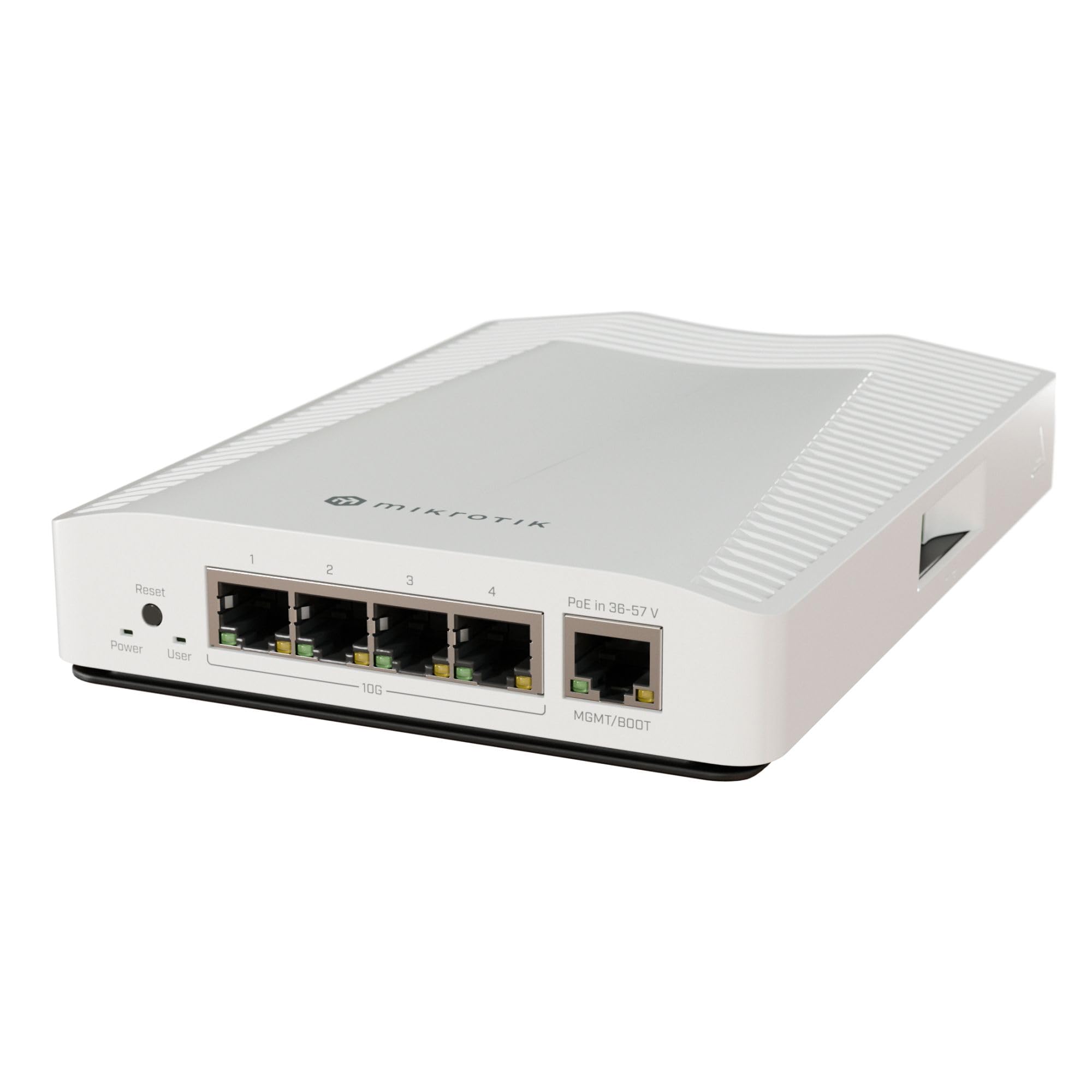
The MikroTik CRS304-4XG-IN is a compact, fanless, four-port 10GBase-T managed switch powered by a dual-core ARM CPU and RouterOS. Its form factor is remarkably small for a 10Gb switch, making it ideal for deskside deployment or integration into a compact home lab. The switching capacity is 40 Gbps, which is sufficient for four non-blocking 10Gb ports.
Users consistently praise its silent operation—no coil whine, no fan noise—and its solid metal build that uses the chassis as a heatsink. RouterOS provides extensive L2 management including VLANs, spanning tree, and link aggregation, though its GUI is less intuitive than competitors. Many users report using two units as a dedicated 10Gb storage network bridge over existing Cat5E cabling.
The key caveats are the learning curve for RouterOS and a design choice where the PoE input for powering the switch is on a dedicated 1Gb management port, not a 10Gb port. This is a minor annoyance for some. For users who need a quiet, powerful, and compact managed 10Gb switch for a small number of devices, this is an excellent choice.
Why it’s great
- Completely silent fanless operation with no coil whine or moving parts.
- Very compact form factor perfect for tight spaces or deskside use.
- RouterOS provides deep L2 management capabilities with VLANs and STP.
Good to know
- RouterOS has a steep learning curve and a less intuitive GUI than other vendors.
- The PoE input for powering the switch is on a 1Gb port, not a 10Gb port.
5. MokerLink 8 Port 10G Managed Ethernet Switch (8x10G RJ45)
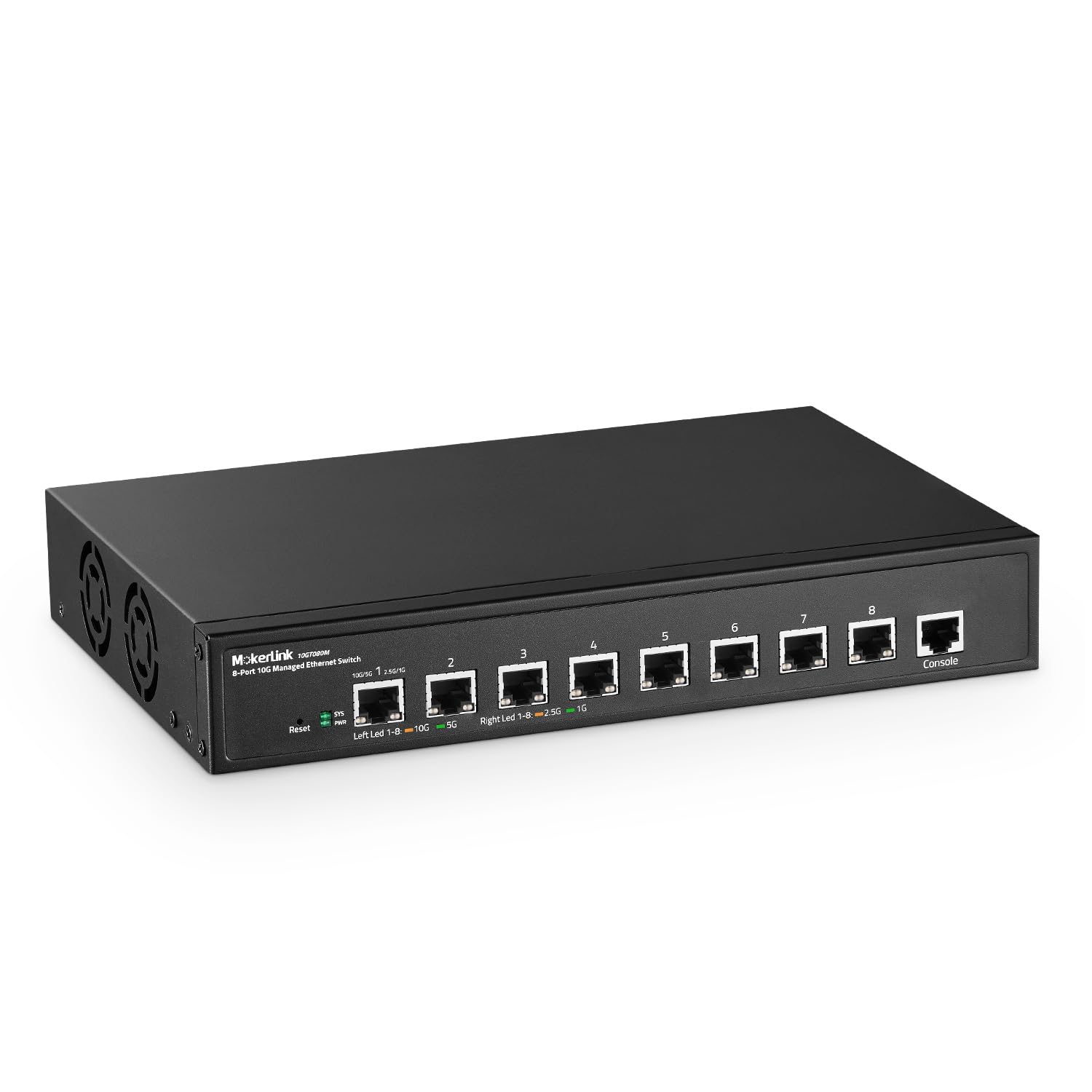
This MokerLink switch is a high-density 10GBase-T solution offering eight auto-adaptive 10G/5G/2.5G/1GBase-T RJ45 ports and full L3 managed capabilities. It features a metal chassis designed for both desktop and rackmount deployment, and includes an industrial-grade fan for active cooling. The switching capacity supports non-blocking line-rate performance across all ports.
The L3 feature set mirrors its 4+4 sibling, including VLAN, ACL, QoS, DHCP Snooping, and static routing. Users report it works flawlessly in a home lab environment with a 100-foot Cat7 cable, and the 6kV lightning protection provides peace of mind. The main complaint across multiple reviews is the fan noise, which is described as louder than expected and potentially disruptive in a quiet room.
This switch is best suited for a rack in a basement, garage, or dedicated server closet where fan noise is not a primary concern. For users needing eight full 10GBase-T copper ports with advanced management at a competitive price, this is a powerful option. The lack of a detailed manual and slightly confusing initial IP configuration are minor hurdles.
Why it’s great
- Eight 10GBase-T RJ45 ports provide more copper 10Gb ports than most competitors.
- Full L3 management with static routing and extensive security features.
- Rackmount kit and desktop form factor options for flexible deployment.
Good to know
- Fan noise is notable and may be too loud for an open office or bedroom.
- The setup guide reportedly has a typo in the default IP configuration step.
6. Davuaz 8-Port 10G Unmanaged Ethernet Switch
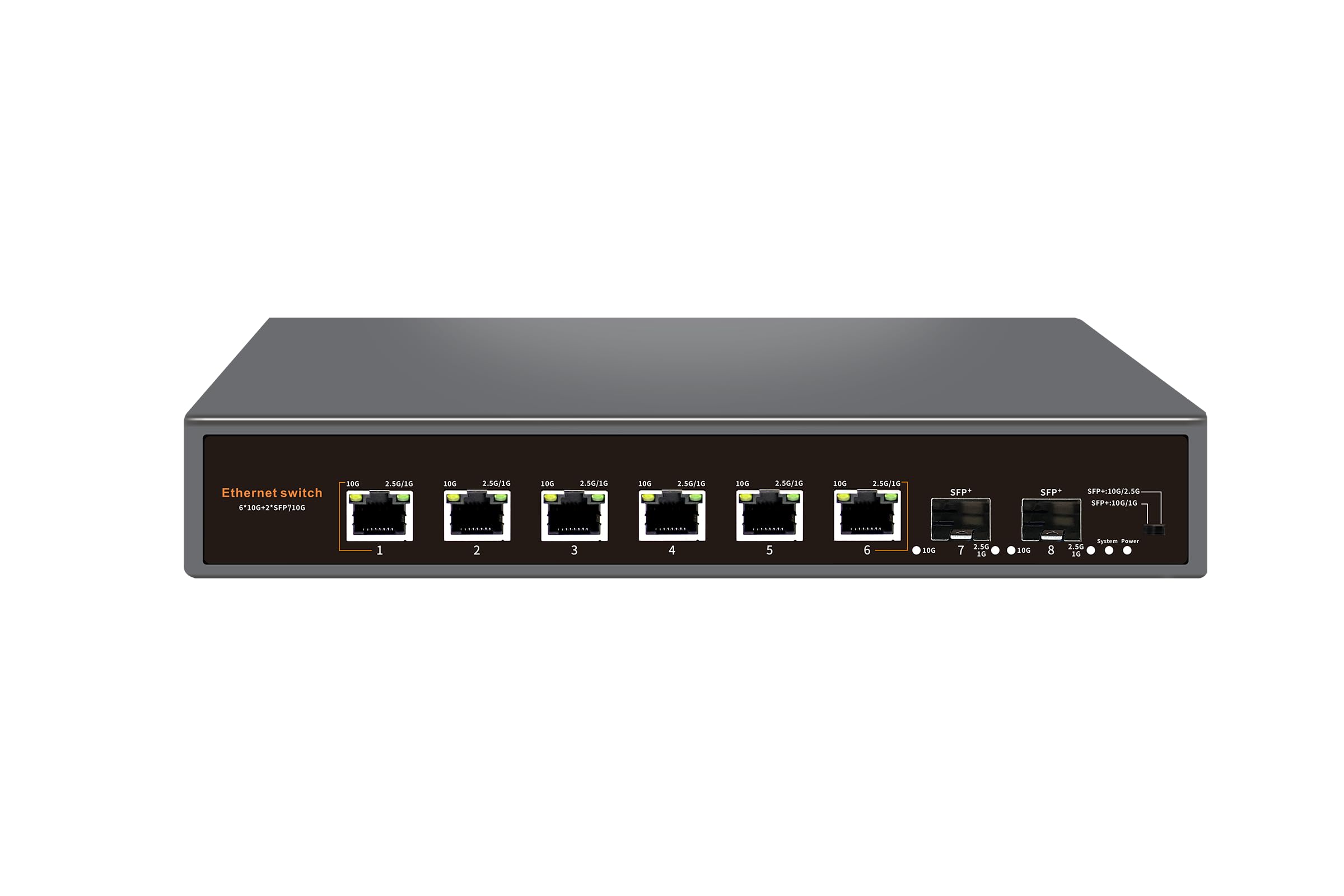
The Davuaz 8-Port switch is a straightforward unmanaged solution with six 10GBase-T ports and two 10G SFP+ uplink slots, all backed by a 160 Gbps switching capacity. The metal chassis is fanless and silent, making it an excellent choice for a desk or office. Users report successful deployments in hot attics where the unit’s 55°C temperature rating proved sufficient for years of operation.
It supports auto-negotiation down to 1Gb, ensuring compatibility with older devices. The LED indicators clearly distinguish between 10Gb and lower rates. While many users report flawless performance and a massive speed upgrade from Gigabit, a small number of reports indicate that only two of the copper ports achieve the full 2.5Gb rate, with others defaulting to 1Gb speeds or lower throughput. This inconsistency is a risk.
This switch is ideal for users who want a silent, low-maintenance upgrade to 10Gb for a small number of devices and do not require any network management. The lack of any configuration options is a positive for some and a limitation for others. The potential for mixed performance across ports is a point of caution.
Why it’s great
- Fanless metal chassis provides completely silent operation for quiet environments.
- Combines 6x copper and 2x SFP+ ports with a high 160 Gbps switching capacity.
- High temperature tolerance stable in hot attic installations for extended periods.
Good to know
- Some units show inconsistent multi-Gig speeds, with only a subset of ports performing.
- No management features whatsoever; ideal only for simple, fixed topologies.
7. MokerLink 10G Easy Web Managed Switch (4×2.5G + 2x10G)
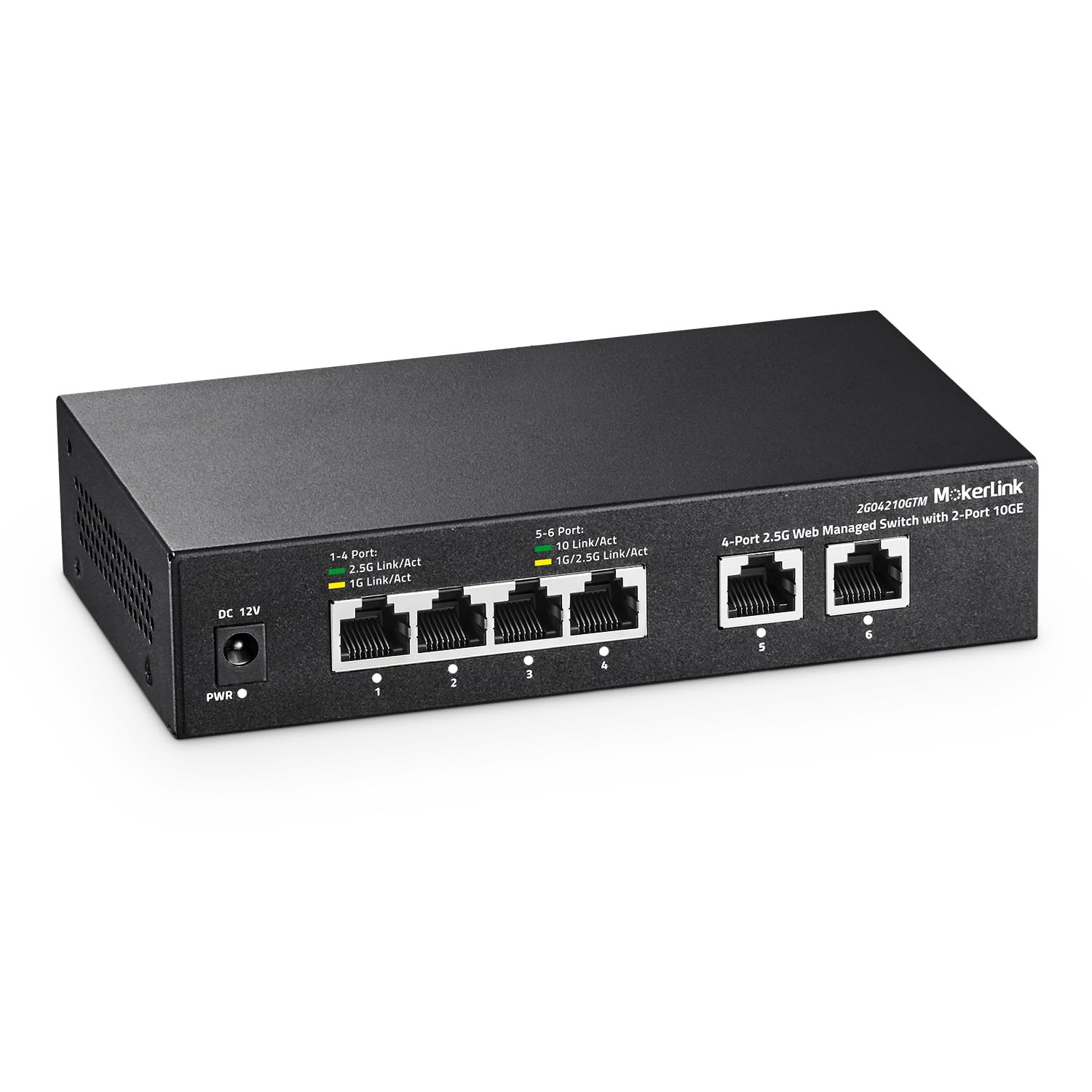
This MokerLink switch is an entry point into managed 10Gb networking without a large upfront investment. It provides four 2.5Gb RJ45 ports for modern Wi-Fi APs and workstations, plus two 10GBase-T RJ45 ports for uplinking to a NAS or core router. The 60 Gbps switching capacity is adequate for these six ports. The fanless metal chassis keeps noise at zero.
The web management interface offers L2 features including VLAN, QoS, LACP, and IGMP snooping, allowing network segmentation. Users report it works well as a desktop switch, with clear LED indicators for port speed. However, a critical review highlights a serious limitation: the web interface can force all SFP+ ports into the same speed mode, preventing a mix of 1Gb and 10Gb devices.
This switch is best for users who have a few 2.5Gb devices and need a single 10Gb uplink, and who want basic managed switching without breaking the bank. The port mix is not a full 10Gb solution for multiple servers or workstations. The potential speed-mode limitation on SFP+ is a significant caveat that requires careful planning of your device mix.
Why it’s great
- Lowest cost entry into managed networking with 10Gb uplink capability.
- Fanless and completely silent, making it suitable for any room.
- Web managed VLAN and LACP features provide basic network segmentation.
Good to know
- Port mix prioritizes 2.5Gb devices; only two 10Gb ports are available.
- SFP+ ports may not support mixing 1Gb and 10Gb devices simultaneously due to UI limitations.
FAQ
Can I use Cat5e cable for 10Gb connections?
What is the difference between an SFP+ port and a 10GBase-T RJ45 port?
Does a 10Gb switch need active cooling?
Will a 10Gb switch work with my existing Gigabit devices?
Final Thoughts: The Verdict
For most users, the best 10gb network switch winner is the MokerLink 8 Port 10G Managed Switch (4xRJ45 + 4xSFP+) because it offers the most versatile port configuration and deep L3 management at a mid-range price, perfect for a home lab core. If you need silent operation for a small desktop setup, grab the MikroTik CRS304-4XG-IN. And for powering 10Gb Wi-Fi access points without management complexity, nothing beats the YuanLey 5-Port 10G PoE Switch.