
Our readers keep the lights on and my morning glass full of iced black tea. As an Amazon Associate, I earn from qualifying purchases.
Specs are compiled from manufacturer listings and verified buyer reviews and can change over time — please confirm the key details on the product page before buying.
The real pain isn’t that your network feels slow — it is that the backbone of your entire home or small office (the switch connecting your NAS, server, and main workstation) is the hidden choke point. If you are moving large files, editing video off a network drive, or running virtual machines, a standard gigabit switch is the reason you wait. The fix is a 10gb sfp+ switch, and the choice depends on how many fiber ports you need, if you want web-based management, and if fan noise or rack-mount size matters to you.
I’m Min — the founder and writer behind Gadgets Feed. This guide is built by comparing the manufacturers’ published specifications and the patterns across verified customer reviews, so you get each pick’s real strengths and trade-offs instead of marketing spin.
Whether you are building a home lab, future-proofing an office network, or connecting a NAS for multi-user 4K editing workflows, this breakdown of the best 10gb sfp+ switch options helps you match specs to your exact setup without guessing.
Our Picks at a Glance


How To Choose The Best 10Gb SFP+ Switch
A 10Gb switch is the backbone of any high-speed network, but the wrong choice can leave you with ports that can’t negotiate the right speed, a noisy fan in your living room, or a management interface that requires a networking degree. Here are the three specs that make or break the decision.
Switching Capacity — The Real Throughput Number
A switch with 8 SFP+ ports (each rated for 10 Gbps) needs at least 160 Gbps of total switching capacity to let all ports talk at full speed at the same time. If the number is lower, you have a bottleneck built right into the hardware. The 160 Gbps standard is common across most 8-port models here, while the 12-port MokerLink bumping to 240 Gbps gives you headroom as you add devices.
Managed vs. Unmanaged — What You Actually Control
An unmanaged switch (like the MokerLink 8-port or the Binardat 8-port) is truly plug-and-play — you plug in power, insert your SFP+ modules, and devices see each other instantly. No configuration, no passwords, no web interface. A managed switch (like the TP-Link Omada SX3008F or the Binardat L3 Managed) gives you VLANs to segment traffic, link aggregation (LACP) to combine ports for more bandwidth to a server, and SNMP for monitoring. If you never touch VLAN settings, an unmanaged switch saves you time and eliminates a potential configuration headache.
SFP+ Only vs. Hybrid Ports
Pure SFP+ switches are all-fiber (or DAC cable) and require a transceiver for every connection. Hybrid models like the SICSOLINK 8-port or the YuLinca 12-port include copper 10GBASE-T RJ45 ports alongside SFP+ slots. The copper ports let you connect a 10G NAS or workstation over standard Cat6A or Cat7 cable without buying a separate SFP+ to RJ45 module. The trade-off is price and power draw — hybrid switches tend to cost more and run slightly warmer. Your choice depends on whether you already have fiber runs or prefer the simplicity of copper Ethernet.
Quick Comparison
| Model | Best For | Ports | Switching Capacity | Management | Amazon |
|---|---|---|---|---|---|
| MokerLink 8‑Port★ Best Overall | Simple fiber aggregation | 8× SFP+ | 160 Gbps | Unmanaged | Amazon |
| Binardat 8‑Port ManagedAlso Great | VLAN and routing on a budget | 8× SFP+ | 160 Gbps | L3 Web Managed | Amazon |
| TP‑Link Omada SX3008FTop Performer | Enterprise managed fiber switch | 8× SFP+ | — | L2+ Smart Managed | Amazon |
| Binardat 8‑Port Unmanaged | Budget 10G fiber backbone | 8× SFP+ | 160 Gbps | Unmanaged | Amazon |
| Davuaz 10Gbase-T + SFP+ | Copper 10G with fiber uplinks | 6× RJ45 + 2× SFP+ | 160 Gbps | Unmanaged | Amazon |
| SICSOLINK 8‑Port Hybrid | Rack-mount copper + fiber mix | 6× RJ45 + 2× SFP+ | 160 Gbps | Unmanaged | Amazon |
| MokerLink 12‑Port Managed | High-port-count fiber network | 12× SFP+ | 240 Gbps | L3 Web/CLI Managed | Amazon |
| YuLinca 12‑Port Hybrid | Mix of copper and fiber ports | 8× SFP+ + 4× RJ45 | 160 Gbps | Web Managed L2 | Amazon |
In‑Depth Reviews
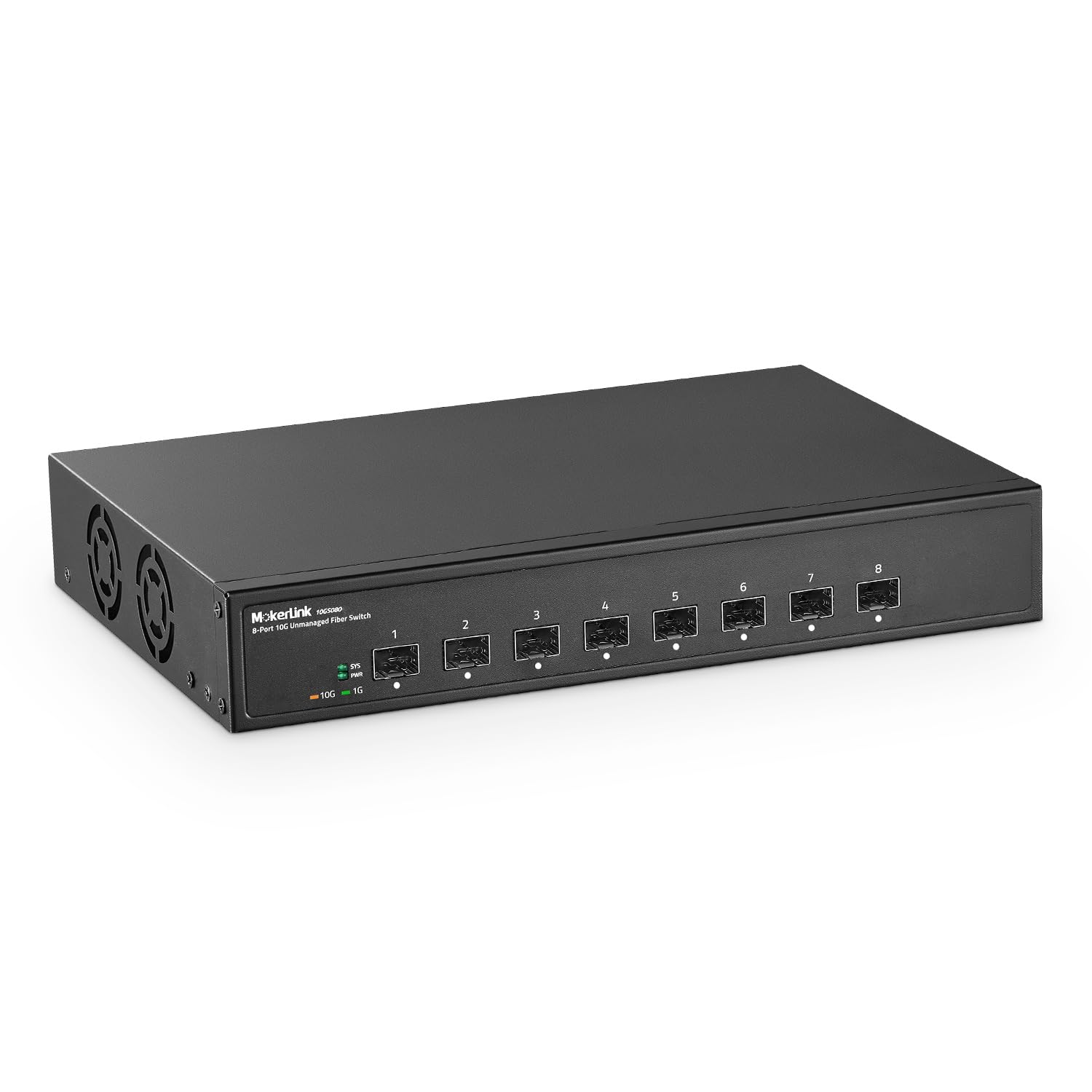
1. MokerLink 8 Port 10G SFP+ Unmanaged Fiber Switch
Our pick — 4.5★ from 800+ verified ratings; the strongest balance of quality and price.
The unassuming 8-port fiber switch that buyers report sets up in under five minutes and just stays out of the way.
This is the definition of “it works.” No configuration, no web login, no VLAN setup — you plug in the power, insert your SFP+ modules, connect the fiber, and the 160 Gbps switching capacity handles the rest. The forwarding delay is under 10 microseconds, so the switch practically adds no latency. The metal case includes an industrial-grade fan for heat dissipation, and the model number is simply “8x10G SFP” — this is a no-frills box that does one thing well. One buyer mentioned “setup less than 5 minutes” which is the core promise: any data center manager or home lab enthusiast can have this running before the first coffee finishes.
At 828 ratings with a 4.5 average, this is the most-reviewed switch in the roundup, suggesting consistent reliability across many buyers. Unlike the SICSOLINK hybrid, this is pure fiber — every one of the eight ports is SFP+, so you need a transceiver per device. The industrial-grade fan is built for heat dissipation, so it is not silent — expect some fan noise if this sits on your desk. The trade-off against the Binardat unmanaged is mostly price and brand recognition; they share the same 160 Gbps and 8-port spec, so your choice may come down to which link or price you trust more.
Why It’s So Popular
- 8 full 10 Gbps SFP+ ports — all non-blocking at full line speed
- Under-10-microsecond forwarding delay adds zero lag
- Proven at scale — over 800 ratings averaging 4.5 stars
- Compact metal desktop or wall-mount design
What You Give Up
- No management or VLAN support — a pure unmanaged switch
- Fan is present and audible; not silent like the fanless Binardat managed model
- Requires SFP+ transceivers for every device (not included)
For the fast-and-easy buyer: If you need an 8-port fiber backbone that is proven by thousands of buyers and you don’t want to learn a management interface, this is the safe bet.
Not for quiet spaces: The fan produces audible noise — if absolute silence matters, the fanless Binardat managed switch is a better fit.
2. Binardat 8 Port 10 Gigabit SFP+ Managed Switch
The one switch that brings Layer 3 routing to your home lab while staying affordable or making noise.
This is the balance for anyone who wants real network control — VLANs to isolate your IoT devices from your main network, static routing, OSPF, and even BGP — all in a fanless metal box that stays silent. The 8 SFP+ ports each support 1G, 2.5G, or 10G modules, and the 160 Gbps switching capacity means no port blocks another. Unlike a typical unmanaged switch where you just plug and hope, here you log into the web interface (the maker recommends starting via a direct IP config on your PC) and shape the traffic exactly how you want it. The switching capacity is 160 Gbps across the 8 SFP+ ports, but at 10 Gbps of data transfer rate per port, the real-world throughput matches the Binardat 8-port unmanaged model on raw speed — the difference is what you can configure on top.
Buyers report that this switch handled a segmented VLAN for a trunked home network “without a single minute of downtime over the past 3 months.” One reviewer noted that the fanless design extends to the power supply itself — no hum, no whine, which is rare in this class. The main gotcha: if your SFP+ module isn’t recognized, you need to enter the web interface and enable DAC support in the port config screen — a simple step that isn’t obvious from the start.
Why It Earns the Top Spot
- Fanless and silent — no fan noise at all, even the power supply stays quiet
- Full L3 management (static routes, OSPF, RIP, BGP) for serious home labs
- 160 Gbps switching capacity ensures non-blocking 10G on all ports
- 8 SFP+ ports with 1G/2.5G/10G auto-negotiation
The Quirks
- Web UI login has a glitch — you must check “remember password” to proceed, per one reviewer
- Runs warm in operation (the reviewer noted 42–51°C idle)
- No manufacturer warranty link found on the company website
Best for the techie: If you know what VLANs and static routes do and want to manage them from a web browser without paying enterprise prices, this is your switch.
skip it if: You want true plug-and-play without touching a config page — an unmanaged model saves you the setup time.
3. TP-Link Omada SX3008F
The enterprise-class 10G switch from a brand you know, integrated into the Omada cloud management ecosystem.
If you already run TP-Link Omada access points or gateways, the SX3008F slides right into your centralized cloud dashboard — you can monitor and configure the whole network from a single screen anywhere. The 8 SFP+ ports each run at 10 Gbps non-blocking, and the switch supports L2+ features like static routing, IGMP snooping, link aggregation (LAG), and 802.1Q VLANs. A buyer noted that “jumbo frames are not enabled from the start” and must be turned on via the web UI after the switch gets a DHCP lease — a small step that matters if you transfer large files. The CLI is Cisco-like, which network admins will appreciate: the 1000-page CLI manual is included in the documentation.
Owners mention the switch runs cool (one measured it at 37°C) and quiet, making it a strong alternative to louder Aruba or Cisco gear. The RJ45 SFP+ modules work fine — one user confirmed an FS.com SFP-10G-T module passed traffic at full speed. The 5-year manufacturer warranty is a standout, giving you long-term confidence that budget brands can’t match. The catch: the switch doesn’t auto-detect 1G vs 10G speed — you may need a USB console cable or another switch to initially configure it, and you can’t change the admin GUI VLAN away from VLAN 1.
What Stands Out
- Full Omada SDN integration with remote cloud access and app control
- 5-year manufacturer warranty — the longest in this roundup
- Cisco-like CLI with a 1000+ page manual for professional network admins
- Low power draw and cooler operation than enterprise alternatives
The Trade Offs
- Does not auto-negotiate 1G vs 10G — you need initial console access or a 10G adapter
- No out-of-band management port for backup access
- Cannot change the management VLAN from VLAN 1 in the GUI
Built for the Omada ecosystem: If you already use TP-Link Omada gear or want remote cloud management of a small business network, this switch justifies the premium.
Not for plug-and-play: First-time setup requires a bit of networking expertise — a beginner might find the lack of auto-speed detection frustrating.
4. Binardat 8 Port 10 Gigabit Fiber Switch (Unmanaged)

The cheap-as-it-gets 8-port 10G fiber switch that delivers full line speed without any management overhead.
For the price of a single 10G SFP+ module from a big brand, you get the whole switch. This is the ultimate “just make it work” solution: plug in power, insert your SFP+ modules, connect fiber cables, and you have eight 10 Gbps ports running at 160 Gbps total switching capacity. The data sheet says “full speed on 10gbe and 2.5gbe ports” according to one buyer, and another reported achieving 2.37 Gbps over non-ideal copper cabling without grounding issues. The metal case includes a built-in silent fan for heat dissipation, and it can sit on a desk or mount to a wall.
The trade-off against the higher-priced 12-port managed options is obvious: no web interface, no VLANs, no link aggregation. You plug it in, and every device on every port sees every other device — period. That is exactly what some buyers need: a straightforward fiber backbone for a NAS and a couple of servers, with zero configuration required. The only surprise is that the switch ships without SFP+ modules, so factor the cost of transceivers or DAC cables into your budget before you buy.
Why It Wins on Value
- 8 full 10 Gbps SFP+ ports at a per-port cost that is tough to top
- True plug-and-play — customers note it works right from the start with no config
- 160 Gbps switching capacity is the same spec as switches costing twice as much
- Compact metal case with wall-mount options
The Limits
- No management features — no VLANs, no SNMP, no link aggregation
- Does not include SFP+ modules; you must buy them separately
- Industrial-grade fan is not silent — it produces audible noise in a quiet room
For the no-fuss builder: If you just need cheap 10G fiber ports between a NAS and a desktop and don’t care about VLANs, this is the most affordable way to do it.
Not for managed networks: pass on it if you need to segment traffic or monitor port statistics — you will want the managed version or the TP-Link.
5. SICSOLINK 8 Port 10G Unmanaged Ethernet Switch (6 RJ45 + 2 SFP+)
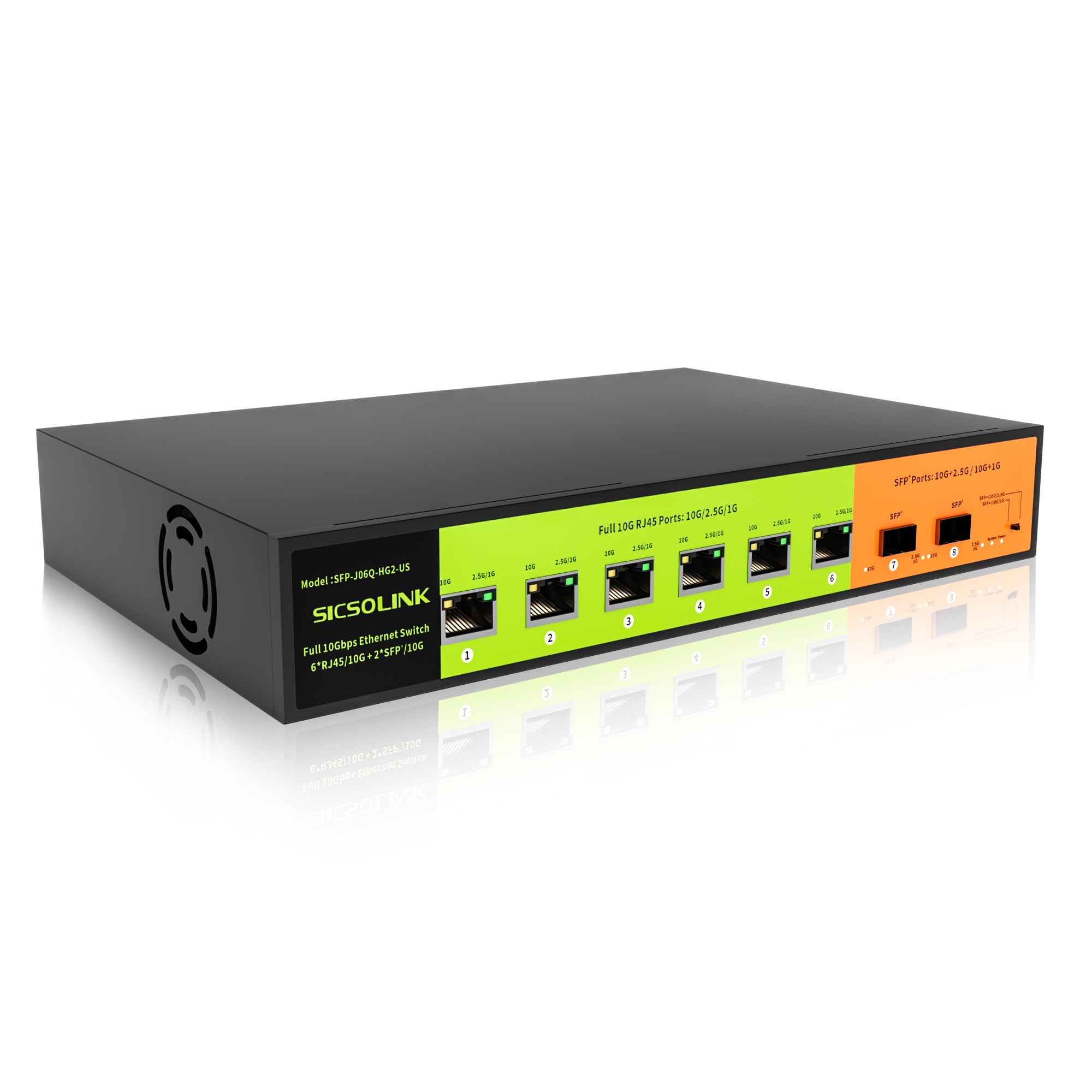
The hybrid switch that lets you connect copper 10G devices without extra transceivers, then adds fiber uplinks for longer runs.
Six RJ45 ports each handle 10G/5G/2.5G/1G auto-negotiation over standard Cat6A or Cat7 cable (up to 100 meters), while the two SFP+ ports handle fiber or DAC for long-distance uplinks. This means your 10G NAS or gaming PC connects with a plain Ethernet cable — no separate SFP+ to RJ45 module needed. The 160 Gbps switching capacity keeps all eight ports non-blocking, and one buyer confirmed 9.4 Gbps through iperf between a NAS and a compute cluster. The included 19-inch rack-mount ears let you install it in a server rack alongside your other gear.
Reviewers point out the upgraded 3200 RPM fan is noticeably quieter than the typical 5000 RPM fans you find in budget switches, though the unit “does run extremely hot” according to one review — the 6KV surge protection is a nice safeguard if you live in an area with electrical storms. The all-metal construction and included rack hardware mean this feels more substantial than the plastic alternatives, though at 3.9 pounds it is heavy enough that you should use the rack ears or a sturdy shelf. The catch: the two SFP+ ports mean you have less fiber expansion than a pure 8-port SFP+ switch, so if every connection will be fiber, look at the MokerLink or Binardat unmanaged models instead.
The Hybrid Advantage
- Six 10GBASE-T ports mean copper devices plug in directly without adapters
- Full 19-inch rack mount kit included in the box
- 6KV surge protection shields your gear from lightning strikes
- 160 Gbps switching capacity supports non-blocking 10G across all ports
Running Hot
- Shoppers say the unit runs extremely hot during operation
- Only two SFP+ ports limit fiber expansion compared to all-SFP+ models
- No management features — it is a pure unmanaged switch
Ideal for mixed-media homes: If your main devices use copper Ethernet but you want a fiber uplink to another floor, this hybrid saves you money on transceivers.
Look elsewhere for fiber-first: If every device uses SFP+ modules, a pure SFP+ switch gives you more fiber ports for the same money.
6. MokerLink 12 Port 10G SFP+ Managed Fiber Switch
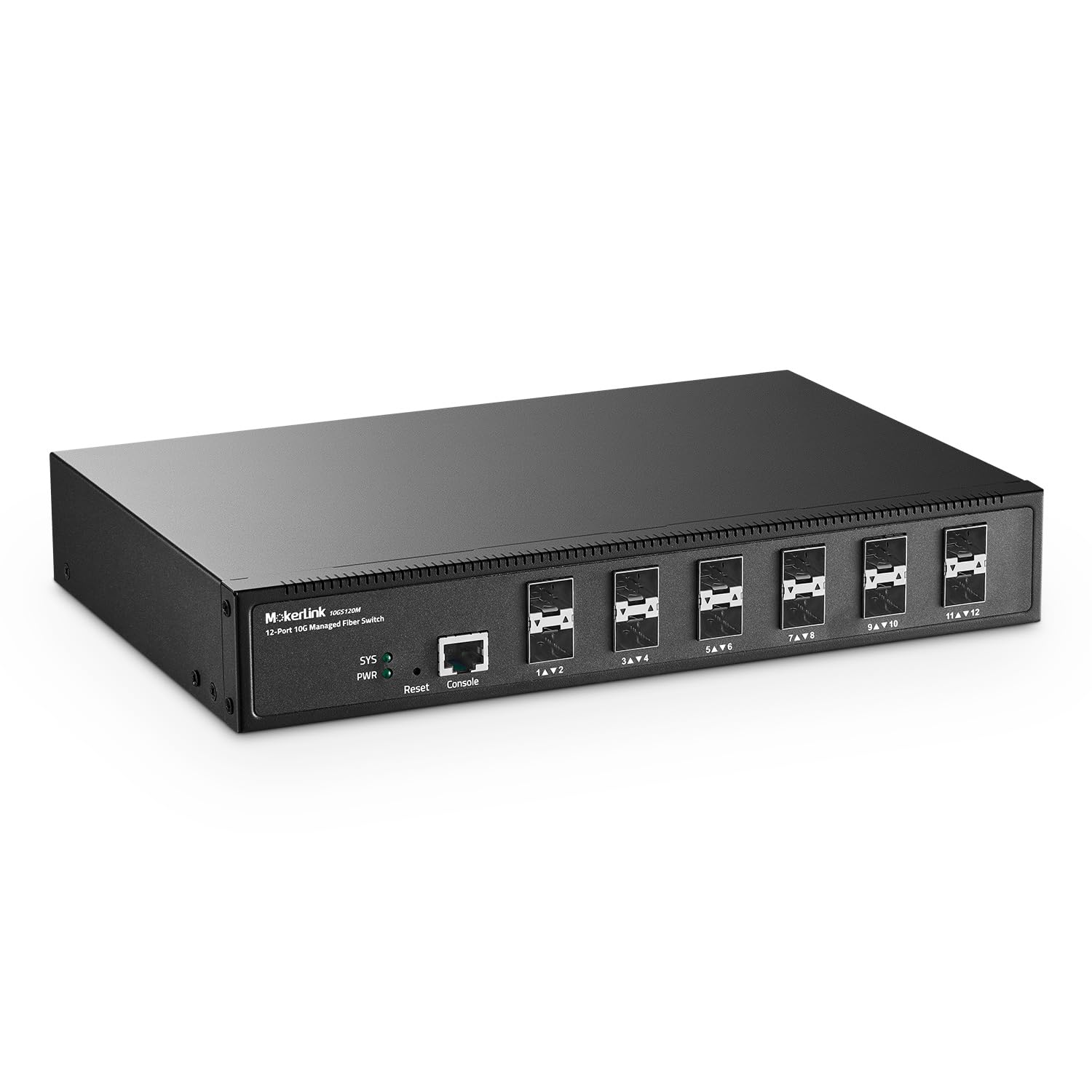
The extra ports and L3 management make this the right call when 8 SFP+ ports are not enough for your growing network.
With 12 SFP+ ports and 240 Gbps of switching capacity, this switch has 50% more bandwidth headroom than the 8-port models — all 12 ports can run at 10 Gbps at the same time without blocking. The L3 management includes IPv4/IPv6 routing, OSPF, RIP, static routes, VLANs, ACLs, QoS, link aggregation (LACP), and a full security suite (DoS attack prevention, DHCP snooping, 802.1X authentication). You can manage it through a web interface, CLI via Telnet/SSH, or SNMP for monitoring platforms. The console, telnet, and SSH access mean it integrates into existing network operations without requiring a separate management station.
Owners mention mixed experiences on long-term reliability. One noted the switch has been “rock-solid since install” with zero errors or link issues across all 2.5G ports and the 10G SFP+ uplink. Another reported that “10G-to-10G transfers can cause massive packet loss” that a reboot fixes, and a different reviewer said “10G uplink DAC errors worsen with age.” The web interface is described as “basic” or “crude,” and the CLI manual is sparse. This is a powerful switch for the port count and price, but the durability depends on your specific use case and firmware version.
Port Count Winner
- 12 SFP+ ports — the most fiber ports in this roundup
- 240 Gbps switching capacity gives genuine non-blocking 10G on every port
- Full L3 routing (OSPF, RIP, BGP4, static routes) for complex networks
- Built-in AC cable receptacle saves space in a rack
Reliability Question Marks
- Multiple customers note packet loss on 10G-to-10G transfers that requires a reboot
- Basic web interface and basic manual
- DAC link quality may degrade over time, per one long-term reviewer
- Industrial-grade fan produces noticeable noise
For the port-hungry home lab: If you need 12 fiber ports for your server stack or core aggregation, no other switch here matches the count at this price.
Not for mission-critical uptime: The packet-loss and DAC degradation reports make this a risk for a production environment — stick with the TP-Link or Binardat managed for reliability.
7. Davuaz 10Gbe Unmanaged Ethernet Switch (6 RJ45 + 2 SFP+)
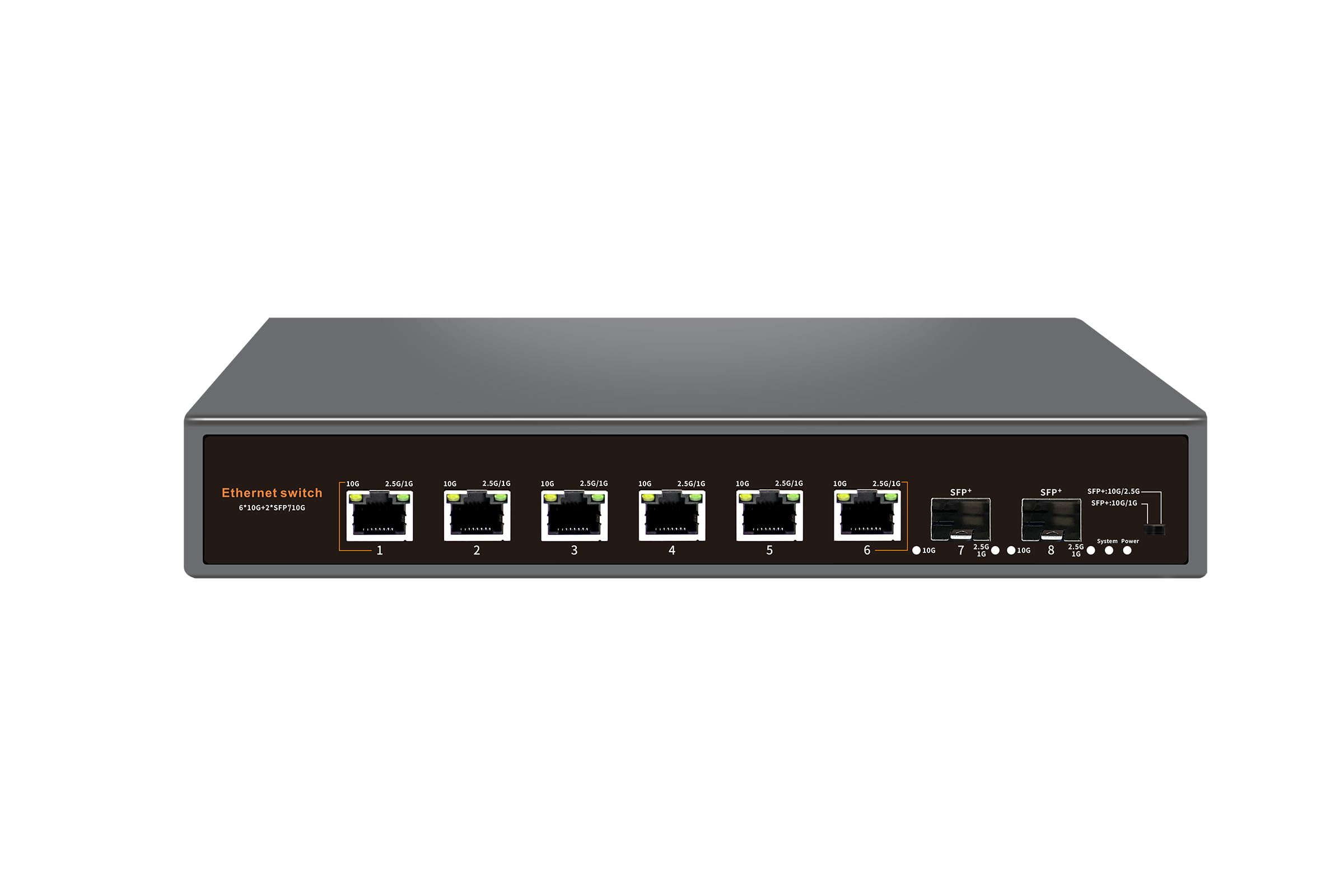
The cheap hybrid switch with copper-heavy ports and surge protection that one buyer ran in an attic for over 15 months.
Six copper RJ45 ports handle 1G/2.5G/5G/10G auto-negotiation, and two SFP+ ports offer fiber or DAC uplink — all on a 160 Gbps switching capacity. The LED indicators show speed differently than you might expect: the “L” LED lights up for 10G, the “R” LED lights up for 5G/2.5G/1G, which one reviewer found confusing (“2.5g is yellow leds and not green”). The 6KV lightning protection is the standout physical safety feature — an unusual addition at this price point. One buyer confirmed it survived attic heat (rated to 55°C or 131°F) for over 15 months powered via a PoE injector, which is impressive for a fanless metal switch in an unconditioned space.
The catch is reliability inconsistency. The price lands between the budget and mid-range tiers, and the mixed reliability means this is a roll of the dice unless you buy from a seller with a solid return policy.
Where It Shines
- Six 10GBASE-T ports connect copper devices directly without modules
- 6KV surge protection adds safety for attic or outdoor-adjacent installations
- Fanless metal design — silent in operation
- Reviewers point out it handles high attic temperatures long-term
The Big Risk
- Random disconnects reported by multiple buyers — a critical reliability issue
- LED indicators show speed with unintuitive color coding (yellow for 2.5G)
- No rack-mount hardware included; desktop only
- Only 2 SFP+ ports limit fiber expansion
For the risk-tolerant tinkerer: If you need a cheap hybrid switch for a non-critical test bench or secondary network and accept the gamble on random disconnects, this is the most affordable copper+SFP+ option.
Not for a primary network: The random disconnects make it unsuitable for a production or daily-driver network — the SICSOLINK hybrid is more reliable for similar copper-to-fiber mixing.
8. YuLinca 12 Port 10Gbps Managed Switch (8 SFP+ + 4 RJ45)
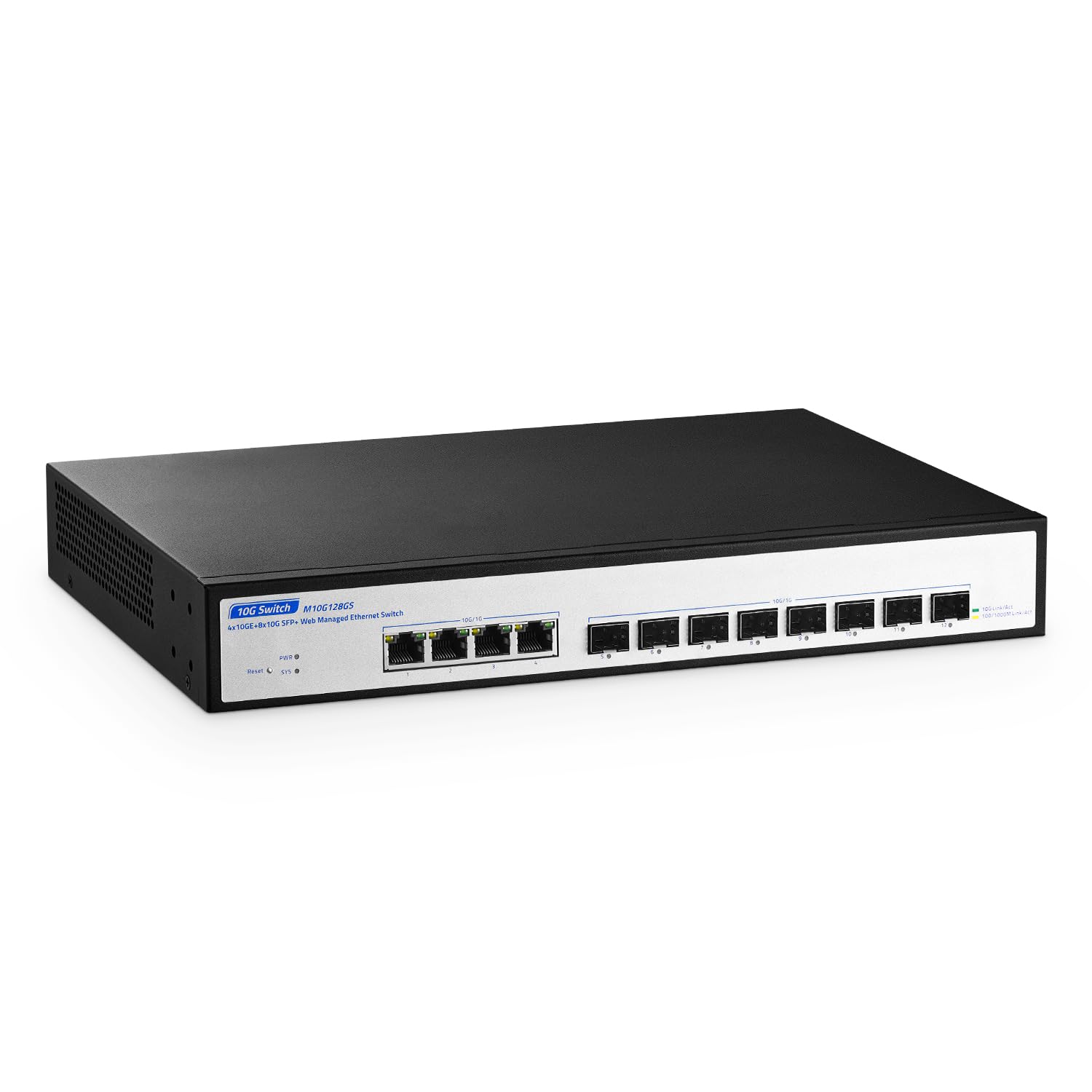
The 12-port managed hybrid that gives you eight fiber ports and four copper ports in one box — a rarity at this price.
Eight SFP+ slots plus four RJ45 10GBASE-T ports, all sharing a 160 Gbps switching capacity, make this the most versatile port mix in the roundup. The copper ports on this switch auto-negotiate down to 100M, 1G, 2.5G, 5G, and 10G, so legacy devices connect without any adapter. The web management interface supports VLANs, QoS, port protection, link aggregation (LACP), spanning tree, multicast, SNMP, and broadcast storm suppression. One owner reported they mixed several brands of SFP+ modules (10Gb and 1Gb) and “they’ve all worked,” which is a good sign for compatibility.
The main complaints center on the fan noise — one reviewer described it as a “HIGH PITCHED sound… like a dog whistle for those of us who rely on our hearing for a living.” Another reviewer who returned the switch cited a “decent” basic switch but listed cons like “narrow configurability” and “poor web interface.” The 160 Gbps switching capacity across 12 ports means not all ports can run at full 10 Gbps simultaneously without oversubscription — the real-world non-blocking limit is lower than the MokerLink 12-port at 240 Gbps. For a managed hybrid in a quiet office, you might want the fanless Binardat managed switch instead, even though it has fewer ports.
Port Versatility
- 8 SFP+ slots + 4 RJ45 10GBASE-T ports — the most hybrid options
- RJ45 ports auto-negotiate from 100M up to 10G, so older devices work
- Web management with VLAN, LACP, SNMP, and spanning tree
- Compatible with multiple SFP+ brands per buyer reports
The Noise & Capacity Issue
- High-pitched fan noise — unbearable in quiet rooms per reviewers
- 160 Gbps switching capacity across 12 ports means potential oversubscription
- Web interface described as basic with limited configurability
- Requires saving configuration in web UI or settings are lost on reboot
For the port-diverse setup: If you need both fiber and copper 10G in one managed box and have a noisy server room where fan sound is irrelevant, this is the best hybrid choice.
Not for quiet spaces: The high-pitched fan makes it unsuitable for a home office or living area — go with the fanless Binardat managed switch if silence is part of the requirement.
Understanding the Specs
Switching Capacity
This is the total amount of data (in Gbps) the switch can move between all ports at once. For an 8-port 10G switch, you need at least 160 Gbps to let every port run at full speed simultaneously. A 12-port model with only 160 Gbps creates a bottleneck — not all ports can hit 10G at the same time. Always check this number against your port count.
Managed vs. Unmanaged
An unmanaged switch works the moment you plug it in — no configuration, no interface, no passwords. A managed switch lets you control traffic with VLANs (separate your IoT devices from your main network), link aggregation (combine two ports for 20 Gbps to a server), and SNMP (monitor traffic via software like Nagios). If you never plan to change settings, save the money and buy unmanaged.
SFP+ vs. 10GBASE-T
SFP+ ports use a small transceiver module and fiber optic cable or a DAC (direct attach copper) cable — best for long runs (kilometers with single-mode fiber) or low-latency server connections. 10GBASE-T ports use standard RJ45 Ethernet cables (Cat6A or Cat7) up to 100 meters — simpler for home/office wiring but generate more heat and cost more in switch hardware. Hybrid switches give you both in one box.
Jumbo Frames
Standard Ethernet frames carry 1500 bytes of data per packet. Jumbo frames (up to 10,000 bytes or 16K bytes) let each packet carry more data, reducing CPU overhead and improving throughput for large file transfers between NAS and workstations. Not every switch enables jumbo frames by default — the TP-Link Omada requires you to turn it on in the web UI. If you move large media files, jumbo frame support matters.
FAQ
Can I use a 10G SFP+ switch with 1G devices?
What cable do I need for a 10GBASE-T port?
Do these switches include SFP+ modules?
What is the difference between a managed and an unmanaged switch?
Can I mount these switches in a server rack?
How many watts does a 10G SFP+ switch typically use?
What is the maximum operating temperature for these switches?
Can I use a DAC cable instead of fiber with SFP+ ports?
Final Thoughts: The Verdict
For most buyers building a 10G home lab or small office backbone, the winning 10gb sfp+ switch is the Binardat 8 Port Managed Switch because it gives you full L3 management, fanless silent operation, and a 160 Gbps switching capacity at a price that undercuts every major brand. If you want enterprise reliability with a 5-year warranty and Omada cloud management, grab the TP-Link Omada SX3008F. And for the purest value play — 8 ports of 10G fiber with zero config — the standout is the Binardat 8 Port Unmanaged Switch.
How We Picked
We do not accept paid placement. Every pick is matched to a real buyer and a real use-case; we do not hands-on test units.
Sources & Methodology
Specifications: manufacturer listings and product documentation. Review insights: verified customer reviews, as of July 2026. Pricing: not shown on this page (it changes often); check the current price via the retailer link.
As an Amazon Associate, Gadgets Feed earns from qualifying purchases. This does not affect which products we feature.