
Our readers keep the lights on and my morning glass full of iced black tea. As an Amazon Associate, I earn from qualifying purchases.
Specs are compiled from manufacturer listings and verified buyer reviews and can change over time — please confirm the key details on the product page before buying.
You are ready for 10 gigabit speeds, but choosing the wrong 10Gb switch means noise that drives you out of the room, ports you outgrow in six months, or management complexity that turns a weekend project into a week of frustration. The real question is which switch gets out of your way and lets your NAS, workstation, or server run at the speed you paid for.
I’m Min — the founder and writer behind Gadgets Feed. This guide is built by comparing the manufacturers’ published specifications and the patterns across verified customer reviews, so you get each pick’s real strengths and trade-offs instead of marketing spin.
if you need a silent desktop unit for creative work or a managed hub to segment your home lab traffic, this roundup of the best 10gb switch options for 2025 covers the bandwidth, port counts, and real-world quirks that matter most.
Quick Picks
- TP-Link TL-SX1008 — Best Overall
- NICGIGA 8-Port 10G Unmanaged Switch — Best Value 8-Port
- MokerLink 12-Port 10G Managed Switch — L3 Managed
- MikroTik CRS304-4XG-IN — Compact Managed
- NICGIGA 5-Port 10G Unmanaged Switch — Budget Pick
How To Choose The Best 10Gb Switch
The most important choice you face is if you need a managed switch or an unmanaged one. An unmanaged switch is truly plug-and-play — you connect your devices, and it forwards traffic without any configuration. A managed switch lets you create separate networks (VLANs), prioritize traffic (QoS), and monitor performance. If you simply need more 10 gigabit ports for a NAS, a gaming PC, or a workstation, an unmanaged switch is all you need. If you plan to isolate IoT devices from your main network or set up link aggregation, invest in a managed model.
Port Count and Switching Capacity
Every device you connect to a 10 gigabit port needs that full bandwidth. A 5-port switch gives you four usable device ports (one is used for uplink), while an 8-port gives you seven. The switch’s total switching capacity (measured in Gbps) tells you whether all ports can run at full speed simultaneously. A 100Gbps switch on five ports gives you 20 Gbps per port in theory, while a 160Gbps switch on eight ports gives the same 20 Gbps per port — in both cases sufficient for full 10 gigabit per port in real-world use.
Fan Noise and Cooling
A 10 gigabit switch generates more heat than a standard gigabit switch. Many budget models use small, high-RPM fans that produce an audible whine. If your switch will sit in a living room, home office, or bedroom, look for a fanless design or a model with a smart fan that adjusts speed. The trade-off is that fanless switches typically have fewer ports and a metal case that acts as a heatsink.
Quick Comparison
On smaller screens, swipe sideways to see the full table.
| Model | Best For | Ports | Switching Capacity | Weight | Amazon |
|---|---|---|---|---|---|
| TP-Link TL-SX1008 | Proven reliability | 8 | 160 Gbps | 3.27 lbs | $348.61Amazon |
| NICGIGA 8-Port | High bandwidth, low cost | 8 | 160 Gbps | 1.91 kg | $251.98$279.98Amazon |
| MokerLink 12-Port | L3 managed flexibility | 12 | 240 Gbps | 3.8 lbs (1.72 kg) | $389.99Amazon |
| NICGIGA 5-Port | Compact, quiet setup | 5 | Not specified | 1.47 kg | $189.98$199.98Amazon |
| MikroTik CRS304-4XG-IN | Managed in a tiny box | 4 | 40 Gbps | 0.7 kg | Amazon |
In‑Depth Reviews
1. TP-Link TL-SX1008

The eight-port workhorse that buyers report still running flawlessly after more than three years.
This is the unmanaged switch you buy when you want to connect eight devices — a 10G NAS, a couple of workstations, a WiFi 6 access point — and never think about the switch again. The TP-Link TL-SX1008 gives you 8 × 10-Gigabit ports with a switching capacity of up to 160 Gbps, so every port can run at full 10 gigabit speed simultaneously. A smart fan adjusts its speed based on temperature, which keeps noise down in a home office. Owners mention it “works flawlessly after 3+ years,” a durability record in the 10 gigabit space where fan failures are the top complaint.
The catch is that this is an unmanaged switch — there is no web interface, no VLAN support, and no QoS. You plug it into your router, and it hands out bandwidth automatically. For most home and small office setups where you just need more 10 gigabit ports, that is a feature, not a limitation. The metal casing acts as a heatsink, so the fan rarely spins up under normal loads. One reviewer noted that wall-mounting is tricky because of the cutout design, so plan for a shelf or rack.
Why it stands out
- Proven reliability — works flawlessly after 3+ years per buyer reports
- Smart fan keeps noise low in a home office or living room
- Full 160 Gbps switching capacity ensures no port is starved
What to consider
- No VLAN or management features — purely plug-and-play
- Wall mounting is difficult due to the cutout design
Reach for this if: you need a dead-simple, reliable 8-port 10 gigabit switch with a three-year warranty and a track record of lasting years.
Look elsewhere if: you require VLANs, link aggregation, or any configuration beyond plug-and-play.
2. NICGIGA 8-Port 10G Unmanaged Switch

Eight 10 gigabit ports at a price that undercuts the competition by a wide margin.
The NICGIGA 8-Port delivers the same port count as the TP-Link TL-SX1008 — 8 × 10G/5G/2.5G/1000M/100M RJ45 ports — with an identical 160 Gbps switching capacity, but at a significantly lower entry cost. All five port speeds are auto-negotiated, so it works with your existing 2.5G equipment today and scales up as you upgrade. The metal case supports both desktop and 19-inch rackmount setups, and the included rack ears make server-room installation simple.
The compromise here is the fan. NICGIGA uses an industrial-grade 5000 RPM fan rated at 24 dB. Customers note that the unit runs quietly in an open closet, but there is at least one verified review of the internal fan failing shortly after the return window closed. That means this switch is best suited for a basement, garage, or equipment rack where fan noise is less critical. It also carries only a one-year warranty, compared to the TP-Link’s three-year coverage.
Why it wins on value
- Full 8-port 10 gigabit switching with 160 Gbps capacity at a budget-friendly price
- Auto-negotiation across 10G, 5G, 2.5G, 1G, and 100M for mixed-speed networks
- Includes rackmount ears for 19-inch racks
What to watch for
- One-year warranty is shorter than premium alternatives
- Reviewers point out occasional fan failure after the return period
Best for: anyone building a 10 gigabit network on a tight budget who can tolerate a slightly higher fan risk and shorter warranty.
skip it if: the switch must sit in a quiet living space or you want a multi-year warranty for confidence.
3. MokerLink 12-Port 10G Managed Switch
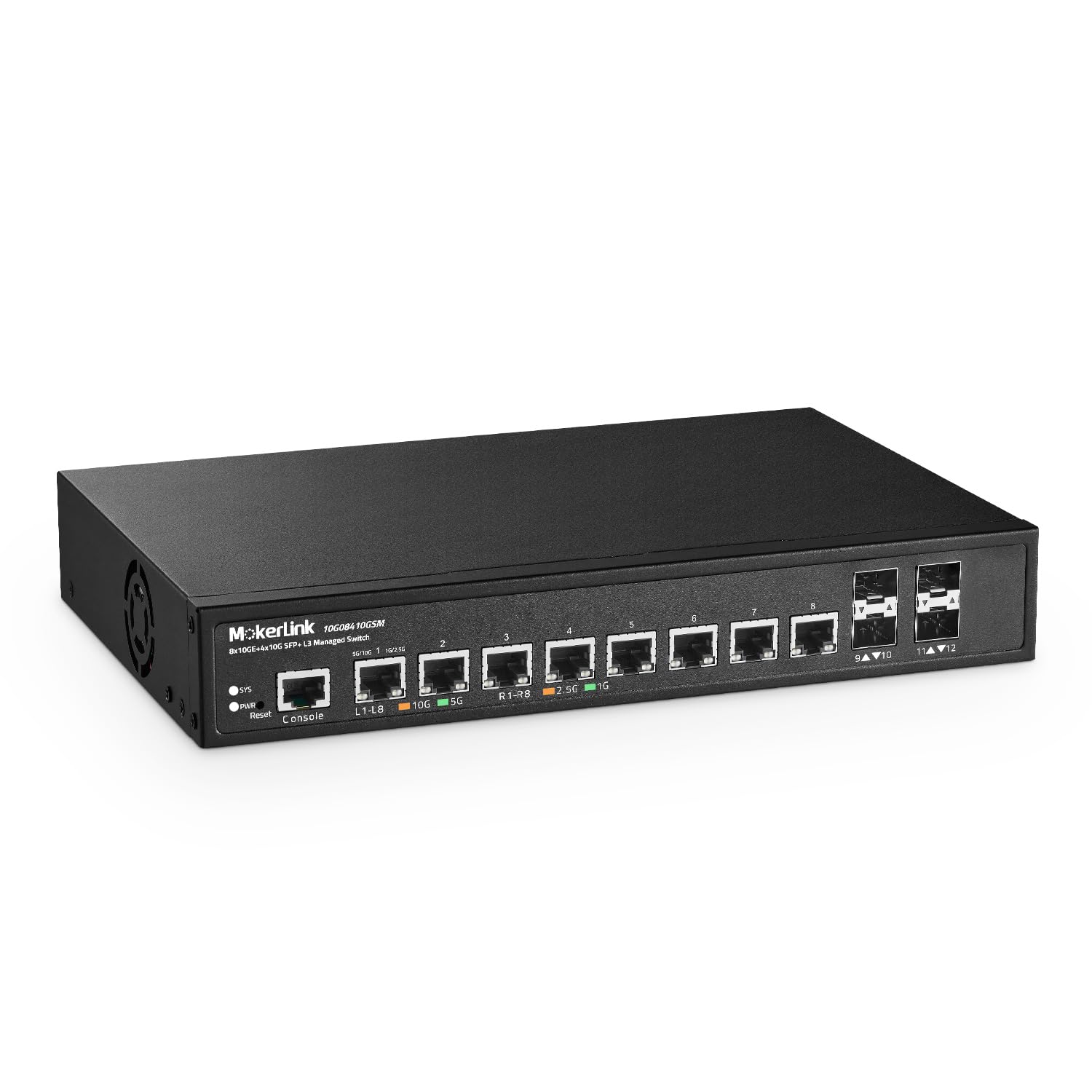
Twelve ports — eight copper, four fiber — with full Layer 3 management for serious home labs and small offices.
The MokerLink delivers 8 × 10G Ethernet ports plus 4 × 10G SFP+ slots, giving you a total of 12 10-gigabit ports, which is three times the port count of the MikroTik CRS304-4XG-IN (12 ports vs. 4 ports). Its switching capacity is 240 Gbps, and it supports full Layer 3 routing (IPv4/IPv6, static routes, VLAN, ACL, QoS, and security features like DHCP snooping and port security). This is the switch you choose when you need VLAN isolation for IoT devices, link aggregation, or routed subnets — all through a web GUI or CLI.
Shoppers say that the fan is audible at 10 feet, with one reviewer noting it runs about 12°F above ambient room temperature. The included rackmount kit makes installation straightforward. However, the setup guide contains a documented error in the default IP subnet suggestion, and firmware updates are not easily available from the manufacturer’s website. For an experienced network admin, these are minor inconveniences; for a beginner, they could be frustrating.
Why it shines
- 12 ports (8 copper + 4 SFP+) at a lower price than comparable managed switches
- Full Layer 3 management with VLAN, ACL, QoS, and DHCP snooping
- Includes rackmount ears and supports desktop or rackmount installation
Where it falls short
- Setup guide contains an IP subnet error that can confuse beginners
- Fan noise is noticeable in a quiet room; some buyers replace the fan
Reach for this if: you need a low-cost managed 10 gigabit switch with fiber uplinks and are comfortable working through a learning curve.
Look elsewhere if: you want a plug-and-play experience or the switch must be silent in a shared living space.
4. MikroTik CRS304-4XG-IN
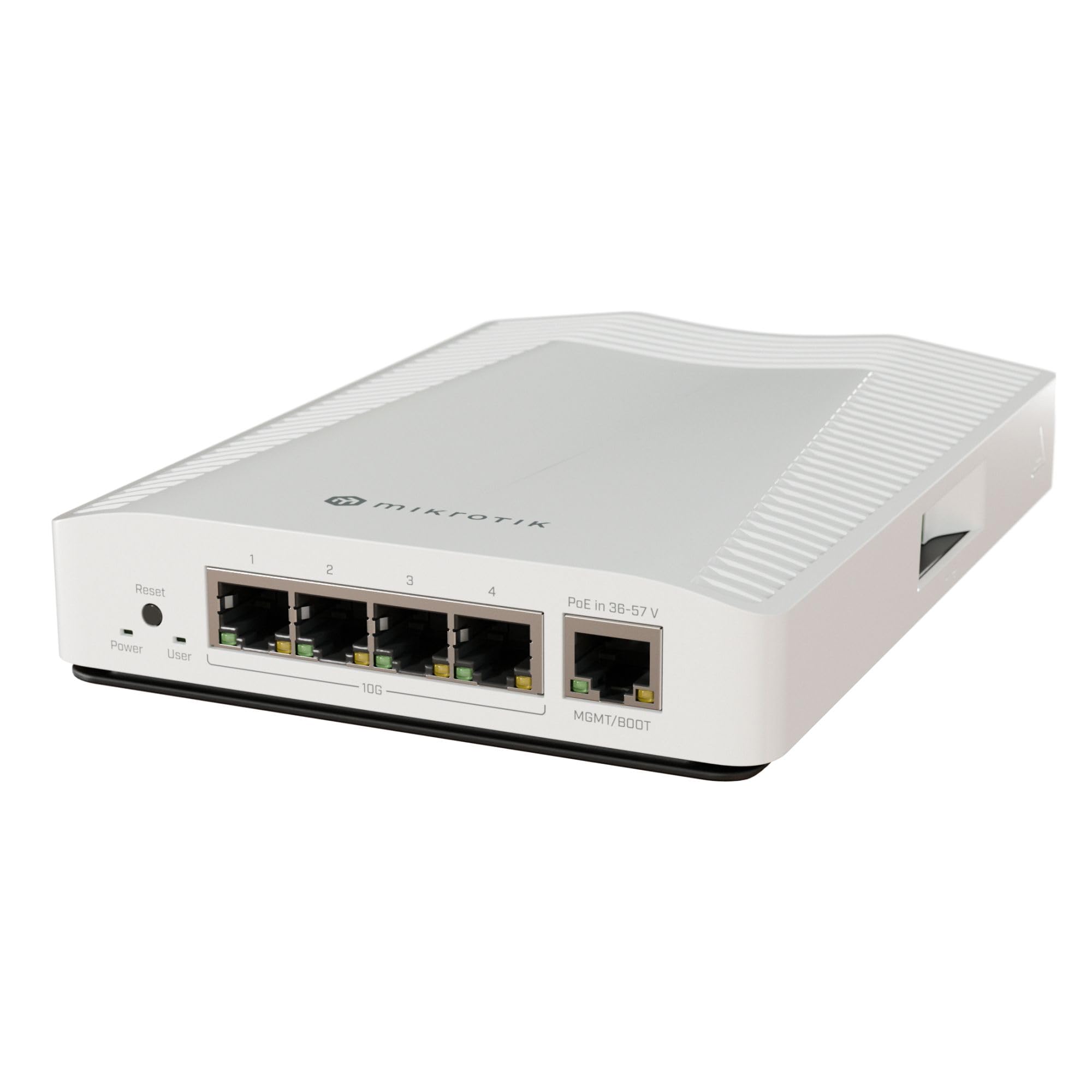
A fanless, managed 10 gigabit switch that fits in the palm of your hand and stays silent.
The MikroTik CRS304-4XG-IN is the only fanless, passively cooled switch on this list, with a weight of just 0.7 kilograms — about one-third the weight of the MokerLink 12-port switch (2.2 kilograms). It has 4 × 10GbE ports, one of which supports PoE input for backup power. This is a fully managed switch running MikroTik’s RouterOS, meaning you can configure VLANs, link aggregation, firewall rules, and spanning tree protocols. Buyers report that the switch runs cool even with three 10 gigabit devices attached, and one buyer mentioned that their “existing Cat5E trunk supports 10Gbps line speeds,” which means you may not need to rewire.
The trade-off is significant: you get only four ports, and configuring the switch requires real effort. RouterOS is powerful but not intuitive, and one owner reported that the AI-generated configuration needed manual corrections using MikroTik’s VLAN documentation. Additionally, the PoE input port operates at only 1 gigabit, so you cannot power the switch through a 10 gigabit PoE line. For a compact, silent, managed 10Gb switch, the MikroTik is in a class of its own.
Why it is unique
- Fanless, passive cooling — zero noise, ideal for a living room or bedroom
- Full RouterOS management suite for advanced VLAN and routing
- Compact at 0.7 kg and includes desktop mounting brackets
What you give up
- Only 4 ports, which you may outgrow quickly
- RouterOS has a steep learning curve; not plug-and-play
- PoE input port is limited to 1 gigabit, not 10 gigabit
Best for: network enthusiasts who need a silent, managed 10 gigabit switch and are willing to learn RouterOS.
pass on it if: you need more than 4 ports or want a switch you can set up in under 15 minutes.
5. NICGIGA 5-Port 10G Unmanaged Switch

The entry point to 10 gigabit networking that gives you four usable ports while staying affordable.
If you only need to connect a NAS and one or two workstations at 10 gigabit speeds, the NICGIGA 5-Port is the most affordable way to do it. It has 5 × 10G/5G/2.5G/1000M/100M RJ45 ports. It is unmanaged, so you plug it in and it works, and the metal case includes rackmount ears for 19-inch racks. The fan is rated at 24 dB, similar to the 8-port version.
The same fan reliability concern exists here: one customer observed that “4 days outside the return window and the fan inside is making tons of noise.” That said, the majority of owners mention silent operation and flawless performance in NAS and home lab setups. The one-year warranty limits your protection, but for the price, this switch provides a genuine path to 10 gigabit for a two- or three-device network.
Why it works
- Most affordable 5-port 10 gigabit switch for a small setup
- Auto-negotiation across five speeds for mixed equipment
- Includes 19-inch rackmount ears and metal case
Where it risks
- Customers note fan failures after the return window
- Only 5 ports — you may need more in a year
Reach for this if: you have exactly two or three 10 gigabit devices and want the lowest entry cost for a 10Gb switch.
Look elsewhere if: you need more than 4 usable ports, a longer warranty, or zero fan risk.
Understanding the Specs
Switching Capacity
This number, measured in Gbps, tells you the total amount of data the switch can move per second across all ports at once. A 160 Gbps switch with 8 ports can give each port up to 20 Gbps, which is enough for full 10 gigabit speeds on every port simultaneously. If the switching capacity is too low, ports will share bandwidth and you lose the speed you paid for.
Managed vs Unmanaged
An unmanaged switch works right from the start — plug in cables, and traffic flows. A managed switch lets you create separate virtual networks (VLANs), prioritize certain traffic (QoS), set up link aggregation, and monitor port activity. Managed switches require configuration and some networking knowledge, but they give you control over your network’s security and performance.
FAQ
Will a 10Gb switch work with my existing Cat5e or Cat6 cables?
How much fan noise should I expect from a 10Gb switch?
Can I use a 10Gb switch with slower devices like 1 gigabit or 2.5 gigabit equipment?
How many devices can I connect to a 5-port 10Gb switch?
What is the difference between an SFP+ port and an RJ45 copper port?
Do I need a managed switch for my home network?
Why do some 10Gb switches weigh more than others?
Can I rack-mount any of these switches?
How long does a typical 10Gb switch last?
What is the real-world speed difference between a 1 gigabit switch and a 10 gigabit switch?
Final Thoughts: The Verdict
For most people, the best 10gb switch winner is the TP-Link TL-SX1008 because it combines 8 ports, a proven three-year track record, quiet smart fan operation, and a solid 3-year warranty — all without requiring any configuration. If you want a managed switch in a silent fanless package, grab the MikroTik CRS304-4XG-IN. And for the most ports at the lowest cost in a fully managed Layer 3 switch, the MokerLink 12-Port is the best value for a home lab or small office.
How We Picked
We do not accept paid placement, and we did not hands-on test every unit. Instead, we match each pick to a real buyer and use-case by comparing the manufacturers’ published specifications against the patterns in verified customer reviews — so you get each pick’s real strengths and trade-offs instead of marketing copy.
Sources & Methodology
Specifications: manufacturer listings and product documentation. Review insights: verified customer reviews, as of July 2026. Pricing: not shown on this page (it changes often); check the current price via the retailer link.
As an Amazon Associate, Gadgets Feed earns from qualifying purchases. This does not affect which products we feature.
Product prices and availability are accurate as of the date/time indicated and are subject to change. Any price and availability information displayed on Amazon at the time of purchase will apply to the purchase of this product. As an Amazon Associate I earn from qualifying purchases.
CERTAIN CONTENT THAT APPEARS ON THIS SITE COMES FROM AMAZON. THIS CONTENT IS PROVIDED "AS IS" AND IS SUBJECT TO CHANGE OR REMOVAL AT ANY TIME.
Amazon and the Amazon logo are trademarks of Amazon.com, Inc. or its affiliates.