
Our readers keep the lights on and my morning glass full of iced black tea. As an Amazon Associate, I earn from qualifying purchases.
Specs are compiled from manufacturer listings and verified buyer reviews and can change over time — please confirm the key details on the product page before buying.
You want an 11-inch laptop for easy carrying, but the real choice is between Chrome OS simplicity and full Windows flexibility. Chromebooks start up in seconds, resist viruses, and use less battery, but they cannot run heavy desktop software. Windows 11 machines run the full app world but often need more patience and closer attention to battery life. Your daily tasks decide the pick: school portals, streaming, email, and cloud docs all work well on a Chromebook, while specific Windows-only programs need the real thing.
I’m Min — the founder and writer behind Gadgets Feed. This guide is built by comparing the manufacturers’ published specifications and the patterns across verified customer reviews, so you get each pick’s real strengths and trade-offs instead of marketing spin.
Here is how to find the best value. A note upfront: this list uses flexible matching, so some picks are 11.6-inch screens rather than the exact 11 inches, but they serve the same purpose. The 11 inch laptop champions here balance battery stamina, build toughness, and enough memory for the apps you rely on every day.
Our Picks at a Glance


How To Choose The Best 11 Inch Laptop
Before you buy, settle the operating system question. Chrome OS is a locked-down, cloud-first environment that is fast and safe but limited to web apps and Android titles. Windows 11 Home in S Mode gives you the familiar desktop but restricts installs to the Microsoft Store until you switch out. Your workflow dictates which one feels liberating and which one feels like a cage.
Battery stamina is the real spec
Manufacturers quote optimistic hours, so look at the fine print. Real-world numbers run lower, especially with screen brightness up and Wi-Fi active. For a travel or school machine, aim for a claim of at least 10 hours so you survive a full day without hunting a plug.
Storage and memory set your ceiling
Budget laptops often pair 4GB of RAM with 32GB or 64GB of eMMC flash storage. That is fine for a few apps and cloud files, but it fills quickly. If you plan to keep many offline files, prioritize 64GB or a model with an SSD slot for upgrades later.
Build quality beats looks
Kids and commuters drop things. A ruggedized chassis with rubber edges and a spill-resistant keyboard can outlast a sleeker shell. Look for durable design claims and check what owners say about hinges and keys after months of use.
Quick Comparison
| Model | Best For | Battery Life | Storage | Operating System | Amazon |
|---|---|---|---|---|---|
| Samsung Chromebook 4 (K01US)★ Best Overall | Everyday schoolwork | 12.5 hrs | 32 GB | Chrome OS | Amazon |
| Acer Chromebook CBO311 (Renewed)Best Value | Travel on a budget | 10 hrs | 64 GB | Chrome OS | Amazon |
| Dell Latitude 3190 (Renewed)Windows Pick | Windows 2-in-1 value | 11 hrs | 128 GB | Windows 11 Pro | Amazon |
| Acer Chromebook 11 C732 | Tough classroom use | 12 hrs | 32 GB | Chrome OS | Amazon |
| Acer Chromebook 311 CB311-9H | Streaming and browsing | 10 hrs | 32 GB | Chrome OS | Amazon |
| Samsung Chromebook 4 (K03US) | More RAM for multitasking | 12.5 hrs | 64 GB | Chrome OS | Amazon |
| ASUS Chromebook CR11 | Durability plus Wi-Fi 6E | — | 64 GB | Chrome OS | Amazon |
| HP Stream 11 | Long Windows battery | 13.15 hrs | 64 GB | Windows 11 S | Amazon |
| ASUS Vivobook Go 12 L210 | Frequent travel | 12 hrs | 64 GB | Windows 11 S | Amazon |
| HP Chromebook x360 | Convertible tablet use | 13.75 hrs | 32 GB | Chrome OS | Amazon |
| Svikou 11″ 2-in-1 | High-res display on a budget | — | 256 GB+ | Windows 11 Pro | Amazon |
In‑Depth Reviews
1. Samsung Chromebook 4
Our pick — over 4★ from 2,500+ verified ratings; the strongest balance of quality and price.
The crowd favorite that survives the school year and the summer after
The Samsung Chromebook 4 is the machine that keeps showing up in camps and classrooms for one reason: it keeps working. The chassis meets military-grade durability standards, surviving drops and rough handling that would break typical budget laptops. Buyers report it has survived a year and a half of heavy use and still feels snappy for web browsing and homework.
Battery life is the headline here, rated at 12.5 hours on a single charge. That is enough for a full school day plus study time, and the gigabit Wi-Fi keeps things moving when you are on a fast network. The 4GB of RAM handles multiple tabs, though the 32GB of storage will fill up fast if you keep lots of files offline.
The screen is the main compromise. It is bright, but owners wish it were crisper and clearer for movies, and some find the lowest brightness setting still too bright for dark rooms. The keyboards get praise for being comfortable, and the setup takes about five minutes from the start. The thing everyone raves about is the virus resistance — a real relief for anyone tired of maintaining a Windows machine.
What wins people over
- 12.5-hour battery lasts a full day plus
- Military-grade durability for clumsy hands
- Secure Chrome OS resists viruses
- Simple five-minute setup
Know before you buy
- Screen is bright but not crisp
- 32GB storage fills quickly
- Speakers are on the weak side
Reach for this if: you want a durable, virus-proof daily driver for school or light work that rarely needs a charger.
Look elsewhere if: you need crisp visuals for movies or plan to keep large offline libraries.
2. Acer Chromebook CBO311 (Renewed)
The travel throwaway that arrives looking like it just left the factory
The Acer CBO311 is the budget travel companion that buyers keep calling a steal. It arrives as a renewed unit, yet owners consistently report receiving one in “perfect condition” that looks and works like new. For a trip laptop you plan to toss in a bag, that is exactly the reliability you want.
You get an 11.6-inch HD matte display in a chassis about 0.71 inches thin and only 2.65 pounds. That weight makes it a genuinely easy carry for daily commutes, and the matte screen cuts glare on bright trains and planes. The Intel Celeron N4500 dual-core processor with 4GB of RAM and 64GB of eMMC storage handles email, cloud files, and video calls without drama.
Battery life rates up to 10 hours, which trails the Samsung’s 12.5 hours but still covers a travelling workday. The touchscreen works perfectly, setup is easy, and dual-band Wi-Fi 5 plus USB-C and USB-A ports cover the basics. The only real complaint involves an occasional webpage that stumbles on the “confirm you are not a robot” check, which is a minor annoyance rather than a flowstopper.
Smart travel buy: if you want a light, cheap, and surprisingly clean machine for road work, this renewed Acer over-delivers for the money.
Keep it grounded: the 10-hour battery means you will reach for a charger sooner than with the Samsung above.
3. Dell Latitude 3190 (Renewed)
A full Windows 11 Pro machine that folds into a tablet for less than a Chromebook
Get a full Windows experience on an 11-inch screen without the premium price with the Dell Latitude 3190. It runs Windows 11 Pro on an Intel N5030 quad-core processor (a chip with four cores for everyday tasks), and the 128GB solid-state drive (a fast storage type) holds four times the storage of the 32GB Samsung Chromebook 4, so you have room for real applications and offline files.
The 11.6-inch HD multi-touch display flips into a 2-in-1, and owners love the responsive touchscreen and comfortable keyboard. For basic everyday tasks like browsing, email, and documents, it feels fast and sturdy. The value story is why so many buyers are satisfied — it looks great, works great, and delivers the full Windows experience on a compact budget device.
Battery life is the honest weak point. It rates 11 hours on paper, but owners mention it runs short in practice and can heat up during longer sessions. There are also scattered reports of charging problems and the occasional unit arriving with defects, which is the reality of buying renewed. The touchpad is responsive and the 2-in-1 design is the draw, but this is a machine for light daily tasks, not demanding apps.
Windows on a budget: this is the pick if you need full Windows 11 Pro and a 128GB SSD without jumping to a 13-inch price bracket.
Set expectations: treat battery life as shorter than claimed, and check the unit thoroughly given renewed-condition quirks.
4. Acer Chromebook 11 C732

Built to survive juice spills and the unforgiving classroom floor
The Acer Chromebook 11 C732 is the rugged workhorse for busy environments. It carries military-grade durability certification and a spill-resistant keyboard, so it survives water spills and drops better than most. Owners describe the case as sturdy and report it has survived water exposure without complaint, which is exactly what you need for a kid’s school machine.
Performance is where this one shines. The Intel Celeron N3350 with 4GB of LPDDR4 memory delivers fast, responsive operation, and the battery is rated up to 12 hours with an average standby of 12 hours. Owners consistently praise the speed and the all-day battery, with one noting it boots instantly on opening the lid. The 11-inch screen is exactly the right size for a student or a small desk.
The trade-off is the 32GB of eMMC storage. It is fine if you lean on Google Drive for files, and the 100GB of included cloud space helps, but local storage is tight. The webcam is grainy in video calls, so Zoom sessions will look soft. The touchpad takes some getting used to because there are no dedicated click buttons, but the water-resistant keyboard and sturdy frame make this a top choice for young users.
Built to last
- Military-grade durability plus spill-resistant keyboard
- Up to 12 hours of battery in real use
- Fast boot and responsive everyday performance
- Perfect 11-inch size for kids
The fine print
- 32GB storage fills quickly
- Webcam is grainy for video calls
- Touchpad has no dedicated click buttons
Choose this for: students or anyone whose laptop faces spills and drops on a daily basis.
skip it if: you need crisp video calls or store lots of files locally.
5. Acer Chromebook 311 CB311-9H

The light coffee-table machine that stays put for quick browsing
The Acer Chromebook 311 earns its place in the living room rather than the backpack. Owners love that it is small enough to leave out on a coffee table for quick browsing or YouTube, and it does everything expected of it with no regrets. The Intel Celeron N4000 processor with 4GB of LPDDR4 RAM keeps things responsive, and the 11.6-inch HD display is clear enough for casual streaming.
Build quality is the standout here, with owners praising the lightweight design and well-made feel. The keyboard is comfortable, the camera and mic are clear for video calls, and the gigabit Wi-Fi keeps connections strong. Battery life rates up to 10 hours, which owners say holds up even on extended Skype sessions. It is also ideal for meetings and research on the go.
The obvious catch is the missing touchscreen on this CB311 model, which confuses buyers because ads show a touch version. The speakers are also on the weak side, so you will want headphones for music. The 32GB storage is fine if you stream everything, and the 100GB of Google Drive space handles backups. The clear webcam and strong performance make this a great value for the price.
Perfect travel companion: lightweight, well-made, and responsive for browsing, streaming, and video calls.
Double-check the listing: this model is not a touchscreen, and the speakers are weak, so plan for external audio.
6. Samsung Chromebook 4 (K03US)

The same tough Samsung shell with double the RAM and double the storage
This is the Samsung Chromebook 4 for buyers who want breathing room. It keeps everything that makes the K01US great — military-grade durability, a compact 11.6-inch design, and a 12.5-hour battery — but upgrades the memory to 6GB of RAM and storage to 64GB. That extra RAM makes multitasking smoother, letting you keep more tabs and apps open without slowdowns.
Owners describe it as fast, portable, and easy for non-tech users, with one noting it can write for three to four days without charging. The keyboard is responsive, the gigabit Wi-Fi is reliable, and Bluetooth connects a mouse and earbuds at the same time without issues. It is ideal for reading, writing, browsing, and Google Meet calls.
The screen is the most common complaint. Multiple owners describe it as weak or poor for movies, with narrow viewing angles, so this is not a media machine. There is also no touchscreen on this non-convertible model, which some wish for. The mixed reliability reports are honest to note — some units stop working after a few months, so buy from a flexible seller. For the price, the 6GB of RAM and 64GB of storage make this the better value than its sibling for most users.
Upgraded basics
- 6GB RAM for smoother multitasking
- 64GB storage doubles the entry model
- Same 12.5-hour battery and tough build
Where it stumbles
- Screen is poor for movies at angles
- No touchscreen on this model
- Some units stop working after months
Grab this if: you want the Samsung durability with enough RAM to keep many tabs and apps alive at once.
Think twice if: movies on a pillow matter to you — this screen is built for work, not film.
7. ASUS Chromebook CR11

A ruggedized shell with Wi-Fi 6E speeds and a keyboard that fights germs
The ASUS Chromebook CR11 is the forward-looking pick for classrooms and homes that want the newest wireless tech. It runs on the Intel Celeron N100 processor with 4GB of RAM and 64GB of eMMC storage, and its standout feature is Wi-Fi 6E plus Bluetooth 5.3. That means faster, more stable connections on modern routers, which is a real advantage over older Chromebooks.
The ruggedized body with rubber edges meets US military-grade durability standards, shielding internals from classroom drops. Owners say it is well made and sturdy, and one bought it specifically for a grandson who needed something reliable and easy to carry. The spill-resistant keyboard adds another layer of protection against accidental water drops and splashes.
Modern and tough: Wi-Fi 6E, a spill-resistant keyboard, and an antibacterial coating make this the most future-proof rugged Chromebook here.
Keep it simple: 4GB RAM and 64GB storage cap heavy multitasking, and there is no touchscreen to flip into tablet mode.
8. HP Stream 11 (Royal Blue)
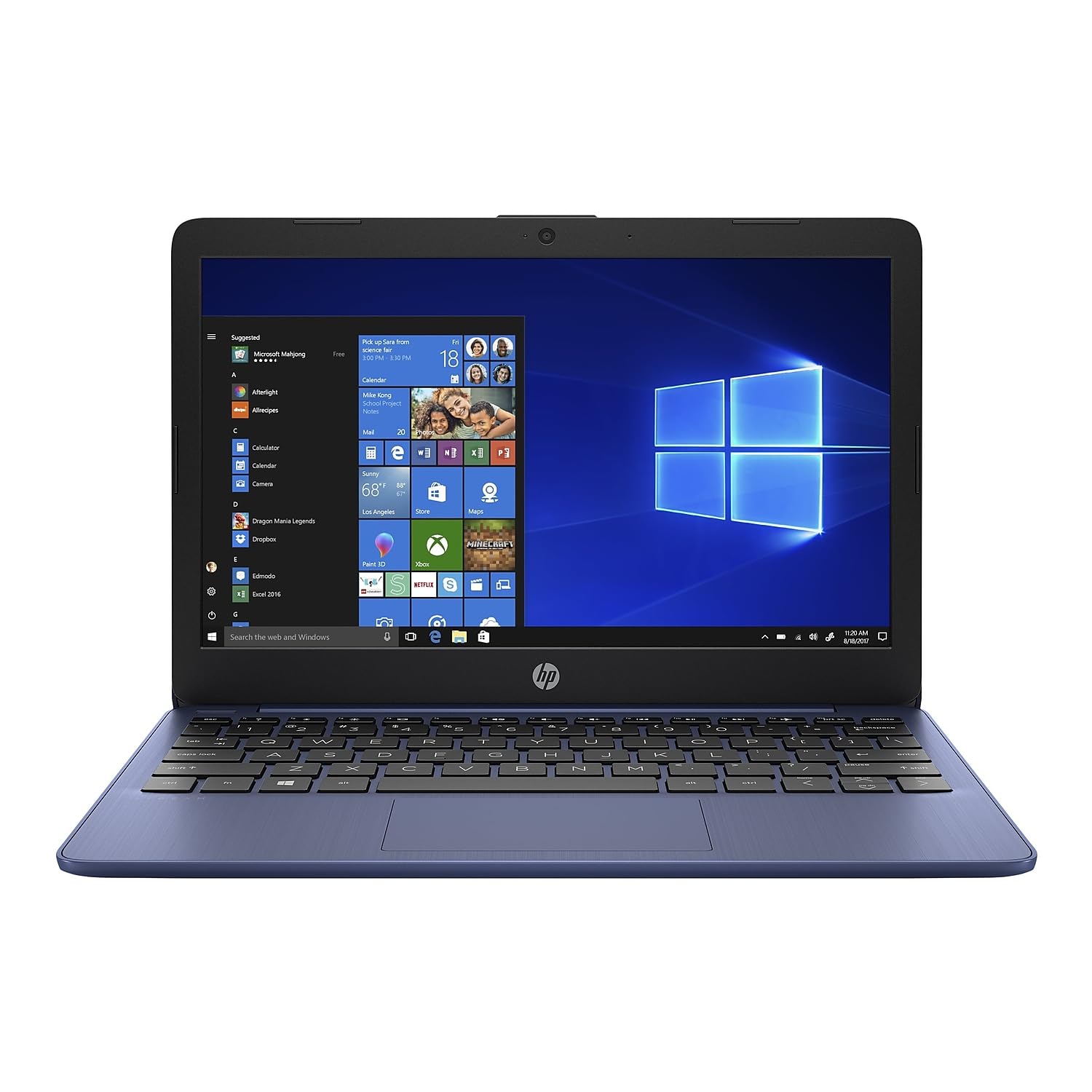
The Windows laptop that outlasts most Chromebooks on a single charge
The HP Stream 11 flips the usual script by delivering Windows 11 Home in S Mode with a battery rating of up to 13 hours and 15 minutes. That is longer than the Samsung Chromebook 4’s 12.5 hours, and it gives you a real Windows desktop for that marathon day. The dual-core Intel Celeron N4020 processor with 4GB of RAM handles everyday tasks, and the 64GB eMMC storage holds Windows 11, Microsoft 365, and your files.
Portability is a strong suit. Owners call it slim, light, and expressive, with one using it full-time for tuning a truck and praising the battery life during active use. The 1366 x 768 anti-glare display makes it easy to move from room to room or work near a window without glare. It syncs Bluetooth accessories easily with the Realtek Wi-Fi 5 and Bluetooth 5.0 combo, and it includes a 1-year Microsoft 365 subscription.
Speed is the honest weak point. Owners describe it as slow to start and note apps can feel sluggish, with some units needing a few weeks of updates before settling into reliable performance. The four-hour battery drain in standby is annoying, and the S Mode restrictions mean you are stuck with Microsoft Edge until you switch out. For a light travel or college spare, this is a solid Windows machine — just not a speed demon.
Windows endurance
- Up to 13 hours and 15 minutes of battery
- Anti-glare display for bright rooms
- 1-year Microsoft 365 subscription included
- Slim, light, and easy to carry
Honest limits
- Slow boot and occasional sluggishness
- S Mode restricts installs to Microsoft Store
- Drains battery while asleep
Pick this for: Windows users who need a full desktop OS and all-day battery without Chromebook restrictions.
Look elsewhere if: you need instant performance — the Stream 11 rewards patience more than speed.
9. ASUS Vivobook Go 12 L210

A featherweight 2.31-pound Windows machine that vanishes into a backpack
The ASUS Vivobook Go 12 L210 is the laptop for people who measure everything by carry weight. At just 2.31 pounds and 0.7 inches thin, it is one of the lightest Windows machines in this class, and owners confirm it fits easily in a backpack for travel. The 11.6-inch HD display with a 1366 x 768 resolution is bright enough for light work and web browsing.
The Intel Celeron N4020 processor with 4GB of LPDDR4 RAM runs Windows 11 in S Mode, and the 64GB eMMC flash storage holds the OS plus your essentials. A full year of Office 365 Personal is included, which is a real value for students. The port selection is generous for the size: USB 3.2 Gen 1 Type-C, USB 3.2 Gen 1 Type-A, and HDMI, so you can plug into an external monitor or projector without a dongle.
The honest reality is that this is a slow machine. Owners describe it as fine for email, Word, and Excel but mildly slow, with load times that test patience. The battery life is rated at 12 hours, but customers note it dies within hours in some cases and can stop charging. The touchpad doubles as a numpad, which causes accidental activations. This is a great travel spare for light writing, not a daily workhorse.
Ideal short-haul companion: the light weight, real keyboard, and HDMI port make it perfect for trips where you need email and documents.
Manage expectations: the Celeron processor and 64GB drive mean patience is required, and battery reports are inconsistent across units.
10. HP Chromebook x360

A 360-degree hinge and touchscreen turn this Chromebook into a tablet on demand
The HP Chromebook x360 is the flexible one, with a 360-degree hinge that lets it swing between laptop, tent, stand, and tablet modes. That flexibility makes it a hit with families — owners love folding it over for their kids to use as a tablet, and the touchscreen responds well. The 11.6-inch HD touch display has a 1366 x 768 resolution and a BrightView WLED-backlit panel.
Performance earns top marks. The Intel Celeron N3350 processor with 4GB of LPDDR4 RAM keeps things fast, with owners calling it speedy and reliable, booting in seconds. The battery is rated up to 13 hours and 45 minutes of mixed use, which is excellent for a 2-in-1. The lightweight 2.76-pound build makes it easy for a student to carry, and the white case is a clean look that owners specifically wanted.
The 32GB of eMMC storage is the primary limit, and the LPDDR4-2400 SDRAM is not upgradable, so this is a fixed-configuration machine. It comes with 100GB of two-year Google Drive cloud storage to soften the local storage squeeze. The dual USB-C charging is convenient, and the touchscreen is the reason to pick this over non-convertible models. For students and kids, this is a top choice.
Flexibility wins
- 360-degree hinge folds into a tablet
- Fast boot and reliable performance
- Up to 13 hours and 45 minutes of battery
- Responsive touchscreen
Fixed limits
- 32GB storage and non-upgradable RAM
- Chrome OS cannot run Windows apps or Fortnite
Choose this for: kids and students who want a sturdy, fast convertible that doubles as a tablet for schoolwork.
pass on it if: you need more than 32GB of storage or want to run Windows-only software.
11. Svikou 11″ Pink 2-in-1
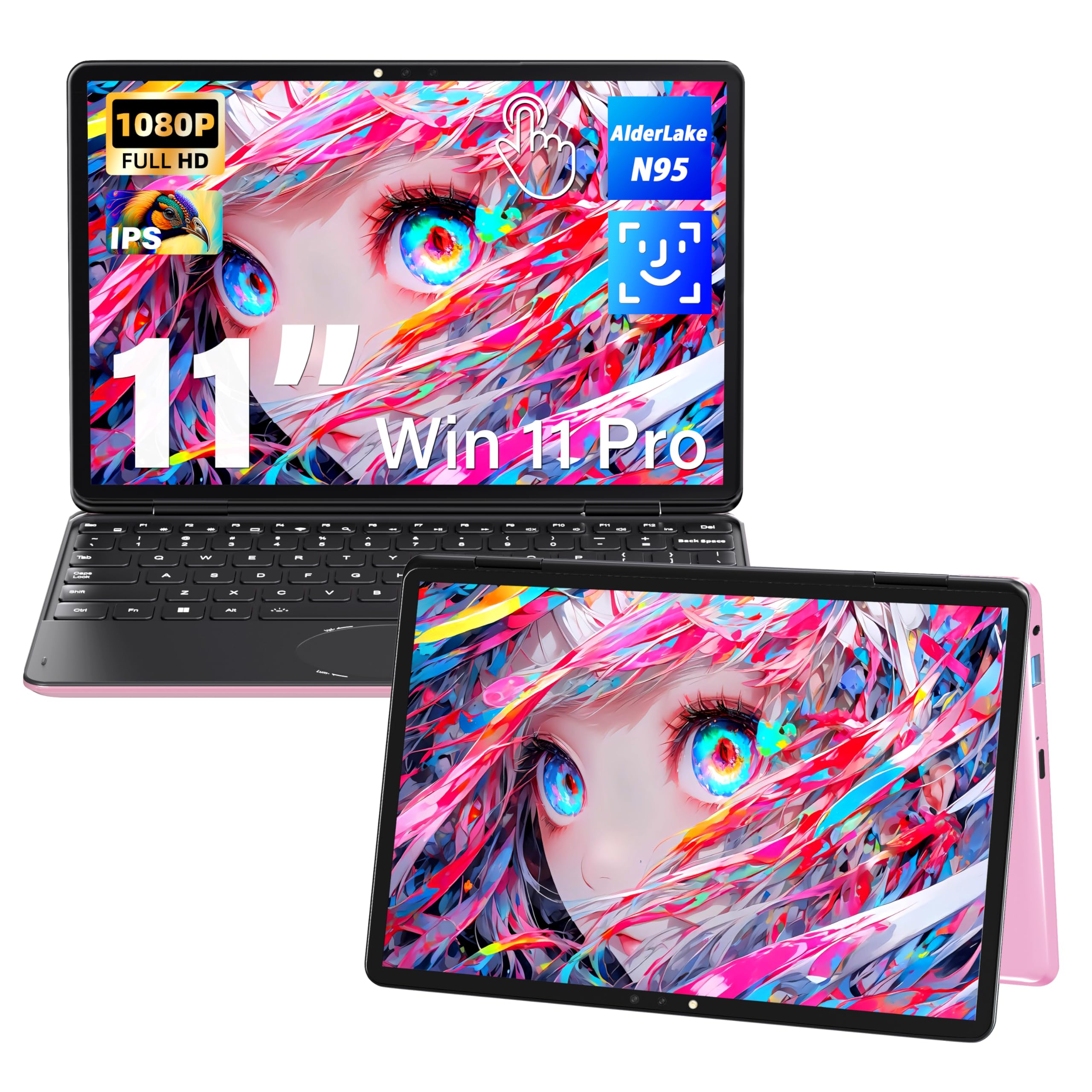
A sharp 1920×1200 IPS panel and full 360-degree flip in a pink shell
The Svikou 11-inch convertible stands out for its display. The 1920×1200 IPS screen with a 16:10 aspect ratio is noticeably sharper than the 1366 x 768 panels on most of its rivals, and it covers 100% of the sRGB color range for accurate colors. That extra vertical space makes document work and web browsing feel roomier, and the 60Hz refresh rate keeps scrolling smooth.
It runs Windows 11 Pro on a 12th-gen Intel Celeron N95 processor with 4 cores and a maximum frequency of 3.4 GHz, paired with 8GB of DDR4 RAM. Storage options go up to 256GB, 512GB, or 1TB SSD, with owners reporting configurations like 16GB RAM and 1TB SSD run smoothly. The full-size backlit keyboard with a scissor-switch mechanism is comfortable to type on, and the 2MP webcam handles video calls.
Buyers love the compact size, the crisp touchscreen, and the build quality, with one noting Windows 11 Pro runs flawlessly. The battery is the biggest complaint — one owner measured only about 1.5 hours down to 30% charge, and another found a 3500mAh battery gives roughly two hours idle. The vents sit on the bottom, which can trap heat. This is a stylish, sharp-screen machine for light tasks, but battery anxiety is real.
Sharp and stylish: the high-resolution IPS display and smooth Windows 11 Pro experience make this the best screen in the class.
Plan around power: battery life is genuinely short, so keep the charger close and treat this as a desk-adjacent machine.
Understanding the Specs
Chrome OS vs Windows 11
The operating system decides what you can run. Chrome OS is a web-first system built by Google — it boots in seconds, updates itself, resists viruses, and runs Android apps from Google Play, but it cannot install traditional Windows software. Windows 11 gives you the full desktop experience with legacy app support, but it is heavier and slower on budget hardware, especially in S Mode, which restricts installs to the Microsoft Store until you switch out. Your software needs decide the platform.
Battery life ratings
Manufacturer battery claims are optimistic because they are measured in ideal conditions with low brightness and light use. Real-world hours run 20-30% lower, especially with Wi-Fi active and brightness up. For an 11-inch travel machine, look for a claim of at least 10 hours so you survive a full day realistically. Check what reviewers point out, because a 13-hour claim can still fall short in practice.
FAQ
Can an 11-inch Chromebook replace a full laptop?
How much storage do I really need on an 11-inch laptop?
What does military-grade durability mean on these laptops?
Is a 2-in-1 touchscreen worth it on an 11-inch laptop?
How long does an 11-inch laptop battery actually last?
What is the difference between eMMC storage and an SSD?
Which is better for a student, Chrome OS or Windows?
Can I connect an 11-inch laptop to an external monitor?
Final Thoughts: The Verdict
If you want one dependable pick, the best 11 inch laptop is the Samsung Chromebook 4 because it pairs a 12.5-hour battery with military-grade durability and a virus-proof system at a crowd-pleasing price. If you want a full Windows desktop, the Dell Latitude 3190 delivers a real Windows 11 Pro experience with a 128GB SSD. And for students or kids who need a flexible, tough companion, the HP Chromebook x360 folds into a tablet with up to 13 hours and 45 minutes of battery life. Let your daily workflow pick the platform, then let the battery and build pick the model.
How We Picked
We do not accept paid placement. Every pick is matched to a real buyer and a real use-case; we do not hands-on test units.
Sources & Methodology
Specifications: manufacturer listings and product documentation. Review insights: verified customer reviews, as of August 2026. Pricing: not shown on this page (it changes often); check the current price via the retailer link.
As an Amazon Associate, Gadgets Feed earns from qualifying purchases. This does not affect which products we feature.