
Our readers keep the lights on and my morning glass full of iced black tea. As an Amazon Associate, I earn from qualifying purchases.
Specs are compiled from manufacturer listings and verified buyer reviews and can change over time — please confirm the key details on the product page before buying.
Before you buy an 1151 ITX motherboard, check which Intel processor you already own or plan to buy. These compact boards fit 6th and 7th gen Core chips, but not every model supports every CPU from the start, and a few need a BIOS update before a newer processor will even boot. This guide sorts three mini-ITX boards by what they actually do well — server duty, budget builds, and integrated Wi-Fi — so you match the board to your build, not the other way around.
I’m Min — the founder and writer behind Gadgets Feed. This guide is built by comparing the manufacturers’ published specifications and the patterns across verified customer reviews, so you get each pick’s real strengths and trade-offs instead of marketing spin.
Your 1151 itx motherboard choice hinges on three things: your CPU generation, if you need onboard Wi-Fi or ECC memory support (error-correcting memory that prevents data corruption), and how comfortable you are updating the BIOS before you can press the power button.
Our Picks at a Glance
How To Choose The Best 1151 ITX Motherboard
Mini-ITX boards measure only 170mm x 170mm, so every connector, heatsink, and M.2 slot is crammed into a tiny space. That makes compatibility the entire game — a board that fits the socket but not your case, cooler, or CPU generation creates a frustrating build day. Start by confirming your exact processor model, then work backward to the board that supports it.
Match the CPU Generation First
The LGA1151 socket appears in both 6th gen (Skylake) and 7th gen (Kaby Lake) Intel Core processors. Most boards listed here accept both, but a 7th gen CPU often needs a BIOS update first — and you can’t run that update without a 6th gen chip installed. If you’re pairing a new 7th gen processor with an older stock board, check whether it ships with a compatible BIOS or plan to borrow an older CPU for the upgrade.
Choose the Chipset That Matches Your Needs
Chipsets control which features the board can offer. The H110 chipset is the basic, budget-friendly option limited to 2133 MHz memory. The H270 adds more PCIe lanes, USB 3.1 Gen 1 with a USB Type-C port, and Intel Optane memory support. The C242 chipset on the server board steps up to ECC memory support and dual Gigabit LAN — features aimed at home labs and NAS builds rather than gaming rigs.
Decide on the Extras That Matter
The physical size of a motherboard is fixed, but the features built into that small space vary wildly across models. Onboard Wi-Fi saves you from running a cable through the house, ECC memory protects against data corruption in server workloads, and dual LAN ports enable advanced router setups like pfSense. Before you pay for any of these, ask whether your build actually uses them, because each feature adds to the price.
Quick Comparison
| Model | Best For | Chipset | Item Weight | Memory Speed | Amazon |
|---|---|---|---|---|---|
| Supermicro MBD-X11SCL-IF-O★ Best Overall | Home Lab / Server Builds | Intel C242 | 1.5 pounds | 2666 MHz | Amazon |
| ASUS H110I-PLUS | Budget Builds | Intel H110 | 1.2 pounds | 2133 MHz | Amazon |
| GIGABYTE GA-H270N-WIFI | Compact Gaming / Media Builds | Intel H270 | 1.8 pounds | 2133 MHz | Amazon |
In‑Depth Reviews
1. Supermicro MBD-X11SCL-IF-O
Our pick — over 4★ from 20+ verified ratings; the strongest balance of quality and price.
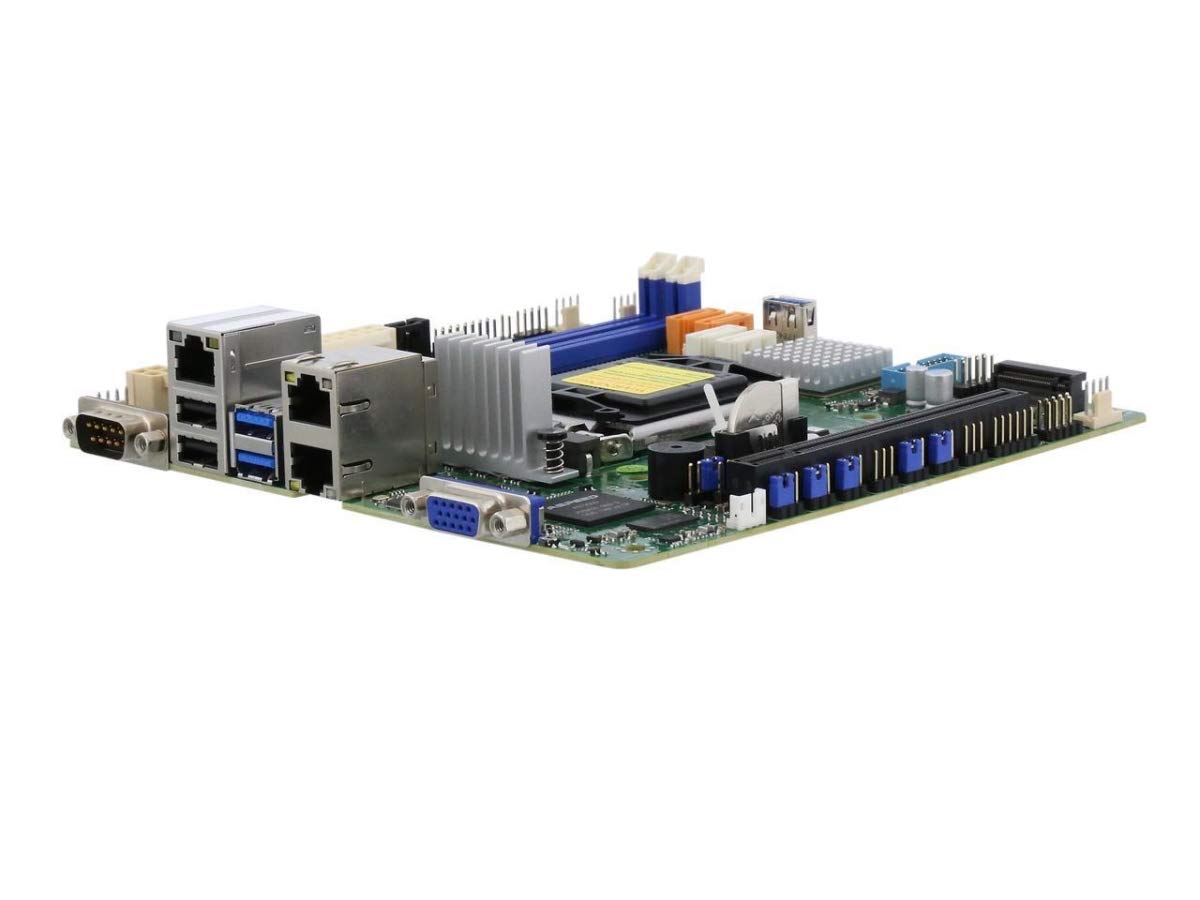
This C242 board treats your home lab like a real server, with ECC memory and remote management built into a tiny frame.
If you are building a pfSense router, a NAS, or a small virtualization host, the Supermicro X11SCL-IF is the one that speaks your language. The Intel C242 chipset open up the big differentiator here: support for up to 64GB of DDR4 2666MHz ECC UDIMM memory across two slots, which protects against data corruption in always-on workloads. It also carries dual Gigabit LAN ports with Intel i210-AT controllers, so a 7 a.m. firewall build can split traffic across two wired connections without an add-in card.
The storage side is equally serious for a board this size: four SATA3 (6Gbps) ports with RAID 0, 1, 5, and 10 support, plus an M.2 NGFF connector for a fast boot drive. Buyers report running this flawlessly for over five months in a 1U chassis with a Pentium Gold G5420, praising how quickly the web-based management interface responds. One helpful detail: it accepts non-ECC RAM too, so you are not locked into expensive server memory if your budget says otherwise.
The honest catch is that the free IPMI (a remote management controller that lets you control the board over the network) requires a license if you want full remote BIOS access. The metal shield blanks also limit the rear to one RJ45 port unless you adjust them, and the 24-pin and front-panel connectors need extension cables in certain cases. A few owners note the memory compatibility list is picky — one unit stubbornly threw an error until the right sticks were installed.
Why it earns its price
- ECC memory support at 2666 MHz for stable 24/7 server operation
- Dual Gigabit LAN with Intel i210-AT controllers for router and NAS use
- RAID 0, 1, 5, and 10 across four SATA3 ports
- Onboard graphics mean no discrete GPU needed for basic display
What you should know
- IPMI remote BIOS access needs a paid license
- Shield blanks require adjustment to expose both RJ45 ports
- Picky about memory compatibility — check the QVL list first
Reach for this if: your build is a firewall, NAS, or VM box where ECC memory and dual LAN genuinely earn their keep.
Look elsewhere if: you want a plug-and-play gaming board — the server focus shows in the licensing and connector quirks.
2. ASUS H110I-PLUS

A stripped-down, honest board that pairs perfectly with a used 6th gen Core chip for a low-cost daily driver.
The ASUS H110I-PLUS earns its spot as the budget pick because it skips extras you will never use. Built around the Intel H110 chipset, it keeps memory at 2133 MHz across two slots and leans on the 5X Protection II suite — a set of hardware safeguards like overcurrent and overvoltage protection that shields the board from everyday electrical surprises. For a media center or office PC, that is genuinely all you need.
What wins people over is the clean installation experience. The board pairs with the i3 6100 without any setup headaches — owners mention it working perfectly right from the start with that chip, with the media-acclaimed UEFI BIOS and EZ Flash 3 making firmware updates straightforward. The integrated HDMI, DVI, and VGA ports support dual monitors, so you can run a two-screen workspace straight from the motherboard’s graphics output.
The most-discussed trade-off is reliability, which earns mixed feedback. Several owners describe flawless daily operation, but a few received boards with bent socket pins or experienced systems that would not restart cleanly. There is also a real BIOS compatibility note: to use a 7th gen CPU, you first need a 6th gen chip installed to update the BIOS. The light 1.2-pound build reflects its bare-bones nature — simple, but not feature-rich.
The value argument
- 5X Protection II safeguards against power and voltage issues
- HDMI, DVI, and VGA ports give you dual-monitor support without a GPU
- UEFI BIOS with EZ Flash 3 makes firmware updates painless
- Installation is genuinely simple with 6th gen chips
Read this before buying
- 7th gen CPUs require a BIOS update using a 6th gen chip first
- Reliability feedback is mixed — a few units arrive with bent pins
- Memory capped at 2133 MHz with only two slots
Grab it when: you are building a budget HTPC or office machine around a 6th gen Core chip and want the lowest possible entry cost.
Think twice if: you already own a 7th gen CPU with no spare 6th gen chip to perform the BIOS update.
3. GIGABYTE GA-H270N-WIFI

Integrated Wi-Fi plus a USB Type-C port makes this the easiest pick for a tidy small-form-factor build.
The GIGABYTE GA-H270N-WIFI solves the messiest part of a mini-ITX build: network cables. It ships with Intel Windstorm Peak Wi-Fi built right onto the board, and buyers describe it as the best wireless they have ever experienced — no dongle, no PCIe card, no cable snaking through the living room. For a compact case like the Fractal Node 202, that is a genuine quality-of-life win, especially since the board runs flawlessly in that exact enclosure according to owners.
Under the hood, the Intel H270 chipset supports both 7th and 6th generation Core processors and adds Intel Optane memory readiness — a feature the H110 board above lacks. The ultra-fast M.2 slot runs at PCIe Gen3 x4 speeds for a snappy NVMe boot drive, while dual-channel DDR4 across two DIMMs handles up to 2133 MHz stock memory. You also get Intel USB 3.1 Gen 1 with a USB Type-C port, so modern peripherals plug straight in without an adapter.
The standout smart feature is Smart Fan 5, which uses multiple temperature sensors and hybrid fan headers to keep the system quiet under light loads and cool under gaming sessions. The catch is RAM overclocking: customers note it tops out around 2400MHz even with faster 3200MHz sticks installed. The BIOS also reads as less user-friendly than ASUS boards, lacking companion utilities like AISuite3, and the USB 3 header sits close enough to the CPU socket to limit some large coolers.
The convenience list
- Onboard Intel Windstorm Peak Wi-Fi removes the need for any add-in card
- USB 3.1 Gen 1 with a USB Type-C port for modern peripherals
- M.2 slot runs at PCIe Gen3 x4 for fast NVMe drives
- Smart Fan 5 uses multiple temperature sensors to balance noise and cooling
Where it pinches
- RAM overclocking holds at 2400MHz even with 3200MHz modules
- BIOS is less friendly than ASUS and lacks companion utilities
- USB 3 header placement can block large CPU coolers
Pick this one for: a clean gaming or media build where built-in Wi-Fi and the USB Type-C port save you real hassle.
skip it if: you plan to overclock your memory — the 2400MHz ceiling will cap your 3200MHz kits.
Understanding the Specs
Chipset and CPU Generation
The chipset is the traffic controller for everything on the board — it decides how many USB ports, SATA drives, and M.2 slots you get, and which memory speeds are allowed. On the 1151 socket, the H110 chipset is the basic entry point limited to 2133 MHz memory, while the H270 adds USB Type-C and Optane support. The C242 chipset goes further with ECC memory and dual LAN for server work. Match the chipset to the CPU generation you own, because a 7th gen processor often needs a BIOS update on an older stock board before it will boot.
RAM Support and ECC Memory
Memory speed and type matter more on a small board because you only get two DIMM slots — there is no room to add more later. Standard DDR4 at 2133 MHz or 2666 MHz covers everyday builds, but if you are building a NAS or virtualization host, ECC memory corrects single-bit data errors automatically to protect against corruption. Only the server-class C242 board here supports ECC UDIMM sticks, so decide early whether data integrity is worth the added cost and the pickier compatibility list.
FAQ
Will a 7th gen Intel CPU work in any 1151 ITX motherboard?
What is the difference between ECC and non-ECC memory?
How many RAM slots does a mini-ITX board usually have?
Does an 1151 ITX motherboard come with built-in Wi-Fi?
Can I overclock my RAM on a non-overclocking chipset board?
Is a server motherboard like the Supermicro worth it for a home build?
What does IPMI mean on the Supermicro board?
How much do these 1151 ITX motherboards weigh?
Final Thoughts: The Verdict
For most builds, the 1151 itx motherboard winner depends on what you are constructing. If your machine is a pfSense router or a NAS, the Supermicro X11SCL-IF is the clear choice with its ECC memory support and dual Gigabit LAN. If you want built-in Wi-Fi and a USB Type-C port without extra cards, grab the GIGABYTE GA-H270N-WIFI. And for the tightest budget with a 6th gen chip already in hand, the ASUS H110I-PLUS gives you a simple, dependable foundation for the least money.
How We Picked
We do not accept paid placement. Every pick is matched to a real buyer and a real use-case; we do not hands-on test units.
Sources & Methodology
Specifications: manufacturer listings and product documentation. Review insights: verified customer reviews, as of August 2026. Pricing: not shown on this page (it changes often); check the current price via the retailer link.
As an Amazon Associate, Gadgets Feed earns from qualifying purchases. This does not affect which products we feature.