
The thin aluminum frame of an 11-inch tablet offers zero forgiveness in a fall. One corner strike and the digitizer cracks, leaving you with a non-responsive screen and a repair bill that often exceeds the price of a good case. The right case absorbs that energy, not your wallet.
I’m Min — the co-founder and writer behind Gadgets Feed. I’ve spent hundreds of hours cross-referencing drop-test data, material durometers, and real-world user reports to separate the few genuinely protective 11-inch cases from the many that just look tough on the product page.
You need a case that locks the device securely, provides a reliable stand for hands-free use, and survives daily commutes or kid-induced chaos. This guide cuts through the noise to help you find the absolute best 11inch tablet case for your specific use case and budget.
How To Choose The Best 11Inch Tablet Case
An 11-inch tablet is a crossover device — part productivity tool, part media consumption hub, part kid’s gaming rig. The case must accommodate all those roles without compromising on protection or convenience.
Drop Protection vs. Bulk Trade-off
A military-grade drop rating (MIL-STD-810H) usually requires multiple layers — a hard polycarbonate shell, a soft TPU inner core, and raised bezels. This adds measurable weight and thickness. If your tablet lives on a desk, a slim folio is fine. If it travels in a bag or gets handed to a child, prioritize multi-layer construction and a weight below 500 grams.
Kickstand Mechanisms Matter More Than You Think
Three common stand types exist: magnetic multi-angle (ZUGU style), friction hinge (OtterBox style), and 360-degree rotating (SEYMAC style). Magnetic stands offer the most viewing angles and are the most secure on uneven surfaces like a lap or bed. Friction hinges wear out over time. Rotating stands add flexibility for portrait mode but often feel less stable when fully extended.
Screen Protector Integration
Cases with a built-in screen protector promise all-in-one convenience, but the plastic film they use creates a noticeable gap between your finger and the display. This makes swiping gestures (like pulling down Control Center) feel mushy and imprecise. A separate tempered glass screen protector plus a case without a built-in film is the better experience for daily use.
Quick Comparison
On smaller screens, swipe sideways to see the full table.
| Model | Category | Best For | Key Spec | Amazon |
|---|---|---|---|---|
| ZUGU Case iPad 10.9 | Magnetic Stand | Versatile daily use | 8-angle magnetic stand, 5 ft drop | Amazon |
| ZUGU Case iPad Pro 11 | Premium Slim | Pro users needing Apple Pencil 2 charging | 8-angle magnetic stand, 5 ft drop | Amazon |
| OtterBox Defender | Rugged Multi-Layer | Maximum drop/scratch protection | Multi-layer, 468g weight | Amazon |
| SUPCASE Unicorn Beetle Pro | Heavy Duty | Samsung Tab A11+ protection | Built-in screen protector, kickstand | Amazon |
| SEYMAC Stock Full-Body | Rotating Stand | Kids or hands-free work/play | 360° rotating hand strap & stand | Amazon |
| tomtoc Portfolio Sleeve | Travel Sleeve | Protecting iPad inside a bag | MIL-STD-810H, accessory compartment | Amazon |
| Apple Smart Folio | Ultra-Slim Folio | Minimalists who want Apple fitment | 0.67 inch thin, magnetic attach | Amazon |
In‑Depth Reviews
1. ZUGU Case for iPad A16 11th Generation 11 Inch (2025), 10th Gen 10.9 Inch (2022)
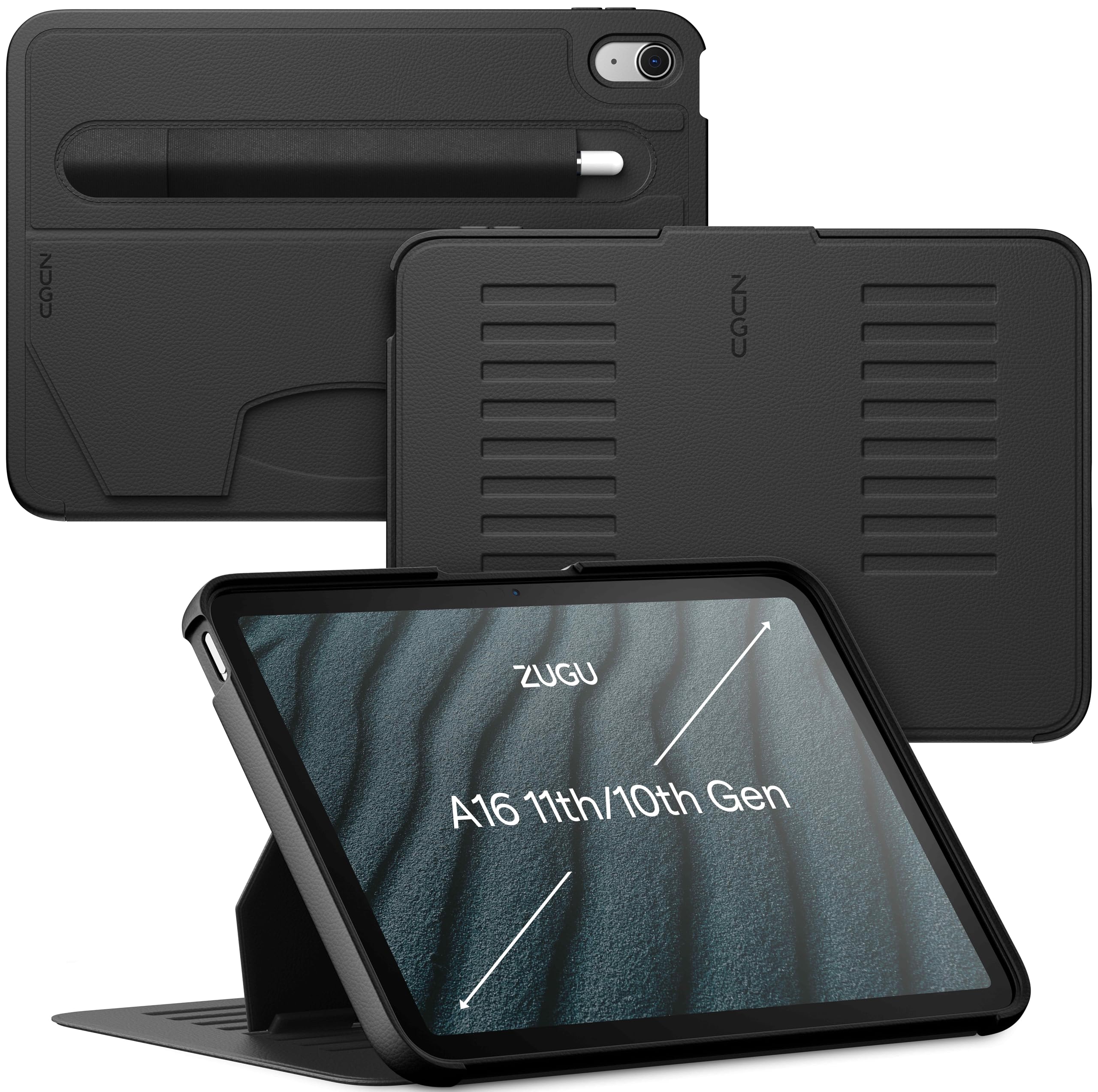
The ZUGU case earns the top spot because it solves the two biggest pain points of an 11-inch tablet case: stand stability and drop protection. Its eight-angle magnetic stand locks the tablet securely at any angle from typing to drawing, and it holds firm on uneven surfaces like a bed or couch — something friction-hinge stands simply cannot do. At 458 grams, it adds noticeable heft but not enough to feel like a brick.
The TPU frame and raised bezels deliver a 5-foot drop rating that has saved tablets in real-world falls reported by users. The built-in pencil slot holds an Apple Pencil securely without interfering with its charging, and the sleep/wake magnet is responsive every time. The 2-year warranty and free iPad repair coverage for AppleCare+ deductibles are an added trust signal most case brands avoid offering.
The only area where it falls short is the lack of a built-in screen protector — you’ll need to buy a separate tempered glass layer. But that’s actually a benefit, because the plastic film on competing cases degrades touch accuracy. Pair this with a quality screen protector and you have the best all-around experience available.
Why it’s great
- 8-angle magnetic stand is the most versatile on the market
- 5 ft drop protection with TPU corners and raised bezels
- 2-year warranty with free iPad repair coverage
Good to know
- No built-in screen protector (requires separate purchase)
- Heavier than slim folios at 458g
- Only compatible with iPad 10.9 gen 10/11, not iPad Pro models
2. ZUGU Case iPad Pro 11 Inch Case, 1st/2nd/3rd/4th Generation

This is the same ZUGU formula adapted for the iPad Pro 11 2018-2022 chassis, with one critical addition: a rear cutout that supports wireless charging for the Apple Pencil 2. The slim profile (only 0.51 inches thick) keeps the Pro feeling premium while still delivering the same 8-angle magnetic stand and 5-foot drop protection that defines the brand.
User reports confirm this case survives years of daily abuse — drops down stairs, being thrown in backpacks, and even being knocked off tables by pets. The magnets in the stand legs are strong enough to stick the entire tablet to a refrigerator or metal filing cabinet, which is a neat bonus for kitchen recipe viewing or workshop reference. The side-mounted Apple Pencil slot works without blocking charging.
The trade-off is weight: at 360 grams, it’s not the lightest option. Some users also noted that the magnets on this Pro version feel slightly weaker than the gen 9 iPad version. It’s a minor gripe for a case that otherwise nails both protection and usability in a single package.
Why it’s great
- Wireless Apple Pencil 2 charging without removing the case
- Strong fridge-mountable magnets in the stand legs
- Slim 0.51 inch profile with full drop protection
Good to know
- Magnets slightly weaker than the non-Pro ZUGU versions
- No built-in screen protector
- Not compatible with the 2024 iPad Pro 11 M4
3. OtterBox Defender Series Case for iPad Air 11-inch (M3) & (M2)

When the priority is absolute protection over everything else, the OtterBox Defender is the benchmark. Its multi-layer construction — a hard polycarbonate shell, a soft silicone outer layer, and a built-in screen protector — creates a fortress around your iPad Air 11-inch. At 468 grams, it is the heaviest case on this list, but that weight is accompanied by proven real-world drop survival.
The integrated kickstand is functional but notably flimsy compared to the magnetic solutions from ZUGU. Users report it can be difficult to snap closed and the thin plastic latch may come undone over time. The built-in screen protector also has a known warping issue that can create a gap, making button presses feel stiff. OtterBox’s warranty support is excellent, replacing defective units without hassle.
If you work in construction, spend time outdoors, or have a child who treats the tablet like a hockey puck, this case will outlast the device. But for daily home and office use, the stand limitations and added bulk make it a specialized tool rather than an everyday companion.
Why it’s great
- Proven multi-layer drop protection for extreme environments
- Port covers keep out dust and debris
- Reliable customer service and warranty support
Good to know
- Kickstand is flimsy and hard to close
- Built-in screen protector can warp over time
- Heaviest option at 468g, very bulky
4. SUPCASE for Samsung Galaxy Tab A11+ Plus Case with Stand (Unicorn Beetle Pro)
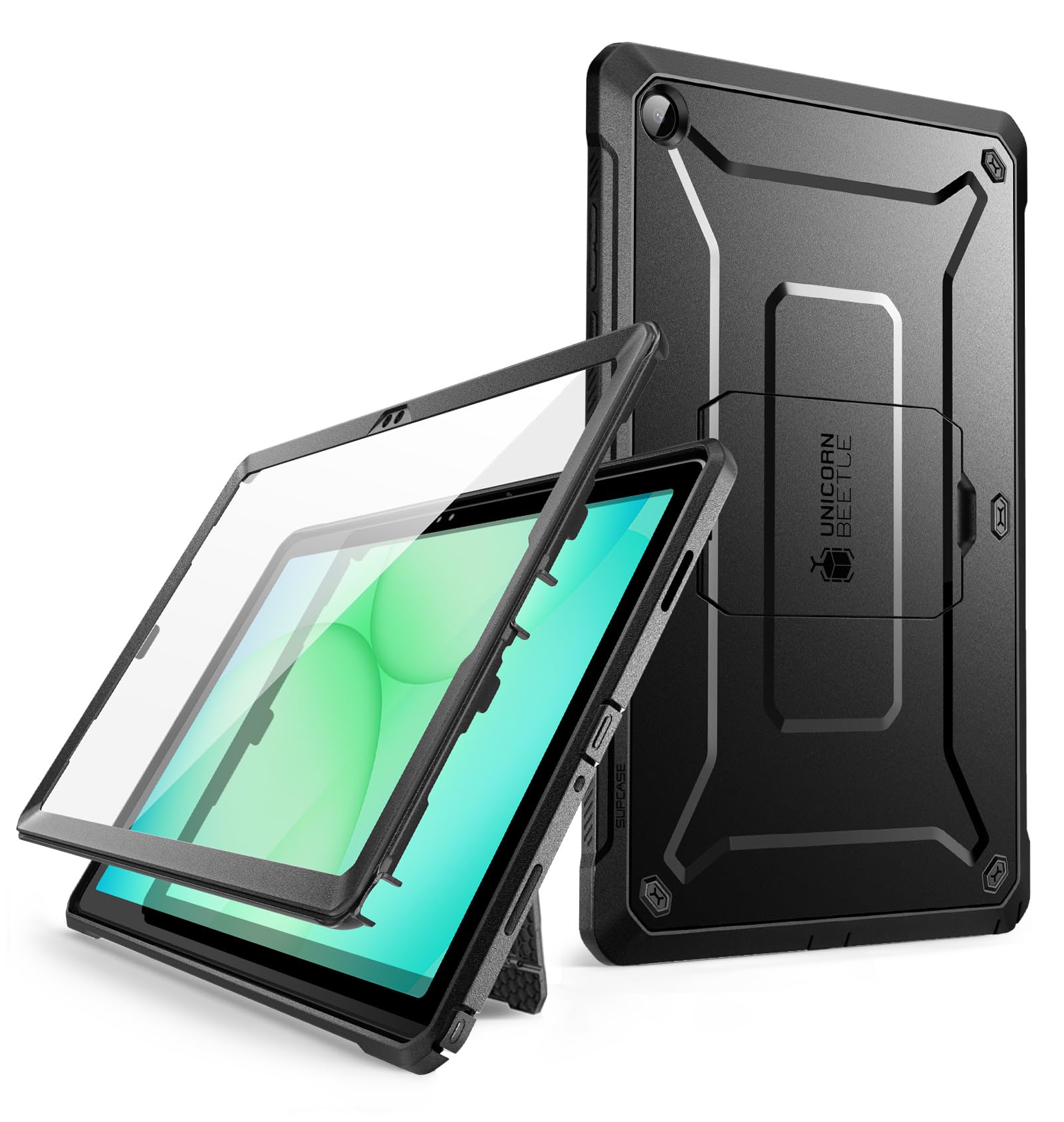
If you own a Samsung Galaxy Tab A11+ 2025, the SUPCASE Unicorn Beetle Pro is the only purpose-built rugged option available. It wraps the tablet in a shock-resistant polycarbonate and TPU dual-layer shell with a pop-out kickstand for media viewing. The built-in screen protector covers the display entirely, and the port covers keep the USB-C port and headphone jack free of pocket lint.
Real-world testing shows this case survives drops from ATV speed falls and cat-induced table knock-overs without damage to the tablet. The outer material has a soft-touch, slip-resistant texture that feels premium and stays grippy in sweaty hands. The kickstand is functional but only works in landscape orientation, which limits its use for portrait reading or document scanning.
The main weakness is the built-in screen protector, which users report can expand in heat and float away from the glass, causing a gap that makes typing less accurate. Several owners solved this by replacing the built-in film with a separate tempered glass protector. The SUPCASE warranty is responsive, with sellers replacing units with defects free of charge.
Why it’s great
- Only dedicated rugged case for Galaxy Tab A11+ 2025
- Slip-resistant outer texture is comfortable and secure
- Port covers keep out dust and debris
Good to know
- Built-in screen protector expands in heat, creating a gap
- Kickstand only supports landscape orientation
- Adds significant bulk to an already sizable tablet
5. SEYMAC Stock Case for iPad (A16) 11th/10th Generation 11″/10.9″

The SEYMAC case is designed for the specific scenario where the tablet is held for extended periods — reading recipes, watching videos while cooking, or handing to a child for road trips. Its standout feature is a 360-degree rotating hand strap that lets you grip the tablet securely with one hand, plus a kickstand that adjusts to 30°, 45°, and 60° angles for desk use.
The full-body protection includes a built-in screen protector and shock-absorbing corners that have saved multiple iPads from drops on construction sites and toddler-related accidents. Users report the case holds up well over months of daily abuse, and the included shoulder strap adds portability for outdoor use. At 360 grams, it is lighter than the OtterBox while offering similar corner protection.
The major downside is the built-in plastic screen protector, which makes pulling down the iPad’s Control Center difficult because of the raised lip. The hand strap also creates a bump on the back that prevents the case from lying flat — a minor issue for most uses, but annoying if you frequently place the tablet on a table for typing.
Why it’s great
- 360° rotating hand strap for secure one-handed grip
- Includes shoulder strap for hands-free carrying
- Lightweight at 360g despite full-body protection
Good to know
- Built-in screen protector makes swiping gestures difficult
- Hand strap prevents case from lying flat on a table
- Only compatible with iPad 10th/11th gen, not iPad Pro
6. tomtoc Portfolio Case for 11 Inch iPad Air M4, M3&M2, Pro M5, iPad (A16)

This is not a traditional snap-on case — it is a hard-shell portfolio sleeve that your iPad goes inside. It passes the MIL-STD-810H drop test, meaning the outer EVA shell can absorb impacts that would crack a screen. The interior has a microfiber lining that prevents scratches, plus an elastic divider panel and mesh pocket for storing cables, an Apple Pencil, a USB-C hub, and a small power bank.
The internal dimensions (10.82 x 7.87 inches) are generous enough to hold an iPad with a slim case or Smart Keyboard Folio already attached. This is a major advantage if you want to switch cases without buying a new sleeve. The zip closure is smooth and robust, and the carrying handle fits comfortably in hand. Users report fitting a Surface Go 2 with its own rugged case plus a Bluetooth keyboard inside.
The limitation is that this is purely a transport/storage solution — you cannot use the tablet while it is inside the sleeve. It also adds 580 grams of weight before you even put the iPad in, making it a heavier carry option. If your workflow involves docked or keyboard-based typing, this sleeve works great as a bag insert but not as a daily-use cover.
Why it’s great
- Passes MIL-STD-810H drop test for serious protection
- Holds iPad with case or keyboard folio already installed
- Ample accessory storage for cables, pencil, and hub
Good to know
- Cannot use the tablet while it is inside the sleeve
- Heavy at 580g before adding the iPad
- Power adapters may not fit in the accessory pocket
7. Apple Smart Folio for iPad Air 11-inch (M2, M3, and M4) – Light Violet

The Apple Smart Folio is the thinnest, lightest option on this list and the only one designed and built by Apple specifically for the iPad Air 11-inch (M2, M3, M4). It attaches magnetically to the iPad’s back, automatically wakes the device when opened, and puts it to sleep when closed. The new sliding design adds adjustability for different viewing angles, making video calls and media consumption more comfortable.
The fit is perfect — it aligns with every button, port, and camera module precisely. The polyurethane material feels premium and resists fingerprints. For users who carry their iPad in a bag and only need scratch protection rather than drop protection, this folio is the most elegant solution available. The magnetic attachment is strong enough to hold the iPad securely through normal use.
There is no getting around the fact that this case leaves the sides of the iPad completely exposed. One drop on a corner and the aluminum frame will dent and the screen may shatter. The lack of a kickstand means you are limited to the reduced-angle typing position and a single media mode. For a device this expensive, the Smart Folio is a scratch guard, not a protective case.
Why it’s great
- Ultra-thin and lightweight — barely adds bulk
- Perfect magnetic fit and reliable sleep/wake function
- Premium build quality and material feel
Good to know
- No side protection whatsoever — not drop-safe
- Only two stand positions, limited adjustability
- Expensive for what is essentially a front and back cover
FAQ
Can a case with a built-in screen protector work with a separate tempered glass layer underneath?
Will a case for iPad 10.9 inch work on an iPad Pro 11 inch?
How do I clean a TPU case without causing yellowing?
Final Thoughts: The Verdict
For most users, the best 11inch tablet case winner is the ZUGU Case for iPad 10.9 because it combines real 5-foot drop protection with the most versatile magnetic stand system available. If you need Apple Pencil 2 wireless charging and a slimmer profile, grab the ZUGU Case iPad Pro 11. And for absolute maximum protection in extreme environments, nothing beats the OtterBox Defender Series.