
Locking down a graphics card with 12GB of video memory used to be a simple performance tier, but the current market splits across Intel, NVIDIA, and AMD architectures with wildly different strengths. Whether you are chasing high-refresh 1440p gaming, AI-assisted creative workflows, or a future-proof upgrade path, the choice between GDDR6 and GDDR7 memory, PCIe 4.0 versus 5.0 support, and varying core counts demands a clear breakdown of what each 12GB-class card actually delivers in real-world applications.
I’m Min — the co-founder and writer behind Gadgets Feed. I have spent hundreds of hours dissecting GPU specifications, cross-referencing benchmark data, and analyzing driver maturity across every 12GB SKU on the market to bring you a guide that cuts through the marketing noise.
If you are serious about upgrading your rig, my curated analysis of the best 12 gb graphics card for your specific build and budget will save you hours of research and ensure you get the right balance of raw performance, thermals, and long-term value.
How To Choose The Best 12 GB Graphics Card
Not all 12GB frames are created equal. A mid-range 12GB card from one generation can be outperformed by a newer 12GB card with faster memory and a wider bus. You must weigh three core pillars: the memory subsystem (type, bus width, bandwidth), the architecture and its feature set (upscaling tech, ray tracing cores), and the physical compatibility with your case and power supply.
Memory Architecture: GDDR6, GDDR7, and Bus Width
The 12GB capacity alone is not the story. A card with GDDR7 memory and a 192-bit bus, like the RTX 5070 series, can deliver up to 672 GB/s bandwidth — a massive leap over older GDDR6 12GB cards that top out around 504 GB/s. Wider buses (256-bit or 384-bit) allow the GPU to access its 12GB frame buffer faster, directly impacting texture loading and high-resolution gaming. If you play at 1440p with texture-heavy mods or creative apps, prioritize bandwidth over raw clock speed.
Architecture Generation and Feature Lock-In
An entry-level 12GB card from the previous generation (e.g., RTX 3060) lacks dedicated hardware for modern upscaling like DLSS 4 or Intel XeSS 2. You are paying for VRAM capacity but missing the AI accelerators that future-proof performance. Newer architectures — NVIDIA Blackwell, Intel Xe2-HPG, and AMD RDNA 4 — include dedicated tensor or matrix cores that boost frame rates significantly in supported titles. If you intend to keep the card for three-plus years, skip older 12GB models and target the latest generation.
Physical Fit and Power Delivery
Graphics cards with 12GB of VRAM span from compact dual-fan 8-inch designs to massive triple-fan 12-inch monsters. Always measure your case clearance, especially depth. Similarly, power requirements vary widely: some 12GB cards pull as little as 150W under load (Intel Arc B580) while premium 12GB models like the RTX 3090 can exceed 350W. Check your PSU’s wattage and available PCIe power cables — newer cards use a 12VHPWR 16-pin connector that may require an adapter or a fresh PSU.
Quick Comparison
On smaller screens, swipe sideways to see the full table.
| Model | Category | Best For | Key Spec | Amazon |
|---|---|---|---|---|
| ASUS Prime RTX 5070 | Premium | SFF 1440p Gaming | 12GB GDDR7, 192-bit | Amazon |
| MSI RTX 5070 Gaming Trio OC | Premium | Quiet High-Performance | 12GB GDDR7, 2625 MHz | Amazon |
| PNY RTX 5070 Epic-X ARGB OC | Premium | Blackwell + DLSS 4 | 12GB GDDR7, PCIe 5.0 | Amazon |
| Gigabyte RTX 5070 WINDFORCE OC | Mid-Range | Budget RTX 50 Series | 12GB GDDR7, 192-bit | Amazon |
| Sparkle Intel Arc B580 Titan OC | Mid-Range | Silent 1440p Value | 12GB GDDR6, 2760 MHz | Amazon |
| ASRock Intel Arc B580 Challenger OC | Mid-Range | Budget-First Upgrade | 12GB GDDR6, DP 2.1 | Amazon |
| Gigabyte RX 9070 XT Gaming OC 16G | Premium | High-FPS 4K Raster | 16GB GDDR6, 256-bit | Amazon |
| ASUS Prime RX 9070 XT OC | Premium | Linux / Creator | 16GB GDDR6, PCIe 5.0 | Amazon |
| Sapphire Nitro+ RX 9070 XT OC | Premium | Aesthetic 4K Build | 16GB GDDR6, 256-bit | Amazon |
| Sapphire Nitro+ RX 7900 XTX | High-End | Multi-Monitor / AI | 24GB GDDR6, 384-bit | Amazon |
| NVIDIA RTX 3090 FE | Enthusiast | 6K Video / Legacy | 24GB GDDR6X, 384-bit | Amazon |
In‑Depth Reviews
1. ASUS SFF-Ready Prime NVIDIA GeForce RTX 5070 Graphics Card

The ASUS Prime RTX 5070 hits the sweet spot for 1440p competitive gamers who want the latest Blackwell architecture in a compact package. Its 2542 MHz core clock coupled with 12GB of blistering-fast GDDR7 memory on a 192-bit bus delivers up to 672 GB/s bandwidth — a 33% improvement over the previous generation. The 2.5-slot, SFF-Ready design is a gift for builders who want a powerful card that fits in smaller cases without sacrificing thermal performance.
Phase-change GPU thermal pads ensure the chip stays under 67°C under full load, while the Dual BIOS lets you switch between quiet operation and maximum performance. Real-world results from verified buyers show it pairing perfectly with a 7800X3D for 1440p competitive titles, pulling off a 10% overclock boost (+300 core, +1500 VRAM) with ease. The card’s jet-black, minimalist aesthetic integrates seamlessly into any dark-themed build.
For creators, the dedicated AI-accelerated cores in the Blackwell architecture handle CAD rendering and studio workloads without breaking a sweat. Verified users note it runs quiet and cool even during extended rendering sessions. The only upfront consideration is the 16-pin power connector — ensure your PSU is compatible or plan for an adapter cable.
Why it’s great
- Compact SFF-Ready 2.5-slot design fits most cases
- GDDR7 memory provides massive bandwidth uplift
- Dual BIOS with quiet mode for low-noise gaming
- Strong overclocking headroom (+10%)
Good to know
- Requires a 16-pin 12VHPWR power connector
- Runs warm (60-67°C) at stock; case airflow matters
2. MSI RTX 5070 12G Gaming Trio OC Graphics Card

The MSI Gaming Trio OC stakes its claim as the premium 12GB GDDR7 card for users who demand the best thermals and quietest operation. The Tri Frozr 4 thermal design with STORMFORCE fans — seven blades with claw texturing — delivers superior airflow at minimal noise levels. A nickel-plated copper baseplate and square-shaped core pipes maximize heat transfer from the GPU die and memory modules, keeping the 2625 MHz boost clock stable under extended loads.
Real-world performance hits 1440p high-settings gaming with ease, and verified users report smooth 4K experiences in many titles without needing DLSS upscaling. The build quality is palpable — the card feels substantial in hand, and the fitment in a standard mid-tower is straightforward. Buyers pairing it with a Ryzen 5 and 32GB of RAM are seeing exceptional frame rates across the board.
MSI includes DLSS 4 support out of the box, giving you the latest neural rendering tech for frame generation and image quality improvements. The card also comes with an 8-pin to 16-pin adapter, though using the PSU’s native 16-pin cable is recommended for the cleanest power delivery. This is the card for the builder who prioritizes silence and longevity over absolute lowest cost.
Why it’s great
- Tri Frozr 4 cooling is exceptionally quiet under load
- Premium metal construction with reinforced backplate
- Quad-DisplayPort 2.1a and HDMI 2.1b outputs
- Ready for 4K gaming without upscaling in many titles
Good to know
- Larger 3-slot size may not fit compact cases
- Requires at least a 750W PSU with 16-pin support
3. PNY NVIDIA GeForce RTX 5070 Epic-X ARGB OC Triple Fan

PNY’s RTX 5070 Epic-X ARGB OC brings the full Blackwell feature set — including all 80 ROPs and full PCIe 5.0 support — to a triple-fan design that runs cooler than many dual-fan competitors. The 2685 MHz boost clock and 12GB GDDR7 memory on a 192-bit bus deliver frame rates that beat the RTX 4070 Super in raw FPS benchmarks, as verified by multiple buyers. The card’s ARGB lighting adds a subtle flair to the build without being overbearing.
Thermal performance is a standout: users report the triple-fan array keeps case temperatures lower overall, and the card remains whisper-quiet under maximum load. The 8% factory overclock provides immediate headroom, and overclockers have extra room to push further. The physical footprint is surprisingly small for a triple-fan card, fitting easily into mini tower cases — making it a rare “small powerhouse” in the RTX 5070 lineup.
NVIDIA Reflex and DLSS 4 are fully integrated, making the Epic-X a top pick for competitive shooters where reduced system latency is critical. The card includes a 16-pin to dual 8-pin adapter, so it is compatible with most 750W fully modular PSUs. Just confirm your case clearance before purchase — the 2.4-slot width is reasonable but the length can vary.
Why it’s great
- Outperforms RTX 4070 Super in raw FPS
- Excellent thermals keep overall case temps low
- Small footprint fits mini tower builds
- 8% factory OC with extra headroom
Good to know
- ARGB lighting may not appeal to minimalist builders
- Requires 16-pin to 2×8-pin adapter or native cable
4. Gigabyte GeForce RTX 5070 WINDFORCE OC SFF 12G

The Gigabyte WINDFORCE OC is the most accessible entry point into the RTX 5070 family without sacrificing the core Blackwell experience. It still packs 12GB of GDDR7 memory on the full 192-bit bus, but uses a slightly lower 2542 MHz core clock to keep costs down. The WINDFORCE cooling system with three fans is proven effective, with one verified user reporting 300 FPS in Cyberpunk 2077 at max graphics and path tracing — a staggering result for a mid-range SKU.
The card is labeled “SFF-Ready,” meaning it can fit into small-form-factor cases that accept full-height cards. Builders appreciate the reinforced structure and metal backplate that prevent PCB flex and sag. The bundled adapter works fine, though experienced users recommend ditching it for the PSU’s native 16-pin cable for the most stable signal.
One minor confusion reported by a buyer involves the memory interface — advertised as 256-bit in some listings but physically confirmed as 192-bit (matching the GDDR7 standard for RTX 5070). This is a listing discrepancy, not a hardware issue. If you want the lowest-cost path to a 12GB GDDR7 card that still supports DLSS 4 and great 1440p frame rates, this is your pick.
Why it’s great
- Lowest-price RTX 5070 with full GDDR7 benefits
- SFF-Ready with reinforced backplate
- Excellent 1440p and Cyberpunk path tracing performance
- Quiet operation under 99% utilization
Good to know
- 192-bit bus may be mislabeled in some listings
- Requires at least 750W PSU
5. Sparkle Intel Arc B580 Titan OC, 12GB GDDR6
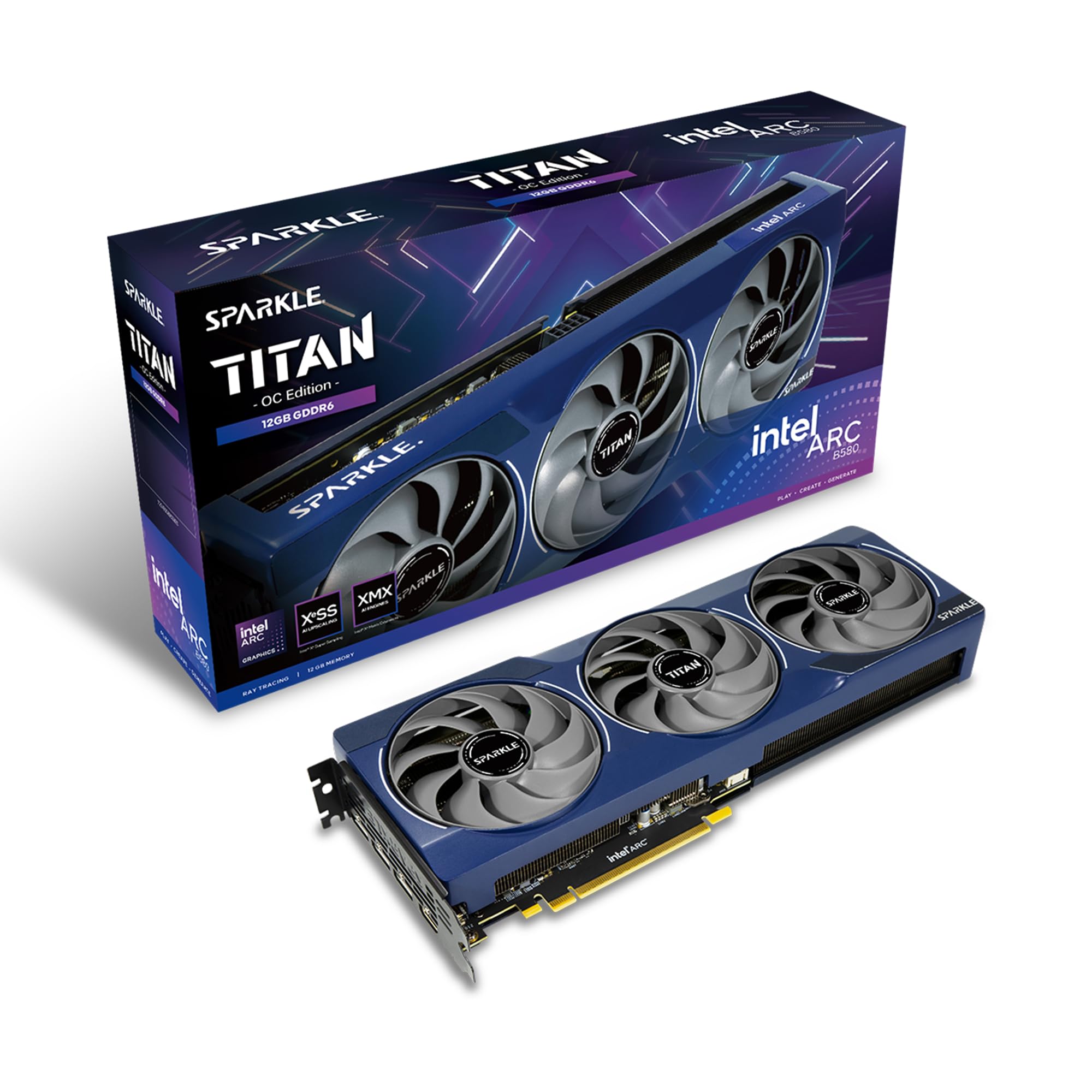
The Sparkle Intel Arc B580 Titan OC is a mid-range 12GB GDDR6 card that punches above its weight class for 1440p gaming, especially in titles that utilize Intel’s XeSS 2 upscaling. The Torn Cooling 2.0 system with an axial fan keeps acoustics impressively low — verified users note it runs cool and quiet even under sustained load. The 2760 MHz factory boost clock is aggressive for this tier, and the blue breathing light adds a subtle glow without RGB overload.
Where this card truly shines is as a replacement for aging RTX 3070 or GTX 1080 Ti units. Buyers report excellent 1440p performance with smooth framerates across a wide library of games. The metal backplate and included sag bracket ensure the PCB stays protected in any orientation. It is also a strong option for Linux users (Fedora, Arch) where Intel’s open-source drivers are well-supported.
Two compromises: VR support is not functional according to verified buyers, and the drivers are still maturing — requiring Resizable BAR (ReBAR) enabled on a 10th-gen Intel or equivalent AMD CPU for peak performance. Without ReBAR, the card underperforms significantly. Keep drivers updated to extract the full value, and you get a quiet, capable 12GB card for less than most NVIDIA alternatives.
Why it’s great
- Excellent 1440p performance for the price
- Very quiet operation with Torn Cooling 2.0
- Includes anti-sag bracket and metal backplate
- Strong Linux support through open-source drivers
Good to know
- VR not currently supported
- Requires ReBAR for full performance; drivers still maturing
6. ASRock Intel Arc B580 Challenger 12GB OC

The ASRock Intel Arc B580 Challenger OC is the most affordable way to get 12GB of VRAM in a modern architecture today, powered by Intel’s Xe2-HPG with 20 Xe cores. The 2740 MHz GPU clock and 19 Gbps memory clock deliver solid 1080p performance — 120+ FPS on higher settings — and respectable 1440p gaming for the price point. The dual-fan design with 0dB Silent Technology stops fans completely under light loads for truly silent desk operation.
Verified buyers praise its low power draw: under 150W at full load, making it a drop-in upgrade for systems with modest 650W PSUs. The compact 249mm length fits nearly any case, and the DisplayPort 2.1 outputs (one up to UHBR13.5) and HDMI 2.1a support 8K displays. It is also a surprisingly good card for sports training footage analysis, handling high bit-rates without dropping frames.
The main caveat is the driver ecosystem: without ReBAR enabled on a compatible CPU, the card’s performance plummets. Some early buyers found driver installation “a nightmare” with outdated software, though recent updates have stabilized the experience significantly. For a budget upgrade from an older 6GB or 8GB card, this offers genuine generational leaps in VRAM capacity and feature support.
Why it’s great
- Lowest-cost 12GB card with modern architecture
- Very low power draw (<150W) — ideal for budget PSUs
- Compact dual-fan design fits most cases
- DP 2.1 and HDMI 2.1a for 8K display support
Good to know
- Requires ReBAR for optimal performance
- Drivers less mature than NVIDIA or AMD alternatives
7. Gigabyte Radeon RX 9070 XT Gaming OC 16G

While this card carries 16GB rather than 12GB, the Gigabyte RX 9070 XT Gaming OC belongs in this discussion as the premier AMD option for users who need more VRAM than the 12GB threshold. The 256-bit bus paired with 16GB of GDDR6 memory provides a bandwidth buffer that directly benefits 4K texture-heavy titles and creative applications. The WINDFORCE cooling system with RGB lighting and a Dual BIOS (Performance or Quiet) lets you tailor the card to your thermal and noise priorities.
Real-world testing shows this card handles 4K at 100+ FPS in demanding titles when paired with an AMD 9 9900X. Verified buyers praise the vivid image quality and excellent frame pacing. The reinforced structure and metal backplate add rigidity, and the card uses standard 8-pin power connectors — no 16-pin adapter headaches. It is a plug-and-play upgrade for existing AMD builds.
One known quirk: the default fan curve on the Performance BIOS spins fans up to 2800 RPM, which can produce audible noise. Users report that capping the maximum fan speed to 60% and applying a slight undervolt (-35mV) reduces noise significantly while losing only 50 MHz of boost clock. This minor tuning unlocks a great mix of silence and performance.
Why it’s great
- 16GB VRAM with 256-bit bus for 4K gaming
- Smooth 100+ FPS at 4K with modern CPUs
- Dual BIOS for quiet or performance tuning
- Standard 8-pin connectors, easy PSU compatibility
Good to know
- Default fan curve can be loud at 2800 RPM
- Requires manual tuning for optimal noise/performance balance
8. ASUS Prime AMD Radeon RX 9070 XT 16GB GDDR6 OC Edition

The ASUS Prime RX 9070 XT OC Edition is a high-end 16GB card with a PCIe 5.0 interface designed for the creator who needs reliable performance under sustained loads. The Axial-tech fans with dual-ball bearings last up to twice as long as sleeve bearing designs, and the 0dB technology stops fans entirely during light gaming or idle desktop use. The phase-change GPU thermal pad ensures optimal heat transfer, keeping temperatures between 55-59°C under stress — exceptional thermal performance for this tier.
Power consumption hovers around 180-190W under full load, which is remarkably efficient for a high-end card. Verified users report it works perfectly out of the box on Linux (Xubuntu 22.04 and Fedora), which is a major plus for the open-source community. The 2.5-slot design is friendly for most mid-tower cases, and the lack of RGB on the Prime line appeals to stealth-build enthusiasts.
Creative professionals will appreciate the 16GB of VRAM for large 3D scenes and video editing timelines. The three PCIe power connectors (8-pin) provide ample headroom. Just be aware that maintaining 1440p 240Hz or 4K 144Hz at max settings in modern AAA titles may require turning down a few detail levels — this is a trend across all GPUs at this class.
Why it’s great
- Excellent Linux support (Xubuntu, Fedora)
- Low power draw (~180-190W) for high performance
- Dual-ball bearing fans for long lifespan
- Phase-change thermal pad keeps temps low
Good to know
- May not sustain 1440p 240Hz at max settings in AAA titles
- Requires 3 PCIe 8-pin connectors
9. Sapphire Nitro+ AMD Radeon RX 9070 XT Gaming OC 16GB

Sapphire’s Nitro+ line has long been the gold standard for AMD GPU aesthetics and cooling, and the RX 9070 XT OC continues that legacy. The card runs all games at maxed settings without breaking a sweat, and verified users report outstanding fan performance — quiet even under sustained gaming sessions. The 16GB of GDDR6 memory on a 256-bit bus provides enough bandwidth for 4K gaming and creative workloads.
The Nitro+ design language is unmistakable: a sleek, angular shroud with customizable ARGB lighting that looks premium in any build. The included monitoring and performance optimization software gives you granular control over fan curves, clock speeds, and voltage. Buyers note that even without any tuning, the card delivers “good statistics on the board” right out of the box. It is an easy recommendation for builders who care about the visual coherence of their rig.
For the highest-end 4K gaming with ray tracing and maximum settings, the Nitro+ delivers a smooth experience. The vapor chamber cooler helps keep temperatures in check, though it is worth noting this card runs relatively cool compared to competing designs. The only downside is the price premium over the base RX 9070 XT, but the build quality and thermal performance justify the extra cost.
Why it’s great
- Excellent 4K gaming with all settings maxed
- Very quiet fans even under load
- Customizable ARGB with premium aesthetic
- Vapor chamber cooling for stable temps
Good to know
- Premium price over reference RX 9070 XT
- Larger size requires spacious case
10. Sapphire 11322-01-40G Nitro+ AMD Radeon RX 7900 XTX Vapor-X

The Sapphire Nitro+ RX 7900 XTX Vapor-X is the ultimate 4K gaming and AI training powerhouse, with 24GB of GDDR6 memory on a 384-bit bus providing 960 GB/s of bandwidth. This card is built for enthusiasts who max out AAA titles at native 4K resolutions without compromise. The Vapor-X cooling system — a vapor chamber paired with a massive heatsink — keeps GPU temperatures under 60°C while the fans stay very quiet, even during sustained loads.
Verified users report it is an excellent upgrade from RTX 3080 12GB cards for triple-monitor setups (7680×1440), averaging 120-160 FPS at native resolution. The card also includes premium features like a fuse protection circuit, an anti-sag bracket, and Sapphire’s fan quick-connect system for easy cleaning. For AI training workloads, the 24GB frame buffer is a massive advantage over 12GB cards, allowing larger batch sizes without VRAM overflow.
The main trade-off is power delivery: a 1000W PSU is strongly recommended for stability at high resolutions, and the 3.5-slot form factor demands a roomy case. There is no risk of melting connectors thanks to the standard 8-pin power inputs, though. If you need maximum VRAM for AI/creative tasks and want superior rasterization performance over the RTX 4080, this is your card.
Why it’s great
- 24GB GDDR6 with 384-bit bus for massive bandwidth
- Vapor-X cooling keeps temps under 60°C
- Fuse protection and anti-sag bracket included
- Excellent price-to-performance vs RTX 4080
Good to know
- Requires 1000W PSU for stable 4K performance
- 3.5-slot size limits case compatibility
11. nVidia GeForce RTX 3090 Founders Edition

The NVIDIA RTX 3090 Founders Edition remains a legendary card in the 12GB+ VRAM discussion, boasting 24GB of GDDR6X memory on a 384-bit bus for professional-grade workloads. It was designed for “8K gaming” and creative use, with verified buyers reporting laughable rendering speeds: a 6K video in DaVinci Resolve that previously took 20-30 minutes on CPU now renders in 4 minutes with real-time playback. For video editors and 3D artists, the 3090 is still a capable workhorse.
For gaming, the 3090 delivers huge performance gains over the RTX 2080 Ti, enabling smoother frame rates and higher quality settings across the board. The triple DisplayPort 1.4a and single HDMI 2.1 outputs support high-resolution displays and multi-monitor setups. The card also supports NVIDIA’s ecosystem, including CUDA acceleration for AI and machine learning tasks.
Critical warnings: this is an older generation card (Ampere architecture) from 2020. It does not support DLSS 4 or the latest ray tracing improvements found in Blackwell or RDNA 4 cards. Additionally, the used market is full of cards that may have been mined on, leading to degraded thermal performance. Buy from trusted sellers only. If you find a good deal and primarily do creative work that benefits from 24GB VRAM, it still holds value.
Why it’s great
- 24GB GDDR6X with 384-bit bus unmatched for creative VRAM needs
- Exceptional video rendering performance
- CUDA ecosystem for AI and machine learning
- Excellent multi-monitor support
Good to know
- Old Ampere architecture; no DLSS 4 support
- Used market risk: previously mined cards may have degraded performance
FAQ
Is 12GB of VRAM enough for 1440p gaming in 2025 and beyond?
Does GDDR7 memory make a big difference over GDDR6 for 12GB cards?
Do I need PCIe 5.0 for a 12GB graphics card to work properly?
Final Thoughts: The Verdict
For most users, the best 12 gb graphics card winner is the ASUS Prime RTX 5070 because it combines the essential GDDR7 memory upgrade, SFF-friendly dimensions, and excellent 1440p gaming performance in one balanced package. If you want the quietest operation and premium thermals, grab the MSI RTX 5070 Gaming Trio OC. And for the tightest budget that still gets you 12GB of modern VRAM, nothing beats the value of the ASRock Intel Arc B580 Challenger OC.