
The problem with most laptops is that they force you to choose between raw portability and actual computing power. A 15-inch screen is great for a desk but a burden in a backpack, while an 11-inch chassis often squeezes in a cramped keyboard and a low-resolution display that strains your eyes after an hour. A true 12-inch laptop splits that difference with a screen that delivers a comfortable viewing area inside a frame that slips into any bag, but the market is flooded with underpowered Chromebooks and decade-old refurbished units that can barely handle a modern browser.
I’m Min — the co-founder and writer behind Gadgets Feed. This guide is the result of many hours spent cross-referencing processor benchmarks, display resolutions, RAM and storage configurations, battery capacities, and real-world user feedback across eleven different models to separate the genuinely capable 12-inch machines from the ones that will frustrate you within a month.
Whether you need a rugged field unit, a lightweight student companion, or a convertible tablet that docks into a workstation, this breakdown will match you with the right best 12 inch laptop for your specific workflow and budget.
How To Choose The Best 12 Inch Laptop
A 12-inch laptop is a compromise by design, so you need to be deliberate about which spec you are willing to sacrifice and which one you cannot live without. The three factors below will make or break your daily experience.
Processor and RAM — The Real Performance Ceiling
In a 12-inch chassis, thermal constraints mean you won’t find desktop-class CPUs. However, the difference between an Intel Celeron N4000 and an Intel N100 or a Snapdragon X Plus is night and day. The Celeron will stutter with more than five browser tabs, while the N100 handles light Office work and streaming without complaints. RAM is equally critical: 4GB is a hard floor that will cause slowdowns in Windows 11, while 8GB is the practical minimum for moderate multitasking. Aim for 12GB or 16GB if your workflow includes video calls, multiple documents, and a dozen browser tabs simultaneously.
Storage Type — eMMC vs NVMe SSD
Budget-friendly 12-inch laptops often ship with 32GB or 64GB of eMMC storage. This is soldered flash memory that is significantly slower than a proper SSD. After Windows updates and a few applications, that 32GB fills up fast, and the system will crawl. An NVMe SSD (256GB or 512GB) delivers read speeds that are 10x faster, making boot times, app launches, and file transfers feel instant. If the listing says “eMMC,” expect to rely heavily on cloud storage or an external drive.
Display Resolution and Build Quality
The 12-inch screen size is small enough that a 1366×768 resolution will look visibly pixelated for text and web browsing. A 1920×1080 (Full HD) or higher resolution like 2000×1200 or 2304×1440 makes a massive difference in clarity. Also inspect the build: a plastic hinge on a 2-in-1 convertible will loosen over time, while a metal chassis with a 360-degree hinge holds up to daily flipping. If you work outdoors or in bright coffee shops, prioritize a matte or anti-reflective display treatment and at least 300 nits of brightness.
Quick Comparison
On smaller screens, swipe sideways to see the full table.
| Model | Category | Best For | Key Spec | Amazon |
|---|---|---|---|---|
| Microsoft Surface Pro 12” | Premium 2-in-1 | Professional multitasking + AI | Snapdragon X Plus / 16GB RAM | Amazon |
| Panasonic Toughbook CF-33 | Fully Rugged | Fieldwork & harsh environments | IP65 / 1200 nit display | Amazon |
| QAZIPO 2-in-1 12” | Value 2-in-1 | Students & light office work | 12GB RAM / 1-Year Office 365 | Amazon |
| Jumper EZpad V12Pro | Convertible Tablet | Portability & media consumption | 2K IPS / 12GB RAM / 256GB SSD | Amazon |
| KOOFORWAY 8” Mini | Ultra-Compact | Travel & note-taking | 1TB SSD / N150 / Win 11 Pro | Amazon |
| Crelander 2-in-1 Mini | Compact Convertible | Pocket-friendly productivity | Intel N100 / 12GB DDR5 | Amazon |
| KOOTIGERS 8” Mini | Budget Mini | Basic tasks & kids | N150 / 12GB RAM / 512GB SSD | Amazon |
| Samsung Chromebook Plus 12.2” | Chromebook 2-in-1 | Cloud-first students | Stylus Pen / 224GB bundle | Amazon |
| HP Chromebook X360 12” | Chromebook 2-in-1 | Google Classroom & browsing | 13h battery / 3:2 display | Amazon |
| Apple MacBook 12” Retina | Renewed Premium | macOS in a featherlight shell | 2304×1440 Retina / 256GB SSD | Amazon |
| Auusda 15.6” Laptop | Budget Workhorse | Home office & admin tasks | Ryzen 3 / Fingerprint reader | Amazon |
In‑Depth Reviews
1. Microsoft Surface Pro 12”

The Surface Pro 12-inch is the gold standard for a high-performance 12-inch machine. The Snapdragon X Plus chip delivers up to 45 trillion operations per second, making this a true Copilot+ PC that handles AI-assisted writing, summarization, and multitasking without any lag. The 12-inch PixelSense touchscreen runs at a smooth 90Hz refresh rate, and the built-in kickstand lets you prop it up at any angle for drawing, presentations, or hands-free video calls.
With up to 16 hours of battery life, this device outlasts a full workday even with the keyboard cover attached (sold separately). The 16GB of RAM paired with a 512GB NVMe SSD means you can keep dozens of browser tabs, Excel sheets, and Slack channels open without hitting a performance wall. The facial recognition login via Windows Hello is instant, and the 4K-capable front camera makes you look professional on every Zoom call.
It is not cheap, and the keyboard and Slim Pen are sold separately, which pushes the total investment higher. But if you need a 12-inch device that genuinely replaces a full laptop without compromise, this is the one. Raw photo editing in Lightroom can be slow for Denoise tasks, but for everyday office work, streaming, and creative note-taking, it’s unmatched in this size class.
Why it’s great
- Snapdragon X Plus offers desktop-class speed in a fanless chassis
- 16-hour battery life genuinely lasts a full day of mixed use
- 1200p 90Hz touchscreen with excellent color accuracy
Good to know
- Keyboard and Slim Pen are not included in the box
- Snapdragon X Plus has slower performance for some creative apps like Lightroom Denoise
2. Panasonic Toughbook CF-33
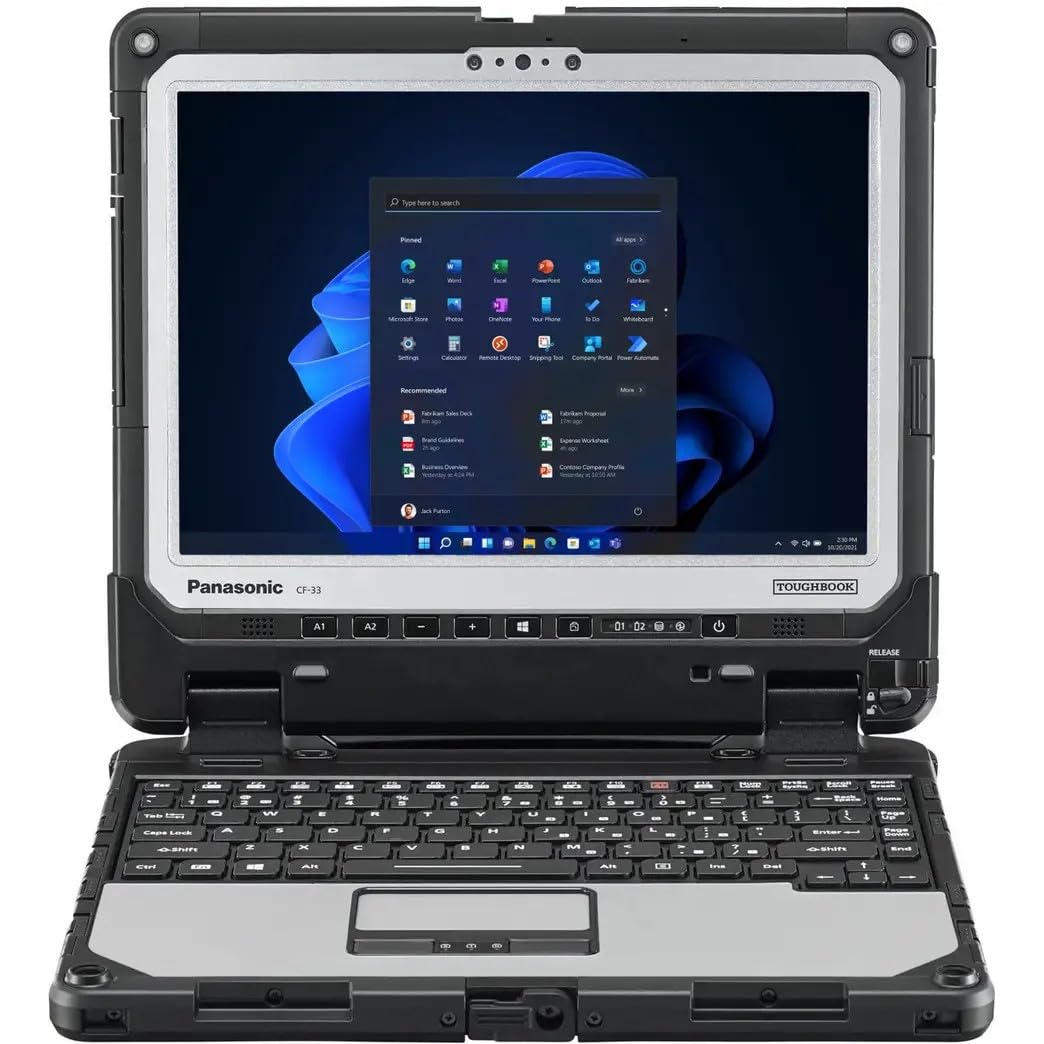
The Panasonic Toughbook CF-33 is not a laptop you buy for its sleek aesthetics — it’s a fully rugged 12-inch convertible built to MIL-STD-810G standards and IP65-rated for dust and water resistance. The 12-inch QHD display (2160×1440) hits 1200 nits of brightness, making it fully readable under direct sunlight, and the anti-reflective treatment plus glove-compatible touch and digitizer means you can operate it with thick work gloves or a stylus in the rain.
Inside, you get a 7th-gen Intel Core i5-7300U processor, 16GB of DDR4 RAM, and a 512GB SSD. This is not a modern CPU, but for running Windows 11 Pro with field-specific software (mapping, inventory, data collection), it is more than adequate. The package includes two 22Wh hot-swappable batteries, 4G LTE with a dedicated u-blox GPS module, and a barcode reader — features you simply will not find on any consumer 12-inch laptop. The keyboard base adds a serial port, VGA, and extra USB ports for connecting legacy equipment.
The catch is weight: the tablet alone is 3.4 lbs, and with the keyboard base attached the total exceeds 6 lbs. It is also a refurbished unit (renewed), so battery life from the included cells may be around 5-6 hours rather than the rated 14. But if your work takes you to construction sites, warehouses, or outdoor job sites where a standard ultrabook would fail within a week, this Toughbook will outlast your truck.
Why it’s great
- IP65 dust/water resistance and MIL-STD-810G drop protection
- 1200 nit QHD display readable in direct sunlight
- Includes 4G LTE, dedicated GPS, and barcode scanner
Good to know
- Heavy at over 6 lbs with keyboard base attached
- Refurbished unit; real-world battery life is about 5-6 hours
3. QAZIPO 2-in-1 12”
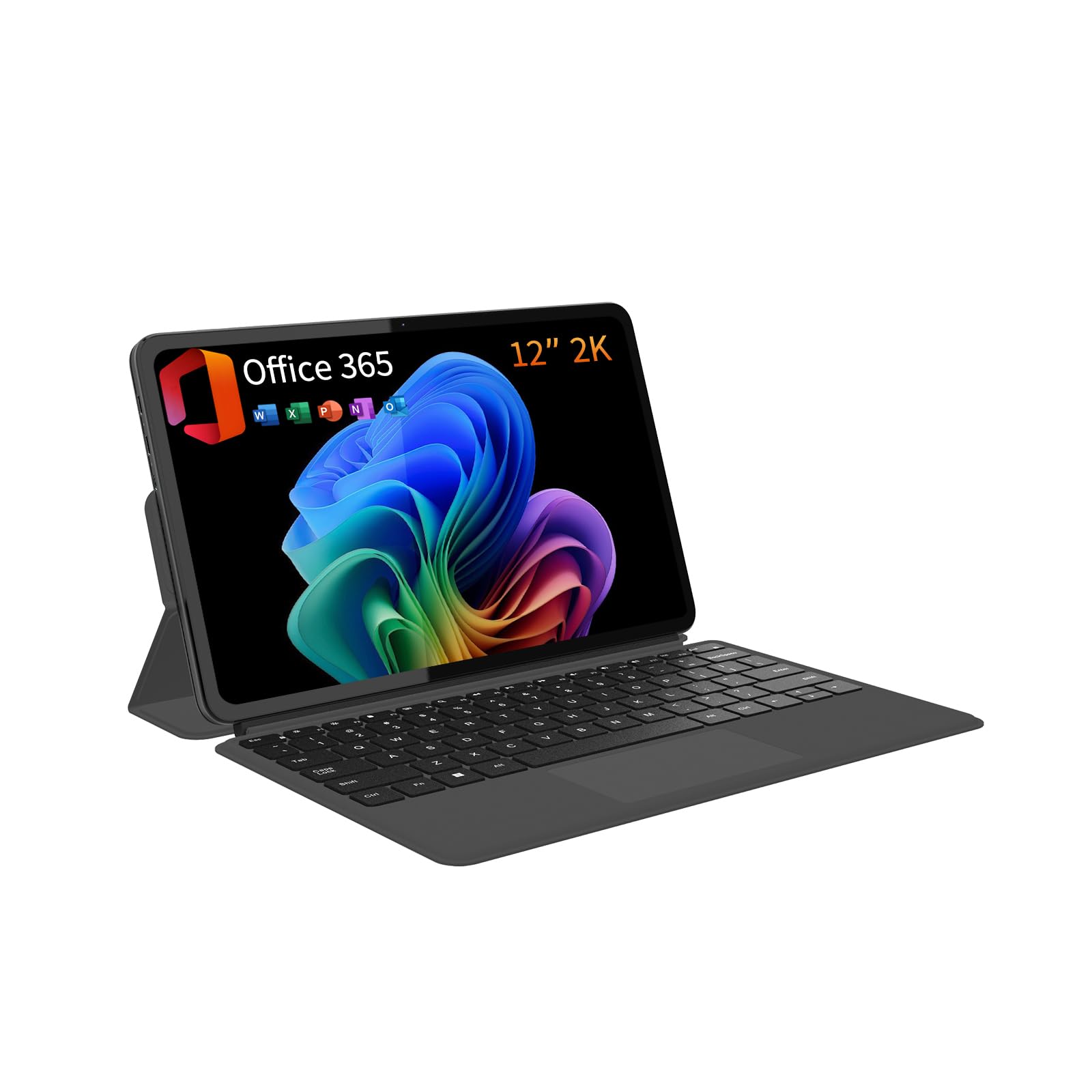
The QAZIPO 2-in-1 12-inch is built around the idea that you should not have to choose between a detachable tablet and a full desktop operating system. It ships with a magnetic leather case keyboard and a full 1-year Office 365 subscription, so you can unbox it and immediately start working on Word, Excel, or PowerPoint without hunting for licenses or extra accessories. The 12-inch 2K IPS touchscreen (2000×1200) covers 100% sRGB, making it suitable for light photo edits and color-accurate design previews.
Under the hood, the Intel Pentium Gold 6500Y processor with 12GB of RAM and a 512GB SSD delivers smooth performance for web browsing, video streaming, email, and Office applications. The 10-point capacitive touch is responsive, and the detachable keyboard snaps on firmly for laptop mode then detaches cleanly for tablet use. At just 1.4 lbs and 0.36 inches thick, it is one of the lightest 12-inch convertibles available, perfect for tossing into a messenger bag for classes or client meetings.
The battery life is solid for a device in this price tier, and the dual USB-C ports support charging, data transfer, and 4K video output to an external monitor. Some users report occasional 20-second freezes related to disk usage spikes after extended use, which may be resolved with OS reinstallation. Overall, this is a compelling package for students and remote workers who want a modern Windows 11 experience in a genuinely portable form factor without paying a premium.
Why it’s great
- Includes a 1-year Office 365 subscription and magnetic keyboard
- 12GB RAM delivers smooth multitasking for Office and web apps
- Ultra-light 1.4 lb design with 2K touchscreen
Good to know
- Intel Pentium Gold 6500Y is slower for heavy creative workloads
- Occasional disk usage spikes can cause brief system freezes
4. Jumper EZpad V12Pro
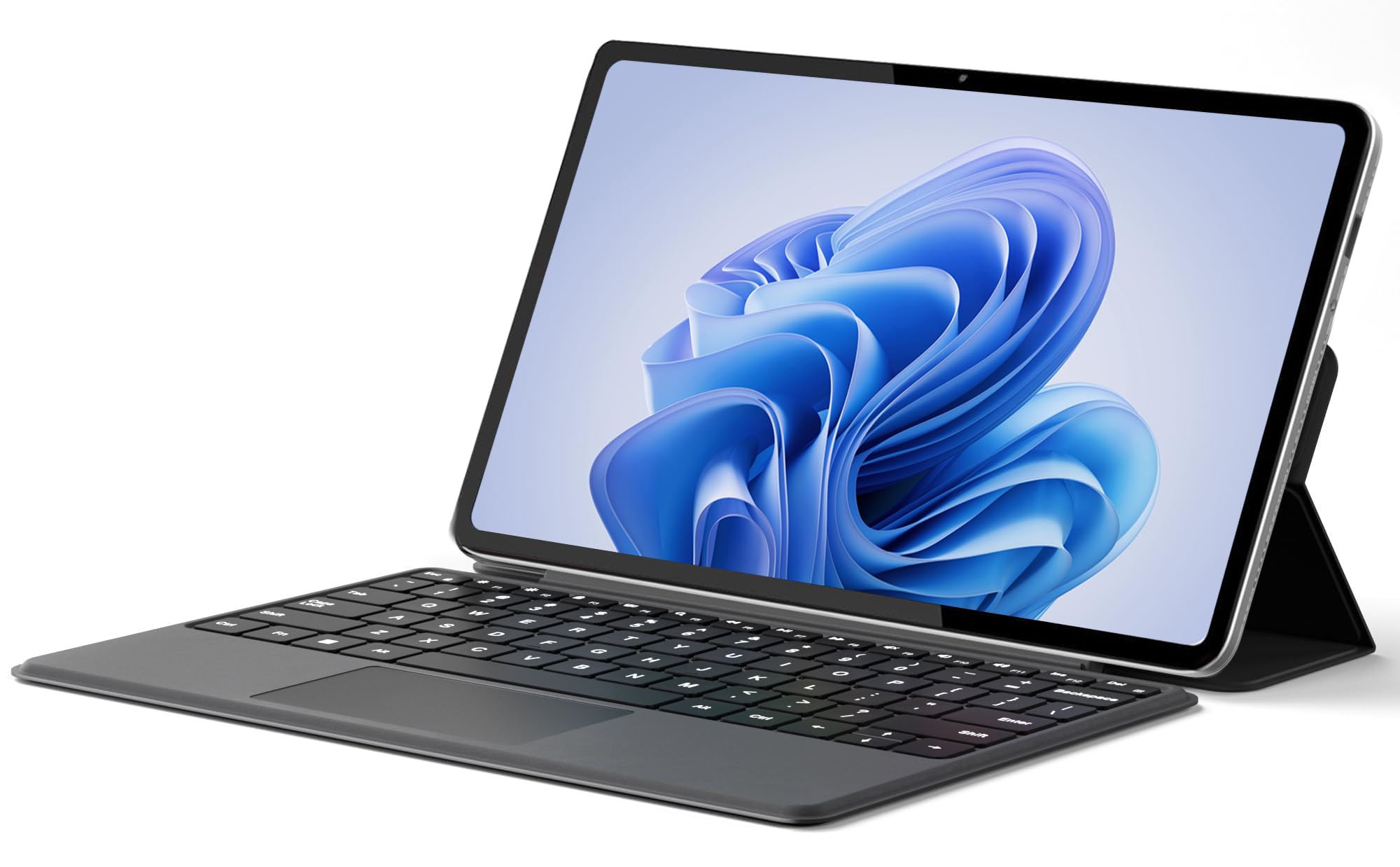
The Jumper EZpad V12Pro is a 2-in-1 tablet/laptop hybrid that punches above its price point with a sharp 2000×1200 IPS display and 12GB of RAM. The Intel Pentium Gold 6500Y processor handles everyday tasks like web browsing, document editing, and video streaming with ease, and the 256GB NVMe SSD ensures quick boot times and snappy app launches. The detachable magnetic leather keyboard is surprisingly comfortable for a device in this class, and the built-in kickstand lets you prop it up in landscape or portrait orientation.
Portability is the main selling point here: at just 0.64 kg (1.4 lbs) without the keyboard, it slips into a small backpack pocket or a large purse without adding noticeable weight. The 4300mAh battery delivers up to 8 hours of video playback, which is solid for a full day of classes or a cross-country flight. Dual full-function USB-C ports handle charging, data, and video output, and the 3.5mm headphone jack plus dual stereo speakers provide decent audio for media consumption.
The build quality is metal-bodied and feels more premium than the price suggests, though the camera resolutions (front 200W, rear 500W) are only adequate for basic video calls. The cooling fan can become audible under sustained load, but it keeps the internals stable during longer work sessions. For students and casual users who want a functional Windows 11 device that easily converts between a laptop and a tablet, this is an excellent entry point.
Why it’s great
- Sharp 2K IPS touchscreen with 10-point capacitive touch
- Lightweight design at 1.4 lbs with metal chassis
- Dual USB-C ports with full data, video, and charging support
Good to know
- Cameras are low resolution (200W/500W) for video calls
- Cooling fan can become audible under sustained load
5. KOOFORWAY 8” Mini
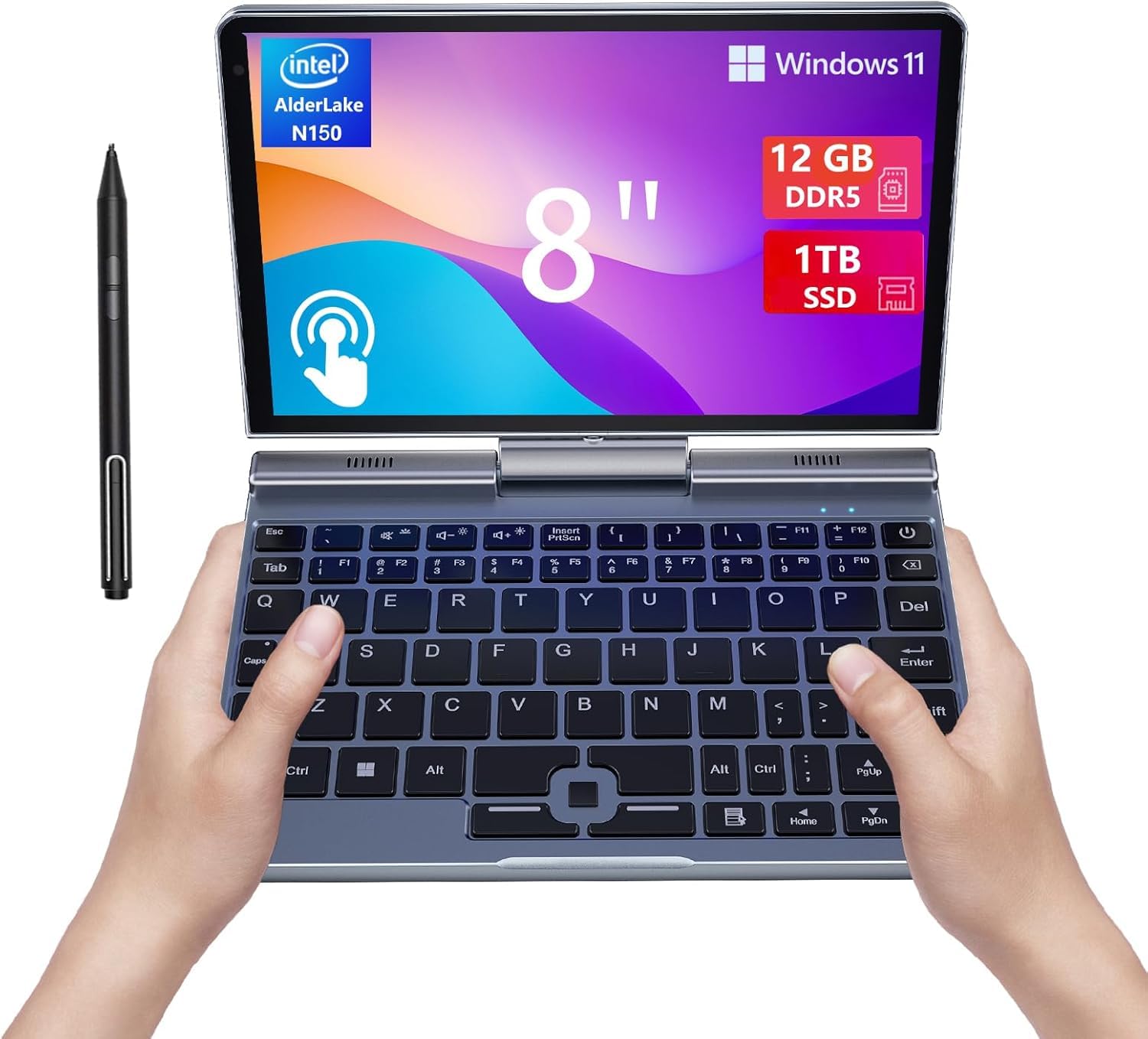
The KOOFORWAY 8-inch Mini Laptop is a pocket-sized powerhouse that refuses to compromise on storage. It packs a 1TB M.2 SSD — rare for an 8-inch device — paired with 12GB of LPDDR5 RAM and an Intel N150 processor that turbos up to 3.6GHz. This combination means you can store your entire media library, work files, and applications without ever worrying about running out of space. The 8-inch HD touchscreen supports handwriting input via the included rechargeable stylus, and the 180-degree rotating hinge transforms it into a tablet mode for note-taking or sketching.
The CNC-machined full-metal body feels dense and well-constructed, and the fanless design keeps operation silent during light tasks. The fast-charging battery reaches a full charge in about 2 hours and delivers 4-5 hours of mixed use. Port selection is generous for its size: one USB 3.0, one USB-C, a full-size HDMI port, and a headphone jack give you real expandability without needing a dongle. Wi-Fi 6 and Bluetooth 5.2 ensure fast wireless connectivity.
The biggest trade-off is the compact keyboard layout. The power button sits on the top row where you might expect a Delete key, which can cause accidental sleep events. The speakers are quiet, and the fan runs warm under sustained CPU load. But if you prioritize extreme portability and refuse to accept slow eMMC storage, this mini laptop is a standout choice for travel, note-taking, and light productivity.
Why it’s great
- 1TB NVMe SSD provides massive storage in an 8-inch chassis
- CNC metal body feels premium and durable
- Wi-Fi 6 and Bluetooth 5.2 for modern connectivity
Good to know
- Keyboard layout is cramped with awkward power button placement
- Battery life is limited to 4-5 hours of real-world use
6. Crelander 2-in-1 Mini

The Crelander 2-in-1 Mini Laptop is built around the 12th-gen Intel N100 processor, which brings Alder Lake efficiency to the 8-inch form factor. The N100 beats older Celeron and Pentium chips by a wide margin, handling multiple browser tabs, Office applications, and even light coding without stuttering. The 8-inch touchscreen rotates 360 degrees into tablet mode, and the included stylus pen works well for handwritten notes or quick sketches in OneNote.
The 12GB of DDR5 RAM is a step above the DDR4 found in most budget mini laptops, and the 512GB NVMe SSD provides ample fast storage with the option to upgrade to 2TB. The package includes a USB hub, HDMI cable, and stylus out of the box, so you don’t need to buy extra accessories to connect an external monitor or a mouse. Wi-Fi 6 and Bluetooth 5.2 keep connections stable, and the PD 30W charging via USB-C tops up the battery quickly.
Users consistently praise the portability — it fits in a hoodie pocket — but a few report that the battery can die and refuse to charge after several months, suggesting quality control issues on some units. The keyboard is tight but usable, though the power key placed above the backspace key can cause accidental shutdowns during typing. For the price, the performance-per-pound ratio is excellent, but consider an extended warranty for peace of mind.
Why it’s great
- Intel N100 Alder Lake CPU delivers modern performance in an 8-inch chassis
- 12GB DDR5 RAM is a rare and valuable spec at this price
- Includes stylus, USB hub, and HDMI cable in the box
Good to know
- Some units experience battery failure within months
- Keyboard power key placement causes accidental sleep events
7. KOOTIGERS 8” Mini

The KOOTIGERS 8-inch Mini Laptop is the entry-level champion for anyone who needs a full Windows 11 Pro machine at the smallest possible size. The Intel N150 processor, 12GB of LPDDR5 RAM, and a 512GB M.2 SSD deliver snappy performance for web browsing, email, Office apps, and streaming. The 1280×800 IPS touchscreen is not Full HD, but the 360-degree hinge allows you to rotate it into tent or tablet mode for presentations or media consumption.
At just 1.72 lbs and with a fanless design, this mini laptop is dead silent during operation. The metal chassis feels surprisingly rugged — one user reported surviving a drop that would have shattered a plastic competitor. Port selection is a highlight: you get a full-size Ethernet port, HDMI, USB-C, USB 3.0, and a headphone jack, which is unusual for an 8-inch device. The included stylus, USB hub, and HDMI cable mean you can start working immediately without additional purchases.
The keyboard is the main drawback: the cramped layout and small touchpad make touch typing difficult, and the battery life hovers around 4-6 hours depending on workload. The 8-inch screen is small for prolonged document editing, but for quick email replies, spreadsheet checks, or Netflix on a plane, it is perfectly functional. This is a niche tool for travelers, field technicians, or anyone who needs a Windows machine that fits in a coat pocket.
Why it’s great
- Full Windows 11 Pro in a fanless 8-inch metal body
- Includes Ethernet port, HDMI, and multiple USB ports
- Includes stylus, USB hub, and HDMI cable
Good to know
- Keyboard is cramped and not suitable for touch typists
- Battery life averages 4-6 hours under real-world use
8. Samsung Chromebook Plus 12.2”

The Samsung Chromebook Plus 12.2-inch is designed for users who want a cloud-first experience with the flexibility of a 360-degree convertible. The 12.2-inch Full HD touchscreen is bright and responsive, and the 2-in-1 hinge lets you flip it into tablet, tent, or stand mode depending on your task. The included stylus pen and wireless mouse add immediate value, and the 7-in-1 docking station with a 128GB SSD plus a 32GB MicroSD card provides a total of 224GB of storage spread across multiple drives.
Inside, the Intel Celeron 3965Y processor and 4GB of LPDDR3 RAM are the weakest specs in this guide. Chrome OS itself is lightweight and secure, with built-in virus protection and automatic cloud backups, making it a safe choice for students or older adults who only need basic computing.
The build quality is decent for the price bracket, and the 2.98 lb weight makes it easy to carry between classes. Some users report that the device becomes unusable within months due to crashes, suggesting reliability can be inconsistent. If your workflow is entirely browser-based and you value the included accessories over raw processing power, this Chromebook provides a complete ecosystem out of the box.
Why it’s great
- Comes with stylus, wireless mouse, and 7-in-1 docking station
- Chrome OS is secure, simple, and automatically backs up to the cloud
- 12.2-inch FHD touchscreen with 360-degree convertible hinge
Good to know
- Celeron 3965Y with only 4GB RAM is too slow for heavy multitasking
- Reliability is inconsistent, with some units failing within months
9. HP Chromebook X360 12”

The HP Chromebook X360 12-inch is a well-rounded 2-in-1 Chromebook that earned a reputation for reliability among students and parents. The 3:2 aspect ratio screen is a standout feature — it offers more vertical space than a typical 16:9 display, making it excellent for reading documents, browsing the web, and working in Google Classroom without constant scrolling. The HD+ touchscreen (1366×768) is not the sharpest, but the 13-hour battery life means it can survive a full school day without a charger.
The Intel Celeron N4000 processor with 4GB of RAM is basic by modern standards, but Chrome OS is designed to run well on modest hardware. Users report that the device boots quickly, handles Google Docs and web browsing fluidly, and integrates seamlessly with Google Classroom for homework submissions. The 32GB of eMMC storage is tight — you will rely almost entirely on cloud storage for files — but for a dedicated school device, this is rarely a problem.
The build quality is solid for the price, and the 360-degree hinge feels durable enough for daily flipping between laptop and tablet modes. Some users report occasional screen glitching within the first hour of use, though this seems isolated. If you need a kid-friendly, low-maintenance Chromebook for online learning and light entertainment, the HP X360 is a proven option that will not drain your budget.
Why it’s great
- 3:2 aspect ratio display is ideal for document reading and browsing
- 13-hour battery life easily lasts a full school day
- Reliable integration with Google Classroom and cloud apps
Good to know
- 32GB eMMC storage is very limited; cloud storage is required
- 1366×768 resolution is noticeably less sharp than Full HD screens
10. Apple MacBook 12” Retina

The Apple MacBook 12-inch Retina is a beloved relic for those who want macOS in the smallest possible footprint. The 2304×1440 Retina display with IPS technology delivers a pixel density of ~226 PPI, making text, images, and videos look incredibly sharp on the 12-inch screen. The fanless Intel Core M-5Y31 processor and 8GB of RAM provide a smooth macOS experience for web browsing, email, media consumption, and light productivity tasks like Pages or Keynote.
This is a renewed (refurbished) unit, so condition varies. Some users receive units that look and feel like new with no scratches and fully functional ports, while others report keyboard sticking, battery service warnings, and dented chassis. The single USB-C port handles charging, data, and video output, so you will need a hub or dongle for connecting peripherals or an external display.
The appeal here is clear: a genuine Apple laptop that weighs under 2 pounds and fits in a small bag, running the full macOS ecosystem without the weight and size of a MacBook Air or Pro. If you find a well-refurbished unit with a healthy battery, it is a fantastic ultra-portable Mac. But the lottery of used electronics means you should buy from a seller with a solid return policy and be prepared for potential battery or keyboard issues down the line.
Why it’s great
- Stunning 2304×1440 Retina display with excellent sharpness
- Ultra-light and portable at under 2 pounds
- Runs full macOS for the Apple ecosystem experience
Good to know
- Refurbished condition varies significantly; some units have defective batteries or keyboards
- Single USB-C port requires a dongle for most peripherals
11. Auusda 15.6” Laptop
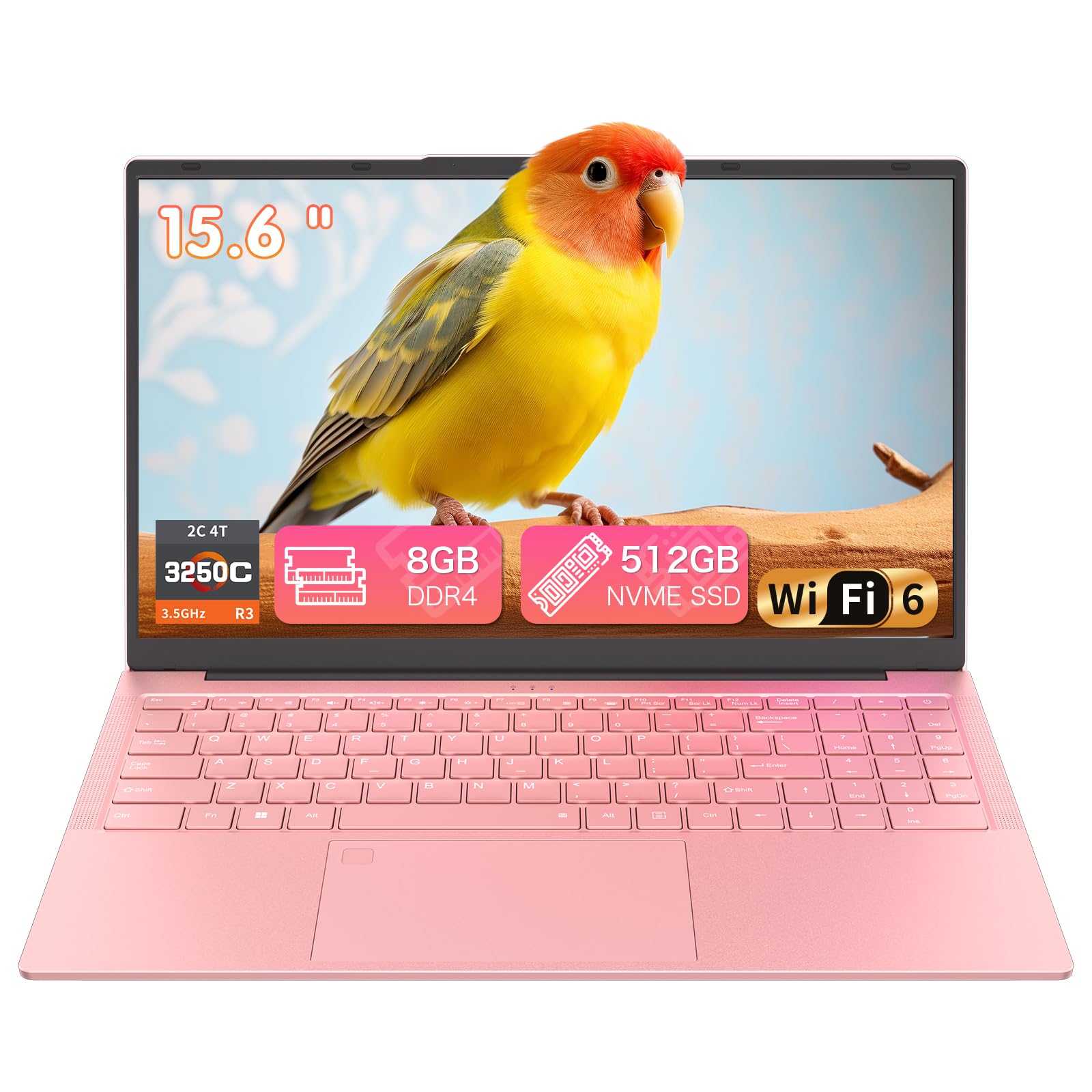
The Auusda 15.6-inch Laptop is an outlier in this guide because of its larger screen size, but it qualifies on price and serves as a point of comparison for budget-minded buyers who could step up to a 15-inch chassis for similar money. The Ryzen 3 3250C processor with 8GB of dual-channel DDR4 RAM and a 512GB NVMe SSD delivers noticeably better multitasking performance than the Celeron-based Chromebooks in the same budget tier. The backlit keyboard and fingerprint reader add convenience that is rare at this price point.
The 15.6-inch Full HD display offers a comfortable workspace for spreadsheets, document editing, and streaming, and the inclusion of WiFi 6 and Bluetooth 5.3 ensures modern wireless connectivity. The dual USB-C ports support data, charging, and video output, and the physical camera switch provides privacy assurance. The soft pink finish (also available in other colors) gives it a distinctive look that stands out from the sea of silver and black laptops.
The biggest complaint from users is the short battery life — the laptop can drain completely while turned off in a bag over several days, suggesting poor power management in sleep mode. At 3.7 lbs it is heavier than any 12-inch machine, but if you need a larger screen and a more powerful processor than what budget 12-inch options offer, this is a practical alternative. For home office work, online classes, and family entertainment, it provides reliable performance at a very low entry cost.
Why it’s great
- Ryzen 3 processor outperforms Celeron-based competitors at this price
- Backlit keyboard and fingerprint reader add premium touches
- WiFi 6 and Bluetooth 5.3 for modern wireless connectivity
Good to know
- Battery drains significantly even when the laptop is shut down
- 15.6-inch screen is larger and heavier than a true 12-inch laptop
FAQ
Is a 12-inch laptop screen too small for daily work?
Can I upgrade the RAM or storage on a 12-inch laptop?
How does a Chromebook vs Windows 11 vs macOS affect my choice?
What is the difference between 1366×768 and Full HD on a 12-inch screen?
Final Thoughts: The Verdict
For most users, the best 12 inch laptop winner is the Microsoft Surface Pro 12” because its Snapdragon X Plus processor, 16-hour battery life, and versatile kickstand design deliver genuine laptop-class performance in a tablet frame that adapts to your workspace. If you need a rugged machine that survives drops, dust, and rain, grab the Panasonic Toughbook CF-33. And for a value-packed convertible that includes Office 365 and a magnetic keyboard right out of the box, nothing beats the QAZIPO 2-in-1 12”.