
Our readers keep the lights on and my morning glass full of iced black tea. As an Amazon Associate, I earn from qualifying purchases.
Specs are compiled from manufacturer listings and verified buyer reviews and can change over time — please confirm the key details on the product page before buying.
If your PC sounds like a hair dryer under load, the fans are the first thing to fix. The right 120mm fan moves serious air while staying nearly silent, and it can shave several degrees off your components. This guide breaks down the best options by what they do best, so you can pick the one that matches your build and your ears.
I’m Min — the founder and writer behind Gadgets Feed. This guide is built by comparing the manufacturers’ published specifications and the patterns across verified customer reviews, so you get each pick’s real strengths and trade-offs instead of marketing spin.
Whether you are building new, upgrading a loud prebuilt, or replacing a failed fan, these are the 120mm case fans that deliver on their promises while staying affordable.
Our Picks at a Glance



How To Choose The Best 120mm Case Fans
Before you buy a 120mm case fan, ask yourself three things: how much noise can you stand, how much airflow does your PC really need, and where will you mount it? Once you answer those, the spec sheet makes sense.
Airflow vs. Static Pressure
Airflow, measured in CFM (cubic feet per minute), tells you how much air the fan moves in open space — perfect for front intakes or rear exhausts. Static pressure, measured in mm H₂O, tells you how hard the fan pushes air through resistance. If you are mounting a fan on a radiator or a thick heatsink, you need pressure, not just raw volume.
Noise Level and Speed Range
Manufacturers rate noise in decibels (dB) and speed in rotations per minute (RPM). A fan that spins up to 2000 RPM pushes plenty of air, but it gets loud at that speed. Look for a wide PWM (pulse-width modulation, a way to control fan speed) range, so the fan stays quiet at low RPM and only speeds up when your CPU or GPU heats up.
Bearing Type and Lifespan
The bearing is the part that spins — it determines both noise and longevity. Fluid dynamic bearings (FDB) are the common choice for quiet, long-lasting operation, while magnetic levitation (MagLev) bearings float the rotor to cut friction. Expect a good fan to be rated for tens of thousands of hours.
Quick Comparison
| Model | Best For | Max Speed | Noise Level | Airflow | Amazon |
|---|---|---|---|---|---|
| Noctua NF-A12x25 G2★ Best Overall | Quiet Performance | 1800 rpm | 22.5 dB | 107.3 m³/h | Amazon |
| be quiet! Silent Wings 4High-Speed Pick | High-Speed Cooling | 2500 rpm | 31.2 dB | 76.7 CFM | Amazon |
| ARCTIC P12 Pro A-RGBRadiator Performer | Radiator Pressure | 3000 rpm | — | 77 CFM | Amazon |
| ASUS ROG Strix XF120 | Whisper-Quiet Exhaust | 1800 rpm | 22.5 dB | 62.5 CFM | Amazon |
| ASUS TUF Gaming TF120 ARGB | Lighting + Cooling | — | 29 dB | 76 CFM | Amazon |
| Thermalright TL-C12C-S X3 (ARGB) | Budget 3-Pack | 1550 rpm | 25.6 dB | 66.17 CFM | Amazon |
| NZXT F120Q | Simple Quiet Intake | 1700 rpm | 25.1 dB | — | Amazon |
| ARCTIC P12 PWM PST A-RGB | Affordable RGB | 2000 rpm | 0.3 Sone | 48.8 CFM | Amazon |
| Thermalright TL-C12CW-S X3 (White) | White RGB Build | 1550 rpm | 25.6 dB | 66.17 CFM | Amazon |
In‑Depth Reviews
1. Noctua NF-A12x25 G2 PWM
Our pick — over 4.5★ from 400+ verified ratings; the strongest balance of quality and price.
The quiet champion that drops temps and barely whispers at your desk.
At 1800 rpm and just 22.5 dB, this fan is the benchmark for silent cooling. Swapping your stock cooler fan for this one can drop CPU temperatures by about 5°C under a stress test, buyers report., all while staying nearly inaudible even at 80% speed. The included Low-Noise Adaptor dials it down to around 1500 rpm if you want even less sound.
Buyers rave about the quiet: one review says, “Incredibly good air flow with barely any sounds.” The Sterrox LCP (a liquid-crystal polymer that resists warping) frame with tight tip clearance keeps air moving in a straight line, and the SSO2 (self-stabilising oil-pressure) bearing is rated for over 150,000 hours. You also get anti-vibration mounts, a radiator gasket, extension cables, and a Y-splitter to run two fans from one motherboard header.
The honest catch is the price — it costs more than many budget AIO coolers. And if you want RGB lighting or a reverse-blade design, Noctua simply does not offer it here.
Why it earns the crown
- Superb 22.5 dB noise level at full 1800 rpm
- Accessory kit covers mounts, gasket, cables, and splitter
- High-quality SSO2 bearing rated beyond 150,000 hours
Where it falls short
- Premium price that rivals whole coolers
- No RGB or reverse-blade variant
Reach for this if: you want the quietest, most reliable 120mm fan for a case or radiator and do not care about lighting.
Look elsewhere if: you are on a tight budget or want addressable RGB effects.
2. be quiet! Silent Wings 4 120mm PWM High Speed
A heavy-duty 2500 rpm performer that stays hushed until you demand max cooling.
This fan is built for people who want headroom. With a top speed of 2500 rpm and a 76.7 CFM airflow rating, it can push serious air through a case or radiator, yet owners find it virtually silent at idle speeds around 30%. The 6-pole, 3-phase motor is designed to reduce vibration, and the fluid-dynamic bearing is rated for up to 300,000 hours of life.
At 310 g, it is noticeably heavier than the 195 g Noctua NF-A12x25 G2 above — that heft reflects the dense frame and premium build. The scope of delivery includes two mounting options: pre-installed anti-vibration mounts for quiet case use, and plastic mounts for radiators and heatsinks. It lacks any RGB lighting, which is a feature for many builders.
The trade-off is that at full tilt, the 31.2 dB noise level is audible — this is a high-speed fan, not a strictly silent one. Owners mention it gets noticeable around 30% speed if you push it, and the value is debated: some call it worth every dollar, others find it pricey for a single fan.
What stands out
- High 2500 rpm ceiling for demanding cooling loads
- 300,000-hour fluid-dynamic bearing rating
- Two mounting options included for case or radiator
The honest limit
- Audible 31.2 dB at maximum speed
- Heavier and pricier than typical 120mm fans
Best suited to: a high-end build where you want the option of massive airflow and are fine tuning a fan curve.
Skip if: you prioritize absolute silence over peak performance.
3. ARCTIC P12 Pro A-RGB (3 Pack)
A high-pressure 3000 rpm trio that tears through dense radiator fins.
If you are cooling a thick radiator, static pressure matters more than raw airflow. This ARCTIC P12 Pro pushes 77 CFM with high static pressure, and owners confirm it penetrates dense radiators and mesh panels with ease — the high pressure design is the whole point here. The 4-pin PWM connection lets you dial speeds from a crawl up to 3000 rpm, and the fan stops completely below 5% PWM for a zero-RPM silent mode.
The 3-pack value is a big draw, with the fluid dynamic bearing keeping things smooth and quiet at low speeds. Buyers praise the build quality and note it works beautifully without proprietary software — it plays nice with open-source fan controllers. The LED ring lighting is vibrant and addressable, matching most 5V RGB ecosystems.
The recurring gripe is noise at high speed. This is the strongest fan here at 3000 rpm, but that power gets loud — owners say it is quiet below 60-70% but unmistakable at full tilt. It is a tool for performance, not for silent builds.
Built for
- High static pressure ideal for radiators and mesh
- 3000 rpm maximum with 0 RPM stop below 5% PWM
- 3-pack delivers strong per-fan value
Keep in mind
- Gets loud above 60-70% speed
- Not the pick for a silence-obsessed build
Grab this for: a water-cooling loop or a case with heavily filtered intakes.
Think twice if: you want near-silent operation at all times.
4. ASUS ROG Strix XF120

A magnetic-levitation fan that stays whisper-quiet while delivering a 10°C gaming drop.
You get near-silent operation at 22.5 dB (about as loud as a whisper) while still moving 62.5 CFM (cubic feet per minute) of air, so it works great as an exhaust or intake fan. The MagLev (magnetic-levitation) bearing floats the rotor, reducing friction and noise, and it carries a 400,000-hour lifespan rating. Customers note gaming temperatures dropping around 10°C., and several call it a quieter alternative to more expensive flagship fans.
With a speed range of 250 to 1800 RPM, you can set a fan curve that stays silent at idle, and at 0% PWM the fan stops completely. Anti-vibration pads on the frame prevent rattling, and the 5-year warranty covers you for years. There is no RGB lighting, which owners like — the plain black design blends into any build.
The only real caveat is a low-frequency hum some notice at very high RPM, plus the price sits at the premium end of the spectrum. It is worth it for the silence and longevity, but budget buyers have cheaper options.
Why it stands out
- Quiet 22.5 dB operation with strong 62.5 CFM flow
- MagLev bearing rated for 400,000 hours
- 5-year warranty and anti-vibration pads included
Consider this
- Premium price tag
- Minor low-frequency hum at high RPM for some
Choose this if: you want a silent, reliable, long-lasting fan and do not miss RGB.
Pick something else if: your budget is tight or you need addressable lighting.
5. ASUS TUF Gaming TF120 ARGB (3 Pack)
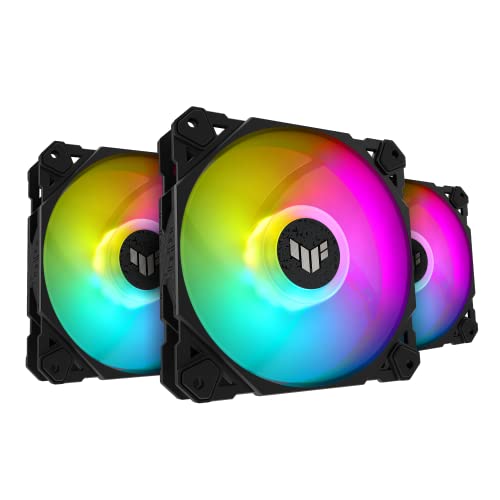
A 3-pack with a built-in hub that delivers class-leading airflow and deep, vibrant lighting.
This is the fan pack for builders who want their lighting to pop. The double-layer LED array produces deeper color saturation than standard RGB fans, and the bundled ARGB hub connects up to four fans with onboard lighting control and Aura Sync support. You get strong 76 CFM airflow and PWM control with an ultra-wide RPM range, so cooling and aesthetics work together.
The advanced fluid dynamic bearing is rated up to 250,000 hours, and anti-vibration pads dampen rattling to keep noise down to 29 dB. Buyers love the cooling performance — It keeps CPUs in the 50-60°C range under load. — and the true, customizable ARGB is a highlight. The TUF branding comes with a durable build quality and a 2-year warranty.
The main complaint is airflow noise at high speeds, and cable management can get messy since the power and ARGB lines tangle easily. If you want a clean, quiet build, you may need to tune the fan curve down.
The highlights
- Powerful 76 CFM airflow with deep double-layer ARGB
- Bundled 4-fan ARGB hub with Aura Sync
- 250,000-hour fluid dynamic bearing
Be aware
- Noisy airflow at higher speeds
- Wiring can get tangled between power and ARGB cables
This suits: a colorful gaming rig where RGB effects are as important as cooling.
Not ideal for: a silent, minimalist no-LED build.
6. ARCTIC P12 PWM PST A-RGB

A quiet, affordable RGB fan with the static pressure to handle heat sinks and radiators.
This single fan packs a lot of value. It is tune for static pressure with a 48.8 CFM airflow, making it suitable for heat sinks and radiators even with increased air resistance. The 4-pin PWM connector regulates speed across a broad 200-2000 rpm range, dropping to 0 rpm below 5% for true silence at idle.
The 12 A-RGB LEDs in the hub and transparent rotor give even, rich lighting, and both the fan and A-RGB cables have integrated Y-splitters for easy daisy-chaining. Owners call it extremely quiet below 60% speed and appreciate the all-time low temperatures it achieves. It is widely considered one of the best affordable static pressure fans on the market.
The catch is minor: each fan has a power cable and an RGB cable, so a build with many fans can get messy. It is a single fan, not a pack, so outfitting a whole case costs more per fan than the Thermalright options below.
Why it impresses
- Quiet at low speeds with rich A-RGB lighting
- tune static pressure suits radiators
- Integrated Y-splitters make daisy-chaining easy
Worth noting
- Two cables per fan add wiring clutter
- Sold individually, not as a multi-pack
A smart pick for: a single high-quality fan on a radiator or as a stylish exhaust.
Skip if: you need to fill three or more case slots at once.
7. Thermalright TL-C12C-S X3 (ARGB)

A budget-conscious trio that delivers surprising airflow and ARGB for less than the price of one premium fan.
At just 100 g each, these are feather-light performers spinning up to 1550 rpm with 66.17 CFM of airflow. The 3-pack makes them unbeatable for a full case refresh, and the S-FDB bearings keep noise around 25.6 dB. Reviewers point out dramatic temperature improvements, One buyer notes a 3-degree drop in idle temps., and they move a lot of air even at low RPM.
The ARGB lighting supports up to 17 modes and can be synchronized through your motherboard header. The 55 cm cables allow for PWM series control, making installation flexible. The value is the story here — “these things are stellar for the price,” as owners put it.
The noise level gets mixed feedback: some find them super quiet, others note they can get loud. An occasional unit has arrived with a rasping bearing noise, though a touch of grease fixed it. The plastic feels thinner than premium fans, and longevity is unproven against long-running rivals.
What you get
- 3 fans for less than the cost of one premium unit
- 66.17 CFM airflow with S-FDB bearings
- 17 ARGB modes synchronized via motherboard
The trade-offs
- Mixed feedback on noise — some find it loud
- Thinner plastic build, unproven long-term durability
Best for: a budget build or a case needing many fans filled while staying affordable.
Look elsewhere if: you demand whisper-quiet operation at all speeds.
8. Thermalright TL-C12CW-S X3 (White)

A stylish white 3-pack with neutral-toned ARGB that keeps temps impressively low.
This is the same S-FDB bearing and 1550 rpm platform as its black sibling, but tuned for white builds. The 66.17 CFM airflow keeps components cool, with One buyer reports GPU and CPU staying under 40°C.. The neutral white RGB lighting earns specific praise — it looks cleaner and less rainbow-hued than typical ARGB, and it daisy-chains well even with other brands’ fans.
Noise is the top positive aspect here at 87 mentions, with buyers consistently describing the fans as quiet and smooth. The PWM control connects via 4-pin and the long 55 cm cables make routing easy. It is a strong value pick for a white-themed rig that wants both cooling and aesthetics.
The build feels solid for the price, though one buyer did note a single stripped screw out of the pack — three still held fine. The RGB is tunable and looks great in solid color modes, though it is average compared to premium lighting systems.
It shines at
- Quiet operation — the most-praised feature
- Neutral white ARGB that suits white builds
- Strong 66.17 CFM airflow at a budget price
Minor issues
- Occasional stripped screw in the pack
- RGB quality is decent, not top-tier
Reach for this if: you are building a white-themed PC and want quiet ARGB cooling on a budget.
skip it if: you need premium RGB effects or max-performance speeds.
9. NZXT F120Q

A simple, smart quiet fan with a chamfered frame that pushes air deep into your case.
This is a no-nonsense fan for buyers who want effective cooling without fuss. The nine sickle-style blades and chamfered frame direct air in a concentrated flow pattern that travels far into the case to cool vital components. With a top speed of 1700 rpm and a 25.1 dB noise level, it balances airflow and sound for versatile intake or exhaust use.
The fluid dynamic bearing provides stability and a 60,000-hour lifespan, and PWM control dynamically adjusts speed based on system temperatures. Owners find it quiet and effective, with several noting it works particularly well as a bottom intake fan. Installation is easy, and the build quality feels solid.
The catch is a simple one: this is not a high-pressure fan. If you plan to mount it on a radiator or behind a very restrictive filter, buyers suggest the static pressure version instead. It is a clean, affordable single-fan option, though the 3-packs from Thermalright offer better per-fan value.
What works
- Quiet 25.1 dB operation with strong airflow
- Chamfered frame directs air deep into the case
- 60,000-hour fluid dynamic bearing
What to know
- Not designed for radiators or restricted spaces
- Sold individually — less value than multi-packs
Great for: a straightforward case intake or exhaust upgrade where you want quiet, reliable airflow.
Not for: radiator cooling or builds needing high static pressure.
Understanding the Specs
Noise Level (dB)
Decibels measure sound pressure — the lower the number, the quieter the fan. A fan at 22.5 dB is essentially a whisper in a quiet room, while one at 31.2 dB is clearly audible. Most good fans let you run well below their maximum rated speed, so check both the peak noise and the low-speed behavior.
Airflow (CFM)
Cubic feet per minute measures how much air a fan moves in open space. Higher CFM means more cooling in a case with good airflow. But for radiators or dense filters, static pressure (measured in mm H₂O) matters more — it tells you how hard the fan can push air through resistance. A high-CFM fan with low pressure will struggle on a thick radiator.
FAQ
What is the difference between airflow and static pressure in a case fan?
What does a 4-pin PWM fan connector do?
How many 120mm fans does a typical PC case need?
Are 120mm fans compatible with radiators and CPU coolers?
What is the difference between RGB and ARGB fans?
How loud is too loud for a case fan?
What is a fluid dynamic bearing and why does it matter?
Should I replace the stock fans that came with my case?
Can I use a 120mm fan on a 140mm radiator?
What is a “zero RPM” mode in a case fan?
Final Thoughts: The Verdict
For most builders, the 120mm case fans winner is the Noctua NF-A12x25 G2 because it stays whisper-quiet at 22.5 dB while pushing strong airflow, and it comes with a full accessory kit. If you need high-speed performance for a hot, demanding build, choose the be quiet! Silent Wings 4. And if you want to refresh your whole case on a budget with ARGB (addressable RGB lighting), the Thermalright TL-C12C-S X3 three-pack is the value pick.
How We Picked
We do not accept paid placement. Every pick is matched to a real buyer and a real use-case; we do not hands-on test units.
Sources & Methodology
Specifications: manufacturer listings and product documentation. Review insights: verified customer reviews, as of August 2026. Pricing: not shown on this page (it changes often); check the current price via the retailer link.
As an Amazon Associate, Gadgets Feed earns from qualifying purchases. This does not affect which products we feature.