
Our readers keep the lights on and my morning glass full of iced black tea. As an Amazon Associate, I earn from qualifying purchases.
Specs are compiled from manufacturer listings and verified buyer reviews and can change over time — please confirm the key details on the product page before buying.
If you want the short answer: the be quiet! Silent Wings 4 is the fan most people should buy. It moves a lot of air, stays quiet at normal speeds, and has racked up the kind of long-term owner trust that makes it the safest pick in this whole list. But if your goal is raw airflow above all else, one of the thick high-speed fans here pushes far more air than anything else on the page. This guide sorts out which is which.
I’m Min — the founder and writer behind Gadgets Feed. This guide is built by comparing the manufacturers’ published specifications and the patterns across verified customer reviews, so you get each pick’s real strengths and trade-offs instead of marketing spin.
Airflow, noise, and static pressure are the three numbers that decide whether a fan actually works in your build. The picks below cover both the whisper-quiet crowd-pleasers and the high-output monsters, so you can match one to your real setup rather than guessing at the shelf. Here is the honest breakdown of the best 120mm cfm fan.
Our Picks at a Glance


How To Choose The Best 120mm CFM Fan
Buying a fan looks simple until you realize two fans with nearly identical numbers can behave completely differently once they are bolted into your case. The trick is to know which spec matters for your specific situation before you click buy.
Match airflow to what the fan has to push through
A fan sitting behind an open mesh front panel has an easy job, so you want one tuned for raw airflow. A fan bolted to a radiator or crammed against a dust filter has to force air through resistance, and that is where static pressure matters more than the headline airflow figure.
Decide how loud you can actually live with
Every fan here is PWM, which means the motherboard adjusts its speed based on temperature instead of running flat-out all the time. A fan rated loud at full speed can still be near-silent at the mid-range speeds your PC actually runs at day to day. That is why a high top speed is not automatically a problem — it is headroom you control.
Check the frame thickness before you commit
Most fans are a standard thin frame, but some high-output models use a thicker 38mm body for bigger blades. That extra bulk moves more air but eats clearance, so measure your mounting spot if space is tight.
Quick Comparison
| Model | Best For | Max Airflow (CFM) | Max Speed (RPM) | Noise (dB) | Amazon |
|---|---|---|---|---|---|
| be quiet! Silent Wings 4 120mm PWM High Speed★ Best Overall | Best all-round quiet-strong pick | 76.7 cfm | 2500 rpm | 31.2 db | Amazon |
| NZXT F120QBest Value | Quiet intake/exhaust on a budget | — | 1700 rpm | 25.1 db | Amazon |
| 12038 PWM Cooling Fan 120mm x 38mmMax Airflow | Maximum airflow above all else | 230 cfm | 5400 rpm | 55 dBA | Amazon |
| Thermalright TL-C12C-S 5 Pack | Budget ARGB cooling for a full build | 66.17 cfm | 1550 rpm | 25.6 db | Amazon |
| Wathai 12038 120mm x 38mm | Server and mining-rig airflow | 230 cfm | 5300 rpm | 60 dBA | Amazon |
| ASUS ROG Strix XF120 | Premium quiet airflow anywhere in the case | 62.5 cfm | 1800 rpm | 22.5 db | Amazon |
| Thermalright TL-M12Q X3 | RGB builds that want easy wiring | 68.9 cfm | 2000 rpm | 28.2 db | Amazon |
| Silverstone FHS 120X | Industrial and server high-pressure duty | 144 cfm | 4000 rpm | 51.8 db | Amazon |
| NZXT F120X RGB | High-Speed RGB performance builds | — | 3100 rpm | 41 db | Amazon |
In‑Depth Reviews
1. be quiet! Silent Wings 4 120mm PWM High Speed 2500 RPM
Our pick — over 4.5★ from 950+ verified ratings; the strongest balance of quality and price.
The quiet fan that still pushes serious air when your CPU heats up
If you want one fan that does everything well, this is it — it moves up to 76.7 CFM of air (cubic feet per minute, a measure of how much air it shifts) while topping out at 31.2 dB, which is about the level of a soft conversation. The funnel-shaped frame and close blade-to-frame gap build the pressure you need to push that air through a radiator or a heatsink, not just an open case panel.
What wins people over is the sound character. Owners describe it as near-silent in normal use, and one buyer running it on a Ryzen 7700X reported temps dropping 3-5°C versus the stock Kraken Elite fans it replaced. The 6-pole three-phase motor and fluid-dynamic bearing both cut vibration, and be quiet! rates the bearing at up to 300,000 hours of life, so it should easily outlast several builds.
The honest catch is the price. This sits at the higher end of the mainstream range, and a slice of buyers feel the quiet operation does not quite justify what you pay over cheaper fans that also move air. It is not a fan that wins on raw CFM-per-dollar — it wins on doing a lot quietly. One reviewer sums it up: “My go-to fan for upgrades to CFM for 4 wire fans. Super quiet, awesome airflow, and long lived.”
near-silent high speed
- 76.7 CFM at a rated 31.2 dB — strong airflow without turning your room into a wind tunnel
- Up to 300,000-hour fluid-dynamic bearing life for real long-term value
- Two mounting options in the box: anti-vibration pads for cases, plastic mounts for radiators and heatsinks
premium price
- Priced at the top of the mainstream tier, and some buyers feel the premium is steep
- Cranked toward silence over absolute maximum CFM — a high-speed 38mm fan outpaces it on raw airflow
quiet builds: you want one fan that handles case, radiator, or heatsink duty quietly and lasts for years.
budget shoppers: your only goal is the highest possible airflow number, or you want the cheapest fan that still cools well.
2. NZXT F120Q 120mm Quiet Airflow PC Case Fan
A quiet airflow fan that slips into almost any build without fuss
Nine sickle-style blades and a chamfered frame are what make this NZXT fan push air in a tight, concentrated flow that travels deep into the case. It runs up to 1700 rpm and stays rated at just 25.1 dB, which is one of the calmest numbers in this whole group. For a pure case intake or exhaust role, that combination of airflow and quiet is exactly what most builds need.
Contrast it with the high-speed 38mm fan further down the list: that one trades quiet operation for raw volume, while the F120Q is built around low-noise, consistent cooling. The fluid-dynamic bearing is rated for a 60,000-hour lifespan, and PWM control lets the motherboard dial speed up or down with system temperature. Buyers call it a solid, near-silent case fan that moves real air, and the low single-unit price makes it an easy add-on.
The one thing to weigh is that this is an airflow fan, not a high-pressure one. Owners note that if you plan to mount it on a radiator or in a restricted space, you may want the static-pressure version instead. The other small gripe that shows up is the mounting hardware — a few buyers found the screws the weak point — so keep a spare set handy if you are fussy about installs.
case intake: you need quiet intake or exhaust airflow at a friendly price and your mounting spot is open, not blocked.
radiator use: your plan is a radiator or a tight, high-resistance mounting position where pressure matters.
3. 12038 PWM Cooling Fan 120mm x 38mm DC 12V 4Pin
A thick-frame brute that moves roughly three times the air of a quiet case fan
Here is the number that defines this fan: 230 CFM at 5400 rpm. Compare that to the be quiet! Silent Wings 4 at 76.7 CFM and you are looking at a 3.0x gap in raw airflow — this one is in a different league entirely. The 38mm-thick frame and dual ball bearings are built for exactly this, and the bearing is rated for 55,000 hours of use.
Buyers confirm the output: “Moves massive air volume, far exceeding average PC fans (4x+).” That output is why it shows up in server chassis, workstations, cabinets, and DIY ventilation projects as much as in gaming PCs. It runs on a standard 4-pin PWM connection, comes with two grills, four screws and nuts, and the PWM control responds the way you would expect.
Be honest with yourself about the trade-off, though. All that airflow is loud — extremely loud at full speed, by most accounts — and it draws serious power. The people happiest with it tend to be running a speed controller so they can dial it back to sane levels. If you want a fan you can leave at 100% and forget, this is not that fan.
thick frame
- 230 CFM at 5400 rpm — roughly triple the airflow of a standard quiet case fan
- Dual ball bearings rated to 55,000 hours for long, hard service
- Ships with grills, screws and nuts for immediate mounting
loud at full
- Extremely loud at full speed — realistically needs a speed controller
- High power draw means it is not a drop-in for every header
high airflow: your project lives or dies on airflow — server chassis, mining, cabinet ventilation — and you can control the speed.
silent setups: a quiet, everyday PC case fan is what you actually want.
4. Thermalright TL-C12C-S 5 Pack 120mm ARGB Case Fan

Five ARGB fans in one box — enough to fill a whole case while staying affordable
The pitch here is simple: a 5-pack of 120mm fans moving up to 66.17 CFM each at a max of 1550 rpm, all with addressable RGB lighting built in. Up to 17 lighting modes sync through your motherboard’s ARGB header, so the color follows the rest of your build instead of fighting it. For anyone outfitting a fresh case from scratch, buying them as a set is the whole point.
The daisy-chain wiring is the quiet hero. Buyers highlight how convenient it is to link the PWM and ARGB cables fan-to-fan without a separate controller hub, and the translucent blades diffuse the light evenly rather than throwing harsh hotspots. The S-FDB bearings keep noise down to a rated 25.6 dB and cut the blade-shaking that cheaper fans develop over time.
What you should know: this is a value pack, not a premium one. A few units show up defective from the start, and it is worth keeping one spare rather than assuming every fan in the pack is perfect — though the failure rate still tends to compare well against pricier name-brand fans. The lighting also needs an ARGB header, so an older board without one means adding a controller.
full builds: you want to fill a case with five matching ARGB fans for the price of two or three premium ones.
single fan: you need the lowest possible unit noise, or your motherboard has no ARGB header for the lighting.
5. Wathai 12038 120mm x 38mm PWM Computer Case Fan
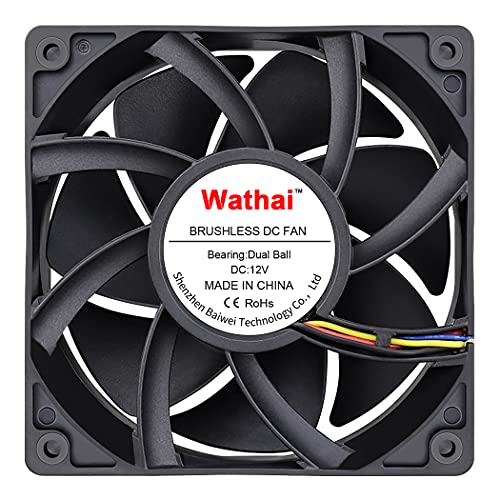
A mining-rig workhorse built to keep hot hardware breathing through long days
This is a 38mm-thick fan rated for 230 CFM at 5300 rpm, aimed squarely at people cooling mining rigs, Antminer chassis, and server GPU setups. The dual ball bearings are rated for 67,000 hours and let you lay the fan flat or stand it upright, which matters when you are shoehorning airflow into an odd frame. It runs a standard 4-pin PWM connector with intelligent speed regulation tied to a temperature trigger you set in BIOS.
Airflow is what buyers praise loudest here — several owners say it punches above its rated 230 CFM. Cooling results back it up: one owner kept a full-overclock 5950X below 70C under extreme load at 4k rpm, and another measured CPU heatsink temps down to 45C.
Now the honest part: noise is genuinely divisive, and this is the one spec to take seriously before buying. It is near-silent at low speed but very loud once you pass the halfway mark, and there is real talk of needing an external controller and the right power setup. Set it to a low fixed percentage and it becomes a well-behaved, extremely effective fan; run it wide open and you will hear it.
server racks: mining rigs, server chassis, and any build where moving maximum air beats staying quiet.
small cases: you want a set-and-forget fan that stays whisper-quiet at full speed.
6. ASUS ROG Strix XF120 120mm PWM Fan

A premium quiet fan with a bearing rated to outlive the rest of your build
Two numbers tell you what this fan is about. The first is its 22.5 dB noise rating — the lowest in this entire roundup — and the second is its magnetic-levitation bearing, rated for up to 400,000 hours. The MagLev design keeps the rotor centered so it runs smoothly with reduced friction, and a 250–1800 rpm operating range lets it spin all the way down to a stop at 0% PWM for near-silent idle.
It is built to be versatile: ASUS tunes it to blend airflow and static pressure so it works as a case fan, on a radiator, or on a CPU heatsink. Buyers report it lowering gaming temps by around 10C on a 7900X setup, and the anti-vibration pads and sleeved cables give it a premium feel from the start. Buyers regularly compare it favorably against more expensive name-brand fans on both pressure and silence.
The honest limit is that it is a patient fan, not a dramatic one — 62.5 CFM at 1800 rpm is tuned for smooth, quiet operation rather than maximum output. If you want the biggest possible airflow number, the thick 38mm fans on this list leave it behind. What you get here instead is a five-year warranty and the quiet, long-life behavior that keeps a build pleasant to sit next to.
premium bearings
- 22.5 dB noise rating — the calmest fan in this lineup
- MagLev bearing rated up to 400,000 hours, backed by a 5-year warranty
- Works as case fan, radiator fan, or CPU cooler fan thanks to blended airflow and pressure
costly single
- 62.5 CFM at 1800 rpm favors quiet over raw airflow
- Premium-tier pricing for a single fan, bought one at a time
performance rigs: silence and long-term durability matter more to you than chasing the highest airflow figure.
cheap builds: you need maximum CFM per fan and can live with more noise.
7. Thermalright TL-M12Q X3 120mm ARGB Case Fans 3-Pack

Three fans with mirror lighting and a wiring scheme that keeps your case tidy
This 3-pack runs up to 2000 rpm with 68.9 CFM of airflow and 2.21mmH2O of pressure, which is enough to serve as case intake, exhaust, or radiator fans. The headliner is the dual-side infinity mirror lighting — it gives the fans a fuller, layered look that reads especially well in glass-panel cases or in side and bottom positions where you see more than one face of the fan.
The daisy-chain connection is what buyers rave about most. It links the 4-pin PWM and 3-pin 5V ARGB cables fan-to-fan, so a stack of them tidies down to a couple of connections instead of a web of wires — one buyer runs six fans on only two connections. The fans are described as quiet, dependable, and a strong value, with the mirror RGB syncing cleanly through motherboard lighting software.
Two small things to plan for. The lighting needs a compatible ARGB header and software, and the included split setup only ships with one adapter dongle, so a multi-fan 2+1 arrangement may need an extra one. A few buyers also found the cable installation instructions unclear at first — nothing that stops a build, just worth reading twice.
rgb towers: you are building an RGB-focused PC and want strong airflow with clean, daisy-chained wiring.
non rgb: you have no ARGB header or software and do not want to add a controller.
8. Silverstone FHS 120X High Speed 120mm x 38mm PWM Fan

Server-grade airflow with a speed range wide enough to tame it down
Silverstone built this one for industrial and server duty, and the specs say so: 144 CFM of airflow, 11.7 mmH2O of static pressure, and a 1,000–4,000 rpm range that you control through PWM. The giant-bladed 38mm design is what generates that pressure, and the dual ball bearing is meant to keep it running for a long service life. It is not a quiet fan — 51.8 dBA at full tilt — but it is far cheaper than the Sanyo and Delta equivalents buyers compare it to.
Its saving grace is control. Because the speed range dips as low as 1,000 rpm, you can set a fan curve that keeps it well short of its loudest point and still move serious air. Buyers running it at 70% report plenty of airflow without the full roar, and one home-server owner uses three as front intake and notes they run fine on standard motherboard headers under 1A.
This is a fan for people who need the pressure, not a fan for a quiet desk build. Owners mention bearing scratch at very low rpm, and it is loud by design when pushed — but for a 4U server, a 3D printer hot end, or a memory-cooling setup, that pressure is the whole reason it earns its spot.
dense radiators: you need genuine industrial static pressure for a server, printer, or dense hardware and can shape the fan curve.
home offices: noise is your priority or your build has no way to cap its rpm.
9. NZXT F120X 120mm PWM RGB Performance PC Case Fan
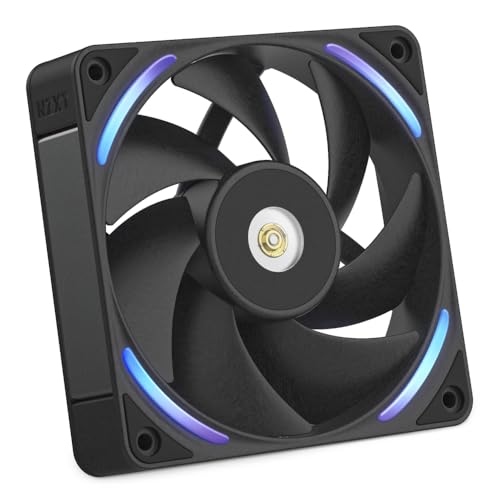
A performance-first RGB fan with materials built to hold shape at high speed
Most RGB fans treat the cooling as an afterthought. This one leads with materials: liquid-crystal polymer blades and frame that resist flex and vibration when the fan runs hard, ultra-tight tip-to-frame clearance to cut turbulence and air leakage, and a reinforced metal core around the motor housing. It spins up to 3100 rpm, and NZXT’s CAM software keeps the lighting synced with the rest of the build.
The hybrid bearing blends magnetic levitation with fluid-dynamic lubrication, so the rotor stays centered and stable at high speed while friction and wear stay low. Owners mention it keeping liquid temps meaningfully lower, with a smooth, premium look. At 41 dB at full speed it is not the quietest fan here — that is the trade for the extra rpm — but proper fan-curve tuning in BIOS keeps it manageable, and buyers who run it below its ceiling describe it as relatively quiet under load.
One fit note worth flagging: it is a thicker 30mm body rather than the common 25mm, so check clearance if you are working in a compact small-form-factor case. That extra bulk is part of what gives the higher-speed design its stability, but it does demand a bit more room.
rgb airflow: you want a high-rpm RGB fan with premium materials and lighting that syncs through NZXT CAM.
non rgb: you want the same brand’s quieter, lower-rpm performance for a calm build.
Understanding the Specs
CFM and Airflow
CFM stands for cubic feet per minute — simply how much air the fan moves each minute. Higher CFM means more air pushed through, which is why a 230 CFM fan outpaces a 76.7 CFM fan by a wide margin. But a high CFM number only helps if the fan can push that air where you need it, so pair a big airflow figure with a mounting spot that is not heavily blocked.
Static Pressure
Static pressure, measured in mmH2O, is the fan’s ability to push air through resistance like a radiator, a dust filter, or a dense heatsink. A fan with strong pressure can force air through obstacles that would stall a low-pressure airflow fan. If your fan mounts against anything restrictive, pressure matters more than the headline CFM figure. This is why the thick 38mm fans with high pressure specs suit radiators and dense hardware best.
FAQ
Will a 120mm fan fit my case if I already have 140mm mounts?
Do I need a 38mm thick fan or is a standard 25mm enough?
What is PWM and do I need it?
Can a single 120mm fan handle a whole build?
How long does a 120mm fan actually last?
Why are the high-speed 38mm fans so loud?
Do ARGB fans need a special motherboard header?
Can I run a high-CFM fan on a normal motherboard header?
Is more CFM always better for a case fan?
What is the difference between airflow and static pressure fans?
Final Thoughts: The Verdict
For most people, the 120mm cfm fan to buy is the be quiet! Silent Wings 4 120mm PWM High Speed — it delivers 76.7 CFM at a rated 31.2 dB and backs it with a fluid-dynamic bearing rated up to 300,000 hours, so it quietly handles case, radiator, or heatsink duty for years. That balance has earned it 900+ ratings at 4.7 stars. If raw airflow is the whole point and you can control the speed, grab the 12038 PWM Cooling Fan and its 230 CFM at 5400 rpm. And if you want premium silence plus a five-year warranty, the ASUS ROG Strix XF120 with its 22.5 dB rating is the one to reach for.
How We Picked
We do not accept paid placement. Every pick is matched to a real buyer and a real use-case; we do not hands-on test units.
Sources & Methodology
Specifications: manufacturer listings and product documentation. Review insights: verified customer reviews, as of September 2026. Pricing: not shown on this page (it changes often); check the current price via the retailer link.
As an Amazon Associate, Gadgets Feed earns from qualifying purchases. This does not affect which products we feature.