
A 120mm PC radiator is the compact thermal solution for small-form-factor builds, ITX rigs, and tight spaces where a larger 240mm or 360mm unit simply won’t fit. The challenge is balancing raw heat dissipation against fan noise and physical constraints — a choice that defines your entire system’s thermal profile.
I’m Min — the co-founder and writer behind Gadgets Feed. I’ve spent countless hours analyzing thermal resistance values, fin density, pump reliability data, and real-world customer feedback across the full spectrum of 120mm radiator designs to separate genuine performance from marketing hype.
Whether you are contending with a cramped chassis or seeking silent operation for a modest CPU, the right choice depends on understanding fin material, port threading, and fan static pressure. This guide presents the best 120mm pc radiator options for every build scenario.
How To Choose The Best 120mm PC Radiator
Selecting the right 120mm radiator requires understanding thermal physics, physical constraints, and noise tolerance. The small size means every specification matters more than it does in larger rads — there is less room for inefficiency.
Core Material: Copper vs. Aluminum
Copper offers roughly 1.7 times the thermal conductivity of aluminum, making full-copper radiators the gold standard for custom loop builds. However, mixing copper and aluminum in the same loop accelerates galvanic corrosion unless a proper coolant inhibitor is used. Aluminum radiators are lighter and cheaper but require higher airflow to match copper’s heat rejection at the same fin density.
Fin Density and Airflow Requirements
A 120mm radiator’s fin pitch — measured in fins per inch (FPI) — directly determines the static pressure needed. High-FPI rads (20+ FPI) require fans with at least 5.0 mmH₂O static pressure to push air through the dense core. Low-density rads (10–15 FPI) work well with standard case fans but trade thermal capacity. For a 120mm unit, a balanced 15–18 FPI is ideal for most builds.
Port Threading and Mounting Flexibility
Standard G1/4 inch threads are universal across PC water cooling, but verify that the radiator includes both the correct mounting screws for push and pull orientations and enough clearance for fan hubs. Some budget-friendly models omit short screws for direct push mounting, forcing a pull configuration that can trap dust inside the chassis.
Quick Comparison
On smaller screens, swipe sideways to see the full table.
| Model | Category | Best For | Key Spec | Amazon |
|---|---|---|---|---|
| Alphacool NexXxos ST30 | Full Copper Custom Loop | Maximum Heat Transfer | Full copper core & chambers | Amazon |
| Thermaltake TH120 V2 | Premium AIO | Infinity Mirror Aesthetics | 2000 RPM PWM pump | Amazon |
| Dracaena.io 120mm AIO | Value AIO | Budget-Friendly Liquid Cooling | 180W TDP support | Amazon |
| CORSAIR iCUE Link LX120 | Premium RGB Fan | Radiator Push Fan | 2400 RPM static pressure fan | Amazon |
| Noctua NF-A12x25 PWM | Premium Radiator Fan | Industry-Leading Quiet Operation | 22.6 dB(A) max noise | Amazon |
| Thermalright Frozen Notte 120 | Budget AIO | Entry-Level Liquid Cooling | 2800 RPM pump speed | Amazon |
| FOSA Copper Radiator 120mm | Budget Custom Loop | DIY Water Cooling Starter | Copper inner core | Amazon |
In‑Depth Reviews
1. Alphacool NexXxos ST30 Full Copper Radiator
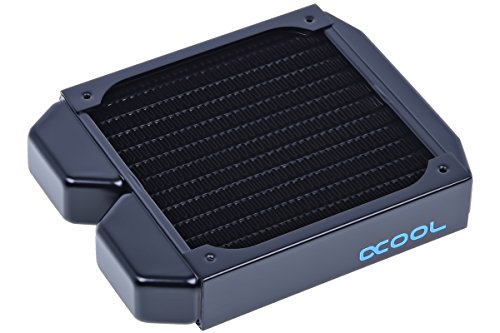
The Alphacool NexXxos ST30 is a fully copper construction — fins, chambers, and channels — delivering superior thermal conductivity that aluminum-based radiators cannot match. At 30mm thick with 124mm width and 157mm length, this unit fits most ITX builds while providing a dense copper core that excels at rejecting heat from moderate TDP CPUs. The brass-threaded G1/4 ports resist cross-threading better than soft copper threads on cheaper alternatives.
Real-world users report a consistent 5°C drop per fan stage when paired with good static pressure fans, and multiple build logs confirm reliable performance over extended periods. The steel side panels add structural rigidity that prevents warping under extended thermal cycling, a common failure point in budget radiators. Since it is a custom loop component, you will need to source your own pump, reservoir, tubing, and fittings.
One important caveat is that this radiator ships with 30mm screws only — you will need to source shorter 5mm screws separately if you plan a push configuration directly against the case panel. Additionally, a small number of users reported leakage after several months, so testing the loop for 24 hours before permanent installation is strongly recommended.
Why it’s great
- Full copper construction maximizes heat transfer for a 120mm footprint
- High flow pattern reduces air trap risk inside the loop
- Brass ports provide long-term thread durability
Good to know
- Does not include short screws for direct push mounting
- Some units have shown eventual leakage — leak test before final assembly
2. Thermaltake TH120 ARGB Sync V2

The Thermaltake TH120 V2 is a 120mm AIO that pairs a high-performance copper base plate with a 2000 RPM PWM pump for maximum coolant circulation. The radiator uses an aluminum core matched with a copper cold plate, a common hybrid design that keeps costs manageable while still accelerating heat away from the CPU. The 360-degree rotating Infinity Mirror cap provides the most visually striking pump head in this category.
Real performance data shows impressive results: an FX-9370 idles at approximately 38°C, while a more modern FX-8350 drops from loud air cooling to an idle of 33°C and a full load of just 52–53°C at a 21.7°C ambient. Users confirm the included fan operates at a noise level comparable to premium fans like Noctua models, with the 25.8 dBA rating holding up in practice. The V2 revision improves pump reliability and simplifies the mounting system compared to the original TH120.
The installation instructions remain somewhat ambiguous, and the wiring harness includes a number of unused connectors that can complicate cable management in small cases. Additionally, some users found the fan’s 4-pin header did not work on the designated CPU fan header and had to use a chassis header instead. The two-year warranty provides some peace of mind for this mid-range investment.
Why it’s great
- Copper cold plate offers strong thermal transfer for a 120mm AIO
- Extremely quiet fan operation at low and high speeds
- Infinity Mirror cap delivers exceptional RGB aesthetics
Good to know
- Mounting instructions are unclear and lack detail
- Included fan may not work on the intended motherboard header
3. Dracaena.io 120mm AIO CPU Cooler
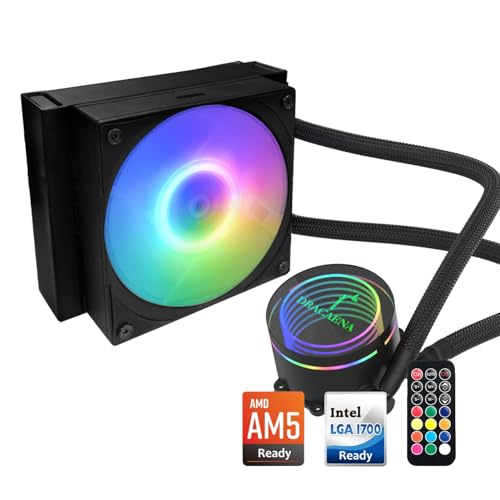
The Dracaena.io 120mm AIO packs a 180W TDP rating into a compact 158×120×27mm aluminum radiator with a copper cold plate, making it capable of handling mid-range gaming CPUs without thermal throttling. The 120mm fan delivers 30–65 CFM at 500–2200 RPM with a noise ceiling of 28.8 dBA, which is competitive for this price bracket. The pump uses a hydraulic bearing rated for 40,000 hours at 2400 RPM, offering decent longevity for an entry-level AIO.
Customer reports confirm it runs 5°C cooler than typical stock air coolers while operating significantly quieter. The included six-port ARGB controller and remote control provide lighting customization without requiring motherboard RGB software, a rare feature at this price level. The LGA 1366 compatibility is a standout — this AIO can revive older workstation builds that have been abandoned by most other cooler manufacturers.
Build quality concerns include a plastic pump housing that feels less durable than all-metal alternatives, and the mounting instructions are sparse enough that some users needed to watch additional videos. Customer support from Dracaena.io is reportedly excellent, with replacements sent free of charge even after extended ownership periods. The remote control’s LED mode selector can conflict with motherboard ARGB sync, so decide early whether you want software or hardware control.
Why it’s great
- 180W TDP rating handles mid-range CPUs effectively
- Includes ARGB remote and 6-port controller for standalone lighting control
- Rare LGA 1366 support for legacy workstation builds
Good to know
- Plastic pump housing feels less premium than all-metal units
- Instructions are sparse — may require external mounting guides
4. Noctua NF-A12x25 PWM chromax.Black.swap

The Noctua NF-A12x25 is not a radiator itself but the definitive fan for any 120mm radiator discussion — its 22.6 dBA max noise at 2000 RPM is the quietest in its class while delivering class-leading static pressure. The Sterrox LCP (liquid-crystal polymer) construction enables a record 0.5mm tip clearance between blade and frame, virtually eliminating the turbulence noise that plagues most fans at high RPM. The AAO frame with Flow Acceleration Channels ensures the high static pressure needed for dense radiator cores.
Users consistently report that this fan moves more air through radiator fins than any competing 120mm fan at the same noise level. One builder documented a 4°C drop in GPU idle temperature (42°C to 38°C) simply by swapping to the NF-A12x25 from a standard budget fan. The chromax.black.swap edition includes seven color sets of anti-vibration pads and a black gasket, letting you match any build aesthetic without sacrificing the fan’s acoustic decoupling.
The primary drawback is the premium pricing — this single fan costs more than some entry-level AIO liquid coolers. The cable length is also somewhat short for mid-tower cases, requiring careful routing or a PWM extension. At 1300–1400 RPM, some users report an audible hum that is absent at higher or lower speeds, so you may want to set a custom fan curve that skips this narrow band.
Why it’s great
- Industry-leading 22.6 dBA noise level at 2000 RPM
- Sterrox LCP material enables the tightest blade tip clearance
- Seven swappable pad colors for aesthetic customization
Good to know
- Premium pricing that exceeds many entry-level AIO coolers
- Short cable length — extension often needed in mid-tower cases
- Narrow audible hum at 1300–1400 RPM requires careful fan curve tuning
5. CORSAIR iCUE Link LX120 RGB

The CORSAIR iCUE Link LX120 is a 2400 RPM 120mm fan engineered specifically for radiator duty, delivering 69.9 CFM of airflow backed by 5.22 mmH2O of static pressure — sufficient to push through high-FPI radiator cores. The dual light loops feature 18 LEDs per fan (inner and outer) for stunning customizable RGB that syncs across the iCUE ecosystem. The Magnetic Dome bearing refines the magnetic levitation design to reduce friction noise while extending the fan’s operational lifespan.
The iCUE Link system is the standout feature: bridge connectors daisy-chain up to 14 fans using a single cable to the iCUE Link System Hub, reducing a typical 26-fan cable mess to just two to four wires. Users report thermal improvements of up to 10°C on RTX 5070 GPUs when old stock fans were replaced with LX120s, and 9800X3D CPU temps dropped to 35–40°C idle and 50–60°C under gaming loads. The fan runs remarkably smooth and quiet even at full speed, though it is audibly louder than the Noctua NF-A12x25.
The major drawback is cost: each fan costs a premium and the Link System Hub must be purchased separately. The included fan cables are also on the shorter side, so the hub needs to be centrally located in the case. iCUE software, while powerful, requires patience during initial setup and may have minor conflicts with non-CORSAIR RGB components when trying to synchronize lighting across brands.
Why it’s great
- High 5.22 mmH2O static pressure handles dense radiator cores
- iCUE Link daisy-chain dramatically simplifies cable management
- Dual-loop RGB with 18 LEDs per fan is visually exceptional
Good to know
- Expensive per fan, and the required Link hub is sold separately
- Fan cables are short — hub placement must be central
- iCUE software setup has a learning curve
6. Thermalright Frozen Notte 120 ARGB Black
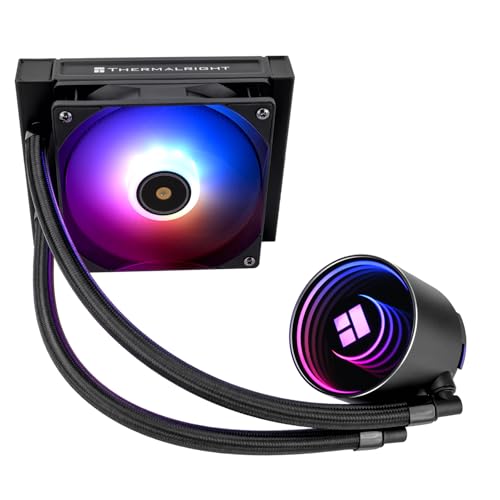
The Thermalright Frozen Notte 120 packs an aggressive 2800 RPM (±10%) pump — the fastest in this comparison — paired with a 2000 RPM PWM fan that pushes 72.37 CFM at a moderate 27.7 dBA. The pump head uses a 0.1mm pitch copper bottom with mirror electroplated acrylic, driving strong cooling for a 120mm AIO. The S-FDB (Stably-Fluid Dynamic Bearing) fan addresses the blade jitter problem common in hanging fan orientations, making this unit especially suitable for top-mounted radiator positions.
Real-world performance is impressive for the price: an i7-13700K idles in the mid-20s°C and stays in the upper 50s to low 60s°C under demanding workloads like Topaz AI and Lightroom with Photoshop. An AMD 5900x never exceeds 70°C with a 145W PPT limit. The ARGB lighting on the pump and fan syncs via a standard 5V 3-pin header, though the fan’s ARGB implementation has fewer LEDs than premium alternatives, resulting in a less vibrant look.
The all-aluminum alloy pump cover feels premium, but the mounting system requires the original AMD motherboard backplate for AM4/AM5 installations, which complicates the process if that backplate is missing. The fan cables are not bundled with a daisy-chain connector, so routing multiple cables demands careful planning. For builders prioritizing function over flash, the Frozen Notte delivers cooling performance that punches well above its price category.
Why it’s great
- Aggressive 2800 RPM pump drives strong coolant flow for a 120mm loop
- S-FDB bearing eliminates jitter in hanging fan orientations
- Keeps high-end CPUs like i7-13700K in the 60°C range under workload
Good to know
- Fan ARGB has fewer LEDs — less vibrant than dual-loop designs
- Requires motherboard AMD backplate for AM4/AM5 installation
- Fan cables lack daisy chain, increasing cable clutter
7. FOSA Copper Radiator 120mm

The FOSA Copper Radiator 120mm is a budget-friendly entry into custom-loop water cooling, featuring a copper inner core for heat transfer with a stainless steel outer panel for structural durability. The radiating stripe design increases surface area for heat dissipation, and the standard G1/4 threads ensure compatibility with most water blocks, pumps, and fittings in the PC water cooling ecosystem. A rubber pad is included to decouple vibration noise from the case panel.
Users report solid thermal performance for the price, with no leaks during initial testing and installation that is straightforward for anyone familiar with custom loops. The copper construction looks the part and provides noticeable thermal improvement over aluminum entries at a similar price point. The 6.1 x 4.69 x 1.06-inch dimensions fit standard 120mm fan mounts without clearance issues.
Build quality is adequate for the price but not premium — the G1/4 fittings can be over-tightened and damage the threads, and some units arrive with minor paint defects on the steel panel. The stainless steel panel helps prevent corrosion but does not contribute to thermal performance as the copper core does. This radiator is best suited for first-time custom loop builders who want copper performance without the premium price tag of the Alphacool ST30.
Why it’s great
- Copper core provides better thermal transfer than aluminum alternatives
- Included rubber pad reduces vibration noise
- Standard G1/4 threading fits most water cooling components
Good to know
- Soft copper threads are easy to over-tighten and damage
- Some units arrive with minor paint defects
- Stainless steel panel adds durability but not thermal performance
FAQ
Can a 120mm radiator handle a high-end CPU?
Is an all-copper radiator worth the premium over aluminum?
What is the difference between a 120mm AIO and a 120mm custom loop radiator?
Final Thoughts: The Verdict
For most users building a custom loop, the best 120mm pc radiator winner is the Alphacool NexXxos ST30 because its full copper construction delivers unmatched thermal transfer in a compact 30mm form factor. If you prefer the simplicity of an AIO, the Thermaltake TH120 V2 combines a reliable copper cold plate with stunning RGB aesthetics. And for the best value AIO, nothing beats the Thermalright Frozen Notte 120 which competes with units costing twice as much.