
Our readers keep the lights on and my morning glass full of iced black tea. As an Amazon Associate, I earn from qualifying purchases.
Specs are compiled from manufacturer listings and verified buyer reviews and can change over time — please confirm the key details on the product page before buying.
Slim fans exist to cool tight spots—between radiators and case walls, under GPUs, and inside ITX builds—where standard 25mm fans won’t fit. Thinner blades move less air and often run louder, so you trade cooling performance for fit. This guide ranks the best 120mm slim fans by real airflow and noise, not just specs.
I’m Min — the founder and writer behind Gadgets Feed. This guide is built by comparing the manufacturers’ published specifications and the patterns across verified customer reviews, so you get each pick’s real strengths and trade-offs instead of marketing spin.
Thickness, noise in decibels, and airflow in CFM are what separate a great thin fan from a frustrating one, and our list of the best 120mm slim fans weighs all three against real-world build scenarios.
Our Picks at a Glance


How To Choose The Best 120mm Slim Fans
Choosing a slim fan means balancing millimeters of clearance against airflow and noise. Before you pick one, you need to know your clearance, your noise tolerance, and whether you’re cooling a radiator or just pulling air through a case.
Measure your clearance first
Slim fans typically come in 12mm, 15mm, or even 15.6mm thicknesses. That few millimeters is the entire reason you’re here, so measure the gap you’re filling — between a thick radiator and a GPU, or behind a motherboard tray. A 15.6mm fan will not fit where a 12mm one does.
Match airflow to the job
Airflow is measured in CFM (cubic feet per minute). More CFM moves more air through an open case, but a radiator or heatsink needs static pressure (the force pushing air through tight fins) instead. A high-CFM fan can be useless on a dense radiator if it lacks pressure.
Quick Comparison
| Model | Best For | Thickness | Airflow | Max Noise | Amazon |
|---|---|---|---|---|---|
| Noctua NF-A12x15 FLX★ Best Overall | Near-silent long-term builds | 15mm | 94.2 m³/h | 23.9 dB(A) | Amazon |
| ID-COOLING NO-12015-XT-ARGBBest RGB | RGB builds with PWM | 15mm | 54.6 CFM | 31.2 dB | Amazon |
| Scythe Wonder Tornado Slim | Silent-focused value seekers | 15mm | 34.31 CFM | 27.8 dB | Amazon |
| SXDOOL 120mm Slim | Ultra-tight 12mm gaps | 12mm | 39 CFM | 18 dB | Amazon |
| Scythe Kaze Flex II Slim | Radiator push-pull setups | 15mm | 48 CFM | 27.8 dB | Amazon |
| Silverstone Air Slimmer 120 | Top-tier radiator performance | 15.6mm | 63.67 CFM | 31.7 dB | Amazon |
| Noctua NF-A12x15 PWM | Automatic speed control | 15mm | 157 CFM* | 23.9 dB | Amazon |
*The NF-A12x15 PWM’s 157 CFM figure is listed by the manufacturer as a combined or system-level spec; the FLX model’s 94.2 m³/h is the more conservative per-fan measurement. Compare like-for-like on the models where single-fan CFM is stated.
In‑Depth Reviews
1. Noctua NF-A12x15 FLX
Our pick — over 4.5★ from 800+ verified ratings; the strongest balance of quality and price.
A premium 15mm fan that stays quiet and fast for years.
Buyers report the NF-A12x15 FLX has been running for five years without getting louder or slower — durability that justifies the premium position at the top. It’s a 120x120x15mm, 12V, 3-pin fan rated at 1850 RPM max, hitting just 23.9 dB(A) at full tilt. Because it’s a 3-pin FLX version, you get three speed settings — 1850, 1400, and 950 RPM — toggled by swapping the included Low-Noise Adaptors, so you can choose between max airflow or near-silent operation without software.
Beyond the numbers, the A-series frame uses Flow Acceleration Channels and Advanced Acoustic Optimisation, which in plain terms means the air is shaped to reduce turbulence hum. It ships with anti-vibration mounts, fan screws, an extension cable, and a 3:4-pin adaptor so you can power it straight from the power supply. The 15mm profile slides into tight spots like between a radiator and case, which is exactly what one builder needed to solve an overheating issue. Quality is the thing owners praise most — the build feels solid and worth the money, even if the brown color isn’t for everyone.
Dropping the speed from 1850 to 1400 RPM makes it barely audible, and at the 950 RPM low setting it’s effectively silent while still moving enough air for light cooling duties. In one reported case, swapping this fan into a passively cooled machine dropped daily temperatures from the 50s down to 35°C. It is pricier than rivals, and full-speed operation is noticeably loud (comparable to stock fans at mid-load), but the flexibility of three physical speed settings covers that.
What keeps it at the top
- Five years of real-world use with no degradation in noise or speed
- Three selectable speeds (1850/1400/950 RPM) for airflow or silence
- Only 23.9 dB(A) at maximum speed
- Anti-vibration mounts and full accessory kit included
Where it compromises
- 3-pin means no automatic motherboard speed control
- Full speed is loud, close to stock fan levels
- Premium pricing, and the brown finish divides opinion
Choose it for: A build where you want set-and-forget reliability, selectable silence, and don’t mind adjusting speeds manually.
Note the trade-off: You lose automatic PWM speed control, so if the system must throttle itself, the PWM version below is the smarter pick.
2. ID-COOLING NO-12015-XT-ARGB
A 15mm RGB fan that delivers airflow rivaling pricier models.
The ID-COOLING NO-12015-XT-ARGB is the budget pick that refuses to act like one. Noise runs from a whisper-quiet 13.8 dB up to 31.2 dB at full speed, which is the price you pay for that class-leading airflow. The Addressable RGB syncs to your motherboard through a standard 5V 3-pin connector, letting the lighting match your whole rig.
You get strong airflow without the brand-name price tag, and buyers are surprised at how well these hold up. One reviewer notes: “Slim rgb fan, they look cool, have decent amount of pressure (I have 2 of these as extractors) with low noise.” The blades and frame use an even light diffuser, so the RGB glow looks uniform across the whole fan. Build quality is the most-praised feature, with reliability close behind. You also get screws for direct case mounting and separate screws for radiator mounting, so installation is straightforward.
Unlike the Scythe options above that lean purely on silence, this one balances airflow and lighting, but there is a real catch. The 15mm thinness means the fan blades sit very close to whatever is in front of them; owners warn about scraping if the fan is mounted flush against something, and the wiring is thin. It’s a fantastic value, but this isn’t a silent fan — at high RPM the 31.2 dB is noticeable, and durability gets mixed feedback over the long term.
The impressive side
- 54.6 CFM, the highest airflow among value slim fans
- PWM control from a slow 500 RPM to a fast 2,000 RPM
- Vibrant addressable RGB synced via 5V 3-pin
- Screws included for both case and radiator mounting
Where to be careful
- 31.2 dB at max speed is among the louder slim fans here
- Blades risk scraping when mounted flush without standoffs
- Durability reviews are mixed over extended use
Reach for this if: You want RGB lighting plus PWM control without paying a premium, and airflow matters more than near-silence.
Look elsewhere if: You need a truly silent fan or have a gap so tight that even 15mm leaves almost no clearance.
3. Scythe Wonder Tornado 120 Slim
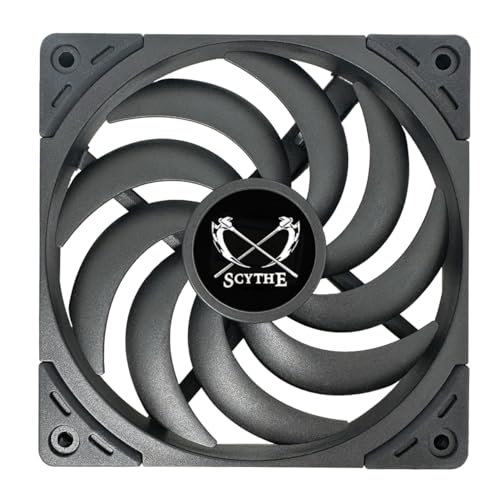
A quiet 15mm fan that still moves enough air for most builds.
The Scythe Wonder Tornado 120 Slim targets a specific buyer: someone who wants low noise as the priority but still needs meaningful airflow. It’s a 120x120x15mm fan rated at 34.31 CFM with a maximum noise of just 27.8 dB — noticeably quieter than the ID-COOLING’s 31.2 dB, and the 12% quieter choice if decibels keep you up at night. At 2,000 RPM it tops out faster than the Noctua NF-A12x15’s 1,850 RPM, so it can spin quicker while staying calmer to the ear.
What makes this one different is the engineering underneath. The proprietary Fluid Dynamic Bearing uses compressed metal for the bearing and pressure shaft, promising a lifespan up to 120,000 hours — that’s over a decade of continuous duty. The 9 tune blades are swirled specifically to push high static pressure, which is what you want when pushing air through radiator fins rather than just open space. Owners running it in NR200 mini-ITX cases with mesh panels report surprise at “the airflow for the thin model” given how quiet it runs.
The catch here is that “silent” is relative. While the spec sheet is gentle, some owners found it too noisy for their specific application and moved it elsewhere, and the included screwless mounts drew sharp criticism. For a true silent-focused case fan, the speed range matters too — this is a 4-pin PWM fan, so your motherboard can throttle it automatically, which helps tame the noise at idle. It ships as a single unit, so factor in quantity if you need several.
Silence first: At 27.8 dB and 2,000 RPM, this is the quiet-spinning option that still delivers enough air for most case and radiator duty.
Know the limits: 34.31 CFM trails the higher-flow fans on this list, and the screwless mounts are best swapped for standard screws.
Best suited to: Quiet-focused builders who have PWM headers and want a fan that can spin fast when needed but stay hushed at idle.
skip it if: You need maximum airflow in a tight space — the ID-COOLING pushes 59% more air, and this fan’s pressure is tuned for radiators more than open case flow.
4. SXDOOL 120mm Slim Fan (12mm)

At 12mm thick, this fan fits gaps no other model here can.
When you’re down to single-digit millimeters of clearance, the SXDOOL is the answer. At just 12mm thick — 3mm slimmer than the 15mm standard on this list — this is the fan people turn to when their motherboard fits too tightly for anything else. It’s a 120x120x12mm, 12V DC fan with a 3-pin connector, spinning at a fixed 1400 RPM. It moves 39 CFM at a rated 18 dB, which is the quietest noise spec of the entire lineup and a full 41% more airflow than the Scythe Wonder Tornado manages.
This fan fits tight spots where others won’t: one owner places it under a turntable to cool a receiver below, and another needed exactly this 120mm thickness to mount between a case wall and the end of a radiator. The tune blades balance air pressure and flow, and the aerodynamic air-inlet is designed to cut down on turbulent noise. It comes with a 1-year manufacturer’s warranty. But buyer feedback is mixed on noise and performance, so treat it as a situational tool, not a universal fix — some call it very quiet, others found it noisy, and one rattling first unit was replaced by one that “works beautifully.”
The trade-off is lifespan. One owner reported the fan was fine for 17 months until the bearings failed, on a machine running 8+ hours daily. That makes it a smart choice for backup computers or occasional-use rigs, but not the fan to trust for a 24/7 workstation. It’s a 3-pin fixed-speed fan too, so you can’t throttle it down automatically when things get quiet.
Built for impossible gaps: At 12mm thick, it solves clearance problems that 15mm fans cannot, with a quiet 18 dB rating at 1400 RPM.
Right tool, right job: Owners mention bearing failure around 17 months in heavy daily use, so treat it as a light-duty specialist, not a marathon runner.
Pick this when: You measured the gap and a 15mm fan won’t fit — this is the slimmest option that still pushes a respectable 39 CFM.
Think twice if: You need a fan for a primary machine that runs 8+ hours a day; the premium Noctua options carry far longer lifespans.
5. Scythe Kaze Flex II 120 Slim

A slim fan with 11 blades engineered to drop CPU temps under load.
The Scythe Kaze Flex II 120 Slim attacks cooling from a different angle: more blades. Its 11 tune fan blades are designed to generate maximum CFM volume, and the numbers back it up — 48 CFM of airflow at 27.8 dB, spinning up to 1,800 RPM via PWM. This makes it the clear middle-ground pick between the high-flow ID-COOLING and the quiet-focused Wonder Tornado, and it sits in the same 15mm thickness class. It’s a direct Scythe sibling to the Wonder Tornado above, sharing the Fluid Dynamic Bearing rated for 120,000 hours, but tuned for more airflow at a slightly lower max speed.
Real-world results are dramatic for an ITX builder who reported CPU temps dropping from 73-75°C down to 64-68°C after installing these. The frame itself is 1mm slimmer than its predecessor, freeing up extra space for Mini-ITX enthusiasts, and the compressed-metal bearing shaft promises long-term stability. Owners use it as a rear exhaust in cases like the NZXT H6, praising how it fits behind motherboard LED logos, and in pull configurations on front AIO radiators where GPU clearance is tight. The sleeved cable wrap earns compliments for looking professional.
Noise is the recurring theme, and it’s the one area to read carefully. Below 800 RPM it’s genuinely quiet, but customers note it becomes “way too noisy” above that threshold. That makes PWM control essential — you’ll want your motherboard to keep it under 800 RPM during light loads and only let it spin up when things get hot.
Its strengths
- 48 CFM airflow with an 11-blade design
- Real ITX builds report 8-9°C temperature drops
- PWM control to keep it under 800 RPM for silence
- Fluid Dynamic Bearing rated for 120,000 hours
Its limits
- Way too noisy above 800 RPM by owner consensus
- Best treated as a PWM-controlled fan, not a fixed-speed one
- Middle-of-the-pack airflow trails the ID-COOLING
Choose it for: Radiator push-pull setups or ITX builds where you need real airflow and have PWM headers to keep speeds sensible.
Choose the Wonder Tornado instead if: You want the quieter sibling with a higher 2,000 RPM ceiling and don’t need the extra 14 CFM of airflow.
6. Silverstone Air Slimmer 120

The performance king that cools like a 20mm fan in a 15.6mm body.
The Silverstone Air Slimmer 120 is for builders who refuse to compromise on cooling just because space is tight. Measuring 15.6mm thick — a hair over the standard 15mm — it pushes an enormous 63.67 CFM at 1,800 RPM, the highest airflow figure on this list among fans with clearly stated single-fan specs. The unique 9 scimitar blade design generates high air pressure specifically to blast heat through radiators and heatsinks, and owners describe it as “20mm class performance” from a body that saves 10mm of clearance. Full-range PWM means it can spin from 0 RPM up to full speed, letting your motherboard ramp it as needed.
Performance is what wins people over here — it consistently tops slim-fan comparison tests, showing lower temperatures and noise than rivals in small form factor builds. Reviewers point out it cooling an Intel Ultra 7 270K effectively and moving serious air through a 30mm thick radiator. The all-copper Fluid Dynamic Bearing is built for longevity, using polycarbonate blades on a PBT frame. If you’re pairing it with a low-profile cooler like the AXP-120-67, this is the fan that open up its full potential.
The honest trade-off is that this is a performance-first fan, not a silence-first one. At 31.7 dB max noise it’s the loudest fan here at full tilt, and the noise profile is MIXED in reviews. Owners call it “not the quietest but it will move air,” and one reported bearing rattle after repeated use on a demanding radiator setup.
Why it leads on performance
- 63.67 CFM — the highest clear single-fan airflow here
- Full-range PWM from 0 to 1,800 RPM
- Scimitar blades built for high static pressure on radiators
- All-copper Fluid Dynamic Bearing for longevity
The honest drawbacks
- 31.7 dB makes it the loudest at full speed
- Occasional reports of bearing rattle on demanding setups
- 15.6mm thickness can matter in ultra-tight gaps
Get this if: You have a radiator that needs serious airflow and you’re willing to trade a few decibels for performance that punches above its thickness class.
Pass if: Your build is noise-sensitive — the Noctua NF-A12x15 hits 23.9 dB, a full 7.8 dB quieter, though with far less airflow.
7. Noctua NF-A12x15 PWM
Automatic speed control meets Noctua’s legendary quiet in one slim package.
If the FLX version above is the manual-transmission Noctua, this is the automatic. The NF-A12x15 PWM is the same 120x120x15mm, 12V fan but with a 4-pin PWM connector, so your motherboard adjusts the speed automatically between idle and 1,850 RPM based on temperatures. You get the same 23.9 dB(A) maximum noise and the same >150,000h MTTF rating, which in plain terms means it’s rated to run for over 17 years before failure. The included Low-Noise Adaptor caps it at 1,400 RPM if you want a guaranteed-silent ceiling.
The build uses the same award-winning A-series design with Flow Acceleration Channels and Advanced Acoustic Optimisation, and owners consistently call it quieter than the stock fans it replaces. One builder swapped it onto a Thermalright AXP 67 cooler for a 5800X in a Fractal Ridge and reported it runs quieter than the included fan while moving more air. Low noise is the thing owners praise most, with build quality close behind. The accessory kit is the richest here: anti-vibration mounts, fan screws, an extension cable, and a y-cable for running two PWM fans off one header.
Owners are upfront that “this isn’t cheap,” and they say to grab it if you genuinely need a slim fan — otherwise standard-thickness options make more sense. The real downside compared to standard fans is airflow: at 157 CFM listed (likely a paired or system figure) it can’t match a 25mm thick fan’s raw volume, but for its 15mm class it’s excellent. It also uses an ABS plastic frame versus the FLX’s fibre-glass reinforced PBT, a minor difference.
What earns the premium
- Automatic PWM speed control via 4-pin header
- 23.9 dB(A) max noise with 1,850 RPM ceiling
- Rated >150,000 hours MTTF
- Y-cable included to run two fans on one header
Where it asks for compromise
- Premium price for a slim fan
- Lower raw airflow than a 25mm standard fan
- ABS frame instead of the FLX’s fibre-glass reinforced PBT
Buy this one if: You want Noctua’s quiet and durability but need the motherboard to handle speed automatically — low-maintenance.
Buy the FLX version instead if: You prefer manually selecting three fixed speeds, or want the tougher fibre-glass reinforced PBT frame.
Understanding the Specs
Thickness (mm)
The defining spec of a slim fan. Standard fans are 25mm thick; slim fans range from 12mm to 15.6mm. This single number decides whether the fan fits between your radiator and case wall, or under a GPU. Measure your gap before buying — a 15.6mm fan simply won’t fit where a 12mm one does.
Airflow (CFM)
Cubic feet per minute measures raw volume of air moved. Higher CFM cools open spaces better, but radiators and heatsinks need static pressure to push air through tight fins. A fan with high CFM but low pressure can underperform on a dense radiator — match the fan to the job, not just the number.
Noise (dB(A))
Decibels measure sound pressure, and every 10 dB is roughly a doubling of perceived loudness. A 23.9 dB fan is genuinely quiet; a 31.7 dB fan is clearly audible. But noise specs are measured at max speed — a PWM fan at idle can be far quieter than its peak rating suggests.
PWM vs 3-Pin
PWM (4-pin) fans let the motherboard automatically adjust speed based on temperature, slowing to near-silent at idle and ramping up under load. Fixed-speed 3-pin fans run at one speed unless you manually switch adaptors or use voltage control. For set-and-forget builds, PWM is easier to live with.
FAQ
Will a 15mm slim fan fit where my standard 25mm fan was?
What is the difference between a 12mm and a 15mm slim fan?
Is PWM control worth it on a slim fan?
Which slim fan moves the most air?
Can I use a slim fan on a radiator?
How long do slim fans last compared to standard fans?
Do slim fans come with mounting screws and accessories?
What does the 3-pin FLX version of the Noctua mean?
Are slim fans noisier than standard 25mm fans?
Can I run two slim fans from one motherboard header?
Final Thoughts: The Verdict
For the majority of shoppers, the 120mm slim fans winner is the Noctua NF-A12x15 FLX because it’s the crowd favorite — a 4.8-star reputation across 800+ owners who report five years of silent, consistent operation. If you want automatic speed control and don’t mind the premium, grab the NF-A12x15 PWM. And for the highest airflow in a slim body, the Silverstone Air Slimmer 120 is the one to reach for when cooling performance beats silence.
How We Picked
We do not accept paid placement. Every pick is matched to a real buyer and a real use-case; we do not hands-on test units.
Sources & Methodology
Specifications: manufacturer listings and product documentation. Review insights: verified customer reviews, as of September 2026. Pricing: not shown on this page (it changes often); check the current price via the retailer link.
As an Amazon Associate, Gadgets Feed earns from qualifying purchases. This does not affect which products we feature.