
Our readers keep the lights on and my morning glass full of iced black tea. As an Amazon Associate, I earn from qualifying purchases.
Specs are compiled from manufacturer listings and verified buyer reviews and can change over time — please confirm the key details on the product page before buying.
If your CPU cooler or small-form-factor case only has room for a sliver of a fan, you feel the heat — and the noise. A 120mm slim PC fan squeezes real cooling into spaces where a standard 25mm-thick fan simply cannot fit, so your build stays quiet and your temperatures stay sane. This guide sorts the quietest and most powerful 15mm-class options so you can pick the one that matches your exact clearance and noise tolerance.
I’m Min — the founder and writer behind Gadgets Feed. This guide is built by comparing the manufacturers’ published specifications and the patterns across verified customer reviews, so you get each pick’s real strengths and trade-offs instead of marketing spin.
Finding the right 120mm slim pc fan means balancing airflow, noise, and thickness against your case’s tight clearance, and this breakdown makes that call clear.
Our Picks at a Glance


How To Choose The Best 120mm Slim PC Fan
Before you click buy, the most important thing to understand is your clearance. Slim fans here are about 15mm thick, but some drop to 12mm or stretch past 15.6mm — that one millimeter can decide whether the fan fits between your GPU and a radiator. Measure your gap first, then shop the thickness.
Airflow vs. Static Pressure
Two numbers matter: airflow (measured in CFM, or cubic feet per minute) tells you how much air the fan moves in open space, while static pressure tells you how hard it pushes air through tight obstacles like a radiator or heatsink fins. For a radiator, you want high static pressure; for a simple case exhaust, high airflow is the better target.
Noise Level and Speed Control
Every fan lists a noise rating in dBA — the higher the number, the louder it gets at full speed. A 4-pin PWM connector lets your motherboard automatically adjust speed based on temperature, so the fan spins fast when hot and slow when idle. A 3-pin fan meanwhile runs at a fixed speed unless you manually change it, which often means more noise for less control.
Quick Comparison
| Model | Best For | Airflow (CFM) | Noise (dBA) | Speed (RPM) | Amazon |
|---|---|---|---|---|---|
| Noctua Chromax Black Swap★ Best Overall | Ultra-quiet premium cooling | 94.2 m³/h | 23.9 | 1850 | Amazon |
| ARCTIC P12 Slim PWM PSTSuper Quiet Trio | Quiet multi-pack value | 34.51 | 0.3 Sone | 2100 | Amazon |
| Noctua NF-A12x15 FLXLegacy Performer | Premium 3-pin simplicity | 94.2 m³/h | 23.9 | 1850 | Amazon |
| SilverStone Air Slimmer 120 | High airflow for radiators | 63.67 | 31.7 | 1800 | Amazon |
| ID-COOLING NO-12015-XT-ARGB | Budget RGB with strong airflow | 54.6 | 31.2 | 2000 | Amazon |
| SXDOOL 120mm Slim | Ultra-thin 12mm cases | 39 | 18 | 1400 | Amazon |
| Scythe Kaze Flex II 120 Slim | Balanced value performance | 48 | 27.8 | 1800 | Amazon |
| Scythe Wonder Tornado 120 Slim | Budget airflow with high RPM | 34.31 | 27.8 | 2000 | Amazon |
| SilverStone Air Slimmer 120 ARGB | RGB with high static pressure | — | 31.7 | 1500 | Amazon |
In‑Depth Reviews
1. Noctua Chromax Black Swap 120mm
Our pick — over 4.5★ from 850+ verified ratings; the strongest balance of quality and price.
The quiet premium that tames overheating without shouting about it.
When you need a 15mm fan that simply disappears into your build, this is the one to beat. It swings a broad 450–1850 RPM range at just 23.9 dB(A), so it can breeze along near-silent at idle and only spin up when your CPU actually demands it. The 4-pin PWM header means your motherboard takes the wheel — set it and let it self-regulate.
The trick here is clever engineering. Flow Acceleration Channels and an Advanced Acoustic Optimisation frame push more air through tight heatsinks while keeping the tone smooth rather than whiny, which is why it shines on low-profile coolers, HTPCs, and ITX builds. Buyers report it resolved CPU overheating, dropping temps from 60°C to 35/40°C in about 10 seconds at low speed. One build saw idle temps drop from the 50s to 35°C after the swap.
The Quiet Wins You Over
- Ultra-low 23.9 dB(A) keeps it inaudible in a quiet room
- Anti-vibration pads in six colours let you match your build
- Stops entirely at 0% PWM for semi-passive setups
What to Know First
- Premium pricing puts it above most slim rivals
- Heavier than others at 270 g — compare that to a 100 g slim fan
Reach for this if: you want the quietest possible 15mm fan and are happy paying for the polish.
Look elsewhere if: you need lighting — this is a strictly all-black, no-RGB affair.
2. ARCTIC P12 Slim PWM PST (3 Pack)
Three whisper-quiet 15mm fans that go toe-to-toe with pricier names.
If you are outfitting an entire small case at once, this 3-pack delivers the most silence per dollar. The P12 Slim spins from 200 up to 2100 RPM via a 4-pin PWM PST connector, and its noise rating of just 0.3 Sone (a human-perception unit rather than a raw decibel figure) tells you it is engineered for near-silent operation. The 15mm height slides into small-form-factor cases where a 25mm fan simply will not fit.
The real story is how it compares to the big names. Reviewers found it runs 2-3°C cooler than a Noctua at a fraction of the cost, with equal noise. — and in a deshroud mod on an MSI 6700XT inside an H1 case, it stayed whisper-quiet at full speed while dropping temps enough to stop throttling.. Owners do note the plastic feels a touch flimsy and can wobble on the first few startups before settling in.
The Value Play
- Three fans for one purchase covers a full small build
- High 2100 RPM ceiling when you need maximum cooling
- Low current draw means you can chain several on one header
The Trade-Off
- Flimsy feel with possible startup wobble for the first three cycles
- 34.51 CFM airflow is modest — better for radiators than open case flow
Best for: budget-minded builders who want three quiet fans without the premium price tag.
Think twice if: you need maximum open-airflow — this favours pressure on heatsinks over raw volume.
3. Noctua NF-A12x15 FLX
The classic 15mm fan that keeps proving itself years later.
It is the 3-pin cousin of our Best Overall pick, sharing the same 120x15mm frame, the same Flow Acceleration Channels, and the same 23.9 dB(A) noise ceiling. The difference is the FLX system: instead of motherboard speed control, you pick between 1850, 1400, or 950 RPM using the included Low-Noise Adaptors.
That simplicity is exactly why some prefer it. At 1400 RPM it is simply inaudible, and at 1850 it still runs quieter than most stock fans at medium. Owners running it five years straight report it has not gotten louder or slower — one transferred it to a whole new PC and kept going. The 0.28 kg weight and fibre-glass reinforced PBT frame give it that hefty, premium feel, and the included anti-vibration mounts and 3:4-pin Molex adaptor mean it can run straight from your power supply without a fan header.
Built to Outlast
- Proven >150,000 h MTTF reliability rating
- Three speeds via included cables suit non-PWM motherboards
- Drops idle temps dramatically — one Zbox went from the 50s to 35°C.
The Catch
- No PWM — speed changes mean swapping cables, not software
- Brown colour scheme is not for every aesthetic
Who it beats: any stock Intel cooler fan on noise and build quality — this is the upgrade that finally makes your PC silent.
Who it does not: anyone wanting automatic speed control or RGB lighting; that means the PWM version instead.
4. SilverStone Air Slimmer 120

The slim fan that moves serious air through a radiator.
Most 15mm fans sacrifice airflow for thinness; this one refuses to. That makes it the pick for radiators where static pressure matters, and Owners confirm it moves enough air through a 30mm thick 22fpi radiator at 1200 RPM to keep temps in check..
The 15.6mm thickness and 9 scimitar-style blades are tuned for quick heat dissipation, and the all-copper Fluid Dynamic Bearing promises a long lifespan with steady performance. The honest catch is noise: at 31.7 dB(A) it is noisier than the Noctua’s 23.9 dB(A) — a 31% gap you will hear at full speed. Reviews consistently say “not the quietest but it will move air,” which is the perfect summary of this trade-off.
Serious Airflow
- Top-tier 63.67 CFM for a slim design
- High static pressure ideal for radiators and heatsinks
- Full-range PWM from 0 to 1800 RPM
The Noise Reality
- 31.7 dB(A) at max speed is clearly audible
- Reviewers call it “loud as heck” at full tilt — keep it below max RPM
Reach for this if: you need maximum airflow through a tight radiator gap and can tolerate some fan noise.
Look elsewhere if: silence is your priority — the Noctua and ARCTIC are far quieter at a similar size.
5. ID-COOLING NO-12015-XT-ARGB

Budget RGB that actually moves air like a name-brand fan.
Most budget fans force you to choose between looks and performance; this one gives you both. The Addressable RGB syncs to your motherboard via a standard 5V 3-pin connector, and the airflow is a surprising 54.6 CFM at 2000 RPM — enough that owners say it outperforms name-brand fans at the same price. At 100 g, it is also featherweight compared to the Noctua’s 270 g, making it painless for vertical or GPU-mounted setups.
The slim 15mm profile fits low-profile coolers and ITX builds, and the PWM control drops to 500 RPM at idle to keep things quiet. The honest caveat is noise: at 31.2 dB(A) at full speed, it runs louder than pricier rivals, and one owner hit blade clipping when using them as pull fans on a 360mm AIO at high RPM. For a standard case fan or RGB-heavy build, though, it is a crowd-pleaser that looks and performs above its pay grade.
Why It Wins Fans Over
- Strong 54.6 CFM airflow for a slim budget fan
- Motherboard-synced ARGB via 5V 3-pin connector
- Just 15mm thick — fits tight CPU cooler spots
The Compromise
- Noise at high RPM is the most-discussed disappointment
- Blades felt delicate; handle with care during install
Reach for this if: you want RGB looks and solid airflow without spending premium money.
Think twice if: you run fans at max speed near your desk — the noise will be noticeable.
6. SXDOOL 120mm Slim Fan

The thinnest pick here — 12mm — for the tightest of tight spots.
If you are measuring gaps in millimetres, this is the fan that squeezes into places others cannot. At just 12mm thick it is slimmer than any other pick in this list, and buyers confirm it fits between a case wall and the end of a radiator where nothing else would. The trade-off is a modest 1400 RPM and 39 CFM, which is plenty for a quiet exhaust or a low-profile CPU cooler.
The 18 dB(A) rating makes it genuinely quiet, and the tune aerodynamic air-inlet cuts turbulence noise. A motherboard that fits too tightly in a case, a turntable cooling a receiver, or a backup PC that runs occasionally — this fan handles those jobs with ease. The honest caveat is longevity: one owner reported bearings failing after 17 months of heavy 8+ hour daily use, so this is best as a light-duty or secondary fan rather than a 24/7 workhorse.
The Slim Advantage
- Ultra-slim 12mm profile fits impossible gaps
- Quiet 18 dB(A) rating suits a home theatre PC
- Cheap enough for a backup or a test bench
Know the Limits
- 3-pin connector means no automatic PWM speed control
- Mixed reports on long-term bearing life with heavy use
Best for: a niche gap-filling role where 15mm is still too thick and quiet airflow is the goal.
skip it if: you need it on 24/7 — pick a bearing-less-tech fan for that duty cycle.
7. Scythe Kaze Flex II 120 Slim

A refined 15mm fan that trimmed a millimetre off its own frame.
Scythe took its proven Kaze Flex design and made it 1mm slimmer across the frame, which adds precious clearance for Mini-ITX builders. The 11 tune blades push 48 CFM at 1800 RPM — a solid middle-ground number that is stronger than the Wonder Tornado’s 34.31 CFM but quieter on paper. A rear exhaust on an NZXT H6 or a spot behind a motherboard LED logo are exactly the tight roles owners praise it for.
The Fluid Dynamic Bearing is rated for 120,000 hours., and the improved frame focuses on higher airflow with lower noise. In a small-form-factor build, These helped one owner drop CPU temps from 73-75°C to 64-68°C.. The recurring note is noise above 800 RPM, so treating this as a slow-spinning exhaust rather than a max-speed intake gets the best results.
The Balanced Choice
- Decent 48 CFM airflow for a slim fan
- 1mm slimmer frame than its predecessor for extra clearance
- Long 120,000-hour bearing rating
The Noise Note
- People find it too loud above 800 RPM — keep it slow
- 27.8 dB(A) at max is louder than the Noctua’s 23.9 dB(A)
Reach for this if: you want a dependable mid-range slim fan for a rear exhaust or under-GPU airflow.
Look elsewhere if: you plan to run it fast near your ears — the noise at higher RPM is the recurring complaint.
8. Scythe Wonder Tornado 120 Slim
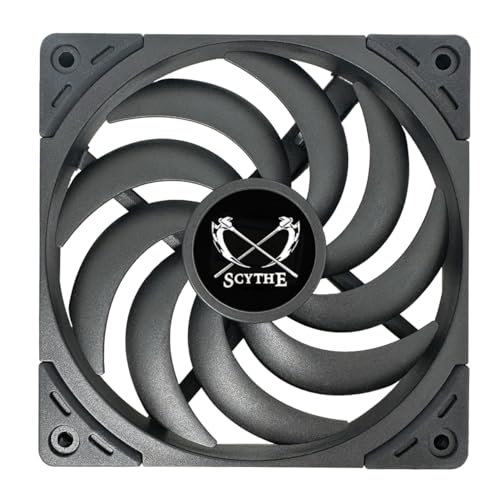
A budget 15mm fan with a high 2000 RPM ceiling and surprising build heft.
For the price, this is a remarkably well-made little fan — owners note it feels heavy and high-quality for the money. The 9 tune blades push a modest 34.31 CFM, but the 2000 RPM max speed gives you headroom to spin up when needed. In a NR200 mini-ITX case with a mesh panel, it handled cooling duties without complaint.
The Fluid Dynamic Bearing is rated for up to 120,000 hours, and the compressed-metal bearing shaft promises stability. The honest trade-off: at 27.8 dB(A) it is not the quietest, and one buyer put it plainly — “Move a lot of air. Too noisy for the application I had in mind.” The screwless mounts it ships with are also widely considered the weak point, so plan to use your own screws for a secure fit.
The Bargain Build
- Cheap entry into a quality slim fan
- 2000 RPM ceiling for when you need max spin
- 120,000-hour bearing life rating
The Weak Points
- 27.8 dB(A) is audible — not a silent-fan candidate
- Included screwless mounts are “garbage” per the review pages
Best for: a budget build where you want decent airflow and can accept some fan noise.
Think twice if: silence matters — spend a little more on the ARCTIC or Noctua.
9. SilverStone Air Slimmer 120 ARGB
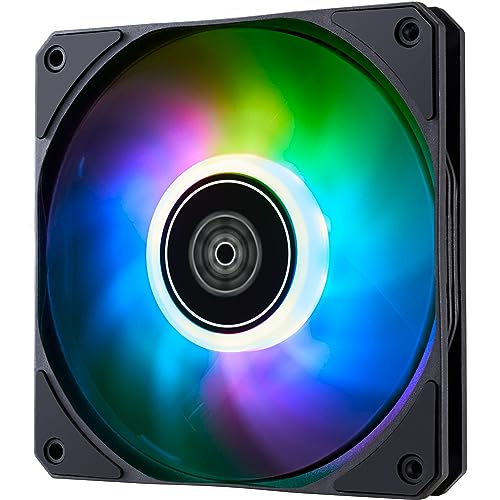
Same scimitar-blade pressure, now with ARGB lighting on top.
This is the lit-up sibling of the SilverStone Air Slimmer, sharing the same 15.6mm frame and the same 9 scimitar fan blades engineered for high static pressure. The difference is the ARGB lighting, which adds visual flair to the same radiator-pushing performance. It also positions itself as a strong exhaust fan, designed to transport large volumes of heat out of most systems.
The all-copper Fluid Dynamic Bearing keeps the lifespan long, and the 1500 RPM max speed is slightly lower than the non-RGB version’s 1800 RPM — a small trade for the lighting. Noise is the same 31.7 dB(A) story: powerful, not silent. Owners fitting it into tight CPU cooler spots found it freed up RAM space and worked as a plug-and-play alternative to pricier Corsair slim fans without needing a Commander Pro hub.
Performance Plus Lights
- ARGB lighting with the same high-pressure blade design
- Fits tight CPU cooler spots and frees RAM clearance
- Plug-and-play — no extra controller hub required
Keep in Mind
- 31.7 dB(A) noise at high speed is the same as its non-RGB sibling
- 1500 RPM ceiling is lower than the non-RGB version’s 1800 RPM
Reach for this if: you want RGB and radiator-grade static pressure in one slim 15.6mm package.
Look elsewhere if: noise bothers you at high speed — this is a performer, not a whisper.
Understanding the Specs
Airflow (CFM) and Static Pressure
CFM (cubic feet per minute) is the raw volume of air a fan moves — higher numbers mean more airflow in open space. Static pressure, on the other hand, is how hard a fan pushes air through resistance like radiator fins or a dense heatsink. For a radiator, pick a high-pressure fan; for a simple case exhaust, a high-CFM fan is the better match.
Noise Level (dBA) and Sone
Noise is measured in dBA, a human-weighted decibel scale, and sometimes in Sones, which measure perceived loudness directly. A 23.9 dB(A) fan is near-silent in a quiet room, while 31.7 dB(A) is clearly audible. Remember that decibels are logarithmic — a small numeric jump is a large perceived difference.
PWM vs. 3-Pin Connectors
A 4-pin PWM fan lets your motherboard automatically adjust speed based on CPU temperature, spinning fast when hot and slow when idle. A 3-pin fan runs at a fixed voltage-controlled speed, which often means manual switching or constant noise. For most builds, PWM is the set-and-forget choice.
Bearing Types and Lifespan
The bearing determines both noise and durability. Fluid Dynamic Bearings (FDB) are the quiet, long-life standard — several picks here are rated for 120,000 hours or more. Cheaper sleeve bearings wear out faster under heavy daily use, which is why budget fans sometimes fail after a year or two of constant running.
FAQ
Will a 120mm slim fan fit where a standard 25mm fan does not?
What is the difference between 3-pin and 4-pin PWM fans?
How do I know if a fan is strong enough for a radiator?
Is a lower dBA rating always quieter in real use?
Can I control a 3-pin slim fan with my motherboard?
How long do slim fans typically last?
Is a 12mm fan noticeably weaker than a 15mm fan?
Can I use slim fans as GPU radiator fans?
Final Thoughts: The Verdict
For most buyers, the 120mm slim pc fan winner is the Noctua Chromax Black Swap because it pairs the quietest noise floor in this roundup — 23.9 dB(A) at 1850 RPM — with the reliability of a >150,000-hour rating. If you are outfitting a whole small case at once, grab the ARCTIC P12 Slim 3-pack for three near-silent 15mm fans that beat pricier names on value. And for the tightest of gaps, the 12mm SXDOOL is the one to reach for when every millimetre counts.
How We Picked
We do not accept paid placement. Every pick is matched to a real buyer and a real use-case; we do not hands-on test units.
Sources & Methodology
Specifications: manufacturer listings and product documentation. Review insights: verified customer reviews, as of August 2026. Pricing: not shown on this page (it changes often); check the current price via the retailer link.
As an Amazon Associate, Gadgets Feed earns from qualifying purchases. This does not affect which products we feature.