
Our readers keep the lights on and my morning glass full of iced black tea. As an Amazon Associate, I earn from qualifying purchases.
Specs are compiled from manufacturer listings and verified buyer reviews and can change over time — please confirm the key details on the product page before buying.
You want a graphics card with 12GB of video memory, and that is the right call for high-refresh 1440p gaming today. That VRAM amount lets you install high-resolution textures without the frame drops you get on 8GB cards. Here are the strongest 12GB options, from budget Intel models to premium GeForce cards, so you can match one to your monitor, power supply, and games.
I’m Min — the founder and writer behind Gadgets Feed. This guide is built by comparing the manufacturers’ published specifications and the patterns across verified customer reviews, so you get each pick’s real strengths and trade-offs instead of marketing spin.
The best 12gb gpu for you depends on your resolution and budget, and we have compared the top contenders by performance, cooling, and real-world feedback.
Our Picks at a Glance


How To Choose The Best 12GB GPU
Before you spend money, understand that not all 12GB cards are equal; the speed of the memory, the number of fans, and the boost clock all change how a card feels in your games, even when the VRAM size matches.
Match the card to your resolution and refresh rate
Your monitor decides which card you need; for 1080p gaming, almost every card here will feel fast, for 1440p, you want a card with a strong boost clock and modern upscaling like DLSS, and for 4K, a 12GB card can work, but you will need to rely on features like DLSS more heavily to keep frame rates high.
Check your power supply and physical space
Every card has two physical demands; first, check your power supply wattage and make sure you have the right 8-pin connectors, and second, measure your case — many of these cards are over 10 inches long, and some need a 2.5-slot width. Fitting a big card into a small case is a common mistake.
Understand the memory types: GDDR6 vs GDDR6X vs GDDR7
The type of memory affects how fast data moves; older cards use GDDR6, faster cards use GDDR6X, and the newest generation uses GDDR7. Faster memory means smoother frame delivery at higher resolutions, which is why the newest cards feel snappier even with the same 12GB capacity.
Quick Comparison
| Model | Best For | Memory Type | Boost Clock | Interface | Amazon |
|---|---|---|---|---|---|
| ZOTAC RTX 3060 Twin Edge OC★ Best Overall | Reliable 1080p & 1440p gaming | GDDR6 | 1807 MHz | PCIe 4.0 | Amazon |
| ASRock Arc B580 ChallengerBest Value | Best overall value in 1440p | GDDR6 | 2740 MHz | PCIe 4.0 | Amazon |
| Sparkle Arc B580 Titan OCCool Runner | Cool, quiet 1440p gaming | GDDR6 | 2760 MHz | PCIe 4.0 | Amazon |
| MSI RTX 3060 Ventus 3X OC | Triple-fan cooling for long sessions | GDDR6 | 1807 MHz | PCIe 4.0 | Amazon |
| MSI RTX 3060 Ventus 2X OC | Renewed pick for tight budgets | GDDR6 | 1807 MHz | PCIe 4.0 | Amazon |
| ASUS Phoenix RTX 3060 V2 | Small PCs and AI workloads | GDDR6 | 2 GHz | PCIe 4.0 | Amazon |
| ASRock RX 7700 XT Challenger | High-refresh 1440p gaming | GDDR6 | 2584 MHz | PCIe 4.0 | Amazon |
| GIGABYTE RTX 4070 Windforce OC | Efficient 4K-capable gaming | GDDR6X | — | PCIe 4.0 | Amazon |
| ASUS Prime RTX 5070 | SFF builds and future-proofing | GDDR7 | 2542 MHz | PCIe 5.0 | Amazon |
| GIGABYTE RTX 5070 Gaming OC | High-refresh 1440p with DLSS 4 | GDDR7 | 2600 MHz | PCIe 5.0 | Amazon |
| NVIDIA RTX 5070 Founders | Reference design and frame generation | GDDR7 | 2.51 GHz | PCIe 5.0 | Amazon |
In‑Depth Reviews
1. ZOTAC Gaming GeForce RTX 3060 Twin Edge OC
Our pick — over 4.5★ from 4,500+ verified ratings; the strongest balance of quality and price.
The proven crowd favorite that handles almost any modern game at high settings without drama.
This ZOTAC card is the most trusted 12GB option on the market, and the reason is simple: it just works. Buyers report it handles most games at ultra quality settings and delivers solid 1080p and 1440p gaming performance, making it a reliable step up from older cards like the RTX 2060. Its 12GB of GDDR6 memory on a 192-bit bus moves data fast enough for high-resolution textures, while the 1807 MHz boost clock keeps up with modern titles.
Cooling is handled by the IceStorm 2.0 system with Active Fan Control and Freeze Fan Stop — the fans literally stop spinning at low load, so your PC is silent when you are just browsing. It needs just a single 8-pin power connector and a 600W power supply, which makes it an easy drop-in for many existing builds. At just 907 g, it is noticeably lighter than the ASRock Arc B580 above, which tips the scales at 999 g, so it puts less strain on your motherboard slot.
This card handles 8K resolution (8K Ready) and offers 4 display outputs: 3x DisplayPort 1.4a and 1x HDMI 2.1, plus VR support. Owners mention easy installation and say Diablo 3 runs at 325-355 FPS at 1080p ultra. One reviewer who traded down from a faster card called it “unremarkable but stable” — high praise for a daily driver. The trade-off: it is not built for ultra 4K gaming, so if that is your target, look further up this list.
What owners praise most
- Performance is the top reason people buy — nearly 400 owners single it out
- Simple installation process with no driver headaches
- Fans stop at idle, keeping the system silent
The honest trade-offs
- Some find it a bit bulky for small cases or travel
- Noise and cooling get mixed feedback at higher loads
The right pick if: you want the safest, most proven 12GB card for 1080p and 1440p gaming from a trusted brand.
Reach elsewhere if: you plan to play at native 4K — this card is not built for that workload.
2. ASRock Intel Arc B580 Challenger 12GB OC
A budget-minded 1440p card that punches far above its weight class.
If you want maximum frames per dollar at 1440p, this ASRock Arc B580 is the card to beat. Its 2740 MHz GPU clock is dramatically higher than the 1807 MHz on the ZOTAC RTX 3060 above — a 53% advantage that shows up in faster rendering and smoother gameplay. The 12GB of GDDR6 memory runs at 19 Gbps on a 192-bit bus, giving it plenty of bandwidth for modern game textures and creative applications.
What wins people over is the value — owners call it “the GOAT for performance on a budget” and note it runs games like God of War, Witcher, and Forza Horizon 6 flawlessly on ultra settings. It uses the Intel Xe2-HPG architecture with 160 XMX engines for AI acceleration, which also supports Xe Super Sampling 2 (XeSS 2) — Intel’s answer to DLSS that boosts frame rates in supported games. The dual-fan design with 0dB Silent operation means fans stop at low temps, and the metal backplate adds rigidity.
Connectivity is future-proof with 3x DisplayPort 2.1 and 1x HDMI 2.1a, supporting up to four displays at 8K resolution. It needs just one 8-pin power connector and a 650W supply, and customers note it runs cool and quiet with mature drivers. The card measures 249mm in length and is a 2-slot design, so verify your chassis has clearance before buying. Some owners do express uncertainty about Intel’s long-term driver support, so this is a pick for those comfortable with a slightly newer ecosystem.
The standout strengths
- Card quality is the most-discussed positive — 38 owners praise it
- Value for money is the second biggest praise point
- Runs noticeably cooler and quieter than expected
Who should think twice
- Requires a 650W PSU and 2-slot clearance, so verify your case
- Driver support is newer, with occasional compatibility notes
Grab this for: the best balance of price and 1440p performance, especially if you like tinkering with new tech.
Look elsewhere if: you want the absolute simplest plug-and-play experience with zero setup configuration.
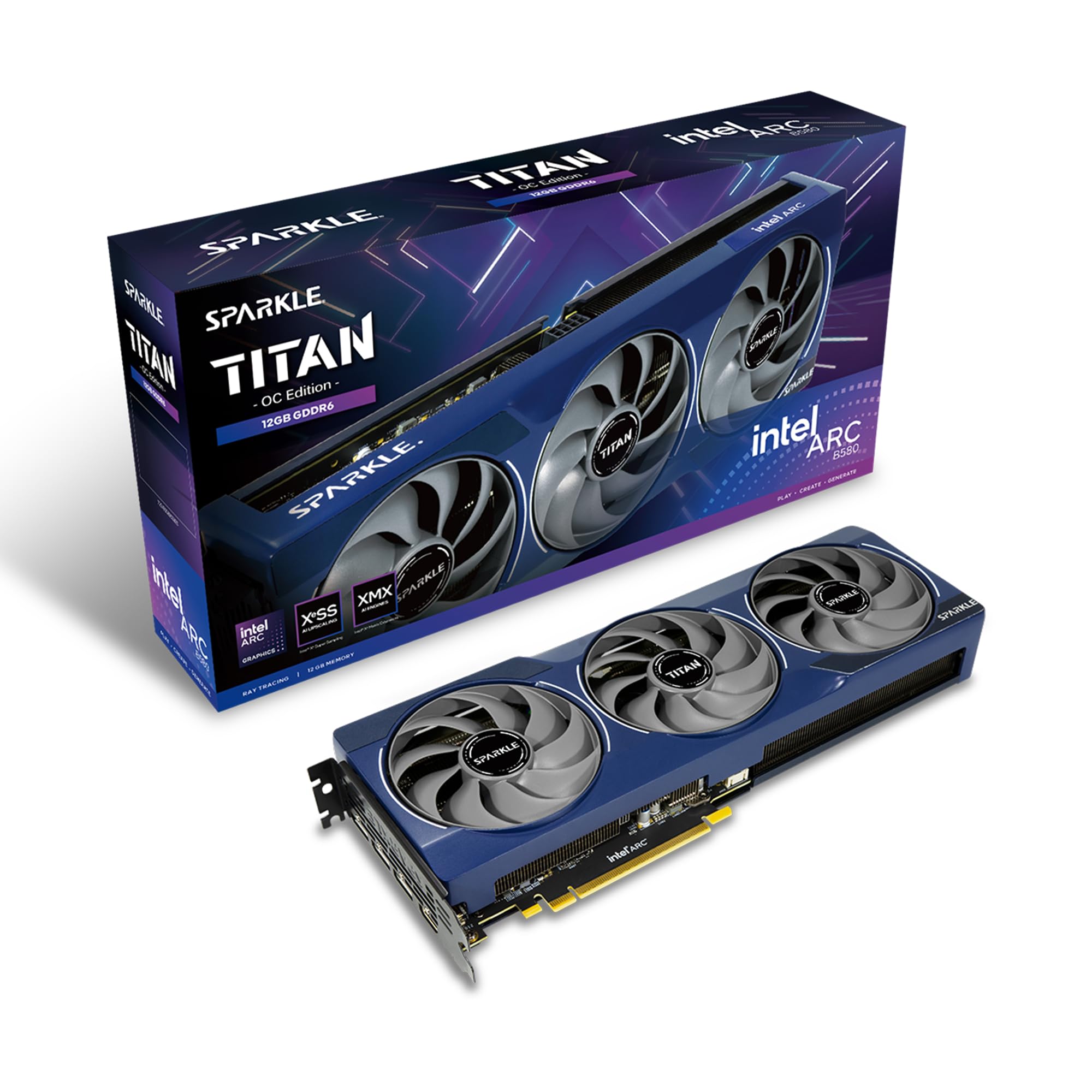
3. Sparkle Intel Arc B580 Titan OC
The slimmest high-clock 12GB card that stays astonishingly cool under heavy loads.
The Sparkle Arc B580 Titan OC is the overclocked sibling of the ASRock above, pushing the boost clock slightly higher to 2760 MHz. What makes it special is the Thermal performance — reviewers point out the card “stays at 59 degrees average under load,” which is remarkably cool for a gaming card. The TORN Cooling 2.0 system with an axial fan handles heat efficiently, and the blue breathing light adds a subtle visual accent for your case window.
Physically, this card is slimmer than most 3-fan designs at 12.4 inches long, making it easier to fit into mid-tower cases. Items like the metal backplate and the included graphics card sag bracket show attention to long-term durability. Owners describe it as “even at inflated prices, this is a better value,” noting it is an excellent replacement for a 3070 and runs crisp at 1080p with the ability to handle 1440p at medium-to-low settings.
The catch here is that it is a 1080p Ultra-centric card first and foremost. A buyer noted it is “excellent GPU for 1080p Ultra, and 1440p medium to low settings,” which means it is not the card for pushing high refresh rates at 1440p. It also lacks VR support, so if you are a headset gamer, this is the wrong choice. For video editing, owners praise it as having the best AV1 encoder, making it a dual-purpose pick for creators.
Where it shines: Thermals are the headline — 59°C under load is exceptional, and the thin profile fits more cases.
The one limitation: Gaming strength is concentrated at 1080p; demanding 1440p titles will need lower settings.
Choose this if: you game at 1080p on a high-refresh monitor and also do video editing work.
Give it a miss if: you need VR support or want consistent high settings at 1440p.
4. MSI Gaming GeForce RTX 3060 Ventus 3X 12G OC (Renewed)
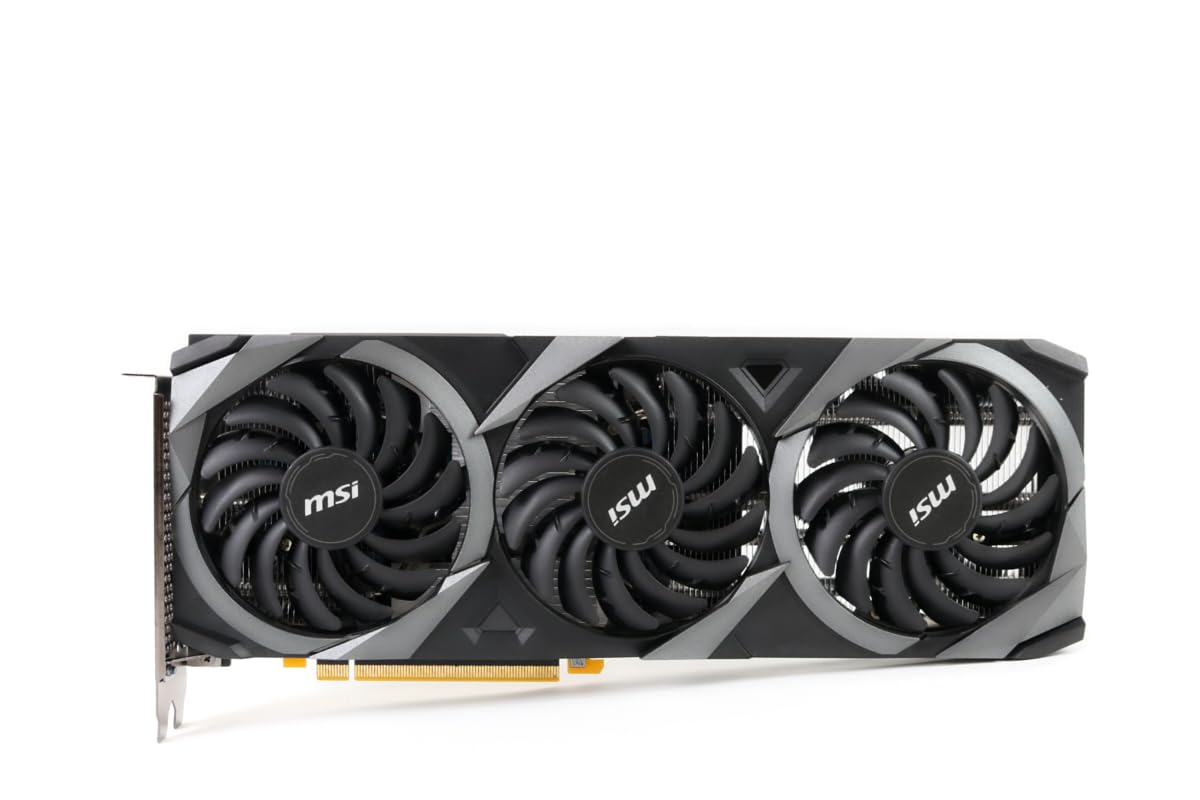
A triple-fan workhorse that keeps itself cool and quiet during marathon gaming sessions.
This MSI card takes the reliable RTX 3060 platform and adds a serious cooling upgrade with three TORX Fan 3.0 fans and a huge heatsink. That extra cooling capacity means the card maintains its 1807 MHz boost clock for longer without thermal throttling, which keeps frame rates stable in demanding games. The Zero Frozr feature stops the fans entirely at low temps, so it is silent during desktop use.
For 1440p gaming, the 12GB of GDDR6 memory at 15 Gbps on a 192-bit bus gives you solid bandwidth. Owners use it beyond gaming — one runs AI and game development, another upgraded from an RTX 1060 to play MSFS 2020 at 4K graphics with other settings on high. The custom PCB (printed circuit board) with hardened circuits and tune trace routing adds durability, and MSI Afterburner software gives you full overclocking control.
This is a renewed product, meaning it has been inspected and tested to work like new. MSI Dragon Center software lets you monitor and tweak settings in real-time. At 12.4 inches long, check your case clearance, but owners note the length “was not a problem in my mid tower and ATX board.” Choose this if you want the proven RTX 3060 experience with the best possible cooling.
Why it earns its place
- Triple fans move more air, keeping temps lower under load
- Great for mixed use — gaming, AI projects, and video editing
- Zero Frozr keeps fans silent until they are needed
Points to check
- Renewed condition means inspect it on arrival
- Length of 12.4 inches needs a roomy case
Pick this for: extended gaming sessions where consistent cooling matters more than raw speed.
Choose differently if: you need the latest generation features like DLSS 4.
5. MSI RTX 3060 Ventus 2X 12G OC (Renewed)

A renewed twin-fan classic that delivers most of the 3060 experience for less money.
This is the smaller sibling of the Ventus 3X, using two TORX 3.0 fans instead of three, which makes it shorter at 9.3 inches and easier to fit into compact builds. It keeps the same core specs — 12GB GDDR6 at 15 Gbps on a 192-bit bus and an 1807 MHz boost clock — so gaming performance is nearly identical to the bigger card. The Zero Frozr feature still stops fans at low temps for silent operation.
Owners love the value, calling it “a big step up from the 1070 and the 1030 6gb.” One buyer uses it for VR, noting no issues during long VRChat sessions and a great pairing with a Ryzen 9 5900X. Another reports rendering is “three times faster than my old 1080ti,” showing the 12GB VRAM makes a real difference for creative work. It supports 4K@120Hz over HDMI 2.1, so it works well with modern TVs.
As a renewed product, condition is the main variable — buyers consistently say the cards “look brand new” and work “perfectly, just install graphics drivers and go.” Reliability feedback is mixed in the review data, so skip this if you want zero uncertainty. For the price, it is an excellent way into 12GB gaming. Cyberpunk at max settings will struggle, but the DLSS upscaler (a feature that boosts frame rates) helps, though one owner suggests AMD Fidelity instead due to light artifacts.
Best for budget builders: The same 12GB and 1807 MHz performance as triple-fan models, in a shorter package that fits more cases.
Buyer beware: Renewed electronics carry some reliability risk, so budget for a possible return.
Choose this if: you want 12GB performance at the lowest possible entry cost and do not mind renewed condition.
Think twice if: you need a brand-new card with a full manufacturer warranty.
6. ASUS Phoenix RTX 3060 V2 (Renewed)

A pint-sized 12GB card with a surprisingly big appetite for AI workloads.
At just 7 inches long, this ASUS Phoenix is the shortest card on this list, making it the go-to for small-form-factor builds where space is tight. It uses a single axial-tech fan with dual ball bearings, which ASUS designs to last longer than sleeve bearings. The protective backplate and Auto-Extreme manufacturing add durability despite the compact size.
What surprises most people is how capable this small card is. One owner runs 27B LLM models easily on an old PCIe 3.0 rig with a 4th-gen i5, calling it “great performance for LLM” use. The 12GB VRAM is the reason — it is right at the threshold for running large language models locally. For gaming, shoppers say running all their games at 1440p without issues, and using it for Photoshop work, proving this tiny card is surprisingly versatile.
This renewed product is covered by the Amazon Renewed Guarantee, so you get a replacement or refund if not satisfied. The GPU clock speed is listed at 2 GHz with 12GB of GDDR6 memory. The trade-off: a single fan works harder than multi-fan designs, so it may run warmer or louder under sustained heavy loads — though owners say it has “more than enough power to play games and do work in photoshop.”
Its superpower: The 7-inch length fits ITX and small cases that reject every other 12GB card.
Where it is weakest: Single-fan cooling means it is not for long, heavily overclocked sessions.
Buy this for: a compact build where every inch of space counts, or for running AI models locally.
Pass on this if: you have a large case and want maximum cooling headroom for gaming marathons.
7. ASRock Radeon RX 7700 XT Challenger 12GB OC

A raw-power AMD card that crushes high-refresh 1440p without breaking a sweat.
If you want pure rasterization performance, this is the strongest value in the mid-range. The RX 7700 XT uses AMD’s RDNA 3 architecture with 54 Compute Units and RT+AI Accelerators, boosting up to 2584 MHz with a game clock of 2226 MHz. The 12GB of GDDR6 memory on a 192-bit bus is paired with 48MB of AMD Infinity Cache, which reduces latency and boosts performance at high resolutions.
Buyers report it runs most AAA games at 70+ FPS on max settings, and one buyer called it a “massive upgrade from my 3060,” giving performance a solid 8/10. The dual-fan design with striped ring fans and Ultra-fit Heatpipe technology keeps things cool, with 0dB Silent Cooling stopping fans at low temperatures. The stylish metal backplate adds rigidity, and it has three DisplayPort 2.1 outputs plus one HDMI 2.1.
This card needs two 8-pin power connectors and is not compatible with all pre-built systems, so verify your power supply and chassis before buying. Reliability gets mixed feedback in the data — most owners say it works perfectly from the start, but a few report units failing after about two weeks. Its power efficiency is solid, and the build quality is the most-praised aspect, with 22 owners highlighting it. For competitive 1440p gaming, this card delivers exceptional frames per dollar.
The performance highlights
- Build quality is the top positive — 22 owners praise it
- Runs most AAA games at 70+ FPS on max settings
- Infinity Cache boosts high-resolution performance
What to watch
- Needs dual 8-pin power connectors
- Reliability is mixed, with some reports of early failures
Reach for this if: you want maximum 1440p frame rates for competitive gaming and value raw performance.
Be cautious if: you want guaranteed long-term reliability, as the mixed feedback suggests some variance.
8. GIGABYTE GeForce RTX 4070 Windforce OC 12G

An efficiency king that delivers 4K-capable gaming on surprisingly low power draw.
This is the card that proves 12GB can handle 4K with the help of modern features. Powered by NVIDIA’s Ada Lovelace architecture with DLSS 3, it uses 4th Generation Tensor Cores for up to 4x performance with DLSS 3 and 3rd Generation RT Cores for up to 2x ray tracing performance. The 12GB of GDDR6X memory on a 192-bit interface is significantly faster than standard GDDR6, which is why owners mention 550 FPS in some HD games.
What impresses owners most is the efficiency. One buyer notes it “rarely draws more than 175 watts” and runs with temperatures below 75°C, with idle temps as low as 30-37°C. The WINDFORCE cooling system with 3X fans, RGB Fusion, Dual BIOS, and a protection metal backplate keeps things quiet and cool. The included anti-sag bracket prevents the card from drooping over time. Many owners note they did not need a PSU upgrade because of the low power draw and single 8-pin connector.
At 4K resolution, customers note 120+ FPS in older games and 70-95 FPS in newer titles with DLSS enabled. The review pages sum it up: “DLSS fixes poor ports and Reflex reduces input latency.” One buyer called it a “good buy for at least 4 more years,” suggesting strong longevity. The only real complaint is the sparse documentation — the power cabling can be confusing, and an 8-pin connector may not fit standard PSU cables, requiring a 6+2 pin instead. It is a premium investment, but one that competes with pricier cards.
Why it is worth the premium
- Performance is the top praise — 55 owners highlight it
- Efficient power draw means no PSU upgrade needed
- DLSS 3 and ray tracing extend its usable life
The small frustrations
- Documentation is minimal — no real instructions included
- Power connectors can be confusing on first install
Invest in this if: you want 4K-capable gaming with high efficiency and do not mind paying for premium features.
Step down if: you only game at 1080p and want to save money on a 12GB card.
9. ASUS Prime RTX 5070 12GB GDDR7

A future-proof Blackwell card that squeezes 4K-class performance into a compact frame.
This is the newest generation on the list, powered by the NVIDIA Blackwell architecture with DLSS 4. The 12GB of GDDR7 memory is the fastest type available in this comparison, and the 2542 MHz boost clock keeps pace with modern titles. Reviewers point out it handles games at 1440p and 4K, with one noting Cyberpunk runs at 1440p with Ray Tracing Medium solidly over 60 fps.
The SFF-Ready designation is the defining feature — this enthusiast card is specifically built for small-form-factor builds. The 2.5-slot design balances cooling with build compatibility, and the axial-tech fans have a smaller hub that allows longer blades and a barrier ring that increases downward air pressure. The phase-change GPU thermal pad ensures optimal heat transfer, which owners confirm with reports of excellent temperatures. One buyer overclocked it +10% and saw just 67°C under load.
Owners call it a “quantum leap” from older cards, with one noting it is “overkill today, but built for the future.” It excels at AI tasks like LLMs (large language models) and Stable Diffusion, plus video editing. DLSS 4 upscaling is reportedly “great and stable,” enabling 300-400 FPS in 1440p esports titles and 180-200 FPS in any game. A 3-year warranty adds confidence, and the included velcro hook, 1-to-2 adapter cable, and speedsetup manual cover installation basics. The main physical note: it fits bigger builds only — check your case clearance, and use a 16-pin or direct PSU cord rather than splitters.
The future-proofing story
- Performance is the most-praised aspect — 109 owners highlight it
- GDDR7 memory is the fastest in this category
- Excellent for AI, video editing, and 4K gaming
Considerations
- Single-fan-style design may run slightly warmer than triple-fan rivals
- Fits bigger builds only — verify case dimensions
Buy this if: you are building a compact PC now but want cutting-edge performance for years to come.
Skip if: you game mainly at 1080p and do not need 4K or AI horsepower.
10. GIGABYTE RTX 5070 Gaming OC 12G

A Blackwell powerhouse that makes 1440p gaming feel easy and almost silent.
This GIGABYTE card is the enthusiast-grade version of the RTX 5070, with a higher 2600 MHz boost clock than the ASUS model above and the same 12GB of GDDR7 memory on a 192-bit interface. It is powered by the NVIDIA Blackwell architecture with DLSS 4, and shoppers say it handles 1440p gaming “like a dream” — with one noting Battlefield runs at over 165 frames per second on ultra settings.
The WINDFORCE cooling system maintains temperatures below 80°C under load, and the noise level is described as “almost negligible.” At 12.87 inches long and 5.2 inches wide, it is a substantial card that needs a roomy case. Owners appreciate that it fits perfectly in standard towers and works quietly, with one buyer noting his son “was thrilled when it was quiet, a quality product and was not terribly expensive.”
With PCIe 5.0 support (the latest motherboard connection standard), this card is ready for new builds. The 12GB of GDDR7 memory at 2600 MHz provides the bandwidth for high-refresh 1440p and entry-level 4K gaming. Owners consistently call it “great value for money,” praising the always-good temperatures and excellent graphics. It weighs 2 kg, so ensure your motherboard slot and case can support the weight, though the sturdy build handles it well.
The daily-driver strengths
- Performance is the top praise — 34 owners highlight it
- Near-silent operation under normal gaming loads
- Keeps temperatures below 80°C even under stress
What to plan for
- Large 12.87-inch length needs a full-size case
- Heavier at 2 kg, so consider a sag bracket
Reach for this if: you want top-tier 1440p performance with the quietest operation and newest DLSS 4 features.
Look elsewhere if: you have a compact case or a smaller power supply.
11. NVIDIA GeForce RTX 5070 12GB GDDR7
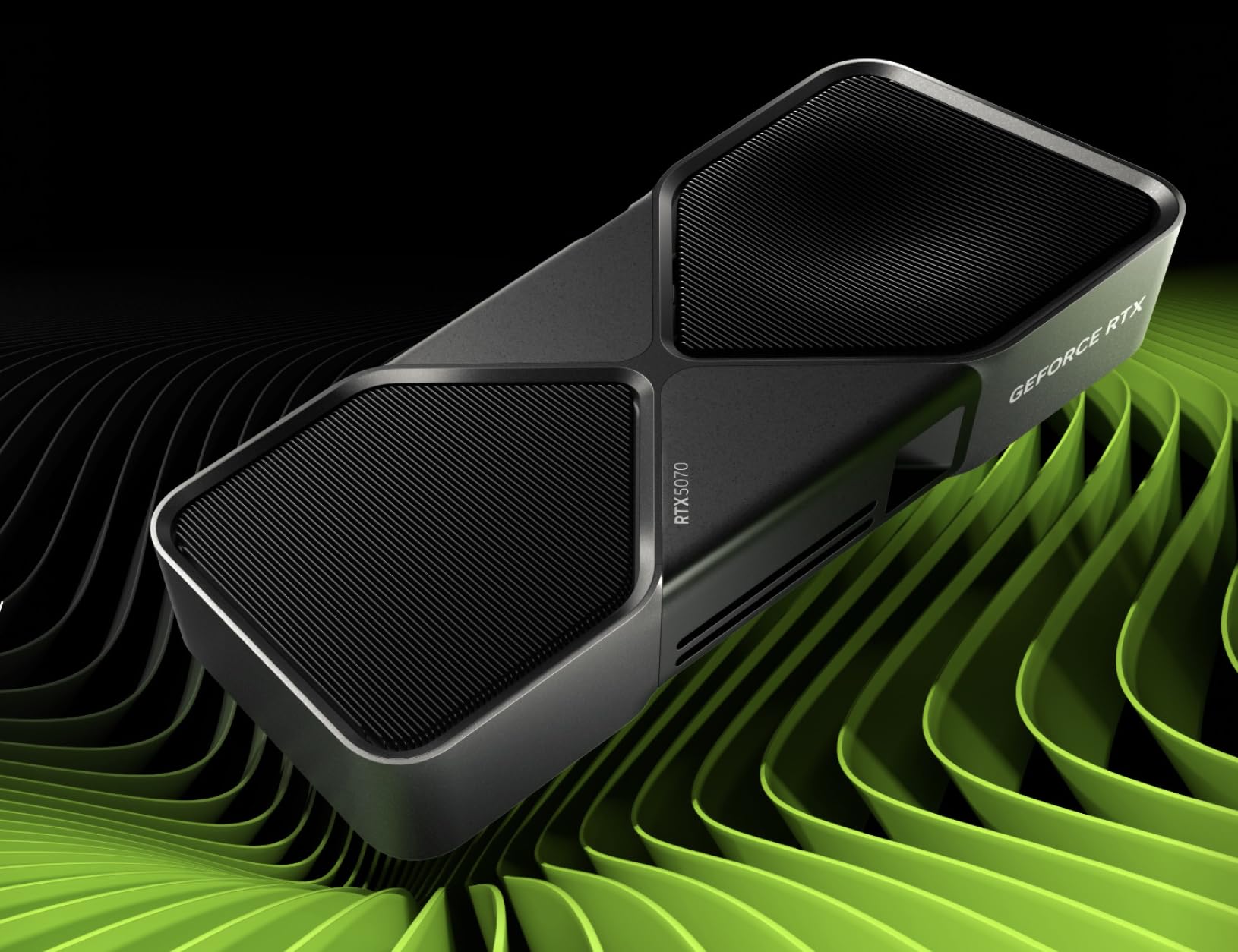
The reference-design Blackwell card for purists who want NVIDIA’s own vision of the 5070.
This is NVIDIA’s own Founders Edition interpretation of the RTX 5070, wrapped in a graphite grey shroud. It features 12GB of GDDR7 memory with a 2.51 GHz memory clock speed and supports resolutions up to 3840×2160, making it a capable 4K option when paired with DLSS. The Blackwell architecture and DLSS 4 bring the latest upscaling and frame generation technology to your games.
The defining feature here is multi-frame generation, which owners say is “amazing.” One buyer reports running graphic settings on high-very high and expecting around 140-220 FPS depending on the frame generation range, adjustable from 2x to 6x on supported games. This makes the card feel much faster than its raw specs suggest, especially at higher resolutions. Game Ready and NVIDIA Studio Drivers keep it tune for both gaming and creative work.
This Founders Edition is the standard-bearer for the 50-series, with the NVIDIA App, NVIDIA Studio, and NVIDIA Broadcast software included. At 1000 g and roughly the same footprint as other 5070s, it is a manageable size for most cases. Buyers report it arrived early, in perfect condition, and performs extremely well, with one noting the card “performs extremely well” and another calling it a long-term investment that will “perdure for ages” with undervolting applied. It is a solid choice if you want the purest NVIDIA design without third-party modifications.
Its defining edge: Multi-frame generation can push frame rates to 140-220 FPS on supported titles, making it feel far more powerful than its clock speed suggests.
The compromise: Fewer owners have reviewed it, so long-term reliability data is still accumulating.
Pick this if: you want NVIDIA’s reference design with the latest DLSS 4 and multi-frame generation technology.
Consider alternatives if: you prefer third-party cooling designs with larger heatsinks and more fans.
Understanding the Specs
Boost Clock Speed
The boost clock is the maximum speed your GPU will run
Understanding the Specs
Boost Clock Speed
The boost clock is the maximum speed your GPU will run when under load, measured in megahertz (MHz); a higher boost clock means the card can process more frames per second, so you see smoother gameplay in fast-moving titles. Compare this number across cards with the same architecture to gauge relative speed.
Memory Type: GDDR6 vs GDDR6X vs GDDR7
Memory type determines how fast your GPU can read and write data; GDDR6 is the standard on older cards, GDDR6X is roughly twice as fast, and the newest GDDR7 is the quickest available. Faster memory matters most at higher resolutions like 1440p and 4K, where the card must move more texture data every second.
FAQ
Is 12GB of VRAM enough for 1440p gaming in current titles?
What is the difference between GDDR6 and GDDR7 memory?
Will a 12GB GPU fit in my existing computer case?
What power supply do I need for a 12GB graphics card?
Is a renewed or refurbished 12GB GPU a good idea?
Can a 12GB card handle 4K gaming?
What is DLSS and why does it matter for a 12GB GPU?
Which 12GB GPU is best for AI and machine learning workloads?
Final Thoughts: The Verdict
For most people, the best 12gb gpu is the ASRock Arc B580 Challenger because it delivers exceptional 1440p performance at a price that undercuts most rivals. If you want NVIDIA’s proven reliability and the simplest install, grab the ZOTAC RTX 3060. And for those chasing 4K or AI workloads with the newest features, the ASUS Prime RTX 5070 is the future-proof choice worth the premium.
How We Picked
We do not accept paid placement. Every pick is matched to a real buyer and a real use-case; we do not hands-on test units.
Sources & Methodology
Specifications: manufacturer listings and product documentation. Review insights: verified customer reviews, as of September 2026. Pricing: not shown on this page (it changes often); check the current price via the retailer link.
As an Amazon Associate, Gadgets Feed earns from qualifying purchases. This does not affect which products we feature.