
Our readers keep the lights on and my morning glass full of iced black tea. As an Amazon Associate, I earn from qualifying purchases.
Specs are compiled from manufacturer listings and verified buyer reviews and can change over time — please confirm the key details on the product page before buying.
You need a fan that gulps hot air out of your build or enclosure — but you do not want to listen to a tiny jet engine while you work, game, or sleep. The trick is finding the right balance of air movement, noise, and compatibility for your specific 12-volt project. That is exactly what this guide delivers: a filtered view of the best 12V computer fan options, from quiet desk-side cooling to high-pressure server setups that push serious air.
I’m Min — the founder and writer behind Gadgets Feed. This guide is built by comparing the manufacturers’ published specifications and the patterns across verified customer reviews, so you get each pick’s real strengths and trade-offs instead of marketing spin.
Whether you are cooling a PC case, a DIY electronics project, a wine fridge, or a server rack, the best 12v computer fan for you depends on how much air you need to move and how much noise your ears can tolerate.
Our Picks at a Glance



How To Choose The Best 12V Computer Fan
The first decision is not which brand to buy — it is which physical size your case or device accepts. A 120mm fan moves more air at lower noise than an 80mm fan, but it will not fit a 92mm or 80mm mounting hole. Measure your existing fan or the cutout width before you buy anything else.
Speed Control: PWM (4-Pin) vs Fixed Speed (2-Pin)
A 4-pin PWM fan (Pulse Width Modulation — a standard signal that tells the fan how fast to spin) lets your motherboard or fan controller adjust the speed automatically. That means the fan runs slow and silent when the system is cool, then ramps up when things get hot. A 2-pin fan runs at full speed whenever it has power; the only way to slow it down is to lower the voltage. If your motherboard has a 4-pin header, a PWM fan is almost always the better choice for a PC build. For a stand-alone project like a DIY cooler or a replacement in a fridge, a simple 2-pin fan often works perfectly.
Airflow vs Static Pressure
Airflow (measured in CFM — cubic feet per minute) tells you how much air the fan moves in free space. Static pressure (measured in mmH₂O) tells you how hard the fan can push air through obstacles — tight radiator fins, a dust filter, or a dense CPU heatsink. For an open case exhaust or general ventilation, focus on CFM. For a radiator or heatsink, prioritize static pressure. Many 120mm fans in this list deliver a strong balance of both.
Noise Level (dBA)
Noise is measured in decibels (dBA), and the scale is logarithmic, not linear. A 7 dB increase from 25 dBA to 32 dBA is a noticeable difference in perceived loudness. The quietest fans in this guide hover around 25.1 dBA, which is barely a whisper in a quiet room. A 35 dBA fan is clearly audible and may be distracting during quiet work or sleep. If silence is your priority, aim for any fan rated at 26 dBA or lower.
Bearing Type and Lifespan
The bearing is the part that lets the fan spin, and different bearings last different lengths of time. Rifle bearings (common in be quiet! fans) are rated for 80,000 hours. Sleeve bearings (in basic budget fans) may last 35,000–40,000 hours. Dual ball bearings (found in server-style fans like the ARCTIC S12038) handle heat and dust better and can last 50,000 hours or more. For a PC you intend to keep for years, a higher-end bearing is worth the small extra cost.
Quick Comparison
| Model | Best For | Airflow | Noise Level | Speed | Amazon |
|---|---|---|---|---|---|
| Noctua NF-P12 redux-1700★ Best Overall | Quiet performance | 120.2 m³/h | 25.1 db | 1700 rpm | Amazon |
| be quiet! Pure Wings 3Premium Pick | Silent case cooling | 49.9 cfm | 25.5 db | 1600 rpm | Amazon |
| ARCTIC S12038-8KPerformance Beast | High static pressure | 370 m³/h | 28.5 db | 8000 rpm | Amazon |
| Thermalright TL-C12C X3 | Budget 3-pack value | 66.17 cfm | 25.6 db | 1550 rpm | Amazon |
| Thermalright TL-C12C-S 5-Pack | ARGB bling & airflow | 66.17 cfm | 25.6 db | 1550 rpm | Amazon |
| Wathai 120mm 3000 RPM | High CFM replacement | 105 cfm | 35 db | 3000 rpm | Amazon |
| Wathai 92mm | Compact replacement | 54.8 cfm | 31 db | 2500 rpm | Amazon |
| KEYFANCLUB 80mm 2-Pack | Narrow-space projects | 45 cfm | 32 db | 3000 rpm | Amazon |
In‑Depth Reviews
1. Noctua NF-P12 redux-1700 PWM
Our pick — over 4.5★ from 19,500+ verified ratings; the strongest balance of quality and price.
The fan everyone trusts for quiet, reliable 12V cooling in a PC or server.
This 120mm fan from Noctua delivers a strong balance of noise and airflow. The redux-1700 PWM runs at a maximum of 1700 rpm, pushing a rated 120.2 cubic meters per hour while staying at just 25.1 dB. The NF-P12 design has earned more than 100 awards and recommendations from hardware sites worldwide, and buyers report it is quiet under load with great airflow and cooling for a PC or server. At 4.72 inches square and 0.98 inches thick, it is a standard 120mm size that drops into most cases without any fuss.
The build uses a pressure-tune blade design (the blades are shaped to push air through tight spaces like radiator fins rather than just blowing freely), and the 4-pin PWM connector allows automatic motherboard speed control — meaning the fan runs nearly silent at idle and ramps up only when the CPU demands it. The noise level is the single most-praised quality, with owners consistently calling it unbelievably quiet for the amount of air it moves. At 0.13 kg, it is also lighter than the be quiet! Pure Wings 3 at 0.15 kg, making it easier on your case mounting points.
The catch is that the redux edition is the streamlined, budget-friendly version of Noctua’s premium line — it lacks the fancy rubber mounts and full accessory kit of the more expensive NF-F12 or NF-A12x25, though a wide range of optional accessories (anti-vibration mounts, S-ATA adaptors, y-splitters) are sold separately. For most builders, the balance of price and performance makes this the clear top pick. If pure silence at any cost is your goal, the be quiet! Pure Wings 3 is also worth a very close look.
Why It Wins
- Extremely quiet at 25.1 dB — barely audible even under load
- Pressure-tune blades push air through radiators and heatsinks effectively
- Proven 150,000+ hour MTTF (mean time to failure — a standard measure of expected lifespan) backed by decades of reputation
The Trade-Off
- No rubber anti-vibration pads or fan screws included — plan to buy the optional NA-SAVP1 kit if you want them
- Standard grey redux color lacks the eye-catching look of beige/brown Noctua fans or RGB options
Reach for this if: you want the quietest 120mm fan that still moves serious air for a CPU cooler, radiator, or case exhaust — the crowd favorite, with tens of thousands of owners rating it a reliable choice.
Look elsewhere if: you need built-in RGB lighting or a 2-pin connector for an appliance; this is a pure 4-pin PWM PC fan.
2. be quiet! Pure Wings 3 120mm Silent PWM
German engineering that lives up to its name — truly quiet and efficient.
The Pure Wings 3 is designed specifically for silent operation with very low minimum RPM — you can run it at the slowest speed and still get airflow. It pushes 49.9 cfm (cubic feet per minute) at a maximum speed of 1600 rpm, and the noise level stays at 25.5 dB. That is comparable to the Noctua above, but the be quiet! achieves it with seven airflow-tune blades that reduce turbulence noise. Owners say the fan is impossible to hear unless you are actively concentrating on it, and that it dropped their CPU temperatures by as much as 5°C.
The fan uses a rifle bearing with a rated lifespan of 80,000 hours — that is over 9 years of continuous operation. The frame itself is tune for radiator use, meaning the outlet design directs air more efficiently through the tight fins. It weighs 0.15 kg, which is slightly heavier than the Noctua, but the all-black build feels solid. The Pure Wings 3 is also a full 120mm fan, like the Noctua, but at 25.5 dB it is very slightly louder on paper — though in practice the noise is described as more of a smooth whoosh than any high-pitched whine.
Silent-and-steady: if you are building a media PC, a home server that lives in the living room, or a workstation where background noise is a real problem, this fan is a top-tier choice. The only minor gripe is the lack of vibration-dampening pads on the corners — some buyers add aftermarket pads for whisper-quiet operation.
For the silence-first builder: the be quiet! Pure Wings 3 is the fan to grab if a hum-free room is non-negotiable. If you need: built-in vibration pads or a 2-pin connector, look at the budget options below.
3. ARCTIC S12038-8K Server Fan
A genuine server-grade fan that moves air with force — and noise.
This is not a typical quiet PC fan. The ARCTIC S12038-8K is a 120mm server fan with a massive speed range from 800 to 8000 rpm, delivering a staggering 370 cubic meters per hour of airflow at a static pressure of 37 mmH₂O. It is 38mm thick (the standard “12038” form factor — thicker than a standard 25mm fan) and built with dual ball bearings housed in a brass casing for superior durability against heat and dust. The noise level is listed at 28.5 dB, but that figure is at lower speeds — buyers describe it as a “screeching monster” at full tilt, capable of ventilating a room.
The 4-pin PWM connector gives you control over the full speed range, and the fan can run as low as roughly 200 RPM when the signal is low enough (PWM regulation works effectively below 600 rpm according to one buyer). At that low speed, it is nearly inaudible. But the real appeal is the raw power: this fan can move items off a shelf if placed carelessly, and it knocked several degrees off hardware temperatures in reviews. That level of performance, however, requires power — the high current draw can damage a standard motherboard fan header, so you need a dedicated fan hub or a separate power source.
Raw power first: if you are cooling a server rack, a high-power 3D printer enclosure, or a DIY ventilation project that needs to move air through dense obstacles, the S12038-8K is class-leading among 120mm fans. But the noise is real — any owner tells you: “if you’re thinking of using it outside a sealed room you’re crazy.”
For the high-flow specialist: the ARCTIC S12038-8K is the go-to if your priority is maximum airflow and static pressure, with noise as a secondary concern. Not for: a bedroom PC, a quiet office build, or any scenario where a loud fan would be a dealbreaker.
4. Thermalright TL-C12C X3 (3-Pack)

Three quality fans for the price of one premium — a budget build dream.
The TL-C12C delivers 66.17 CFM of airflow at a noise level of just 25.6 dBA, powered by a maximum speed of 1550 rpm and a static pressure of 1.53 mmH₂O. It uses high-quality S-FDB bearings — these are fluid-dynamic bearings that reduce the shaking common in lifting mode (when a fan is spinning but not perfectly seated), keeping the fan quiet and extending its life. The 4-pin PWM connector with a daisy-chain cable (up to 55cm long) lets you run all three fans from a single motherboard header, which is a neat trick for cable management.
The noise level is praised as the top positive aspect, and the value for money is a close second. Owners describe these fans as silent, sturdy, and effective for enclosure ventilation — one builder noted they are “quiet at medium and low speed” when paired with a variable speed control. The included silicone corner pads reduce vibration noise further, though a few owners noted a low hum or coil whine at specific RPM points. At 120mm square and 25mm thick, these are standard-profile fans that fit any typical case, heatsink, or radiator installation.
The Appeal
- Three fans in a single box at a budget price — nearly unbeatable per-fan value
- S-FDB bearings and silicone pads for genuinely quiet operation
- Daisy-chain cable simplifies wiring in multi-fan builds
The Minor Caveat
- No RGB — a plain black design only, which some builders will want to customize
- Occasional coil whine at around 50% PWM duty cycle, though this varies by unit
Best for: the budget-conscious builder who needs multiple fans for a case or radiator and does not want to spend premium prices. skip it if: you need ARGB lighting or a single fan (the 5-pack ARGB version below is the better match for bling).
5. Thermalright TL-C12C-S 5-Pack (ARGB)

Five fans with lighting effects that cost less than one premium RGB fan.
This is the ARGB version of the TL-C12C above, and it shares nearly the exact same specs: 66.17 CFM airflow, maximum speed of 1550 rpm, noise level at or below 25.6 dBA, and a static pressure of 1.53 mmH₂O. The key addition is the high-brightness LED atomizing blades — the fan blades diffuse the light from the LEDs, giving a soft, even glow rather than harsh individual dots. The fans support up to 17 modes of ARGB lighting effects, synchronized through your motherboard’s ARGB port. The 4-pin PWM and ARGB connectors are daisy-chainable, meaning you can run all five fans without needing a separate controller hub.
The value for money is the most-mentioned positive aspect (by a wide margin), and the noise level is the second most-praised. One buyer summed it up: “Quieter than my older fans, dirt cheap, and look amazing. These could fail in three years and they’d still be worth the price.” The S-FDB bearings and silicone corner pads are the same as the non-RGB version, so the noise profile is identical. The only practical trade-off is that the ARGB cable adds a third wire to manage alongside the PWM cable, making routing slightly busier than the plain fan.
Five fans, one header: if you want to fill every mount in your case with quiet, attractive cooling, this pack is the single best deal for RGB lighting. The daisy-chain setup makes it simple even for a first-time builder.
Reach for this if: you want RGB lighting on a budget — five fans for a price that rivals two premium RGB fans. pass on it if: you prefer a stealthy all-black no-lights look (stick with the non-RGB 3-pack above).
6. Wathai 120mm 12V 0.45A (3000 RPM)

A 105 CFM workhorse that is perfect for appliances and DIY replacements.
This 120mm fan from Wathai delivers 105 CFM of maximum airflow — a high value for a 120mm fan — at a speed of 3000 rpm. The noise level is 35 dBA, which is noticeably louder than the 25 dBA range fans above, but still manageable in a workshop or utility area. It is a 2-pin DC fan, meaning it runs at full speed as long as 12V is applied, and it comes with a fan grill and mounting screws in the box. The cable is 20cm (about 7.8 inches) long, which is sufficient for most internal mounting positions.
This fan is not aimed at silent PC builders. Instead, it is a dedicated replacement fan for appliances like countertop ice makers, portable dehumidifiers, campers, and amplifiers. It also works as an exhaust fan for an electrical cabinet. The noise level gets mixed feedback — some owners find it not too bad, others say it is a little loud — but the cooling performance is consistently praised. Owners mention it keeps their ice maker more efficient and replaced an 11-year-old PSU fan successfully. The sleeve bearing design gives a 40,000-hour lifespan, which is modest compared to higher-end fans but acceptable for appliance use.
For appliance rescue: the Wathai 120mm is the right pick when you are fixing a fridge, cooler, or dehumidifier that needs high CFM at full speed. The noise is a fair trade-off for the air movement, but do not expect whisper-quiet operation.
Best for: GE Opal ice maker replacements, camper electrical panels, and similar 12V appliance projects. Not ideal for: a bedroom PC or any space where 35 dBA is too loud.
7. Wathai 92mm 12V DC Brushless Fan (9225)
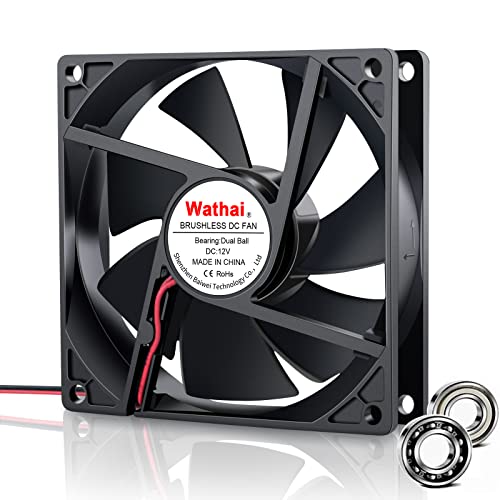
The compact fan that fits tight spots — wine fridges, humidors, and more.
This 92mm fan from Wathai operates at 2500 rpm, delivering 54.8 CFM of airflow at a noise level of 31 dBA. It uses a dual ball bearing design rated for 50,000 hours of continuous use, making it significantly more durable than sleeve-bearing fans of the same size. The 2-pin XH2.54 connector is standard for many appliance fans, but the cable length is a generous 12 inches (30 cm), giving you flexibility in routing. The fan comes as a single unit with no included grill, so you may need to supply your own if you are using it in a case without fan guards.
The noise level is the most-mentioned aspect, and it is a mixed bag — some buyers find it surprisingly quiet, while others say it is a little loud. That 31 dBA rating is typical for a 92mm fan running at full speed, and in a wine cooler or a power supply cabinet it is often quieter than the original failing fan. The functionality and fit are the most-praised positives, with many replacing fans in Edgestar wine fridges, Tooca humidors, and Astron power supplies. Customers note that the fan is a direct drop-in replacement for many 92mm appliances, with the same dimensions (3.62 x 3.62 x 0.98 inches) and electrical specs.
Fits like it belongs: this is the fan you buy when you know the exact 92mm hole you are filling. It works, it fits, and it does the job without the hassle of custom wiring. The noise is noticeable but rarely obtrusive in its intended applications.
Pick this if: you have a 92mm fan slot in a wine fridge, humidor, power supply, or other appliance that needs a reliable replacement. Look elsewhere if: you need a 120mm fan or a silent model for a bedroom PC — the 31 dBA will be audible.
8. KEYFANCLUB 80mm 2-Pack (DC 12V)
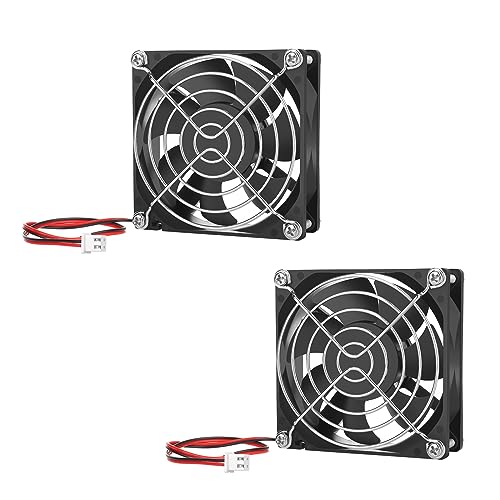
Two tiny fans that run for years — perfect for narrow spaces and projects.
This 2-pack of 80mm fans operates at 3000 rpm and pushes 45 CFM at a noise level of 32 dBA. Each fan measures 3.2 inches square by 1 inch thick, making them significantly smaller than the 120mm fans above — in fact, the Noctua NF-P12 (120mm) is larger than these 80mm fans. These are designed for compact spaces that cannot accept a larger fan, such as RV refrigerators, battery chargers, solar power boxes, and mini electronics enclosures. The sleeve bearing is rated for 35,000 hours, which is on the lower side but still translates to years of continuous use.
The noise level is the most praised aspect, with buyers describing them as “quiet” and “well-constructed” for an 80mm fan. Reliability comes second — one owner wrote of running them nonstop for a couple of years with no issues. The 2-pin XH2.54 connector is standard for many appliances, and the pack includes metal protective grills and mounting hardware, so you can start cooling immediately. The airflow and speed receive mixed feedback; some owners say it moves tons of air for the size, while others find it insufficient for high-flow needs. That variability is typical for budget 80mm fans — they are best for moving warm air out of tight spots, not for cooling a high-performance PC.
Two for the Price of One
- Two 80mm fans with grills and screws included — a complete kit for small projects
- Reliable operation — reviewers point out years of continuous use without failure
- Low noise for an 80mm fan at 32 dBA, especially in a sealed cabinet
Size Limitations
- 80mm fans move less air than 120mm or 92mm fans by nature — not for main PC case cooling
- Airflow is mixed in reviews; some buyers find it underwhelming for their specific project
Reach for this if: you need a compact 80mm fan for a tight space like a greenhouse cabinet, a truck toolbox, or a 12V power inverter. it’s not for you if: your project has room for a 92mm or 120mm fan — those will move more air at similar or lower noise levels.
Understanding the Specs
Airflow (CFM or m³/h)
Airflow tells you how much air the fan pushes in free space, measured in cubic feet per minute (CFM) or cubic meters per hour (m³/h). For a case exhaust fan or general ventilation, higher CFM is better. For a radiator or a CPU heatsink, you need static pressure (below) more than raw CFM. A 120mm fan with 50–70 CFM is typical for quiet builds, while server fans can push 100+ CFM but with more noise.
Noise Level (dBA)
Noise is measured in decibels (dBA). Every increase of 10 dBA sounds about twice as loud to your ears. A fan at 25 dBA is barely audible in a quiet room. At 32 dBA, you can hear it clearly. At 40 dBA, it is actively noticeable during conversation. Always check the noise rating if you are building a quiet PC or putting the fan in a bedroom or office space.
PWM vs DC Voltage Control
PWM (Pulse Width Modulation) uses a 4th wire to send a separate speed control signal to the fan. This lets the motherboard or a fan controller adjust the speed very precisely from near-zero to maximum, without dropping voltage. DC voltage control (on a 2-pin or 3-pin fan) slows the fan by lowering the voltage, which can cause stalling at very low speeds. For modern builds, PWM is the standard; for simple appliance replacements, 2-pin DC is often fine.
Bearing Types and Lifespan
The bearing determines how long the fan lasts and how much noise it makes over time. Sleeve bearings (cheap, 35,000–40,000 hours) are common in budget fans. Rifle bearings (similar quality but with a groove that holds oil, 80,000 hours) and S-FDB bearings (fluid-dynamic, very quiet, long life) are found in mid-range and premium fans. Dual ball bearings (50,000+ hours) handle heat and dust best, making them ideal for server and appliance use.
FAQ
Can I use a 12V computer fan on a 5V or 9V supply?
What is the difference between a 2-pin, 3-pin, and 4-pin fan?
Will a 120mm fan fit in a 92mm or 80mm mounting hole?
Why is my new fan louder than my old one?
What does static pressure mean and do I need it?
How do I connect a 2-pin fan to a 4-pin motherboard header?
How long should a 12V computer fan last?
Do I need a separate fan controller for high-power fans like the ARCTIC S12038?
Can I use a 12V computer fan in a car or RV 12V system?
How do I mount a 120mm fan in a 4U server case?
Final Thoughts: The Verdict
Across the board, the best 12v computer fan is the Noctua NF-P12 redux-1700 PWM because it nails the perfect compromise of ultra-quiet 25.1 dB noise and sturdy airflow for any PC or radiator build. If you want silent case cooling with German engineering and a 5°C temperature drop, grab the be quiet! Pure Wings 3. And for high-pressure server-grade airflow that dominates any radiator or sealed enclosure, the ARCTIC S12038-8K is the beast — just be ready for the noise.
How We Picked
We do not accept paid placement. Every pick is matched to a real buyer and a real use-case; we do not hands-on test units.
Sources & Methodology
Specifications: manufacturer listings and product documentation. Review insights: verified customer reviews, as of July 2026. Pricing: not shown on this page (it changes often); check the current price via the retailer link.
As an Amazon Associate, Gadgets Feed earns from qualifying purchases. This does not affect which products we feature.