
Our readers keep the lights on and my morning glass full of iced black tea. As an Amazon Associate, I earn from qualifying purchases.
Specs are compiled from manufacturer listings and verified buyer reviews and can change over time — please confirm the key details on the product page before buying.
A 12V powered USB hub solves the one problem every multi-device setup eventually hits: your computer can’t deliver enough stable juice to keep external drives, audio interfaces, and charging gadgets all running at once without random disconnects. This guide covers the best eight options, from compact desk companions to high-port-count workhorses, so you know exactly which one handles your gear without hiccups.
I’m Min — the founder and writer behind Gadgets Feed. This guide is built by comparing the manufacturers’ published specifications and the patterns across verified customer reviews, so you get each pick’s real strengths and trade-offs instead of marketing spin.
If you are wiring a permanent desk station, a telescope rig, or a busy gaming setup, the right 12v powered usb hub keeps every device running without dropouts — you just need to match its port count, power budget, and build quality to the gadgets you plug in daily.
Our Picks at a Glance

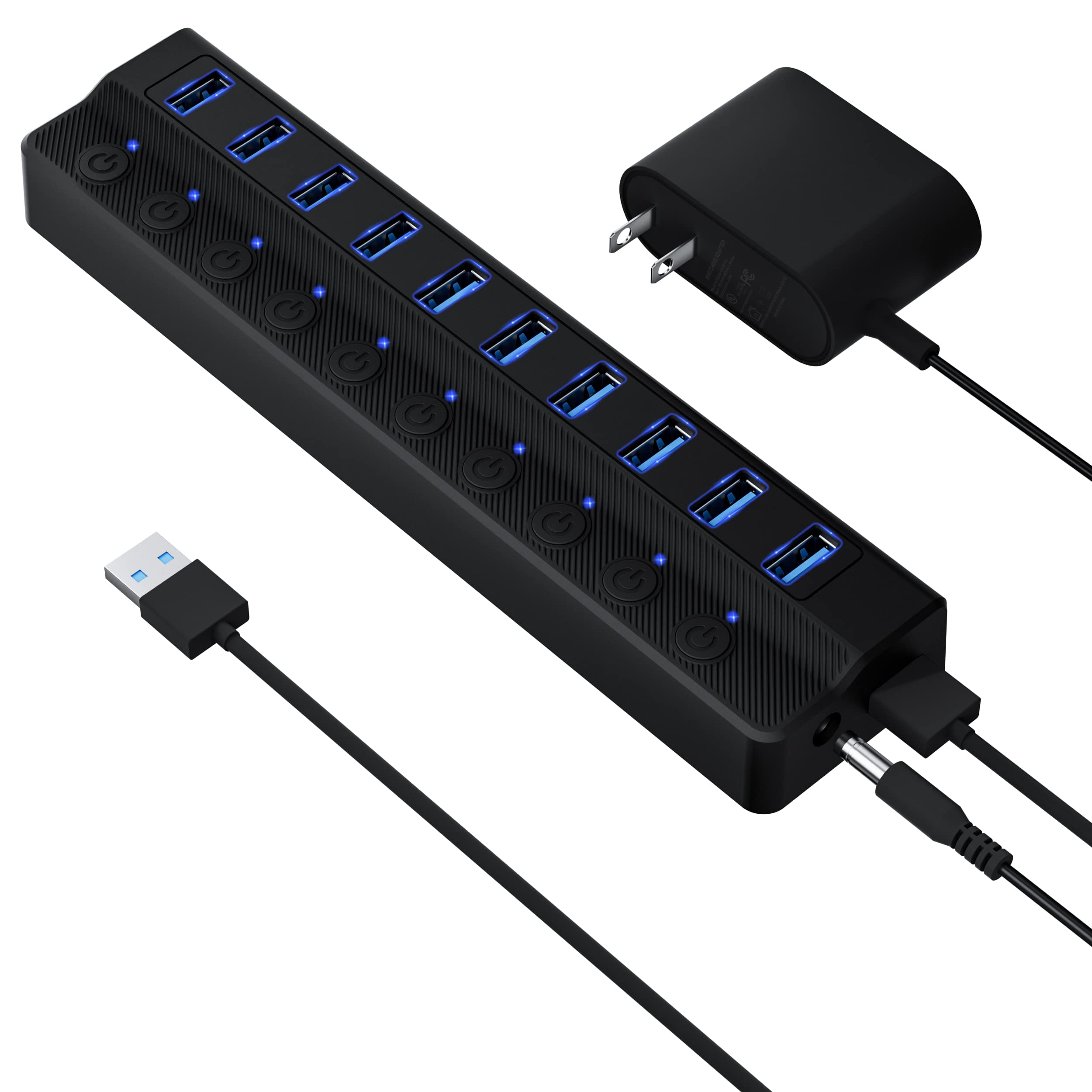

How To Choose The Best 12V Powered USB Hub
The core job of a 12V powered hub is to deliver clean, steady power to every port so your devices never stutter. Three specs define whether a hub actually does that job well: total power wattage, data speed, and build reliability.
Power Delivery is Everything
A label that says “12V/2A” delivers 24 watts total to share across all ports. “12V/3A” gives you 36 watts. “12V/5A” delivers 60 watts, and “12V/8A” pushes 96 watts. Higher total wattage means you can connect more high-draw devices (like external hard drives or a VR headset) without the hub choking and dropping connections. For most desktop setups, a 24W to 36W adapter handles four to six standard USB devices well; for power-hungry gear or many ports, go higher.
Data Speed vs Real-World Need
USB 3.0 offers speeds up to 5 Gbps, which is plenty for SSDs, flash drives, and HD video transfers. USB 3.2 Gen 2 bumps that to 10 Gbps, a real advantage if you regularly move large files between fast drives. Both are backward compatible with older USB 2.0 gear, so you do not lose anything by choosing a higher-speed hub.
Build, Switches, and Port Layout
An aluminum enclosure dissipates heat better than plastic and feels sturdier on a desk. Individual on/off switches for each port let you power-cycle a device without unplugging it, saving wear on ports. A charging-only port (sometimes labeled QC 3.0) can fast-charge a phone or tablet while the rest handle data, which is a handy split for a tidy desk.
Quick Comparison
| Model | Best For | Total Ports | Total Power | Data Speed | Amazon |
|---|---|---|---|---|---|
| GEKRY 7-Port★ Best Overall | Mountable permanent desk setup | 7 | 36W (12V/3A) | 5 Gbps | Amazon |
| ONFINIO 10-PortBest Value | High-value multi-device expansion | 10 | 24W (12V/2A) | 5 Gbps | Amazon |
| RSHTECH 5-PortCompact Companion | Compact setup with fast charging | 5 | 24W (12V/2A) | 5 Gbps | Amazon |
| Aiibe 8-Port | Legacy PC with QC 3.0 charging | 8 | 36W (12V/3A) | 5 Gbps | Amazon |
| ZIUMIER 10-Port RGB | Gaming desk with RGB lighting | 10 | 24W (12V/2A) | 5 Gbps | Amazon |
| FIDECO 10-Port | High-speed data and mixed USB-C/A | 10 | 60W (12V/5A) | 10 Gbps | Amazon |
| Rosonway 10-Port | Premium aluminum build with dual cables | 10 | 36W (12V/3A) | 10 Gbps | Amazon |
| AGEEN 16-Port | Maximum port count and high-power charging | 16 | 96W (12V/8A) | 5 Gbps | Amazon |
In‑Depth Reviews
1. GEKRY 7-Port Powered USB 3.0 Hub
Our pick — 4.5★ from 350+ verified ratings; the strongest balance of quality and price.
The desk organizer that mounts cleanly and never drops a connection.
This hub is for anyone who wants to bolt a hub under a desk and forget it exists. The alloy steel case includes mounting brackets, so you can screw it in place with the USB jacks facing the rear — exactly what buyers building sit-stand workstations or tidy server corners do. At 4.95 inches long, it is compact enough to hide behind a monitor riser.
It delivers 36W through its 12V/3A power brick, so each of the seven ports gets a steady 5V/900mA, and any four ports can push up to 1.5A each for BC 1.2 charging (a fast-charge standard for older devices). Buyers report running five USB hard drives plus a chip programmer without a single disconnect — a feat cheaper bus-powered hubs cannot pull off. The transfer speed hits 5 Gbps via USB 3.0, fast enough to move HD video files in seconds. As the review pages put it: “Input is 12V and seems to be internally regulated, so mine have been tolerant of powering from my common 13.8v DC bus.” That voltage tolerance is a serious plus for anyone with a non-standard DC supply.
What owners rave about
- Solid metal housing with real mounting ears — screws in securely under a desk or inside a cabinet.
- 36W power supply handles multiple hard drives and high-draw gear without dropouts.
- Individual per-port overcurrent protection (TTs) means a mix of old and new USB devices co-exist without drama.
The honest trade-off
- All USB jacks face forward; the power brick and downstream cable exit from the same side, which can be awkward in tight spaces.
- Not designed for fast charging — BC 1.2 at 1.5A is slower than dedicated QC 3.0 ports found on some competitors.
Reach for this if: you want a permanent, mountable hub that powers several external drives reliably without ever thinking about it again.
Think twice if: you need a hub you can grab and toss in a bag — this one is built to stay put.
2. ONFINIO 10-Port Powered USB 3.0 Hub
Ten ports, individual switches, and a price that undercuts most five-port rivals.
For the buyer who simply needs lots of ports without spending much, this ONFINIO hub is the crowd favorite — nearly a thousand owners have rated it. It packs ten USB 3.0 ports at 5 Gbps each, all powered by a 12V/2A (24W) adapter. That is enough juice to run a full desk of keyboards, mice, flash drives, and a webcam without dragging power from your laptop’s limited bus. The 12V/3A power brick is praised in reviews for handling “high-draw devices (e.g., Quest link, mic) without disconnects.”
Each port gets its own on/off switch with an LED, so you can cut power to a device without yanking the cable — a huge convenience for troubleshooting or saving idle power. At 7.8 inches long and only 0.9 inches tall, it is a slim black bar that disappears behind a monitor. The plastic body is lighter than metal alternatives, which keeps costs down, but it still feels solid enough for daily desktop use. Owners call the quality a standout: over 45 reviewers highlight the build, and the per-port power isolation is specifically noted for fixing flickering LED issues that other hubs cause.
Why it wins the value slot
- Ten USB-A 3.0 ports with individual switches — a rare combo at this price tier.
- 12V/3A power supply delivers stable 36W that handles VR headsets and condenser mics.
- Narrow footprint (1.7 inches wide) saves desk space.
The honest catch
- All ports share a single 5 Gbps uplink bandwidth, so transferring data on multiple fast drives simultaneously will bottleneck.
- An occasional unit arrives with a port that fails within months; support is responsive per reviews, but quality control is not perfect.
Grab this for: a budget-friendly way to add ten ports to a desktop that needs to connect many low- to mid-power devices.
Look elsewhere if: you need a metal chassis for ruggedness or plan to run more than two external SSDs simultaneously at full speed.
3. RSHTECH 5-Port Powered USB Hub (RSH-A35)
A tiny powered hub that adds a dedicated fast-charging port for phones.
At just 4.9 inches wide, this RSHTECH hub is the most portable powered option here — it easily fits in a laptop bag or velcroes to a telescope tripod leg. It gives you four USB 3.0 data ports plus one dedicated fast-charging port that delivers up to 2.4 amps, enough to charge a phone more than halfway in 30 minutes. The 12V/2A adapter provides 24W of total power, which is plenty for four SSDs and a phone charging side-by-side.
Astrophotographers love it — owners mention using it to power a hand controller and guide camera through a single 12V line to a laptop, with individual on/off switches letting them cycle gear without unplugging. The build quality earns consistent praise (over 40 reviewers call it solid), and the charging speed is the second-most-discussed positive. A fast-charge port this capable in a sub-5-inch body makes it the top pick for portable rigs and tidy travel desks.
What makes it special
- Dedicated 2.4A fast-charging port in a very compact frame.
- Individual on/off switches for each data port — rare at this size.
- Weighs so little it velcros easily to tripod legs, camera rigs, or the underside of a mobile desk.
A fair limitation
- Only five total ports; not the right choice if you need to connect more than four data devices plus a charger.
- The fast-charge port is snug for some oversized plugs, and the plastic body does not dissipate heat as well as aluminum.
Ideal for: photographers, telescope users, and anyone who needs a powered hub small enough to velcro onto portable gear while keeping a phone charging fast.
skip it if: your desk already has ten devices — you will run out of ports before you run out of gear.
4. Aiibe 8-Port Powered USB 3.0 Hub

Six data ports plus two fast-charge ports with QC 3.0 in one slim hub.
This Aiibe hub is designed for users with older laptops that have limited USB ports but need fast charging for modern phones. It offers six USB 3.0 data ports (5 Gbps) plus two dedicated charging ports that support Quick Charge 3.0 and BC 1.2 technology — letting you charge a smartphone to roughly 50% in about 30 minutes. The 12V/3A adapter delivers 36W, giving the data ports enough power to keep external SSDs and hard drives stable even under load.
Customers note it lasting five years of daily use, and the value proposition is strong: a compact 6.22-inch body with a non-slip base and sleek black finish that sits unobtrusively beside a keyboard. A buyer mentions it works great for injecting USB power to an oscilloscope without draining the test device battery. The only nuance is that the two end ports are charging-only (no data), so you effectively have six data ports — worth knowing as you plan your layout.
The big wins
- Two dedicated QC 3.0 charging ports deliver fast phone charging while six data ports handle peripherals.
- 36W adapter keeps multiple external drives reliable through years of daily use.
- Slim 0.71-inch profile and non-slip rubber base stay put on a crowded desk.
Know before you buy
- No USB-C ports — all connections are USB-A.
- The AC adapter brick is larger than the hub itself, which can block adjacent power outlets.
Best for: breathing new life into an older laptop with few USB ports, especially if you want fast phone charging at your desk.
Not for: anyone who needs USB-C connectivity or prefers a hub with individual port switches.
5. ZIUMIER 10-Port RGB Powered USB 3.0 Hub
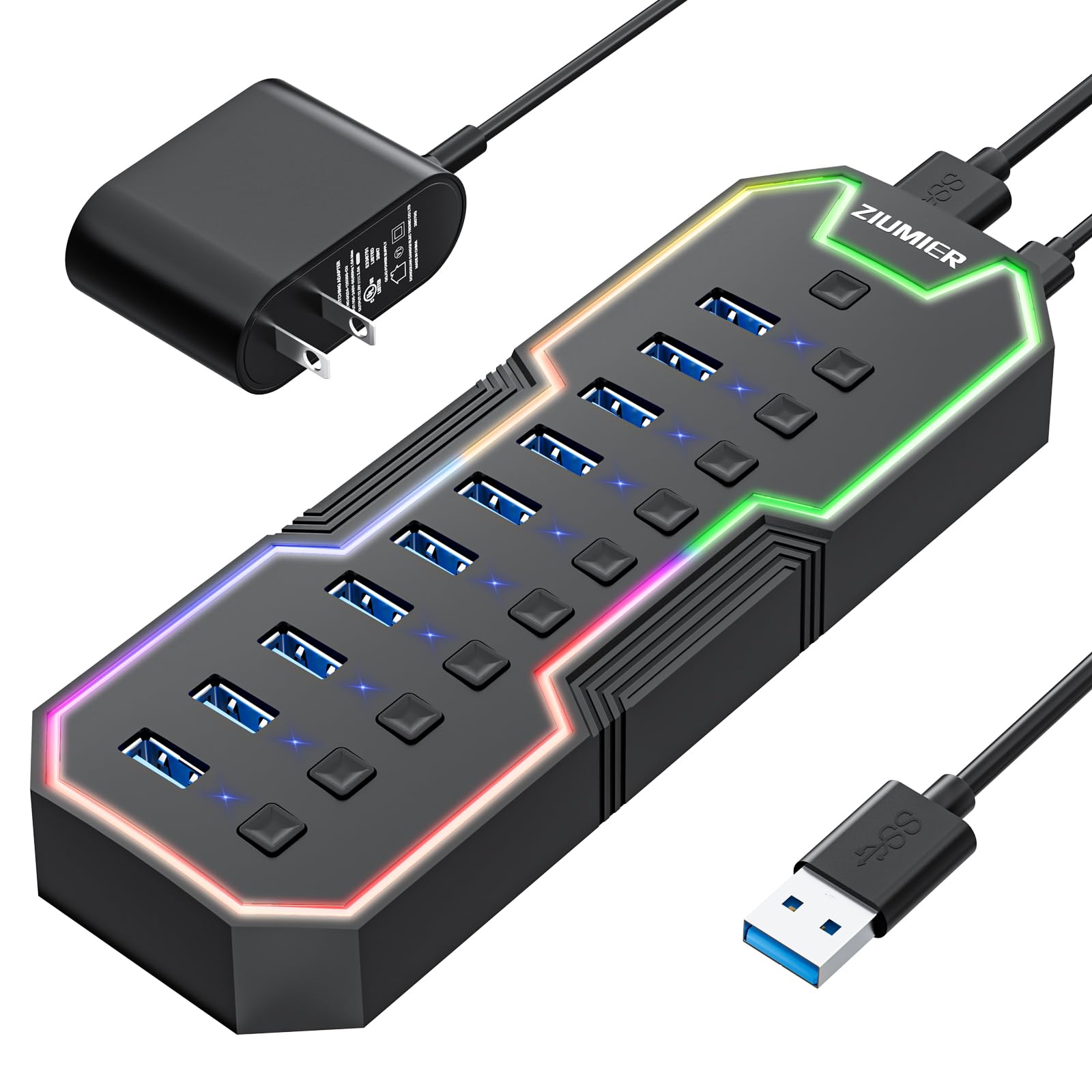
Ten ports with RGB lighting that actually looks good on a gaming desk.
This hub brings an RGB LED strip to the standard powered-hub formula, so your desktop gets a subtle colorful glow that you can switch on or off with a dedicated button. Beneath the lights, it is a functional 10-port USB 3.0 hub with a 12V/2A (24W) power supply — plenty for a gaming keyboard, mouse, headset base, flash drive, and a phone, all running without hiccups. The 5 Gbps data transfer speed keeps file moves snappy.
Each port has its own on/off switch with an LED indicator, so you can power-cycle a stubborn device without unplugging. Owners praise its reliability and say it transferred “big files without hiccups.” The plastic build keeps weight low, and the two-year warranty adds confidence. One quirk: a loose power plug on some units, noted by a few owners, but overall the hub gets high marks for both function and desk aesthetic at this price.
Why it stands out
- RGB lighting adds a tasteful glow that can be turned off entirely — no obnoxious rainbow flash.
- Individual per-port switches with LED status lights give precise control over each connected device.
- 2-year warranty is longer than most at this price point.
The rough edges
- Some units ship with a loose-fitting power connector that slips out with a bump.
- Plastic buttons and shell feel less premium than aluminum alternatives.
Choose this for: a gaming or streaming setup where a little desk RGB makes you smile, but you still need ten reliable ports.
Pass if: you want a rugged aluminum hub or need fast charging — this model does not support QC 3.0.
6. FIDECO 10-Port 60W Powered USB 3.2 Gen 2 Hub
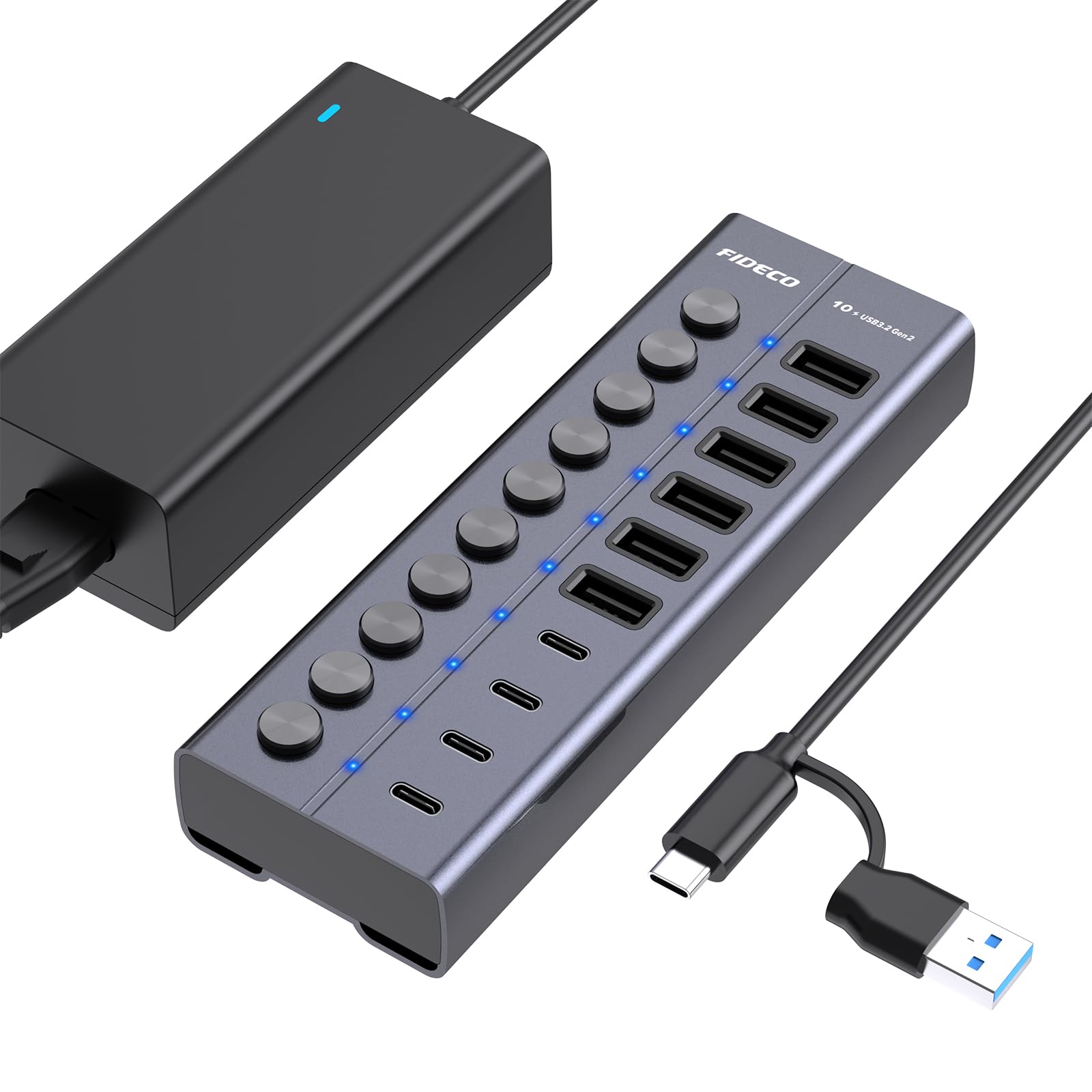
A 10Gbps metal powerhouse that drives multiple drives and charges them, too.
This FIDECO hub is the speed king of the list. It uses USB 3.2 Gen 2, hitting data transfer speeds up to 10 Gbps — twice as fast as a standard USB 3.0 hub. It comes with a 60W (12V/5A) power adapter, which is enough to run six USB-A ports and four USB-C ports simultaneously without starving any port. BC1.2 charging at 5V/1.5A means your phone or tablet recharges while data flows, and the aluminum alloy body acts as a heat sink to keep things cool under load.
Owners call it “solidly built” and note that the individual on/off switches are “very sturdy.” The package includes a USB-C to USB-C cable with a USB-A adapter, so it works smoothly with modern laptops that have only USB-C ports as well as older PCs. The catch: it is larger than most hubs at 6 inches wide, and some reviewers point out that data speeds can dip when all ports are under heavy simultaneous load. Still, for professionals transferring large media files, this is the fastest path to a clutter-free desk.
What makes it worth the premium
- 10 Gbps data transfer speed — twice as fast as USB 3.0 hubs.
- 60W total power ensures all 10 ports (6 USB-A 4 USB-C) stay stable.
- Aluminum chassis with non-slip rubber pads keeps it planted and cool.
One issue to factor in
- A small number of shoppers say the hub can freeze a computer if power bleeds back through the USB channel; treat it as a potential risk with sensitive motherboards.
- Physical footprint (6 x 2 x 1.1 inches) is larger than most.
Ideal for: creative professionals and power users who shuffle large files between fast SSDs and need the highest possible throughput on a desktop.
pass on it if: your setup runs standard USB 3.0 gear — you will not see a speed benefit, and a less expensive hub will do the same job.
7. Rosonway 10-Port Powered USB 3.2 Gen 2 Hub (RSH-A10S)

Full aluminum body with both USB-A and USB-C cables in the box.
The Rosonway RSH-A10S delivers 10 Gbps data speeds through its USB 3.2 Gen 2 interface, and unlike many hubs, it ships with two detachable cables: a USB-A to B cable and a USB-C to B cable. That means it works immediately with both older PCs and the newest MacBooks or ultrabooks without an adapter hunt. The enclosure is solid aluminum, which owners say feels “high performance” and handles heavy loads without overheating.
It runs on a 36W (12V/3A) UL-certified power supply, providing steady power to all ten ports. Individual on/off switches with soft blue LEDs let you manage connected devices with one tap. Buyers upgrading from older hubs say this model eliminates the “microphone hum” and random disconnects they tolerated for years. The only recurring gripe is that the narrow footprint can make it a bit tippy on a desk, and a rare port may fail to recognize certain older devices. Overall, it is the most polished aluminum hub in this mid-to-premium tier.
The high points
- 10 Gbps via USB 3.2 Gen 2 with two included cables (USB-A and USB-C) for universal compatibility.
- Aluminum body with subdued blue LEDs — looks professional and dissipates heat well.
- 18-month warranty extendable to 2 years gives confidence in long-term use.
A small compromise
- The hub is narrow and can rock slightly when plugging in stiff cables; a weighted base would help.
- Only one USB-C port — buyers who want more than one Type-C may prefer the FIDECO.
Best for: owners of both USB-A and USB-C laptops who want a single hub that works with either, plus aluminum build quality that lasts.
Not if: you need USB-C ports for multiple C-only devices, or you plan to power more than six power-hungry peripherals simultaneously.
8. AGEEN 16-Port Powered USB 3.0 Hub

Sixteen ports with 96 watts — the docking station alternative for extreme setups.
When you need to connect every USB device you own and never think about power limits, the AGEEN hub is the answer. It has 16 ports in total: 10 USB-A 3.0 data ports, 2 USB-C 3.0 data ports, plus 4 dedicated charging ports (2 QC 3.0 at 24W each and 2 smart-charging ports at 12W each). The 96W UL-certified power adapter (12V/8A) is the highest wattage in this roundup, giving you headroom to run a dozen external drives, a VR headset, and still fast-charge a tablet.
Every port has its own power switch with an LED, so you can turn off unused devices without yanking cables. The aluminum shell keeps it cool, and the 8.66-inch width is still compact enough for a desk corner. Owners highlight the “heavy-duty power supply” and “per-port power buttons” as deal-making features. Be aware that the four charging ports are power-only (no data), and some users wish the power switches were rocker-style rather than full-off. Also, a few units developed port failures around six months, though the advertised 24-month warranty and responsive support typically resolve that.
What justifies the price
- 16 ports (10 USB-A, 2 USB-C, 4 charging) with a 96W adapter — enough for a full studio or server bench.
- Dual QC 3.0 ports fast-charge two phones or tablets simultaneously at 24W each.
- 24-month warranty and aluminum body for durability.
Things to know
- Transfer speed stays at 5 Gbps (USB 3.0), not 10 Gbps like the premium FIDECO or Rosonway models.
- No rubber feet on the bottom — the hub slides on smooth desks; a DIY pad fix is common.
- Port failure has been reported within 6 months on a small number of units, though support provides replacements.
Perfect for: anyone running a heavy peripheral setup — musicians with multiple audio interfaces, system administrators with test benches, or creators with many external drives.
Not the right fit if: you need 10 Gbps data speeds or prefer a smaller, travel-friendly hub.
Understanding the Specs
Power Adapter Rating
The total power (watts) the hub can draw from its wall adapter is the single most important spec for reliability. A 12V/2A adapter delivers 24 watts; 12V/3A gives 36 watts; 12V/5A provides 60 watts; and 12V/8A pushes 96 watts. More watts means the hub can keep all ports stable even when you plug in high-draw devices like external hard drives, VR headsets, or multiple charging phones. A hub with too little wattage for your gear will drop connections or charge slowly.
Data Transfer Standard
USB 3.0 (also called USB 3.1 Gen 1) tops out at 5 Gbps — roughly 10x faster than USB 2.0 and plenty fast for moving HD videos or backing up a drive. USB 3.2 Gen 2 reaches 10 Gbps, which is a real advantage when copying large files between fast SSDs. Both standards work with older USB 2.0 and 1.1 devices, so you do not lose compatibility by choosing a faster hub. For most everyday setups, 5 Gbps is more than enough.
FAQ
Can a 12V powered USB hub charge my laptop?
Will a 12V hub work with a 5V-only computer port if I forget the adapter?
How many devices can I actually run on a 24W hub?
Is it safe to leave a powered USB hub on 24/7?
What does “individual on/off switches” actually do for me?
Do USB-C ports on these hubs support full data and video?
Will a 10-port hub work with a Mac Mini or MacBook Air?
What is the difference between USB 3.2 Gen 2 and USB 3.0 in real life?
Final Thoughts: The Verdict
Across the board, the 12v powered usb hub winner is the GEKRY 7-Port because it combines a mountable alloy-steel chassis, a 36W power supply, and individual overcurrent protection into a package that just works for years. If you want the highest data speeds, grab the FIDECO 10-Port for its 10 Gbps throughput and aluminum build. And for the ultimate port count with fast charging, the AGEEN 16-Port is the one to reach for — it powers an entire desktop of gear without breaking a sweat.
How We Picked
We do not accept paid placement. Every pick is matched to a real buyer and a real use-case; we do not hands-on test units.
Sources & Methodology
Specifications: manufacturer listings and product documentation. Review insights: verified customer reviews, as of July 2026. Pricing: not shown on this page (it changes often); check the current price via the retailer link.
As an Amazon Associate, Gadgets Feed earns from qualifying purchases. This does not affect which products we feature.