
Case temperature creep, GPU throttling, and that annoying whine at 2 AM are the signs of a system crying out for better airflow. The right 12V PWM fan transforms a hot, noisy desktop into a cool, silent workstation. But with dozens of specs and price points, picking the wrong one wastes time and money.
I’m Min — the co-founder and writer behind Gadgets Feed. I’ve spent countless hours analyzing static pressure curves, decibel ratings, and bearing types to separate the high-performance contenders from the cheap air movers that fail within months.
After comparing airflow, noise, and build quality across a wide range of options, this guide zeroes in on the specific models that deliver real cooling without the racket. Here is my pick for the best 12v pwm fan for your build this year.
How To Choose The Best 12V PWM Fan
Choosing a 12V PWM fan is a balancing act between how much air you need to move and how much noise you can tolerate. The primary spec to consider is static pressure measured in mmH₂O — a higher value pushes air through dense radiator fins and mesh panels. A fan’s noise rating, measured in decibels (dBA), tells you how loud it gets at its top speed. PWM range (the minimum and maximum RPM) determines how well the motherboard can fine-tune speed for a quiet idle versus full-load cooling.
Bearing Type and Lifespan
The bearings inside the fan hub are the most common point of failure. Sleeve bearings are cheap but wear out quickly, lasting around 35,000 hours. Rifle bearings, fluid dynamic bearings (FDB), and S-FDB bearings are a significant upgrade: they use lubrication to reduce friction and noise, often exceeding 60,000 to 150,000 hours of operation. For a fan that will run 24/7 in a home server or workstation, spending more on a fluid dynamic or rifle bearing model is worthwhile.
Form Factor and Installation
Standard 120mm and 140mm fans are 25mm thick, but some builds require slim fans — the ARCTIC P14 Slim is only 16mm thick, making it a necessity for small form factor cases. Pay attention to mounting hole spacing and frame design; a 150mm-wide round frame like the Noctua NF-A15 won’t fit every case. Custom cables, daisy-chain connectors, and included accessories like anti-vibration mounts or splitters can make or break a clean install.
Multi-Packs and Value
If you are populating a new case or a radiator, multi-packs provide significant savings per fan. The Thermalright TL-C12C X3 three-pack and the ARCTIC P12 Pro PST five-pack deliver premium-tier specs at a fraction of the per-unit cost of single-fan boxes. Always check the included accessories — a Y-cable or PST daisy-chain connector can eliminate the need for a separate fan hub.
Quick Comparison
On smaller screens, swipe sideways to see the full table.
| Model | Category | Best For | Key Spec | Amazon |
|---|---|---|---|---|
| Noctua NF-A15 PWM | Premium | Ultra-quiet CPU cooler | 19.2 dBA at 1200 RPM | Amazon |
| ARCTIC P12 Pro PST 5-Pack | Premium | High-RPM radiator use | 3000 RPM max speed | Amazon |
| be quiet! Light Wings LX 140mm | Premium | RGB showcase with silence | 20.6 dBA noise level | Amazon |
| Thermalright TL-C12C X3 | Mid Range | Best value three-pack | 66.17 CFM at 1550 RPM | Amazon |
| be quiet! Pure Wings 3 120mm | Mid Range | Silent case cooling | 2100 RPM rifle bearing | Amazon |
| ARCTIC P14 Slim PWM PST | Mid Range | SFF and tight spaces | 16mm slim profile | Amazon |
| Wathai 120mm 2-Pack | Budget | Non-PC electronics cooling | 2-pin, 2000 RPM sleeve | Amazon |
In-Depth Reviews
1. Noctua NF-A15 PWM

The Noctua NF-A15 PWM is the reference standard for silent cooling. Its 150mm wide round frame houses a 140mm fan blade that moves 115.5 m³/h of air at a whisper-quiet 19.2 dBA. The included Low-Noise Adaptor drops the top speed to 900 RPM for inaudible operation, while the 300-1200 RPM PWM range gives the motherboard precise control. This fan is specifically designed for high-end CPU coolers like the NH-D15, with 120mm mounting hole spacing that lets it replace standard 120mm fans on radiators.
Build quality is exceptional: a fibre-glass reinforced PBT frame, anti-vibration mounts, and a 6-year warranty backed by an MTTF rating exceeding 150,000 hours. The kit includes a Y-cable for running two fans off a single header, a 30cm extension cable, and four silicone anti-vibration mounts. Users report dropping CPU temperatures by 10-15 degrees Celsius under load compared to generic fans, with the fan being nearly inaudible even at 100% PWM duty cycle.
The brown color scheme is polarizing, and the 150mm width can cause fitment issues in some cases — a few users reported the fan preventing side panel closure in Corsair Air 540 builds. At its price point, it is not a budget choice, but for those prioritizing absolute silence and long-term reliability in a high-end desktop, the NF-A15 is unmatched.
Why it’s great
- Industry-leading 19.2 dBA noise level
- 150,000-hour MTTF with 6-year warranty
- Includes Low-Noise Adaptor and Y-cable
Good to know
- 150mm width may not fit all cases
- Polarizing brown color scheme
- Premium pricing
2. Thermalright TL-C12C X3 120mm 3-Pack

The Thermalright TL-C12C X3 three-pack delivers serious value for budget-conscious builders. Each fan pushes 66.17 CFM at a maximum of 1550 RPM with a static pressure of 1.53 mmH₂O — enough to handle case cooling and basic radiator duty. The S-FDB bearing is a significant upgrade over sleeve bearings, reducing noise and extending lifespan. Each unit includes four silicone corner pads that dampen vibration against the case frame.
In real-world testing, these fans keep system temperatures competitive with models costing three times as much per unit. The 4-pin PWM connector allows motherboard control from idle to full speed, and the 55cm cable length supports daisy-chaining multiple fans on a single header. Users have successfully used them on CPU coolers and as case fans in NAS builds, with one reviewer reporting they outperformed Noctua NF-A12x25 in a NAS enclosure with slightly higher but acceptable noise levels.
Noise is the main trade-off — at 25.6 dBA, they are not silent at full speed. Some users note a medium-frequency drone at mid-RPM ranges. The included screws are adequate, and the fans work reliably, but they lack the premium packaging and extensive accessory kits of more expensive models. Nevertheless, for a three-pack at this price point, the TL-C12C X3 is a fantastic entry point.
Why it’s great
- Excellent CFM-to-price ratio in a 3-pack
- Quality S-FDB bearings for longevity
- Silicone anti-vibration pads included
Good to know
- Audible drone at mid-RPM range
- No extensive accessory kit
- Not suitable for silent-focused builds
3. be quiet! Pure Wings 3 120mm PWM High-Speed

The be quiet! Pure Wings 3 120mm is a high-speed PWM fan designed specifically for radiator duty. Its 2100 RPM top speed delivers 59.6 CFM with a frame outlet optimized to minimize air leaks on heat sinks and radiators. The rifle bearing is rated for 80,000 hours of operation, a notable upgrade over sleeve-bearing alternatives. The 7 airflow-optimized blades trade some raw CFM for a quieter acoustic profile than its RPM would suggest.
Users report that this fan is nearly inaudible at normal operating speeds and delivers a soft hum even at 100% PWM. It works exceptionally well as a direct replacement for stock AIO cooler fans, with several reviewers noting a 2-3 degree Celsius drop in CPU temperatures after swapping out OEM fans. The 4-pin PWM connector provides a broad speed range from very low minimum RPM for near-silent idle up to 2100 RPM for demanding loads.
The polycarbonate frame feels durable, and the German-engineered design instills confidence. However, the fan lacks included anti-vibration pads or gaskets, which means users with sensitive hearing may need to add aftermarket rubber mounts. At its price, it sits in a competitive zone — you pay a premium over budget fans for the quieter operation and longer bearing life, but you lose out on the multi-pack savings of the Thermalright or ARCTIC offerings.
Why it’s great
- Excellent radiator airflow with low noise
- 80,000-hour rifle bearing lifespan
- Solid German build quality
Good to know
- No anti-vibration pads included
- Single pack only
- Not the cheapest option per fan
4. ARCTIC P14 Slim PWM PST
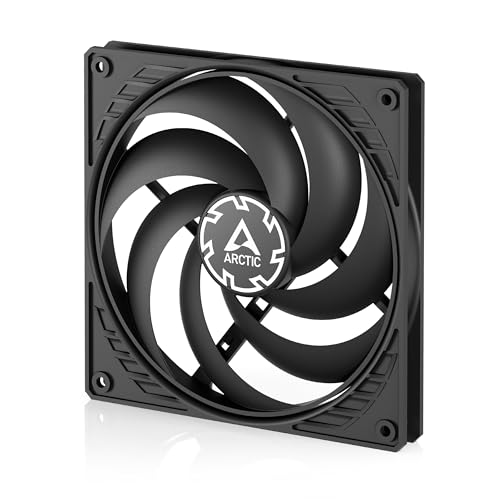
When case depth is measured in millimeters, the ARCTIC P14 Slim PWM PST is a lifesaver. At only 16mm thick — compared to the standard 25mm — this 140mm fan fits into tight spaces where a conventional fan would not, such as between a radiator and a side panel in small form factor builds. Despite the slim profile, it delivers 52 CFM at 1800 RPM with a static pressure of 1.55 mmH₂O, which is competitive with many standard 25mm-thick 140mm fans.
The PWM Sharing Technology (PST) allows daisy-chaining multiple fans off a single motherboard header, a huge convenience for cable management. The fan supports a 0 RPM mode below 5% PWM, effectively stopping the blades for complete silence at low system loads. The 150-1800 RPM range gives the motherboard a wide band to react to temperature changes. Users with SFF rigs like the Lian Li 185M report using this fan as front intake with excellent results, keeping their M-ATX systems cool without the noise of a full-sized fan.
The main compromise is build quality: the polycarbonate frame feels less premium than other ARCTIC models, and the lack of included rubber gaskets can cause blade rubbing against the case when mounted. Some users report blade wobble at low speeds, requiring 3D-printed spacers or rubber washers to fix. The price for a single slim 140mm fan is fair, but the Silverstone slim fans offer a more polished alternative. However, for absolute space constraints, the P14 Slim is a reliable choice.
Why it’s great
- Only 16mm thick for tight SFF builds
- PST daisy-chain for simple wiring
- 0 RPM mode for silent idle
Good to know
- May need spacers to prevent blade rub
- Plastic frame feels less premium
- Single pack only
5. be quiet! Light Wings LX 140mm PWM
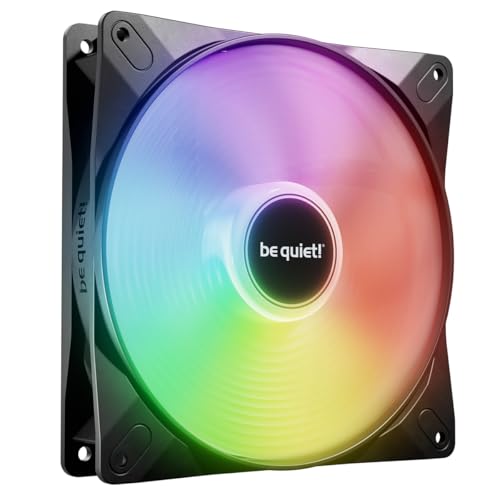
The be quiet! Light Wings LX 140mm is the fan you install when you want your build to look as good as it performs. A ring of 16 addressable RGB LEDs sits in the hub, shining outward through frosted blades to create a diffused glow. The fan produces a very quiet 20.6 dBA while delivering strong airflow with its optimized blade design. The frame outlet is shaped to minimize air leaks, ensuring each blade stroke pushes air through the case rather than recirculating it.
The daisy-chain ARGB connection uses an input-output system, allowing you to link multiple fans through a single motherboard header or ARGB controller. The included 4-pin PWM connector provides standard speed control, and users report that the fan stays quiet up to about 40% PWM with no annoying oscillating hum at any speed — a common complaint in cheaper RGB fans. Build quality is high, with a metal-reinforced frame and a rifle bearing rated for 60,000 hours.
The main limiting factor is that this is a 140mm fan only, so it may not fit all case slots. Some users with older systems noted the RGB integration required specific software for individual color control. At its price, it competes with premium Noctua models on acoustics and adds a significant visual element that Noctua lacks. If silence is your only concern, the more expensive NF-A15 is still the king, but the Light Wings LX offers the best blend of quiet operation and flashy aesthetics.
Why it’s great
- Vibrant ARGB with frosted blade diffusion
- Very quiet 20.6 dBA operation
- Daisy-chainable ARGB and PWM
Good to know
- 140mm size only
- Software-dependent for individual LED control
- Higher price than non-RGB alternatives
6. ARCTIC P12 Pro PST 5-Pack

The ARCTIC P12 Pro PST is built for pure performance. With a maximum speed of 3000 RPM, this 120mm fan moves 77 CFM of air through the most restrictive radiators and mesh panels. The fluid dynamic bearing (FDB) is the premium choice for durability and quiet operation at any speed. Each fan features a redesigned rotor blade that balances high static pressure with acceptable noise levels. The 5-pack with an integrated Y-cable splitter makes it easy to populate an entire case or a 360mm AIO radiator at a low per-fan cost.
The 0 RPM mode stops the fan entirely below 5% PWM, making for a completely silent system during low-load desktop work. The wide PWM range from 600 to 3000 RPM gives the motherboard fine-grained control. Users report that at 1800 RPM, the fan is barely audible, and the cooling is excellent — one user called it the “best bang for your buck” fan on the market. The included Y-cable splitter, however, is an integrated design that some find makes cable management frustrating rather than easier.
The biggest trade-off is noise at top speed. At 3000 RPM, the P12 Pro PST roars — it is not a fan for silent operation if left at 100%. Some users specifically bought these for their high CFM in a restrictive case, acknowledging the noise as a necessary byproduct of performance. For a balanced build, a lower-RPM fan like the Pure Wings 3 is a better choice. But for those building a high-end system where temperatures matter more than noise, the P12 Pro PST five-pack is a compelling package.
Why it’s great
- High 77 CFM at top speed
- 5-pack provides excellent value per fan
- 0 RPM mode under 5% PWM
Good to know
- Very loud at 3000 RPM
- Integrated Y-splitter complicates cable management
- Overkill for most standard case setups
7. Wathai 120mm 2-Pack
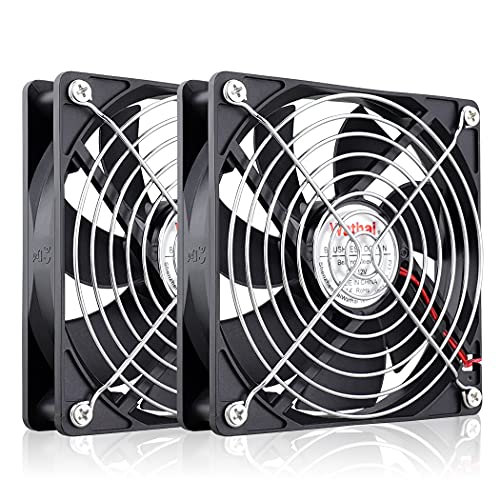
The Wathai 120mm 2-pack is a no-frills cooling solution best suited for DIY electronics projects rather than modern PC case cooling. Each fan moves a respectable 66.7 CFM at 2000 RPM, but the 2-pin XH2.54 connector means it does not support PWM speed control — it runs at full speed whenever powered. The sleeve bearing is rated for only 35,000 hours, which is short compared to other options and prone to early failure in dusty environments. The pack includes fan grills and mounting screws, making it ready for non-standard mounting.
Users have successfully deployed these fans to cool RV electrical cabinets, power supplies, dehumidifiers, and amplifiers. The quiet operation at 2000 RPM (28 dBA) is adequate for many environments. The 11-inch cable length is generous for connecting to remote power sources. One reviewer even used this fan as a direct replacement for a 12V fan in a decade-old NZXT PSU, reporting it worked flawlessly with no notable noise increase.
For a standard desktop computer, the limitations are significant: no PWM means constant full-speed noise, and the sleeve bearing will wear out faster than fluid dynamic or rifle bearings. If you need a 12V fan for a non-PC use case where constant high-speed cooling is acceptable, the Wathai is a budget-friendly option. But for a PC, you are better off spending slightly more on the Thermalright 3-pack, which offers PWM control, better bearings, and better value for your main system.
Why it’s great
- Budget-friendly 2-pack
- Includes fan grills and mounting hardware
- Good air flow for DIY electronics cooling
Good to know
- No PWM speed control (2-pin)
- Short 35,000-hour sleeve bearing lifespan
- Runs at full speed constantly
FAQ
Can I use a 12V PWM fan on a 5V or 24V system?
Does higher PWM frequency mean quieter fan operation?
What is the difference between a 3-pin DC fan and a 4-pin PWM fan?
Can I replace a 2-pin fan with a 4-pin PWM fan?
Why does my fan make a clicking or rubbing sound at low RPM?
Final Thoughts: The Verdict
For most users, the best 12v pwm fan winner is the Noctua NF-A15 PWM because it delivers the lowest noise floor (19.2 dBA) while still moving serious air, backed by an unbeatable 6-year warranty and 150,000-hour lifespan. If you value raw performance per dollar for a full case or radiator setup, grab the ARCTIC P12 Pro PST 5-Pack. And for a silent build on a tight budget where 0-3 fans are needed, nothing beats the value of the Thermalright TL-C12C X3 3-Pack.