
Our readers keep the lights on and my morning glass full of iced black tea. As an Amazon Associate, I earn from qualifying purchases.
Specs are compiled from manufacturer listings and verified buyer reviews and can change over time — please confirm the key details on the product page before buying.
A 13-inch monitor exists to solve one specific problem: you need a second screen that actually travels with you. Not a clunky desktop panel you lug in a separate bag, but a display that slips into your laptop sleeve and turns any coffee shop, airplane tray, or hotel desk into a proper dual-screen workstation. The catch is that the category is full of panels that look fine on paper but wash out in daylight, feel cheap in the hand, or refuse to play nice with your specific laptop’s USB-C port. This guide walks you through the six best options right now, from a 4K OLED that rivals a high-end TV to a rugged touchscreen built for a bowling alley counter.
I’m Min — the founder and writer behind Gadgets Feed. This guide is built by comparing the manufacturers’ published specifications and the patterns across verified customer reviews, so you get each pick’s real strengths and trade-offs instead of marketing spin.
You can now get a 13 inch monitor that fits your exact job — whether that is a vivid OLED for gaming on the go or a rugged touchscreen for a retail counter. The right pick depends on your real workload, not just the specs.
Our Picks at a Glance

How To Choose The Best 13 Inch Monitor
Picking a 13-inch monitor means you are trading pure size for portability, so the decisions that matter most are about resolution, panel technology, and how it connects to your laptop. Here are the three factors that define whether a portable monitor is useful or just another gadget that gathers dust in your bag.
Resolution: 4K vs 1080p on a Small Screen
On a 13-inch panel, 1080p is perfectly readable for emails, coding, and spreadsheets because the pixel density is similar to a standard 24-inch 1080p desktop monitor. But 4K (3840×2160 or higher) gives you a noticeably sharper image for photo editing, video work, or reading fine text, and it makes a huge difference when you are working with complex timelines or high-res images. The trade-off is that driving a 4K portable monitor demands more from your laptop’s graphics and battery, and some cheaper USB-C cables cannot handle the bandwidth.
Panel Type: OLED, IPS, or IGZO
Because you use a portable monitor in different lighting, the panel type decides how well it works for you. OLED gives you deep blacks and stunning contrast (100000:1 is common on an OLED panel like the UPERFECT), so movies and games look incredible, but it costs more and can be slightly less efficient at peak brightness for long periods. IPS (In-Plane Switching) panels, like the one used in the MAGICRAVEN and JuneBox touchscreen, give you wide viewing angles and good color at a lower price. IGZO (Indium Gallium Zinc Oxide) is a newer LCD technology that offers high resolution with lower power draw, which makes it ideal for a premium travel monitor like the Intehill.
Connectivity: Does Your Laptop Support USB-C Video?
Many modern laptops can send video, power, and data over a single USB-C cable, which makes a portable monitor truly one-cable and clutter-free. However, not every USB-C port supports DisplayPort Alt Mode — some are only for charging or data transfer. If your laptop lacks a video-capable USB-C port, you will need an HDMI connection (most portable monitors include a mini-HDMI port and cable). Some high-end monitors also support Thunderbolt 3 or 4, which handles 4K at 60Hz with ease. Always check your laptop’s specs for USB-C video output before you buy any monitor that relies on a single-cable connection.
Quick Comparison
| Model | Best For | Resolution | Brightness | Panel Type | Amazon |
|---|---|---|---|---|---|
| UPERFECT 4K OLED★ Best Overall | Best Overall 4K OLED | 3840 x 2160 | 500 cd/m² | OLED | Amazon |
| Intehill U13NAPremium 16:10 | Highest Resolution 16:10 | 3840 x 2400 | 500 cd/m² | IGZO | Amazon |
| Elo 1302L | Rugged Touchscreen POS | 1920 x 1080 | — | LCD | Amazon |
| MAGICRAVEN 4K | Best Value 4K | 3840 x 2160 | 400 cd/m² | LCD (IPS) | Amazon |
| JuneBox Touch Monitor | Budget Touchscreen | 1920 x 1080 | 400 cd/m² | LCD (IPS) | Amazon |
| Mobile Pixels Duex Plus | Laptop Screen Extender | 1920 x 1080 | 250 cd/m² | LCD | Amazon |
In‑Depth Reviews
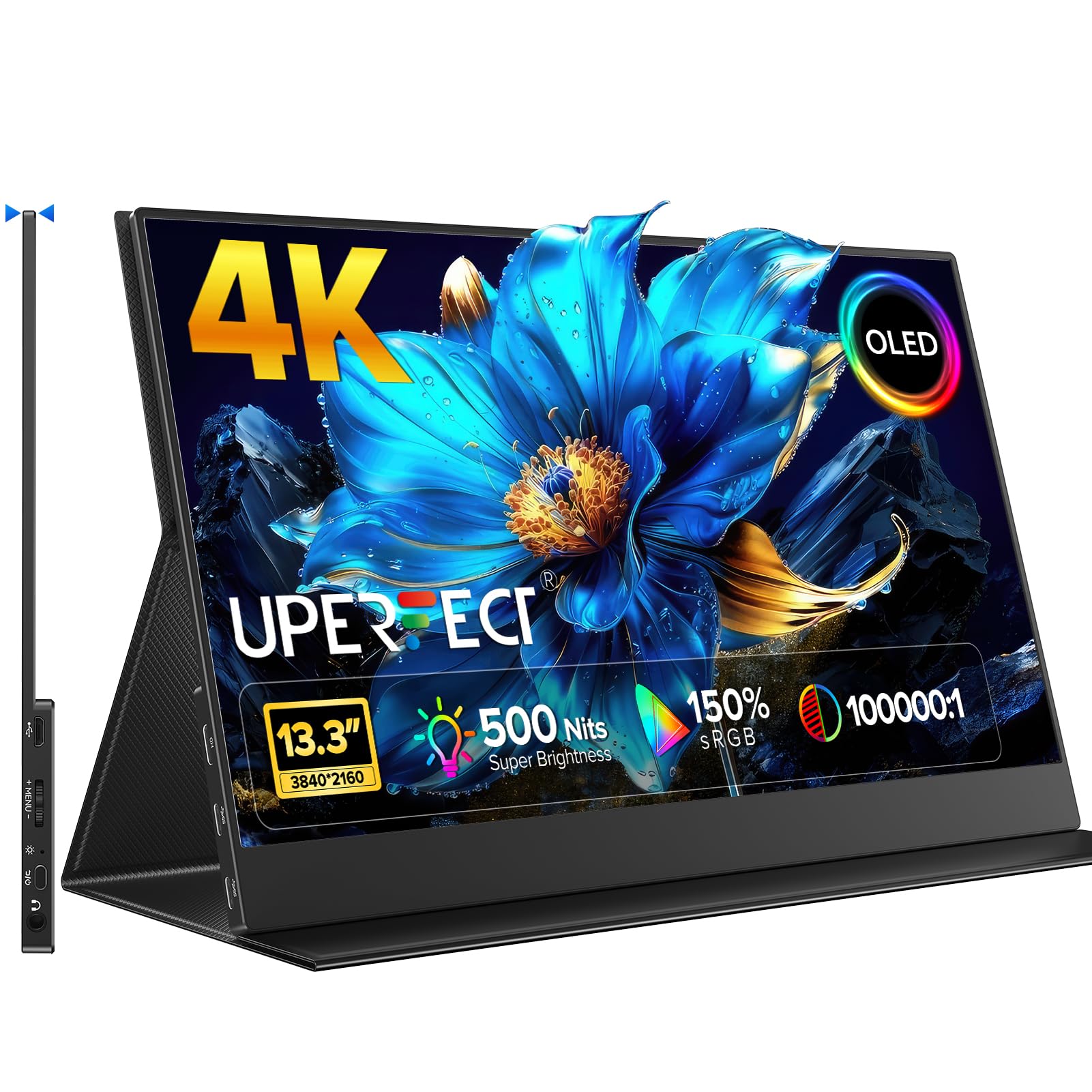
1. UPERFECT 4K OLED Portable Monitor
Our pick — over 4★ from 750+ verified ratings; the strongest balance of quality and price.
A 4K OLED that makes your laptop look like it upgraded to a cinema-grade second screen.
The single spec that tells you everything about this monitor is the 100000:1 contrast ratio — for context, the MAGICRAVEN below runs 1500:1, so you are getting a 66.7x gap in black-level depth. That means true blacks, not the grayish dark you see on most portable LCDs. The 500 cd/m² brightness means it stays vivid even in a bright cafe, and the 150% sRGB color gamut (the JuneBox touchscreen, by comparison, covers 72% NTSC) makes it a serious tool for photo editors and video color-graders who need accurate, wide color on the go.
Buyers report, “PS5 runs flawlessly at 60fps via microHDMI,” which confirms the 1ms response time and 60Hz refresh rate are more than capable for console gaming. The aluminum casing feels premium in the hand, and the magnetic folio cover doubles as a kickstand. The trade-off here is that you absolutely need either a USB-C port that can deliver both power and video or its included power adapter — one reviewer noted a high-pitch noise when power was insufficient, so do not rely on a standard phone charger to run it.
What stands out
- Deep OLED blacks at 100000:1 contrast ratio
- 500 nits brightness stays visible in bright rooms
- 150% sRGB gamut for color-critical work
The trade-offs
- Needs sufficient USB-C power delivery or included adapter
- Built-in speakers are average for casual use
Who it serves: Traveling creative pros and console gamers who want the best picture quality possible in a 13-inch frame.
Who should look elsewhere: If you only need a basic second screen for spreadsheets and never work in high-glare environments, the MAGICRAVEN 4K offers a very strong picture for less.
2. Intehill 4K Portable Monitor U13NA
A 13.4-inch 4K display with a 16:10 ratio that gives coders and editors more vertical room.
The resolution here is 3840×2400, which is actually *more* pixels than standard 4K (3840×2160) — the extra 240 rows of pixels on the vertical give you more lines of code or a taller document view without scrolling. The IGZO (Indium Gallium Zinc Oxide) panel technology keeps power draw lower than a typical LCD at this resolution, and the 500 nit brightness matches the UPERFECT OLED above for daylight usability. One buyer mentioned the 338 PPI (pixels per inch) is higher than an iPad’s 264 PPI, so text looks incredibly sharp.
Buyers also report it works as a “brightest portable monitor” with a single USB-C cable for both power and video, which is the dream for a clean travel setup. The included magnetic folio cover acts as both a protector and a stand. The honest catch: the mini-HDMI cable included only supports 4K at 30Hz (barely enough for desktop use but not for smooth gaming), and one owner reported an EDID aspect ratio issue on Windows via HDMI. Stick to the USB-C connection and you will get the full 4K60 experience it was designed for.
Why it wins
- Highest pixel density at 338 PPI for ultra-sharp text
- 16:10 ratio gives extra vertical workspace
- IGZO panel for efficient power consumption
What to know
- HDMI cable only supports 4K30, not 60Hz
- Screen is glossy and can be reflective
Best for: MacBook Pro owners and coders who want the sharpest possible text and extra vertical space on a portable second screen.
Not for you if: You need a touchscreen or plan to use HDMI as your primary connection — the USB-C path is the only way to get the full 4K60 performance.
3. Elo 1302L 13″ Touchscreen Monitor

A commercial-grade 13-inch touchscreen built to survive thousands of taps at a busy checkout counter.
This is a completely different kind of 13-inch monitor — it is not built for travel or media consumption, but for point-of-sale (POS) environments like retail, hospitality, and restaurant counters. The Elo 1302L uses TouchPro PCAP (projected capacitive) technology to deliver up to 10 simultaneous touches, which mimics the responsiveness of a tablet. One reviewer confirmed they use it daily at a front desk register and noted the touch response is solid, saying the “monitor is made sturdy it doesn’t feel cheap.” Another user even runs one in a bowling center where “it gets touched a ton,” calling it a “panic purchase” that worked out perfectly.
The standout hardware feature here is the USB Type-C port that carries touch, video, and power through a single cable — but if your PC lacks USB-C, it also accepts traditional HDMI and VGA connections. The VESA mount pattern gives you flexibility to attach it to a wall, a desk arm, or a custom kiosk. The catch is the price bracket — this is a business investment, not a casual accessory. At 1920×1080 resolution, it is not for photo editing, and the 800:1 contrast ratio is standard LCD fare, not a feature you buy this screen for.
What it delivers
- 10-point PCAP touch for a tablet-like experience
- Single USB-C cable carries touch, video, and power
- VESA mountable for custom installations
What it is not
- Not portable or lightweight — built for fixed installation
- 1080p resolution with standard contrast
Who needs this: Business owners and IT managers setting up a reliable, heavy-use POS station in retail, hospitality, or a restaurant.
skip it if: You are a mobile worker looking for a second screen — this one is designed to stay mounted at a counter, not in your bag.
4. MAGICRAVEN Portable Monitor 13.3″ 4K
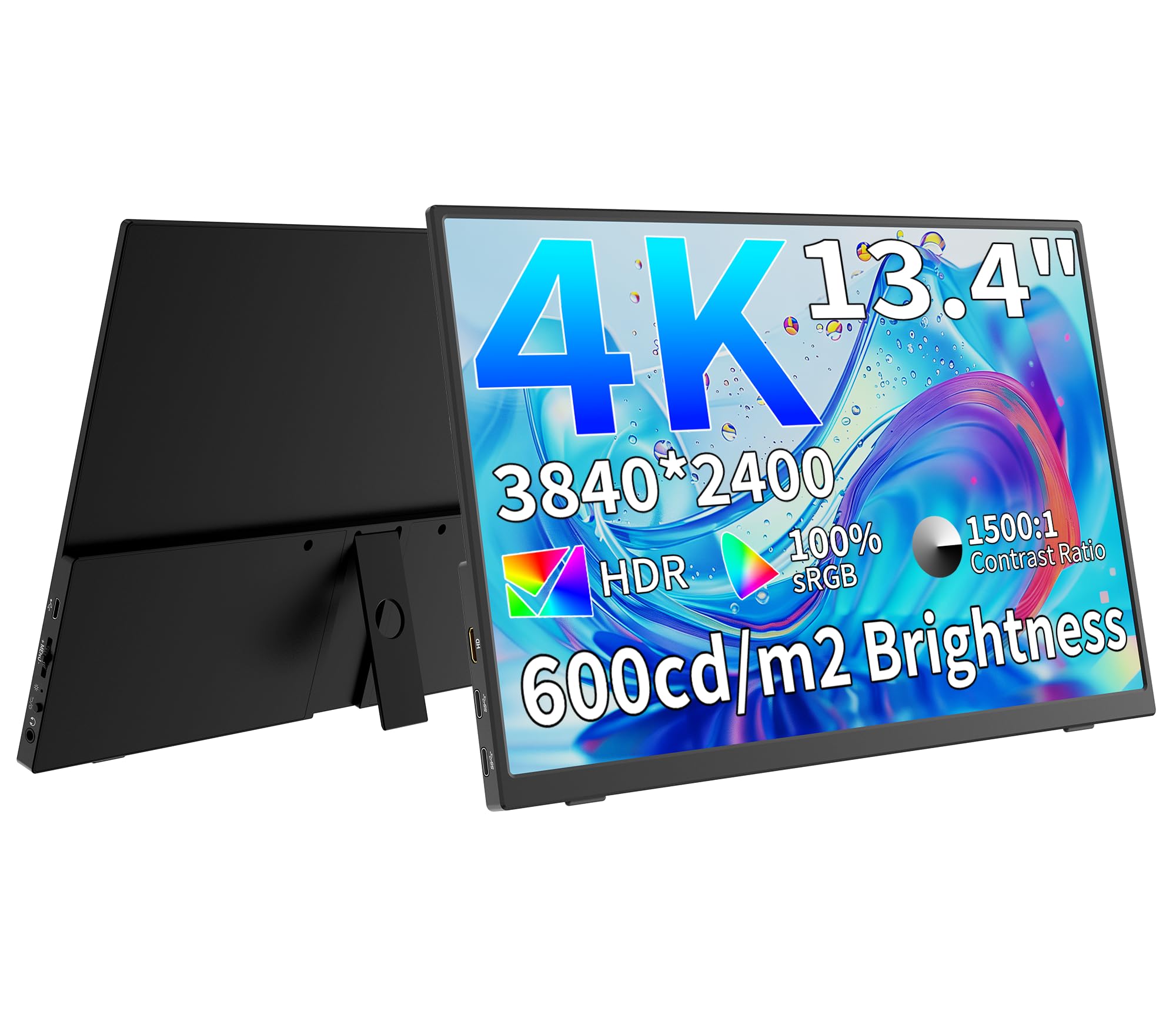
4K resolution at a price that makes it a no-brainer for anyone wanting a sharp portable second display.
The MAGICRAVEN brings 3840×2160 4K resolution to a 13.3-inch IPS LCD panel at a price that undercuts the OLED contenders by a wide margin. While it lacks the deep blacks of the UPERFECT’s OLED (1500:1 contrast ratio here vs 100000:1 on the UPERFECT), it still offers 400 cd/m² brightness and 100% sRGB color gamut, which is perfectly respectable for office work, presentations, and casual media. At just 0.97 pounds (monitor only), it is one of the lightest 4K portable monitors you can buy.
Owners mention it is a “4K USB-C monitor, plug-and-play with power and video,” which is the highest praise for a travel monitor — no drivers, no fuss, just one cable. The aluminum construction surprised at least one reviewer, who noted the build quality felt like a much more expensive product. The trade-off is that one reviewer called the screen “fragile,” noting that once it bends even slightly, “it’s garbage.” This is a risk with any ultra-thin portable monitor, but it means you need to transport it in a padded sleeve, not loose in a bag with heavy objects.
Value highlights
- True 4K resolution at an entry-level price
- Weighs under 1 lb for easy portability
- Solid aluminum build with good OSD adjustments
Real limits
- Very fragile if bent — needs careful transport
- LCD panel cannot match OLED contrast or black levels
Reach for this if: You need 4K resolution on a budget for productivity, coding, or as a second display for presentations, and you are careful with your gear.
Look elsewhere if: You need the deepest blacks and richest colors for photo or video editing — that is the UPERFECT OLED’s job.
5. JuneBox 13.3” Portable Touch Screen Monitor
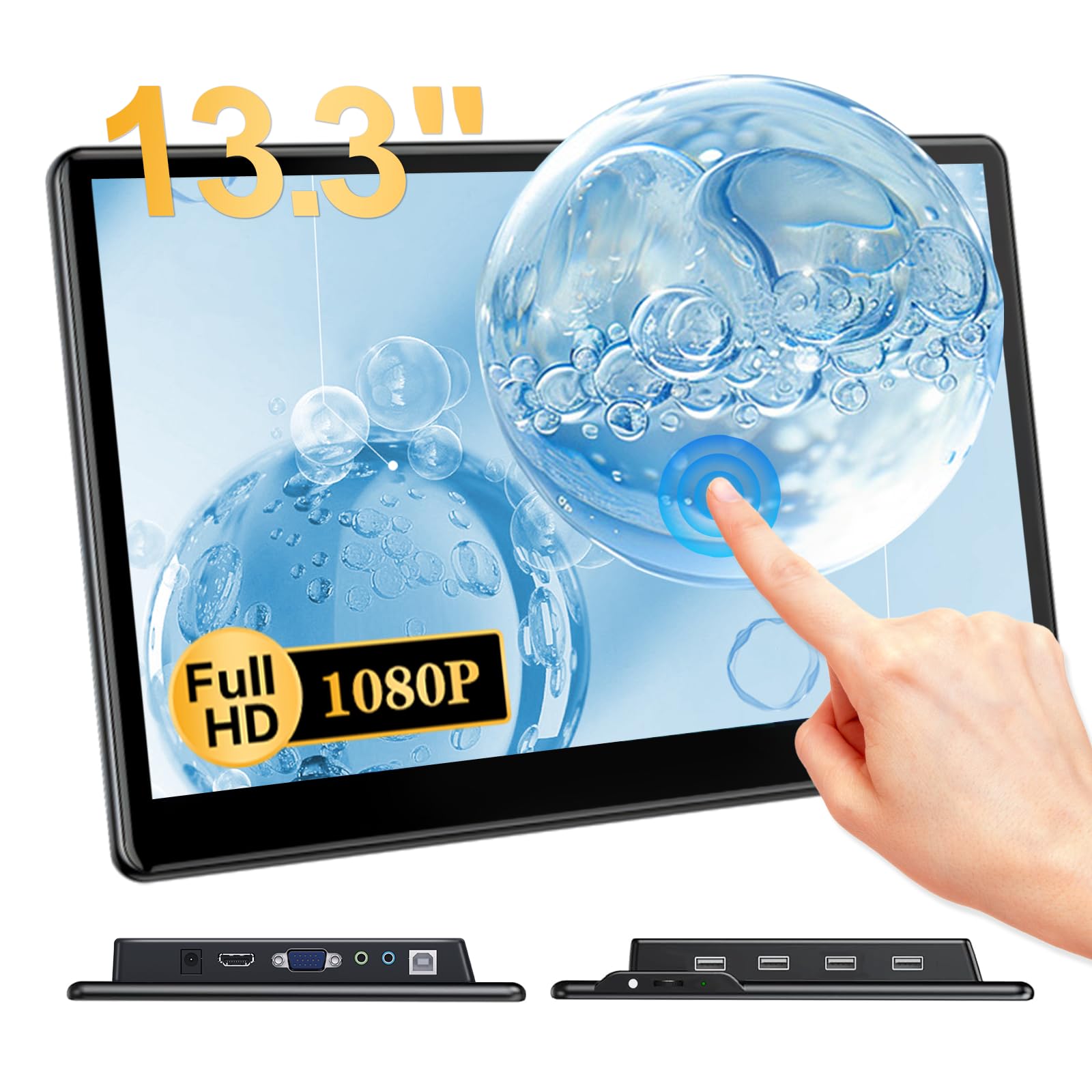
A 13.3-inch touchscreen that adds swipe and tap to your laptop at a price that makes sense for budget setups.
The JuneBox monitor distinguishes itself with a 10-point capacitive touchscreen and a port selection that includes HDMI, VGA, and four USB-A 2.0 ports for peripherals like a keyboard, mouse, or webcam. This makes it a good fit for a fixed desk where you want a touch interface for quick interactions, or for a Raspberry Pi project where the built-in touch and VGA input matter. Customers note the “bright, clear display; accurate, responsive touch; quick setup” and note it is ideal for remote work, presentations, and video meetings.
At 1920×1080 resolution, it is not as sharp as the 4K picks above, but the 72% NTSC color gamut and 400 cd/m² brightness are solid for a budget touch panel. One reviewer called the color quality “great” and said the touchscreen “works well” with their laptop. The honest catch here is that the touch function requires a USB-B connection to work, not just HDMI, so you will need to run an extra cable — it is not a one-cable touch-and-video solution like the Elo. The VESA 75x75mm mount pattern does let you attach it to a monitor arm to save desk space.
What you get
- Responsive 10-point touch for interactive use
- VGA and 4 USB-A ports for older devices and peripherals
- VESA mountable for a clean desk setup
Where it cuts corners
- Touch requires USB-B and HDMI, not a single cable
- 1080p resolution lacks the sharpness of 4K for text
Who it fits: Budget-conscious users who want touchscreen capability for presentations, digital signage, or a dedicated monitor for a Raspberry Pi.
pass on it if: You need a clean one-cable setup for travel — the separate USB-B cable for touch is a hassle on the go, and the single-cable Elo is a better bet for fixed touch applications.
6. Mobile Pixels Duex Plus DS 13.3″ Portable Monitor
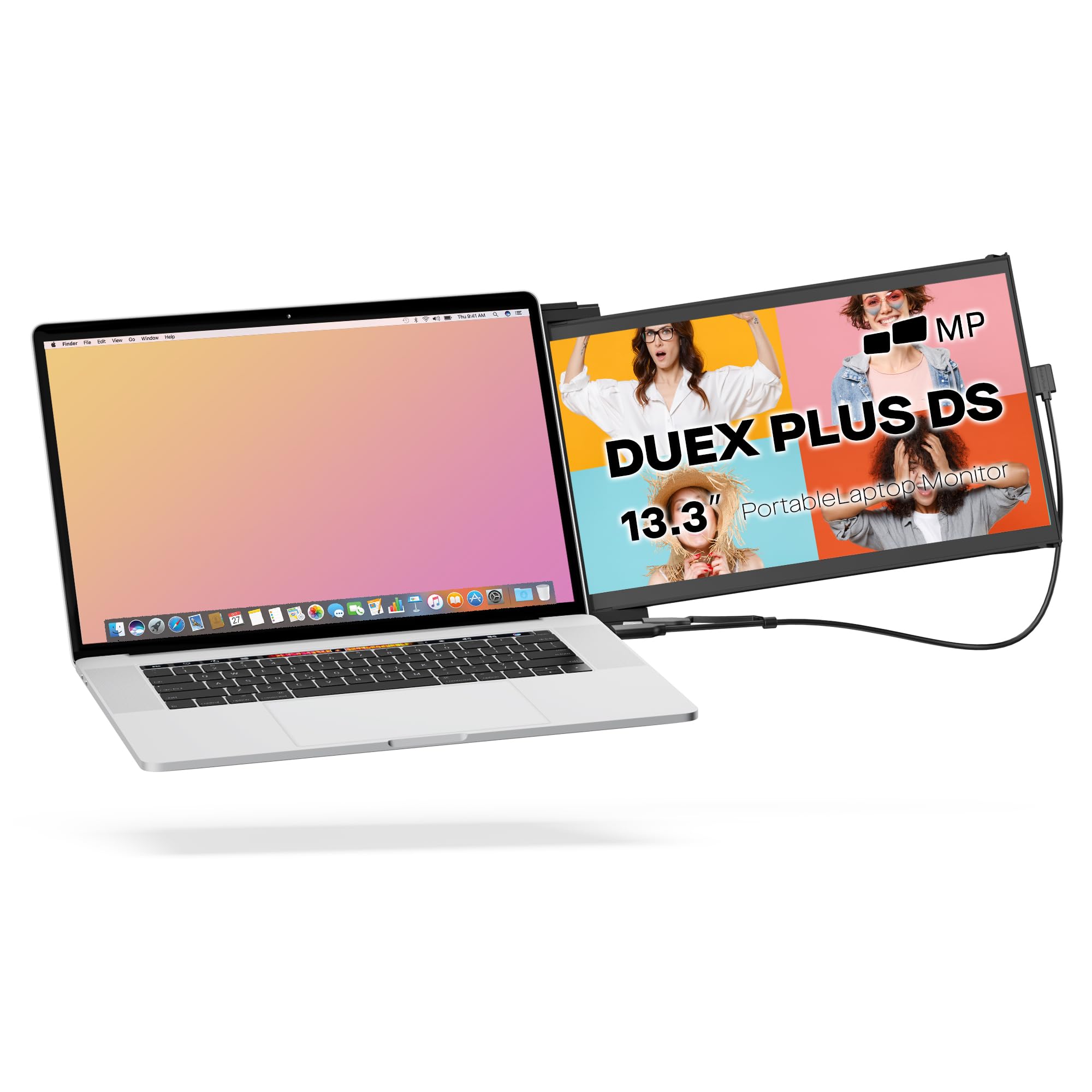
A monitor that magnetically sticks to the back of your laptop and slides out when you need a second screen.
The Duex Plus DS solves a unique space problem: it attaches to the back of your laptop lid with metal adhesive plates and magnets, then slides out to the side to create a dual-screen setup without taking up any desk space. This is ideal for digital nomads working in tight spots like truck campers, airplane seats, or cafe counters. Reviewers point out it is “perfect for digital nomads in tight spaces like truck campers,” and one customer observed it “enables true dual-screen without extra desk space.”
At 1080p with a 250 cd/m² brightness and 1000:1 contrast ratio, the picture quality is standard — it is not the sharpest or brightest panel on this list, but it is perfectly usable for documents, email, and light multitasking. The trade-off, which multiple reviewers flagged, is that this monitor requires *two* cables — a mini-HDMI for video and a USB-C for power — unlike the single-cable solutions from Intehill or MAGICRAVEN. One reviewer called it “junk” due to flickering, which suggests the cable connection can be finicky if your laptop’s USB-C port does not deliver consistent power. Stick to a powered USB-C port or use the included adapter for reliable performance.
Unique advantage
- Mounts magnetically to your laptop lid for zero-desk-space setup
- Lightweight at 1.3 lbs and only 0.25 inches at the thinnest point
- Compatible with Mac, Windows, Chromebook, and Samsung DeX
Real drawbacks
- Requires two cables (mini-HDMI + USB-C) — not a single-cable monitor
- 250 cd/m² brightness is low for bright rooms
- Some units reported flickering dependent on power source
Designed for: Travelers, digital nomads, and anyone who works in confined spaces where a normal portable monitor’s stand would be in the way.
Not for you if: You want a bright, crisp display for photo editing or gaming — the 1080p panel and 250-nit brightness are best for basic productivity tasks.
Understanding the Specs
Contrast Ratio and Black Levels
The contrast ratio tells you the difference between the brightest white and the darkest black the screen can show. A higher number — like 100000:1 on an OLED — means blacks look truly black (not gray), which makes movies, games, and dark-mode interfaces look far more rich. A standard IPS LCD, like the MAGICRAVEN’s 1500:1, is perfectly fine for office work and web browsing, but you will notice the difference when you watch a film in a dim room or edit a dark photo. This is the single spec that separates a premium portable monitor from a basic one in everyday use, not just a number on a box.
Color Gamut and Why It Matters
A color gamut spec like “150% sRGB” or “72% NTSC” measures how many colors the monitor can show compared to a standard color space. A wider gamut (like 150% sRGB on the UPERFECT OLED) means reds look richer, greens look more natural, and gradients are smoother. For a creative professional editing photos, videos, or digital art on a plane, a wide-gamut monitor means what you see on screen is close to what prints or shows up on a calibrated desktop monitor. For email and spreadsheets, even the basic 72% NTSC of the JuneBox touchscreen is more than enough — you will not miss the extra colors just reading text.
FAQ
Will a 13.3 inch monitor fit in my laptop bag?
Can I use a 13 inch monitor with my iPhone or Android phone?
What is the difference between a portable monitor and a laptop screen extender?
Do I need a special cable for 4K at 60Hz on a 13 inch monitor?
Is a touchscreen portable monitor worth it for non-creative work?
How do I power a portable 13 inch monitor on the road?
Can I use a 13 inch monitor as a primary display for a mini PC?
What is the typical lifespan of a portable 13 inch monitor?
Does a 13 inch monitor support HDR?
Will a 13 inch monitor work with a gaming console?
Final Thoughts: The Verdict
For most people, the 13 inch monitor winner is the UPERFECT 4K OLED because its 100000:1 contrast ratio, 500-nit brightness, and 150% sRGB color gamut deliver a visual experience that simply does not exist in other portable monitors at this size. If you want the sharpest possible text and extra vertical workspace for coding, grab the Intehill U13NA with its 16:10 4K panel. And for a rugged, no-compromise touchscreen that can survive a busy retail counter, the standout is the Elo 1302L.
How We Picked
We do not accept paid placement. Every pick is matched to a real buyer and a real use-case; we do not hands-on test units.
Sources & Methodology
Specifications: manufacturer listings and product documentation. Review insights: verified customer reviews, as of July 2026. Pricing: not shown on this page (it changes often); check the current price via the retailer link.
As an Amazon Associate, Gadgets Feed earns from qualifying purchases. This does not affect which products we feature.