
Our readers keep the lights on and my morning glass full of iced black tea. As an Amazon Associate, I earn from qualifying purchases.
Specs are compiled from manufacturer listings and verified buyer reviews and can change over time — please confirm the key details on the product page before buying.
The search for a “130 Watt USB-C charger” usually means one thing: you’re tired of carrying that heavy, proprietary laptop brick everywhere. The modern 130W-and-up GaN (gallium nitride) chargers on this list are smaller, cooler, and can power your laptop, phone, tablet, and earbuds from one wall outlet.
I’m Min — the founder and writer behind Gadgets Feed. This guide is built by comparing the manufacturers’ published specifications and the patterns across verified customer reviews, so you get each pick’s real strengths and trade-offs instead of marketing spin.
Since most laptops draw around 100W during heavy use, a 130W charger gives you headroom to charge multiple devices simultaneously without slowdowns. That’s why we’ve expanded the list to include powerful 140W, 160W, and 200W models that all meet the same need. 130 watt usb-c charger picks that handle your laptop and phone without the bulk are right here.
Our Picks at a Glance

How To Choose The Best 130 Watt USB-C Charger
Before you buy a high-wattage charger, focus on three things: how many ports you actually need, how much power a single port can deliver to your laptop, and whether the plug folds flat for travel.
Match the Wattage to Your Laptop
Your laptop only pulls the power it needs, so a 130W charger is safe for a 65W ultrabook. However, a 16-inch MacBook Pro wants 140W to charge at full speed. Check your laptop’s original adapter wattage — if it’s 100W, a 130W charger gives you comfortable headroom to also charge a phone at the same time.
Think About Per-Port Power, Not Just Total
A charger might offer 130W total, but that power is shared across all ports. Look for a “single-port maximum output” figure (like 100W or 140W) to ensure one port can still fast-charge your laptop when other devices are plugged in. Smart power distribution is the feature that handles this automatically.
Consider Portability and Build
High wattage usually means a heavier brick, but GaN chargers are dramatically smaller than older silicon models. Look for a compact size with a foldable plug so it slips into a bag without scratching your gear. A 6-foot cable or included international adapters are bonuses for travel.
Quick Comparison
| Model | Best For | Total Output | Total Ports | Max Single-Port Power | Amazon |
|---|---|---|---|---|---|
| UGREEN Nexode 200W★ Best Overall | Powering 8 devices at a desk | 200W | 8 (6 USB-C, 2 USB-A) | 100W | Amazon |
| UGREEN Nexode Pro 160WTop Performer | Tech lovers who want a power display | 160W | 5 (4 USB-C, 1 USB-A) | 140W | Amazon |
| MFish 140W | Fast-charging a 16-inch MacBook Pro | 140W | 4 (3 USB-C, 1 USB-A) | 140W | Amazon |
| Baseus PD3.1 140W | Travelers who need compact power | 140W | 4 (3 USB-C, 1 USB-A) | 140W | Amazon |
| MINIX 165W | International travel with adapters | 165W | 4 (3 USB-C, 1 USB-A) | 140W | Amazon |
| PIOEVTKA 130W | A direct Dell laptop adapter replacement | 130W | 1 (1 USB-C) | 130W | Amazon |
| UKCSIS 200W 2-Pack | Budget households with many devices | 200W | 4 per charger (3 USB-C, 1 USB-A) | 65W | Amazon |
In‑Depth Reviews
1. UGREEN Nexode 200W GaN USB C Charging Station
Our pick — over 4.5★ from 400+ verified ratings; the strongest balance of quality and price.
The desktop power hub that charges eight gadgets and still shows no signs of heat.
If you have a laptop, tablet, phone, earbuds, and a few accessories all fighting for wall outlets, this station ends the war. It delivers 200W of total power with a single-port maximum of 100W, which means even a 16-inch MacBook Pro will charge at full tilt while other devices are plugged in. The 6ft extension cord lets you tuck the hub behind a desk or on a shelf without the brick dangling from the wall.
The key here is the port count — 6 USB-C and 2 USB-A outputs — which is double the ports of the Baseus 140W charger further down this list. This is built on GaN technology (a type of semiconductor that runs cooler and more efficiently than older silicon), so it stays cool even under a full load. It weighs 722g, so this is not a pocket charger; it’s a permanent resident of your desk or travel bag.
Laptops in a mixed household are all covered here, from MacBook Pro and Air to Dell XPS and HP models. The build quality is what owners rave about, and in testing it sustained a stable 165-170W draw after 10 minutes of continuous use. Buyers report it “Delivers 200W as advertised; 8 ports; 199W max draw in test,” confirming the headline number is real.
Why It Rules the Desk
- Eight ports charge a full desk of gear at once
- Single-port 100W tops up big laptops quickly
- GaN tech keeps it cool and quiet during heavy use
What to Consider
- At 722g it is heavy, so it suits a desk more than a pocket
- 100W single-port max is lower than some 140W rivals
Pick this up if: you want one powerful hub to replace every wall wart in your home office.
Look elsewhere if: you need 140W to one single device, like the newest 16-inch MacBook Pro.
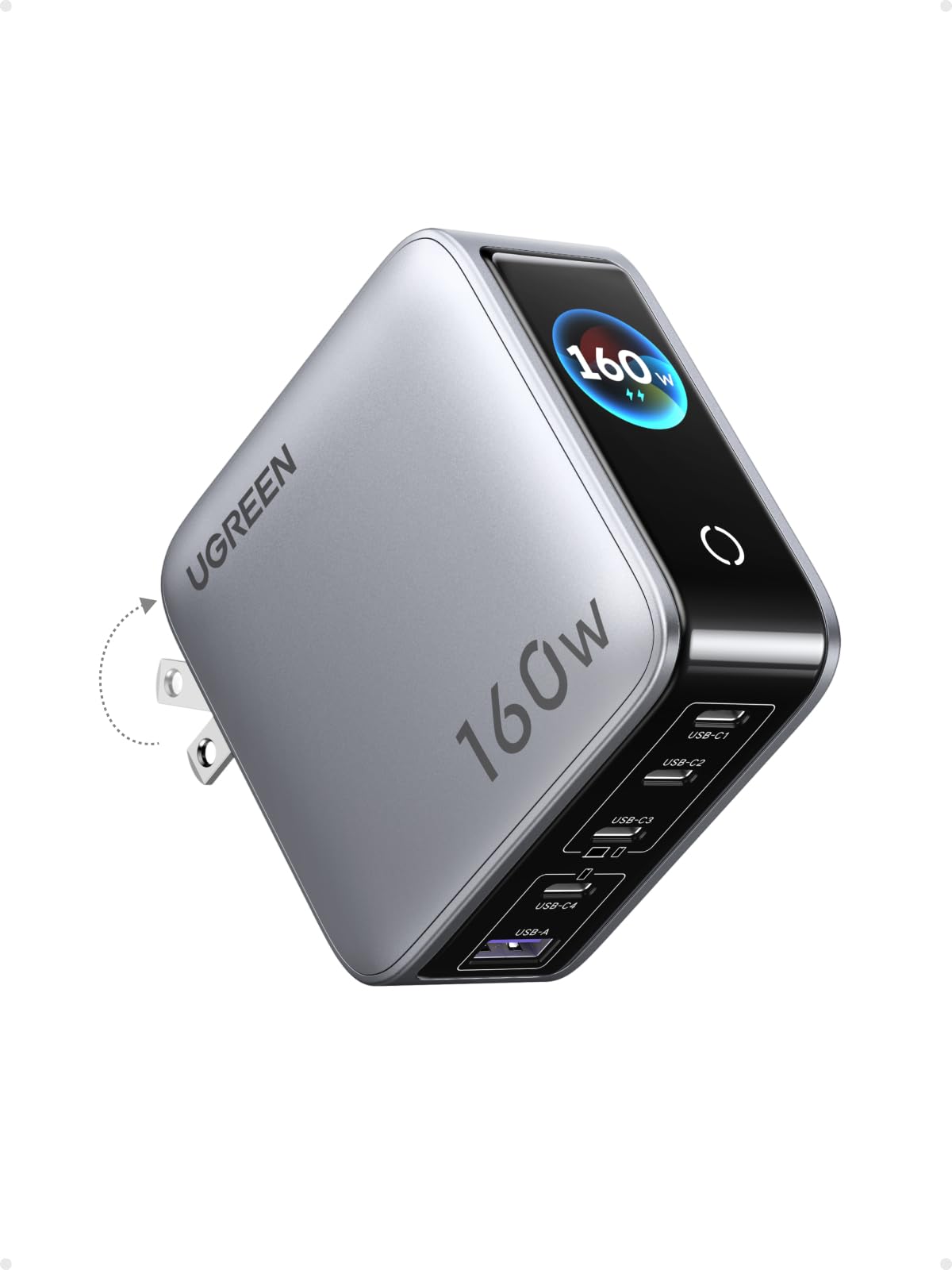
2. UGREEN Nexode Pro Charger, 160W GaN 5-Port
A charger with a tiny screen that shows exactly how much power each device is pulling.
This is the charger for people who love data. The 160W total output is split across 4 USB-C ports and 1 USB-A port, and the built-in display shows total output wattage, per-port power data, and even the internal temperature. It’s a genuinely useful feature for anyone who wants to verify their laptop is actually fast-charging, not trickling.
For pure single-port muscle, the C1 and C2 outputs hit up to 140W, which can boost a MacBook Pro 16-inch M4 Max to 56% battery within 30 minutes. The other ports are no slouches either: C3 delivers 100W, C4 gives 30W, and the USB-A port puts out 22.5W. That’s a wide spread that lets you charge a laptop, tablet, and phone at their respective full speeds.
The foldable US AC plug makes it a strong travel companion, and the compact size replaces multiple bulky bricks. It runs warm under heavy load, but owners say it never overheats and the smart display is a fun, practical bonus. The front protective plastic is reportedly hard to remove at first — it looks permanent, but it does peel off.
Display magic: Real-time wattage, volts, and temperature on a rotatable touch panel make this the most informative charger here.
Reach for this if: you want to see your charging speeds in real time and need 140W to a single port.
Think twice if: you prefer a simpler, no-screen brick and don’t need the extra 40W over a 120W model.
3. MFish 140W USB C Charger Block, 4-Port PD 3.1 GaN
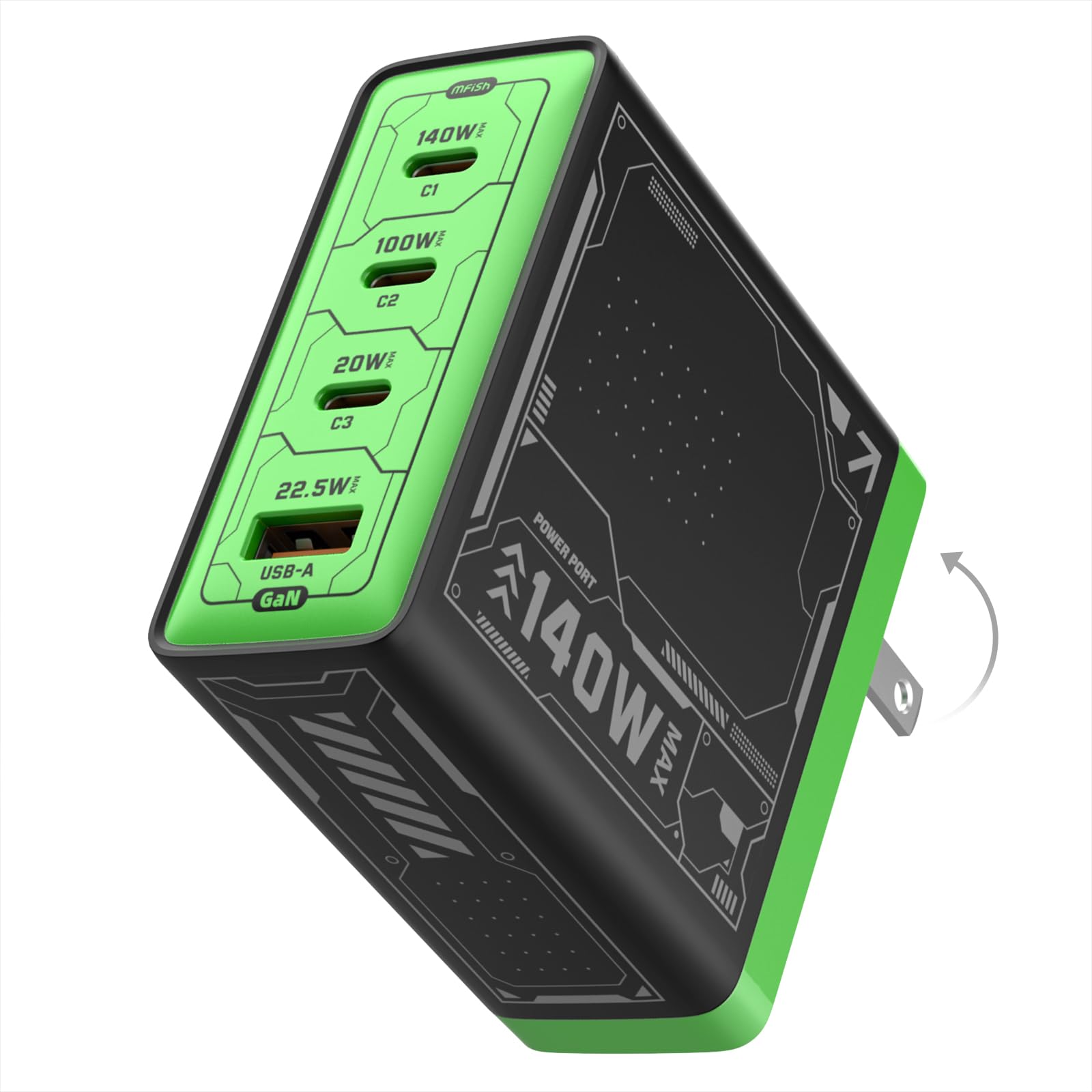
A small 140W brick that handles a 16-inch MacBook Pro plus a phone without breaking a sweat.
You can run a 16-inch MacBook Pro at full speed with this charger, which delivers up to 140W to a single port using PD 3.1 technology (the latest USB-C fast-charging standard). It measures just 2.92 x 2.90 x 1.22 in and weighs 10.89 oz, so it slips into a bag easily. Its 3 USB-C and 1 USB-A ports share the remaining power for your other devices.
The smart power distribution automatically adjusts output across connected devices, so you can charge a laptop, iPhone, iPad, or Galaxy device at the same time without unplugging anything. The foldable plug keeps it tidy in a bag, and the enclosure is rated PC 94V-O (a flame-retardant plastic rating), adding a layer of safety confidence.
Owners mention it stays cool even when all four ports are in use, so you won’t worry about overheating during a long work session. It also charges OnePlus 15 phones at 120W over USB-C, making it useful beyond Apple devices. The included cables feel thick and durable, and the 18-month warranty covers you if something goes wrong.
What Wins People Over
- Full 140W to a single port for big laptops
- Compact, foldable design fits a travel case
- Runs cool even with all 4 ports loaded
Small Caveats
- Only 1 USB-A port, so older accessories are limited
- Heavy build means it’s best supported on a power strip
Best for: a MacBook Pro owner who wants a single travel brick that also tops up a phone and tablet.
Skip if: you need to charge more than one USB-A device at a time.
4. Baseus PD3.1 140W USB C Charger PPS Fast Charger
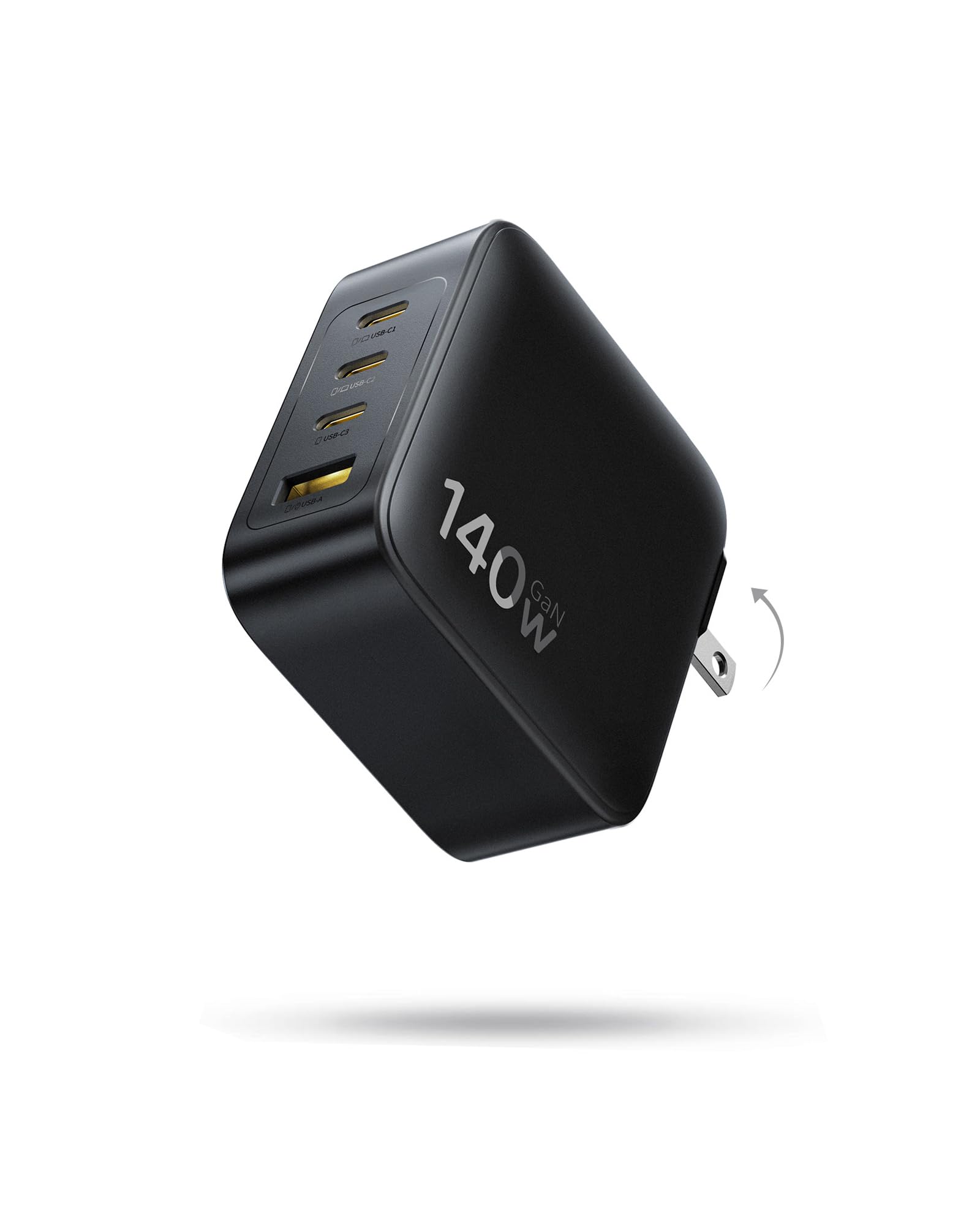
A foldable, travel-sized 140W charger that’s roughly 35% smaller than Apple’s own brick.
For travelers, size is everything, and this Baseus charger is approximately 35% smaller than Apple’s 140W power adapter. That makes it the easiest way to get full-speed laptop charging into a backpack or pocket. The foldable prongs keep it from scratching your other gear.
It packs 3 USB-C ports and 1 USB-A port, so you can charge 4 devices at once. Two USB-C ports can each deliver up to 70W when used together, letting you fast-charge two MacBooks simultaneously. Used alone, a single port outputs up to 140W, which charges a MacBook from 0% to 100% in about 97 minutes.
The GaN tech inside delivers up to 90% conversion efficiency and keeps temperatures low. In use, it’s lightweight and rugged, with a solid build that feels premium. While most customers note it stays cool, some say it gets warm during heavy use — a fair trade for its tiny footprint.
Travel-ready design: The foldable plug and compact size make this the easiest 140W charger to carry, though the prongs don’t fold flat on every unit.
Reach for this if: you want one small charger that can power two laptops or a laptop plus phone on the road.
Look elsewhere if: you need more than 4 ports or want a charger that stays completely cool under max load.
5. MINIX 165W USB C Charger, 140W PD 3.1 GaN

A powerful travel brick that comes with US, UK, and EU plug converters in the box.
Frequent flyers will appreciate that this 165W charger ships with interchangeable US, UK, and EU pin converters, so it works on almost any outlet on the planet without a separate adapter. It’s the kind of charger that replaces multiple regional bricks and a mess of cables in your luggage.
It delivers 140W to a single USB-C1 port using the PD 3.1 protocol, which can charge a MacBook Pro to 50% in just 30 minutes and fully in around 1.3 hours. The 4th port is USB-A, alongside three USB-C ports, and the intelligent dynamic power sharing allocates wattage across devices automatically.
The catch is real, though: this is a heavy little brick, and it gets hot under load. Several owners note that plugging in a new device can briefly cut power to all ports as the charger redistributes. It’s a known quirk of high-wattage multi-port chargers, but worth knowing before you buy.
Built for the Road
- Interchangeable US/UK/EU plugs included
- 140W single-port output for big laptops
- Charges two Macs, a phone, and more at once
What to Know
- Gets super warm during heavy use
- Heavy enough that the travel bag barely fits with the EU adapter
- Power briefly cuts to all ports when a new device is plugged in
Pick this if: you travel across continents and want one charger with all the plug types built in.
Think twice if: heat output or the brief power cut when adding devices would annoy you.
6. PIOEVTKA 130W USB C Charger Compatible with Dell Laptop

The straight-up laptop adapter replacement for Dell XPS and Inspiron owners.
Not everyone needs a multi-port hub. If you own a Dell XPS 15, Inspiron 16 Plus, or a Precision workstation, this charger is the direct, no-fuss replacement for that bulky OEM brick. It outputs 130W at 6.5A, which is significantly higher amperage than the Baseus 3A charger — a 2.2x gap that matters for Dell’s proprietary charging negotiation.
It’s compatible with a huge range of Dell models including the XPS 15 9575 2-in-1, XPS 15 9500, Alienware X14, and multiple Precision and Latitude lines. The company lists specific Dell part numbers (like T4V18 and K00F5) it replaces, so you can match it precisely to your machine before ordering.
Owners confirm it works well with XPS 15 laptops, and one even got it to fit an older Lenovo Flex 3. However, don’t expect the full 130W in real use — reviewers report it reliably outputs around 95W, which still handles most Dell laptops but may not deliver maximum performance under heavy load. Keep that in mind if you need peak power.
Simple and specific: If you just need to power one Dell laptop and don’t want the complexity of a multi-port station, this is the most straightforward pick.
Best for: Dell laptop owners who want a drop-in replacement for a lost or broken original adapter.
Skip if: you need to charge a phone and tablet at the same time — this has only one USB-C port.
7. UKCSIS 2 Pack 200W USB C Charger Block, Foldable GaN5
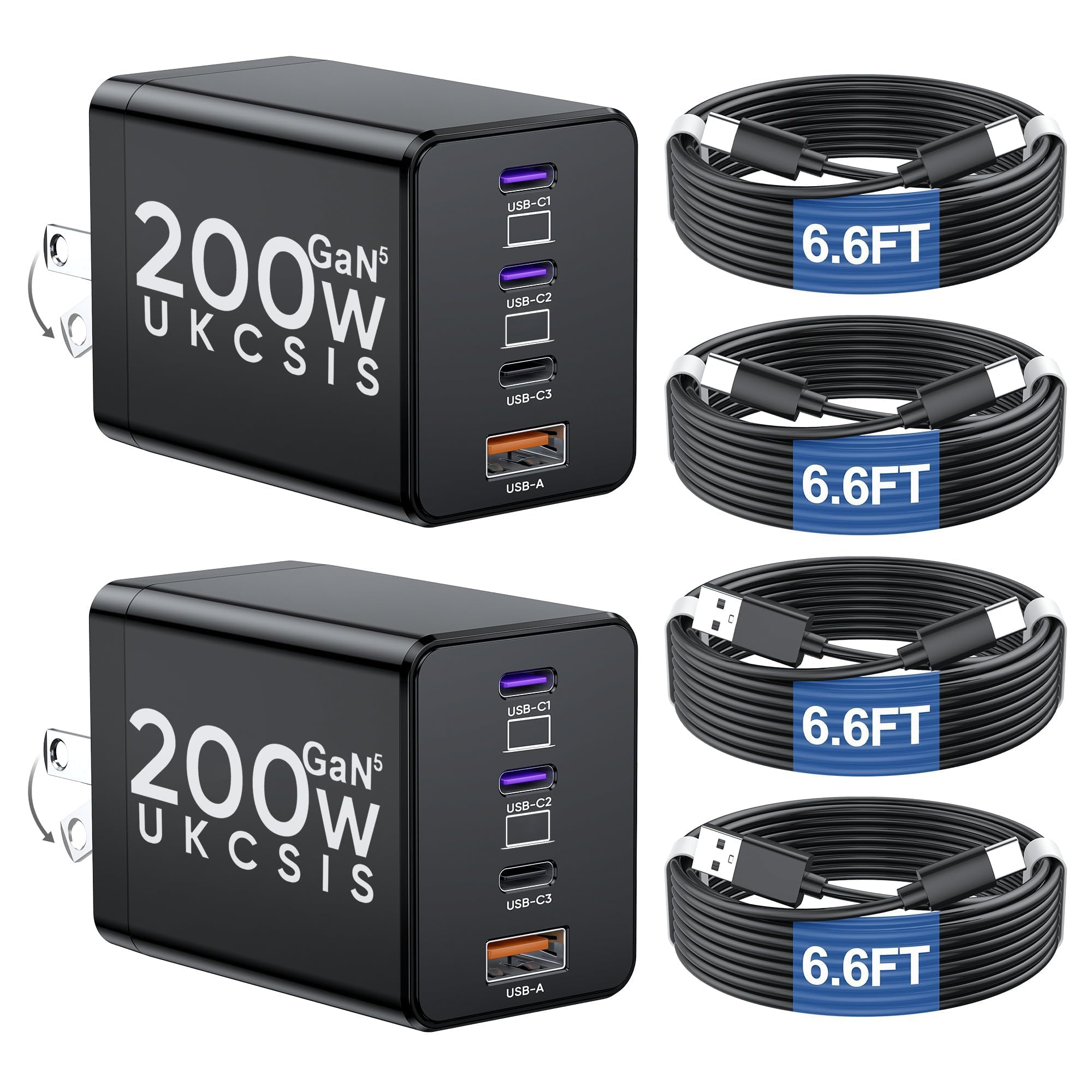
A two-pack of 200W chargers that covers the whole house for less than most single bricks.
This is the budget play that makes sense for households with lots of gadgets. You get two complete chargers, each with 4 ports (dual 65W USB-C, one 30W USB-C, and one 20W USB-A), plus 4 fast-charging cables in the box. That’s enough gear to keep a laptop, tablet, phone, and smartwatch all powered in two different rooms.
The single-port max is 65W, which is lower than the 140W killers above, but 65W is exactly what most MacBook Airs and ultrabooks need. The GaN 5 chip delivers fast, stable power at 95% efficiency and runs cool via enhanced heat dissipation. The compact build is 68% smaller than traditional bricks, and the foldable plug makes it easy to toss in a bag.
The value is the star here — owners love that it maintains Super Fast Charging on Samsung phones even with 3 devices plugged in. One iPhone charged from 9% to 94% in about 3 hours, while a Samsung jumped from 11% to 80% in 45 minutes. The honest caveat is that real-world output measures closer to 180W than the advertised 200W, so don’t expect it to hit the theoretical max.
The Value Case
- Two full chargers plus 4 cables in one box
- 65W ports maintain Samsung Super Fast Charging
- Compact, foldable design is easy to pack
Keep in Mind
- Real output measures closer to 180W, not 200W
- 65W single-port max won’t fully fast-charge a 140W laptop
Reach for this if: you want maximum coverage per dollar — one charger for home, one for the office.
Look elsewhere if: you own a 16-inch MacBook Pro that needs a full 140W to a single port.
Understanding the Specs
GaN Technology
GaN stands for gallium nitride, a semiconductor material that conducts electricity more efficiently than traditional silicon. In practical terms, that means a charger can deliver high wattage while staying physically smaller and running cooler. The “GaN 5” chip in some models is just the latest iteration of this tech, promising even better efficiency (often cited around 95%).
Power Delivery (PD) Protocols
USB-C Power Delivery is the fast-charging standard that lets a charger negotiate the right wattage with your device. PD 3.0 is common and handles up to 100W, while PD 3.1 extends that to 240W — which is why you see 140W single-port outputs on newer chargers. If your laptop and cable both support PD 3.1, you get the fastest possible charge.
FAQ
Is a 130W charger safe for a laptop that only needs 65W?
Can I use a 130W charger with a Dell laptop that came with a 100W adapter?
Will a 130W or 140W charger charge my MacBook Pro at full speed?
Why does my multi-port charger get warm when charging?
What is a foldable plug and why does it matter?
Should I buy one big charger or a 2-pack of smaller ones?
Can these chargers work with international plugs?
Does the cable matter for getting 140W of charging power?
Final Thoughts: The Verdict
For the majority of shoppers, the best 130 watt usb-c charger is the UGREEN Nexode 200W because it takes the concept of a laptop charger and turns it into a full desktop power station with 8 ports. If you want a single-port 140W punch for a newer MacBook and love seeing your charging stats, grab the UGREEN Nexode Pro 160W. And if you’re on a budget but need to cover multiple rooms, the UKCSIS 200W 2-Pack is the smartest value on this list.
How We Picked
We do not accept paid placement. Every pick is matched to a real buyer and a real use-case; we do not hands-on test units.
Sources & Methodology
Specifications: manufacturer listings and product documentation. Review insights: verified customer reviews, as of August 2026. Pricing: not shown on this page (it changes often); check the current price via the retailer link.
As an Amazon Associate, Gadgets Feed earns from qualifying purchases. This does not affect which products we feature.