
Our readers keep the lights on and my morning glass full of iced black tea. As an Amazon Associate, I earn from qualifying purchases.
Specs are compiled from manufacturer listings and verified buyer reviews and can change over time — please confirm the key details on the product page before buying.
You need a 14.8V battery that matches your device’s exact connector and part number, or it simply won’t fit or power on. The real difference between these picks depends on watt-hours (total energy storage), charge cycles (how many times you can recharge it), and safety certifications that match your needs.
I’m Min — the founder and writer behind Gadgets Feed. This guide is built by comparing the manufacturers’ published specifications and the patterns across verified customer reviews, so you get each pick’s real strengths and trade-offs instead of marketing spin.
Whether you’re reviving an old laptop or powering a full camera rig, the right 14.8 volt li-ion battery must match your device’s voltage, capacity, and physical connector to run without issues.
Our Picks at a Glance


How To Choose The Best 14.8 Volt Li-Ion Battery
A 14.8V lithium-ion pack isn’t a universal accessory. It’s a precision part built for a specific device family, so your first job is to confirm the physical shape, the connector type, and the part number printed on your old battery all match the new one.
Match the Watt-Hours, Not Just the Brand
Watt-hours (Wh) tell you the true energy capacity, while milliamp-hours (mAh) only make sense when the voltage is the same. At 14.8V, a 95Wh camera battery holds far more energy than a 38Wh laptop pack, so compare Wh figures when you want to know how long a charge will last. A higher Wh number usually means longer runtime, but it also means a heavier, bulkier pack.
Read the Charge Cycle Rating
The cycle rating tells you how many full charges the cells are designed to survive before capacity starts to fade. A 500-cycle pack suits light daily use, while a 1200-cycle pack handles heavy, frequent charging. If you’re powering a robot vacuum that runs almost every day, a higher cycle count is worth seeking out.
Check the Certifications and Protective Circuits
Lithium-ion batteries need built-in protection against overcharging, over-current, and short circuits to stay safe in daily use. Look for packs that mention CE, FCC, or UL certification, and confirm the battery has a protection circuit board inside. For travel, note that some camera batteries state compliance with IATA and TSA air-travel rules, which matters if you plan to fly with them.
Quick Comparison
| Model | Best For | Capacity | Voltage | Weight | Amazon |
|---|---|---|---|---|---|
| REYTRIC V-Mount★ Best Overall | Camera rigs and LED lights | 95Wh | 14.8V | 1.4 lbs | Amazon |
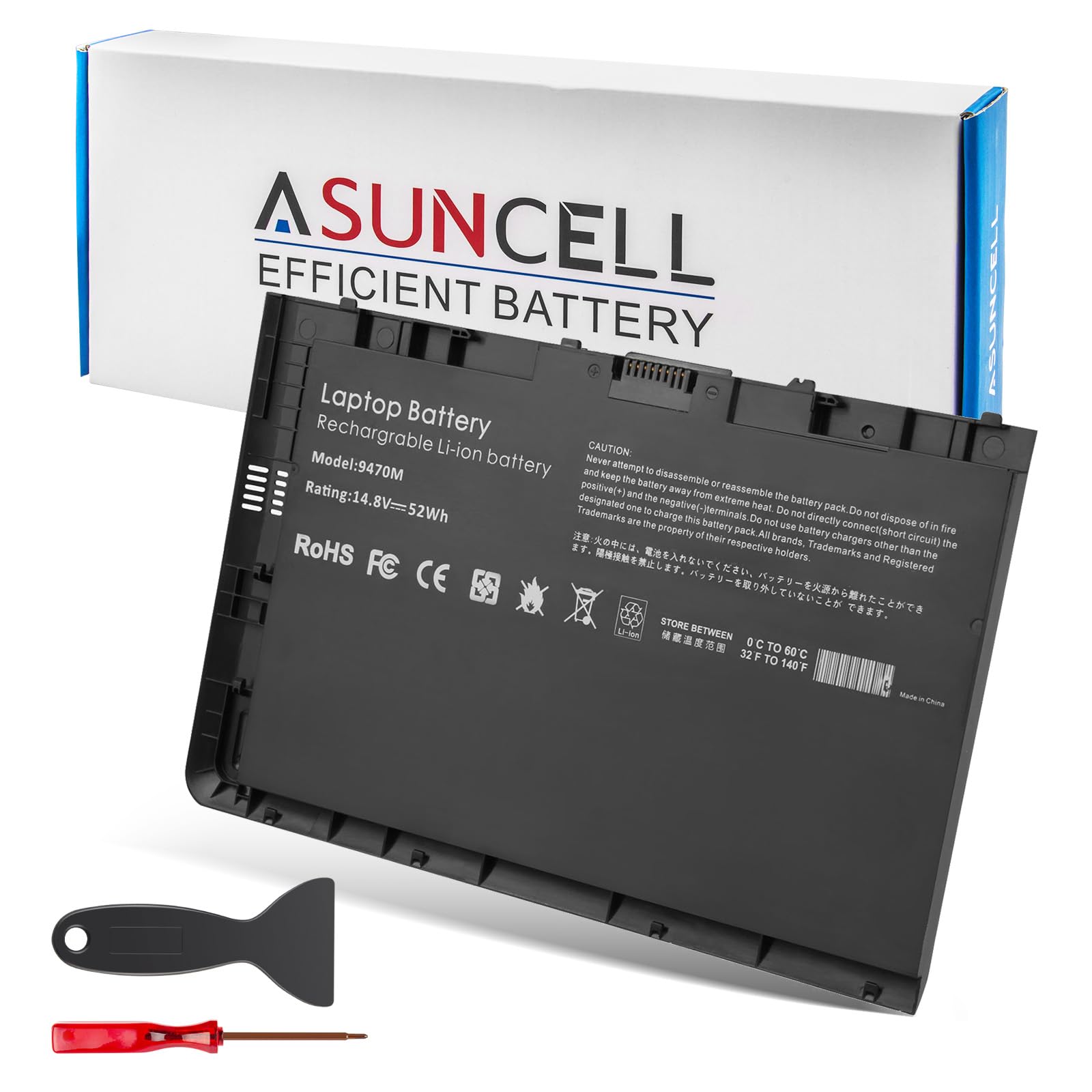
| ASUNCELL BT04XLCompact Pick | HP EliteBook Folio laptops | 52Wh | 14.8V | 9.6 oz | Amazon |
| GHU RI04XLValue Pick | HP ProBook G3 series | 2600mAh | 14.8V | 8.6 oz | Amazon |
| GHU M5Y1K | Dell Inspiron 3000/5000 | 2800mAh | 14.8V | 7.7 oz | Amazon |
| NinjaBatt A41-X550A | Asus X550 series | 2600mAh | 14.8V | 10.88 oz | Amazon |
| KingSener PA5013U | Toshiba Portege Z830/Z930 | 3060mAh | 14.8V | 350 g | Amazon |
| Futurebatt A42-U46 | Asus U56/U46 series | 5200mAh | 14.8V | 15.2 oz | Amazon |
| NASTIMA RO14-LI64 | iRobot Roomba 500-800 | 6400mAh | 14.8V | 520 g | Amazon |
| SANISI M5Y1K | Dell Inspiron and Latitude | 2750mAh | 14.8V | 0.2 kg | Amazon |
In-Depth Reviews
1. REYTRIC 95Wh V-Mount Battery
Our pick — over 4.5★ from 750+ verified ratings; the strongest balance of quality and price.
The powerhouse that keeps a mirrorless rig and monitor fed for an entire shoot day.
The 95Wh capacity here is the headline, and it shows in the real world. Buyers report one 95Wh V-Mount battery powers a Sony A7s III with an external Ninja V recorder for 1h15m on a 100% meter, and the second battery often goes unused. That’s roughly 70-90 minutes on a 60W LED light at full output, which makes this pack a genuine workhorse rather than a backup.
It’s a compact 14.8V pack weighing about 1.37lb, and the 5.9 x 3.93 x 1.57-inch body carries a 4-level LED indicator on the side so you always know the remaining power. The built-in smart charger takes only 3 hours to go from empty to full, and the included wall plug means no extra charger is needed. A separate 5V/2.1A USB output lets you top up a smartphone while the camera runs.
What wins people over is the battery quality — it’s the most-praised aspect by a clear margin, with battery life close behind. Owners note it runs a monitor and an external sound recorder for several hours, and the D-Tap plus USB ports cover most rigs. The one real limitation is port count: there’s only one D-Tap and one USB-A, so if you need to power multiple accessories, you’ll want an adapter plate.
Run Time That Delivers
- 95Wh / 6600mAh capacity for long shoot days
- Charges from empty in about 3 hours with included wall plug
- D-Tap and 5V/2.1A USB power options
- Complies with IATA, ICAO, TSA, and UN air-travel rules
Rig Considerations
- Single D-Tap and single USB-A port limit multi-accessory setups
- At 1.4 lbs, you feel the weight on a gimbal
- USB audio path can cause sync issues; keep audio power separate
Reach for this if: you run a Sony, Blackmagic, or other V-Mount camera with a monitor or LED light and want a full day of power in one pack.
look elsewhere if: your rig needs more than one D-Tap output — you’ll need an adapter plate.
2. ASUNCELL BT04XL 52Wh HP EliteBook Battery
The featherweight 3-cell pack that breathes new life into an aging EliteBook Folio.
Built specifically for the HP EliteBook Folio 9470m and 9480m lines, this 14.8V pack delivers 52Wh from a slim 3-cell design. At just 9.6 ounces it slides into the laptop bay and adds almost no carry weight — the compact footprint keeps the ultrabook feeling like an ultrabook. Owners mention it fits into a kid’s HP laptop and works right away, and the battery life is decent, predicting 2+ hours on a charge.
The BT04XL replaces a long list of part numbers including BT04, NP03XL, HSTNN-IB3Z, and 687945-001, so confirm your old label before ordering. It’s rated for up to 500 recharge cycles over its life, and the Grade A cells include overcharge, over-discharge, over-current, and short circuit protection. ASUNCELL backs it with a 12-month warranty and 24/7 email support.
The honest catch is durability in some units. A few owners found it worked well for a few months and then died suddenly, with one noting it immediately shuts down when unplugged. That’s not the dominant experience — most owners are happy — but it’s worth knowing the long-term track record has occasional rough patches. For a budget-friendly way to avoid buying a whole new laptop, the value is hard to argue with.
Daily driver: the 52Wh capacity and 9.6-ounce weight make it the ideal low-cost revival for an HP Folio that’s lost its original charge.
Perfect for: anyone keeping an old EliteBook Folio 9470m or 9480m alive for basic work and web use.
Keep this in mind: a small number of units have failed after a few months, so hold onto the 12-month warranty details.
3. GHU RI04XL 38Wh HP ProBook Battery
The repeat-purchase champion for old HP ProBooks that always fits and holds its charge.
Battery life is the top praised feature, with owners reporting 3-year lifespans on previous units. Customers note one previous GHU replacement lasted 3 years before needing a swap, and the new one charges up to 100% and holds the charge without issues.
This 38Wh pack is built for the HP ProBook 450 G3, 455 G3, and 470 G3 series, matching part numbers RI04, RI04XL, RI06XL, and 805294-001. It weighs just 8.6 ounces, making it a light addition to the chassis. The GHU pack has passed CE, FCC, ROHS, and UL testing, which speaks to both quality and safety. The single review point to note: some owners buy it twice, which is the strongest compliment an aftermarket battery can earn.
Before ordering, compare the connector and shape to your original battery — GHU asks you to double-check the old part number because the RI04 label is the white sticker most 805294-001 batteries carry. It’s a low-cost entry point that restores portable use without the OEM markup.
Built to Return To
- 3-year lifespan reported on the previous replacement
- Passed CE, FCC, ROHS, and UL testing
- Charges to 100% and holds the charge reliably
- 8.6 oz keeps the ProBook light
Check Before You Buy
- Runtime is slightly below original, around 2 hours
- You must confirm the connector and shape match your old battery
Grab it if: you own a ProBook 450, 455, or 470 G3 and want a proven, low-cost replacement.
Slow down if: the physical connector on your current battery doesn’t match — this is a precise fit.
4. GHU M5Y1K 40Wh Dell Inspiron Battery

The Dell fix that restores portable use and saves you from buying a new computer.
The 40Wh, 14.8V lithium-ion pack targets a huge family of Dell Inspiron 3000 and 5000 series laptops, including the 3451, 3552, 5558, and 5759 models. At just 7.7 ounces, it’s the lightest laptop pack in this lineup, and owners confirm it fits perfectly and charges immediately. One buyer running an upgraded 5559 with max RAM and an extra SSD still gets 2+ hours per charge, which shows real-world stamina.
Reliability leads the praise, with value for money close behind. The summary notes some owners get about 5 hours of use, while others report it doesn’t charge all the way up — so the experience varies. What’s consistent is the fit: the M5Y1K, HD4J0, 6VFVM, and 1KFH3 compatible labels all match the original Dell connectors, and one owner found it arrived at 85% charge, ready to use immediately.
It’s a mid-range pick that beats the budget tier on user confidence. The watt-hours are advertised accurately, and the pack shows no self-discharge when sitting idle. For a student or home laptop that needs one more lease on life, this is a solid, affordable stopgap.
Cost saver: the combination of accurate 40Wh capacity and a perfect fit means most owners avoid a full laptop replacement for a fraction of the cost.
Pick this when: your Dell Inspiron 3000/5000 series has a dead original pack and you want a light, reliable swap.
Expect variance: a minority of owners see the charge stop short of 100%, so keep the warranty in mind.
5. NinjaBatt A41-X550A Asus Battery

The 4-cell pack rated for 1000 charge cycles that outlasts the cheap alternatives.
NinjaBatt’s PRO line leans on a cycle rating that beats most laptop packs: over 1000 charge cycles, backed by ‘A’ grade premium cells and a smart control chip. At 14.8V and 2600mAh (44Wh), it’s built to restore an Asus X550 series to something close to original performance. Reviewers point out the computer shows roughly 4 hours of battery life on a full charge, which is strong for an older machine used mostly for media.
The fit is exact across a broad Asus family including X550C, X550L, X550J, FX50J, and many others. One interesting detail buyers share: when Asus batteries die, a sensor inside the old pack prevents charging, and this replacement fits and charges immediately — often arriving around 70% ready to go. The package includes the battery pack and a manual, and NinjaBatt adds a 12-month warranty on every purchase.
Battery life and quality are equally praised, both cited at the same high level. One note from an owner: their laptop originally shipped with a 2900mAh/44Wh battery, and this one is rated slightly lower at 2600mAh, so the runtime may be a touch shorter than the very first charge the laptop saw. For an aging Asus, it’s a strong, safety-packed revival.
Built to Endure
- Rated for over 1000 charge cycles
- Charges immediately on first install, often at ~70%
- 12-month warranty included with purchase
- Overheat, short-circuit, and overload protections
Small Trade-Off
- 2600mAh is slightly below some original Asus packs at 2900mAh
- Runtime depends heavily on your usage patterns
Best suited for: Asus X550-series owners who want a battery with a long cycle life and a solid warranty.
Worth knowing: if you replace a higher-capacity original, expect slightly shorter runtime than the laptop’s first days.
6. KingSener PA5013U 47Wh Toshiba Battery

The ultrabook saver that lifts a dead Portege from 1.5 hours to a full 5 hours.
This 47Wh, 14.8V pack is made for the Toshiba Portege Z835, Z830, Z930, and Z935 ultrabook series, matching part numbers PA5013U-1BRS, PA5013U, and PA5013. The results are dramatic: shoppers say battery life jumping from about 1.5 hours to roughly 5 hours after three discharge-and-recharge cycles, and one buyer fixed a BIOS clock issue at the same time. The fit is described as perfect, and the pack includes the tools to open the notebook and swap the battery.
Reliability leads the praise, with fit close behind. The 3060mAh cell has a built-in protection board for durable, safe use and is rated for more than 500 recharge cycles. External testing shows UL certification. KingSener also provides detailed instructions to wake the new battery properly: discharge to 5% (not 0%), then cycle it 3-4 times for best results.
The one practical note is the included torx screwdriver. A buyer found it didn’t work on a secure torx screw in the center of the case, and needed a #7 secure torx driver instead. It’s a minor tooling detail, not a battery flaw — the energy performance itself earns consistent praise. For reviving a Portege that’s been on its last legs, this is a reliable, affordable second life.
Ultrabook savior: the 47Wh capacity and clean fit turn a dying Portege into a genuinely usable 5-hour machine again.
Go with this if: you have a Portege Z830/Z930 and want the battery life restored without buying a new laptop.
Be ready for: possibly needing a #7 secure torx driver to remove a center case screw.
7. Futurebatt 5200mAh Asus U56 Battery

The high-capacity 14.8V pack that stops the 30-minute recharge cycle for good.
At 5200mAh, this is the biggest laptop battery in the lineup, and it delivers. One owner’s constant 30-minute recharge cycle disappeared overnight — the laptop went back to standard specs and now lasts about 2.5 hours before needing a charge. The 14.8V rating and higher-quality cells keep the same size and shape as the OEM battery, so it drops straight into the Asus U56 and U46 families, matching the A32-U46 and A42-U46 part numbers.
Battery quality is the top positive, with value for money close behind. You can recharge it up to 600 times over its life, and it carries CE, FCC, and RoHS certification (safety and environmental standards for electronics sold in Europe and the US). Futurebatt includes a 12-month replacement warranty with low-maintenance customer service, so you get real confidence for an aftermarket part.
There’s a notable split in battery life experiences, though. While some owners enjoy solid 2.5-hour sessions, a few report the pack doesn’t hold charge as well as they’d like. Also worth knowing: you need to keep the battery cable from your old battery, as it’s not included — one owner learned this the hard way. For a higher-capacity Asus revival, the trade-off is mostly about managing expectations on long-term charge retention.
The Big Capacity
- 5200mAh is the largest laptop pack here
- CE, FCC, and RoHS certified
- Rechargeable up to 600 times
- 12-month replacement warranty included
The Fine Print
- Battery cable from your old battery is required
- Battery life is mixed — some packs hold charge less consistently
Choose this for: an Asus U56/U46 that needs maximum capacity per charge and a longer cycle life.
Plan ahead: save the cable from your old battery before you swap, and know that charge retention varies.
8. NASTIMA 6400mAh Roomba Battery

The vacuum upgrade that stretches a Roomba’s run from 1 hour to over 4.
This is the only robot vacuum battery in the lineup, and it redefines what a Roomba can do. The 14.8V, 6400mAh pack has 2.1 times the capacity of the original 3000mAh NiMH battery, and owners confirm the real-world result: autonomy jumps from about 1 hour to more than 4 hours on a single charge. For a large house, that’s the difference between a partial clean and finishing the whole floor plan.
It’s rated for an exceptional 1200 charge cycles and has a low self-discharge rate of just 1% per month, meaning it holds its charge while sitting in the dock. The lithium cells have CE, ROHS, FCC, MSDS, and UN 38.3 approvals, plus built-in protection against overload, over-current, over-voltage, short circuit, and overheating. NASTIMA includes 30 days of refund coverage and a 12-month warranty.
Compatibility covers the Roomba 500, 600, 700, and 800 series — a long list from the 501 through the 896 — but it is not compatible with Roomba 690 or 900 series models. One early owner on a Roomba 560 noted it charges correctly to the green light with none of the red or orange flashing a previous defective replacement battery had. For a robot vacuum that’s been running shorter and shorter, this is a transformative, budget-friendly fix.
4x the cleaning time: the 6400mAh capacity and 1200-cycle rating make this the clear upgrade for an older 500-800 series Roomba.
Perfect for: Roomba owners in the 500-800 series who want dramatically longer cleaning runs.
Double-check: confirm your model isn’t a 690 or 900 series — those are not compatible.
9. SANISI M5Y1K 40Wh Dell Battery

The entry-level Dell fix that charges properly and gets recognized without a hitch.
This 14.8V, 40Wh 4-cell pack targets a broad set of Dell Inspiron models — 3451, 3452, 5558, 5758, 5759, and more — plus Latitude 3460, 3470, and 3560. The standout from owners is how cleanly the laptop recognizes it: the machine accepts it without any issues, charges properly, and shows excellent battery life. One buyer’s Dell Inspiron works great right after install, with a note that it delivers good capacity for the price compared to OEM options.
The M5Y1K part number matches the original Dell label, and the 100% brand-new cells include overcharge, over-discharge, over-temperature, and short-circuit protection. It’s rated for up to 500 recharge cycles. The warranty structure is straightforward: full refund within 60 days and free replacement within one year, backed by a brand that says product quality and service must be perfect.
The honest caveat is long-term uncertainty. One buyer, cautious after seeing other third-party batteries fail within a year, notes the listing doesn’t use the word “genuine” or “OEM” and suspects it could be a knockoff. That’s a single cautious voice, not a pattern — most owners are satisfied. For a low-cost way to keep a Dell Inspiron or Latitude running, this is a reasonable entry point with a solid warranty safety net.
Budget revival: at 40Wh with clean laptop recognition, this is a low-risk way to restore a Dell without OEM pricing.
Reach for this if: you want a cheap, warrantied replacement for a Dell Inspiron or Latitude.
Stay cautious: long-term durability is unproven, so keep the 60-day refund window in mind.
Understanding the Specs
Watt-Hours vs Milliamp-Hours
Watt-hours (Wh) is the true measure of energy a battery holds, while milliamp-hours (mAh) only tells you capacity at a specific voltage. At 14.8V, a 95Wh camera pack holds much more energy than a 38Wh laptop pack, so always compare Wh when you want to know real runtime.
Charge Cycles Explained
A charge cycle is one full discharge and recharge. A 500-cycle pack suits light daily use, while a 1200-cycle pack handles heavy, frequent charging. For robot vacuums that run daily, a higher cycle count is worth prioritizing.
FAQ
Will a 14.8V battery work in my laptop if the voltage matches?
How do I know which part number my battery needs?
What does watt-hours (Wh) mean for my battery life?
Can I fly with a 14.8V lithium-ion battery?
How long does a replacement laptop battery typically last?
Is a higher mAh battery always better?
Do I need to cycle a new battery before using it?
What safety certifications should I look for?
Why won’t my laptop recognize a new replacement battery?
Final Thoughts: The Verdict
For the majority of shoppers, the 14.8 volt li-ion battery winner is the REYTRIC V-Mount because its 95Wh capacity and D-Tap plus USB outputs deliver the most reliable all-day power across the whole list. If you want to revive a specific laptop, the GHU RI04XL is the proven value pick for HP ProBooks, and the NASTIMA Roomba battery is the outstanding choice for owners of older 500-800 series vacuums seeking quadruple the cleaning time.
How We Picked
We do not accept paid placement. Every pick is matched to a real buyer and a real use-case; we do not hands-on test units.
Sources & Methodology
Specifications: manufacturer listings and product documentation. Review insights: verified customer reviews, as of August 2026. Pricing: not shown on this page (it changes often); check the current price via the retailer link.
As an Amazon Associate, Gadgets Feed earns from qualifying purchases. This does not affect which products we feature.