
Our readers keep the lights on and my morning glass full of iced black tea. As an Amazon Associate, I earn from qualifying purchases.
Specs are compiled from manufacturer listings and verified buyer reviews and can change over time — please confirm the key details on the product page before buying.
A 14-inch Android tablet hits a balance for people who find 10-inch screens cramped for reading sheet music, marking up documents, or watching movies side-by-side with a chat window, but do not want to haul a full laptop around the house. The challenge is that the category is flooded with no-name brands whose specs look similar on paper, so picking one that actually holds a charge, runs apps without stuttering, and streams in true HD takes a close look at what is inside the box. This guide cuts through that noise by comparing the three most relevant models side-by-side using their published specs and what real buyers experienced.
I’m Min — the founder and writer behind Gadgets Feed. This guide is built by comparing the manufacturers’ published specifications and the patterns across verified customer reviews, so you get each pick’s real strengths and trade-offs instead of marketing spin.
Whether you are a musician needing a digital sheet music stand, a student juggling textbooks and streaming, or someone who just wants a massive screen for your lap, the right 14 inch android tablet depends on how much RAM (random-access memory) you need, how long you need the battery to last, and whether you demand the latest Android version today.
Quick Picks
- ROSYVIBE 2025 14 Inch Android 15 Tablet — Top Performer
- Callsky-Pro CTAB14 14 Inch Android 15 Tablet — Best Value
- Maxsignage EP1495T 14 Inch Android 16 Tablet — 2-in-1 Pick
How To Choose The Best 14 Inch Android Tablet
When a tablet screen reaches 14 inches, it stops being a pocket companion and becomes a portable workstation. The features that matter shift accordingly — a big battery becomes non-negotiable, RAM determines how many windows you can keep open, and the Android version dictates how long the tablet stays useful. Here is what to focus on.
RAM, Storage, and the Real Cost of Multitasking
Every open app, browser tab, or split-screen task uses a piece of your tablet’s RAM (random-access memory). For a large 14-inch screen designed to show multiple things at once, 8GB is the bare minimum but you will see app reloads often. A machine with 36GB of RAM can keep a music score app, a video tutorial, and a chat window all running without any of them refreshing, which is what you need for a real desktop-like experience. Storage matters too: 128GB fills up fast with downloaded movies and PDFs, whereas 256GB or microSD expansion (a slot for a tiny memory card) gives you room to grow.
Battery Capacity: The Real-World Range
Battery life is quoted in either hours (“12 hours of video playback”) or milliamp hours (mAh — a unit of electrical charge capacity, like the size of the fuel tank). A 10,000mAh battery is typical and covers a full day of mixed use. A 11,580mAh battery pushes that into multi-day territory for moderate users. The important thing is that the “battery average life” rating in the specs tells you something real: a 6-hour rating means you will be hunting for an outlet by mid-afternoon, while a 72-hour rating (tested on light mixed use) means you can go multiple days without thinking about it.
Android Version and Widevine L1
The version of Android (15 vs 16) determines how long the tablet will receive app and security support — newer is better for longevity, but Android 15 on a recent device is still fine for the next few years. Widevine L1 is a certification (a digital rights management level) that tells streaming apps like Netflix and Amazon Prime Video that your screen is secure enough to play 1080p or 2K content. A tablet without Widevine L1 will often be stuck at 480p, which looks soft and blurry on a 14-inch display.
Quick Comparison
| Model | Best For | RAM / Storage | Battery | Display Resolution | Amazon |
|---|---|---|---|---|---|
| ROSYVIBE 2025 | Extreme multitasking & multi-day battery | 36GB / 256GB | 11,580 mAh | 2000×1200 (2K) | Amazon |
| Callsky-Pro CTAB14 | HD streaming & all-day work | 16GB / 256GB | 10,000 mAh | 1920×1200 (FHD) | Amazon |
| Maxsignage EP1495T | Laptop-like 2-in-1 with keyboard | 8GB / 128GB | 10,000 mAh | 1920×1200 (FHD) | Amazon |
In‑Depth Reviews
1. ROSYVIBE 2025 14 Inch Android 15 Tablet

The 36GB RAM monster that keeps a dozen apps open without breaking a sweat.
This tablet is built for people who demand desktop-level multitasking from a slate. The massive 36GB RAM (36GB — a blend of 12GB physical plus 24GB virtual, which works together to keep apps from reloading) means you can run a video call, a note-taking app, a music sheet reader, and several browser tabs all in split-screen without stuttering. That is 36GB RAM compared to the 8GB on the Maxsignage below, and it shows in real use — buyers report that “the performance fully meets our needs” for demanding tasks like running complex music score apps.
Battery life is where this pick truly separates itself. The 11,580 mAh capacity (measured in milliamp hours, the size of the electrical “fuel tank”) gives it a tank of 11,580 mAh compared to the Callsky-Pro’s 10,000 mAh, and the published battery average life of 72 Hours compared to the Maxsignage’s 6-hour rating. For a working weekend or a long flight, you simply do not think about charging. The display runs at 2000×1200 resolution (a 2K-quality FHD screen, which is 200 pixels wider than standard 1920×1080 panels), making text look extra crisp for sheet music. The included stylus works well for quick annotations, and buyers like the musician who wrote “I play in a cover band and was looking for an affordable tablet to display my sheet music” found it perfect for that use case. The one honest trade-off is that Android tablets from smaller brands sometimes have quirks — one reviewer noted there is no “screen on and off mode” like a Samsung tablet, meaning you have to press the physical button to wake it — but at this price-to-performance ratio, that caveat is easy to live with.
Where It Dominates
- 36GB RAM handles split-screen and heavy apps without reloading — compared to the Maxsignage’s 8GB RAM.
- 72-hour battery life compared to the 6-hour Maxsignage, meaning multi-day use on one charge.
- 2000×1200 display (2K quality) is sharper than the 1920×1200 panels on the other two picks.
What to Accept
- Android 15 (not version 16) means one fewer year of guaranteed future updates compared to the Maxsignage.
- No built-in keyboard case — you pay extra for a keyboard accessory if you need to type a lot.
- Some buyers found the included manual sparse for advanced settings.
Perfect for power users and musicians: If you need to run multiple resource-hungry apps in split-screen or use the tablet as a digital music stand all weekend without charging, this is the only choice that truly delivers desktop-like RAM and all-day-plus battery.
skip it if you need the newest Android version or a keyboard included: If your priority is Android 16 for longer future support or you want a 2-in-1 laptop-like setup from the start without buying extra accessories, the Maxsignage covers that specific need better.
2. Callsky-Pro CTAB14 14 Inch Android 15 Tablet

The 14-inch tablet that streams true HD and stays connected without Wi-Fi.
This is the pick for someone who cares most about watching movies and TV shows in full quality, because it carries Widevine L1 certification — a digital rights management level that lets apps like Netflix and Amazon Prime Video stream in full 1080p HD rather than fuzzy 480p. That matters a lot on a 14-inch screen, where soft video looks noticeably blurry. The 16GB RAM (16GB) is plenty for typical multitasking with a few apps side by side, and one buyer summed it up as “Excellent value: 14″ bright display, 16GB RAM, 256GB storage, smooth performance.”
A major advantage here is 4G LTE support — you can pop in a SIM card and stay online in the car, on the train, or at the park without hunting for public Wi-Fi. The 10,000 mAh battery (measured in milliamp hours, the size of the electrical tank) delivers a rated average life of 12 Hours, which easily covers a full school or work day. The included stand case folds into three positions for hands-free viewing, and buyers noted it supports up to 512GB microSD expansion for storing offline video libraries. The 18W USB-C charging (measured in watts, the speed of the charger) refills the battery reasonably quickly. The honest trade-off is that the MTK T616 processor (a mid-range octa-core chipset) is not as snappy for heavy gaming or massive multitasking as higher-end silicon — one disappointed buyer reported only 5 hours of battery on simple games, which is far below the rated average. If your use involves long gaming sessions, look at the RAM-heavy pick above.
Strengths Worth Noting
- Widevine L1 certification delivers 1080p HD streaming from Netflix, Prime Video, and other services.
- Built-in 4G LTE keeps you online when Wi-Fi is unavailable — the other two picks here lack cellular.
- 12-hour battery life and 18W fast charging cover a full day of mixed work and play.
Things to Know
- Performance with heavy games is not great — some buyers saw battery drain much faster than the rated life during gaming.
- Runs Android 15, not the newer Android 16 found on the Maxsignage.
- No included keyboard accessory; you buy separately if you need to type extensively.
Perfect for streamers and mobile workers: If your daily driver needs 4G LTE for connectivity on the go and Widevine L1 for crisp HD streaming on a big screen, this gives you the most versatile connectivity at a mid-range price.
pass on it if you game heavily or need maximum RAM: For demanding gaming with long sessions, the ROSYVIBE’s 36GB RAM and larger battery handle it better. Also look elsewhere if you absolutely need Android 16 today.
3. Maxsignage EP1495T 14 Inch Android 16 Tablet
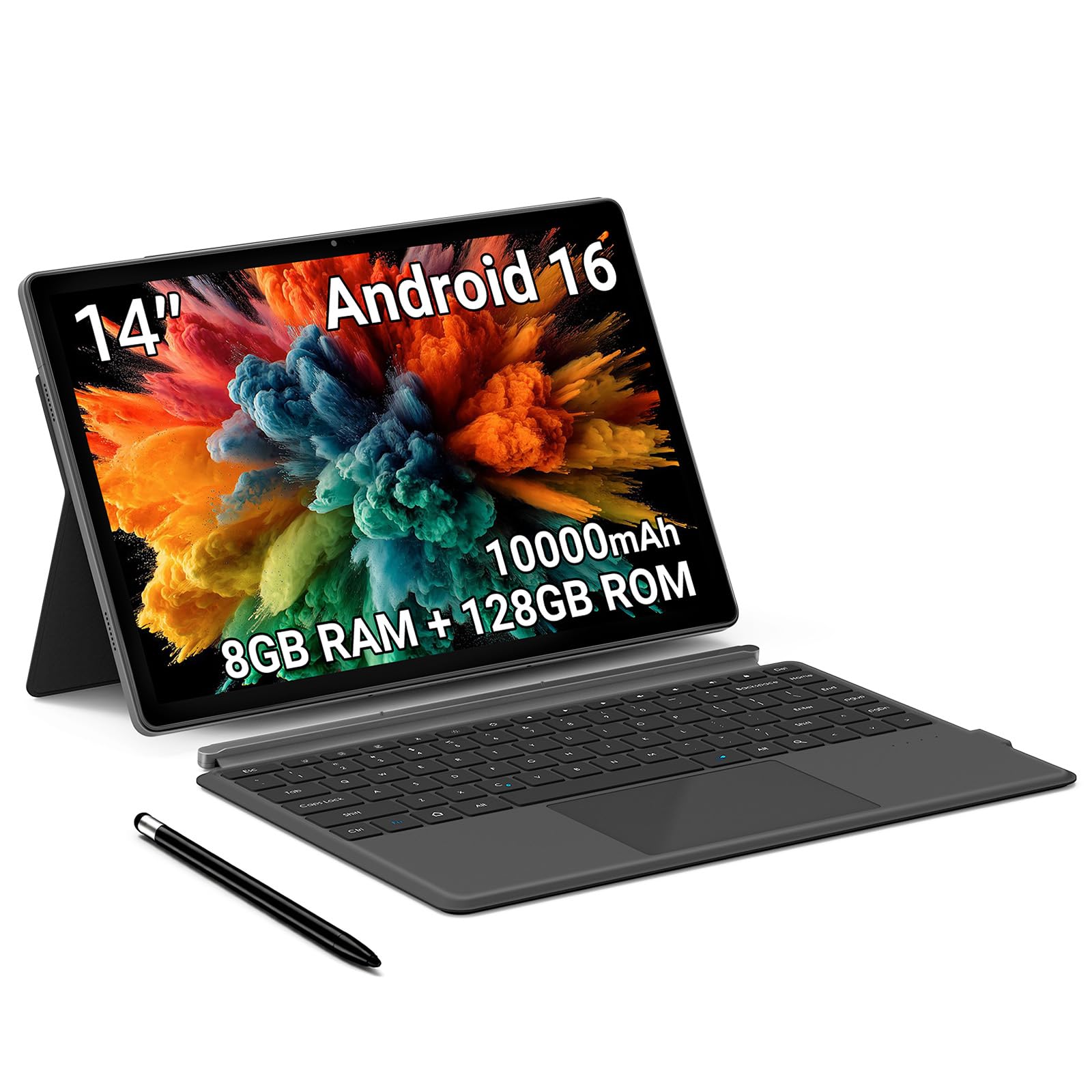
The Android 16 tablet that transforms into a laptop with its detachable keyboard.
The biggest reason to consider this tablet is its operating system version: it ships with Android 16, the newest available, meaning longer support for future apps and security patches compared to the Android 15 tablets on this list. It also comes in a complete 2-in-1 bundle with a detachable magnetic keyboard and leather case, so you can use it like a small laptop for typing emails, editing documents, or taking video calls — no extra purchase needed. The 8GB RAM (8GB) and 128GB storage (128GB) are modest, and indeed have 8GB RAM and 128GB storage compared to the ROSYVIBE’s 36GB RAM and 256GB storage.
Battery life is the biggest weak point here. The 10,000 mAh battery (measured in milliamp hours, the size of the electrical tank) is the same capacity as the Callsky-Pro, but the published battery average life is only 6 Hours, compared to the ROSYVIBE’s 72-hour rating. In plain terms, you need to charge this tablet by early afternoon if you start your day at 8 AM. Connectivity is a strength, however, with Wi-Fi 6 (the newest generation of Wi-Fi for faster, more stable internet) and Bluetooth 5.4 (the latest Bluetooth standard for lower-latency accessories). Reviewers are split — some love the build quality, while one frustrated buyer reported “Sending it back, won’t charge properly! Green light on for full charge, open to 19%.” If you get a good unit, the keyboard bundle makes it a fine budget laptop alternative; just keep a charger nearby.
What Makes It Stand Out
- Comes with a detachable magnetic keyboard and case included in the box — the only pick here ready as a 2-in-1 from the start.
- Runs Android 16, the freshest OS version for longer future app compatibility.
- Wi-Fi 6 and Bluetooth 5.4 deliver the fastest wireless connectivity on this list.
The Hard Trade-Offs
- 8GB RAM is 4.5x less than the ROSYVIBE; heavy multitasking will hit reloads sooner.
- 6-hour battery life is short — expect to charge mid-day (the ROSYVIBE lasts 72 hours).
- Some units have charging issues per buyer feedback, creating a quality-control risk.
Ideal for budget-conscious laptop switchers: If you need a keyboard for typing class notes or emails and want the newest Android version for security, this all-in-one bundle gives you a laptop-like experience for less than a Chromebook.
Step back if you need all-day battery or heavy multitasking: The 6-hour run time means you are tethered to an outlet, and the 8GB RAM will feel cramped if you run many apps side by side. For those needs, the ROSYVIBE or Callsky-Pro serve you better.
Understanding the Specs
RAM (Random-Access Memory)
RAM is the temporary workspace a tablet uses to keep your open apps ready. More RAM means you can have more apps open in split-screen without them refreshing or closing. For a 14-inch tablet intended for real multitasking — watching a video while taking notes, for example — 8GB is entry level, 16GB handles most daily needs, and 36GB lets you run heavy creative apps and browser tabs without stuttering. The amount of RAM directly affects how the tablet feels “snappy” when switching between tasks.
Battery Capacity (mAh) and Battery Average Life
Battery capacity is measured in milliamp hours (mAh) — think of it as the size of the fuel tank. A 10,000mAh battery is standard for a large tablet and can last a full day. The 11,580mAh battery on the top pick holds 11,580 mAh compared to the 10,000 mAh standard in the other two picks. The “battery average life” rating is a manufacturer-tested number that tells you how many hours of typical mixed use you get from a full tank. A 6-hour rating means you need to recharge mid-day; a 72-hour rating means you can go multiple days on a single charge for light use.
FAQ
Can I use a 14-inch Android tablet for reading sheet music while playing piano?
What is Widevine L1 and do I need it?
How much RAM do I really need on a 14-inch tablet?
Will a 14-inch tablet fit in my backpack or bag?
What is the difference between Android 15 and Android 16?
Can I expand the storage on these tablets with a microSD card?
Can I use a keyboard with a 14-inch Android tablet for typing?
Is 4G LTE support important for a tablet?
How long should the battery last on a 14-inch Android tablet?
Are these tablets good for kids or older adults?
Final Thoughts: The Verdict
If you want one dependable pick, the 14 inch android tablet winner is the ROSYVIBE 2025 because its 36GB RAM and 11,580mAh battery deliver desktop-class multitasking and multi-day runtime that the other picks cannot match. If you want a tablet with built-in 4G LTE and Widevine L1 for streaming on the go, grab the Callsky-Pro CTAB14. And for a budget-friendly 2-in-1 that comes with a keyboard and the latest Android 16, the standout is the Maxsignage EP1495T.
How We Picked
We do not accept paid placement. Every pick is matched to a real buyer and a real use-case; we do not hands-on test units.
Sources & Methodology
Specifications: manufacturer listings and product documentation. Review insights: verified customer reviews, as of July 2026. Pricing: not shown on this page (it changes often); check the current price via the retailer link.
As an Amazon Associate, Gadgets Feed earns from qualifying purchases. This does not affect which products we feature.