
If you’ve run out of space on your PC or laptop and need a massive 14TB external hard drive, you’re entering a territory where reliability, data transfer speed, and long-term warranty define your buying decision. 14TB external hard drives are not for casual users — they are built for creators, IT admins, and data hoarders who need to store years of work on a single shelf.
I’m Min — the co-founder and writer behind Gadgets Feed. I’ve spent months researching the differences between 7200RPM enterprise drives inside aluminum enclosures versus budget-friendly desktop drives, cross-referencing every review, spec sheet, and warranty policy to give you a conclusive guide.
Whether you need encrypted backup or full-time media storage, this guide breaks down the best 14 TB external hard drive options with honest pros and cons for every budget.
How To Choose The Best 14 TB External Hard Drive
14TB external hard drives sit in a unique spot — they’re large enough for a multi-year backup strategy but small enough to be a single desktop unit. Your choice depends on drive rotation speed, interface, enclosure material, and how much noise you’re willing to tolerate.
7200RPM vs 5400RPM — Why Speed Matters
Most 14TB external drives use 7200RPM enterprise-class HDDs, which offer 20–30% faster sequential reads and writes compared to 5400RPM consumer drives. For media editing, large database back-ups, or running local AI models, 7200RPM reduces wait time significantly. If you only archive files weekly, 5400RPM is fine and runs cooler. Always check the listed rotational speed.
Interface: USB 3.0, USB-C, or Thunderbolt?
A 14TB hard drive over USB 3.0 (5Gbps) is enough for backup speeds (~150MB/s). USB-C (10Gbps) and Thunderbolt 3 (40Gbps) are overkill for a single mechanical drive but allow daisy-chaining and future-proofing. If you plan to use the drive for editing 4K video or running virtual machines, prioritize USB-C or Thunderbolt for the flexibility, not raw speed.
Enclosure Build Material and Cooling
Aluminum enclosures dissipate heat better than plastic, which matters for 7200RPM drives that run 24/7. Some premium models include an internal fan. Plastic cases are lighter but can trap heat during sustained writes. For a drive that sits on your desk for years, metal construction with ventilation is the smarter investment.
Quick Comparison
On smaller screens, swipe sideways to see the full table.
| Model | Category | Best For | Key Spec | Amazon |
|---|---|---|---|---|
| Avolusion PRO-T8 14TB | Desktop | Budget mass storage | 7200RPM, 256MB cache | Amazon |
| WD Elements 14TB | Desktop | Reliable plug-and-play | USB 3.0, 5Gbps | Amazon |
| Oyen Digital HDX Pro C 16TB | Desktop | Enterprise build quality | USB-C 10Gbps, 7200RPM | Amazon |
| WD My Book 14TB | Desktop | Encrypted backup | 256-bit AES, backup software | Amazon |
| SanDisk Extreme 8TB SSD | Portable SSD | Rugged portable storage | 1050MB/s, IP65 rated | Amazon |
| G-Technology G-DRIVE 14TB | Desktop | Mac workflow with TB3 | Thunderbolt 3, aluminum | Amazon |
| SanDisk Pro G-RAID 48TB | RAID Array | Enterprise video production | 540MB/s read, RAID 0 | Amazon |
| UGREEN NAS DH2300 | NAS Enclosure | Home network storage | 2-bay, 64TB max | Amazon |
| SSK 2TB USB SSD | Portable SSD | High-speed mobile backup | 550MB/s, dual USB-A/C | Amazon |
In‑Depth Reviews
1. Avolusion PRO-T8 Series 14TB

The Avolusion PRO-T8 Series 14TB desktop external hard drive pairs a brand-new premium enclosure with a like-new 7200RPM enterprise hard drive that has passed rigorous factory testing. With zero power-on hours and 100% health verified at the factory, this drive delivers enterprise-grade internal components for a fraction of the price of a new-brand 14TB drive.
Data transfer reaches up to 5Gbps via USB 3.0, and the 256MB cache buffer helps smooth out large file transfers. Users have reported using it as a Plex server for 4K streaming over WiFi without lag, and running local AI models that previously filled their internal drives. The 2-year warranty adds peace of mind for such a capacity.
Some users noted that the drive can lock out wireless keyboards when active, which is a minor inconvenience, but for the price per terabyte, this is the best value 14TB desktop hard drive currently available. Just be aware you are getting a refurbished enterprise drive — not a brand-new retail unit.
Why it’s great
- Enterprise 7200RPM HDD with 100% health check
- Excellent price per TB among 14TB options
- Fast enough for 4K streaming and local AI models
Good to know
- Refurbished internal drive, not brand-new retail
- Plastic enclosure may trap heat during sustained writes
- Can interfere with wireless keyboards when powered on
2. Oyen Digital HDX Pro C 16TB
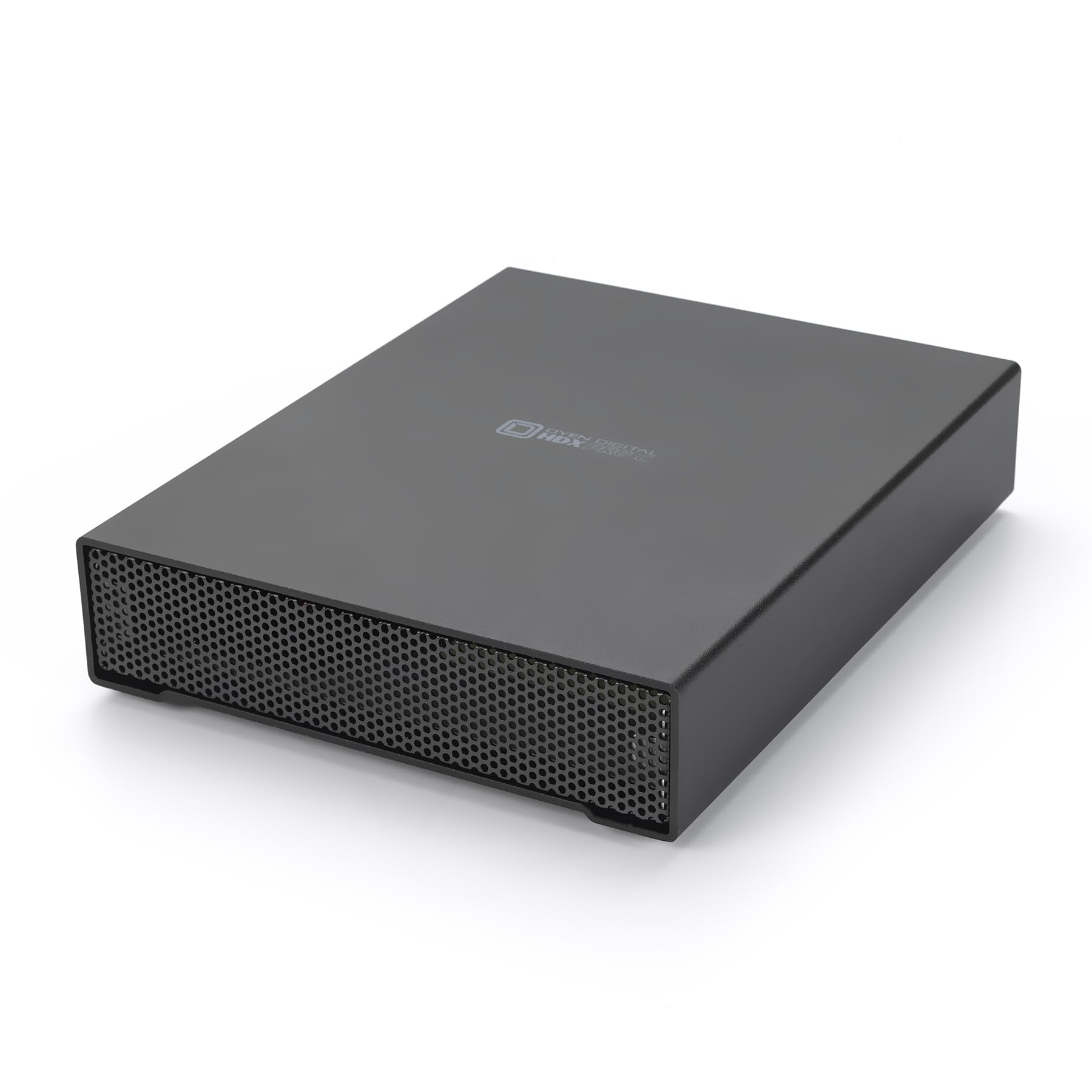
The Oyen Digital HDX Pro C 16TB external hard drive stands out for its all-aluminum enclosure with an internal fan and power supply — a rarity in consumer external drives. This 7200RPM enterprise drive reaches up to 270 MB/s over USB-C at 10Gbps, making it one of the fastest single-spindle desktop drives you can buy.
Unlike most external drives that rely on an external power brick, the HDX Pro C integrates the PSU into the chassis, reducing cable clutter. The secondary USB-C port allows daisy-chaining additional drives or peripherals. Users consistently praise the build quality, with many stating it’s the highest-quality large-capacity SATA enclosure they’ve used, especially on Linux systems without driver issues.
It runs warm and audibly active, as expected from a 7200RPM drive with a fan. Some users recommend using a dedicated power outlet per unit to prevent shutdowns from power strip overload. If you want a 14TB/16TB drive that feels built to last a decade, this is it.
Why it’s great
- All-aluminum chassis with integrated PSU and fan
- USB-C 10Gbps with daisy-chain capability
- Enterprise 7200RPM drive inside
Good to know
- Runs warm and has audible fan noise
- Requires dedicated power outlet for stability
- Premium price over consumer-grade drives
3. WD Elements 14TB Desktop

The Western Digital 14TB Elements Desktop external hard drive is the most reliable plug-and-play 14TB drive for Windows users. It features a USB 3.0 interface with speeds up to 5Gbps, a compact upright design, and the trusted WD build quality that has made Elements one of the best-selling external drive lines for years.
Users consistently report that this drive runs quiet when idle and only becomes audible during active transfers. The aluminum-enclosed shell helps dissipate heat efficiently, and the small footprint means it won’t tip over easily. Transfer rates are smooth and consistent, with no overheating issues even during long backup sessions. It works out of the box on Windows 11 without any driver installation.
Some users note the drive is slightly noisier during writes compared to idle, and the included power brick is relatively small. For data integrity, WD drives are widely regarded as more reliable than Seagate among long-term users. The 14TB Elements is a straightforward, no-nonsense choice for anyone who wants reliable storage without extra software.
Why it’s great
- Trusted WD reliability and build quality
- Quiet operation with efficient heat dissipation
- True plug-and-play on Windows
Good to know
- No hardware encryption or backup software included
- Audible during active file transfers
- Power brick is small and may be easy to lose
4. WD My Book 14TB Desktop

The WD 14TB My Book Desktop External Hard Drive is a step up from the Elements line, adding 256-bit AES hardware encryption and WD Discovery software with built-in backup and password protection. This makes it an ideal choice for businesses or anyone who needs encrypted storage to protect sensitive data.
The My Book enclosure is made from aluminum, glass, or ceramic materials, giving it a premium feel. Users report that the drive is extremely durable — one user dropped a similar 8TB My Book from 3 feet onto hardwood while the drive was spinning, and after removing it from the enclosure, the internal WD HDD worked perfectly. Transfer speeds over USB 3.0 (5Gbps) are consistent, and the drive runs quiet.
Some users experienced initial failures with the first unit they received, which required a replacement under the 3-year warranty. Others noted that the included WD software can cause issues on macOS, recommending reformatting with Apple Disk Utility instead. The drive also has a 5–10 second spin-up delay after inactivity, which can be annoying for frequent access.
Why it’s great
- 256-bit AES hardware encryption for data security
- Premium metal enclosure design
- Excellent durability — can survive minor drops
Good to know
- WD software can conflict with macOS; use Apple Disk Utility
- Spin-up delay after inactivity (5–10 seconds)
- First unit failure rate is higher than ideal
5. SanDisk Extreme 8TB Portable SSD

The SanDisk 8TB Extreme Portable SSD offers NVMe-level speeds with up to 1050MB/s read and 1000MB/s write, making it the fastest drive in this list by a wide margin. While it’s an 8TB SSD rather than a 14TB HDD, it’s included here for users who prioritize speed over raw capacity for active projects.
This drive is built for extreme portability with IP65 water and dust resistance, plus 3-meter drop protection — meaning you can take it from studio to location without worry. The included carabiner loop lets you attach it to a backpack, and the rugged silicone shell protects against bumps. With 256-bit AES hardware encryption and a 5-year warranty, it’s a complete solution for photographers and videographers.
Users note it gets slightly warm during long transfers, but the compact size and fast speeds more than compensate. One drawback is the 8TB capacity limit — you’ll need to manage your storage more carefully compared to a 14TB HDD. For editing 4K/6K video directly from the drive, this SSD is unmatched.
Why it’s great
- Blazing 1050MB/s read for direct editing
- IP65 water/dust resistant and drop proof
- 5-year limited warranty and 256-bit encryption
Good to know
- Only 8TB — less capacity than 14TB HDDs
- Gets warm during sustained transfers
- Premium price per TB compared to HDD
6. G-Technology 14TB G-DRIVE Thunderbolt 3

The G-Technology 14TB G-DRIVE with Thunderbolt 3 and USB-C is the premium choice for Mac users who need a desktop drive that matches their iMac aesthetic. With dual Thunderbolt 3 ports for daisy-chaining up to 5 devices and a single USB-C port, this drive integrates seamlessly into a professional Mac workflow.
The all-aluminum case is solid, stylish, and helps dissipate heat. Data transfer speeds reach up to 250MB/s, though some users note the 7200RPM drive doesn’t fully saturate Thunderbolt 3 bandwidth. It works flawlessly for Time Machine backups, large photo libraries, and music storage. Users with Macs report zero connectivity issues, a welcome change from some WD drives.
Some users report an incessant knocking noise even when idle, which can be disruptive in a quiet studio. Others note that G-Technology no longer accepts product registrations, so keep your proof of purchase. For Mac-centric environments that need reliable Thunderbolt storage, this is the benchmark.
Why it’s great
- Thunderbolt 3 daisy-chain for up to 5 devices
- All-aluminum design matches Mac aesthetics
- Works perfectly with Time Machine and photo libraries
Good to know
- Audible knocking noise reported by some users
- G-Technology discontinued product registration
- 7200RPM can’t fully use Thunderbolt 3 bandwidth
7. SanDisk Professional 48TB G-RAID Project 2

The SanDisk Professional 48TB G-RAID Project 2 is a dual-drive RAID array that ships with two 7200RPM Ultrastar Enterprise-class hard drives inside, configured in RAID 0 for speeds up to 540MB/s read and 490MB/s write. This is the fastest HDD-based external storage system available, rivaling some SATA SSDs in throughput.
It includes a PRO-BLADE SSD Mag slot, allowing you to add an SSD for fast transfers and proxy editing without adding another device. The Thunderbolt 3 (40Gbps) and USB 3.2 Gen 2 (10Gbps) interfaces, combined with color-coded cables, make setup foolproof. This drive is built for professional video production where every second matters.
However, two critical user reports indicate catastrophic failure within 40 days, with WD support taking over a month to ship a replacement. One user called it “Garbage” after four separate G-Drive failures. While the performance is elite, the reliability and support track record raise serious concerns for long-term data storage. This drive is best used as part of a broader backup strategy, not as your only copy.
Why it’s great
- 540MB/s reads — fastest HDD RAID on the market
- PRO-BLADE SSD Mag slot for fast proxy editing
- Dual Thunderbolt 3 and USB-C interfaces
Good to know
- Multiple reports of catastrophic failures within weeks
- WD support is extremely slow for RMA replacements
- RAID 0 means no redundancy — one drive fails, all data lost
8. UGREEN NAS DH2300 2-Bay Desktop

The UGREEN NAS DH2300 is a 2-bay NAS enclosure designed for beginners who want to move from scattered external drives to a centralized network storage hub. It supports up to 64TB of capacity (using two 32TB drives) and offers remote access, AI-powered photo organization, and automatic backups across Windows, macOS, iOS, and Android devices.
File transfers reach up to 125MB/s over the 1GbE port, which is respectable for a consumer NAS. It features 4GB onboard RAM and a quad-core processor. The AI photo album automatically tags faces, locations, and objects, making it easy to search through thousands of photos. The device is also TÜV SÜD certified for data security.
Keep in mind this NAS doesn’t support Docker or virtual machines, and drives are not included. The UGREEN runs quiet with SSDs but can get noisy with enterprise HDDs. It works best with wired Ethernet. For a one-time cost, it replaces monthly cloud subscription fees, making it a smart long-term storage investment.
Why it’s great
- AI-powered photo tagging and duplicate detection
- Supports up to 64TB across two bays
- Replaces monthly cloud fees with one-time purchase
Good to know
- No Docker, VMs, or Plex via Docker support
- Requires wired Ethernet — no integrated Wi-Fi
- Drives not included (diskless system)
9. SSK 2TB External USB SSD Dual Drive

The SSK 2TB External USB SSD Dual Drive offers 550MB/s read and 500MB/s write speeds with a unique dual-head design featuring both USB-C and USB-A 3.2 Gen 2 connectors. This makes it incredibly versatile for transferring data between smartphones (iPhone 15 and Android), laptops, PS4, smart TVs, and desktop PCs without needing an adapter.
The zinc alloy shell provides shock resistance and fast heat dissipation. It’s plug-and-play with compatible devices, pre-formatted in exFAT for cross-platform use. Users have praised its build quality and speed, with many switching from traditional flash drives. The included leather case adds a touch of protection and style.
However, some users report reliability issues: the drive can get very hot during extended use, and after several months, some units fail to be recognized by smartphones, causing USB-C port errors. For a budget-friendly compact SSD, it works great for daily transfers but should not be your primary backup device.
Why it’s great
- Dual USB-C and USB-A connectors for wide compatibility
- Zinc alloy case with shock resistance
- 550MB/s read speeds for fast file transfers
Good to know
- Prone to overheating during extended use
- Some units become unrecognizable after months of use
- Only 2TB — limited capacity for large media libraries
FAQ
Can I shuck a 14TB external drive and use it internally?
Is 14TB enough for a video editing workflow?
How long does a 14TB external hard drive last?
Final Thoughts: The Verdict
For most users, the 14 tb external hard drive winner is the Avolusion PRO-T8 14TB because it combines enterprise 7200RPM performance with the best price per terabyte on the market. If you want a premium aluminum build with USB-C future-proofing, grab the Oyen Digital HDX Pro C 16TB. And for plug-and-play reliability with the best warranty support, nothing beats the WD Elements 14TB Desktop.