
A 140mm fan is the cooling sweet spot for most PC builds — it moves more air than a 120mm fan at lower noise levels, so your system stays cooler without sounding like a vacuum cleaner. But the wrong fan can leave your GPU throttling from heat or add an annoying hum to your desk. This guide cuts through the specs to show you which 140mm fan actually delivers the quiet, effective cooling you need for your specific case, cooler, or radiator setup.
I’m Min — the co-founder and writer behind Gadgets Feed. This guide is built by comparing the manufacturers’ published specifications and the patterns across verified customer reviews, so you get each pick’s real strengths and trade-offs instead of marketing spin.
Finding the right fan means balancing airflow (how much air it pushes), noise, and the physical space it fits into. These five picks represent the best 140mm fan options across different priorities — from silent operation to lighting effects to slim profiles for tight spaces.
How To Choose The Best 140mm Fan
Picking a 140mm fan is about more than just grabbing the cheapest option. You need to match the fan’s strengths — airflow, pressure, noise, and size — to your specific build. Here’s what matters most.
Airflow vs. Static Pressure
Airflow (measured in cubic feet per minute, or CFM) is how much air the fan moves in open space — great for case intake or exhaust. Static pressure (measured in mmH₂O) is how hard the fan pushes air through resistance, like a dense radiator or a tall CPU cooler heatsink. If you’re mounting on a radiator, prioritize static pressure; for a mesh case panel, high airflow fans work better.
Noise Level and Bearing Type
Noise is measured in decibels (dB) or sones. A difference of 3 dB is roughly double the perceived loudness. Fans under 25 dB are generally quiet enough to ignore inside a closed case. The bearing type also matters: fluid dynamic bearings (FDB) and rifle bearings tend to last longer and stay quieter over time than sleeve bearings, which dry out faster.
Size and Clearance
Not all 140mm fans are the same thickness. Standard fans are 25mm thick, but slim models (like the ARCTIC P14 Slim at 16mm) fit in small form factor cases where a regular fan won’t. Always check your case or cooler’s clearance specs before buying — a fan that doesn’t fit is useless.
PWM Control and Daisy-Chaining
PWM (pulse width modulation) lets your motherboard adjust the fan speed automatically based on temperature, keeping things quiet at idle and powerful under load. Fans with daisy-chain connectors (like the Lian Li UNI Fan) let you link multiple fans with a single cable, making cable management much cleaner.
Quick Comparison
On smaller screens, swipe sideways to see the full table.
| Model | Category | Best For | Key Spec | Amazon |
|---|---|---|---|---|
| Noctua NF-A14x25 G2 PWM | Premium | Ultra-quiet, high-performance cooling | 1500 RPM max speed | Amazon |
| Lian Li UNI Fan SL-Infinity 140 | Premium ARGB | Stunning RGB lighting with easy daisy-chain cable management | 72.7 CFM airflow | Amazon |
| be quiet! Light Wings LX 140mm | Mid-Range ARGB | Quiet operation with stylish frosted blade lighting | 20.6 dB noise level | Amazon |
| AsiaHorse Amici 140mm ARGB | Value ARGB | High airflow with striking infinity mirror effects on a budget | 89.77 CFM airflow | Amazon |
| ARCTIC P14 Slim PWM PST | Budget Slim | Tight-clearance builds needing a low-profile 140mm fan | 16mm slim depth | Amazon |
In‑Depth Reviews
1. Noctua NF-A14x25 G2 PWM

1500 RPM maximum speed and Sterrox liquid-crystal polymer (LCP) construction make the Noctua NF-A14x25 G2 PWM the top pick for silence-focused builders and overclockers who want the best raw cooling performance with near-silent operation under 800 RPM.
Reviewers report this fan drops CPU temperatures by about 1°C compared to similar high-end models, a small but meaningful gain for quiet-PC builders. The included Low-Noise Adaptor (LNA) caps speed for even quieter operation, and the premium-grade SSO2 bearing (a self-stabilizing oil-pressure bearing) is rated for over 150,000 hours of use (roughly 17 years of continuous runtime).
The polarizing brown color scheme doesn’t match most modern all-black or RGB builds, but if your priority is peerless acoustics and build quality, the Noctua is the undisputed champ in its class.
Why it’s great
- Class-leading quietness at 24.8 dB
- Premium Sterrox LCP build for durability
- Includes LNA, Y-splitter, extension cable, and anti-vibration mounts
Good to know
- Brown color won’t match most builds
- Lower static pressure than some competitors at max RPM
2. Lian Li UNI Fan SL-Infinity 140

Aesthetics come first with the Lian Li UNI Fan SL-Infinity 140, and its signature infinity mirror design uses 40 LEDs per fan to create a multi-layer light effect visible from any angle — a look that completely outshines the be quiet! Light Wings LX (which uses 16 LEDs in a simpler hub design). On raw specs, it spins up to 2100 RPM (17% faster than the ARCTIC P14 Slim’s 1800 RPM), delivering 72.7 CFM of airflow at a still-respectable 28 dB noise level.
The real party trick is the daisy-chain system: you connect up to four fans with a single cable using pin-to-pad contact points, eliminating cable clutter entirely. Buyers report that idle temperatures sit around 40°C for the CPU and 35°C for the GPU, with max loads hitting 65°C and 70°C respectively — excellent figures for a visually focused build.
The catch is the premium price and the fact that you need Lian Li’s separate controller (sold with the 3-pack) for full software control via L-Connect 3. But for builders who want a showpiece PC, the SL-Infinity sets the bar. Choose this over the top pick if you prioritize dazzling RGB effects and near-invisible cable management over raw silence or value.
Where it shines
- Stunning infinity mirror aesthetics with 40 LEDs
- Single-cable daisy-chain for up to 4 fans
- Strong 72.7 CFM airflow at quiet 28 dB
Worth noting
- Requires separate controller for full RGB control
- White color setting appears slightly blue
3. be quiet! Light Wings LX 140mm PWM
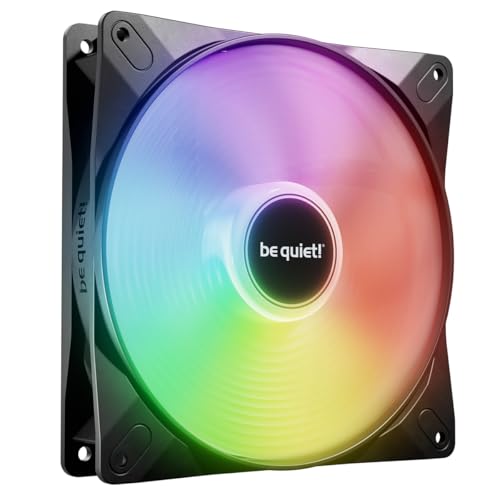
If your gaming rig sits beside your desk and you want ARGB lighting without the constant whir of fan noise, the be quiet! Light Wings LX 140mm PWM is the quietest illuminated fan in this guide. At just 20.6 dB, it is 46% quieter than the AsiaHorse Amici (30 dB), and its frosted blades with 16 LEDs inside the hub produce a soft, diffused glow. The rifle bearing, which holds oil in spiral grooves, is rated for 60,000 hours of operation.
Buyers consistently report these fans are “quiet and easy to install” with “great airflow” even at low speeds. The daisy-chain ARGB connector lets you link multiple fans without a mess of cables, and the optimized blade design minimizes air leaks at the frame edges for better cooling efficiency.
It doesn’t match the airflow numbers of the AsiaHorse Amici (89.77 CFM) or the Lian Li UNI Fan, but for a mid-range build where silence is the priority, the Light Wings LX is the smart, understated pick. At 20.6 dB, it is the quietest fan with lighting in this entire list.
What stands out
- Ultra-quiet 20.6 dB operation
- Frosted blade lighting looks premium
- Rifle bearing rated for 60,000 hours
The trade-offs
- Lower max airflow than high-CFM alternatives
- Simple hub lighting, not infinity mirror style
4. AsiaHorse Amici 140mm ARGB
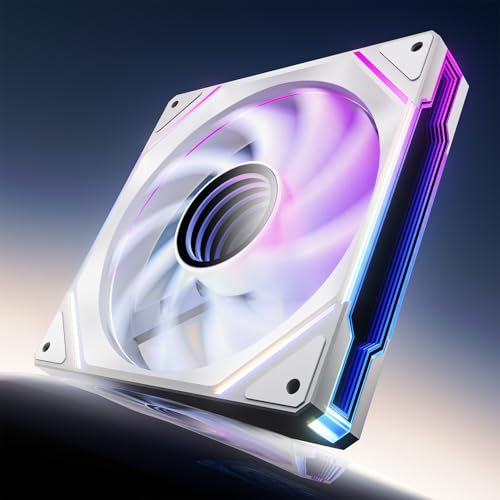
The single number that matters most in this category is 89.77 CFM — that is 73% more airflow than the ARCTIC P14 Slim (52 CFM), making it the undisputed air-moving champion of this lineup. If your PC runs hot from a powerful GPU or CPU, this fan will pull or push more air than anything else here. It achieves this through an aggressive 9-blade design that spins up to 2000 RPM, backed by a hydraulic bearing rated for 50,000 hours of life.
The downside you accept is noise: at 30 dB, it is noticeably louder than the be quiet! Light Wings LX (20.6 dB) — about four times the perceived volume (a 10 dB increase sounds twice as loud). You also get an infinity mirror design similar to the Lian Li UNI Fan, but the mirror effect is less pronounced. On the plus side, owners mention it offers “easy install under 10 min with labeled cables” and delivers “surprisingly strong and silent” performance at lower RPMs.
At an entry-level price, the Amici delivers premium-level airflow and RGB for a fraction of the cost — making it the price-to-performance king for budget builders who prioritize cooling over silence. If noise is your top concern, the be quiet! Light Wings LX is a better fit.
The upsides
- Massive 89.77 CFM airflow — highest in the lineup
- Infinity mirror ARGB with 24 LEDs
- Hydraulic bearing rated for 50,000 hours
Keep in mind
- 30 dB noise level is louder than premium options
- White variant has a visible black plastic center ring
5. ARCTIC P14 Slim PWM PST
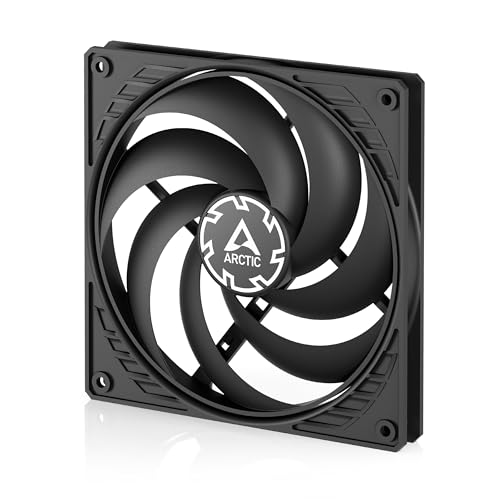
At a budget-friendly price, the ARCTIC P14 Slim gives you exactly one thing that no other fan here can: a 16mm-thin profile that fits where standard 25mm fans cannot. It is an “extremely slim 140mm fan ideal for SFF (small form factor)/low-clearance builds,” as buyers confirm, working perfectly in cases like the Fractal Ridge or in push-pull radiator configurations where space is millimeters tight. The PWM PST (PWM Sharing Technology) lets you daisy-chain the speed control signal to other fans without needing a fan hub.
What you give up is raw airflow: at 52 CFM, it moves 73% less air than the AsiaHorse Amici (89.77 CFM), and its 1800 RPM max speed means it needs to spin faster to move the same amount of air. Some buyers also note that the thin plastic frame can cause blade wobble at low speeds, sometimes rubbing against the case — a problem easily fixed with rubber washers or spacers.
This is the perfect pick for anyone building in a small form factor case where every millimeter counts. If you need a 140mm fan to fit into a space that a regular fan won’t, the ARCTIC P14 Slim is essentially your only choice — and it does the job surprisingly well for the price.
Why we’d pick it
- Ultra-slim 16mm profile fits tight spaces
- PWM PST daisy-chain for cable-free speed control
- Optimized static pressure for radiators
A few caveats
- Only 52 CFM airflow is lower than full-size fans
- Thin plastic frame may need spacers to avoid blade rubbing
Understanding the Specs
Airflow (CFM) vs. Static Pressure (mmH₂O)
CFM (cubic feet per minute) measures how much air a fan moves freely — important for case intake or exhaust through mesh panels. Static pressure measures how hard a fan pushes air through resistance, like a dense radiator or a tall CPU cooler. For a radiator, look for high static pressure (1.5 mmH₂O and above); for general case airflow, high CFM is what you want.
Noise Level (dB vs. Sones)
Decibels (dB) measure sound pressure; 30 dB is roughly a whisper, and 20 dB is near-silent. Sones are a different scale where 1 sone equals about 40 dB at 1 meter. The difference between a fan at 20.6 dB (like the be quiet! Light Wings LX) and one at 30 dB (like the AsiaHorse Amici) is about four times the perceived loudness, so small number differences matter a lot for quiet builds.
FAQ
Should I use a 140mm fan as intake or exhaust?
Can I mix 120mm and 140mm fans in the same case?
What does PWM mean on a fan?
Final Thoughts: The Verdict
If you want one dependable pick, the best 140mm fan is the Noctua NF-A14x25 G2 PWM because it delivers unmatched quietness and cooling efficiency in a single, premium package. If you want stunning ARGB lighting with easy cable management, grab the Lian Li UNI Fan SL-Infinity 140. And for budget buyers who need maximum airflow while staying affordable, the AsiaHorse Amici 140mm ARGB is a fantastic value pick.