
Chasing high-refresh 1440p gaming means demanding a system that can push well over 100 frames per second at Quad HD resolution without stuttering or dropping settings to medium. The wrong prebuilt delivers a GPU that bottlenecks at 1440p or pairs it with a CPU that chokes on modern titles. You need a machine where every component — from the graphics card’s VRAM buffer to the processor’s core clock — is calibrated for that specific sweet spot.
I’m Min — the co-founder and writer behind Gadgets Feed. I’ve spent hundreds of hours analyzing benchmark data, sifting through real owner feedback, and comparing thermal performance across dozens of 1440p-focused prebuilt configurations to separate genuinely capable rigs from marketing-heavy duds.
This guide cuts through the noise to deliver the most practical recommendations for a best 1440p gaming pc that delivers smooth frame rates and lasting value for your setup.
How To Choose The Best 1440p Gaming PC
Building or buying for 1440p (2560×1440) requires balancing four key hardware pillars. Skimp on any one, and your frame rate suffers or you leave performance on the table. Here’s what to evaluate.
GPU VRAM and Memory Bandwidth
1440p demands more video memory than 1080p. A card with 8GB of VRAM can struggle in modern titles at max textures, especially with ray tracing enabled. Look for 12GB or 16GB configurations — the RTX 5070 with 12GB and the RTX 5070 Ti with 16GB are strong 1440p contenders. Also consider the memory bus width: a 192-bit or 256-bit interface moves data faster than the narrower 128-bit found on older budget cards, which directly impacts texture streaming and frame time consistency at higher resolutions.
CPU-GPU Balance (Avoiding the Bottleneck)
At 1440p, the GPU becomes the primary performance driver, but a weak CPU can still introduce stutter in CPU-bound titles like simulation games or open-world RPGs. A modern 8-core processor — such as the AMD Ryzen 7 8700F, 9800X3D, or Intel Core i9-14900KF — provides enough headroom to feed the GPU without limitation. The 3D V-Cache chips from AMD (X3D series) are particularly effective at maintaining high 1% low frame rates, which translates to smoother gameplay even during intense scenes.
RAM Speed and Capacity
DDR5 RAM running at 6000MHz is the sweet spot for Ryzen 7000/9000 series processors, as it aligns with the Infinity Fabric clock for optimal bandwidth. 32GB is the recommended capacity for 1440p gaming, allowing you to keep a browser, Discord, and streaming software running alongside demanding titles without hitting memory limits. Slower 4800MHz or 5200MHz kits can cause a measurable drop in frame rates, especially in CPU-heavy scenarios.
Cooling and Case Airflow
Sustained 1440p gaming generates significant heat — a high-end GPU and CPU can push combined wattage past 400W. A 240mm or 360mm liquid cooler handles sustained loads better than a budget air cooler, while a case with good front mesh intake and at least three fans (front intake, rear exhaust) prevents heat soak that leads to throttling. Check that the chassis has enough clearance for the GPU length (most RTX 5070 Ti cards measure 300-340mm) and a high-wattage PSU (850W Gold or better) for stable power delivery.
Quick Comparison
On smaller screens, swipe sideways to see the full table.
| Model | Category | Best For | Key Spec | Amazon |
|---|---|---|---|---|
| Andromeda Insights Galaxy V2 | Premium | 1440p max settings, longevity | RX 9070 XT 16GB / Ryzen 9800X3D | Amazon |
| Stormcraft Skyhawk PRO | Premium | High FPS at 1440p with ray tracing | RTX 5070 Ti 16GB / Ryzen 9800X3D | Amazon |
| Skytech Gaming King 95 | Premium | Ultra settings 60+ FPS at 1440p | RTX 5070 Ti 16GB / Ryzen 9850X3D | Amazon |
| Cooler Master NR2 Pro | Premium | Compact ITX 1440p gaming | RTX 5070 Ti 16GB / Ryzen 9800X3D | Amazon |
| iBUYPOWER Y40 PRO | Mid-Range | 1440p gaming with streaming | RTX 5070 Ti 16GB / Ryzen 9 7900X | Amazon |
| Thermaltake LCGS View i570-170 | Premium | High-end 1440p with liquid cooling | RTX 5070 12GB / Core i9-14900KF | Amazon |
| MSI Codex Z2 | Mid-Range | 1440p gaming, reliable brand | RTX 5070 12GB / Ryzen 7 8700F | Amazon |
| ASUS ROG G700 (2025) | Mid-Range | Balanced 1440p with liquid cooling | RTX 5070 12GB / Core Ultra 7 265KF | Amazon |
| Alienware Aurora ACT1250 | Mid-Range | 1440p gaming, premium support | RTX 5070 12GB / Core Ultra 7 265F | Amazon |
| CyberPowerPC Gamer Master | Value | Entry-level 1440p gaming | RTX 5060 Ti 8GB / Ryzen 7 8700F | Amazon |
| Lenovo Legion Tower 5i | Value | 1440p gaming with upgrade path | RTX 5060 Ti 8GB / Core Ultra 7 265F | Amazon |
| ZYNEEX R5-9600X | Value | Budget 1440p, multitasking | RTX 5060 8GB / Ryzen 5 9600X | Amazon |
| Suevery i9-13900HX | Value | 1440p gaming, high CPU performance | RTX 5060 8GB / Core i9-13900HX | Amazon |
In‑Depth Reviews
1. Andromeda Insights Galaxy V2 Gaming PC
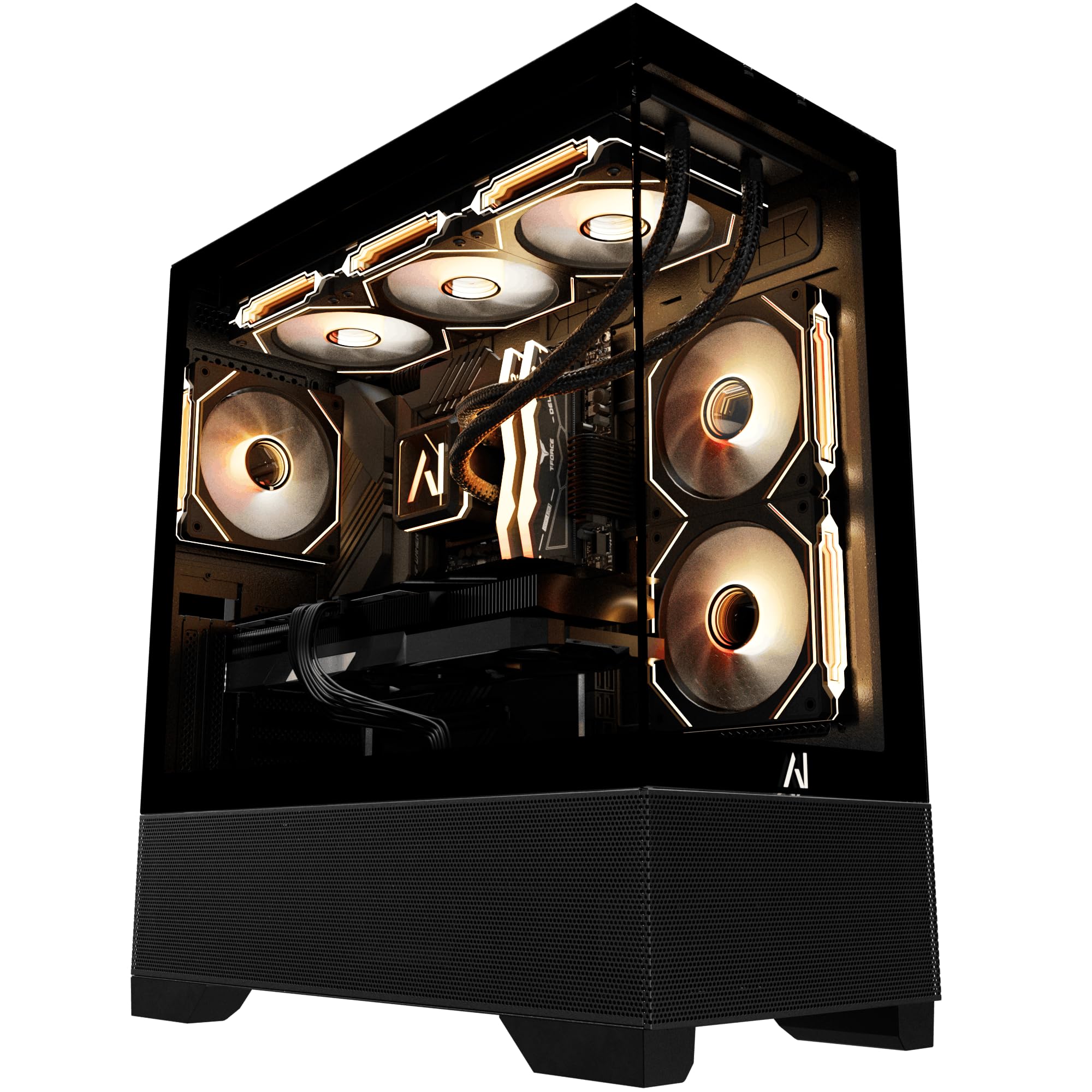
The Galaxy V2 pairs the AMD Ryzen 7 9800X3D — an 8-core, 16-thread processor with 96MB of L3 cache and a 5.2GHz turbo boost — with the RX 9070 XT carrying 16GB of GDDR6 VRAM on a 256-bit memory bus. This combination delivers 144-180 FPS in demanding titles like Tarkov and Rust at 1440p max settings, with the 3D V-Cache keeping 1% low frame rates exceptionally stable during busy scenes.
The 32GB of DDR5 RAM running at 6000MHz is perfectly matched to the Ryzen platform’s Infinity Fabric clock, eliminating a common bottleneck in budget prebuilts. Storage is a 2TB Gen4 NVMe SSD with read speeds exceeding 7000MB/s, ensuring near-instant level loads. The 850W Gold-rated PSU provides ample headroom for the 9070 XT’s peak power draw, while the B650 motherboard includes Wi-Fi and Bluetooth connectivity out of the box.
Real owners report that the system shipped with proper drivers, no bloatware, and clean cable management. Some noted the white GPU can look slightly mismatched in a black case, but performance feedback is universally positive — buyers describe it as a “beast for the price” and note it is cheaper than sourcing identical components individually. The two-year parts and lifetime labor warranty add significant peace of mind for a premium purchase.
Why it’s great
- RX 9070 XT 16GB handles 1440p max settings with 144+ FPS in competitive titles
- Ryzen 9800X3D with 96MB cache delivers exceptional 1% low frame rate stability
- 2TB Gen4 SSD with 7400MB/s read eliminates loading screen wait times
Good to know
- White GPU color may not match black case aesthetic for some buyers
- AIO cooler software can be unreliable and occasionally shows null temperature readings
2. STORMCRAFT Skyhawk PRO Gaming PC

The Skyhawk PRO pairs the AMD Ryzen 7 9800X3D with the RTX 5070 Ti carrying 16GB of GDDR7 VRAM on a 256-bit bus — a formidable 1440p combination. The GDDR7 memory offers substantially higher bandwidth than GDDR6, which benefits ray tracing performance and high-resolution texture streaming. The 360mm AIO liquid cooler keeps the 9800X3D below 60°C even during extended sessions, preventing thermal throttling that would otherwise degrade frame rates.
The 32GB of DDR5 RAM clocked at 6000MHz ensures low latency data transfer between the CPU and GPU, critical for maintaining smooth frame pacing in open-world games. The 2TB Gen4 NVMe SSD provides ample storage for a modern game library, with enough bandwidth to support DirectStorage for faster asset loading. The 850W Gold PSU and AM5 B850 chipset motherboard allow for future GPU upgrades without requiring a full system rebuild.
Buyers report that the system runs Star Citizen on Ultra at 1080p with 200+ FPS in space and 48 FPS in dense cities, but at 1440p the 5070 Ti will push dramatically higher numbers. Some units shipped with a buzzing headphone jack on the top I/O panel and a fan that scrapes the duct under load — both minor QC issues that don’t affect gaming performance. The curved glass case and subtle LED lighting appeal to those who want a refined aesthetic without excessive RGB.
Why it’s great
- RTX 5070 Ti 16GB GDDR7 delivers class-leading 1440p ray tracing performance
- 360mm AIO liquid cooler keeps thermals in check during extended gaming
- Ryzen 9800X3D with 96MB cache handles CPU-bound titles effortlessly
Good to know
- Top headphone jack may have buzzing interference; rear jack works fine
- One of six fans can scrape the duct under load; minor fixable issue
3. iBUYPOWER Y40 PRO Gaming PC

The Y40 PRO’s core strength lies in the RTX 5070 Ti with 16GB GDDR6 — a card that comfortably exceeds 100 FPS at 1440p on very high settings in modern AAA titles. Owners upgrading from an RTX 2080 Super report a dramatic jump in frame rate consistency, with the 5070 Ti eliminating the micro-stutter that plagued older architectures at higher resolutions. The Ryzen 9 7900X, with its 12 cores and 24 threads boosting to 5.6GHz, ensures the CPU never becomes the limiting factor, even when multitasking with streaming software and Discord open simultaneously.
The 32GB of DDR5 RAM at 5200MHz is adequate for gaming but leaves some performance on the table — 6000MHz would better utilize the Ryzen platform’s memory controller. The 2TB NVMe SSD provides fast boot and load times, and the chassis offers excellent airflow with a tempered glass side panel that shows off the 16-color RGB lighting. The inclusion of a keyboard and mouse makes it a true plug-and-play option.
A minority of buyers experienced crashes within the first two weeks, with customer support suspecting faulty RAM. However, the majority report zero issues and praise the build quality and value proposition. The system comes with no bloatware, which is a refreshing departure from many OEM prebuilts. For the price, the Y40 PRO delivers the core 1440p experience — a fast 5070 Ti — with a capable CPU and ample storage, making it a strong mid-range contender.
Why it’s great
- RTX 5070 Ti 16GB delivers over 100 FPS at 1440p very high settings
- Ryzen 9 7900X with 12 cores eliminates CPU bottlenecks during multitasking
- 2TB NVMe SSD provides ample storage for a modern game library
Good to know
- DDR5 RAM at 5200MHz is slower than the 6000MHz sweet spot for Ryzen
- Some units reported crashes, potentially related to RAM quality control
4. Thermaltake LCGS View i570-170 Gaming Desktop

The View i570-170 leverages the Intel Core i9-14900KF — a 24-core, 32-thread processor capable of boosting to 6.0GHz — paired with the RTX 5070 12GB on a 192-bit bus. For 1440p gaming, the 5070 handles most titles at high settings, but the 12GB VRAM buffer can be a limiting factor in games that consume more than 10GB at 1440p with ray tracing. The i9-14900KF provides exceptional single-threaded performance, which benefits esports titles that rely on high CPU clock speeds.
Thermaltake implemented a closed-loop liquid cooling solution with a 240mm radiator, which effectively manages the i9-14900KF’s high thermal output under sustained load — reaching around 80-85°C under gaming loads, well within safe limits. The 32GB of DDR5 at 6000MT/s matches the platform’s recommended memory speed, and the 1TB NVMe SSD provides fast storage, though you may need to add a second drive for a larger game library. The B760 chipset motherboard supports standard ATX upgrades.
Owners consistently praise the build quality and noise levels, noting the system runs “crystal clear” graphics and “very quiet” even during demanding sessions. One reviewer reported minimal fan noise and the absence of bloatware — a significant advantage over some competitors. The power supply cover with filtered ventilation and vertical side mount radiator support are thoughtful design touches that improve long-term dust management. For those who prioritize CPU performance in productivity tasks alongside 1440p gaming, this configuration offers strong hybrid capability.
Why it’s great
- Core i9-14900KF delivers class-leading single-threaded performance for CPU-bound games
- 240mm liquid cooler effectively manages i9 heat output with minimal fan noise
- No bloatware and clean Windows installation out of the box
Good to know
- RTX 5070 12GB may struggle with VRAM-heavy titles at 1440p ultra settings
- 1TB storage fills quickly and requires an additional NVMe for a large library
5. Skytech Gaming King 95 Gaming PC
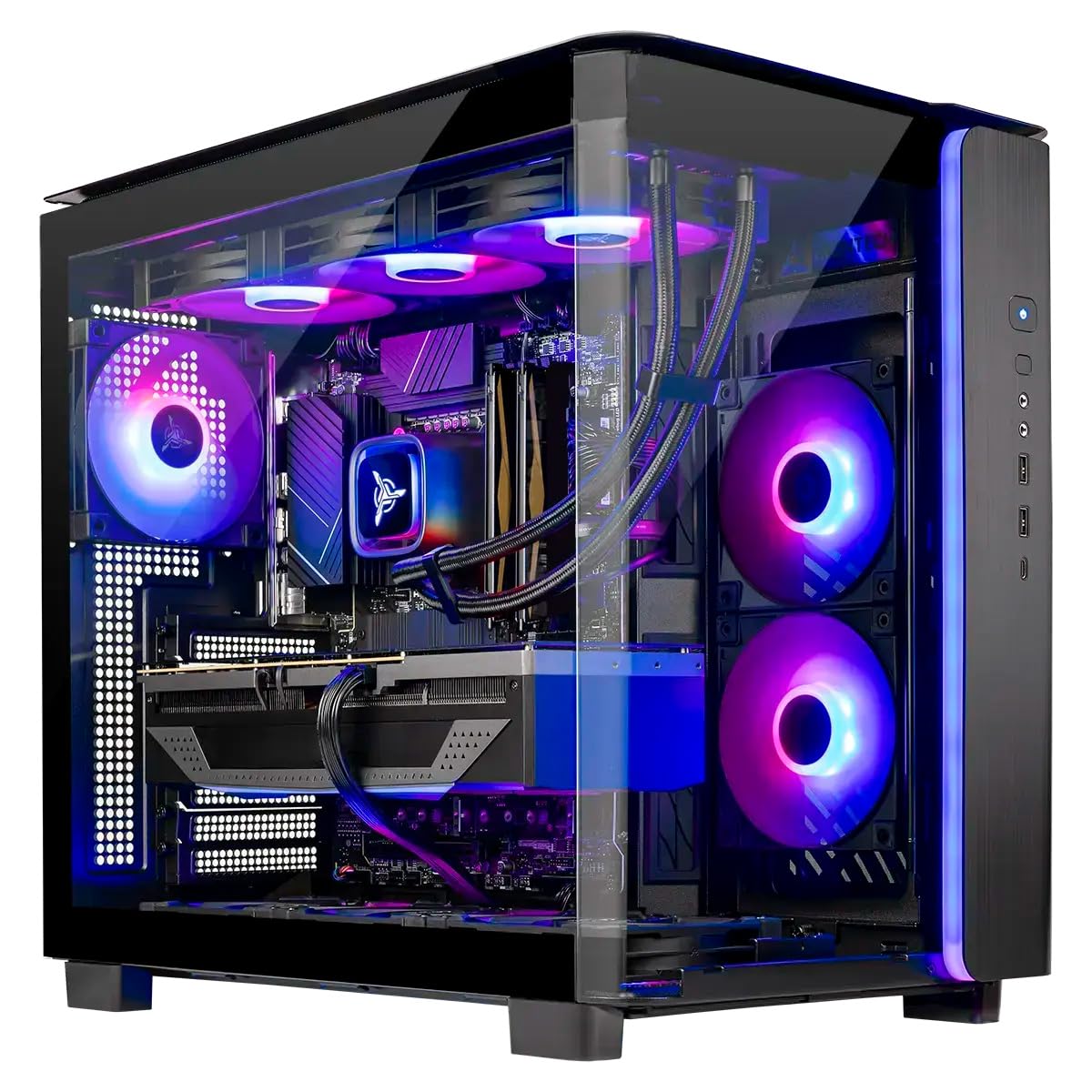
The King 95 features the AMD Ryzen 7 9850X3D — a processor with 8 cores and 16 threads boosting to 5.6GHz, paired with an impressive 96MB of L3 cache — combined with the RTX 5070 Ti 16GB on a 256-bit GDDR7 memory bus. This CPU-GPU pairing is nearly ideal for 1440p gaming, as the large L3 cache reduces memory latency and improves frame time consistency in simulation and open-world titles. The 5070 Ti’s 16GB VRAM buffer prevents the frame drops that occur when the GPU runs out of video memory.
The system includes 32GB of DDR5 at 6000MHz and a 360mm AIO liquid cooler with ARGB fans, which keeps the 9850X3D running cool even under extended gaming loads. The 1TB Gen4 NVMe SSD is fast but somewhat limited in capacity for a premium build — expect to add more storage for a large game library. The 850W Gold ATX 3.0 PSU supports the latest power delivery standards, making future GPU upgrades straightforward.
Skytech provides a 1-year warranty on parts and labor with free lifetime technical support, and the system is assembled in the USA. The King 95 case includes tempered glass, magnetic dust filters, and pre-installed Wi-Fi. Buyer feedback is overwhelmingly positive, with reports of the system handling games like Cyberpunk 2077 and Baldur’s Gate 3 at 1440p ultra settings with smooth 60+ FPS. Some owners noted that the included keyboard and mouse are basic, so plan to replace them for a premium gaming experience.
Why it’s great
- RTX 5070 Ti 16GB GDDR7 with 96MB 3D V-Cache CPU provides elite 1440p performance
- 360mm AIO liquid cooler ensures sustained peak performance without thermal throttling
- 850W ATX 3.0 PSU supports next-generation GPUs for easy upgrades
Good to know
- 1TB SSD fills quickly and additional storage is recommended for a large library
- Included keyboard and mouse are basic; upgrade recommended for serious gaming
6. Cooler Master NR2 Pro Gaming PC

The NR2 Pro packs the AMD Ryzen 7 9800X3D and RTX 5070 Ti 16GB into an 18.25-liter Mini ITX chassis — roughly the size of a large shoebox. This space-constrained design requires the Gigabyte B850I AORUS PRO mini-ITX motherboard and a custom 280mm AIO liquid cooler, which manages the 9800X3D’s 120W TDP effectively within the compact envelope. The RTX 5070 Ti’s 16GB GDDR7 memory and 256-bit bus ensure full 1440p capability despite the small footprint.
The system ships with 32GB of DDR5 at 6000MHz and a 2TB Gen4 M.2 SSD, providing ample storage for a modern game library. The V850 SFX Gold power supply is specifically designed for compact builds, offering 850W of clean power in a smaller form factor. The case supports both glass and mesh side panels, allowing you to prioritize aesthetics or airflow depending on your needs. USB 3.2 Gen 2 Type-C connectivity is available on the front panel.
Owner feedback highlights the system’s ability to run AAA games at 300+ FPS at 1080p, which translates to well over 120 FPS at 1440p on ultra settings. The compact design is praised by college students and those with limited desk space. However, two technical caveats appear consistently: the front USB-C port may not be connected from the factory, and the GPU riser cable can come loose during shipping, potentially causing a no-display scenario that requires reseating. These are minor assembly issues but worth checking upon arrival.
Why it’s great
- 18.25-liter Mini ITX footprint fits in tight desk spaces and small bags
- RTX 5070 Ti 16GB delivers full 1440p performance in a compact chassis
- 2TB Gen4 SSD provides generous storage without drive caddies
Good to know
- Front USB-C port may arrive disconnected; requires internal reseating
- GPU riser cable can loosen during shipping; may appear DOA without reseating
7. MSI Codex Z2 Gaming Desktop

The MSI Codex Z2 balances the AMD Ryzen 7 8700F — an 8-core, 16-thread processor boosting to 5.0GHz — with the RTX 5070 12GB on the Blackwell architecture. The 5070’s 12GB VRAM on a 192-bit bus is sufficient for 1440p gaming at high settings, though headroom for ray-traced textures is tighter than the 16GB variants. The 8700F, with its lower power draw compared to the 9800X3D, runs cooler and allows MSI to use an ARGB fan air cooler with four case fans.
The 32GB of DDR5 RAM and 2TB NVMe SSD provide both speed and capacity, making this one of the few mid-range systems that doesn’t require immediate storage upgrades. The MSI Center software allows for RGB lighting customization via the LED button on the case, and the Windows 11 Home installation is clean. The four-fan setup (three front intake, one rear exhaust) creates positive pressure airflow that reduces dust accumulation inside the case.
Buyer experiences are mixed. Many report excellent 1440p performance with smooth 160Hz gaming and cool temperatures, along with great MSI customer support. However, a concerning pattern emerges: some units experience SSD failure after one month, constant Blue Screen of Death after the return window closes, and Bluetooth connectivity issues that require a third-party PCIe Wi-Fi/BT card upgrade. The inconsistency suggests quality control varies between units. If you buy this, test thoroughly during the return period and consider an extended warranty.
Why it’s great
- 2TB NVMe SSD provides generous storage without immediate upgrade need
- Four-fan positive pressure airflow system keeps dust accumulation low
- Compact case design with tool-less access for easy component upgrades
Good to know
- Some units experience SSD failure or BSOD after the return window closes
- Built-in Bluetooth can be unreliable; many owners upgrade the module
8. ASUS ROG G700 (2025) Gaming Desktop PC

The ROG G700 combines the Intel Core Ultra 7 265KF with the RTX 5070 12GB in a striking dual-glass chassis that showcases the Aura Sync RGB lighting. The 265KF is a 20-core processor (8 P-cores + 12 E-cores) with a 5.5GHz turbo boost, providing strong single-threaded performance for gaming while the E-cores handle background tasks. The RTX 5070 12GB on a 192-bit bus handles 1440p well, but the 12GB VRAM may limit future ray tracing performance in VRAM-heavy titles.
ASUS implemented a quad-fan system with a 240mm liquid cooler and dust filters, which keeps the system running cool during extended sessions. The 58L chassis is spacious enough to support triple-slot GPUs, and the tool-less design makes component upgrades straightforward. Dolby Atmos audio and AI noise cancellation enhance the experience, particularly for voice chat during multiplayer games. Connectivity includes 2.5Gbps Ethernet and Wi-Fi 6, supporting low-latency online gaming.
Buyers consistently rate the G700 highly for its “solid performance,” easy setup, and smooth multitasking during gaming. One owner noted the motherboard is a micro ATX form factor rather than full ATX, which limits expansion slots. The included RGB keyboard and mouse are functional but basic. The ASUS ecosystem — including Armoury Crate software — provides granular control over RGB lighting and performance profiles, though some users find the software suite overly complex for a gaming PC.
Why it’s great
- Dual-glass chassis with Aura Sync lighting offers premium aesthetic appeal
- Quad-fan system with 240mm AIO delivers strong thermal performance
- 2.5Gbps Ethernet and Wi-Fi 6 support low-latency online gaming
Good to know
- Micro ATX motherboard limits expansion compared to full ATX
- Armoury Crate software can be complex and resource-heavy
9. Alienware Aurora Gaming Desktop ACT1250

The Alienware Aurora ACT1250 pairs the Intel Core Ultra 7 265F with the RTX 5070 12GB, featuring a 1000W Platinum-rated PSU — the highest capacity in this entire list. The 265F is a 20-core processor (8 P-cores, 12 E-cores) boosting to 5.3GHz, providing strong multi-threaded performance for both gaming and productivity. The RTX 5070’s 12GB on a 192-bit bus offers solid 1440p gaming, though the 1000W PSU is overkill for this configuration and future-proofs the system for a significant GPU upgrade.
The Aurora chassis features a matte basalt black finish with customizable AlienFX lighting zones, including the prominent stadium lighting ring. Alienware Command Center software controls lighting and performance profiles across different power states. The 1-year onsite service from Dell is a valuable inclusion — if a covered issue arises, Dell will come to your location rather than requiring you to ship the system. The system includes a wired keyboard and mouse, and connectivity covers Bluetooth and Wi-Fi.
Buyers report the system runs “silent” and handles games like Ghost of Tsushima and Portal 2 on high settings without issue. However, some encountered reliability concerns: one unit had a defective front ring light and misaligned USB-C port, with Dell support requiring a motherboard replacement that the owner claims could have been fixed with a bezel swap. Another owner reports the system sometimes refuses to start and requires a full power discharge. The boot time of ~2 minutes is also notably slow for a system with an NVMe SSD.
Why it’s great
- 1000W Platinum PSU provides exceptional headroom for future GPU upgrades
- Dell 1-year onsite service offers repair convenience at your location
- Matte black design with customizable AlienFX lighting looks premium
Good to know
- Some units have defective front lighting and USB-C alignment issues
- ~2-minute boot time is slow for an NVMe SSD system
10. CyberPowerPC Gamer Master Gaming PC

The CyberPowerPC Gamer Master is the most budget-conscious option for 1440p gaming, pairing the AMD Ryzen 7 8700F (8 cores, 4.1GHz base) with the RTX 5060 Ti 8GB. The 5060 Ti features 8GB of GDDR7 VRAM on a 128-bit bus — the narrowest memory interface among these picks, which limits performance at 1440p resolutions where texture data needs to move quickly. However, owners report it runs Call of Duty at 60+ FPS on ultra settings, demonstrating the 5060 Ti can handle 1440p when VRAM isn’t pushed to its limits.
The system includes 16GB of DDR5 RAM — the minimum for modern gaming — and a 1TB PCIe 4.0 SSD. The B850 chipset motherboard supports non-proprietary parts, meaning standard ATX upgrades are possible. The 650W Gold PSU provides adequate power for the 5060 Ti. The tempered glass side panel and customizable RGB lighting add aesthetic value, and the included keyboard and mouse make it a complete starter package.
Buyer feedback is overwhelmingly positive for this price point. One owner returned a lower-specced version and found the RTX 5060 Ti configuration runs “storm-chaser games beautifully” with quiet case fans and great cooling. Another noted it’s a “fantastic deal on an upper mid level gaming rig” with excellent value. A few owners experienced random restarts or USB power issues, which were resolved by adjusting Deep Sleep settings in BIOS — a known AM5 platform quirk. The 1-year parts and labor warranty with free lifetime tech support is a solid safety net for first-time gaming PC buyers.
Why it’s great
- Excellent budget entry point for 1440p gaming with RTX 5060 Ti
- Non-proprietary components allow for easy future upgrades
- Includes keyboard, mouse, and free lifetime tech support
Good to know
- 8GB VRAM on 128-bit bus limits 1440p performance in VRAM-heavy titles
- 16GB DDR5 is the minimum; 32GB recommended for multitasking
11. Lenovo Legion Tower 5i Gaming PC

The Legion Tower 5i is powered by the Intel Core Ultra 7 265F — a 20-core processor with 8 performance cores and 12 efficiency cores, boosting to 5.3GHz — paired with the RTX 5060 Ti 8GB. The 265F’s heterogeneous architecture provides solid single-threaded gaming performance while the E-cores handle background tasks efficiently. The RTX 5060 Ti’s 8GB VRAM is the same limitation as the CyberPowerPC model — sufficient for 1440p at medium-high settings in most titles, but the 128-bit memory bus will show its limits in VRAM-heavy games.
Lenovo includes 16GB of 5600MHz DDR5 RAM, which is expandable to 128GB across four slots — one of the highest upgrade ceilings in this list. The 1TB SSD provides adequate storage. The tower features a transparent, tool-less side panel for easy upgrades, and the 180W optimized air-cooling solution keeps noise levels low during gaming. Connectivity includes 2.5G Ethernet and Wi-Fi 6E, plus 3 months of Xbox Game Pass for immediate gaming access.
Buyers report strong performance in golf simulators and emulators at 4K resolution, though native 1440p gaming requires medium-high settings for the latest AAA titles. Some owners note the RTX 5060 Ti 8GB is the weakest link and recommend a GPU upgrade for “high fidelity modern titles.” The Lenovo build quality and customer support receive positive marks, with one buyer specifically praising that specs are “accurately listed unlike vague competitors.” The expandable memory and tool-less design make this a good platform for those who plan to upgrade gradually.
Why it’s great
- Supports up to 128GB DDR5 RAM, providing exceptional upgrade headroom
- Tool-less side panel and expandable design make upgrades easy
- Includes 3 months Xbox Game Pass for immediate gaming access
Good to know
- RTX 5060 Ti 8GB requires medium-high settings for demanding 1440p titles
- GPU may need upgrading for high-fidelity modern gaming
12. ZYNEEX Gaming Desktop PC R5 9600X
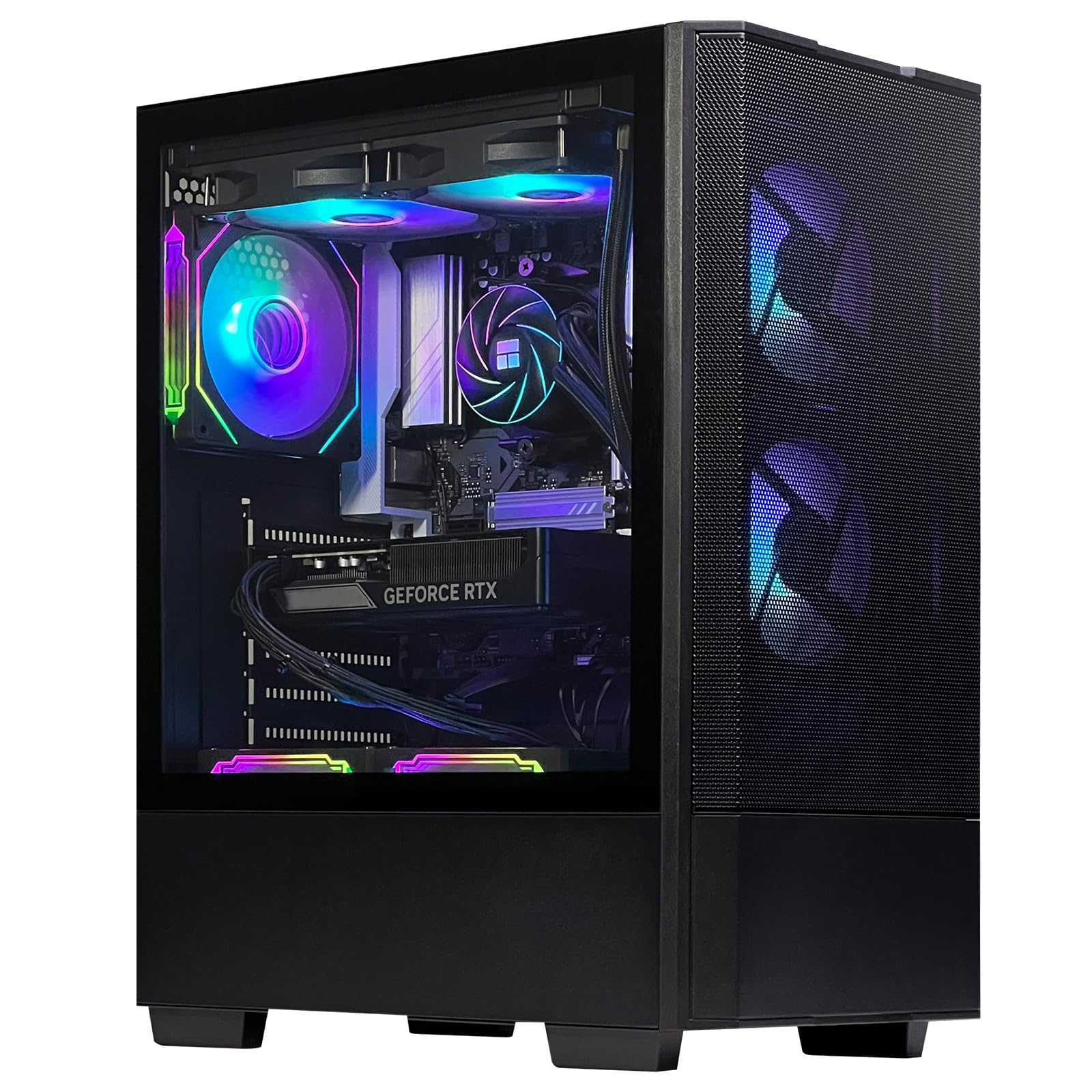
The ZYNEEX R5 9600X combines the AMD Ryzen 5 9600X (6 cores, 12 threads, boosting to 5.4GHz) with the RTX 5060 8GB on a 128-bit bus. The 9600X is a solid mid-range processor, offering strong single-threaded performance for gaming, but its 6 cores may show limitations in CPU-intensive titles that benefit from 8 or more cores. The RTX 5060 8GB is a step below the 5060 Ti, and the 128-bit memory bus further constrains 1440p performance — expect medium settings in demanding titles.
Where this system differentiates itself is the RAM: 32GB of DDR5 at 6000MHz is the sweet spot for gaming and multitasking, and exceeds what many similarly-priced competitors offer. The 240mm liquid cooler and five ARGB fans provide excellent thermal headroom, keeping the system quiet even under load. The 1TB NVMe SSD provides fast storage. The RGB lighting is customizable via the included remote control, allowing you to match your desk aesthetic.
Buyers report the system runs games like World of Warcraft, GTA 5, and Roblox smoothly at max settings, with the 32GB RAM enabling heavy multitasking. One owner noted the PC booted into a pre-existing user account, which suggests the system may not ship with a fresh Windows installation. Customer support responded and provided reset instructions that resolved the issue. The lightweight case design and small footprint make it easy to move between locations, though the compact form factor limits future GPU length compatibility to around 300mm.
Why it’s great
- 32GB DDR5 6000MHz RAM provides excellent multitasking headroom
- 240mm liquid cooler with 5 ARGB fans keeps thermals in check
- Lightweight and compact design for easy transport
Good to know
- RTX 5060 8GB with 128-bit bus requires medium settings for 1440p gaming
- Case may have limited GPU clearance for large aftermarket graphics cards
13. suevery Prebuilt Gaming PC White

The suevery PC pairs a laptop-derived Core i9-13900HX — which has 24 cores (8 P-cores + 16 E-cores) boosting to 5.4GHz — with the RTX 5060 8GB. This is an unusual combination: the CPU offers exceptional multi-threaded performance for productivity tasks, but the RTX 5060’s 8GB VRAM on a 128-bit bus creates a GPU bottleneck for 1440p gaming. In CPU-bound titles, the 13900HX provides headroom, but in GPU-bound games at 1440p, the 5060 will be the limiting factor.
The system features 32GB of DDR5 RAM and a 1TB NVMe SSD, providing adequate capacity for most users. The white curved tempered glass case with color-changing RGB fans offers a distinct aesthetic that stands out from the typical black boxes. The stand-up desktop design places ports on the top for easy access, and the multi-cooling RGB fan setup maintains low noise levels. The system supports up to 4 displays via the RTX 5060’s outputs (3x DisplayPort 1.4, 1x HDMI 2.0b).
Buyers report the system is “powerful” and runs games like Arc Raiders, Apex Legends (150+ FPS), and RDR2 on high/ultra settings easily. One owner noted missing drivers after a system format, which required downloading from the motherboard manufacturer’s website. The system is described as “smaller than expected” and perfect for gaming and browsing. Some units shipped with a white GPU in a white case, while others received a different color — suevery notes that “graphics card color and style is random.” For the price, this system delivers strong value if you need the CPU horsepower for productivity alongside 1440p gaming.
Why it’s great
- Core i9-13900HX with 24 cores provides exceptional CPU performance for productivity
- 32GB DDR5 RAM and 1TB SSD offer solid capacity at this price point
- White tempered glass case with RGB fans offers a unique aesthetic
Good to know
- RTX 5060 8GB creates a GPU bottleneck for 1440p gaming
- Graphics card color and style may be random; not guaranteed to match the case
FAQ
Is 8GB VRAM enough for 1440p gaming in 2025?
Does my 1440p gaming PC need a liquid cooler?
Should I buy a prebuilt 1440p gaming PC or build my own?
What FPS can I expect at 1440p with an RTX 5070 Ti?
Is DDR5 6000MHz necessary for 1440p gaming?
Final Thoughts: The Verdict
For most users, the best 1440p gaming pc winner is the Andromeda Insights Galaxy V2 because the RX 9070 XT 16GB and Ryzen 7 9800X3D provide the most balanced high-performance 1440p experience with excellent frame time consistency and future-proof VRAM capacity. If you want DLSS 3 frame generation and superior ray tracing performance, grab the STORMCRAFT Skyhawk PRO with its RTX 5070 Ti 16GB. And for a compact college dorm or small desk setup where space is at a premium, nothing beats the Cooler Master NR2 Pro.