
Our readers keep the lights on and my morning glass full of iced black tea. As an Amazon Associate, I earn from qualifying purchases.
Specs are compiled from manufacturer listings and verified buyer reviews and can change over time — please confirm the key details on the product page before buying.
Choosing a gaming monitor always depends on one thing: how fast can it keep up with what you see and what you react to. With OLED, the answer is instant — zero backlight lag, perfect blacks, and pixel response times that older LCD panels cannot touch. The catch is finding the right balance between refresh rate, color accuracy, and HDR performance without spending unnecessarily on features you will not use.
I’m Min — the founder and writer behind Gadgets Feed. This guide is built by comparing the manufacturers’ published specifications and the patterns across verified customer reviews, so you get each pick’s real strengths and trade-offs instead of marketing spin.
Whether you play competitive esports, AAA single-player adventures, or a mix of both, the best 1440p oled gaming monitor delivers deep contrast and fast motion without stretching your setup beyond what you actually need.
Quick Picks
- MSI MPG 271QRX QD-OLED — Top Performer
- ASUS ROG Strix XG27AQDMES — Smartest Protection
- LG 27GS93QE UltraGear OLED — Best Value
- AOC 27″ QD OLED Q27GAZD — Budget Champion
- ASUS ROG Strix XG27AQDMG — Glossy Premium
- Pixio PX277 OLED Max V2 — Versatile Hub
- INNOCN GA27M1Q — Speed Demon
- Samsung Odyssey OLED G6 G61SD — Premium Design
- Sony INZONE M10S — Pro-Grade Esports
How To Choose The Best 1440p OLED Gaming Monitor
Buying an OLED gaming monitor is a big step up from IPS or VA panels, but the specs can be confusing. Here is what actually matters for your setup.
Refresh Rate: What speed do you really need?
240Hz is the balance for most gamers — it is smooth enough for competitive play and works perfectly with the latest graphics cards at 1440p. Jumping to 360Hz or 500Hz helps only if you play fast-twitch shooters and own a top-tier GPU that can push those frame rates. For story-driven games, the difference between 240Hz and 360Hz is barely noticeable.
OLED Panel Type: WOLED vs QD-OLED
WOLED uses white OLED subpixels with a color filter, giving you deeper blacks in bright rooms and better anti-glare performance. QD-OLED uses quantum dots to create wider color volume and brighter highlights, but it can show a purple tint in direct light. If your room has windows behind you, a WOLED with a matte finish will look better day-to-day.
Burn-In Protection: What the monitor does to protect itself
All OLED monitors include pixel refresh, screen shift, and logo dimming to prevent burn-in. Some brands add extra hardware: ASUS uses a Neo Proximity Sensor that detects when you step away, MSI includes OLED Care 2.0, and Sony uses a custom heatsink for passive cooling. These features reduce the need for manual maintenance but do not eliminate it entirely.
HDR Performance: True Black vs peak brightness
VESA DisplayHDR True Black 400 is the standard for 1440p OLED monitors — it guarantees deep black levels and decent highlights. Some monitors claim HDR400 or HDR500, but the True Black certification is what actually ensures the black levels look right. If HDR movies and games are your priority, look for True Black 400 or higher.
Quick Comparison
| Model | Best For | Refresh Rate | Contrast Ratio | Brightness | Amazon |
|---|---|---|---|---|---|
| MSI MPG 271QRX QD-OLED | Competitive esports | 360 Hz | 1,000,000:1 | 250 nits | $529.99$629.99Amazon |
| ASUS ROG Strix XG27AQDMES | Burn-in protection features | 240 Hz | — | — | $529.99Amazon |
| LG 27GS93QE UltraGear | Bright-room use and HDR | 240 Hz | 1.5M:1 | 400 nits | $552.18$899.99Amazon |
| AOC 27″ QD OLED Q27GAZD | Budget value | 240 Hz | 1,500,000:1 | — | $549.99Amazon |
| ASUS ROG Strix XG27AQDMG | Glossy OLED picture quality | 240 Hz | — | — | $599.00Amazon |
| Pixio PX277 OLED Max V2 | USB-C charging and KVM | 240 Hz | 1,500,000:1 | 400 nits | $599.99Amazon |
| INNOCN GA27M1Q | Highest refresh rate | 500 Hz | 1,500,000:1 | — | $699.99$774.99PrimeAmazon |
| Samsung Odyssey OLED G6 G61SD | Dynamic cooling and sleek design | 240 Hz | 1,000,000:1 | 250 nits | $579.99$799.99Amazon |
| Sony INZONE M10S | Pro-level esports with tournament modes | 480 Hz | 1,500,000:1 | 275 nits | $898.00Amazon |
In‑Depth Reviews
1. MSI MPG 271QRX QD-OLED

The esports machine that pushes refresh rate past the competition.
The QD-OLED panel delivers a 1,000,000:1 contrast ratio, meaning black areas in dark scenes look truly black rather than gray. At 250 nits of brightness, it is not the brightest OLED here, but the Delta E≤2 color accuracy from the start means you do not have to tweak settings before playing.
Buyers report that the colors are “vibrant” and the text clarity for office work is “crisp,” though the stand has limited adjustment range compared to competitors. One reviewer with a Mac setup noted a dual-monitor handshake issue that required disabling DSC to run both screens at 120Hz — a fix, but an extra step. The MSI OLED Care 2.0 reduces burn-in risk by detecting static images, and the HDMI 2.1 port supports full 48 Gbps bandwidth for console gaming.
Who it crushes for: Competitive players who want the highest frame-rate headroom at 1440p without moving to 4K. The one catch: 250 nits brightness means you will want a room without direct sunlight on the screen; the LG below is 60% brighter at 400 nits for the same price tier.
The 360Hz edge: If you can push 300+ fps in your games, this is the monitor that shows every frame.
Skip it for: Bright-room use where 250 nits may wash out highlights in daytime.
2. ASUS ROG Strix XG27AQDMES
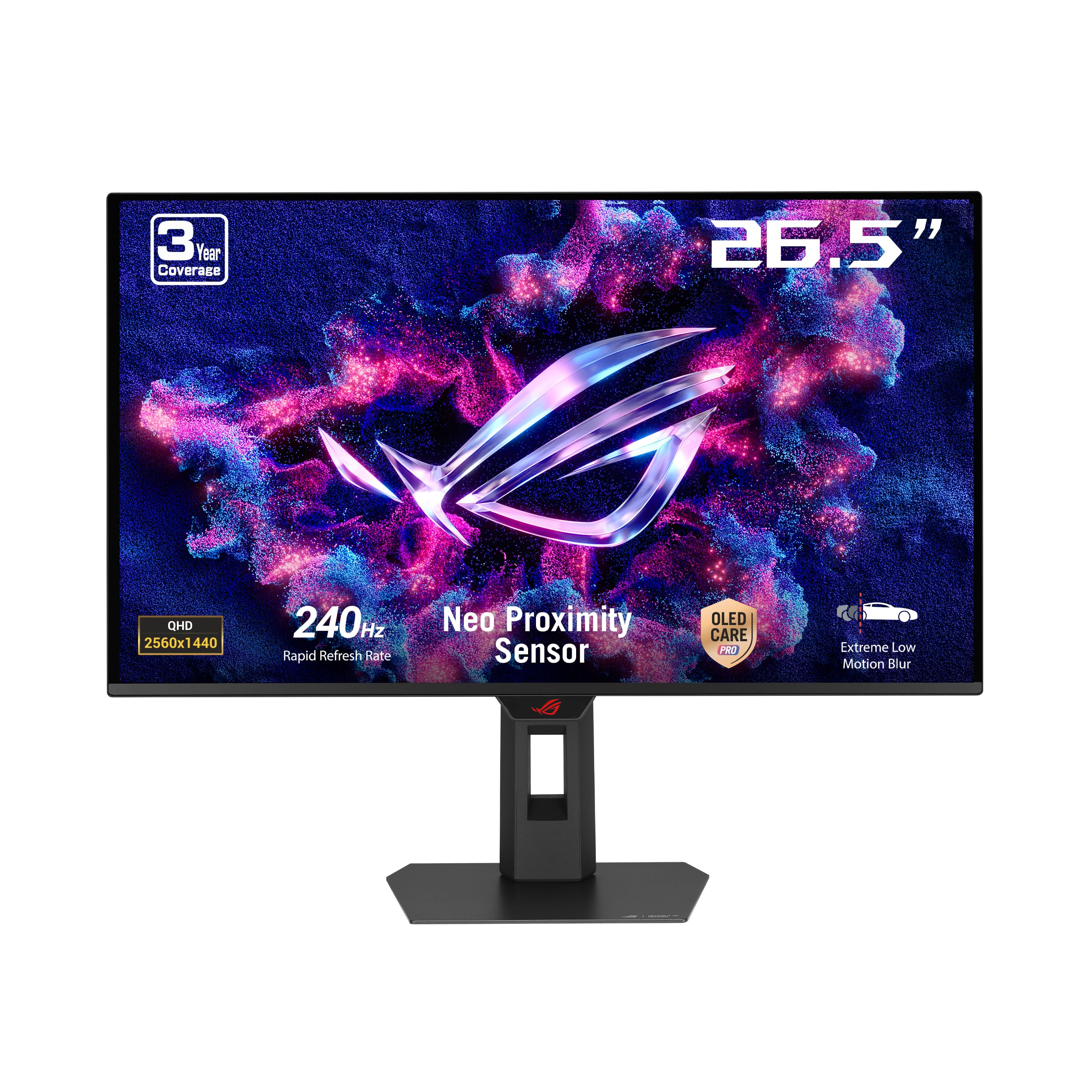
A QD-OLED that watches your seat to prevent burn-in.
ASUS packs a Neo Proximity Sensor into this 27-inch QD-OLED — a small sensor that detects when you walk away from your desk and automatically blanks the screen, reducing burn-in risk during breaks. The 240Hz refresh rate and 0.03ms response time make it feel just as fast as competitors, while the 99% DCI-P3 color gamut ensures HDR content looks rich. It comes with the DisplayWidget Center app, so you adjust OLED Care settings and switch between game profiles without digging through the on-screen menus.
Owners mention that OLED black levels make “Spiele wie Cyberpunk spektakulär aussehen”, with improved HDR and smooth motion at native 1440p. One reviewer noted the lack of a built-in USB hub or KVM as a missing feature at this price, and that the OLED cleaning reminder notification appears too frequently. The monitor weighs 6.8 kg, so plan for a sturdy monitor arm if you want to move it around.
What stands out
- Neo Proximity Sensor automatically protects against burn-in.
- 99% DCI-P3 gamut delivers vibrant HDR colors.
- G-Sync Compatible certification ensures tear-free gameplay.
What you give up
- No USB hub or KVM for multi-device setups.
- OLED cleaning reminder pops up frequently enough to annoy some buyers.
Best for peace-of-mind buyers: If you leave your desk often during gaming sessions, the auto-sensing burn-in protection alone is worth the pick.
Look elsewhere if: You need a built-in KVM switch to toggle between a PC and a console with one keyboard and mouse.
3. LG 27GS93QE UltraGear OLED

The WOLED that stays bright when your room does not stay dark.
The 1.5M:1 contrast ratio and VESA DisplayHDR True Black 400 certification mean dark scenes in games like Resident Evil or Alan Wake 2 look deep and detailed. At 240Hz with a 0.03ms GtG response time, it keeps up with fast shooters just as well as pricier options.
Customers note that the WOLED technology provides “true inky blacks” that avoid the purple washout of QD-OLED in bright rooms. One buyer mentioned the 0.03ms GtG response time and 1440p 240Hz combination as a “plug-and-play” experience with excellent build quality. The monitor also includes HDMI 2.1, DisplayPort 1.4, and a 2-year limited warranty that covers the OLED display panel — a longer coverage period than most budget OLEDs.
Room-brightness champion: The matte screen handles window light better than any glossy QD-OLED here. Only downside: Reviewers point out that brightness is lower than a typical IPS, so you will want a dimmer room for the best HDR experience.
Grab it if: You game in a room with some ambient light and want the best black-level performance without reflections distracting you.
Not ideal for: Users who want a glossy, punchy look — the WOLED matte finish is less “pop” and more accurate.
4. AOC 27″ QD OLED Q27GAZD

QD-OLED quality at a price that leaves room for a GPU upgrade.
The AOC Q27GAZD packs a QD-OLED panel with a 1,500,000:1 contrast ratio — 50% higher than the MSI above — into a chassis that costs noticeably less. The 240Hz refresh rate and 0.03ms GtG response time are standard for this tier, but the HDR400 True Black certification ensures deeper blacks in supported games and movies. Color coverage includes 147.6% sRGB and 110.2% DCI-P3, so out-of-the-box accuracy is strong for both gaming and creative work.
Shoppers say that the picture quality is “insane” for the price, with HDR that impresses even next to monitors costing twice as much. One owner reported a “reverse curve” illusion when moving from a curved to a flat display — the screen appears to curve inward temporarily — which is a brain adjustment rather than a defect. The stand is basic with limited tilt adjustment, so most owners recommend a VESA monitor arm for proper ergonomics.
Saves you money on
- Panel quality: 1,500,000:1 contrast rivals monitors costing hundreds more.
- Color coverage: 147.6% sRGB and 110.2% DCI-P3 for accurate HDR.
- Adaptive-Sync eliminates screen tearing without a premium upcharge.
Where corners are cut
- Stand has no height adjustment — you will want a VESA mount.
- HDMI port limited to 165Hz; use DisplayPort for the full 240Hz.
- Glossy screen shows reflections in bright rooms.
Best for budget-first buyers: If you want true QD-OLED contrast and 240Hz speed without stretching your wallet, this is the one.
skip it if: You cannot use a monitor arm — the stock stand is too short and lacks pivot adjustments for comfortable long sessions.
5. ASUS ROG Strix XG27AQDMG

A glossy WOLED that makes every game look like a cutscene.
The XG27AQDMG uses a third-generation WOLED panel with a glossy finish — the same type of anti-reflective coating you see on high-end TVs — so colors pop with more saturation and blacks look even deeper than matte OLEDs. At 240Hz and 0.03ms response time, it matches the speed of the LG above, but the ROG-exclusive Anti-flicker technology helps reduce eye fatigue during frame-rate dips. ASUS backs this monitor with a 3-year warranty that includes burn-in coverage, giving you long-term confidence.
Buyers report that moving from a 165Hz 1080p IPS to this panel is a “massive upgrade” — the OLED colors, blacks, and contrast are described as “incredible” in competitive games. One customer observed that text appears slightly less sharp than an LCD at the same resolution, which is typical for WOLED subpixel layouts, but “fine” for daily use. The custom heatsink keeps the panel running cool passively, so there is no fan noise.
The glossy advantage: Colors look punchier and blacks appear deeper than matte panels. One thing to know: VRR flickering was fixed by disabling VRR in some setups, according to one review — test your GPU combination before committing.
Reach for this if: You want the richest, most vibrant image quality from a 1440p OLED and are willing to manage reflections in a controlled-light room.
Think twice if: You need built-in speakers or a USB-C port with charging — this monitor skips both.
6. Pixio PX277 OLED Max V2
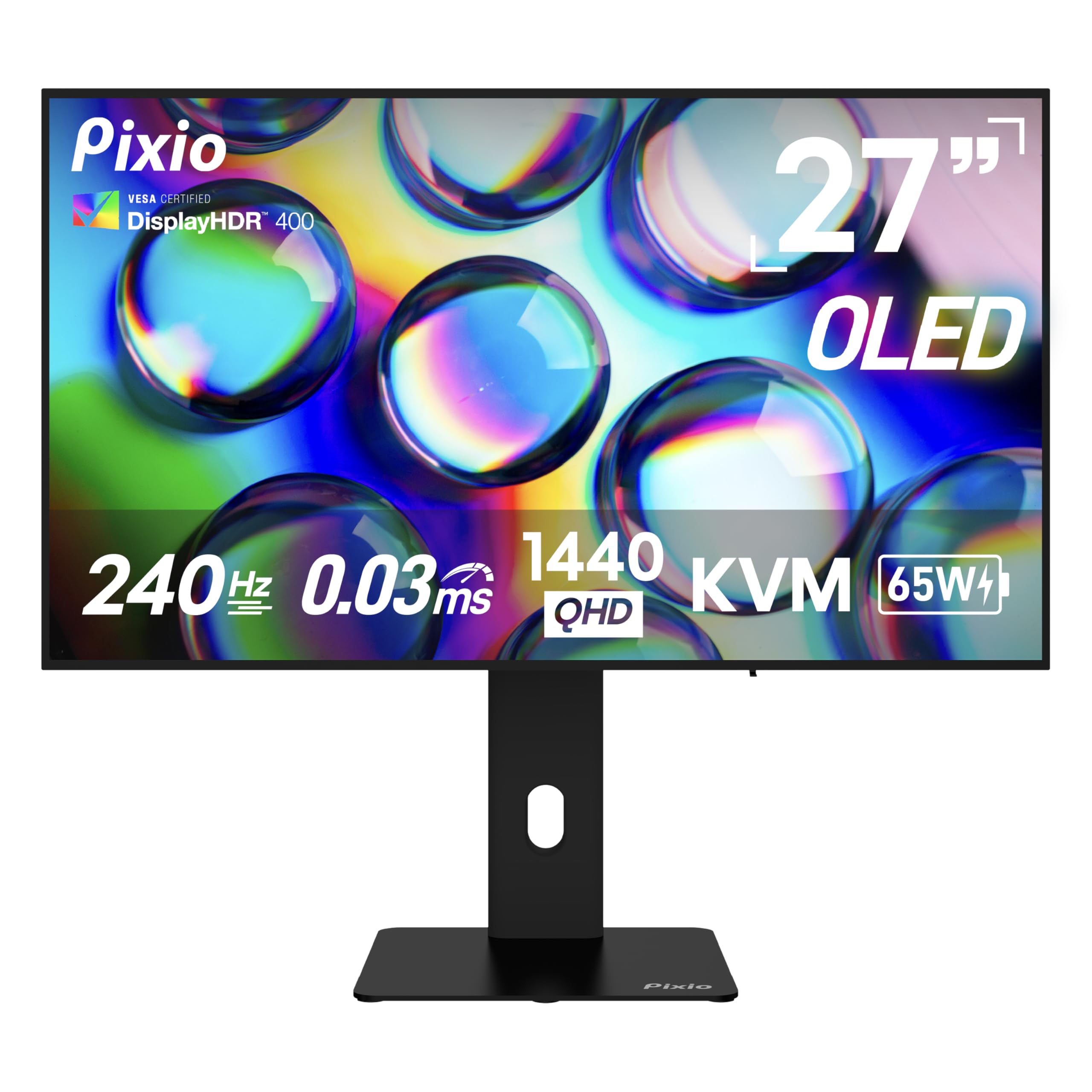
A WOLED that doubles as a docking station for your laptop.
The Pixio PX277 OLED Max V2 sets itself apart with a USB-C port that delivers up to 65W of power delivery, so you can connect and charge a laptop through a single cable while getting 1440p at 240Hz. It also includes a built-in KVM switch, letting you control a PC and a console with one keyboard and mouse — a rare feature at this price. The 1,500,000:1 contrast ratio and 400 nits brightness match the LG above, but Pixio adds built-in speakers for basic audio output.
Owners mention that the monitor is “a great OLED” overall, though the pixel refresh prompt appears mid-use and requires manual cancellation to avoid the screen turning off during a game. One user highlighted that the included DisplayPort cable is only version 1.2, despite the monitor supporting DisplayPort 1.4 — so you may need to buy a better cable for full bandwidth. The fully adjustable stand includes height, tilt, swivel, and pivot, which beats the basic stands on many competitors.
What makes it unique
- USB-C with 65W power delivery — charge your laptop while using the monitor.
- Built-in KVM switch toggles between devices without re-plugging.
- Four video inputs: 2x HDMI 2.1 and 1x DisplayPort 1.4 plus USB-C.
What to plan for
- Pixel refresh prompt cannot be fully disabled and interrupts gameplay.
- Included DP cable is version 1.2, not 1.4 — upgrade recommended.
- Built-in speakers are weak — buyers call them “terrible” with no depth.
Best for laptop gamers: If you want one-cable connectivity for work (charging) and play (gaming), this is the only OLED in the list with USB-C power delivery.
Not for: Purely competitive gamers who want zero interruptions — the pixel refresh pop-up may annoy mid-match.
7. INNOCN GA27M1Q

500Hz in a 1440p QD-OLED — the fastest panel on this list.
INNOCN pushes the refresh rate ceiling to 500Hz at 1440p — a 50% jump over the 360Hz MSI — making this the monitor for players who own a top-tier GPU and want every millisecond advantage in games like CS2 or Apex Legends. The QD-OLED panel delivers a 1,500,000:1 contrast ratio and 99% DCI-P3 color gamut, so the image stays vibrant even at extreme speeds. It includes two DisplayPort inputs and two HDMI 2.1 ports, plus a fully adjustable stand with height, tilt, and swivel adjustments.
Customers note that the 500Hz is “phenomenal” and the response time is “very noticeable” compared to other panel types. One shopper added that you need a very powerful PC — something like a 9800X3D and 7900 XTX — and games that actually hit 400+ fps to see the benefit. The HDR500 certification provides richer highlights than True Black 400, but the monitor is a lesser-known brand, so customer support experience may vary compared to ASUS or LG.
Who it crushes for: Esports players with a flagship GPU who want the highest possible refresh rate at 1440p. The reality check: Most games never hit 500 fps, so you may not always use the full headroom; the 240Hz and 360Hz monitors below offer better brand support for similar real-world performance.
Buy it if: You are building a top-end PC specifically for competitive shooters and want the monitor to never be the bottleneck.
pass on it if: You play story-driven games at 60-120 fps — the 500Hz advantage never sees use, and you overpay for speed you do not need.
8. Samsung Odyssey OLED G6 G61SD

Samsung’s QD-OLED with a unique heat pipe for burn-in protection.
The Odyssey G6 uses a Pulsating Heat Pipe — a first in monitors — that cools five times better than the old graphite sheet method, reducing the core temperature and lowering the long-term risk of burn-in. The 240Hz QD-OLED panel delivers a 1,000,000:1 contrast ratio and Glare Free technology that Samsung says makes the screen 54% less glossy than conventional anti-reflection film. It also includes a thermal modulation system that adjusts brightness based on surface temperature to prevent overheating.
Reviewers point out “absolutely stunning visuals” with deep blacks and vibrant colors that make turn-based RPGs and visual novels look beautiful. One review noted that the pixel shift feature cannot be disabled, leaving small gaps at the display edges — a trade-off for burn-in protection that some find distracting. The silver metal finish stands out on a desk, but the lack of a USB-C port limits modern connectivity compared to the Pixio above.
Unique features
- Pulsating Heat Pipe cools the panel more effectively than graphite sheets.
- Glare Free coating reduces reflections without a matte layer.
- Taskbar and logo detection automatically dims static elements.
What may bother you
- Pixel shift is always on — cannot be disabled, leaving visible borders.
- Silver frame may feel less rich in a dark room than black bezels.
- No USB-C — relies on DisplayPort and HDMI for video input.
Best for: Samsung ecosystem fans and buyers who want active thermal management as extra burn-in insurance.
Consider carefully if: Pixel shift gaps at screen edges will bother your field of view during desktop use.
9. Sony INZONE M10S

Sony’s 480Hz OLED that shrinks to 24.5 inches for tournament play.
The INZONE M10S was developed with the Fnatic esports team and includes a Tournament Mode that switches the display to a 24.5-inch size — mimicking the screen size many pro players used on older LCD monitors — so your muscle memory stays consistent at LAN events. The 480Hz refresh rate and 0.03ms response time at 1440p make it one of the fastest OLEDs available, and the 1,500,000:1 contrast ratio keeps HDR content rich. Sony backs it with a 3-year limited warranty that includes OLED burn-in coverage.
Shoppers say that the monitor is a “complete standout” with input lag described as “literally non-existent” and colors that are “truly beautiful.” One reviewer noted that the low-profile 4mm stand base maximizes desk space, freeing room for a large mouse pad. The passive cooling system uses a custom heatsink with no fan, so it stays silent even during long sessions. It includes DisplayPort 2.1 (UHBR10) and two HDMI 2.1 ports, but the 275 nits peak brightness is lower than the LG’s 400 nits.
The ultimate for esports: The dual-screen-size mode lets you train on 24.5 inches at home and compete on the same size at tournaments. The trade-off: At 275 nits peak brightness, you lose some HDR punch compared to the LG and Pixio — esports performance takes priority over cinematic visuals.
If you compete: The tournament-ready features and 480Hz speed make this the monitor for players who take ranked matches seriously.
Not for: Single-player HDR enthusiasts — the modest brightness holds back highlights in games like Cyberpunk compared to rivals at 400 nits.
Understanding the Specs
Refresh Rate
The number of times per second the screen redraws the image. 240Hz is standard for 1440p OLEDs and feels smooth to almost every gamer. 360Hz and 500Hz exist for top-level competitive players with powerful GPUs. If your graphics card cannot hit those frame rates in your favorite games, the extra speed does nothing for you.
Contrast Ratio
This measures the difference between the brightest white and the darkest black a monitor can show. OLEDs have an advantage here because each pixel produces its own light — black pixels turn off completely. Ratios of 1,000,000:1 or 1,500,000:1 are typical for these monitors, giving you deep blacks without the backlight bleed of LCDs.
Brightness (nits)
A nit is a unit of brightness. 250 nits is fine for a dim gaming room, but 400 nits handles moderate ambient light better and makes HDR highlights pop more. All OLED monitors in this list use VESA DisplayHDR True Black certification, which guarantees proper black-level performance even when brightness is lower than premium LCDs.
Response Time (GtG)
This measures how fast a pixel changes from gray to gray. 0.03ms GtG is the standard across nearly all 1440p OLED gaming monitors — it is effectively instant, meaning you see no ghosting or motion blur during fast camera movements. This is a key advantage over IPS and VA panels, which typically measure 1ms to 4ms.
FAQ
Can I use a 1440p OLED gaming monitor for office work?
Does a 360Hz or 500Hz monitor make a visible difference over 240Hz?
What is the difference between WOLED and QD-OLED?
How long do OLED gaming monitors typically last before burn-in?
Are 1440p OLED monitors good for console gaming?
Do I need to run pixel refresh manually on these monitors?
Can I mount a 1440p OLED gaming monitor on a monitor arm?
Why do some OLED monitors have lower brightness than IPS panels?
Which refresh rate monitor matches the RTX 5070 Ti best?
Do these monitors come with display cables in the box?
Final Thoughts: The Verdict
For most buyers, the best 1440p oled gaming monitor winner is the LG 27GS93QE UltraGear because it combines 400 nits brightness, a matte WOLED panel that handles bright rooms, and 240Hz smoothness at a price that undercuts most premium rivals. If you want the highest refresh rate for competitive play, grab the MSI MPG 271QRX QD-OLED with its 360Hz — 50% more than the LG. And for tournament-level esports with a unique dual-size mode, the standout is the Sony INZONE M10S.
How We Picked
We do not accept paid placement. Every pick is matched to a real buyer and a real use-case; we do not hands-on test units.
Sources & Methodology
Specifications: manufacturer listings and product documentation. Review insights: verified customer reviews, as of July 2026. Pricing: not shown on this page (it changes often); check the current price via the retailer link.
As an Amazon Associate, Gadgets Feed earns from qualifying purchases. This does not affect which products we feature.
Product prices and availability are accurate as of the date/time indicated and are subject to change. Any price and availability information displayed on Amazon at the time of purchase will apply to the purchase of this product. As an Amazon Associate I earn from qualifying purchases.
CERTAIN CONTENT THAT APPEARS ON THIS SITE COMES FROM AMAZON. THIS CONTENT IS PROVIDED "AS IS" AND IS SUBJECT TO CHANGE OR REMOVAL AT ANY TIME.
Amazon and the Amazon logo are trademarks of Amazon.com, Inc. or its affiliates.