
Our readers keep the lights on and my morning glass full of iced black tea. As an Amazon Associate, I earn from qualifying purchases.
When you buy a 1440P ultrawide gaming monitor, you are not just getting sharper pixels — you are getting a 21:9 curved screen that shows you about 33 percent more of the game world sideways than a standard 16:9 display. That extra width means you spot enemies sneaking up from the corner of your eye and take in sprawling open-world landscapes without turning your head.
I’m Min, the writer behind Gadgets Feed. This guide compares published specs and patterns from verified customer reviews so you see each monitor’s real strengths and trade-offs, not marketing language.
Below are four monitors that all hit the core specs: a 3440×1440 resolution (the number of horizontal and vertical pixels) and a refresh rate of 120Hz or higher. They differ sharply in panel tech and price. Think of this as your first filter to decide which 1440p ultrawide gaming monitor matches how you actually play and what you can live with day to day.
Quick Picks
- Alienware AW3423DW — Top Performer
- LG 34GS95QE — Best Refresh
- ASUS ROG Strix XG34WCDG — Premium Pick
- LG 34G600A-B — Budget Champion
How To Choose The Best 1440P Ultrawide Gaming Monitor
Picking the right ultrawide means matching three things: your graphics card (can it push a 3440×1440 resolution over 120Hz?), your tolerance for OLED quirks like pixel-refresh pop-ups, and the kind of games you play most. Here is what separates the options.
Panel Technology: OLED vs VA vs QD-OLED
The panel type controls image quality more than any other spec. VA (Vertical Alignment) panels, like the one in the LG 34G600A, deliver a 4000:1 contrast ratio — the difference between the darkest black and brightest white — which is good for dark scenes without the cost of OLED. OLED and QD-OLED (Quantum Dot OLED) panels, on the other hand, hit near-infinite contrast because each pixel produces its own light and can turn completely off. A 1.5M:1 or 1,000,000:1 contrast ratio means black areas are literally black, not dark gray. The catch is that OLEDs can show temporary image retention if a static element stays on screen too long. Manufacturers handle this with automatic pixel-refresh cycles that run every few hours.
Refresh Rate and Response Time
Refresh rate (measured in hertz, or Hz) tells you how many times the screen updates each second — 160Hz means 160 frames per second, 240Hz means 240. Response time (measured in milliseconds, or ms) tells you how fast a pixel changes from one color to another, which determines motion blur. A VA monitor at 1ms MBR (Motion Blur Reduction) is respectable for most games, but an OLED at 0.03ms GtG (Gray-to-Gray) is so fast that fast-moving objects in shooters look physically sharp with no ghosting behind them. If you play competitive first-person shooters or racing sims, the combination of 240Hz and sub-0.1ms response time is a noticeable edge.
Curvature: 1800R vs 800R
The curvature number (measured in the radius of the circle the curve follows, in millimeters) tells you how aggressive the bend is. A lower number like 800R means a tighter curve — the monitor wraps around you more, which can make you feel inside the game world but can also make the screen look oddly bent when you are doing non-gaming tasks like spreadsheets or browsing. A gentler 1800R curve still gives immersion but feels more natural for mixed use. Most first-time ultrawide buyers find 1800R easier to adjust to.
Quick Comparison
On smaller screens, swipe sideways to see the full table.
| Model | Best For | Panel / Contrast | Refresh Rate | Response Time | Amazon |
|---|---|---|---|---|---|
| Alienware AW3423DW | Color-critical gaming & work | QD-OLED / 1,000,000:1 | 175Hz | 0.1ms GtG | $839.95Amazon |
| LG 34GS95QE | Competitive FPS with 240Hz | OLED / 1.5M:1 | 240Hz | 0.03ms GtG | $635.02Amazon |
| ASUS ROG Strix XG34WCDG | Burn-in peace of mind | QD-OLED / 1,500,000:1 | 175Hz | 0.03ms GtG | $985.00Amazon |
| LG 34G600A-B | Budget ultrawide with no OLED worry | VA / 4000:1 | 160Hz | 1ms MBR | $387.99Amazon |
In‑Depth Reviews
1. Alienware AW3423DW

A QD-OLED that makes every game look cinematic with rich colors and deep blacks
If your main priority is color accuracy and contrast, this Alienware delivers. It uses a QD-OLED (Quantum Dot OLED) panel that covers 149 percent of the sRGB color gamut — the range of colors it can display. That is 51 percent more color coverage than the LG 34G600A’s 99 percent, so reds in a sunset or greens in a forest look richer and more saturated. The 1,000,000:1 contrast ratio is a dramatic jump over that monitor’s 4000:1, meaning black areas look truly black while bright elements like fire or muzzle flashes pop in a way a VA panel cannot match.
The biggest trade-off is the refresh rate. At 175Hz, it is 65Hz slower than the LG 34GS95QE’s 240Hz. Also, buyers report a pixel-refresh pop-up every four hours that takes about seven minutes, and one reviewer noted that the panel has no firmware upgrade path, so what you get out of the box is permanent. The lack of HDMI 2.1 means you are locked to 100Hz over HDMI. Still, for single-player RPGs, sim racing, and creative work, the image quality is in a league of its own, and Alienware covers burn-in for three years.
Why it’s great
- Stunning color volume — 149% sRGB gamut makes games look vibrant and lifelike
- Deep 1,000,000:1 contrast ratio means true black levels for immersive HDR
- 3-year burn-in warranty covers the main OLED anxiety
Good to know
- No HDMI 2.1, so HDMI connection caps at 100Hz
- Forced pixel refresh every 4 hours (7 min each) can interrupt gaming sessions
- Glossy panel can show reflections in a bright room
Best for: immersive single-player games and color-sensitive work where contrast depth matters more than raw speed
Skip if: you need the absolute fastest 240Hz for competitive shooters, or if a pop-up every four hours will drive you crazy
2. LG 34GS95QE

An OLED that runs at 240Hz, so you see motion with no blur in fast shooters
For competitive gamers who want every millisecond of reaction time, the LG 34GS95QE is the standout choice. Its 240Hz refresh rate is 50 percent faster than the Alienware’s 175Hz, and the 0.03ms GtG (Gray-to-Gray) response time means motion blur is basically nonexistent. Fast-moving targets in Call of Duty or Apex Legends stay physically sharp with no ghosting. The 800R curve — a much tighter bend than the standard 1800R on most ultrawides — wraps the display around your peripheral vision, which helps you spot movement from the corner of your eye in FPS games without turning your head.
That steep curve, however, is a double-edged sword. Owners mention that it can feel weird for desktop work or spreadsheet tasks because the edges of the screen appear to bend inward more noticeably. Compared to the Alienware above, the LG has a lower color gamut (standard OLED vs QD-OLED), so reds and greens are not as eye-popping, but the 1.5M:1 contrast ratio still delivers true blacks. One buyer mentioned no burn-in after eight months of heavy use with a black desktop and screen jitter enabled, which is reassuring. The anti-glare matte coating also helps in bright rooms, though some say it slightly softens text clarity.
Why it’s great
- 240Hz + 0.03ms gives a tangible advantage in fast-paced shooters
- True OLED black levels with 1.5M:1 contrast ratio make dark scenes stunning
- G-Sync Compatible and FreeSync Premium Pro cover both GPU ecosystems
Good to know
- 800R curve is very aggressive; not ideal for mixed work/gaming use
- Text clarity is weaker than VA or IPS panels due to OLED subpixel layout
- Menu button on the back is awkward to reach, causing hand cramps
Best for: competitive first-person shooter players who value 240Hz motion clarity over all else
Skip if: you need a monitor for office work or coding, where text sharpness and a gentler curve matter more
3. ASUS ROG Strix XG34WCDG

A QD-OLED that protects itself with a sensor that knows when you leave your desk
ASUS included a feature here that no other monitor on this list can match: a Neo Proximity Sensor at the front of the panel that detects when you step away from your desk and automatically switches the screen to a black image. This reduces the risk of static elements (like a taskbar or heads-up display) burning in when you are away, which is a clever long-term-care trick. The panel itself is a QD-OLED with a 1,500,000:1 contrast ratio — even deeper than the Alienware’s 1,000,000:1 — and a 175Hz refresh rate with 0.03ms response time. It also supports VESA DisplayHDR 400 True Black, so dark scenes in games like Dune Awakening look layered rather than crushed.
The downside is that the proximity sensor can be inconsistent — customers note random shutoffs when they are still sitting in front of the screen, which is annoying mid-game. Another weak spot is the lack of built-in speakers (common on OLEDs, but the LG 34G600A below does include them). The included ASUS DisplayWidget Center app lets you adjust settings with a mouse instead of fumbling with on-screen menus, which is a small but welcome convenience. Compared to the LG 34GS95QE, the XG34WCDG loses 65Hz of refresh rate, but for most single-player and MMO gamers, 175Hz is already more than enough, and the extra burn-in protection gives peace of mind that the other OLEDs do not fully offer.
Why it’s great
- 1,500,000:1 contrast ratio delivers the deepest blacks on this list
- Neo Proximity Sensor reduces burn-in risk automatically when you walk away
- 3-year warranty with burn-in coverage and easy ROG pouch packaging
Good to know
- Neo Proximity Sensor can trigger false shutoffs if you shift position
- No built-in speakers — you need external sound
- 3.5mm headphone jack output reported as unreliable by some buyers
Best for: gamers who want OLED image quality with proactive burn-in prevention and a comprehensive warranty
Skip if: you need built-in speakers or you find proximity-sensor quirks more annoying than pixel-refresh pop-ups
4. LG 34G600A-B
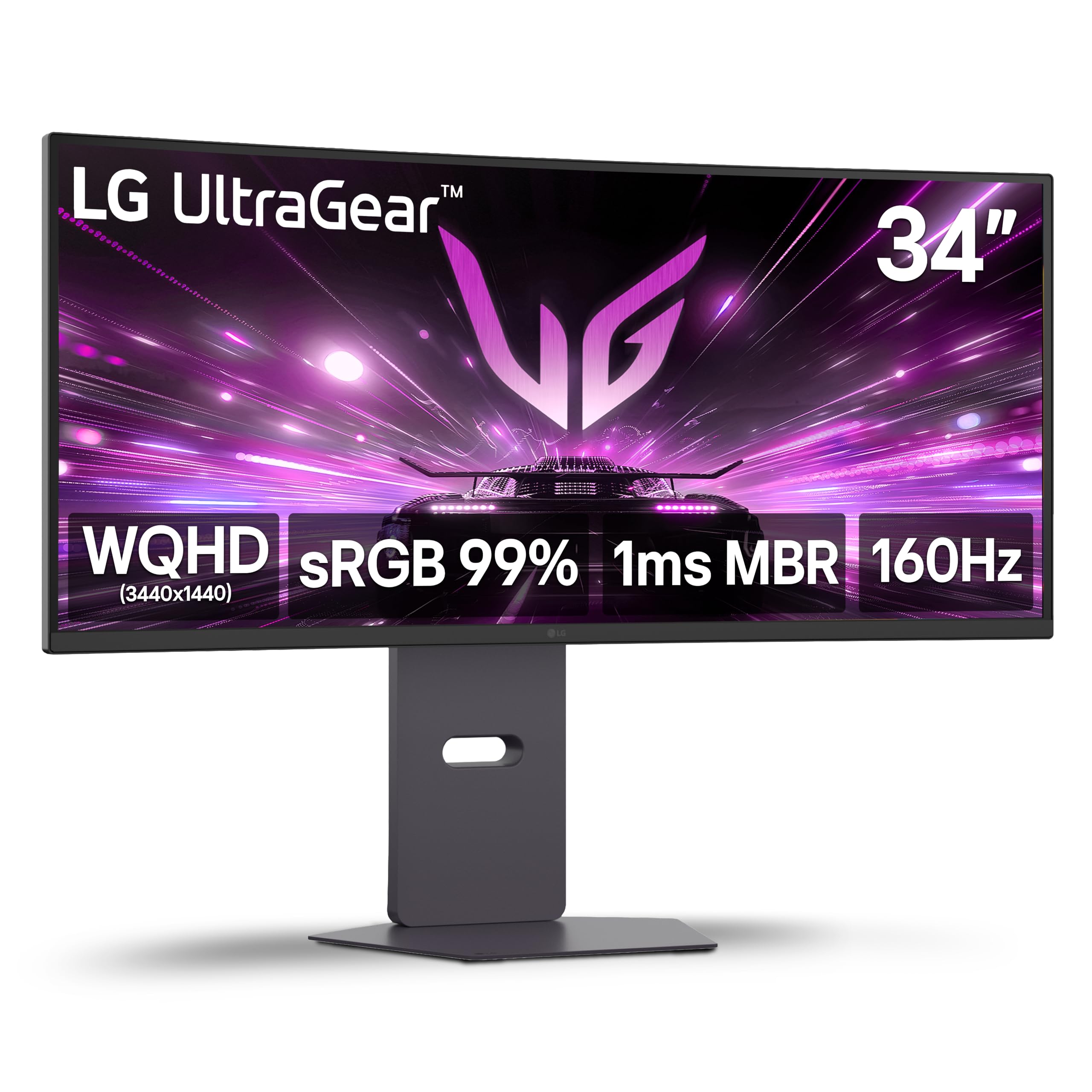
The value king that skips every OLED headache while still covering ultrawide basics
If you want a 34-inch ultrawide without worrying about burn-in, pixel refresh cycles, or high cost, this LG is your entry point. It uses a VA (Vertical Alignment) panel with a 4000:1 contrast ratio — not as deep as the 1,000,000:1 on the Alienware, but still leagues above typical IPS monitors and good enough for dark scenes in games like Diablo or Resident Evil. The 160Hz refresh rate and 1ms MBR (Motion Blur Reduction) keep motion smooth for most genres. While it is 80Hz slower than the LG 34GS95QE above, the difference is only noticeable if you play esports titles at a high level.
The real win here is the value. As reviewers point out, “34in ultrawide is a great value at [price on sale],” and one reviewer called it “close to a [larger] OLED” for picture quality — though the VA panel obviously cannot match the per-pixel black levels of an OLED. It also includes built-in stereo speakers with Waves MaxxAudio, a rare feature that the premium OLED picks all lack, so you get sound without buying separate speakers. The 1800R curve is gentle enough for daily work, and the height/tilt/swivel stand gives you ergonomic flexibility. The trade-off is that the 99 percent sRGB color gamut is noticeably narrower than the 149 percent on the Alienware, so colors are less punchy, but for a budget-minded buyer, this monitor hits the essentials without fear of image retention.
Why it’s great
- 4000:1 contrast ratio delivers good dark-scene performance for the price
- Built-in stereo speakers with Waves MaxxAudio save you from buying external ones
- Fully adjustable stand (height, tilt, swivel) for ergonomic setup
Good to know
- VA panel cannot match OLED black levels — blacks look dark gray in a dim room
- Color gamut (99% sRGB) is significantly less vibrant than QD-OLED alternatives
- Brightness at 300 cd/m² is adequate but not HDR-stunning
Best for: budget-conscious gamers who want ultrawide immersion without OLED maintenance or cost
Skip if: you are a competitive esports player needing 240Hz or a graphics enthusiast who cannot compromise on black levels
Understanding the Specs
Contrast Ratio
Contrast ratio is the difference between the brightest white and the darkest black a monitor can show, written as a number (like 4000:1 or 1,000,000:1). A higher number means blacks look blacker instead of washed-out gray. OLED panels (like the ones in the AW3423DW and 34GS95QE) can turn individual pixels completely off, so their contrast ratio is effectively infinite — which is why dark scenes in games like Metro Exodus look immersive rather than hazy. VA panels like the one in the LG 34G600A hit 4000:1, which is still decent for most games but will show a faint gray glow in a pitch-black room.
Refresh Rate and Response Time
Refresh rate (in Hz) dictates how many times the screen redraws each second — 160Hz means 160 frames per second, 240Hz means 240. Paired with response time (in ms, the speed a pixel changes color), these two specs determine how smooth and blur-free motion looks. A 0.03ms OLED response time is so fast that fast-moving enemies in an FPS appear physically sharp, while a 1ms VA response time still does a good job but may show slight ghosting in very fast transitions. For competitive shooters, aim for 240Hz/0.03ms; for single-player or work, 160Hz-175Hz is plenty.
FAQ
Will a 1440P ultrawide monitor work with my PS5 or Xbox Series X?
What graphics card do I need to drive a 3440×1440 ultrawide at 175Hz or 240Hz?
What is the difference between G-Sync and FreeSync on these monitors?
Does an OLED monitor burn in if I leave a static HUD on screen?
Will I see a difference between 175Hz and 240Hz in real gaming?
How steep is an 800R curve compared to an 1800R curve?
Do these monitors support HDR, and does it actually look good?
Can I use a 34-inch ultrawide for work like photo editing or coding?
What connectivity ports do I need for 3440×1440 at high refresh rates?
Is a 34-inch ultrawide monitor too big for a standard 60cm deep desk?
Final Thoughts: The Verdict
For the majority of shoppers, the 1440p ultrawide gaming monitor winner is the Alienware AW3423DW because it strikes the best balance between QD-OLED color depth, a manageable 1800R curve, and a 3-year burn-in warranty. If you want the highest possible refresh rate for competitive FPS games, grab the LG 34GS95QE with its 240Hz OLED. And for a budget-friendly entry into ultrawide gaming with zero OLED maintenance, the LG 34G600A-B is the straightforward choice.
How We Picked
We do not accept paid placement, and we did not hands-on test every unit. Instead, we match each pick to a real buyer and use-case by comparing the manufacturers’ published specifications against the patterns in verified customer reviews — so you get each pick’s real strengths and trade-offs instead of marketing copy.
Sources & Methodology
Specifications: manufacturer listings and product documentation. Review insights: verified customer reviews, as of June 2026. Pricing: not shown on this page (it changes often); check the current price via the retailer link.
As an Amazon Associate, Gadgets Feed earns from qualifying purchases. This does not affect which products we feature.
Product prices and availability are accurate as of the date/time indicated and are subject to change. Any price and availability information displayed on Amazon at the time of purchase will apply to the purchase of this product. As an Amazon Associate I earn from qualifying purchases.
CERTAIN CONTENT THAT APPEARS ON THIS SITE COMES FROM AMAZON. THIS CONTENT IS PROVIDED "AS IS" AND IS SUBJECT TO CHANGE OR REMOVAL AT ANY TIME.
Amazon and the Amazon logo are trademarks of Amazon.com, Inc. or its affiliates.