
Our readers keep the lights on and my morning glass full of iced black tea. As an Amazon Associate, I earn from qualifying purchases.
Specs are compiled from manufacturer listings and verified buyer reviews and can change over time — please confirm the key details on the product page before buying.
A 144Hz KVM switch lets you share your high-refresh-rate monitors, keyboard, and mouse between two or more computers without constantly unplugging cables — but the wrong one will lock you at 60Hz or flicker every time you switch. This guide cuts through the confusion to find the models that actually deliver smooth 144Hz gaming or desktop performance.
I’m Min — the founder and writer behind Gadgets Feed. This guide is built by comparing the manufacturers’ published specifications and the patterns across verified customer reviews, so you get each pick’s real strengths and trade-offs instead of marketing spin.
Whether you are a gamer wanting fluid motion, a creative juggling multiple machines, or a work-from-home user needing a clean desk setup, understanding the key specs behind a 144hz kvm switch saves you from a frustrating purchase.
Our Picks at a Glance
How To Choose The Best 144Hz KVM Switch
A KVM (Keyboard, Video, Mouse) switch lets you control multiple computers with one set of peripherals. For 144Hz, the crucial point is that the video signal must pass through without being throttled to 60Hz. Here are the key factors to consider.
Video Inputs: DisplayPort vs. HDMI
Most 144Hz monitors rely on DisplayPort (DP) to reach their full refresh rate at 1440p or 4K. If your computer and monitor both use DP, a DP-only KVM is the most stable path. An HDMI+DP combo switch offers more flexibility if you have mixed devices, but check that the HDMI port supports HDMI 2.1 for 4K@144Hz — many older HDMI ports cap at 60Hz.
Number of Computers and Monitors
First, count how many computers you want to control and if you need both monitors showing different content (extended mode) or the same image on both (copy mode). A 2-computer, 2-monitor switch handles most dual-PC setups. If you run three or four machines, a 4-port model saves desk space.
USB Hub Speed and Port Count
A built-in USB 3.0 hub at 5Gbps is 10 times faster than USB 2.0, so your external drives and webcams work without lag. Check that the switch has enough USB ports for your keyboard, mouse, and any other peripherals you want to share.
Switching Method: Button vs. Remote
A physical button on the unit works fine if the switch sits on your desk. A wired remote lets you hide the box under the desk and switch with a tap — a small convenience that matters when the switch is out of arm’s reach.
Quick Comparison
| Model | Best For | Video Inputs | Resolution Support | USB Speed | Amazon |
|---|---|---|---|---|---|
| TJCXELE DP 2-Port★ Best Overall | Dual monitor DP-only | DisplayPort | 4K@144Hz | USB 3.0 5Gbps | Amazon |
| AOOCOO HDMI+DP 4-PortAlso Great | 4-computer mixed setup | HDMI + DP | 8K@60Hz / 4K@144Hz | USB 3.0 5Gbps | Amazon |
| AOOCOO HDMI+DP 2-Port | Mixed cable types | HDMI + DP | 8K@60Hz / 4K@144Hz | USB 3.0 5Gbps | Amazon |
| ANGEET HDMI+DP 2-Port | Compact mixed setup | HDMI + DP | 8K@60Hz / 4K@144Hz | USB 3.0 5Gbps | Amazon |
| JCYMELE DP 2-Port | High-rated DP dual PC | DisplayPort | 8K@60Hz / 4K@144Hz | USB 3.0 5Gbps | Amazon |
| KCEVE HDMI+DP 4-Port | 4-computer budget | HDMI + DP | 8K@30Hz / 4K@144Hz | USB 3.0 | Amazon |
| MLEEDA DP 2-Port | DP 8K readiness | DisplayPort | 8K@30Hz / 4K@144Hz | USB 3.0 5Gbps | Amazon |
In‑Depth Reviews
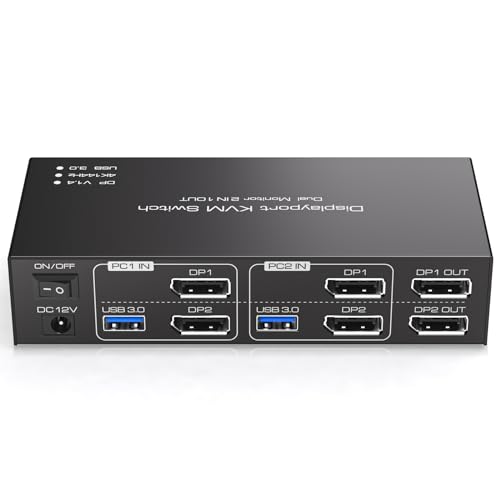
1. TJCXELE DisplayPort KVM Switch 2 Monitors 2 Computers
Our pick — over 4★ from 150+ verified ratings; the strongest balance of quality and price.
A no‑compromise DisplayPort switch that delivers true 4K@144Hz from two PCs.
If your monitors and computers all use DisplayPort, this is the cleanest path to a dual-144Hz setup. It supports 4K@144Hz via DP 1.4, which means you see fluid motion in games or smooth scrolling in design software without the signal degradation that can happen over converted cables. The four USB 3.0 ports transfer data at 5Gbps, keeping your external drives snappy.
Owners mention it “works exactly as expected,” noting the easy setup and smooth switching. One reviewer praised the wired desktop controller — you never reach behind the desk to change sources. The switch runs on a 0.6 Amp current rating, so it uses very little power while staying reliable.
The main catch is that each computer needs two DisplayPort outputs to run dual monitors, so check your graphics card before buying. This switch does not support HDMI at all, so it only suits all-DP setups.
Solid Strengths
- Pure DisplayPort 1.4 for clean 4K@144Hz
- Wired remote button keeps the desk tidy
- USB 3.0 at 5Gbps for fast peripherals
One Limitation
- Requires 2 DP ports per computer
- No HDMI input at all
- DP cables not included
Ideal for: a dual-PC gamer or designer with two DP monitors who wants a simple, reliable switch.
skip it if: your monitors or computers use HDMI — you need an HDMI+DP combo model instead.
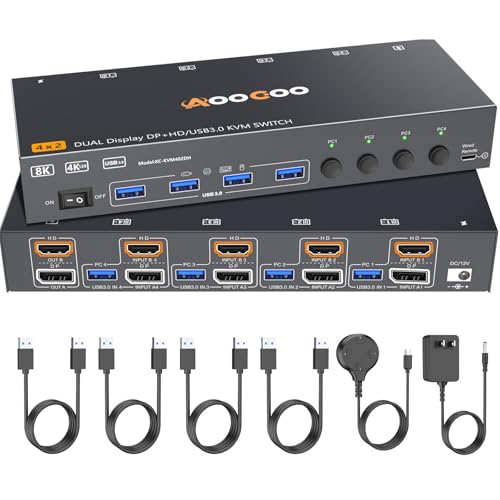
2. AOOCOO HDMI+DP 4-Port KVM Switch
The multi‑computer hub that handles four machines without sacrificing refresh rate.
This KVM lets you control up to four computers through two monitors, using HDMI and DisplayPort inputs. The HDMI side runs at 8K@60Hz and the DP side at 8K@30Hz, while both deliver 4K@144Hz — so your high-refresh-rate gaming or design work stays smooth. You get four USB 3.0 ports (each at 5Gbps) for your keyboard, mouse, printer, and a flash drive, all switched together when you press the button or tap the wired remote.
Buyers report that set-up is easy, with one reviewer noting it “works great” after connecting everything. A trade-off appears if you mix HDMI and DisplayPort cables: one owner found flickering on a 57-inch Samsung secondary display, though they suspected the cables, not the switch. Another buyer mentioned it also works perfectly as a USB-only KVM for sharing peripherals when the video portion isn’t needed.
At 5 Amps current rating, this switch has the highest power headroom of any pick here — reassuring if you plan to connect power-hungry USB devices alongside your monitors.
Why It Leads
- Controls 4 computers from one desk setup
- HDMI + DP inputs for mixed cable types
- 5 Amps current rating for demanding peripherals
Before You Buy
- HDMI caps at 4K@120Hz, DP at 8K@30Hz
- Mixed cable setups may cause occasional flicker
- Larger footprint than 2-port models
Reach for this if: you run three or four computers and need a single clean switch for dual 144Hz monitors.
Look elsewhere if: you only connect two PCs — a smaller 2-port switch saves money and desk space.
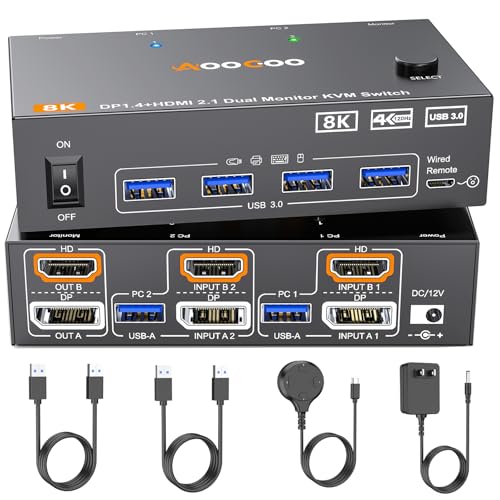
3. AOOCOO HDMI DP2.1 KVM Switch 2 Monitors 2 Computers
The mixed‑cable solution for desks with one HDMI and one DisplayPort monitor.
This switch accepts one HDMI and one DisplayPort connection per computer, making it the right choice if your two monitors use different cable types. It supports 8K@60Hz on the HDMI side and 4K@144Hz on the DP side, so your primary gaming monitor hits full refresh while the secondary handles video or web browsing without issue. The metal housing and rack-mountable design give it a sturdy feel.
Customers note it “works perfectly after a bit of juggling” once the correct cables are connected. One reviewer noted that it worked better than a name-brand switch from a big electronics supplier, calling out the surprising reliability. The switch includes a wired remote and a DC12V power adapter, so no hidden surprises.
The trade-off: each computer needs both an HDMI and a DP output, which many laptops lack. You will likely need a USB-C to HDMI or USB-C to DP adapter, adding a step to the setup.
Why It Fits
- HDMI + DP inputs suit mixed monitor setups
- Metal build feels premium and solid
- Wired remote for easy switching
Check First
- Laptops may need adapters for dual outputs
- Some initial cable confusion reported
- Power adapter required for full speed
Grab this for: a desktop tower with HDMI and DP outputs connecting two different monitors.
Pass it up if: both monitors use the same cable type — a DP-only or HDMI-only switch is simpler.
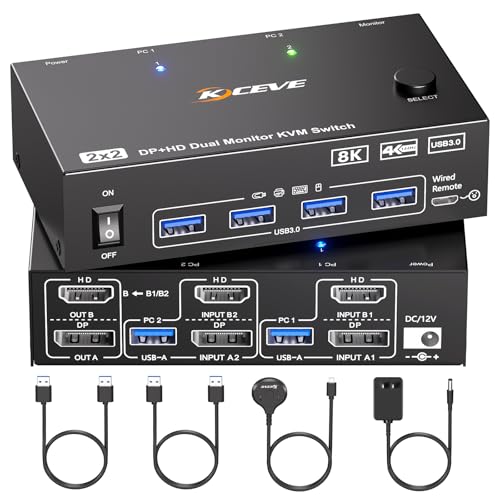
4. ANGEET HDMI+DP KVM Switch 2 Monitors 2 Computers
A tiny box that fits a mixed‑cable dual‑PC workflow on a tight desk.
At just 3.94 x 2.56 x 1.3 inches, this switch is the smallest in the roundup and still handles 8K@60Hz and 4K@144Hz through its HDMI+DP inputs. It supports extended and copy modes for two monitors, and the four USB 3.0 ports let you share a keyboard, mouse, camera, and speakers. The wired remote and 12V adapter are included.
One buyer with a 42-inch LG C5 TV/monitor reported it “works well” for switching between a work laptop and personal PC, calling it excellent value. Another owner noted the responsive switching in 4K mode, though they occasionally needed a second press of the remote button — likely system latency rather than a switch issue.
The most common complaint involves USB port reliability: some users had trouble with wireless keyboard/mouse combos and external hard drives. If you need flawless USB passthrough for multiple devices, test this carefully.
Its Best Moves
- Very compact size saves desk space
- HDMI + DP for mixed cable setups
- Wired remote and 12V adapter included
The Catch
- USB ports can be picky with certain devices
- May require a second button press sometimes
- Occasional artifacting on some monitor combos
Perfect for: a WFH user with a small desk who needs a basic mixed-cable KVM for two computers.
Not for: anyone relying on shared USB hard drives or multiple wireless peripherals.
5. JCYMELE 4K@144Hz DisplayPort KVM Switch 2 Monitors 2 Computers
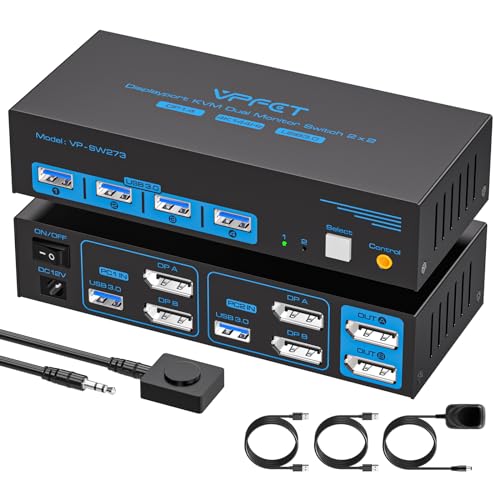
A DisplayPort specialist that earns near‑perfect reviews for reliability.
With a 4.8 out of 5 rating from 30 reviews, this DP-only switch is the highest-rated pick in the list. It supports 4K@144Hz and 8K@60Hz, with backward compatibility for 4K@120Hz and lower resolutions. The extended and mirror modes let you drag windows across both screens or duplicate the display for presentations. Two switching methods — a button on the unit or a wired remote — keep the box hidden while you tap to change sources.
Reviewers consistently call it “well built” and “excellent,” with one owner saying it ran smoothly for about a year switching between work and personal PCs. Another noted that co-workers ordered the same model after seeing theirs in action. The USB 3.0 hub transfers at 5Gbps for your mouse, keyboard, and drives.
You need to follow strict cable rules: each computer must connect via two DP cables and a USB-A cable. The maker warns against using Mac devices and conversion adapters, so this is for all-DP Windows or Linux setups only.
Standout Qualities
- Near‑perfect customer rating (4.8/5)
- Clean DP 1.4 signal for 4K@144Hz
- Wired remote keeps the desk organized
Strict Requirements
- Requires 2 DP ports on each computer
- Mac devices and adapter cables not supported
- No hotkey switching
Best for: a Windows or Linux user with two DP desktop PCs who wants a proven, reliable switch.
Avoid if: you use Mac, HDMI monitors, or any adapter cables in the chain.
6. KCEVE HDMI + DisplayPort KVM Switch 2 Monitors 4 Computers
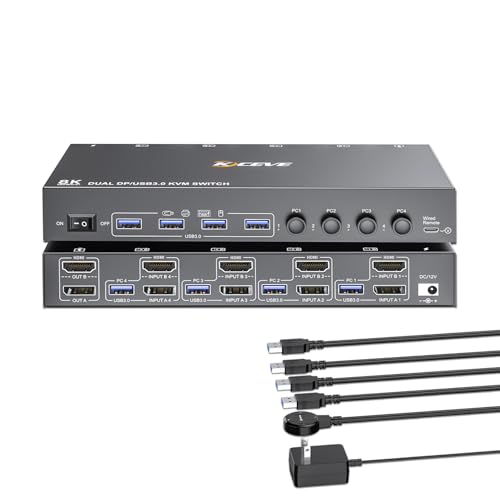
An affordable way to share dual monitors across four computers.
This switch connects up to four computers through two monitors using HDMI and DisplayPort. It supports 4K@144Hz on the DP side and 8K@30Hz on the HDMI side, so your main display runs at high refresh while the second handles lower bandwidth. The four USB 3.0 ports handle mouse, keyboard, printer, and other peripherals. Switching happens via the physical button or the included wired remote, which is larger than most for a more comfortable press.
Reviewers point out it works at 3860×1600 at 144Hz without issues, with one reviewer praising the remote for hiding the box under the desk. Another owner uses it with Logitech wireless peripherals across computers and says switching is smooth. A few users note the USB ports can fail after a few months, requiring a restart or a power injection cable to stay stable.
The main reliability concern appears in long-term reviews: one owner called the switch “essentially non-functional” after four months until they added an external USB power injector. If you buy this, budget for a powered USB hub if you share multiple peripherals.
Strong Points
- Controls 4 computers for a low entry cost
- DP side runs 4K@144Hz
- Comfortable wired remote included
Weak Spots
- USB ports can become unreliable over time
- Power injector may be needed for stability
- No audio switching
Good for: a budget-conscious buyer who needs a 4-computer switch and can add a powered USB hub if needed.
Skip if: you need a set-and-forget device with long-term USB reliability.
7. MLEEDA 8K DisplayPort KVM Switch 2 Monitors 2 Computers

A DP switch that preps your desk for 8K while keeping 4K@144Hz stable.
This DisplayPort switch supports 8K@30Hz and 4K@144Hz via DP 1.4, making it a future-friendly pick if you plan to upgrade to an 8K monitor later. It connects two computers to share two monitors and four USB 3.0 ports at 5Gbps. The wired remote and panel button give you two ways to switch sources, and the IP54 rating offers some dust and splash resistance — unusual for a desk switch.
Shoppers say it works well once you sort out the cables, with one owner saying it “works perfectly” for switching between a personal PC and a work laptop. Another reviewer uses it with a Mac Mini M4, a Windows laptop, and a Linux box at 2560×1440 per monitor, calling it cheaper and smaller than an old IOGEAR they replaced.
The switch draws 2 Amps and includes a USB power cable, so it handles connected peripherals without extra power. Some early owners had issues with cables not sitting snugly, causing intermittent monitor cut-outs — the seller replaced faulty cables and the device worked afterward.
What Stands Out
- 8K@30Hz readiness for future monitors
- IP54 dust and splash resistance
- Works with Logitech Unifying receivers
Heads Up
- Included cables may need replacement
- No HDMI support — DP only
- Some early flickering reported with certain monitor pairings
Pick this for: a forward-looking DP desk setup that might upgrade to 8K monitors.
Choose something else if: your monitors or computers use HDMI connections.
Understanding the Specs
Refresh Rate vs. Bandwidth
The refresh rate (in Hz) tells you how many times per second the image updates. A 144Hz KVM switch must pass enough data through its DisplayPort or HDMI connection to sustain that rate at the chosen resolution. DP 1.4 can carry 4K@144Hz, while older DP 1.2 often caps at 60Hz for 4K. The switch itself does not generate the refresh rate — it simply passes the signal through — so a poor-quality switch can introduce flicker, blanking, or a forced drop to 60Hz.
Current Rating and Power Delivery
The current rating (in Amps) on a KVM switch reflects how much electrical current the unit can handle for its USB ports and internal circuits. A 0.6 Amp switch draws less power and runs cooler, but may struggle with high-power USB devices. A 2 Amp or 5 Amp rating gives more headroom for sharing external drives, webcams, or charging a phone through the switch. The rating is not the power the switch consumes — it is the limit for safe operation.
FAQ
What is the minimum cable quality for 4K@144Hz through a KVM switch?
Can I use a 144Hz KVM switch with a 60Hz monitor?
Does the switch affect input lag or mouse response time?
Will this work with a laptop that only has one video output?
What is the difference between extended mode and copy mode?
Do I need a power adapter for the KVM switch to work?
How do I switch between computers without a wired remote?
Can I use a 144Hz KVM switch with a Mac?
What should I do if my monitor flickers after connecting the KVM switch?
Can KVM switches transmit audio?
Final Thoughts: The Verdict
For most buyers, the 144hz kvm switch winner is the AOOCOO 4-Port because it handles up to four computers and two monitors over both HDMI and DisplayPort while maintaining 4K@144Hz output. If you want a pure DisplayPort setup with proven reliability, grab the TJCXELE DP 2-Port. And for a compact mixed-cable dual-PC desk, the ANGEET HDMI+DP switch is a smart pick.
How We Picked
We do not accept paid placement. Every pick is matched to a real buyer and a real use-case; we do not hands-on test units.
Sources & Methodology
Specifications: manufacturer listings and product documentation. Review insights: verified customer reviews, as of July 2026. Pricing: not shown on this page (it changes often); check the current price via the retailer link.
As an Amazon Associate, Gadgets Feed earns from qualifying purchases. This does not affect which products we feature.