
A 15-inch laptop hits a specific sweet spot: a screen large enough for serious work and immersive entertainment, yet a chassis that still fits in most backpacks. The category is crowded with options that look similar on paper but diverge sharply in processor architecture, display quality, battery endurance, and build materials. Choosing wrong means living with a machine that runs hot, dies by lunch, or lacks the ports you need daily.
I’m Min — the co-founder and writer behind Gadgets Feed. I’ve spent hundreds of hours dissecting spec sheets, analyzing real-world benchmarks, and cross-referencing thousands of user reports to isolate exactly what separates a smart 15-inch buy from a regretful one.
This guide breaks down the top contenders across every meaningful use case, from budget productivity to premium gaming and creative work. Whether you need all-day battery, a blazing GPU, or a durable business machine, the best 15 inch laptop for you is determined by matching your specific workload to the right processor, display, and build quality.
How To Choose The Best 15 Inch Laptop
The 15-inch category spans from ultra-portables under 3.5 pounds to desktop-replacement gaming monsters pushing six pounds. Your choice hinges on three core variables: the processor architecture that dictates battery life and thermal behavior, the display resolution and refresh rate for your visual tasks, and the build quality that determines longevity.
Processor Architecture: U-Series vs. HX-Series vs. ARM
Intel’s U-series processors (like the Core i5-1334U) prioritize efficiency and run cool in thin chassis, making them ideal for office work and streaming. The HX-series chips (like the Core i9-14900HX) draw significantly more power and generate serious heat, but they unlock desktop-class performance for gaming and video rendering. ARM-based processors like the Snapdragon X deliver exceptional battery life — often 15 to 20 hours — but require native ARM64 apps for full compatibility; some legacy x86 software runs slower or not at all. Match the processor to your daily workflow, not your aspirational use case.
Display: Resolution, Refresh Rate, and Panel Type
A 1080p IPS panel is the baseline for most 15-inch laptops and provides good clarity for productivity. QHD (2560×1440 or 1920×1200) adds sharpness for photo editing and spreadsheet work. Refresh rates above 60Hz — 120Hz or 165Hz — reduce motion blur and make cursor movement feel snappier; these matter for gaming and for anyone who scrolls documents all day. AMOLED panels offer infinite contrast and vibrant colors but cost more and can increase battery drain on static screens. Always check brightness nits: 300 nits is adequate indoors; 400 nits or more improves outdoor visibility.
Build Quality and Portability
A metal chassis (aluminum or magnesium alloy) adds rigidity and a premium feel but increases weight. Plastic builds keep weight down but may flex under pressure and show wear faster. Look for MIL-STD-810H certification if you travel frequently or work in less-controlled environments. Weight around 3.5 pounds is genuinely portable; anything over 5 pounds lives mostly on a desk. The hinge mechanism should feel firm — a wobbly screen is a common failure point on budget models.
Quick Comparison
On smaller screens, swipe sideways to see the full table.
| Model | Category | Best For | Key Spec | Amazon |
|---|---|---|---|---|
| Apple MacBook Air 15-inch M5 | Ultraportable | All-day productivity & creative work | 18-hour battery, M5 chip | Amazon |
| MSI Katana 15 HX | Gaming | High-FPS gaming & rendering | RTX 5070, i9-14900HX | Amazon |
| Microsoft Surface Laptop 15 | Premium | ARM efficiency & touchscreen | Snapdragon X Elite, 20h battery | Amazon |
| Samsung Galaxy Book5 360 | Convertible | Tablet mode & Samsung ecosystem | AMOLED touch, 31h battery | Amazon |
| HP Laptop 15 32GB RAM | Productivity | Heavy multitasking on a budget | 32GB RAM, 1TB SSD | Amazon |
| Dell 15 DC15250 | Mid-Range | 120Hz display for everyday use | Core i5-1334U, 120Hz | Amazon |
| Lenovo IdeaPad Slim 3X | Value | AI features & long battery | Snapdragon X, 15h battery | Amazon |
| Acer Aspire Go 15 | Value | Ryzen 7 performance on a budget | Ryzen 7 7730U, 16GB RAM | Amazon |
| NIMO 15.6″ Ryzen 7 | Light Gaming | Integrated RDNA 2 gaming | Radeon 680M, 1TB SSD | Amazon |
| Lenovo V15 | Business | Windows 11 Pro & wired LAN | Ryzen 5 5500U, RJ45 port | Amazon |
| HP 15.6″ FHD 2026 Edition | Budget | Entry-level student computing | Intel N100, 3.64 lbs | Amazon |
In‑Depth Reviews
1. Apple 2026 MacBook Air 15-inch with M5 chip
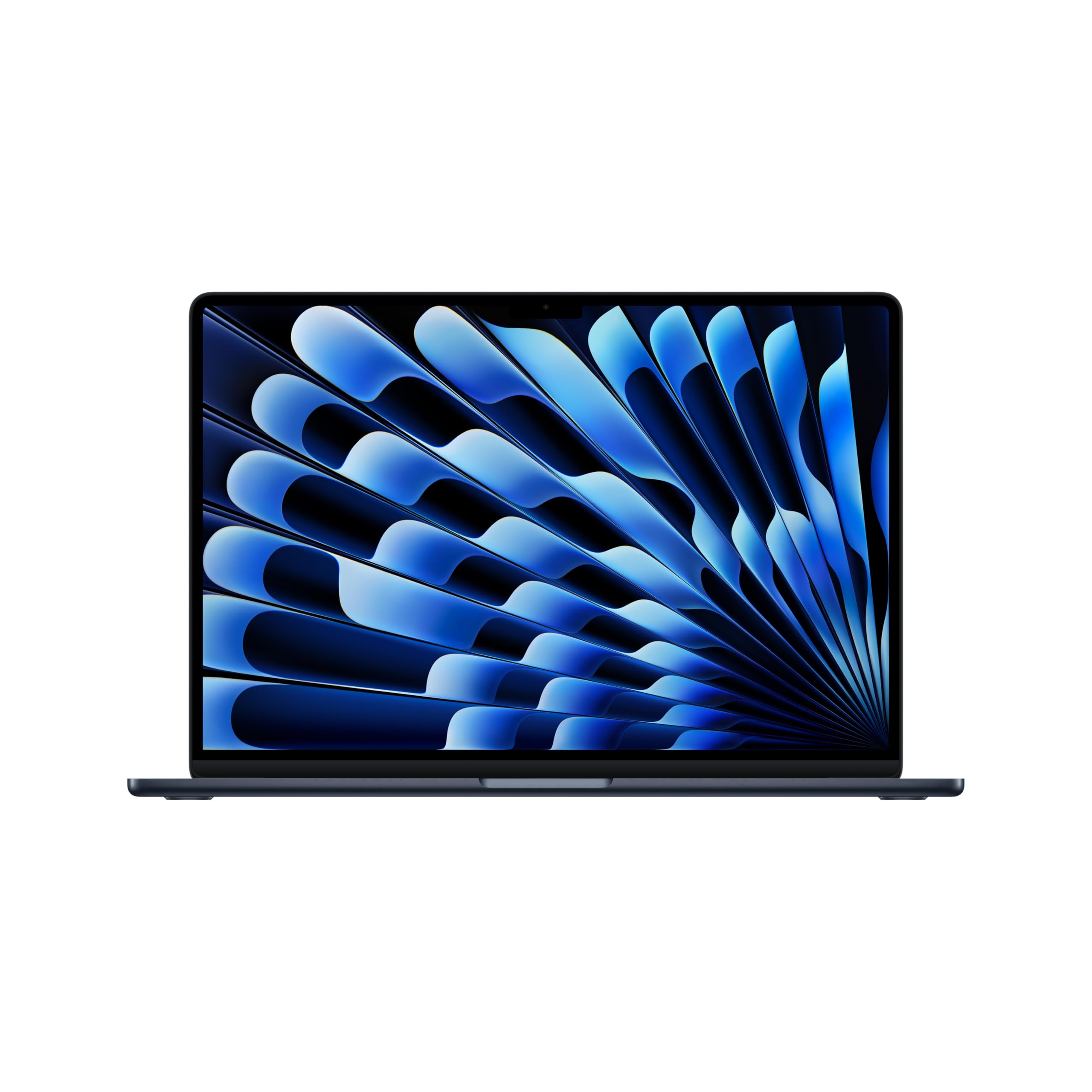
The M5 chip pushes the MacBook Air 15-inch into a class of its own for power efficiency. With a 15.3-inch Liquid Retina display supporting 1 billion colors, the visual experience rivals far more expensive workstations. The 16GB of unified memory ensures that switching between a dozen browser tabs, photo editing software, and video calls produces zero stutter. And with up to 18 hours of battery life, this machine genuinely lasts a full workday without requiring a charger.
The 12MP Center Stage camera keeps you perfectly framed during video calls, and the six-speaker sound system with Spatial Audio makes music and movies immersive. At just 3.32 pounds and 0.45 inches thin, it is remarkably portable for a 15-inch chassis. The MagSafe charging port frees up both Thunderbolt 4 ports for peripherals, and Wi-Fi 7 provides future-proof wireless speeds.
MacOS Seamless integration with iPhone and iPad is a major draw for anyone already in the Apple ecosystem. The fanless design means zero noise under any load, though sustained heavy workloads will cause the chassis to warm up. For professionals, students, and creatives who prioritize battery life, build quality, and a brilliant display, this is the gold standard.
Why it’s great
- Exceptional 18-hour real-world battery life
- Silent fanless operation
- Brilliant 15.3-inch Liquid Retina display
Good to know
- Limited to two Thunderbolt 4 ports
- No high-refresh-rate option for gamers
2. MSI Katana 15 HX

The MSI Katana 15 HX is built for pure performance. The Intel Core i9-14900HX with 24 cores and the NVIDIA GeForce RTX 5070 with DLSS 4 deliver frame rates that crush demanding titles at QHD resolution. The 165Hz display with 100% DCI-P3 coverage means fast-paced games look fluid and colors pop. This is a machine that does not compromise on graphical horsepower.
The Cooler Boost 5 system uses dual fans and five heat pipes to keep thermals in check during extended gaming sessions. The 32GB of DDR5 RAM and 1TB NVMe SSD provide lightning-fast load times and ample storage for a large game library. The 4-zone RGB keyboard with highlighted WASD keys is a nice touch for late-night gaming, and the port selection includes USB-C Gen 2, HDMI 2.1 supporting 8K output, and Wi-Fi 6E.
Battery life is the trade-off — expect around 2 to 3 hours of gaming on battery, and the power brick is large and runs hot. The 15.6-inch chassis is heavy at over five pounds, so this is a desktop replacement rather than a true portable. For gamers and creators who need maximum GPU and CPU power in a 15-inch form factor, the Katana 15 HX is a fierce contender.
Why it’s great
- Top-tier i9-14900HX and RTX 5070 combo
- Smooth 165Hz QHD display with wide color gamut
- Robust cooling system for sustained performance
Good to know
- Short battery life under load
- Heavy and bulky for a 15-inch laptop
3. Microsoft Surface Laptop 15 (2024)

The Surface Laptop 15 represents Microsoft’s vision for the Copilot+ PC era. Powered by the 12-core Snapdragon X Elite processor, it delivers performance that rivals the MacBook Air M3 in many productivity tasks while achieving up to 20 hours of battery life. The 15-inch PixelSense touchscreen display is bright and sharp, making it excellent for creative work and media consumption. The build quality is exceptional, with a sleek aluminum body that feels solid in the hand.
The AI features powered by the NPU enhance everything from real-time video call effects to local photo editing. Windows Hello facial recognition provides instant, secure login. The keyboard is comfortable for long typing sessions, and the haptic touchpad is one of the best on any Windows laptop. The omnisonic speakers with Dolby Atmos produce clear, full sound that fills a room.
The primary caution involves ARM architecture compatibility. Some legacy x86 applications, particularly older games and specialized business software, may not run natively and could exhibit performance issues. For users who primarily work in modern web and cloud-based apps, the Surface Laptop 15 is a premium, long-lasting machine that sets a high bar for Windows laptops.
Why it’s great
- Excellent 20-hour battery life
- Premium build and brilliant touchscreen display
- Fast and secure Windows Hello login
Good to know
- ARM architecture can limit legacy app compatibility
- No high-refresh-rate display option
4. Samsung 15.6” Galaxy Book5 360

The Galaxy Book5 360 stands out for its stunning 15.6-inch FHD AMOLED touchscreen. The infinite contrast ratio and vibrant colors make it a joy for photo editing, video streaming, and reading. The 360-degree hinge allows it to function as a tablet, tent, or presentation mode, adding versatility that traditional clamshells cannot match. With a claimed battery life of up to 31 hours, this is one of the longest-lasting 15-inch laptops on the market.
The Intel Core Ultra processor (Series 2) provides solid performance for everyday tasks and light creative work. The AI features, such as Photo Remaster and Cocreator in Paint, add useful functionality for Samsung ecosystem users. The integration with Galaxy phones via Quick Share and Phone Link is seamless, making file transfers and notification management effortless. The Dolby Atmos quad speakers deliver impressive audio for a thin convertible.
The downsides include a display that, while beautiful, is only 1080p — a higher resolution would better leverage the AMOLED panel’s potential. Some users have reported durability concerns with the screen edge over long-term use. The lack of a dedicated GPU limits gaming capability. For Samsung phone owners and anyone who values a brilliant, versatile touchscreen and exceptional battery life, this is a compelling choice.
Why it’s great
- Stunning FHD AMOLED touchscreen display
- Exceptional battery life for a convertible
- Seamless integration with Samsung Galaxy devices
Good to know
- Screen is only 1080p despite AMOLED quality
- Some durability concerns reported for the hinge assembly
5. HP Laptop 15 32GB RAM

The HP Laptop 15 with 32GB of RAM and a 1TB SSD punches far above its price category. This configuration is typically reserved for machines costing significantly more, and it makes a tangible difference for anyone who runs multiple heavy applications simultaneously — database software, virtual machines, or large spreadsheets. The Intel Processor N100 handles everyday computing efficiently, and the massive RAM ensures you never hit a memory ceiling during normal workflows.
The 15.6-inch Full HD anti-glare display is comfortable for long work sessions, and the battery life is robust enough for a full day of office tasks. The lightweight design at 3.5 pounds and slim 0.7-inch profile make it genuinely portable. The full-size keyboard with numeric keypad is a productivity boon for data entry, and the inclusion of Wi-Fi 6 and Bluetooth 5.3 keeps connectivity modern. The 45W charger is compact and travels well.
The processor is not designed for demanding gaming or heavy video rendering — this is a productivity-first machine. The integrated graphics handle streaming and light photo editing but will struggle with AAA titles. For students, office workers, and home users who need to keep dozens of tabs and applications open without slowdown, the HP Laptop 15 delivers exceptional memory and storage value.
Why it’s great
- Generous 32GB RAM for heavy multitasking
- Large 1TB SSD for ample storage
- Lightweight and portable design
Good to know
- Processor is entry-level; not for gaming
- Display is standard 60Hz IPS
6. Dell 15 Laptop DC15250

The Dell 15 DC15250 brings a 120Hz refresh rate to a mainstream productivity laptop, a feature usually reserved for gaming machines. This makes cursor movement, scrolling through documents, and web browsing feel noticeably smoother than on standard 60Hz panels. The Intel Core i5-1334U processor provides a strong balance of performance and efficiency for everyday tasks, while 16GB of DDR4 RAM ensures smooth multitasking.
The Dell ComfortView software reduces blue light emissions to reduce eye strain during long work sessions, and the lifted hinge design creates an ergonomic typing angle that reduces wrist fatigue. The inclusion of a separate numeric keypad is a small but appreciated feature for anyone who works with numbers. The 1-year onsite service provides peace of mind that if an issue cannot be resolved remotely, Dell will come to your location.
Some users have reported heat buildup and fan noise under sustained load. The 120Hz display is a 1080p panel, not QHD, so it prioritizes smoothness over raw resolution. For students, office workers, and general users who spend hours in front of a screen and want a smoother visual experience without paying a premium, the Dell 15 is a smart pick.
Why it’s great
- Smooth 120Hz display for fluid scrolling
- Ergonomic lifted hinge design
- 1-year onsite service warranty
Good to know
- Has a known heat buildup issue for some users
- Display resolution is standard 1080p
7. Lenovo IdeaPad Slim 3X

The Lenovo IdeaPad Slim 3X brings the benefits of ARM architecture — namely exceptional battery life and a cool-running chassis — to a more accessible price point. The Snapdragon X processor with a 45 TOPS NPU powers Copilot+ AI features while sipping power, delivering a claimed 15 hours of battery life in a 15.3-inch form factor. The WUXGA (1920×1200) display provides a slightly taller aspect ratio that is better for reading documents and browsing web pages.
The premium-grade metal chassis passes MIL-STD 810H tests for durability, and the physical webcam shutter and fingerprint reader add genuine privacy and security features. The expandable SSD slot allows for easy DIY storage upgrades, a feature increasingly rare in budget-friendly laptops. The included 3-month Xbox Game Pass is a nice bonus for casual gaming. The Rapid Boost charging gets you back up to speed quickly.
The Snapdragon X processor is not designed for heavy gaming or demanding creative software — it excels at web-based work, office tasks, and media consumption. Some legacy x86 applications may not run optimally. For students, remote workers, and anyone who needs a durable, long-lasting, and AI-enhanced 15-inch laptop without breaking the bank, the IdeaPad Slim 3X is a well-rounded option.
Why it’s great
- Long battery life with Snapdragon X efficiency
- Military-grade durability MIL-STD 810H
- Expandable SSD for easy storage upgrades
Good to know
- ARM processor may have app compatibility quirks
- Display is only 60Hz
8. Acer Aspire Go 15

The Acer Aspire Go 15 proves that you do not need to spend heavily to get capable performance. The AMD Ryzen 7 7730U processor with 8 cores and 16 threads provides snappy multitasking that handles a dozen browser tabs, Office applications, and streaming simultaneously without hesitation. The 16GB of DDR4 RAM and 512GB PCIe Gen4 SSD are well-balanced for a smooth everyday experience. The dedicated Copilot key gives quick access to AI assistance.
The 15.6-inch Full HD IPS display has narrow bezels that give it a modern look, and Acer’s BluelightShield technology reduces eye strain during extended use. The full-function USB Type-C port allows for charging, data transfer, and display output from a single port. Wi-Fi 6 and HDMI 2.1 ensure fast connectivity and high-resolution external display support. The AcerSense utility makes it easy to manage battery life and storage performance.
The integrated Radeon Graphics are sufficient for casual gaming and video playback but not for demanding titles. The display is a standard 60Hz IPS panel, which is fine for productivity but not as smooth as higher-refresh options. For budget-conscious students, home users, and office workers who need reliable performance for daily tasks, the Aspire Go 15 offers exceptional value for the price.
Why it’s great
- Powerful Ryzen 7 7730U for smooth multitasking
- Dedicated Copilot key for AI features
- Great price-to-performance ratio
Good to know
- Display is standard 60Hz
- Integrated graphics limit gaming capability
9. NIMO 15.6″ Light-Gaming Laptop
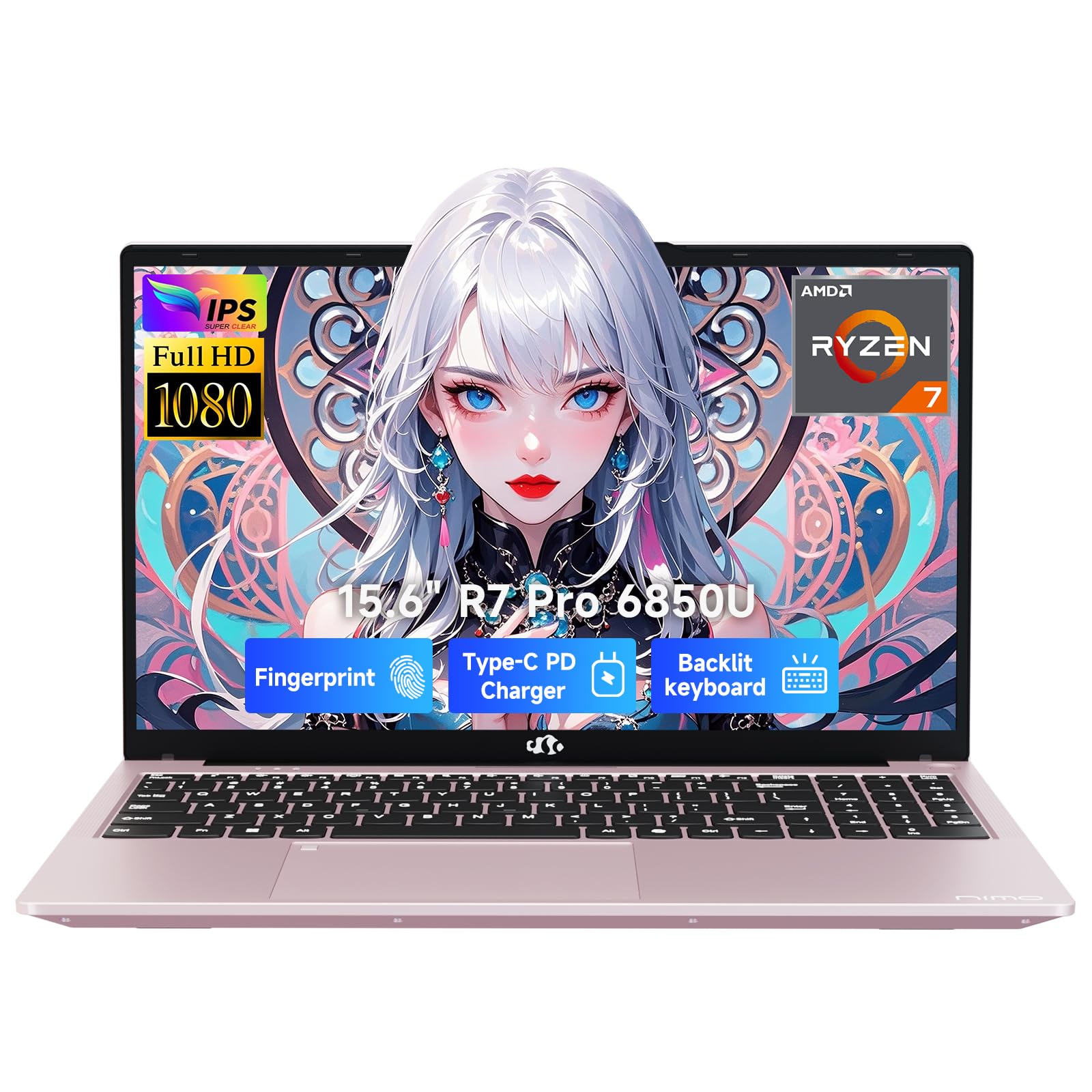
The NIMO 15.6″ laptop uses the AMD Ryzen 7 PRO 6850U paired with the Radeon 680M integrated graphics based on RDNA 2 architecture. This combination is remarkably capable for integrated graphics, allowing it to run games like Minecraft, Roblox, and Raft at playable frame rates, and even handle lighter AAA titles at low settings. The 16GB of LPDDR5 RAM and 1TB PCIe 4.0 SSD ensure fast boot times and ample storage. The 100W PD fast charging gets you back up to speed quickly.
The backlit keyboard with 175-degree lay-flat hinge provides flexibility for different working positions. The fingerprint reader integrated into the touchpad enables quick and secure login. The port selection is generous with two USB-C ports (supporting PD, DisplayPort, and data), three USB-A ports, HDMI 2.0, and a Micro SD reader. The physical webcam shutter and Kensington lock slot address privacy and security concerns for travelers. The 53.58Wh battery provides decent all-day endurance for non-gaming use.
Battery life drops significantly during gaming (3-4 hours), and the fan becomes audible under load. This is not a machine for high-FPS competitive gaming or heavy video rendering. For college students who want one laptop for class productivity and casual gaming in the dorm, the NIMO represents a compelling value proposition.
Why it’s great
- Impressive Radeon 680M integrated graphics for light gaming
- Generous 1TB SSD storage
- Fast 100W PD charging
Good to know
- Battery drains quickly during gaming
- Fan noise can be noticeable under load
10. Lenovo V15 Laptop

The Lenovo V15 is built with business users in mind, shipping with Windows 11 Pro for advanced management features like Group Policy and Active Directory support. The AMD Ryzen 5 5500U hexa-core processor provides solid performance for office applications, and 16GB of RAM ensures smooth multitasking. The inclusion of an RJ45 Ethernet port is a significant advantage for users who need stable wired network connections in office environments.
The 512GB PCIe NVMe SSD offers fast boot and load times. The 15.6-inch FHD display provides adequate clarity for spreadsheets and documents. The numeric keypad is a welcome addition for data entry tasks. The build quality is sturdy for its class, and the laptop feels durable enough for daily commuting. The Windows 11 Pro licensing adds genuine business value with features like BitLocker encryption and Remote Desktop.
The display quality is the main compromise — users consistently report that it is mediocre, with limited brightness and color accuracy. An external monitor is recommended for color-critical work. Battery life is also average, hovering around 4-5 hours with moderate use. For IT departments, small businesses, and professionals who need Windows 11 Pro, a wired network port, and reliable performance at a reasonable price, the Lenovo V15 is a sensible choice.
Why it’s great
- Windows 11 Pro for enterprise management
- Includes RJ45 Ethernet port
- Sturdy build for daily commuting
Good to know
- Display quality is mediocre
- Battery life is only average
11. HP 15.6″ FHD Laptop 2026 Edition

The HP 15.6″ FHD Laptop is designed to hit the lowest possible price point while still delivering a usable experience for essential computing tasks. The Intel N100 quad-core processor is efficient and adequate for web browsing, Microsoft Office, video streaming, and online classes. With 16GB of RAM, it can handle multiple open tabs without choking, which is a genuine advantage over most budget laptops that ship with 8GB. The 256GB SSD provides fast boot and app loading, though storage is limited.
At 3.64 pounds and with a slim profile, it is genuinely portable and fits in most backpacks. The anti-glare display reduces reflections during long study sessions. The full-size keyboard with numeric keypad makes data entry more comfortable. Wi-Fi 6 provides stable wireless connectivity for video calls and streaming. The inclusion of lifetime Office for web is a practical bonus for students and budget-conscious users who need document editing capabilities.
The N100 processor is not suitable for heavy multitasking with resource-intensive applications, and the integrated graphics cannot handle gaming beyond the most basic titles. Storage at 256GB fills up quickly. For students, seniors, or anyone who needs an affordable machine for basic schoolwork, email, and media consumption, this HP delivers essential functionality at an entry-level price.
Why it’s great
- Very affordable for essential computing
- 16GB RAM is generous for the price tier
- Lightweight and easy to carry
Good to know
- Processor is low-power; limited performance
- Only 256GB of storage fills quickly
FAQ
Is a 15-inch laptop too big for daily commuting?
Should I choose a 15.6-inch or a 15.3-inch display?
How much RAM do I need in a 15-inch laptop?
Final Thoughts: The Verdict
For most users, the best 15 inch laptop winner is the Apple MacBook Air 15-inch M5 because it combines a brilliant display, exceptional battery life, and flawless performance in a slim, fanless chassis. If you want maximum gaming and rendering power, grab the MSI Katana 15 HX. And for a budget-friendly Windows laptop with AI features and strong battery life, nothing beats the Lenovo IdeaPad Slim 3X.