
Our readers keep the lights on and my morning glass full of iced black tea. As an Amazon Associate, I earn from qualifying purchases.
Specs are compiled from manufacturer listings and verified buyer reviews and can change over time — please confirm the key details on the product page before buying.
Building your own PC is a rite of passage, but not everyone has the time or patience to troubleshoot a finicky motherboard. If you want a rig that runs the latest AAA games without stuttering, but you would rather spend your weekend playing than assembling, a prebuilt system is the honest shortcut. The real challenge is picking one that does not cut corners on the graphics card or the power supply just to hit a certain number on paper.
I’m Min — the founder and writer behind Gadgets Feed. This guide is built by comparing the manufacturers’ published specifications and the patterns across verified customer reviews, so you get each pick’s real strengths and trade-offs instead of marketing spin.
After sorting through the latest models from Alienware, Lenovo, and CyberPowerPC, here are the six prebuilt towers that earn their spot in our look at the $1500 pc category for 2024.
Our Picks at a Glance


How To Choose The Best $1500 PC
When you are spending this much, you want a machine that handles modern games at high settings while leaving room for upgrades down the road. The key is to focus on a few specs that define the experience, rather than getting distracted by flashy case lights or bundled accessories.
Graphics Card — The Heart of Your Gaming Rig
The GPU (Graphics Processing Unit) is the single most important part for gaming. At this price point, you should be looking at an NVIDIA GeForce RTX 5060 Ti or equivalent. This card handles 1440p gaming with ray tracing (a lighting effect that makes shadows and reflections look realistic) turned on. A system with a weaker GPU will struggle with newer titles, no matter how fast the CPU is.
Processor and Memory Balance
A solid mid-range processor like an Intel Core i7 or AMD Ryzen 7 pairs perfectly with the RTX 5060 Ti. You do not need the top-end chip for pure gaming. Pair that with 16GB of DDR5 RAM (the latest, faster memory standard) as a baseline — it keeps things snappy when you have a game, a browser, and a voice chat all running at once. If you can find 32GB at this price, that is a bonus for streaming or video editing.
Storage and Future-Proofing
Look for a 1TB NVMe SSD (a super-fast solid-state drive that plugs directly into the motherboard). This gives you quick boot times and enough space for several large games. Also, check that the motherboard has room for an extra RAM slot or two — you want the option to upgrade to 32GB without swapping out everything.
Quick Comparison
| Model | Best For | GPU | CPU Speed | RAM | Amazon |
|---|---|---|---|---|---|
| CyberPowerPC GXiVR8040A19★ Best Overall | Value & proven performance | RTX 5060 Ti 8GB | 2.1 GHz | 16GB DDR5 | $1,580.61Amazon |
| Alienware Aurora ACT1250Also Great | Stellar build & support | RTX 5060 Ti | 5.5 GHz | 16GB DDR5 | $1,499.99Amazon |
| KOTIN Ryzen 7 9700X | Extra RAM & liquid cooling | RTX 5060 8GB | 5.5 GHz | 32GB DDR5 | Amazon |
| Lenovo Legion Tower 5i | Smart AI-powered features | RTX 5060 Ti | 5.3 GHz | 16GB DDR5 | $1,418.39Amazon |
| CyberPowerPC GMA2900A3 | AMD Ryzen alternative | RTX 5060 Ti 8GB | 4.1 GHz | 16GB DDR5 | $1,499.99Amazon |
| NOVATECH Titan Pro | Budget entry point | RTX 5060 | 4.2 GHz | 16GB DDR4 | Amazon |
In‑Depth Reviews
1. CyberPowerPC Gamer Xtreme GXiVR8040A19
Our pick — over 4.5★ from 500+ verified ratings; the strongest balance of quality and price.
The prebuilt that leaves nothing on the table for the price.
CyberPowerPC packs an Intel Core i7-14700F with a GeForce RTX 5060 Ti 8GB into a white case with tempered glass and custom RGB lighting. The 14700F runs at a base 2.1 GHz, but that is a modest baseline for a chip that boosts much higher under load — the data shows the Alienware hits a 2.6x faster max speed, but for actual gaming the i7 delivers plenty of headroom. One buyer summed it up perfectly, saying this machine “runs all games on high settings with smooth FPS.”
Connectivity is generous with Wi-Fi 6, Bluetooth 5.3, and a USB-C 3.2 port on the front panel. The 16GB of DDR5 memory and 1TB PCIe 4.0 NVMe SSD are exactly what you want at this level. A few reviewers mention a minor hiccup where the HDD LED and reset wires were swapped on the motherboard, but everyone agrees it is an easy fix and does not affect performance. CyberPowerPC backs it with a 1-year parts and labor warranty plus free lifetime tech support.
Setup Advantages
- WiFi 6 and Bluetooth 5.3 keep you connected without running Ethernet cables
- 447 customer ratings averaging 4.6 stars — the most reviewed pick here
- Free lifetime tech support if you ever get stuck
Setup Annoyances
- Some units arrive with a front-panel cable swapped — easy to fix but not ideal
- Only 8GB of VRAM on the GPU may limit ultra settings in future titles
Confident first pick for: Gamers who want the most reliable, crowd-tested setup with a great GPU and plenty of positive buyer feedback.
Probably not for: Anyone who cannot handle rearranging a couple of front-panel wires on the motherboard.
2. Alienware Aurora Gaming Desktop ACT1250
The Alienware that gives you on-site service and a rock-solid 5.5 GHz foundation.
Alienware wraps everything in a “basalt black” finish with customizable AlienFX lighting zones, including a striking stadium light ring. But the real story is what is inside: an Intel Core Ultra 7 265F processor that peaks at 5.5 GHz, which is 2.6 times the top speed of the CyberPowerPC with the i7-14700F. That speed advantage matters when you are loading complex game worlds or compiling shaders.
The NVIDIA GeForce RTX 5060 Ti handles modern games without breaking a sweat, and the 500W Platinum-rated PSU (power supply unit — the part that delivers clean electricity to your components) keeps everything stable during long sessions. Buyers report that this machine is “excellent value, best price found” and call it “whisper quiet.” One owner mentioned a “low tier Alienware” that still “runs most triple A games” and “hasn’t run hot.” The included Dell 1-Year Onsite Service means a technician will come to your home if something goes wrong — a real safety net for a first-time buyer.
Peak Performance Specs
- 5.5 GHz max CPU speed is the highest in this list — ideal for demanding CPU-bound tasks
- 66MB of cache memory helps reduce lag when loading assets in games
- 500W Platinum PSU is both efficient and reliable for the RTX 5060 Ti
The Fine Print
- Air-cooled (not liquid) so case placement matters for airflow
- Only 16GB DDR5 RAM — good now, but you may want to upgrade in a couple of years
Reach for this if: You want a premium brand with a proven support system and the fastest CPU speed in this roundup.
Look elsewhere if: You absolutely need liquid cooling or more than 16GB of RAM from the start.
3. KOTIN Prebuilt Gaming PC Ryzen 7 9700X
Double the RAM and liquid cooling make this a creator’s dream at a gamer’s price.
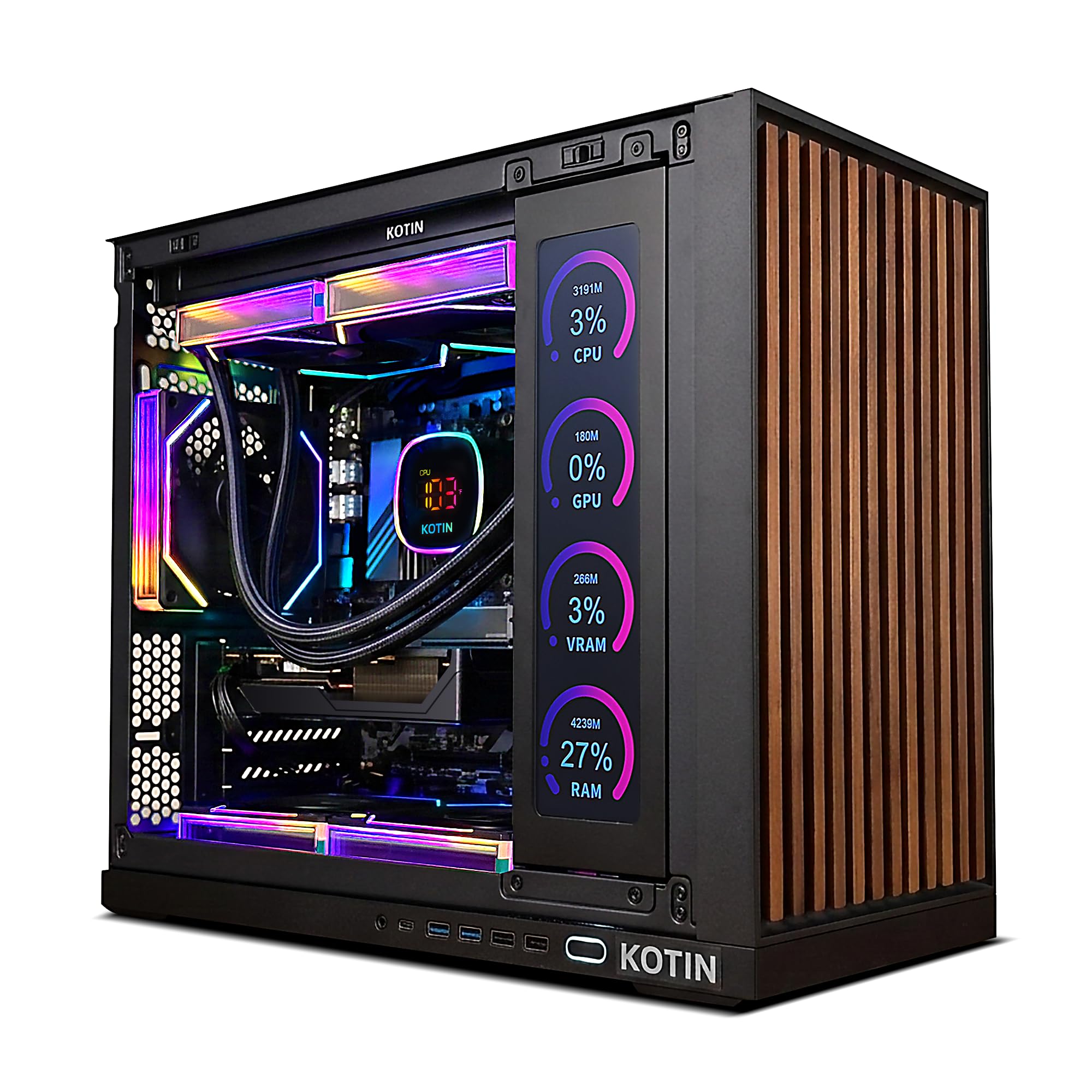
KOTIN goes big on the two things most prebuilts skimp on: memory and cooling. You get 32GB of DDR5 RAM — double what everyone else offers at this price — plus a 360mm liquid cooler (a three-fan radiator system that keeps the CPU much cooler than a standard air cooler, especially during long gaming sessions). The AMD Ryzen 7 9700X processor matches the Alienware’s top speed of 5.5 GHz and pairs with an RTX 5060 8GB.
The built-in 11.3-inch smart display on the side shows real-time CPU and GPU temperatures, usage percentages, and even the weather — a flashy touch that is genuinely useful for monitoring your system. Owners mention that it runs games at “120+ fps on 1440p easily” and runs “EVE Online at max settings” while staying cool (average CPU temperature of 136°F under load). The system also includes Wi-Fi 7 and Bluetooth 5.4, the newest wireless standards, and is assembled in California with a 1-year warranty plus lifetime US tech support.
Edge Over Competitors
- 32GB DDR5 — double the RAM of the Alienware or CyberPowerPC, great for heavy multitasking
- 360mm liquid cooler keeps the Ryzen 7 9700X quiet and cool under sustained loads
- WiFi 7 and Bluetooth 5.4 are the latest connectivity standards
Trade-Offs
- The RTX 5060 is slightly less powerful than the 5060 Ti found in other picks
- One reviewer noted the included memory (EpicGear CL40) can be hard to match if you upgrade later
Choose this for: Streamers and video editors who need extra RAM and want liquid cooling to keep noise low during long sessions.
skip it if: Raw GPU horsepower is your only priority — the RTX 5060 Ti in the Alienware or CyberPowerPC is a stronger gaming card.
4. Lenovo Legion Tower 5i

Lenovo’s AI-tuned cooling and tool-less side panel make this a smart, expandable rig.
The Legion Tower 5i uses an Intel Core Ultra 7 265F that boosts up to 5.3 GHz, paired with an NVIDIA GeForce RTX 5060 Ti. Lenovo calls it “AI-powered” because the system uses an tune cooling algorithm designed to run at up to 180W air cooling (an efficient airflow design that keeps the components cool without a loud fan). The tool-less side panel makes upgrades a breeze — just pop it off to access the internals.
You get 16GB of DDR5 expandable to 128GB, a 1TB SSD, and 2.5G Ethernet for the fastest wired connection. Customers note it “runs golf simulator perfectly with no lag/freezing” and praise Lenovo for “clear specs vs. vague ‘up to’ claims from competitors.” One buyer mentioned it runs modern games at “medium-high settings” and handles emulators like PCSX2 at 4K+. The three months of Xbox Game Pass is a nice bonus for diving straight into the game library.
Standout Features
- 2.5G Ethernet is faster than standard Gigabit Ethernet for smooth online play
- Tool-less side panel makes upgrades truly simple — no screwdriver needed
- Expandable to 128GB DDR5 for future-proofing
Drawbacks
- One owner reported receiving a scratched, dusty unit that appeared used
- Only 8MB of cache memory, significantly less than the Alienware’s 66MB
Ideal for: Gamers who plan to upgrade parts over time and want a fast wired network connection.
Not ideal if: You do not want to risk receiving a less-than-new unit — the packaging quality seems inconsistent.
5. CyberPowerPC Gamer Master GMA2900A3

An AMD Ryzen 7 option for those who prefer the red team’s architecture.
CyberPowerPC’s Gamer Master swaps the Intel Core i7 for an AMD Ryzen 7 8700F clocked at 4.1GHz with 8 cores, built on the AMD B850 chipset. It packs the same RTX 5060 Ti 8GB with GDDR7 memory (the newest, fastest graphics memory standard) and the same 16GB DDR5 and 1TB PCIe 4.0 SSD as its Intel sibling. The case is a tempered glass panel with custom RGB lighting, and connectivity includes two USB-C 3.2 ports and WiFi 6.
The buyer feedback is more mixed than the Intel CyberPowerPC — some rave about the machine while others hit trouble. One reviewer calls it a “10/10 plays every games well” but warns you need a good monitor to avoid a bottleneck. Another reported a “computer did not work on arrival” with poor customer service requiring return shipping. A third had a “setup nightmare” with non-functional HDMI ports and an automatic repair loop. The 18 ratings average 3.4 stars, making this the riskiest pick on the list.
Architecture Perks
- AMD Ryzen 7 8700F with 8 cores handles multi-threaded tasks and gaming well
- Two USB-C 3.2 ports on the front for fast peripheral connections
- Runs GDDR7 memory on the GPU — the latest memory standard for graphics
Real Buyer Risks
- Multiple reports of dead-on-arrival units and poor customer support response
- Lower average rating (3.4 stars) suggests inconsistent quality control
Reach for this if: You are committed to the AMD platform and willing to deal with potential setup issues.
pass on it if: Reliability is your top concern — the Intel CyberPowerPC has far more positive reviews.
6. NOVATECH Titan Pro Prebuilt Gaming PC

The cheapest path to an RTX 5060, but the trade-offs are real.
NOVATECH cuts costs by using an AMD Ryzen 5 5500 CPU (a previous-generation processor) and DDR4 RAM instead of DDR5. You still get the attractive RTX 5060 graphics card for 1440p gaming and a 1TB M.2 SSD for fast loading, plus RGB fans in a black tower case. It runs on Windows 11 Pro and claims to handle 4K streaming and VR gaming.
The reviews reveal a split personality. One buyer says “I ordered this PC and when it arrived, I plugged everything in and tried to turn it on, but nothing happened.” That same buyer reports the company sent a replacement that works great, praising “support is wonderful.” Others say it “works like a charm” and “runs multiple things at once and still run smooth as silk.” The 4.4-star average across 27 reviews is decent, but the mix of dead-on-arrival stories and glowing experiences means your luck may vary.
Price Point Appeal
- Gets you an RTX 5060 at the lowest entry cost in this roundup
- Customer support is responsive with replacements for faulty units
- Includes Windows 11 Pro, which has more features than Windows 11 Home
Notable Compromises
- DDR4 memory instead of DDR5 — slower performance and no upgrade path to the newest standard
- Ryzen 5 5500 is a few generations behind, which may bottleneck the RTX 5060 in CPU-heavy games
Best for: Budget-conscious buyers who want the newest graphics card and are prepared to deal with a potential return.
Look elsewhere: If you want a guaranteed plug-and-play experience without any risk of a dead unit.
Understanding the Specs
Graphics Card (GPU)
The GPU, or Graphics Processing Unit, is the component that renders all the images on your screen. For gaming, this is the most important part of your system. An NVIDIA GeForce RTX 5060 Ti handles 1440p gaming with ray tracing (a lighting technique that creates realistic reflections and shadows) comfortably. The “8GB” refers to the dedicated video memory (VRAM) on the card — more VRAM lets the card handle higher-resolution textures without stuttering.
Processor Speed and Cores
The processor, or CPU (Central Processing Unit), is the brain of the computer. Its speed is measured in GHz (gigahertz), which tells you how many billions of calculations it can perform per second. More GHz generally means faster single-task performance, which matters for gaming. Cores are separate processing units within the CPU — more cores help with multitasking, like streaming while gaming. A modern gaming CPU should have at least 6 cores.
FAQ
Will a $1500 PC run games at 4K resolution?
How long will a $1500 prebuilt gaming PC last?
Is DDR5 RAM worth it over DDR4 in a prebuilt?
Can I upgrade the graphics card in a prebuilt like the Alienware Aurora?
What does “AI-Powered” mean on the Lenovo Legion Tower 5i?
Should I get a liquid-cooled or air-cooled prebuilt PC?
Why does the CyberPowerPC with the i7-14700F have a lower GHz speed than the Alienware?
What is the difference between the RTX 5060 and RTX 5060 Ti?
Are these prebuilt PCs good for video editing and streaming?
Does the NOVATECH Titan Pro include Windows 11 Pro?
Final Thoughts: The Verdict
Across the board, the $1500 pc winner is the Alienware Aurora ACT1250 because it offers the fastest CPU speed in this roundup, an RTX 5060 Ti, and the confidence of Dell’s onsite service. If you want the most consistently praised machine with the highest number of positive buyer reviews, grab the CyberPowerPC Gamer Xtreme. And for double the RAM and liquid cooling at a competitive price, the standout is the KOTIN Ryzen 7 9700X.
How We Picked
We do not accept paid placement. Every pick is matched to a real buyer and a real use-case; we do not hands-on test units.
Sources & Methodology
Specifications: manufacturer listings and product documentation. Review insights: verified customer reviews, as of July 2026. Pricing: not shown on this page (it changes often); check the current price via the retailer link.
As an Amazon Associate, Gadgets Feed earns from qualifying purchases. This does not affect which products we feature.
Related Guides
Product prices and availability are accurate as of the date/time indicated and are subject to change. Any price and availability information displayed on Amazon at the time of purchase will apply to the purchase of this product. As an Amazon Associate I earn from qualifying purchases.
CERTAIN CONTENT THAT APPEARS ON THIS SITE COMES FROM AMAZON. THIS CONTENT IS PROVIDED "AS IS" AND IS SUBJECT TO CHANGE OR REMOVAL AT ANY TIME.
Amazon and the Amazon logo are trademarks of Amazon.com, Inc. or its affiliates.