
Our readers keep the lights on and my morning glass full of iced black tea. As an Amazon Associate, I earn from qualifying purchases.
Specs are compiled from manufacturer listings and verified buyer reviews and can change over time — please confirm the key details on the product page before buying.
If your older desktop is starting to feel sluggish when juggling multiple tabs or editing documents, the most effective upgrade is often the simplest one: more memory. Boosting your system with a fast, reliable kit can instantly smooth out stuttering, cut down on loading times, and give an old build a second life without needing a new computer.
I’m Min — the founder and writer behind Gadgets Feed. This guide is built by comparing the manufacturers’ published specifications and the patterns across verified customer reviews, so you get each pick’s real strengths and trade-offs instead of marketing spin.
Whether you are reviving an old workstation or building a budget home server, choosing the right 16 gb ddr3 ram kit is the key to open up the full potential of your older hardware.
Quick Picks
- Patriot Viper 3 DDR3 RAM 16GB — Top Performer
- G.SKILL RipjawsX Series DDR3 RAM 16GB — Premium Pick
- Crucial RAM 16GB Kit (2x8GB) DDR3 1600 MHz — Best Value
- TEAMGROUP Elite DDR3 16GB Kit (2x8GB) — Budget Champ
- Samsung Original 16GB (2 x 8GB) DDR3 Desktop — OEM Quality
- Silicon Power DDR3 16GB (2 x 8GB) 1600MHz — Efficient Pick
- Motoeagle 16GB (2X8GB) DDR3 1600 MHz UDIMM Kit — Solid Economy
How To Choose The Best 16 GB DDR3 RAM
Picking the right RAM for an older system isn’t about chasing the highest numbers. Instead, you need to match the specs your motherboard supports to get the stability and performance boost you are looking for. Here are the key things to check before you buy.
Capacity and Kit Configuration
For a modern desktop that is a few years old, 16GB is the balance that allows you to run multiple applications, dozens of browser tabs, and even some light gaming or photo editing without hitting a wall. While you can technically use a single 16GB stick, a kit of two 8GB modules lets your processor access both sticks at the same time (dual-channel mode). This essentially doubles the data transfer rate, giving you a noticeable performance advantage in almost every task.
Speed and Latency: The Real Performance Duo
You will often see two numbers on a memory stick: the frequency (like 1600 MHz) and the CAS latency (like CL9 or CL11). Frequency is the clock speed of the memory, but latency is how many clock cycles it takes for the RAM to start delivering data. A lower CL number signals faster response times. For example, a CL9 kit responds to requests quicker than a CL11 kit at the same speed, leading to snappier performance in applications, even if the megahertz rating is the same.
Voltage and Compatibility with Your Motherboard
Most standard DDR3 kits run at a default voltage of 1.5V. However, some newer modules and certain motherboards support the low-voltage DDR3L standard, which operates at 1.35V. While DDR3L sticks are usually backward compatible with 1.5V slots, you must check your motherboard’s specifications to see which type it officially supports. Using the wrong voltage can cause instability, random crashes, or prevent the computer from booting properly. Always consult your motherboard’s qualified vendor list (QVL) or manual to be safe.
Quick Comparison
| Model | Best For | Speed | CAS Latency | Form Factor | Amazon |
|---|---|---|---|---|---|
| Patriot Viper 3 16GB | Best Overall Performer | 1600 MHz | CL9 | 240-Pin DIMM | Amazon |
| G.SKILL RipjawsX 16GB | Premium, Low-Latency Choice | 1600 MT/s | CL9 | 240-Pin DIMM | Amazon |
| Crucial 16GB Kit | Trusted Brand, Broad Compatibility | 1600 MHz | CL11 | 240-Pin DIMM | Amazon |
| TEAMGROUP Elite 16GB Kit | Budget-Friendly Reliability | 1600 MHz | CL11 | 240-Pin DIMM | Amazon |
| Samsung Original 16GB Kit | OEM-Quality Compatibility | 1600 MHz | CL11 | 240-Pin DIMM | Amazon |
| Silicon Power 16GB Kit | Low-Voltage Efficiency Pick | 1600 MHz | CL11 | 240-Pin DIMM | Amazon |
| Motoeagle 16GB Kit | Budget-Conscious Upgrade | 1600 MHz | CL11 | 240-Pin DIMM | Amazon |
In‑Depth Reviews
1. Patriot Viper 3 DDR3 RAM 16GB

The tight timings that turn an old system into a responsive daily driver.
This kit is for you if you want the snappiest possible feel from your older DDR3-based desktop. At 1600 MHz with a CL9 latency, it has a lower latency (CL9 vs. CL11), which means your CPU spends less time waiting for data. You will notice this in quicker application launches and smoother multitasking, especially if you are coming from a slower 1333 MHz or higher-latency set.
Buyers report that this kit provides a noticeable boost in speed for gaming, video streaming, and general desktop use. One owner specifically noted that it “was noticeably faster” after swapping out an older 1333 MHz kit. The voltage runs at standard 1.5V, so it is broadly compatible with most Intel 6 and 7 series and AMD 9 and FM series chipsets.
Where It Shines
- Industry-leading CL9 latency for faster system response.
- XMP 1.3 support for easy overclocking profiles.
- Trusted Patriot brand with solid stability reported by users.
A Consideration
- The tall heat spreaders can interfere with some large CPU coolers.
- While a top performer, its price can sometimes be closer to higher-capacity options.
Perfect for: power users, light gamers, and anyone who wants the absolute fastest timings their old motherboard will accept.
Check before buying: ensure your CPU cooler has enough clearance above the RAM slots for the heat spreaders.
2. G.SKILL RipjawsX Series DDR3 RAM 16GB
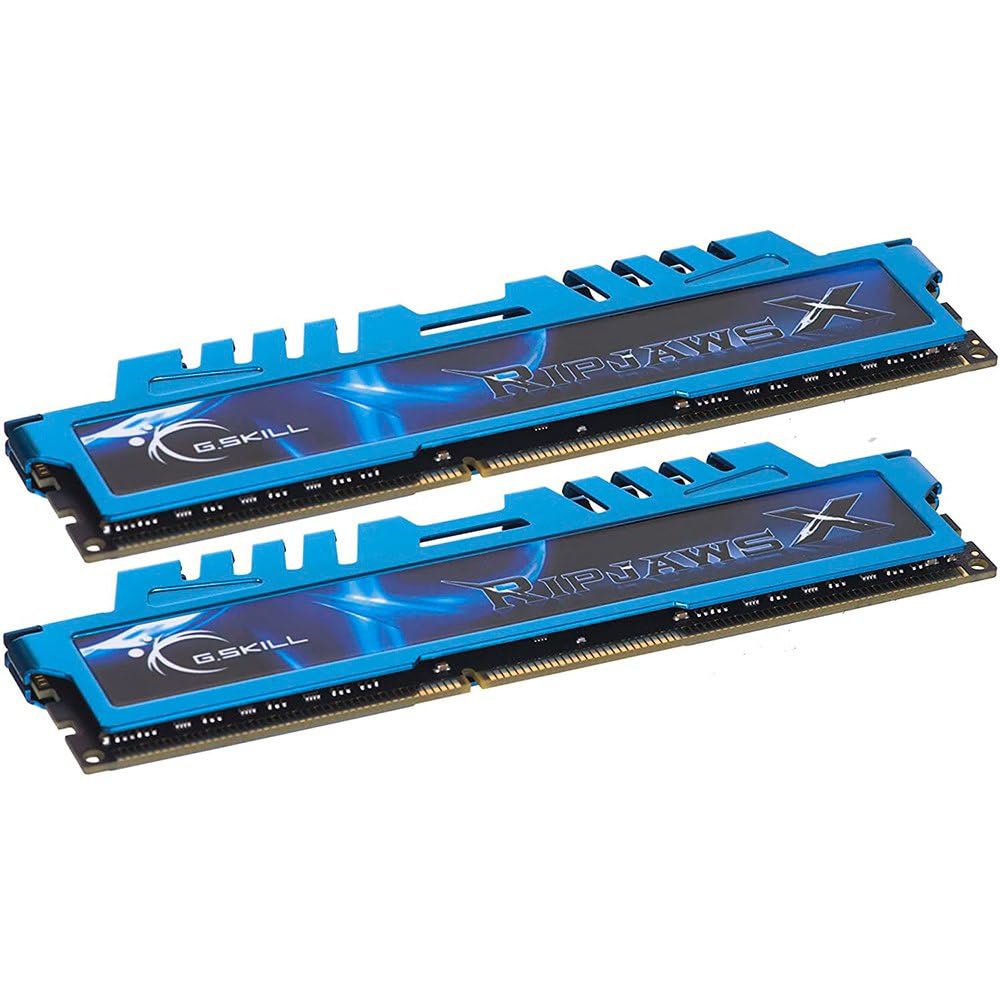
The enthusiast’s kit known for pairing tight CL9 timings with serious overclocking potential.
If your motherboard supports Intel’s XMP (Extreme Memory Profile), this kit is built to take full advantage of it. It runs at a fast 1600 MT/s with an aggressive CL9-9-9 timing at 1.50V, making it a great match for a high-end build from the DDR3 era. The low-profile design, weighing just 11 grams, means it fits easily under large CPU coolers without clearance issues — unlike the taller Patriot Viper 3.
One thing to be aware of is that this memory kit boots at its base JEDEC speed. You will need to enable the XMP profile in your BIOS settings to reach its rated 1600 MT/s potential. Owners mention that it works flawlessly on motherboards that support overclocking, but on a platform like a Dell Optiplex without those options, it will run at a slower default 1333 MHz. It is a premium component for those who know their board can handle it.
Strengths
- Tight CL9-9-9 timings for excellent responsiveness.
- Low-profile heat spreaders fit under most large CPU coolers.
- Excellent track record for stability, even under 24/7 server loads.
Trade-Off
- Requires BIOS adjustment (XMP) to reach full 1600 MT/s speed.
- Not ideal for pre-built systems that lack overclocking settings.
Ideal for: builders and enthusiasts with overclock-capable motherboards who want the reliability and speed of a top-tier brand.
skip it if: your computer is a standard office pre-built without BIOS options to enable XMP.
3. Crucial RAM 16GB Kit (2x8GB) DDR3 1600 MHz

The benchmark for rock-solid dependability and wide compatibility in a single upgrade.
Crucial is a massive name in the memory world for a reason: their sticks work with almost everything. This 16GB kit runs at 1600 MHz with a standard CL11 latency and supports both 1.35V and 1.5V, giving you flexibility for either standard or low-voltage DDR3L systems. The kit is backed by Micron’s 42 years of memory expertise, meaning you get reliable chips that have been rigorously tested.
Customers note incredible results. One owner installed this 16GB kit in a Dell Inspiron 3250 and saw memory performance increased from 10659 to 22783 MB/s and video memory throughput increased from 2994 to 6356 MB/s just by moving to dual-channel mode. It is a simple, no-fuss way to give a significant performance boost to older systems, especially those running demanding creative software like Adobe Photoshop or Illustrator.
Why It’s a Safe Bet
- Dual-voltage support (1.35V / 1.5V) ensures maximum motherboard compatibility.
- Proven to deliver dramatic performance gains (2x+ in some systems).
- Easy installation with online guides available from Crucial.
The Lowdown
- Standard CL11 latency, not as quick as premium CL9 options like the Patriot Viper 3.
- No aggressive heat spreaders; purely functional design.
Best for: anyone who wants a guaranteed, high-quality upgrade without worrying about compatibility or fiddling with BIOS settings.
One caveat: if your system specifically supports it, a CL9 kit will feel slightly more responsive in daily tasks.
4. TEAMGROUP Elite DDR3 16GB Kit (2x8GB)

The affordable workhorse that has proven its reliability across hundreds of gigabytes.
If your main goal is to get 16GB of stable DDR3 memory without spending a premium, this TEAMGROUP kit is an excellent choice. It is a standard 1600 MHz CL11 kit that adheres to JEDEC regulations, so it is built to meet industry specifications for compatibility. It comes with a lifetime warranty, which gives you confidence for a budget-friendly purchase.
Reviews for this kit are exceptional for its price tier. One long-term buyer noted they had “purchased over 196GB of Team Group DDR3; all systems rock solid, zero defects.” That kind of track record speaks volumes about the quality control. For a standard upgrade on an older CPU like an i3-3470, reviewers point out it works as a simple plug-and-play solution that instantly enables smooth multitasking.
Pros
- Excellent value for a reliable 16GB kit.
- Lifetime warranty and free technical support.
- Proven zero-defect track record in bulk installations.
Cons
- Not the fastest DDR3 available (standard CL11).
- No XMP profiles for overclocking.
Reach for this if: you need a cost-effective upgrade for a media center PC, office computer, or browsing machine where stability matters more than ultimate speed.
Look elsewhere if: you are building a high-performance gaming rig and need the lowest possible latency.
5. Samsung Original 16GB (2 x 8GB) DDR3 Desktop Memory

The original equipment maker’s own solution for guaranteed smooth integration.
Sometimes, the best compatibility comes directly from the manufacturer whose chips are inside most other sticks. This Samsung 16GB kit is a genuine OEM DDR3 PC3-12800 module. It uses Samsung’s own memory chips, which are widely regarded for their reliability and are often the preferred choice for those upgrading workstations or servers where stability is essential. It runs at the standard 1600 MHz speed with a CL11 latency.
Buyers consistently praise its compatibility. Many note that the accurate labeling made it easy to choose the correct memory for their system, and installation was a breeze. The kit is designed for standard 1.5V operation in a 240-pin DIMM form factor. While it lacks flashy heat spreaders, its focus is on providing rock-solid, original-quality performance that any Samsung-based system will love.
The Strong Points
- Uses genuine Samsung memory chips for top-tier compatibility.
- Simple, no-fuss design perfect for OEM systems.
- Excellent for resolving system instability in older computers.
The Weak Points
- Standard CL11 timings, not tune for high performance.
- Often priced higher than comparable kits from other brands.
A good match for: anyone who wants original components for a Dell, HP, or Lenovo desktop and values compatibility over raw speed.
Not the best for: budget builds or users who are chasing the lowest latency possible for gaming.
6. Silicon Power DDR3 16GB (2 x 8GB) 1600MHz

The low-voltage kit that cuts power draw without cutting performance.
This Silicon Power kit is an excellent choice for systems that support DDR3L memory. It applies a lower voltage of 1.35V, which the manufacturer states can reduce power consumption by 20% compared to standard 1.5V modules. This makes it ideal for home servers, HTPCs, or any always-on system where you want to save a bit on electricity and generate less heat. It still runs at the full 1600 MHz speed with CL11 timings.
Build quality appears solid. One reviewer noted that their kit used Samsung chips and passed a 5.66-hour Memtest86+ session without a single error. This demonstrates excellent stability for a budget-friendly kit. The modules are 100% factory-tested and backed by a lifetime warranty, which is reassuring for an older platform. They are compatible with both DDR3L and standard DDR3 motherboards.
Advantages
- Low 1.35V operation reduces system power and heat.
- Backward compatible with standard 1.5V DDR3 slots.
- Uses quality chips with proven stability (Memtest86+ verified).
Disadvantages
- Standard CL11 latency, not designed for extreme overclocking.
- Does not support XMP profiles for automatic speed setting.
An ideal choice for: energy-conscious builders or those setting up low-power file servers and media centers.
Not ideal for: high-end gaming rigs that require the absolute lowest latency memory.
7. Motoeagle 16GB (2X8GB) DDR3 1600 MHz UDIMM Kit

The entry-level kit that brings a vintage rig back to life while staying affordable.
This Motoeagle kit is a pure budget play for getting your older PC up and running with a solid 16GB of memory. It is a standard JEDEC-compliant DDR3-1600 kit that operates at 1.5V with a CL11 latency. The manufacturer notes that it uses original IC chips that are 100% tested for RoHS and JEDEC compliance, ensuring it will function in the majority of compatible desktop motherboards.
Shoppers say strong results for the price. One upgrade story mentions “fast shipping (48 hours)” and that the kit works perfectly in an old Gigabyte GA-78LMT-USB3 motherboard, making it a great fit for a non-gaming Linux build. For a secondary PC or a media machine, it is a highly cost-effective way to move from an 8GB bottleneck to a much smoother 16GB experience. Ensure your system has a standard 240-pin DDR3 slot before ordering.
The Upside
- Very budget-friendly option for a standard upgrade.
- Fast and functional for basic computing and non-gaming tasks.
- JEDEC and RoHS compliant for broad compatibility.
The Downside
- Standard CL11 timings mean no performance tuning options.
- Not recommended for mixing with other brands in the same system.
Grab this for: the most affordable way to max out the memory on a secondary PC, a gift for a family member, or a basic office computer.
Pass on it if: your goal is to squeeze the best possible frame rates and system responsiveness out of a gaming-focused build.
Understanding the Specs
CAS Latency (CL)
This number tells you how many clock cycles your RAM needs to start responding to a request. A lower number, like CL9, is faster than a higher one, like CL11. For example, if you have two sticks of RAM running at the same 1600 MHz speed, the CL9 stick will deliver data quicker, leading to a more responsive system in games and applications.
Dual-Channel Kit (2x8GB)
Memory works best in pairs. A kit that comes as two 8GB sticks allows your processor to talk to both at the same time, effectively doubling the data highway’s width. This is called dual-channel mode. It provides a noticeable performance boost in almost everything—from booting up to loading files—compared to using a single 16GB stick.
FAQ
Will DDR3 RAM work in my modern computer?
What is the difference between DDR3 and DDR3L?
Can I mix different brands of DDR3 RAM?
Does faster CL (lower CAS latency) make a big difference?
How do I check how many RAM slots my motherboard has?
What does PC3-12800 mean on a DDR3 stick?
Is 16GB of DDR3 enough for gaming?
My PC has 8GB of RAM. Should I add another 8GB stick?
How do I install new RAM safely?
What does ECC and Non-ECC mean?
Final Thoughts: The Verdict
For most users looking for the best 16 gb ddr3 ram to rejuvenate an older build, the winner is the Patriot Viper 3 16GB Kit because it offers the tightest CL9 timings for a noticeable boost in responsiveness while staying affordable. If you want a guaranteed, low-maintenance upgrade with broad compatibility, grab the Crucial 16GB Kit. And for the ultimate budget-friendly, rock-solid reliability for a secondary PC, the standout is the TEAMGROUP Elite 16GB Kit.
How We Picked
We do not accept paid placement. Every pick is matched to a real buyer and a real use-case; we do not hands-on test units.
Sources & Methodology
Specifications: manufacturer listings and product documentation. Review insights: verified customer reviews, as of July 2026. Pricing: not shown on this page (it changes often); check the current price via the retailer link.
As an Amazon Associate, Gadgets Feed earns from qualifying purchases. This does not affect which products we feature.