
Our readers keep the lights on and my morning glass full of iced black tea. As an Amazon Associate, I earn from qualifying purchases.
Specs are compiled from manufacturer listings and verified buyer reviews and can change over time — please confirm the key details on the product page before buying.
Modern games are eating video memory alive. A 16 GB graphics card is now the line between “runs today” and “still runs in three years,” especially at 1440p where high-res textures pile up fast. This guide breaks down eleven of the best 16 GB options for desktop gaming rigs, sorting them by real-world strengths so you can match one to your monitor, your case, and your power supply.
I’m Min — the founder and writer behind Gadgets Feed. This guide is built by comparing the manufacturers’ published specifications and the patterns across verified customer reviews, so you get each pick’s real strengths and trade-offs instead of marketing spin.
Here is the honest shortlist of the best 16 gb graphics card models for 1440p and 4K gaming, ranked by what owners actually experience with each one.
Our Picks at a Glance



How To Choose The Best 16 GB Graphics Card
Your graphics card decides how good your games look and how smoothly they run. With 16 GB of video memory now standard on mid-range and high-end cards, the real differences come down to boost clocks, cooling, power needs, and which brand’s drivers you prefer.
Boost Clock vs. Base Clock
The boost clock is the fastest speed the GPU can hit under load, and it tells you the card’s real ceiling. A higher boost clock, measured in megahertz (MHz), usually means higher frame rates in games that aren’t limited by your processor.
Check Your Case and Power Supply First
Graphics cards are getting physically longer and hungrier for power. Measure the clearance inside your case and check your power supply’s wattage rating before ordering, because a card that won’t fit or won’t power on is a card you’ll have to return.
Quick Comparison
| Model | Best For | Chipset | Boost Clock | Memory Type | Amazon |
|---|---|---|---|---|---|
| XFX Swift RX 9060 XT★ Best Overall | Best Overall Value | AMD Radeon RX 9060 XT | 3320 MHz | GDDR6 | Amazon |
| ASUS TUF RTX 5070 TiTop Performer | Premium Build Durability | NVIDIA GeForce RTX 5070 Ti | 2610 MHz | GDDR7 | Amazon |
| ASUS Dual RX 9060 XTCompact Pick | Compact Performance | AMD Radeon RX 9060 XT | 3250 MHz | GDDR6 | Amazon |
| ASRock Challenger RX 9060 XT | Small Form Factor Builds | AMD Radeon RX 9060 XT | 3290 MHz | GDDR6 | Amazon |
| GIGABYTE RX 9060 XT Gaming OC | Quiet 1440p Gaming | AMD Radeon RX 9060 XT | 2700 MHz | GDDR6 | Amazon |
| XFX Swift RX 9070 XT | High-End Raster | AMD Radeon RX 9070 XT | 2970 MHz | GDDR6 | Amazon |
| Sapphire Pulse RX 9070 XT | 256-bit Bandwidth | AMD Radeon RX 9070 XT | — | GDDR6 | Amazon |
| PNY RTX 5060 Ti | DLSS 4 Upscaling | NVIDIA GeForce RTX 5060 Ti | — | GDDR7 | Amazon |
| GIGABYTE RTX 5070 Ti | 4K Ultra Settings | NVIDIA GeForce RTX 5070 Ti | — | GDDR7 | Amazon |
| MSI RTX 5070 Ti Ventus 3X | Compact 5070 Ti Fit | NVIDIA GeForce RTX 5070 Ti | — | GDDR7 | Amazon |
| PowerColor Reaper RX 9060 XT | Budget Entry Point | AMD Radeon RX 9060 XT | — | GDDR6 | Amazon |
In‑Depth Reviews
1. XFX Swift AMD Radeon RX 9060 XT OC Gaming Edition
Our pick — over 4.5★ from 350+ verified ratings; the strongest balance of quality and price.
The XFX Swift leads this list because of its 3320 MHz boost clock and a near-perfect owner reputation.
You get a desktop card built around the AMD RX 9060 XT chipset with 16 GB of GDDR6 memory. The boost clock hits up to 3320 MHz, which is the highest figure among the RX 9060 XT cards here and directly shows up as smooth high-frame-rate gaming. Owners coming from cards like the RX 6500 XT report it is “two to three times better” and can finally run games that were unplayable before.
The card runs cool at about 90°F and stays quiet even under load, which owners mention again and again. It is also compact with a two-fan design, fitting most mid-tower cases without clearance headaches. The 1900 MHz base clock and 3840×2160 maximum display resolution round out a card that reviewers call a “terrific” and “great value” upgrade.
What wins people over is raw performance, with owners also praising the value for money and the stability after extended stress tests. The recurring theme is that this card is an easy, reliable jump from older 6 GB or 8 GB cards for anyone gaming at 1080p or 1440p.
Owner Highlights
- 3320 MHz boost clock leads the RX 9060 XT lineup
- Runs cool at about 90°F and stays quiet under load
- Compact 2-fan design fits most cases
Consider This
- It is outpaced by the pricier RX 9070 XT and RTX 5070 Ti cards for 4K ultra
- PCIe x16 interface needs a free slot and a decent power supply
Reach for this if: you want the highest boost clock in the RX 9060 XT family with rock-solid owner reviews.
Look elsewhere if: you need maximum 4K performance, where the 9070 XT and 5070 Ti picks will pull ahead.
2. ASUS TUF Gaming GeForce RTX 5070 Ti OC Edition
The ASUS TUF 5070 Ti is the premium pick for 4K gaming with military-grade construction.
This is a serious high-end card for 1440p and 4K gaming, powered by the NVIDIA Blackwell architecture with 16 GB of GDDR7 memory on a 256-bit interface. ASUS lists OC mode at 2610 MHz boost clock, and owners say that factory overclock pushes performance close to an RTX 5080. It handles 3440×1440 at 240Hz monitors smoothly and runs games at max settings without overheating.
The TUF build quality is a huge part of the appeal. The card uses military-grade components, a protective PCB coating, and a 3.125-slot design with three Axial-tech fans. Owners consistently report quiet operation even at full load, cool temperatures, and a premium metallic look with minimal RGB. The package even includes a TUF card holder and magnets.
Performance is the thing everyone raves about, with quiet operation and build quality close behind. The only real friction is power: ASUS requires a minimum 850W PSU with a 16-pin 12V-2×6 connector, and owners advise skipping the included adapter in favor of three separate PCIe cables from your power supply.
4K Ready: Buyers report excellent performance at 4K and wide 1440p resolutions with rock-solid stability.
Power Hungry: The 850W PSU requirement and 3.125-slot size mean you need to check your case and PSU before buying.
3. ASUS Dual Radeon RX 9060 XT 16GB GDDR6 Gaming
A compact 2.5-slot card that delivers excellent 1440p gaming with silent fan operation.
The ASUS Dual RX 9060 XT is a strong mid-range pick for 1080p and 1440p gaming. It runs a 3250 MHz boost clock in OC mode, and owners describe it as the “budget warrior of 1080p,” reporting 490+ fps in teardown, 90+ in Forza Horizon 6, and 95 fps in Cyberpunk. The 16 GB of GDDR6 VRAM gives you headroom for high-res textures and future titles.
Its defining feature is the 0dB technology, which lets the fans stop spinning entirely during light gaming for silence. The axial-tech fans with a smaller hub and barrier ring push air more effectively, and the dual BIOS switch lets you toggle between Quiet and Performance profiles. Owners praise the easy installation and consistent cool temperatures, even in small cases.
Performance dominates the owner conversation, with price-performance ratio and graphics performance also getting strong praise. The card handles video editing and 3D work well too. At 8″L x 4.7″W, it is noticeably more compact than the 10.63″L XFX Swift, making it a better fit for tighter builds.
Why It Wins People Over
- 0dB technology makes light gaming silent
- Compact 8-inch length fits small cases
- Owners mention easy install and stable temps
Trade-Offs
- Boost clock trails the XFX Swift’s 3320 MHz
- Not built for 4K ultra settings
Go with this if: you want a compact, quiet card that crushes 1080p and handles 1440p with room to spare.
Pass if: you’re chasing the highest RX 9060 XT boost clock, where the XFX Swift edges it out.
4. ASRock Radeon RX 9060 XT Challenger 16GB OC

A small, quiet, and powerful card that owners love for small form factor builds.
The ASRock Challenger RX 9060 XT pairs a 3290 MHz boost clock with a compact 249mm length, making it a top choice for small form factor (SFF) PC builds. The 16 GB of GDDR6 memory runs at 20 Gbps on a 128-bit bus, giving you plenty of bandwidth for modern game textures. Customers note 4K at 60fps and 165 fps on high settings at lower resolutions.
This card is built on AMD’s RDNA 4 architecture with third-gen ray tracing and second-gen AI accelerators. The dual-fan heatsink keeps temps between 60-65°C under load, and the 0dB silent mode stops the fans when idle. Owners repeatedly praise it as “cheap, small, and mighty,” and note the mechanical RGB off switch is a nice touch.
Performance is the standout, with value for money and FPS also earning high marks. The card requires a single 8-pin power connector and a recommended 550W power supply, which is modest for this class. It also runs quiet and cool in hot environments, making it a flexible fit for office setups too.
Small But Mighty: 249mm length and dual fans deliver 4K-capable performance in a tiny package.
The Catch: The 128-bit memory bus is narrower than pricier 256-bit cards, which cap its ceiling at higher resolutions.
5. GIGABYTE Radeon RX 9060 XT Gaming OC 16G

The GIGABYTE Gaming OC is a dependable, quiet 1440p performer with effective WINDFORCE cooling.
This is a well-rounded RX 9060 XT card for 1080p and strong 1440p gaming. It uses GIGABYTE’s WINDFORCE cooling system with a Hawk fan and server-grade thermal conductive gel to keep temperatures in check. Reviewers point out max temps around 68°C under heavy load and praise the quiet operation, with zero-RPM fans when idle.
You get 16 GB of GDDR6 memory (fast video memory that stores game textures), so the card handles the latest games at high resolutions and max settings. Shoppers say it runs flawlessly at high 1080p and strong 1440p with high or ultra settings, and one owner calls it “an excellent option to play over a period of several years without losing the standard.” The 11.06-inch length needs some case clearance though, so measure your case before buying.
Performance is the dominant praise, with value for money and cooling also heavily mentioned. The card gets mixed feedback on reliability and game compatibility, so there is some variability between units. It also lacks a second HDMI port, which matters if you run multiple HDMI displays.
What Owners Like
- WINDFORCE cooling keeps temps around 68°C max
- Quiet with zero-RPM fans at idle
- Sturdy build with RGB lighting
Be Aware
- Large 11.06-inch length needs case clearance
- Only one HDMI port, which is limiting for multi-display setups
Get this for: a quiet, cool-running RX 9060 XT that games comfortably at 1080p and 1440p.
skip it if: you need multiple HDMI outputs, since the single port is a real constraint.
6. XFX Swift AMD Radeon RX 9070 XT Triple Fan Gaming Edition
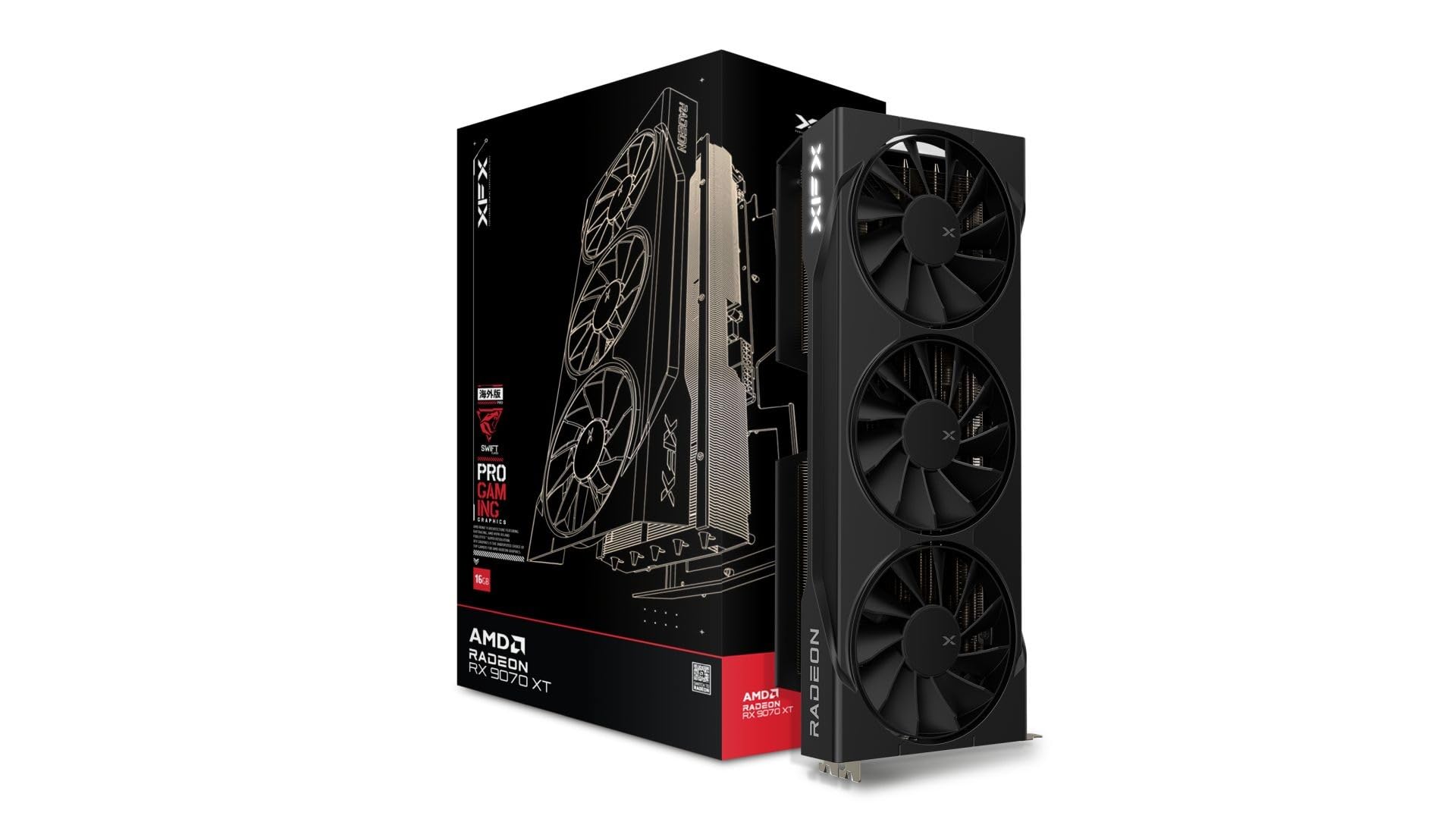
The XFX Swift RX 9070 XT is a high-end 1440p beast with a triple-fan cooling solution.
Step up to the RX 9070 XT and you get a noticeably stronger GPU for high-refresh 1440p and entry 4K gaming. This XFX Swift model runs a boost clock up to 2970 MHz with 16 GB of GDDR6 memory. Buyers report 1440p ultra at 60-100+ fps, with one calling it “an absolute steal” on sale.
The SWFT triple-fan cooling solution (three fans that pull heat away from the card) handles the heat well, and build quality is a major point of praise. The card measures 12.99 inches long, so it needs a roomy case—check your clearance first. Owners note frame generation (a feature that creates extra frames for smoother motion) works great for older games, and the AMD Adrenalin software (the control panel for tuning settings) is sturdy and reliable.
Build quality is the thing everyone raves about, with value for money also getting strong praise. The 12.99-inch length and 1.5 kg weight are the main things to verify against your case. It’s a step up in price from the RX 9060 XT cards, but you’re paying for genuinely more raw performance.
Strong Value: Owners call it a must-buy for future-proofing, with performance rivaling much pricier competition.
Watch Out: The nearly 13-inch length and 1.5 kg weight demand a spacious, well-supported case.
7. Sapphire Pulse AMD Radeon RX 9070 XT Gaming 16GB

The Sapphire Pulse pairs a massive 256-bit memory bus with outstanding 1440p performance.
This is a premium RX 9070 XT card built around a 256-bit memory bus and 64 compute units, which translates to excellent bandwidth for high-resolution gaming. It uses AMD’s RDNA 4 architecture with FidelityFX Super Resolution 4 for AI upscaling. Owners mention 200+ fps at 1440p and call it a “beast” of a card.
The card runs quiet and cool, even when overclocked. One owner describes pushing it to 3440 MHz with a modest undervolt, calling it “top notch performance for the price.” It has dual HDMI and dual DisplayPort outputs, giving you flexible monitor options. No RGB is included, which suits buyers who prefer a clean look.
Performance is the main praise, with value for money also earning positive mentions. The 11.81-inch dimensions are substantial, so check your case clearance. Owners love it for high-refresh 1440p and recommend grabbing one before prices climb.
Owner Favorites
- 14GB VRAM headroom on a 256-bit bus (owners note 14GB used in WoW at max)
- 200+ fps at 1440p in many titles
- Quiet and cool even when overclocked
Trade-Off
- Large 11.81-inch length needs a roomy case
- No RGB for those who want lighting effects
Choose this if: you want massive memory bandwidth and 200+ fps 1440p gaming in a premium card.
Think twice if: your case can’t fit an 11.81-inch card, or you want RGB aesthetics.
8. PNY NVIDIA GeForce RTX 5060 Ti 16GB OC Dual-Fan
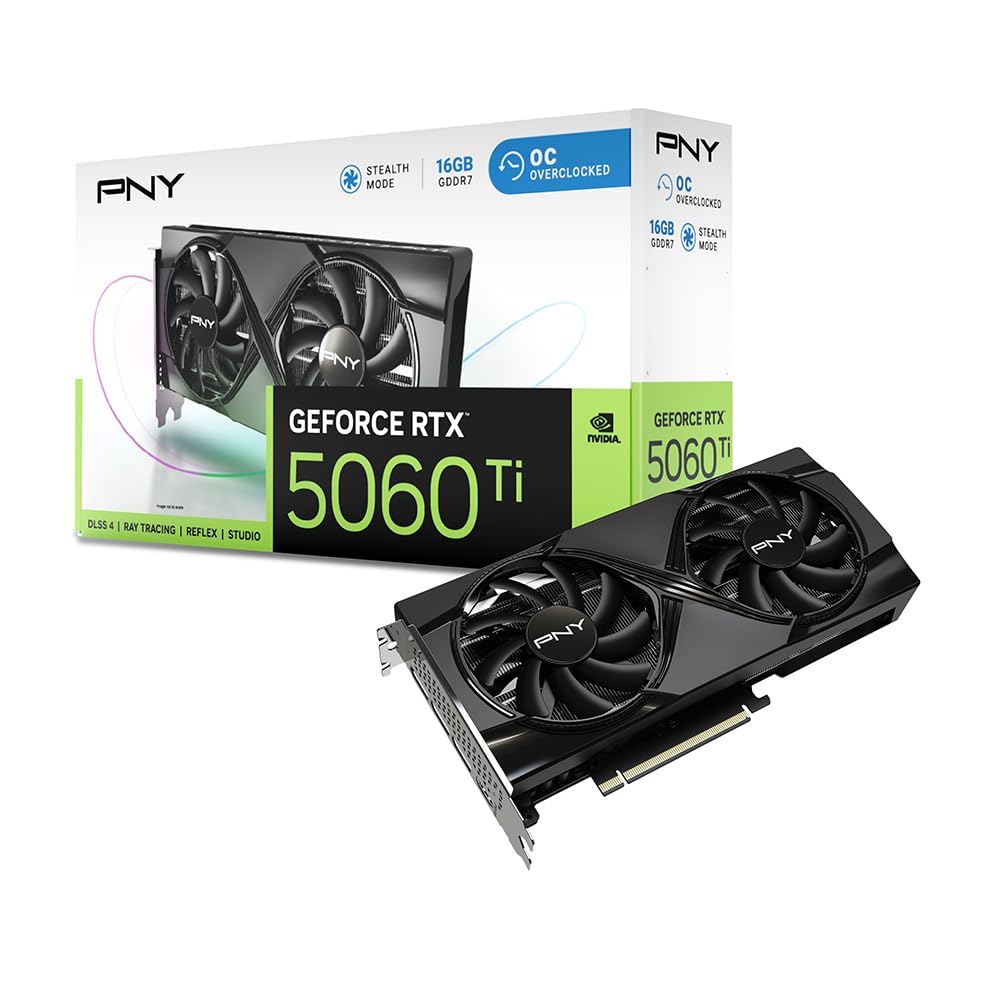
The PNY RTX 5060 Ti brings NVIDIA’s DLSS 4 AI upscaling to a dual-fan 16 GB card.
If you prefer NVIDIA’s ecosystem, the RTX 5060 Ti with 16 GB of GDDR7 memory is a strong 1080p and 1440p choice. GDDR7 is the newest memory type here, and DLSS 4 uses AI to boost frame rates and improve image quality. Customers note over 120fps at 1080p and doubled performance in Cyberpunk 2077.
The card is dual-slot and draws low power, which makes it a great fit for eGPU enclosures. Owners praise it as fast, silent, and cool, with one calling it a “great little 1440 card.” It has fourth-gen ray tracing cores and fifth-gen tensor cores for AI workloads. The main caveat is that NVIDIA’s Linux driver support is weaker than AMD’s, which matters for Linux users.
Performance and value for money are the top owner talking points. The card runs games perfectly across various titles, and DLSS 4 gives it a compatibility edge in games that support it. It connects via PCI-Express x8, which is fine for most systems but note for older platforms.
NVIDIA’s Answer: DLSS 4 AI upscaling delivers a big frame-rate boost in supported titles.
The Caveat: Linux users report weaker compatibility with NVIDIA drivers compared to AMD cards.
9. GIGABYTE GeForce RTX 5070 Ti Gaming OC 16G

A 4K-ready RTX 5070 Ti with WINDFORCE cooling and DLSS 4 for maxed-out ultra settings.
The RTX 5070 Ti is where 4K gaming gets serious, and this GIGABYTE model delivers. It packs 16 GB of GDDR7 memory on a 256-bit interface with NVIDIA’s Blackwell architecture and DLSS 4. Reviewers point out 1080p at 144fps with ray tracing on, and high or ultra 4K in all games. One owner recorded 75-100 fps at 1440p ultra with ray tracing, and frame gen feeling like 180 fps native.
The WINDFORCE cooling system keeps things quiet, and owners note zero coil whine. Max temps sit around 65°C, usually running 50-60°C in normal use. This is a huge 3.5-slot card that includes a GPU stand, so it needs a modern case with serious clearance.
Performance dominates the praise, with cooling and noise level also earning high marks. Value for money gets mixed feedback, reflecting its premium price tier. It runs 2x the performance of an RTX 2080 at the same power draw with half the noise.
Why It Impresses
- Runs all games at high or ultra 4K settings
- Quiet operation with no coil whine
- Max temps around 65°C under load
What To Note
- Huge 3.5-slot design barely fits some cases
- Premium price draws mixed value reviews
Buy it for: maxed-out 4K gaming with quiet cooling and DLSS 4 frame generation.
Hold off if: your case lacks the clearance for a 3.5-slot beast, or your budget stays in the mid-range tier.
10. MSI GeForce RTX 5070 Ti 16G Ventus 3X OC

The MSI Ventus 3X fits strong RTX 5070 Ti performance into a more compact package.
This is a great 1440p upgrade card that manages to fit RTX 5070 Ti performance into a more manageable size. It uses MSI’s TORX Fan 5.0 triple-fan design with ring-arc blades for high-pressure airflow. One owner successfully fit it into a Cooler Master NR200 small form factor case, calling it “exactly what I wanted” for a 1440p/165Hz monitor.
The card features 16 GB of GDDR7 memory running at 28 Gbps on a 256-bit interface. The nickel-plated copper baseplate pulls heat off the GPU and memory quickly, and the square core pipes boost contact. MSI recommends a minimum 750W power supply, which is more modest than some rivals.
Shoppers say strong high-refresh 1440p performance with no coil whine. The triple fan keeps things cool and quiet even under extended gaming sessions. The Ventus line trades some of the flashy aesthetics of pricier cards for a clean, functional design that fits more cases.
Compact Power: Fits small form factor cases like the Cooler Master NR200 while delivering full 5070 Ti performance.
Fair Warning: It’s still a premium-priced card, with some owners noting the cost is on the high side.
11. PowerColor Reaper AMD Radeon RX 9060 XT 16GB GDDR6

The PowerColor Reaper is an ultra-compact, budget-friendly RX 9060 XT with a tiny 200mm length.
For the tightest builds and tightest budgets, the PowerColor Reaper is an ideal starting point. It’s a mere 200mm long, making it perfect for small form factor cases. Owners upgrading from RX 580 or GTX 1080 cards report new games “run like a dream,” and one notes WoW at 5120×1440 maxed hits 100-175 fps in delves.
The card draws power from a single 8-pin connector with a minimum 500W system requirement, keeping the power footprint modest. It has dual DisplayPort 2.1a and one HDMI 2.1b output. Owners praise its near-silent operation, with one noting it’s “silent under load,” and excellent Linux support through Steam OS.
Performance and price-performance ratio are the top owner talking points. The tiny size and quiet operation also earn strong praise. Note that some buyers report it runs warm, with GPU temps of 72-76°C and hotspot temps of 88-91°C, so good case airflow matters.
Owner Favorites
- Ultra-compact 200mm length for SFF builds
- Single 8-pin power with 500W minimum PSU
- Silent under load with strong Linux support
Consider First
- Runs warm, with GPU temps of 72-76°C under load
- Older games may be incompatible with newer driver features
Perfect for: compact builds and budget-first buyers who want 16 GB VRAM without the bulk.
Look past it if: your case has poor airflow, because this card runs warm under sustained load.
Understanding the Specs
Boost Clock Speed
This is the fastest speed the GPU reaches under load, measured in megahertz. A higher boost clock generally means higher frame rates. For example, the XFX Swift RX 9060 XT boosts to 3320 MHz, while the GIGABYTE RX 9060 XT tops out at 2700 MHz — a real difference you’ll feel in games.
Memory Type and Bus Width
GDDR6 is the standard for AMD cards, while GDDR7 is the newer, faster memory on NVIDIA’s RTX 50 series. The memory bus width (128-bit vs 256-bit) determines how much data can move at once. Wider buses like the 256-bit on the Sapphire Pulse enable better high-resolution performance.
Power Supply Requirements
Your power supply must have enough wattage and the right connectors. The PowerColor Reaper needs just 500W and a single 8-pin, while the ASUS TUF RTX 5070 Ti demands 850W with a 16-pin 12V-2×6 connector. Always check your PSU before buying a high-end card.
Card Length and Case Clearance
Graphics cards vary from 200mm to nearly 13 inches long. The PowerColor Reaper at 200mm fits almost any case, while the XFX Swift RX 9070 XT at 12.99 inches needs serious clearance. Measure your case’s GPU area before ordering.
FAQ
Is 16 GB of VRAM enough for 1440p gaming?
What is the difference between GDDR6 and GDDR7 memory?
What power supply do I need for a 16 GB graphics card?
Will a 16 GB graphics card fit in my small form factor case?
Is an AMD or NVIDIA 16 GB card better for me?
How long will a 16 GB graphics card stay relevant?
What is boost clock and why does it matter?
Do these cards support ray tracing?
What is DLSS 4 and do I need it?
How do I know which 16 GB card fits my monitor?
Final Thoughts: The Verdict
For the majority of shoppers, the 16 gb graphics card winner is the XFX Swift RX 9060 XT because it combines the highest boost clock in its family with rock-solid owner reviews and a compact dual-fan design. If you want NVIDIA’s DLSS 4 AI upscaling, grab the PNY RTX 5060 Ti. And for maxed-out 4K gaming with premium build quality, the ASUS TUF RTX 5070 Ti is the one to reach for.
How We Picked
We do not accept paid placement. Every pick is matched to a real buyer and a real use-case; we do not hands-on test units.
Sources & Methodology
Specifications: manufacturer listings and product documentation. Review insights: verified customer reviews, as of September 2026. Pricing: not shown on this page (it changes often); check the current price via the retailer link.
As an Amazon Associate, Gadgets Feed earns from qualifying purchases. This does not affect which products we feature.